


Something that quietly polls a mailbox stopped connecting. Microsoft is switching off legacy TLS for POP and IMAP, a bit at a time, until December 31.
Microsoft announced this in April and said blocking would begin in July. On 7 July it revised the timeline. The rollout now runs from 1 August to 31 December 2026, gradually, worldwide. Articles written from the April announcement still carry the July date. The practical difference matters: there is no single cut-off morning to plan around, so a connection that worked yesterday tells you nothing about next week. One read-only command starts the answer, and this page covers what it does and does not settle.
- The fast first check, and what it does and does not tell you
- Why a copier sending scans is a different protocol, and not in scope
- Three legacy endpoints sit behind one switch. Only two are being retired.
What changed, and the date most write-ups get wrong
Microsoft is removing support for TLS 1.0 and TLS 1.1 on POP3 and IMAP4 connections to Exchange Online. Connections that negotiate either of those versions stop working. Connections using TLS 1.2 or later are unaffected. POP3 and IMAP4 themselves are not being retired, and neither are the standard endpoints: what ends is the acceptance of two obsolete TLS versions on those connections.
That much has been reported widely. The timing has not. The Exchange Team announced the change on 27 April 2026 and said blocking would begin in July. On 7 July, Microsoft revised the timeline in the Microsoft 365 Message Center. The entry, MC1293480, now reads:
"Rollout start: August 1, 2026. Rollout end: December 31, 2026. The rollout will occur gradually worldwide."
Microsoft 365 Message Center, MC1293480, timeline updated 7 July 2026
The official Message Center entry sits inside your own tenant rather than on the public web, so the authoritative copy is not publicly indexed. Third-party mirrors and newsletters do republish Message Center text, but they lag behind it and they are not the record. Articles written from the April announcement, which is most of what a search returns, still say July. If your team has been planning around a July date that has already passed without incident, that is why nothing appeared to happen.
The revised shape of this change is more awkward than a deadline, not less. A deadline gives you one morning to prepare for. A gradual worldwide rollout across five months gives you a window in which your tenant may be reached at any point, with no announcement of the day it happens to you. Two consequences follow, and they are the reason this page exists:
- Working today is not evidence of anything. A tenant reached in September and a tenant reached in December both look identical in August.
- The failure will often arrive unlabelled. If your logging records negotiated TLS versions, or the application reports a handshake failure clearly, you will see it for what it is. Plenty of estates do not, and in those the integration simply stops collecting mail, with the first person to notice being whoever was expecting the documents it delivers.
Everything else on this page is about answering one question cheaply: is anything in your organization still connecting this way, and if so, what.
Which protocol this actually touches, and which one everyone assumes
This is the part that sends people looking in the wrong place. POP3 and IMAP4 are how a client reads mail out of a mailbox. They are not how anything sends mail. Microsoft states it in one sentence.
"POP3 and IMAP4 email programs don't use POP3 and IMAP4 to send messages to the email server."
Microsoft Learn, POP3 and IMAP4 in Exchange Online
Reading mail out of a mailbox
Anything that connects to a mailbox to collect messages. Mail clients configured the old way, and far more commonly, software that polls a shared mailbox on a schedule and does something with what it finds.
Sending mail
A copier doing scan to email, an alerting system, a line of business application that emails a statement. All of these send, which is SMTP, not POP3 or IMAP4.
Modern Outlook and mobile mail
Outlook on the desktop, Outlook on the web, the mobile apps, and anything using modern authentication against Microsoft Graph or Exchange Web Services. None of these connect over POP3 or IMAP4, which is why Microsoft does not expect them to be caught by this change.
So the population at risk is narrower than the headline suggests, and also more specific. It is mostly not your staff, and it is mostly the handful of unattended things that have been quietly reading a mailbox for years, configured once by somebody who may no longer work there, and never touched since because they never broke. A person running an old third-party mail client over POP or IMAP is in scope too, which is worth checking rather than assuming.
Microsoft's own expectation, stated in the April announcement, is narrower still:
"Our expectation is that only customers who have explicitly opted into using those legacy endpoints are impacted by the deprecation we are announcing today."
Exchange Team Blog, 27 April 2026
The two Microsoft statements are not identical, and the gap is worth reading
The Message Center entry scopes the audience broadly, to "Microsoft 365 tenants using POP3 or IMAP4 with Exchange Online". The blog narrows it to customers who explicitly opted in. Both are Microsoft, and they are describing the same change from different angles: the blog is stating an expectation about who will notice, and the Message Center is stating who should check.
Treat the broader one as the instruction and the narrower one as the likely outcome. The check below costs one command and tells you whether the door is even open, which is cheaper than arguing about which sentence applies to you. It does not tell you what is walking through it, and the steps further down cover that part.
One setting, three endpoints, one read-only command
Legacy TLS was not left switched on by accident. Microsoft turned it off in the service years ago and then, because a lot of equipment could not cope, published a set of separate endpoints that still accept the old versions. Using them requires a deliberate tenant-level opt-in. Microsoft is direct about the history:
"Exchange Online no longer supports use of TLS1.0 and TLS1.1 in the service as of October 2020 ... While no longer supported, our servers still allow clients to use those older versions of TLS when connecting to the POP3/IMAP4 endpoint."
Microsoft Learn, opt in to the Exchange Online endpoint for legacy TLS clients using POP3 or IMAP4
The detail that matters, and that neither announcement spells out, is that one tenant setting governs three endpoints rather than two. Microsoft documents the POP3 and IMAP4 endpoints on one page and the SMTP AUTH endpoint on another. The two pages list different endpoints and then give the identical instruction, word for word: "The value $true for the AllowLegacyTLSClients parameter on the Set-TransportConfig cmdlet." So an organization that opted in once, years ago, to keep a single device working also opened the sending path at the same time, and the remediation advice further down this page turns on that fact.
| Legacy endpoint | What connects to it | Direction | In this retirement |
|---|---|---|---|
| imap-legacy.office365.com | Anything reading a mailbox over IMAP4 | Reads mail | Yes |
| pop-legacy.office365.com | Anything reading a mailbox over POP3 | Reads mail | Yes |
| smtp-legacy.office365.com | Devices and applications that send mail using SMTP AUTH, including scan to email | Sends mail | Not named |
Tenants on Microsoft 365 operated by 21Vianet use the equivalent addresses ending partner.outlook.cn. Microsoft states that these opt-in endpoints are not available at all in GCC, GCC High, or DoD environments, "that have legacy TLS permanently turned off". So an institution in a US government cloud cannot have opted in and has no tenant switch to read. It still needs its POP and IMAP clients on TLS 1.2 or later, because the requirement itself applies wherever those protocols are used.
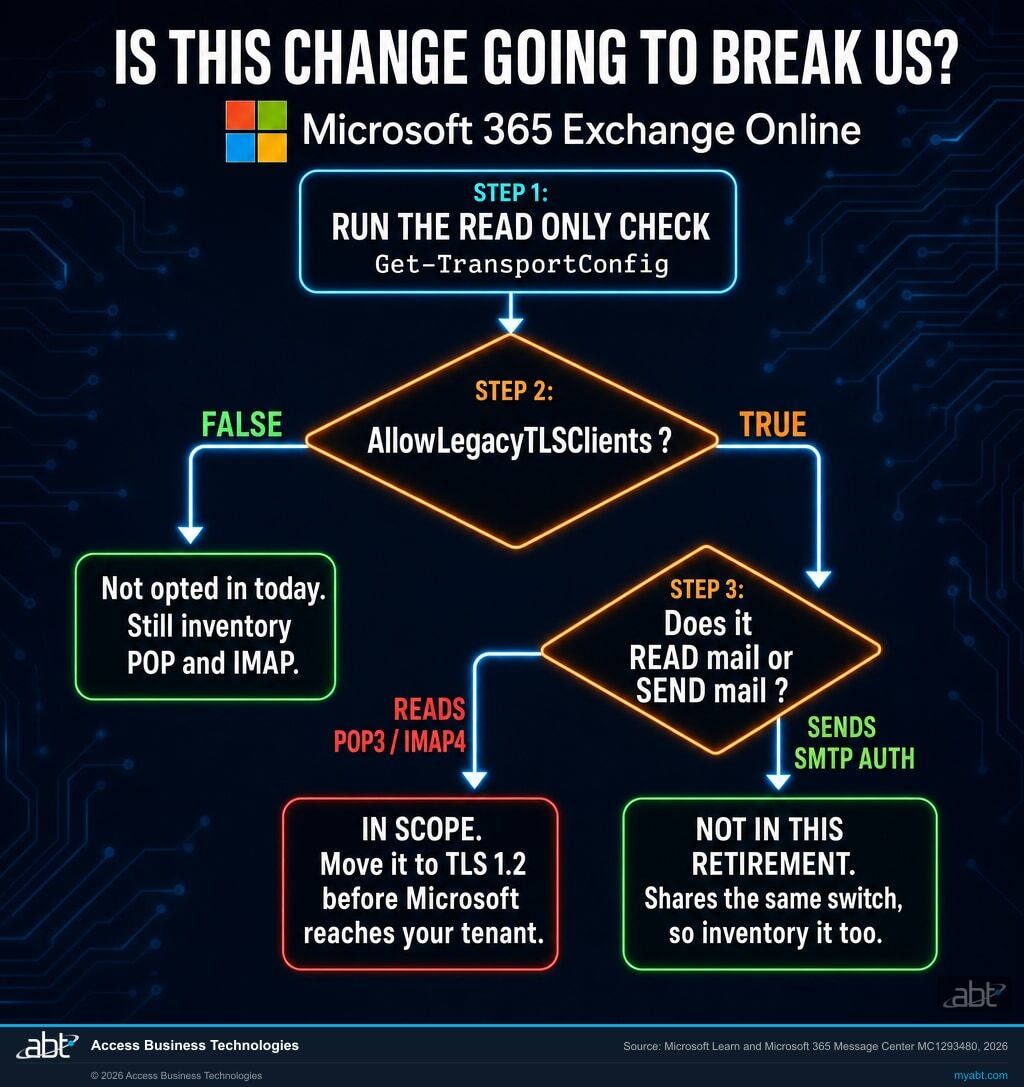
Get-TransportConfig | Format-List AllowLegacyTLSClients
A result of True is not itself a fault, and it is not a reason to switch the setting off this afternoon. Turning it off produces a broader outage than the retirement does, delivered by your own hand and on your own schedule, because the same switch also governs the legacy SMTP AUTH endpoint that Microsoft has not included in this change. Choosing the timing is a real advantage, since a break you scheduled is far easier to diagnose than one arriving on a Sunday in November, but it is a decision to make after you know what depends on all three endpoints.
The order that keeps you out of trouble is: read the setting, find what depends on it, fix or replace those things, and only then turn it off. The steps further down this page follow that order.
Find out what is still connecting the old way
Our engineers read your Microsoft 365 tenant and report which legacy protocols are enabled, which accounts have been seen using them, and which dependencies look likely to break when Microsoft reaches you. No cost, no obligation.
What this actually breaks in a bank, a credit union, or a mortgage company
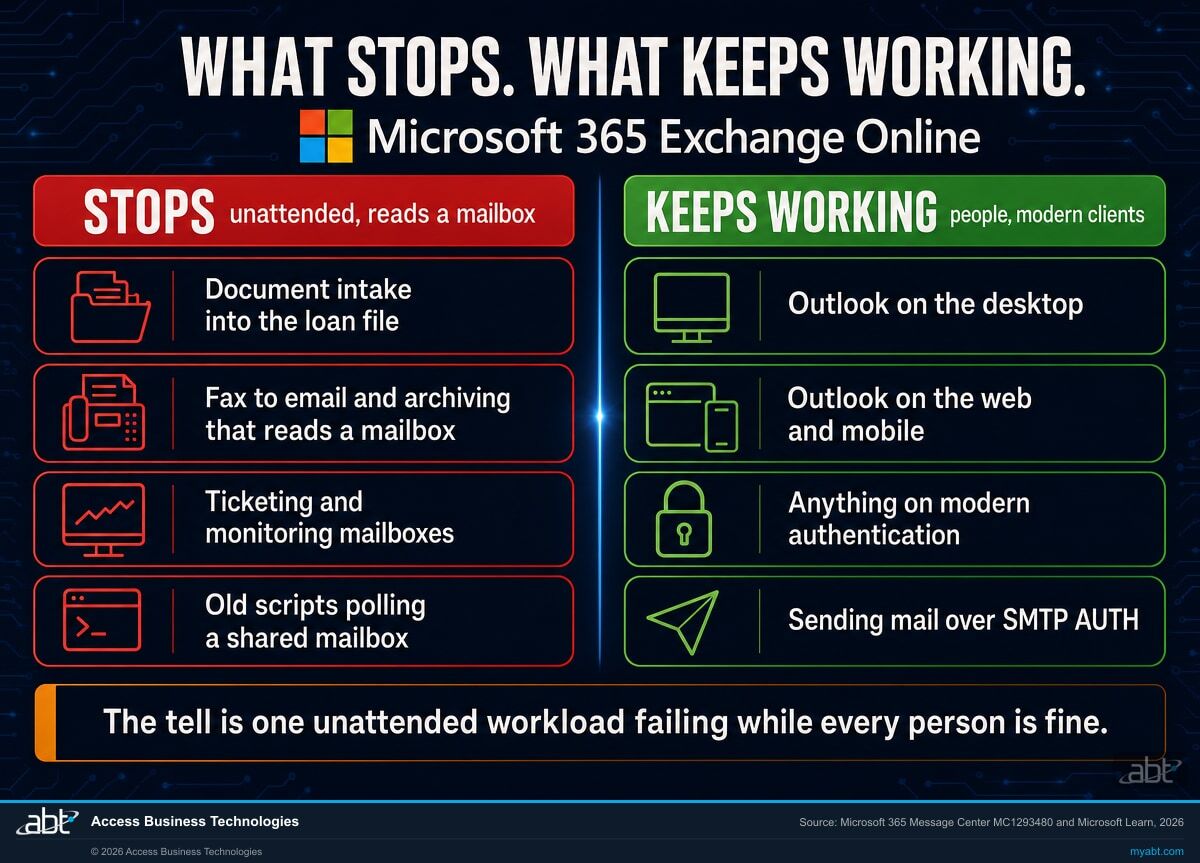
In a regulated institution the things polling a mailbox are rarely email clients. They are pieces of the document pipeline, and each one fails in a way that looks like something else.
Document intake into the loan file
A shared mailbox receives borrower documents, appraisals, or title packages, and something collects them on a timer and files them against the loan. When collection stops, mail keeps arriving and nothing moves. Nobody sees an error, because the mailbox looks healthy. The first symptom is a file that is missing a document everyone remembers sending.
Reads a mailbox, so in scopeFax to email, and archiving that reads rather than sends
Fax gateways typically deliver into a mailbox and then a second process reads them out. Archiving and journaling tools that collect from a mailbox rather than receiving a journal feed sit in the same category. Both keep accepting work while silently collecting none of it, which for an archive is the worse of the two failure modes.
Reads a mailbox, so in scopeTicketing, alerting, and anything with a rules mailbox
Help desk systems that create tickets from a mailbox, monitoring tools that parse alert mail, and small internal scripts written years ago to watch an address. These are the ones nobody has an inventory of, because each was set up to solve one problem and then worked.
Reads a mailbox, so in scopeWhy it will be misdiagnosed
These failures often present as a vendor problem, and that is what sends teams down the wrong path. The integration stopped, so the integration vendor gets called, the vendor sees a connection failure at the Microsoft end and says the problem is with Microsoft 365, and meanwhile the mailbox opens perfectly in Outlook so the mail team concludes the mailbox is fine. Both are right and neither is the answer. Where the client or the network logs are explicit about a TLS handshake failure the diagnosis is much faster, so it is worth checking those before assuming the worst.
The common tell is the pairing: one specific unattended workload failing while the people around it carry on working. That pattern points at a protocol or an authentication path rather than at a mailbox, and TLS is now the first thing on that list to check.
The outage is the symptom. The question underneath is why it was still on.
It is worth separating two things that arrive together. One is an availability problem with a date on it, and it is genuinely inconvenient. The other is a security posture question that has been true since 2020: why is this tenant still accepting a protocol version the industry retired, and who decided that? Whether that rises to a compliance matter depends on your own policies, your contracts, and your regulator, and this page does not attempt to answer it for you. It is a governance and control question first, and it is worth having an answer ready.
Legacy TLS rarely travels alone. The same connections that need it are usually the same connections using basic authentication, on protocols that carry a password on every request and cannot present a second factor. Microsoft ties these together explicitly in its own guidance, noting that disabling basic authentication "will block legacy protocols, such as POP and IMAP", and that enabling security defaults disables POP3 and IMAP4 automatically.
Both statements point the same way, though neither is a verdict on its own. POP and IMAP can be run responsibly, over TLS 1.2 and with modern authentication, so their presence is not proof that anything was skipped. What is worth asking is narrower: if these protocols are enabled broadly, or if legacy TLS is switched on, was that a decision somebody made and recorded, or is it simply what the tenant shipped with? A carve-out that has outlived the person who made it is the version worth taking to a board, because it has a fix rather than just a date.
Two more facts belong in the same conversation. Microsoft states that POP3 and IMAP4 are enabled for every user by default in Exchange Online, so their presence in your tenant is not evidence anybody chose them. And the retirement window closes on 31 December 2026, so the POP and IMAP half of the exposure ends on its own timetable whatever you do. The legacy sending path does not, because Microsoft has not retired it, and that piece stays open until somebody closes it deliberately. The question is how much of this you resolve through a plan rather than through a Sunday afternoon.
What to do, in an order that does not create the outage early
Steps one and two change nothing. Step five is the one that switches something off, and it belongs last for the same reason you do not test a fire alarm by starting a fire.
Read the tenant setting
Run Get-TransportConfig | Format-List AllowLegacyTLSClients in Exchange Online PowerShell, or open the toggle in the Exchange admin center. If it returns False, the tenant is not opted in today, and step two becomes an inventory exercise rather than a remediation. A False reading is a current-state fact rather than a history, and it does not tell you which mailboxes have POP and IMAP enabled, so it lowers the urgency rather than ending the work.
Exchange Online PowerShell, or Exchange admin center Mail Flow settingsInventory everything behind the switch, including the senders
Work out which mailboxes have POP3 and IMAP4 enabled and which are genuinely being used. Both lists are worth having, because the second is almost always much shorter than the first, and the difference is protocol surface you can retire regardless of how this rollout goes.
Inventory the SMTP AUTH senders in the same pass, even though they are not in this retirement. The tenant switch is shared, so before you get anywhere near step five you need to know what is sending through the legacy endpoint as well as what is reading through it. Skipping this is the specific way a team turns a POP and IMAP problem into a scan to email outage.
Pay particular attention to shared mailboxes and service accounts, since that is where unattended integrations live and where nobody notices a sign-in pattern that never changes.
Microsoft Entra sign-in logs, per-mailbox CAS settingsAsk each vendor the narrow question
For every integration on that list, the question is not whether the product supports TLS 1.2. It is whether your deployed version, as configured, negotiates it, and whether it is pointed at a legacy endpoint hostname. Microsoft's own advice is to "validate TLS support with third-party vendors", and the useful form of that request names your version and your configuration rather than asking in general.
Check the configured hostname while you are there. Anything pointed at an address containing -legacy is on the opt-in path by definition and needs no further diagnosis.
Your integration vendors, and the configuration screens of each deviceFix, replace, or retire each one
Most cases are a configuration change: point the client at the standard endpoint and let it negotiate TLS 1.2. Some need a firmware or version update. A few will be genuinely stuck, and those are worth a harder question, because a workload that cannot be moved off a 2020-era protocol version is telling you something about its future beyond this deadline.
Where a mailbox is being polled purely to move documents, this is often the moment to stop polling a mailbox at all and use a supported interface instead. That change costs more now and removes the entire category of problem rather than deferring it.
Configuration, firmware, or a change of integration methodThen turn the setting off yourself
Read this before you run it, because turning the flag off is broader than the Microsoft retirement. The same setting governs the legacy SMTP AUTH endpoint, which Microsoft has not named in this change. Disabling it cuts the sending path at the same moment as the reading paths, so a device that would have survived the retirement stops the instant you flip the switch. That is why step two inventories the senders as well.
Once nothing depends on any of the three endpoints, set the tenant flag back to False rather than waiting to be reached. Doing it deliberately means the change happens at a time you chose, with the people who know why it happened still at their desks, and it closes the posture finding rather than leaving it open until December.
Re-read the setting afterwards to confirm it took. A command that returns without an error is not the same as a setting that changed.
Exchange Online PowerShell, verified by reading the value backWhere ABT fits
Access Business Technologies is a Tier-1 Microsoft Cloud Solution Provider. We have worked with Microsoft technology since 1999, and today we manage Microsoft 365 tenants for credit unions, banks, and mortgage companies. Finding the unattended things connected to a tenant, and working out which of them a Microsoft change is about to reach, is ordinary work here rather than a special engagement.
The free security assessment is a read of your tenant, not a sales call with a report attached. Our engineers look at whether legacy TLS is enabled, which mailboxes have POP and IMAP switched on and which are genuinely using them, where basic authentication survives, which accounts have been seen signing in on legacy protocols, and which dependencies look most likely to break when this rollout reaches you. You get what is switched on, what is not, and what each finding would mean on a bad morning. What a tenant read cannot do on its own is prove a negative about a device we cannot see, so the last step is always confirming the shortlist against the devices and their vendors. There is no cost and no obligation.
ABT also operates M365 Guardian, its managed security service for credit unions, banks, and mortgage companies.
If an integration has already stopped and you need it working today, say so when you get in touch and we will treat it that way rather than as a review.
Where the facts on this page come from
Every Microsoft date, endpoint name, command, and quoted sentence on this page was read from Microsoft's own material on 31 August 2026. Where Microsoft is quoted, the quotation is verbatim. Figures about ABT itself, such as the year the company began working with Microsoft technology, come from ABT rather than from Microsoft.
- Microsoft 365 Message Center, MC1293480, "Exchange Online: Retirement of legacy TLS versions for POP and IMAP connections". Source of the 1 August to 31 December 2026 rollout window, the gradual worldwide wording, the TLS 1.2 minimum, the statement that connections using TLS 1.0 or 1.1 will fail, the affected-audience wording, and the note that modern email clients are not expected to be affected. Published 27 April 2026, timeline updated 7 July 2026. The authoritative entry is visible inside your own tenant, in the Microsoft 365 admin center under Health. It is not published on the public web, although third-party mirrors republish Message Center text with a lag. ABT retrieved this entry directly through the Microsoft Graph service announcement endpoint on 31 August 2026 and confirmed the August rollout start against the raw response.
- Exchange Team Blog, "Deprecating Legacy TLS and Endpoints for POP and IMAP in Exchange Online", 27 April 2026. Source of the original announcement, the statement that support is being removed entirely rather than restricted, and Microsoft's expectation that only customers who explicitly opted in are impacted. techcommunity.microsoft.com
- Microsoft Learn, "Opt in to the Exchange Online endpoint for legacy TLS clients using POP3 or IMAP4". Source of the October 2020 end of support, the imap-legacy and pop-legacy endpoint names, the 21Vianet equivalents, the GCC, GCC High and DoD exclusion, the AllowLegacyTLSClients parameter, and the Exchange admin center toggle name. learn.microsoft.com
- Microsoft Learn, "Opt in to the Exchange Online endpoint for legacy TLS clients using SMTP AUTH". Source of the smtp-legacy endpoint name and confirmation that the same AllowLegacyTLSClients parameter governs it. learn.microsoft.com
- Microsoft Learn, "POP3 and IMAP4 in Exchange Online". Source of the statement that POP3 and IMAP4 programs do not send messages, that both protocols are enabled by default for all users, that security defaults disable them automatically, and that disabling basic authentication blocks them. learn.microsoft.com
Nothing on this page is legal or compliance advice. Tenant settings differ, and Microsoft can revise a rollout timeline, as it did with this one on 7 July 2026. Read your own tenant's Message Center and confirm your own configuration before relying on any figure here.
The settings around this one
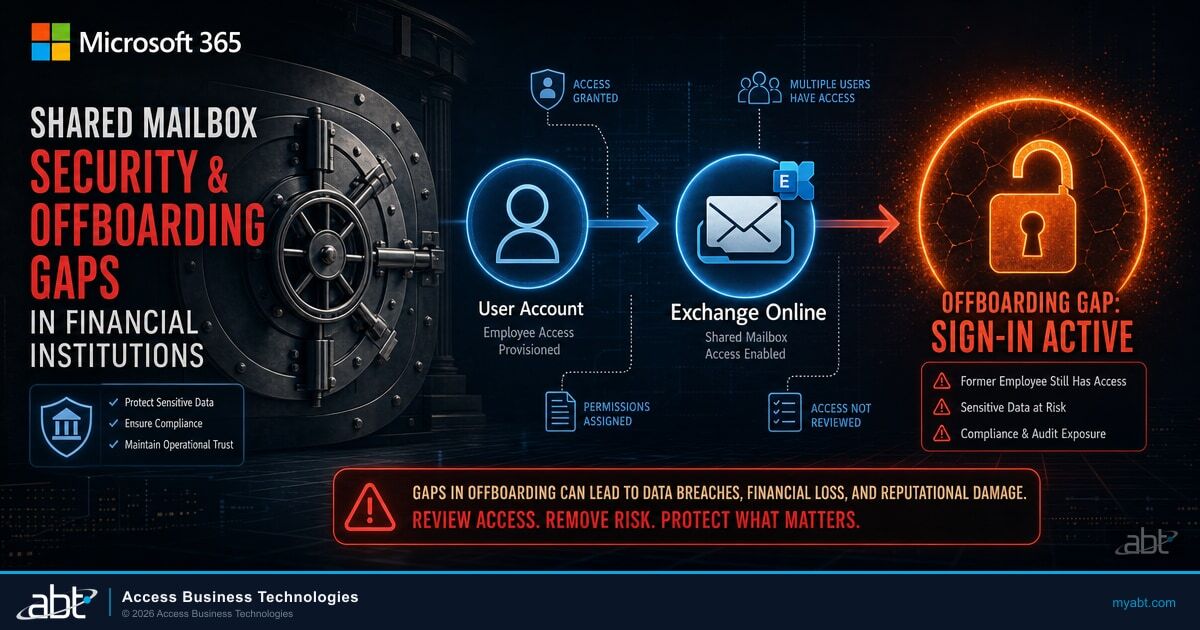
The Mailboxes Your Integrations Are Polling
Shared mailboxes are where unattended workloads live. What Microsoft documents about their sign-in surface, and the review that closes it.
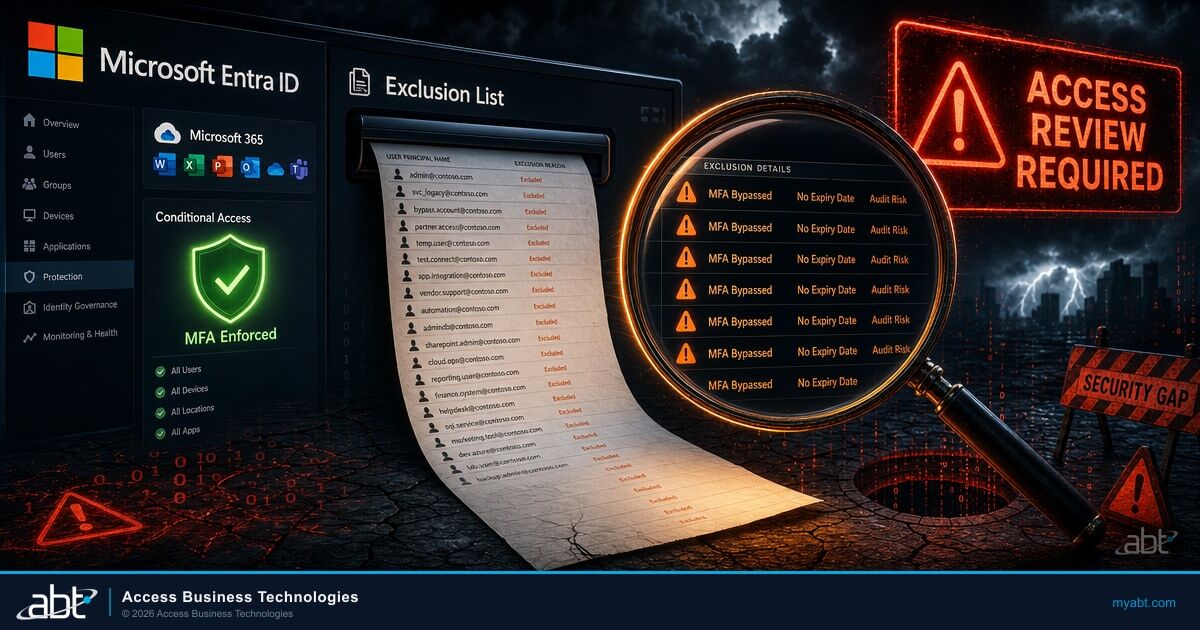
The Exclusion List Nobody Reviews
The same shape of problem one layer up. A carve-out made for one system, years ago, that persists until somebody deliberately removes it.
The Next Legacy Method Microsoft Is Retiring
Passkeys become the Entra default on 1 September 2026 and SMS and voice sign-in retires on 1 February 2027. The same pattern, on the identity side.
Answered from Microsoft's own documentation
Find out what is still
connecting the old way.
Tell us roughly how many mailboxes you run and whether anything has already stopped working. Our engineers will read the tenant and come back with which legacy protocols are enabled, who has been seen using them, and which dependencies this rollout looks likely to reach.
