


Microsoft Defender XDR · Advanced hunting · MC1540336
AADSignInEventsBeta retires January 31, 2027. Move your sign-in hunting queries to EntraIdSignInEvents now, and test each one while both tables still return data.
Microsoft Defender XDR is retiring the two advanced hunting tables that hold Microsoft Entra sign-ins: AADSignInEventsBeta for users, and AADSpnSignInEventsBeta for service principals and managed identities. Their replacements, EntraIdSignInEvents and EntraIdSpnSignInEvents, became generally available in October 2026. Microsoft migrates your custom detections for you. Everything else that names the old tables, from saved hunting queries to workbooks, scripts, API calls and SIEM rules, is yours to update. The next day, February 1, 2027, Microsoft retires the older Defender advanced hunting APIs too, so a reporting script that uses both meets two changes in the same January 31 to February 1 cutover. For a credit union, bank, or mortgage company that watches sign-ins for account takeover, that leaves about eleven weeks to find every query and move it.
- Both old and new tables are in the schema today, so you can run a query against each and compare the results before the date
- The new schema renames AadDeviceId, changes TokenIssuerType from a number to text, and adds risk and Global Secure Access columns
- Microsoft lists the content to inventory: detections, saved and hunting queries, workbooks, scripts, APIs, SIEM content and integrations
The change
What is Microsoft retiring in Defender XDR advanced hunting on January 31, 2027?
Microsoft announced the retirement in Message Center post MC1540336 on November 5, 2026, and documents the replacement tables on Microsoft Learn. Here is what the notice says, and who it reaches.
The change in brief
- What
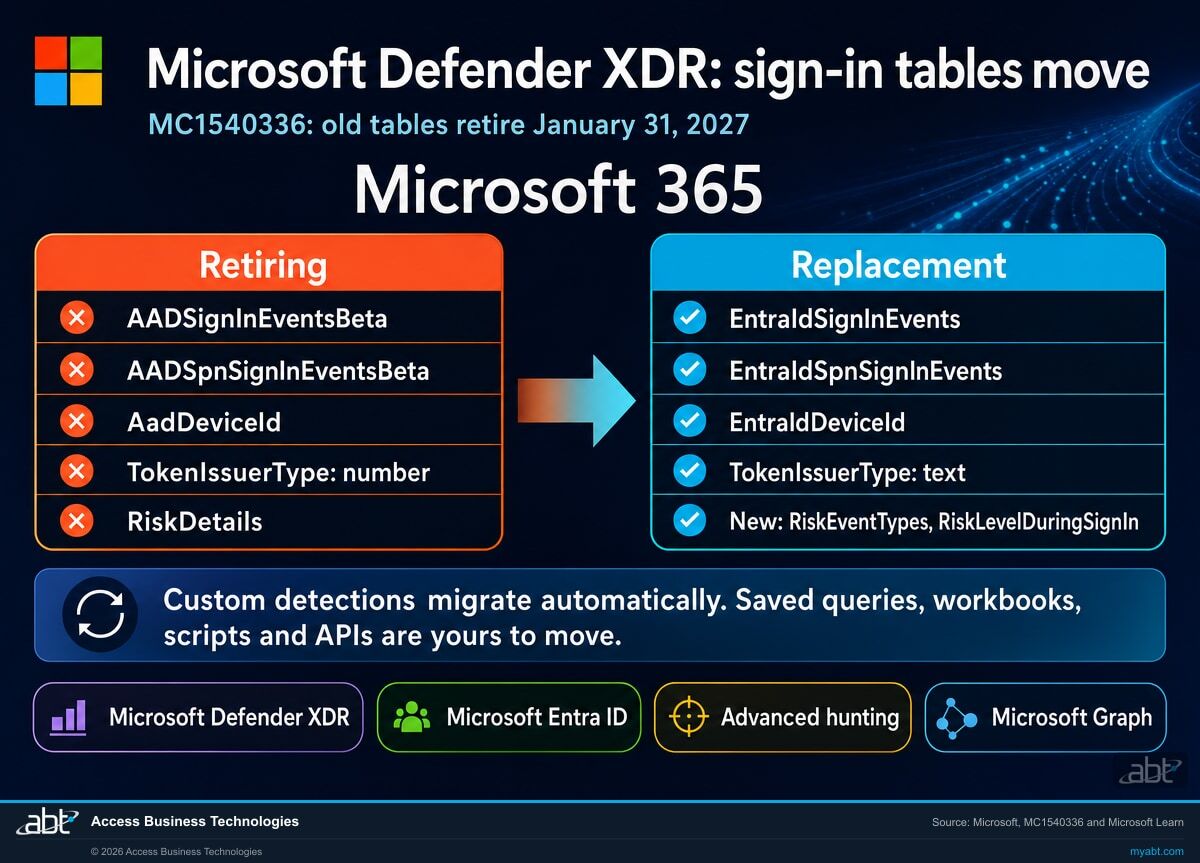
- The AADSignInEventsBeta and AADSpnSignInEventsBeta tables leave advanced hunting. EntraIdSignInEvents and EntraIdSpnSignInEvents replace them, and the AadDeviceId column becomes EntraIdDeviceId.
- When
- The new tables became generally available in October 2026. The old tables retire on January 31, 2027, a Sunday, in every Microsoft cloud: Worldwide, GCC, GCC High and DoD.
- Who
- Microsoft names security administrators, threat hunters, detection engineers, SOC teams, and anyone who maintains queries, custom detections, workbooks, scripts, APIs, or integrations that use the retiring names.
- Automatic
- Microsoft Defender migrates custom detections that reference the retiring tables.
- Your work
- Saved and shared hunting queries, workbooks, scripts, API calls, SIEM content and integrations. Microsoft says these "might fail" if they keep using the old names, and asks for the move before January 31, 2027.
New tables are generally available
EntraIdSignInEvents and EntraIdSpnSignInEvents drop the Beta label and carry the Microsoft Entra name. Both sets of tables return data side by side.
Microsoft sets the date
Message Center post MC1540336 names January 31, 2027 as the retirement date and lists the content to update.
The AAD tables retire
Custom detections are already migrated. Anything else that names the old tables can stop returning results from here.
The legacy hunting APIs retire
Microsoft retires the Defender for Endpoint and Defender XDR advanced hunting APIs and says they stop functioning after that date. Scripts move to the Microsoft Graph Security API first.
"Microsoft Defender will automatically migrate custom detections that reference the retiring tables. External scripts, workbooks, APIs, integrations, and other content outside the managed migration path might fail if they continue to reference the retiring names."
Microsoft 365 Message Center, MC1540336, November 5, 2026These two tables are where a Defender XDR tenant keeps Microsoft Entra sign-ins for hunting. AADSignInEventsBeta holds interactive and non-interactive sign-ins by people. AADSpnSignInEventsBeta holds sign-ins by service principals and managed identities, the accounts that applications and automation use. When a SOC analyst asks who signed in from an unfamiliar country last night, which accounts failed multifactor authentication twenty times, or which application secret started signing in from a new address, the answer usually comes from one of these two tables. The Beta in their names was a preview label that stayed on for years, and Microsoft is now retiring it along with the old Azure AD prefix.
One detail is worth knowing before you plan the work. The Microsoft Learn reference pages for these tables, last updated in August 2026, still give an earlier date, October 19, 2026, and say that all queries using the old table move to the new one automatically. The November 5 Message Center notice is the newer word from Microsoft and is narrower: it names January 31, 2027, and it promises automatic migration for custom detections only. The schema reference Microsoft updated on November 10, 2026 still lists both the old and new tables, which matches the later date. We would plan to the November notice: treat everything outside custom detections as yours to move, and finish before January 31.
Side by side
What changes between AADSignInEventsBeta and EntraIdSignInEvents?
More than the name. We compared the column lists on Microsoft's four table reference pages. Most columns carry over with the same name and type; these are the rows that change a query.
| Item | Retiring table | Replacement table | What to do in a query |
|---|---|---|---|
| User sign-ins | AADSignInEventsBeta | EntraIdSignInEvents | Change the table name on the first line |
| Service principal and managed identity sign-ins | AADSpnSignInEventsBeta | EntraIdSpnSignInEvents | Change the table name on the first line |
| Device identifier | AadDeviceId, string | EntraIdDeviceId, string | Rename it in every filter, join and projection |
| Token issuer | TokenIssuerType, int: 0 for Microsoft Entra ID, 1 for AD FS | TokenIssuerType, string naming the issuer | A filter such as TokenIssuerType == 1 needs rewriting; check the text values your tenant returns first |
| Risk detail | RiskDetails, int | Not in the replacement column list | Find each use; rebuild the logic on the risk columns that remain |
| Risk at sign-in | RiskLevelAggregated, RiskState | Same two, plus RiskLevelDuringSignIn and RiskEventTypes | New detail is available for risk-based hunting |
| Network and token detail | None | IsSignInThroughGlobalSecureAccess, GatewayJA4, UniqueTokenId | Optional; useful if you run Global Secure Access |
| Custom detections | Microsoft Defender migrates them automatically | Open each one afterward and confirm its query and results | |
| Saved queries, workbooks, scripts, APIs, SIEM content | Outside the managed migration path; Microsoft says they might fail | Yours to find, update and test before January 31, 2027 | |
The service principal table gains columns too
EntraIdSpnSignInEvents keeps every column of the retiring table and adds IsConfidentialClient, SessionId, UserAgent, GatewayJA4 and UniqueTokenId. A query that reads AADSpnSignInEventsBeta usually needs only the new table name. The user table is where the type change and the dropped column live, so start the review there.
Find every query, workbook and script that still names the retiring sign-in tables, and see what each one needs before January 31
ABT works with your team to list the content that reads Entra sign-ins in Defender XDR, mark what Microsoft migrates and what it leaves to you, and test the rewritten queries against both tables while both still return data, as part of a free security assessment.
Request the free assessmentThe work
How do you move sign-in hunting queries to EntraIdSignInEvents before January 31, 2027?
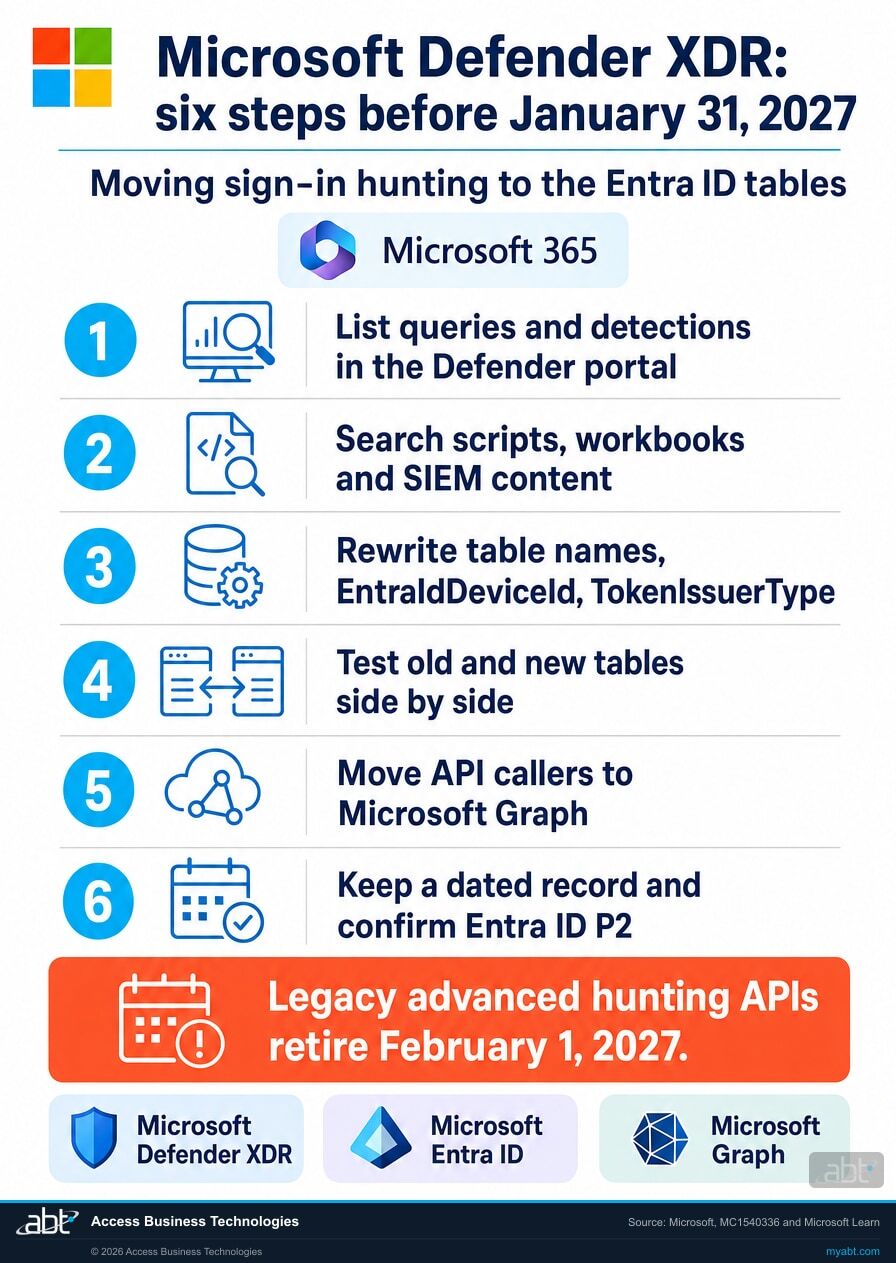
Six steps, built on Microsoft's own list of recommended actions. Steps 1 and 2 build the inventory. Steps 3 and 4 rewrite and test. Step 5 handles the API change that lands the next day, and step 6 is the record.
List everything inside the Defender portal that reads the old tables
Microsoft's notice asks you to inventory custom detections, saved queries and hunting queries first. In advanced hunting, the Queries tab lists Shared queries, My queries and Community queries. Microsoft describes Shared queries as shared to all users in your organization and My queries as accessible only to you, so each analyst on the team checks their own list. Open each query that mentions AADSignInEventsBeta, AADSpnSignInEventsBeta or AadDeviceId and add it to a simple sheet: name, owner, what it is for, and whether anyone still uses it. Custom detections go on the sheet too, marked as migrated by Microsoft, so step 4 confirms them.
Search outside the portal, where Microsoft's migration does not reach
This is the part Microsoft says "might fail." Search every place a query can live as text: PowerShell and Python scripts that call advanced hunting, scheduled reports, workbooks, Power BI datasets, SIEM content, ticketing or automation flows, and any query an outside SOC or security provider runs against your tenant. A plain text search for the three names finds most of them:
AADSignInEventsBeta AADSpnSignInEventsBeta AadDeviceId
Ask each provider in writing which of their queries read your sign-in tables and when they will move them. Their answer belongs on the same sheet.
Rewrite the four things that change
Microsoft asks you to review the new schemas for "column, data type, or casing differences," and our comparison of the reference pages found four that touch real queries. Change the table name. Rename AadDeviceId to EntraIdDeviceId. Rewrite any filter on TokenIssuerType, which was a number and is now text, after you check what text values your own tenant returns. And find any use of RiskDetails, which is absent from the new table's column list, and rebuild that logic on RiskLevelAggregated, RiskLevelDuringSignIn, RiskState or RiskEventTypes. A simple query moves like this:
EntraIdSignInEvents
| where Timestamp > ago(7d)
| where ErrorCode != 0
| summarize Failures = count() by AccountUpn, Country, EntraIdDeviceId
Test each rewrite against the old table while both still return data
Both tables are in the schema today, which makes this the easy part. Run the old query and the new one over the same fixed time window, confirm both complete without errors, and compare the counts and a sample of rows. The same sign-ins should give the same results, so investigate any difference before you retire the old query; a filter on TokenIssuerType or a reference to RiskDetails that did not carry over is the first place to look. Do the same check on every custom detection Microsoft migrated, so you have seen each one return results on the new table. A side-by-side count is a quick start. Run these as two separate queries, with the same fixed start and end in both:
AADSignInEventsBeta
| where Timestamp between (datetime(2026-11-12) .. datetime(2026-11-13))
| count
EntraIdSignInEvents
| where Timestamp between (datetime(2026-11-12) .. datetime(2026-11-13))
| count
Move API callers to Microsoft Graph in the same change
Microsoft retires the Defender for Endpoint and Defender XDR advanced hunting APIs on February 1, 2027, the day after the tables retire, and says in Message Center post MC1220762 that they stop functioning after that date. We would finish the move before January 31. Any script or integration that sends KQL to those APIs moves to the Microsoft Graph Security API's runHuntingQuery method, which looks back 30 days by default when no start time is given. A script that calls the old API with the old table name needs both fixes, so do them together and test once. Our page on the Defender advanced hunting API retirement covers the API move step by step.
Keep the record, and confirm who the tables cover
Record each query or detection on the sheet, the change made, the test result, the date, and who signed off, plus the written answer from each outside provider. Then confirm coverage. Microsoft says a Microsoft Entra ID P2 license is needed to collect and view activities in these tables. Microsoft 365 Business Premium includes Entra ID P1; P2 comes with Microsoft 365 E5 and E7, Microsoft Defender Suite, and the Defender Suite add-ons for Business Premium. If a sign-in table returns no rows at all, check the license before you read it as a quiet week, and note the result in the record.
Where to look
Where do the old table names usually hide?
Microsoft's list of content to review, grouped by who usually owns it. Each card is a place a query can sit for years without anyone opening it.
Saved hunting queries
Shared queries and each analyst's My queries. The private lists are the easiest to miss, because only their owner can see them.
Custom detections
Microsoft migrates these. Confirm each one afterward, and keep a note of the date you checked it.
Workbooks and dashboards
Sign-in charts built for a monthly security report or a board slide often carry the old table name in every panel.
Scripts and scheduled reports
PowerShell or Python that pulls sign-ins on a schedule. These often use the legacy API as well, so both changes meet here.
SIEM and automation content
Rules, playbooks and integrations that send KQL to Defender. Microsoft lists SIEM content and integrations by name.
An outside SOC or provider
Queries a security provider runs against your tenant. Ask for their plan in writing and keep it with your record.
For financial institutions
Why does this matter at a credit union, bank, or mortgage company?
Because sign-in data is where account takeover shows up first, and a hunt that quietly stops returning rows looks exactly like a quiet week.
Your team keeps its view of sign-ins. A loan officer's mailbox reached from an unfamiliar country, a teller's account failing multifactor authentication again and again, a service account signing in from a new address: these are the questions a sign-in hunt answers every week. Moving the queries before January 31 keeps those answers coming without a gap, and the new tables add risk event types and Global Secure Access detail your analysts can put to work.
A broken query fails quietly. When a workbook or scheduled report names a retired table, the person reading it may see an error, or may see an empty chart and read it as good news. The inventory and the side-by-side test in steps 1 to 4 are how you know every sign-in view still reads live data on February 1.
A record you can show. Examiners and cyber insurers ask how you monitor sign-in activity and how you manage changes to your security tools. A dated sheet of every query and detection, the change made, the test result, the provider answers and the license coverage is strong supporting evidence for that answer, written before anyone asked. Our page on the Search-UnifiedAuditLog retirement covers a similar change on the audit log side.
Changes like this one are easy to miss
Our Short is about a Microsoft security change that sysadmins found in a long community thread of monthly updates, weeks before most IT directors at community institutions had heard of it.
The sign-in table retirement arrived the same way, as one Message Center post among hundreds. Reading those posts each week, and turning the ones that touch your tenant into dated work, is how a change like this lands on a calendar in November, with eleven weeks to do the work.
How ABT helps
A free security assessment
ABT is a Tier 1 Microsoft Cloud Solution Provider serving more than 750 financial institutions. It manages Microsoft 365 tenants and hosts Azure environments for credit unions, banks, and mortgage companies. Sign-in monitoring is where those reviews begin, and this assessment covers the queries and reports your team relies on to see it.
With your team, we find every place your tenant reads the retiring sign-in tables, plan each rewrite, and test it before January 31
The assessment is free and ends with written findings you keep. We work through it with an administrator on your team, and your team decides what changes and who makes each change.
- The inventory. Custom detections, shared and saved queries, workbooks, scripts and integrations that name the old tables or AadDeviceId.
- The split. What Microsoft migrates for you, and what stays with your team or a provider.
- The rewrite plan. Table names, the device column, TokenIssuerType filters and RiskDetails logic, query by query.
- The side-by-side test. Old and new results compared over the same window while both tables exist.
- The API check. Scripts that use the legacy advanced hunting APIs, with their move to Microsoft Graph.
- The record. A dated summary for your change log and information security program, including Entra ID P2 coverage.
ABT also operates M365 Guardian, its managed security service for credit unions, banks, and mortgage companies. Learn about M365 Guardian
Related reading
If this opened a bigger question
A change to sign-in hunting tends to raise the questions around it: how long your logs last, which risk controls your license includes, and what an identity attack looks like in the data.
Microsoft 365 Audit Log Retention for Financial Institutions
Purview Audit keeps 180 days by default, and Entra ID sign-in logs keep 30 days on P1 and P2. What your license retains, and how to extend it.
Read the article
Entra Risk Policies Retire Oct 1, 2026: What Banks Must Do
The legacy Entra ID Protection risk policies retired October 1, 2026. What to migrate, and the license question behind it.
Read the article
Storm-2949: Microsoft Just Disclosed a No-Malware Identity Attack on Cloud Tenants
Microsoft's disclosure of an identity attack on cloud tenants that used no malware, with a response plan for Microsoft 365 and Entra ID.
Read the articleAnswered
The AADSignInEventsBeta retirement, answered
Verify it yourself
Where the facts on this page come from
Every Microsoft date, table name, column, license and quotation above comes from the sources listed here.
- Microsoft 365 Message Center, MC1540336, "Microsoft Defender XDR: Retirement of AADSignInEventsBeta and AADSpnSignInEventsBeta tables," published November 5, 2026, read from the tenant over Microsoft Graph; admins can open it in the Microsoft 365 admin center. Source for the January 31, 2027 date, the October 2026 availability of the new tables, the clouds covered, the AadDeviceId rename, the automatic migration of custom detections, the content that might fail, and the recommended actions.
- Microsoft Learn, EntraIdSignInEvents and EntraIdSpnSignInEvents table references. Source for the replacement columns and types, the Entra ID P2 requirement, and the earlier October 19, 2026 wording.
- Microsoft Learn, AADSignInEventsBeta and AADSpnSignInEventsBeta table references. Source for the retiring columns and types, including TokenIssuerType as 0 for Microsoft Entra ID and 1 for AD FS, and RiskDetails.
- Microsoft Learn, Data tables in the Microsoft Defender advanced hunting schema, updated November 10, 2026. Source for both the old and new tables being listed today.
- Microsoft Learn, Proactively hunt for threats with advanced hunting. Source for the 30 days of raw Defender data and longer retention through Microsoft Sentinel.
- Microsoft Learn, Use shared queries in advanced hunting. Source for Shared queries, My queries and Community queries on the Queries tab.
- Microsoft 365 Message Center, MC1220762, "Retirement notice: MDE and XDR Advanced Hunting APIs retiring; migrate to Microsoft Graph Security API," updated October 26, 2026, read from the tenant over Microsoft Graph. Source for the February 1, 2027 retirement of the legacy advanced hunting APIs.
- Microsoft Learn, security: runHuntingQuery. Source for the Microsoft Graph method and its 30-day default lookback.
- Microsoft Learn, Microsoft Entra licensing. Source for Entra ID P1 in Microsoft 365 Business Premium and Entra ID P2 in Microsoft 365 E5 and E7, Microsoft Defender Suite, and the Defender Suite offers for Business Premium.
- The column comparison is ABT's reading of Microsoft's four table reference pages. The order of the steps and the notes on where to look are ABT's recommendations; everything else on this list is Microsoft's own.
AADSignInEventsBeta retires January 31, 2027.
Move your sign-in hunting to the new Entra ID tables and test it while both still return data.
The work starts with an inventory of everything that reads Entra sign-ins in Defender XDR. When it is done, you know which detections Microsoft migrated, which queries, workbooks and scripts are yours to move, what each rewrite changes, and how each one tested on the new tables.
Tell us a little about your environment and we will come back with what we would check first.
What should we look at? Optional.
Encrypted. Private.
Thank you. That is with us.
An ABT specialist will be in touch shortly. If a particular report, script or provider is what you are thinking about, say so in your reply and we will start there.
