


Which managed detection and response provider fits a credit union that already runs Microsoft Defender? The one that runs the Defender you own.
Your staff keeps serving members, your IT team keeps its evenings, and the Microsoft Defender licences you already pay for start doing their full job. The provider that fits is the one that operates Microsoft Defender inside your own Microsoft 365 tenant, acts on an incident at any hour within limits you set in writing, and hands your board and your examiner a record they can read.
- Five tests that separate a provider who acts from one who forwards alerts
- What happens in your tenant at 3:00 AM, step by step, with who does each step
- The NCUA facts every shortlist should be checked against, quoted from ncua.gov
What should a credit union look for in an MDR provider when it already runs Microsoft Defender?
A credit union on Microsoft 365 Business Premium already owns a serious security stack. Microsoft lists what comes with the licence: Microsoft Entra ID P1 for user accounts, Microsoft Intune Plan 1 for device management, Microsoft Defender for Business for devices, Microsoft Defender for Office 365 Plan 1 for email and files, and Microsoft Purview data loss prevention. The detection engines are already running in your tenant. The question is who acts on what they find, how fast, and with what authority.
That reframes the buying decision. You are hiring the team and the automation that turn Defender's signals into a closed incident while your loan officers and member service staff keep working in Outlook, Teams and, where you license it, Microsoft 365 Copilot. Every one of those runs on the same identities and the same tenant the provider is protecting. These five tests come from the questions credit union buyers ask most often, and each one has a section below.
It covers the Defender products you actually license, named in writing
Endpoint, email, identity and cloud apps are separate products with separate licences. The contract should list which ones the provider watches and acts on in your tenant.
It can take action inside your tenant, and the actions are listed
Revoking sessions, disabling an account, isolating a laptop, purging a phishing message from every mailbox. A provider that can only send you an alert at 2:00 AM leaves the response with your IT team.
It tells you exactly who is on duty overnight
Automation, an on-call engineer, or an analyst at a desk are three different answers. Each is fine when it is stated plainly and priced plainly.
It produces evidence your board and your NCUA examiner can follow
A written incident timeline, control documentation, and an independent audit report on the provider itself.
It fits your 72-hour notification clock and lets you leave cleanly
The provider's notice to you has to arrive early enough for your own decision, and your tenant, logs and configuration stay yours when the contract ends.
Which kind of provider fits a credit union on Defender: Defender alone, a provider with its own platform, or a provider that operates your Defender?
| Question | Microsoft Defender with nobody assigned to act on it | A provider that brings its own platform or agent | A provider that operates your Microsoft Defender (Guardian) |
|---|---|---|---|
| Where detection comes from | Microsoft Defender and Microsoft Entra ID Protection, in your tenant | The provider's platform, often alongside your Microsoft signal; ask how the two are correlated | Microsoft Defender XDR signals across identity, endpoint, email and cloud apps, correlated by ABT's own detection engine |
| Who acts at 3:00 AM | Whoever on your staff sees the alert first | Depends on the contract; ask for the list of actions and who takes them | Pre-authorized automated containment at any hour; a human at any hour on Guardian Resolve |
| Software on every workstation | Microsoft Defender only | Sometimes a second endpoint agent; ask how it coexists with Defender | Microsoft Defender only, operated by ABT |
| What you pay for | Your Microsoft licensing | Your Microsoft licensing plus the provider's platform and service | Your Microsoft licensing at Microsoft price on one line, and Guardian on its own line |
| What the examiner sees | Whatever your team wrote down | The provider's reports; ask for a sample | Guardian Security Insights reporting on every rung; a written incident timeline on Guardian Respond and Resolve |
| What you keep when it ends | Everything | Ask about log export and agent removal | Your tenant and data stay where they are; you revoke ABT's delegated access |
The middle column is a real model and some credit unions choose it for good reasons, usually when their environment reaches well beyond Microsoft 365. For a credit union whose identity, email, file storage and endpoints already run on Microsoft, ABT's view is that a second endpoint agent on a Business Premium estate creates four specific costs. Two products both inspect the same file operations and need mutual exclusions that someone tunes forever. The detection signal splits, so the correlation you already pay Microsoft for sees part of the picture. A per-endpoint charge lands on top of licensing you already bought. And at the end of the agreement there is an agent to remove from every workstation.
Operating the Defender you own sidesteps those four costs. It is also why the comparison above keeps Microsoft licensing and the security service on separate lines: you can see what Microsoft charges and what the provider charges, and judge each.
Which Microsoft Defender products should the provider cover?
Microsoft splits Defender into products that are licensed separately, and a provider can cover some and leave others to you. Ask for coverage stated against this list:
- Endpoints: Microsoft Defender for Business (in Business Premium) or Microsoft Defender for Endpoint Plan 2.
- Email and files: Microsoft Defender for Office 365 Plan 1 (in Business Premium) or Plan 2.
- Identity: Microsoft Entra ID Protection for risky sign-ins and users, and Microsoft Defender for Identity for on-premises Active Directory.
- Cloud apps: Microsoft Defender for Cloud Apps, where licensed.
Guardian Contain covers identity, endpoint, email and cloud apps on Microsoft Defender XDR signals. What it can see in each area depends on what your licences switch on, which is where Business Premium credit unions meet the licensing question below.
The licence question most Business Premium credit unions meet
Business Premium includes Microsoft Entra ID P1. Microsoft's ID Protection documentation says plainly: "Using this feature requires Microsoft Entra ID P2 licenses," and its licensing table places sign-in and user risk policies, whether reached through ID Protection or Conditional Access, on P2. A risk-based Conditional Access policy is one of the strongest automatic responses to a stolen credential, and it needs P2 on the accounts it protects.
Microsoft's answer for Business Premium is an add-on, Microsoft Defender Suite for Business Premium. Microsoft lists what it adds: Microsoft Entra ID P2, Microsoft Defender for Identity, Microsoft Defender for Endpoint Plan 2 with advanced hunting and live response, Microsoft Defender for Office 365 Plan 2 with automated investigation and response and threat explorer, and Microsoft Defender for Cloud Apps. For a credit union on Business Premium, ABT recommends the suite as the minimum upgrade. For an institution carrying retention and eDiscovery obligations, the combined Microsoft Defender and Purview Suites for Business Premium is often the better fit, and it is worth asking about on the same call.
Microsoft's Defender for Business FAQ states that it "doesn't support mixed licensing," and that an organization with both Defender for Business and Defender for Endpoint Plan 2 defaults to the Defender for Business experience. Buy the endpoint upgrade for every seat, or buy it for the identity value alone and say so in the plan. Moving the tenant to the Plan 2 experience also takes a Microsoft support request, which ABT opens and verifies for Guardian clients.
Business Premium itself is sized for organizations of up to 300 users. A larger credit union typically puts the users past that line on an enterprise plan that carries Defender for Endpoint Plan 2, so every user lands on the same endpoint experience. The licence comparison in Microsoft 365 E3 vs. E5 vs. Business Premium for financial institutions walks through that decision. Microsoft licensing is always quoted at Microsoft's price, on its own line.
See what your Defender licences can already do, and what is acting on them tonight
We read your Microsoft 365 tenant and report which Defender products are licensed and on, which Conditional Access policies actually enforce, which accounts hold the licence each policy needs, and what would happen to a compromised sign-in at 3:00 AM. Written up and yours to keep.
Get a free security assessmentWhat can the provider actually do inside your tenant at 3:00 AM?
Split the answer into two parts: what happens automatically, and what a person does.
The automatic part, at any hour
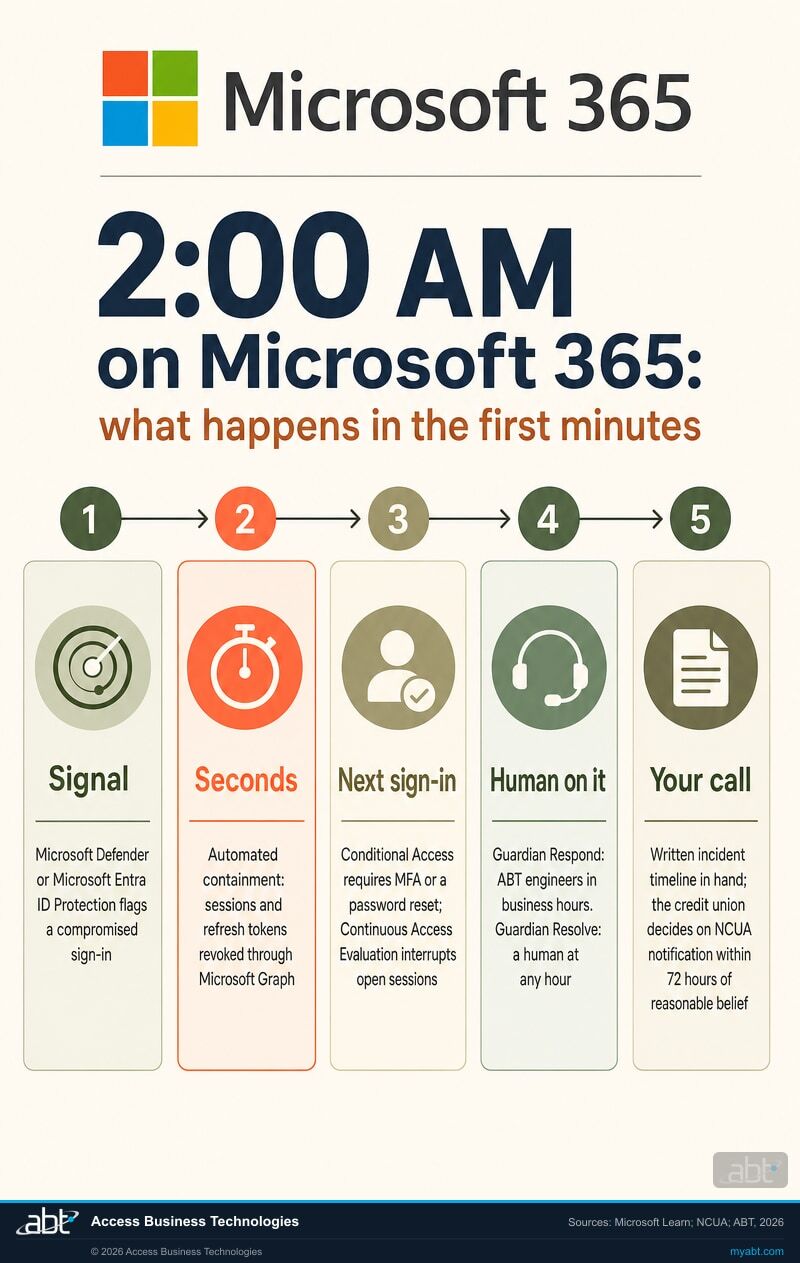
Microsoft supplies the detection. When Microsoft Defender or Microsoft Entra ID Protection detects a risk signal such as compromised credentials, malware, an anomalous sign-in or signs of token theft, ABT's Guardian configuration responds automatically. The affected user's sessions and refresh tokens are revoked through Microsoft Graph. Microsoft 365 apps that support Continuous Access Evaluation end open sessions close to real time, other apps lose access when their current access token expires, and Conditional Access requires multifactor authentication or a password reset at the next sign-in. Device compliance for firewall, antivirus, encryption and TPM is enforced through Conditional Access. This runs 24 hours a day, 365 days a year, holidays included, and for credential compromise the session and token revocation is issued in seconds.
Session revocation matters because a stolen session skips the password and the multifactor prompt entirely. The short below shows how an attacker inherits a session a user already opened, which is exactly what a revoked refresh token shuts down.
The human part, and who authorized it
On covered incidents, ABT engineers can take these containment actions in your Microsoft environment: revoke sessions, reset credentials, disable accounts, isolate a managed endpoint, block a sender, purge malicious mail tenant wide, remove malicious mailbox rules and forwarding, and revoke malicious application consents and service principal access.
Those actions are pre-authorized at contract signing, so nobody is waiting for permission while an attacker works. The pre-authorized list, and any action your credit union wants to keep for its own approval, is agreed during onboarding and recorded. An action with real business impact that sits outside the list, disabling an executive's account during business hours for example, goes to your designated contact first, with a named fallback when that person cannot be reached.
One operating rule is worth asking every provider about. ABT disables and keeps; it does not delete. A disabled account, mailbox rule or consent grant stops working at once and stays readable for the investigation, which is the artifact your insurer and your examiner will ask about later. ABT captures the state of anything it changes before changing it, and records anything it could not retrieve separately from what it found.
Why a signed-in session is the thing to revoke
Is the monitoring really around the clock, and who is on it?
This is the question buyers ask most and the one most worth pinning down, because three very different arrangements get described with the same words. Ask every provider on your shortlist to say which of these it runs overnight: automation acting on its own, a named engineer on call who is paged, or analysts at desks through the night. Then ask how many people are on that overnight shift.
ABT's answer is specific. What runs continuously without a person is the automated detection and containment described above. What is staffed after hours is an on-call rotation two engineers deep, a named primary and a documented secondary, both working from the United States and reached through the ABT emergency support line. ABT does not staff a 24-hour security operations center; automation covers the minutes that matter most at 3:00 AM, and the on-call rotation covers what automation hands over. Every member of ABT's delivery organization works from the United States, after hours and on holidays included.
On the Guardian ladder, how far ABT goes is the rung you choose. Guardian MxDR is ABT's managed detection and response on the Microsoft Defender stack, and it is delivered through the three paid rungs below.
| Guardian rung | What it adds | Who acts after hours | Per user per month |
|---|---|---|---|
| Guardian Foundation | A hardened Microsoft 365 tenant: Zero Trust identity and device baselines, Microsoft Entra ID Conditional Access, multifactor authentication, Microsoft Intune device compliance, Microsoft Purview data loss prevention and Microsoft Defender for Office 365 configuration, with Guardian Security Insights reporting your posture back to you | Self-managed, best-effort support | Included when your Microsoft licensing runs through ABT |
| Guardian Contain | Round-the-clock detection across identity, endpoint, email and cloud apps on Microsoft Defender XDR signals, correlated by ABT's own detection engine, with pre-authorized automated containment that revokes a compromised session in seconds | Automated containment, any hour | $18 ($21 if licensing stays elsewhere) |
| Guardian Respond | ABT security engineers investigate and remediate covered incidents during business hours and produce a written incident timeline suitable for an examiner or an insurer, with no per-incident charge for covered incidents | Automated containment, any hour; engineers in business hours | $27 ($32) |
| Guardian Resolve | A human on the incident at any hour: automation contains in seconds, and when it does not, the on-call engineer engages immediately, day or night | Automated containment plus a human, any hour | $37 ($42) |
Each paid rung carries a 50-user monthly floor, so a 50-user credit union pays exactly the list rate: $900, $1,350 or $1,850 a month with licensing through ABT, or $1,050, $1,600 or $2,100 with licensing elsewhere. Microsoft licensing is quoted at Microsoft's price on its own line, and end-user helpdesk and virtual CISO work are quoted on their own lines as well. Onboarding is a fixed project price per phase. Your exact severity definitions and response targets are set out in your service agreement. The full ladder is on the Microsoft 365 Guardian page.
For most credit unions with a small IT team, the choice is between Respond and Resolve, and it comes down to one question: when automation has contained something at 3:00 AM, do you want an engineer on it before your team arrives, or is the morning soon enough?
What evidence should you get for your board and your NCUA examiner?
Start with what the regulator says about vendors, because it shapes every claim you will hear. NCUA's own page for companies doing business with credit unions states: "NCUA does not approve, endorse, or license any specific products, services, or vendors." It adds that "NCUA does not certify or validate vendor compliance," and that credit unions relying on a vendor remain responsible for complying with applicable laws, regulations and security expectations. A provider described as NCUA approved is describing something NCUA says it does not do. The same holds at the FFIEC level: there is no FFIEC certification for technology or managed security providers.
Then know which examination you are preparing for. NCUA writes that in 2023 it "implemented the Information Security Examination (ISE) procedures, which were developed to help standardize the examination of credit union's information security and cybersecurity programs." The ACET is separate and optional: NCUA calls the ACET maturity assessment "completely voluntary," a tool for measuring your own preparedness over time. And the FFIEC Cybersecurity Assessment Tool reached its sunset on August 31, 2025, with the FFIEC deciding against updating it for NIST Cybersecurity Framework 2.0 or CISA's Cybersecurity Performance Goals. Ask each finalist how its documentation maps to the frameworks you use now: NIST CSF 2.0, the Cyber Risk Institute Profile, CISA's Performance Goals and the FFIEC IT Examination Handbook.
What ABT provides, in the words it uses with examiners and institutions
ABT is a technology service provider to supervised institutions and is not directly examined by the federal banking agencies. What the FFIEC's guidance tells an institution to review in a provider is its service-level reports, audits, third-party reviews and internal control testing results, and ABT provides each of these: monthly service reporting, a SOC 2 Type II report under a mutual non-disclosure agreement, nightly testing of the institution's Microsoft 365 tenant against ABT's security baseline, and a booklet-by-booklet map of ABT's controls to the FFIEC IT Examination Handbook. ABT's standard terms commit it to cooperate reasonably, through the institution, with a lawful examination or information request concerning the services ABT provides.
- Incident record: on Guardian Respond and Resolve, ABT engineers produce a written incident timeline suitable for an examiner or an insurer.
- Posture reporting: every rung includes Guardian Security Insights, which reports your tenant's posture back to you. It is a reporting surface refreshed nightly and reviewed on a cadence; the alerting and containment come from Contain and above.
- Independent audit: ABT's SOC 2 Type II report, from an independent CPA firm, covers the Security criteria for the period May 1 through September 30, 2026, with an unqualified opinion. ABT provides it under a mutual non-disclosure agreement.
The examination work itself, maintaining your security policies, assembling your Microsoft 365 audit evidence and working the exam alongside you, is a separate virtual CISO and exam readiness engagement quoted on its own line. If a written finding is already on your desk, the finding-to-fix map for Microsoft 365 exam findings sorts which Microsoft control each one points at. For the board side, what NCUA and FFIEC examiners expect in credit union board IT reporting covers the cadence and content.
How does the provider fit your 72-hour NCUA notification clock?
"Beginning on September 1, 2023, all federally insured credit unions must notify the NCUA as soon as possible, and no later than 72 hours, after the credit union reasonably believes it has experienced a reportable cyber incident or received a notification from a third party regarding a reportable cyber incident."
Two details in NCUA's guidance bear directly on choosing a provider. First, the clock starts at reasonable belief, so the speed at which your provider turns raw alerts into facts sets how much of the 72 hours you actually have. Second, when a third party tells you about an incident, NCUA says the 72 hours runs from receipt of that notice or from your own reasonable belief, "whichever is sooner." A provider whose contractual notice window equals your regulatory window gives you no time at all.
NCUA also lists what is not reportable: "blocked phishing attempts, failed attempts to gain access to systems, or unsuccessful malware attacks." Containment that stops an attack early limits what the attacker can reach. Whether a particular event is reportable still depends on its facts and NCUA's criteria, and that determination stays with the credit union. NCUA's guidance also asks credit unions to review contracts with critical service providers for timely cyber incident notification and to document every incident, reportable or not.
Keep the roles clear in the contract. ABT provides technical facts. The notification determination and legal advice sit with the credit union, its counsel, its insurance carrier and its compliance officer, and ABT's part is to hand them a defensible record quickly. The three federal reporting clocks side by side are in the 36-hour, 72-hour and 30-day incident reporting clocks.
Where do the provider's people work, what audit report does it hold, and how do you leave?
- Location: every member of ABT's delivery organization works from the United States, in every function and at every tier, after hours and holidays included. Most work Pacific time from Folsom, California.
- Audit: ABT's SOC 2 Type II report is an attestation by an independent CPA firm against the AICPA trust services criteria for Security, for May 1 through September 30, 2026. Ask every finalist which criteria and which period its report covers.
- Data: Guardian operates inside your own Microsoft 365 tenant. ABT manages the tenant under delegated administrative access that you grant; Microsoft hosts the infrastructure, and your data stays in your tenant.
- Exit: your tenant and your data are yours and stay exactly where they are. You can run more than one Microsoft partner at the same time, and ending the relationship means revoking ABT's access.
- Scope: Guardian covers your Microsoft 365 environment. Your core processor's security monitoring stays with the core provider. ABT's engineers do work directly against Jack Henry and Fiserv platforms when they build and support core integrations, which helps when an incident touches the boundary between Microsoft 365 and the core.
ABT has served regulated financial institutions since 1999, serves more than 750 financial institutions, and is a Tier 1 Microsoft Cloud Solution Provider.
How do you test an MDR provider before you sign?
Put the same eight questions to every finalist and ask for each answer in writing. The answers become the scope section of your contract.
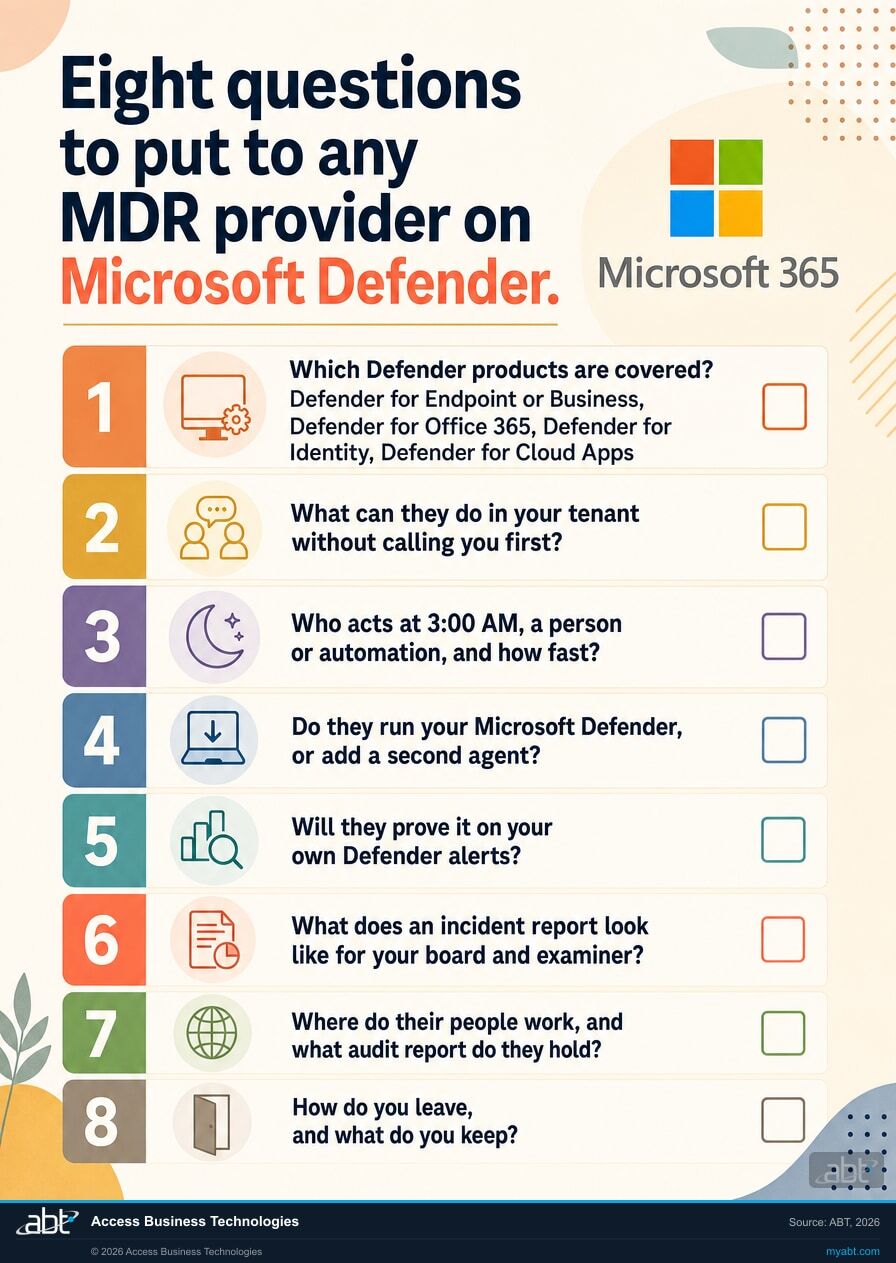
Then run five practical tests on your own tenant before you choose.
- Read the tenant first. Ask the provider to read your Microsoft 365 tenant and report which Defender products are on, which Conditional Access policies enforce, and which accounts hold the licences those policies need. A provider that operates Microsoft's tools can do this from data that already exists.
- Replay a real alert. Pick a recent Defender or Entra ID Protection alert and ask what the provider would have done, in what order, and how long each step takes.
- Read a sample incident report. Ask for a redacted written incident timeline, and read it as your board chair would.
- Read the authority list. Ask for the pre-authorized action list as it would appear in your contract, and decide which actions you keep for yourself.
- Check the clocks. Compare the provider's notice commitment with your 72-hour NCUA window.
ABT's free security assessment covers the first step for your tenant at no cost, and the result is yours whether or not you hire ABT. For the wider question of what a credit union should expect from a managed IT partner beyond security, see managed IT services for credit unions.
Where the facts on this page come from
The stolen session, the reporting clocks, and the licence decision
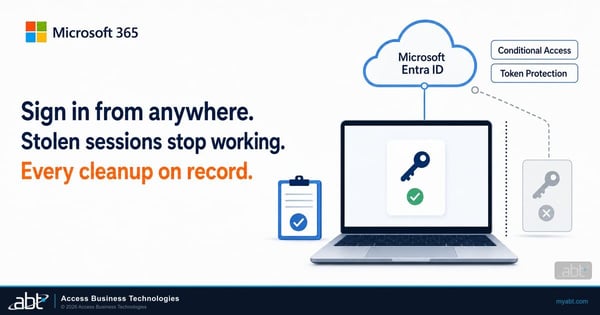
Microsoft 365 Token Replay Campaign: What Banks, Credit Unions, and Lenders Should Do Now
How stolen session tokens get replayed, and the settings that shorten their useful life.
Read the article ›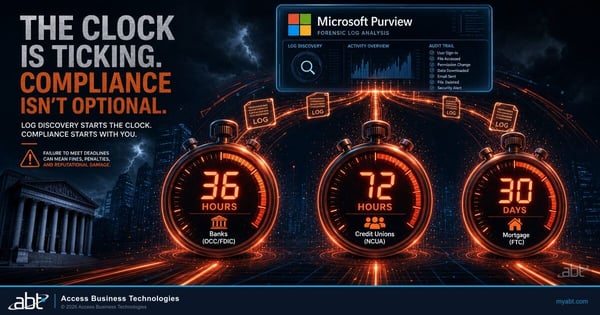
The 36-Hour, 72-Hour, and 30-Day Incident Reporting Clocks
NCUA's 72 hours next to the banking agencies' 36 and the FTC's 30 days, with what starts each one.
Read the article ›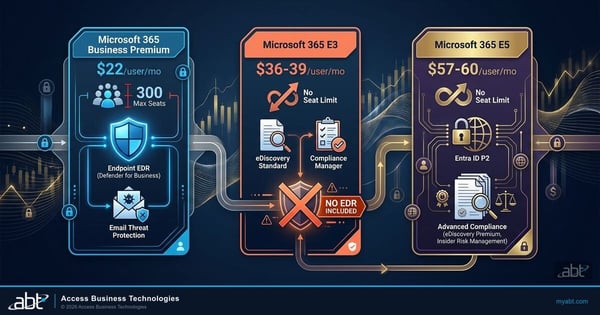
Microsoft 365 E3 vs. E5 vs. Business Premium: The Financial Institution's License Decision
Where Business Premium stops, and what an enterprise plan adds for a growing credit union.
Read the article ›Questions credit unions ask about MDR on Microsoft Defender
Microsoft Defender is the tooling, and managed detection and response is the team and the automation that act on it. Defender generates the signals, and something has to act on them, including at 2:00 AM when a two-person IT team is asleep. With Defender and nothing acting on it, you have detection without response. A provider that operates the Defender you already license closes that gap without adding a second set of tools.
No. NCUA states that it does not approve, endorse, or license any specific products, services, or vendors, and that it does not certify or validate vendor compliance. Credit unions remain responsible for verifying that a vendor supports their needs and for their own compliance. There is also no FFIEC certification for technology or managed security providers. Judge a provider on its independent audit report, its written commitments and the evidence it produces for you.
Automated detection and containment run 24 hours a day, 365 days a year, holidays included, with no human in the loop, and for credential compromise the session and token revocation is issued in seconds. ABT does not staff a 24-hour security operations center. After hours, a two-deep on-call rotation of US-based engineers is reached through the ABT emergency support line. On Guardian Respond, engineers work covered incidents during business hours; on Guardian Resolve, a human is on the incident at any hour.
The ones your credit union pre-authorizes at contract signing. On covered incidents, ABT can revoke sessions, reset credentials, disable accounts, isolate a managed endpoint, block a sender, purge malicious mail tenant wide, remove malicious mailbox rules and forwarding, and revoke malicious application consents and service principal access. The pre-authorized list, and anything you want to keep for your own approval, is agreed during onboarding and recorded. Actions with material business impact outside the list go to your designated contact first, with a named fallback.
No. Guardian operates the Microsoft Defender you already license, in your own Microsoft 365 tenant. ABT's view is that a second endpoint agent on a Business Premium estate adds mutual exclusions to tune, splits the detection signal, adds a per-endpoint cost on top of licensing you already bought, and leaves an agent to remove from every workstation at the end of the agreement.
ABT recommends Microsoft Defender Suite for Business Premium as the minimum upgrade. Business Premium includes Microsoft Entra ID P1, and Microsoft requires Entra ID P2 for sign-in and user risk policies. The suite adds Entra ID P2, Defender for Identity, Defender for Endpoint Plan 2, Defender for Office 365 Plan 2 and Defender for Cloud Apps. License every seat, because Microsoft states that Defender for Business does not support mixed licensing and a partly licensed tenant stays on the Defender for Business experience. Microsoft licensing is quoted at Microsoft's price on its own line.
Guardian is priced per user per month, with Microsoft licensing quoted separately at Microsoft's price. Guardian Foundation is included when your Microsoft licensing runs through ABT. Guardian Contain is $18, Guardian Respond is $27 and Guardian Resolve is $37 with licensing through ABT, or $21, $32 and $42 with licensing elsewhere. Each paid rung has a 50-user monthly floor, so a 50-user credit union pays exactly the list rate. Onboarding is a fixed project price per phase.
NCUA requires federally insured credit unions to notify it as soon as possible, and no later than 72 hours, after reasonably believing a reportable cyber incident occurred. When a third party notifies you, the 72 hours runs from that notice or your own reasonable belief, whichever is sooner. Your provider's job is to hand you the technical facts early enough that the decision has room in it. ABT provides technical facts; the notification determination sits with the credit union, its counsel, its insurance carrier and its compliance officer.
ABT provides monthly service reporting, a SOC 2 Type II report under a mutual non-disclosure agreement, nightly testing of your Microsoft 365 tenant against ABT's security baseline, and a booklet-by-booklet map of ABT's controls to the FFIEC IT Examination Handbook. On Guardian Respond and Resolve, engineers produce a written incident timeline suitable for an examiner or an insurer. ABT is not directly examined by the federal banking agencies, and its standard terms commit it to cooperate reasonably, through your credit union, with a lawful examination or information request about the services it provides.
Guardian covers your Microsoft 365 environment: identity, email, endpoints managed through Microsoft and cloud apps. Security monitoring of the core processor stays with the core provider. ABT's engineers work directly against Jack Henry and Fiserv platforms when they build and support core integrations, which helps when an incident touches the boundary between Microsoft 365 and the core.
Your Microsoft 365 tenant and your data are yours and stay exactly where they are. ABT manages your tenant under delegated administrative access that you grant, and you can run more than one Microsoft partner at the same time. Ending the relationship means revoking ABT's delegated access; your tenant, data and configuration are already where they belong.
Find out what is acting on your Defender signals tonight.
Tell us roughly how many users you have and which Microsoft 365 licences you run. Our engineers read your tenant and come back in writing: which Microsoft Defender products are licensed and switched on, which Conditional Access policies actually enforce, how many of your people hold the licence each risk-based policy needs, and what would happen to a compromised sign-in at 3:00 AM today. Anything the tenant cannot answer is reported as a gap.
ABT manages Microsoft 365 tenants and hosts Azure environments for more than 750 financial institutions. The assessment is a technical review and is not legal or compliance advice.
Get a free security assessment
A read of your Defender coverage, your Conditional Access enforcement and your licence coverage, written up for your credit union.
