


The examiner wrote up your Microsoft 365. Here is the finding-to-fix map.
You have a written finding, a named owner, and a date. What you probably do not have is a clean answer to which Microsoft control the finding points at, what evidence supports the remediation, and which of these fixes has a deadline hiding inside it that no amount of budget will move later.
- How to tell which category of finding you actually received
- Findings mapped to the Microsoft control that closes them, in a table
- The one fix that stops working the longer you wait, in Microsoft's own words
Which kind of finding is actually on your desk
The NCUA publishes the cleanest definitions of the two categories, so this section uses them. They are credit union definitions and they do not carry over to a bank, which is supervised by the OCC, the FDIC or the Federal Reserve under their own terminology and their own escalation ladder. What does carry over is the habit of sorting, and the callout at the end of this section says how. The NCUA's National Supervision Policy Manual separates two things that people in the same room routinely call by the same name.
Somebody already decided this is urgent
NCUA's wording is unambiguous about the bar: "Problems included in a DOR must be significant enough that an examiner would recommend escalating to the next level of elevated enforcement action (for example, an RDL or LUA) for failure to correct the problem."
And about the pace: these are items "that management must begin to address immediately or within a compressed timeframe due to a material financial risk, significant non-compliance with laws or regulations, or substantial safety and soundness concerns."
The manual also tells you what the document itself has to contain, which is a useful way to recognise one: it "must specify the individuals accountable, include appropriate citation(s) regarding the issue, and define the timeline for implementing corrective measures."
You set the pace, and that is stated outright
The same manual: "The Examiner's Findings reflect problems that credit union management must address, but do not currently threaten the viability of the credit union or represent systemic violations."
Then the sentence worth reading twice before anybody cancels a weekend: "Management can decide the timeframe and approach for correcting these problems and can do so in the normal course of business."
That is room to plan rather than react. It is not permission to ignore, which is what the next paragraph is about, and it describes how NCUA characterises the category rather than promising any particular outcome.
The trap sits between the two. A finding you leave alone does not stay a finding forever, and the escalation is not automatic either, which is a distinction people get backwards in both directions. NCUA says repeated failure to resolve "could indicate a serious underlying management deficiency and result in a DOR to address management's lack of controls to ensure problem resolution", and in the same breath that "failure to resolve these problems does not automatically warrant escalating a finding to a DOR."
Read those together and the practical rule falls out. A repeat finding stops being about audit logs or multifactor authentication and starts being about whether management fixes things. That is a much worse conversation, and it is the one that can reach a rating.
One more line matters for anything technical, because it is the answer to the panic that a long project causes: "a credit union must initiate action to address the items quickly, even if it may take a year or more to fully resolve the problem or comply with the corrective action item." Starting promptly is the stated expectation, and length by itself is not what the manual objects to. Be careful what that does and does not buy you, because no regulator cited here establishes a safe harbour: a documented corrective-action plan may demonstrate progress, but does not by itself establish compliance, extend a deadline, or close a finding.
The federal banking agencies use their own vocabulary and their own escalation ladder, and this page does not put words in their mouth. What is worth knowing is the exam you are sitting: the FDIC states that its Information Technology Risk Examination programme "outlines risk-focused examination procedures used to assess IT and cybersecurity risks", and that the Uniform Rating System for Information Technology "describes the internal rating system used by federal and state regulators to uniformly assess financial institution and service provider risks introduced by IT."
The sorting instinct still transfers. Read your own document for the two signals that matter: does it name an accountable person and a date, and have you seen this same item before. Those two answers are a useful place to start regardless of which agency wrote it, but the categories, the thresholds and the escalation ladder are your own regulator's and should be read there.
Findings, the Microsoft controls and evidence that support remediation, and the trap in each one
| The finding, roughly as written | The Microsoft control it points to | The evidence to keep | The trap |
|---|---|---|---|
| Audit logging is not retained for a period sufficient to support investigation | Microsoft Purview An Audit (Premium) entitlement, plus an audit log retention policy that names the workloads and users you need covered. | The retention policy itself, the licence assignment that backs it, and the date it was created. | Time-bound Microsoft states a retention change does not affect previously committed items. Every day you wait is a day Purview will not hold later. |
| Multifactor authentication is not enforced for all users or for privileged accounts | Microsoft Entra ID A Conditional Access policy with the multifactor grant, moved out of Report-only and into the On state. | The policy in the On state, its assignment scope, and sign-in log entries showing the policy applied and succeeded. | Looks done A policy in Report-only is evaluated and never enforced. It photographs beautifully. |
| Risk-based or adaptive access controls are not in place | Microsoft Entra ID Sign-in risk and user risk policies, which Microsoft documents as a Microsoft Entra ID P2 capability. | The policies, and a count of how many of your people actually hold the licence that makes them apply. | Licence join Scoping a policy to All users does not license them. Microsoft documents P2 as a requirement for this feature. |
| Privileged access is not reviewed on a defined cadence | Microsoft Entra ID Access reviews on the privileged roles and on the groups that grant them, with a recurrence rather than a one-off run. | The completed review with reviewer names and decisions, not a spreadsheet exported once. | Cadence One completed review answers the wrong question. The finding is about recurrence. |
| Administrative accounts are not separated from day to day accounts | Microsoft Entra ID Separate administrative identities, excluded from nothing they should be inside, with role assignment reviewed alongside them. | The account inventory, the role assignments, and the Conditional Access scope that covers the admin accounts specifically. | Exclusions Break-glass exclusions written years ago quietly cover more accounts than anyone remembers. |
| Data loss prevention and information handling controls are not documented or enforced | Microsoft Purview Data loss prevention policies and sensitivity labels that are actually published to users, not left in simulation. | The published policy, its scope, and the reports that show it matching real traffic. | Looks done Simulation mode is the Purview version of Report-only. It reports and does not act. |
| Third-party and cloud vendor oversight is not evidenced | Microsoft Service Trust Portal Current Microsoft attestations on file, alongside the same evidence for every other material cloud vendor. | The reports themselves with their dates, and your own review notes against them. | Staleness An attestation on file is not an attestation in date. The finding is usually about the date. |
| The institution's cybersecurity assessment framework is out of date | Framework A current framework. When the FFIEC sunset its own tool it said supervised institutions can instead refer directly to new government resources, naming NIST Cybersecurity Framework 2.0 and the CISA Cybersecurity Performance Goals. | The mapping from your controls to the framework you chose, and board minutes recording the choice. | Quiet expiry The tool many programmes were built on was sunset on 31 August 2025. |
Two columns in that table are doing work that a remediation plan usually skips. The evidence column exists because closing a finding and proving you closed it are separate jobs, and the second one is the one that gets audited. The trap column exists because four of these eight fixes can be completed in the portal, screenshotted, reported to the board, and still be worth nothing at the next examination.
The next two sections take two traps worth separating out: the one with a deadline inside it, and the one where the control is present but cannot be evidenced.
We will read your tenant and tell you what your evidence can currently support
Your audit retention against the window your examiner asked for, every Conditional Access policy with its real enforcement state, and how many of your people hold the licence each policy needs. Written up, in your hands, whether or not you engage us for anything afterwards.
Get a free security assessmentAudit log retention is the only finding on this page that gets harder every day you wait
Start with what a tenant holds by default. Microsoft's wording for the standard tier is exact: "In Audit (Standard), the system retains records for 180 days, which means you can search for activities that occurred within the past six months."
Now put that next to a common examination request. An examiner asking to see privileged activity across the last examination cycle is frequently asking for twelve months. On Audit (Standard), the second half of that request is asking for records that no longer exist. There is no setting, no support ticket and no purchase that brings them back.
The premium tier improves this, and it improves it less evenly than people assume. Microsoft: "Microsoft Entra ID, Exchange, OneDrive, and SharePoint audit records are retained for one year by default. Audit records for all other activities are retained for 180 days by default, or you can use audit log retention policies to configure longer retention periods." Four workloads get the year. Everything else stays at 180 days until somebody writes a policy.
Longer than that is a separate purchase rather than a setting: "a user must be assigned a 10-Year Audit Log Retention add-on license to retain their audit records for 10 years."
"Any changes to licensing or applicable retention policies change the expiration time of the audit data after updating. These changes don't affect any previously committed items."
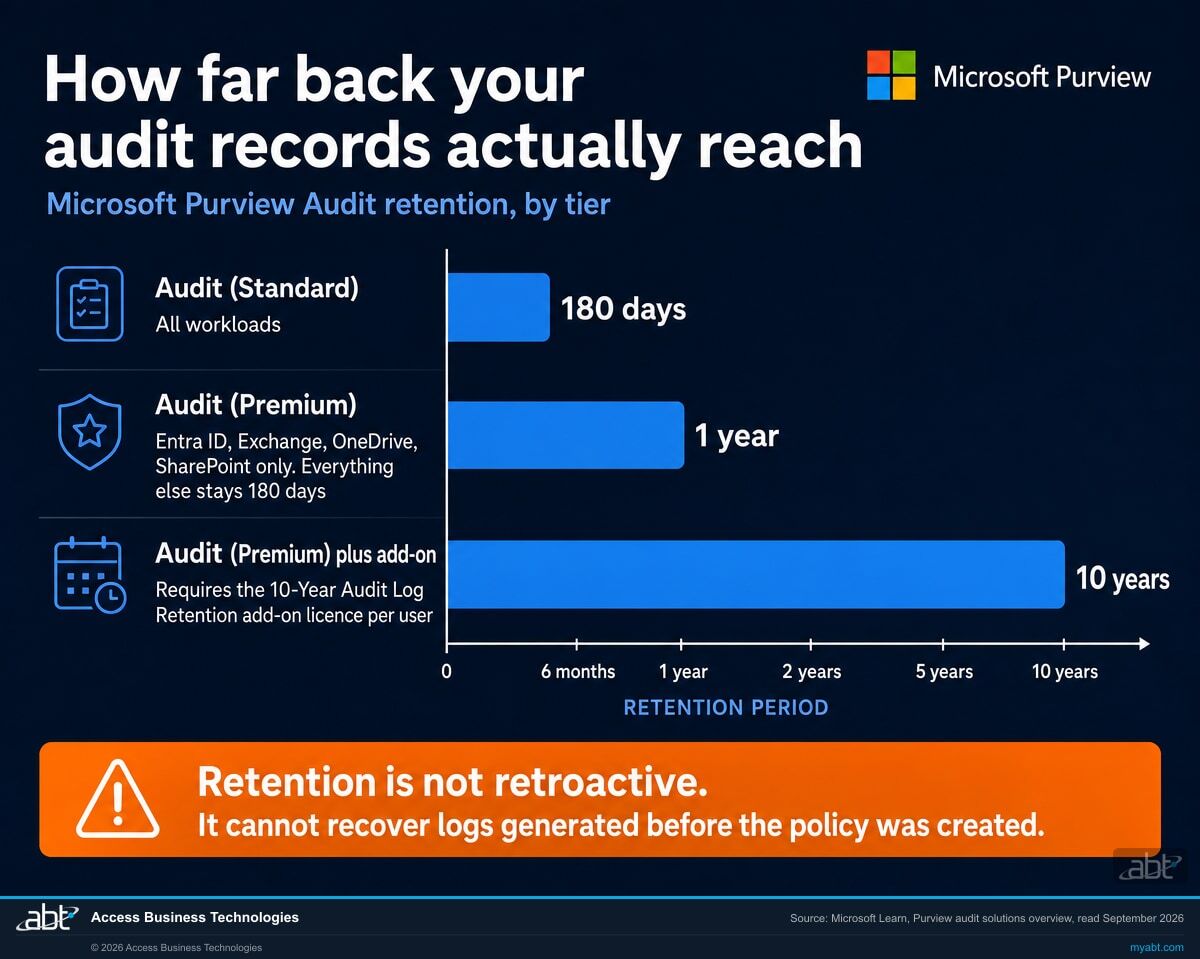
That is the sentence that turns a licensing decision into a deadline, and it is worth being precise about how far it reaches. It says a change to licensing or to a retention policy takes effect going forward and leaves already committed records on the expiry they were given when the pipeline wrote them. Microsoft states the same thing again in the narrower case of the longest tier, where the wording is blunter: "This policy isn't retroactive and can't retain audit logs that were generated before the 10-year audit log retention policy was created." Read together, the practical consequence is the same at every tier. The evidence window you will be able to show an examiner two years from now is being decided by whether the policy exists today, and no amount of budget approved later reaches back to recover the months you spent deciding.
Two more details from the same page catch institutions out, and both are worth checking before you write a remediation plan that promises something the platform will not do.
The first concerns everything that is not a person. Microsoft: "Audit records generated by non-user entities (such as service principal actions, system events, and application activities) are retained for a fixed period of one year. This retention period isn't configurable and custom audit log retention policies don't apply to these records." If your finding is about oversight of application and service principal activity, which is increasingly where the interesting movement in a tenant happens, one year is the ceiling and you cannot extend it.
The second is a boundary date that occasionally explains a confusing gap in an old export. Microsoft: "Audit (Standard) logs generated before October 17, 2023, are retained for 90 days." The default moved from 90 days to 180 days on that date, and records either side of it followed different rules.
If audit retention appears anywhere in your findings, and even if it does not, put the retention policy in place alongside the rest of the remediation work rather than after it, and do not let it queue behind items that will be equally achievable next quarter. Not because it is the most serious item, and not instead of anything genuinely urgent, but because it is the one where the delay itself destroys something. Address native audit retention early, alongside urgent remediation rather than ahead of it. The other fixes on this page have their own deadlines and their own evidence to capture as you go, so this is a point about what delay costs rather than a claim that everything else can safely wait.
The corollary is worth stating too, because it is the honest part: putting the policy in today does not produce evidence for last year. If your examiner has asked for a window that is already gone, the answer is to say so, show the policy that closes the gap going forward, and let the record show the date it started. That is a better position than a search result that quietly returns nothing.
Two ways a policy in your list does not prove what you think it proves
There are two independent ways a Conditional Access policy can be fully present and still fail to demonstrate what a remediation record claims for it, and an institution can be caught by either without any misconfiguration in the ordinary sense. They are different in kind, so keep them apart: the first is enforcement, which Microsoft describes directly, and the second is entitlement, which Microsoft states as a requirement without describing what happens when it is unmet.
The policy is in Report-only, which evaluates and does not enforce
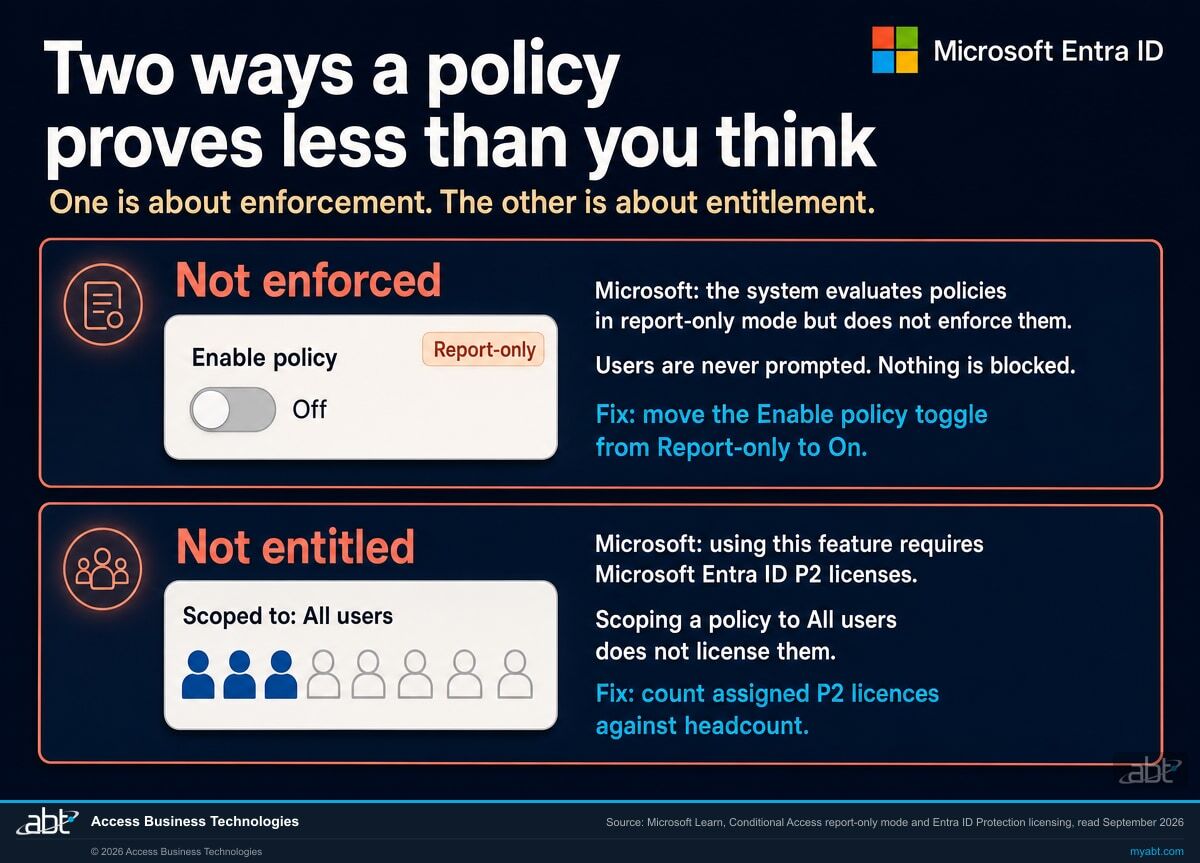
Microsoft's description leaves no room for interpretation: "During sign-in, the system evaluates policies in report-only mode but doesn't enforce them." And elsewhere on the same page: "Report-only mode evaluates policies but doesn't enforce grant controls or session controls. Users aren't prompted for multifactor authentication or blocked by report-only policies."
Report-only is a good feature being used correctly right up until somebody forgets the last step. Microsoft describes that step in one line: "move the Enable policy toggle from Report-only to On." A policy that never got that toggle appears in every list, carries the right name, shows results in the sign-in logs, and has never once stopped anybody.
Check: the policy state, not the policy list
The policy is On, and the licence it requires is not on every account
Risk-based access control is where this bites, because the policy will happily be scoped to everybody. Microsoft states the requirement directly: "Using this feature requires Microsoft Entra ID P2 licenses." Its licensing table marks sign-in and user risk policies, whether reached through ID Protection or through Conditional Access, as unavailable on Microsoft Entra ID Free and unavailable on Microsoft Entra ID P1, and available on Microsoft Entra ID P2 or Microsoft Entra Suite.
Note carefully what that does and does not establish. Microsoft documents a licensing requirement for the feature. It does not, on those pages, describe what happens to an unlicensed user when a risk-based policy is evaluated, and this page will not tell you either, because we could not source it. What follows without any inference is narrower and still decisive: if the documented prerequisite for a control is not assigned across your population, you cannot evidence that control as covering that population. Scoping a policy to All users does not assign anybody a licence, and nothing in the policy blade shows you the licence count. You have to go and count.
Check: assigned P2 licences against total users, as a fraction
The reason both of these survive an internal review is that the review usually asks whether the control exists. Existence is easy to demonstrate and it is the wrong question. The question that matches what an examiner is testing is what the control would do to a sign-in if one arrived right now, and for how many of your people.
This is also why a remediation plan that ends at "policy created" is incomplete in a way that is invisible until the next examination. Two extra lines fix it: the enforcement state, and the assigned licences the control depends on as a fraction of the total. Both are facts about your tenant rather than opinions about it, and both can be produced in an afternoon.
Running the review before the deadline sets it
If your programme was built on the FFIEC assessment tool, it was built on something that is gone
A finding about the currency of your cybersecurity assessment framework is not really a technical finding, and institutions sometimes route it to the wrong team as a result. It usually traces back to one decision.
The FFIEC retired its own Cybersecurity Assessment Tool. Publishing the statement, the OCC recorded that the FFIEC would "sunset the Cybersecurity Assessment Tool (CAT) on August 31, 2025", and that rather than update it the agencies said "Supervised financial institutions can instead refer directly to these new government resources", naming the NIST Cybersecurity Framework 2.0 and CISA's Cybersecurity Performance Goals. The verb matters: this is a pointer to resources rather than an instruction to adopt a particular one.
Plenty of programmes were assembled around that tool over the decade it existed. Maturity levels were mapped to it, board reporting was structured around it, and internal audit tested against it. None of that becomes wrong overnight, and the underlying controls do not change because a document was withdrawn. What changes is the answer to a question an examiner can reasonably ask, which is what framework you are using now and who decided.
The practical remediation is smaller than it sounds and it is mostly documentation. Choose the framework, map your existing controls to it rather than starting again, and put the decision in front of the board so there is a minute recording it. The controls you already run will map to most of it. The gap in the finding is usually the decision and the paper trail, not the security.
It does not enumerate the booklets of the FFIEC Information Technology Examination Handbook or quote from them. The FFIEC's own site refused automated access on the day this page was written, and a claim about what a document contains should come from the document. The FDIC names the Handbook and points to it as providing "guidance to examiners for evaluating financial institution and service provider risk management processes", which is the part that can be stated with a source behind it.
It also does not rank these findings by frequency. Nothing published supports a claim about which Microsoft 365 examination finding is most common, so the map above is organised by the shape of the wording instead. A number invented to sound authoritative is worth less than an honest structure.
The remediation record that survives the follow-up
This is ABT's own view of what a technical remediation record should carry, shaped by what the NCUA manual says a Document of Resolution itself contains. It is not a regulator's checklist and it is not offered as one.
- The finding, quoted, not paraphrased. Paraphrase drifts. If the follow-up compares your record to the original wording and they do not match, the discussion becomes about the mismatch rather than about the fix.
- The specific control you changed, named the way the product names it. "We tightened access" is unverifiable. "Conditional Access policy X, grant control multifactor authentication, moved from Report-only to On, assigned to all users excluding two break-glass accounts" can be checked in a minute by anyone.
- The enforcement state and the covered population. The two facts from the previous section. State them as a fraction where a licence is involved, because that is the shape of the question that will be asked next.
- The date the change took effect, separately from the date you decided to make it. For anything retention-related these are materially different, and the effective date is the one that bounds what evidence exists.
- The evidence, captured at the time. Sign-in log entries showing the policy applying, the retention policy record, the completed access review with reviewer names. Captured later is captured from a different state.
- What is not fixed yet, and when it will be. The manual's own language about items that take a year or more describes an expectation that work begins promptly even where completion is long, which is not the same as a guarantee that starting and documenting is by itself sufficient. An honest partial answer with a date is stronger than a claim of completion that unravels under one question.
- Who owns it, by name. A Document of Resolution names individuals. Your record should be able to answer the same question without a meeting.
The last one is worth a sentence of its own. Findings that repeat are rarely findings nobody understood. They are findings that belonged to everybody, which in practice means the work sat until a date forced it, and the date forced it again the following year. That is the pattern the escalation language in the NCUA manual is aimed at, and it is a management problem wearing a technical costume.
We read the tenant and tell you what your evidence can currently support
The assessment answers the questions this page raises, against your tenant rather than in general. How far back your audit records actually reach today, and how that compares with the window you were asked for. Every Conditional Access policy with its real enforcement state, so the Report-only ones are separated from the enforcing ones. How many of your people hold the licence each risk-based policy documents as a prerequisite, expressed as a fraction rather than an assurance. Which privileged roles carry a recurring access review and which carry a single completed run. Where your exclusions actually reach, resolved to named accounts rather than group names.
You get it in writing, in language you can put in front of a board or an examiner, and the finding-by-finding view of what your record can currently support. Where something cannot be answered from the tenant, we say that rather than filling the gap, because a remediation record built on a guess is worse than one with an honest hole in it.
The written output is yours whether or not you engage us for anything afterwards. ABT manages Microsoft 365 tenants and hosts Azure environments for more than 750 financial institutions, so examination cycles in a regulated setting are the environment we work in daily rather than an occasional project. ABT also operates M365 Guardian, its managed security service for credit unions, banks, and mortgage companies.
One boundary worth stating plainly. ABT produces the technical read. Whether a finding is satisfied is a determination for your institution and your examiner, and nothing here is legal or compliance advice.
Where the facts on this page come from
Before the exam, during it, and the control behind the hardest finding
FFIEC IT Examination Readiness for Financial Institutions
The preparation counterpart to this page. Read it when the examination is scheduled rather than when the findings arrive.
Read the article ›
How to Pass Your NCUA IT Exam: What Examiners Actually Look For
The credit union view, from the same manual this page quotes for the Document of Resolution definitions.
Read the article ›
Microsoft 365 Audit Log Retention for Financial Institutions
The long version of the retention section above, including how to decide which workloads and which users a policy should cover.
Read the article ›Answered from the regulators' and Microsoft's own documents
At a credit union, read the document for the two things NCUA says a Document of Resolution must contain. Its National Supervision Policy Manual states that a DOR must specify the individuals accountable, include appropriate citations regarding the issue, and define the timeline for implementing corrective measures. Those features are required of a DOR rather than unique to one, so treat them as a prompt to check the document heading rather than as proof on their own. Where it is a DOR, the manual describes those items as ones management must begin to address immediately or within a compressed timeframe. If instead the document states a problem and stops, that is the shape of an Examiner's Finding, and the manual says management can decide the timeframe and approach for correcting these problems and can do so in the normal course of business. Banks use different vocabulary, but the same two signals, an accountable name with a date and whether you have seen this item before, still tell you which calendar you are on.
No. Microsoft states that in Audit (Standard) the system retains records for 180 days, which means you can search for activities that occurred within the past six months. Records past that window are no longer in Purview, and no licence purchased afterwards puts them back. That is a statement about Purview rather than about your institution: if those records were exported to a SIEM, an archive or any other store at the time, you still have them there, and that copy is the one to produce. Microsoft is explicit that changes to licensing or applicable retention policies change the expiration time of audit data after updating, and that these changes do not affect any previously committed items. The honest position is to say the window is what it is, put the retention policy in place now so the gap closes going forward, and let the record show the date it started. That is a stronger answer than a search that quietly returns nothing.
Not by default. Microsoft's wording is that Microsoft Entra ID, Exchange, OneDrive, and SharePoint audit records are retained for one year by default, and that audit records for all other activities are retained for 180 days by default unless you use audit log retention policies to configure longer retention. So four workloads get the year automatically and everything else stays at six months until somebody writes a policy for it. Ten-year retention is a separate purchase rather than a setting, because a user must be assigned a 10-Year Audit Log Retention add-on license for their records to be kept that long.
No, and this one surprises people because it is the opposite of the usual answer. Microsoft states that audit records generated by non-user entities, such as service principal actions, system events, and application activities, are retained for a fixed period of one year, that this retention period is not configurable, and that custom audit log retention policies do not apply to these records. One year is both the floor and the ceiling. If a finding concerns oversight of application or service principal activity, build the remediation around exporting those records to somewhere you control rather than around extending retention inside the platform, because the platform will not extend it.
The first thing to check is whether the policy is still in Report-only. Microsoft states that during sign-in the system evaluates policies in report-only mode but does not enforce them, and that users are neither prompted for multifactor authentication nor blocked by report-only policies. A policy in that state appears in every list, carries the right name, and produces entries in the sign-in logs, which is exactly why it survives an internal review. The remaining step in Microsoft's words is to move the Enable policy toggle from Report-only to On. Check the state of the policy rather than its presence in the list, and keep a sign-in log entry showing it applying as the evidence.
Scoping a policy to All users does not license them, and the two are easy to conflate. Microsoft states that using Entra ID Protection requires Microsoft Entra ID P2 licenses, and its licensing table marks sign-in and user risk policies, whether reached through ID Protection or through Conditional Access, as unavailable on Microsoft Entra ID Free and unavailable on Microsoft Entra ID P1. What Microsoft documents is the requirement rather than the behaviour of an unlicensed sign-in, and this page does not assert what that behaviour is. The practical consequence stands either way: a control whose documented prerequisite is not met across your population is a control you cannot evidence as covering that population. Count the assigned P2 licences against your headcount and record the result, because a policy scope alone does not answer the question and the policy blade does not show you the licence count.
The subject of the finding changes. NCUA states that repeated failure to resolve problems in the Examiner's Findings could indicate a serious underlying management deficiency and result in a Document of Resolution to address management's lack of controls to ensure problem resolution. That is a different and worse conversation than the original technical item, because it is about whether the institution fixes things rather than about audit logs or multifactor authentication. The same manual is careful to say that failure to resolve does not automatically warrant escalating a finding to a DOR, so this is a risk rather than a certainty. The practical defence is a named owner and a dated record for every open item.
Length alone is not what the manual objects to, though nothing here guarantees how a given examiner will treat it. The NCUA manual addresses this directly, saying that a credit union must initiate action to address the items quickly, even if it may take a year or more to fully resolve the problem or comply with the corrective action item. A tenant migration, a licensing change, or a phased identity rollout can legitimately span three quarters. What the record needs to show is that action began promptly, that the remaining steps have dates, and who owns them. An honest partial answer with a schedule is a stronger position than a claim of completion that does not survive one follow-up question.
The tool is gone and the controls are not. Publishing the FFIEC statement, the OCC recorded that the agencies would sunset the Cybersecurity Assessment Tool on August 31, 2025, and that rather than update it they said supervised financial institutions can instead refer directly to these new government resources, naming the NIST Cybersecurity Framework 2.0 and CISA's Cybersecurity Performance Goals. That is permissive wording rather than a mandate to adopt one framework. The remediation is mostly documentation rather than engineering. Choose the framework, map the controls you already run to it rather than rebuilding them, and put the decision in front of the board so a minute records who chose and when. Most of the security work will map across; the gap in the finding is usually the decision and the paper trail.
Audit log retention, and this is ABT's reasoning rather than a regulator's instruction. Most of the other remediations on this page can still be carried out later, at the cost of whatever contemporaneous evidence you did not capture in the meantime, and several carry deadlines of their own. Retention is the exception, because Microsoft states that changes to licensing or applicable retention policies do not affect any previously committed items. Every week the policy does not exist is a week Purview will not be able to give you later, whatever you preserved elsewhere at the time. Start the retention policy early even where audit retention is not the most serious item in your findings, and sequence everything else by severity. Early rather than first: anything actively urgent still comes first.
Find out which of your findings your tenant can actually support closing.
Tell us roughly how many users you have and which findings you are working. Our engineers read the tenant and come back in writing on the scope set out above: how far back your audit records reach against the window you were asked for, every Conditional Access policy with its real enforcement state rather than its name, how many of your people hold the licence each risk-based policy depends on, which privileged roles carry a recurring access review, and where your exclusions actually reach once resolved to named accounts. Anything that cannot be answered from the tenant is reported as a gap rather than filled in.
ABT manages Microsoft 365 tenants and hosts Azure environments for more than 750 financial institutions. The assessment is a technical review and is not legal or compliance advice.
Get a free security assessment
A read of your audit retention, your Conditional Access enforcement states and your licence coverage, written up finding by finding.
