


Microsoft 365 Copilot · Microsoft 365 Copilot Business · New offers from December 1, 2026
From December 1, 2026, Microsoft 365 Copilot can be bought without a Microsoft 365 base subscription. What it does for your people still depends on the apps and data they are licensed for.
Copilot earns its seat in the work your people already do: the reply drafted from a long email thread, the recap of a meeting they missed, the policy found and summarized in a sentence. Microsoft is changing how that seat is bought. Its Partner Center announcement of October 14, 2026 says that beginning December 1, 2026, new Microsoft 365 Copilot and Microsoft 365 Copilot Business offers can be purchased without a qualifying Microsoft 365 base subscription, in every channel including the Cloud Solution Provider program, priced the same as the current offers. The offers you hold today were renamed "(add-on)" on October 16 and keep renewing. For a credit union, bank, or mortgage company, the purchase gets simpler and the preparation stays the same: an account, a mailbox, the apps, permissions you trust, and a spending limit your team sets.
- Seats you already hold: Microsoft asks for no action, no migration and no license reassignment; they keep renewing and you can add or reduce seats after December 1
- New purchases from December 1: new offers with their own product and SKU IDs, priced the same, that replace the add-on offers for new Copilot and Copilot Business purchases
- In Microsoft's words, Copilot experiences continue to depend on the Microsoft 365 apps and services a customer is licensed for
- A Microsoft Entra ID work account
- An Exchange Online mailbox for mail, calendar and meetings
- The Microsoft 365 apps the person works in
- Permissions you would be comfortable seeing summarized
The change
What changes for Microsoft 365 Copilot on December 1, 2026?
Microsoft announced it twice on October 14, 2026: to partners in the Partner Center October announcements, and to tenants in Message Center post MC1508148 (public archive copy). Here is what the two say.
The change in brief
- What
- New Microsoft 365 Copilot and Microsoft 365 Copilot Business offers that can be purchased without a qualifying Microsoft 365 base subscription. They carry their own product and SKU IDs and are priced the same as the current offers. From December 1 they replace the add-on offers for new Copilot and Copilot Business purchases.
- When
- The current offers took "(add-on)" in their names beginning October 16, 2026. Microsoft shares the new product and SKU IDs ahead of the price list preview on November 1, 2026. The new offers arrive, and the add-on offers reach end of sale in CSP, on December 1, 2026.
- Where
- Across all channels, including the Cloud Solution Provider program, for commercial, education, government and nonprofit customers. Microsoft's tenant notice adds that self-service purchase and end-user trials inside Microsoft 365 products continue.
- Existing seats
- No migration or license reassignment is required; check any script or report that matches on the product name (step 2). Product and SKU IDs, pricing, renewal terms, auto-renew settings and service remain unchanged, and Microsoft's words are that end of sale isn't end of life: existing customers keep renewing and adjusting seat quantities.
- Capabilities
- The same as today. Microsoft describes this as a purchasing change, and what a person gets from Copilot still depends on the Microsoft 365 apps and services they are licensed for.
The announcement
Partner Center published "Copilot offers and name updates" for CSP partners, and Message Center post MC1508148 told tenants the same day. The tenant notice is filed as stay informed, with no action date.
The "(add-on)" names
The current offers became Microsoft 365 Copilot (add-on) and Microsoft 365 Copilot Business (add-on). Scripts and license reports that match on product names were due to move to product or SKU IDs by this date.
The price list preview
Microsoft shares the new product and SKU IDs ahead of the November 1 price list preview, where partners review the new offers. Prices match the current offers.
The switch
The new offers go on sale and the add-on offers reach end of sale in CSP. The same day, usage-based billing turns on by default for new Copilot Business licenses bought through CSP.
"This purchasing change affects how customers purchase Copilot, not the underlying Copilot capabilities."
"Copilot experiences continue to depend on the Microsoft 365 apps and services a customer is licensed for."
Microsoft Partner Center, Copilot offers and name updates, October 14, 2026The phrase to read carefully is "without a qualifying Microsoft 365 base subscription." Microsoft is removing a purchase prerequisite. The capabilities stay where they were: Copilot reads the mail a person can open, the files they can see, and the meetings they attend, so a seat placed on a person with a mailbox, files and meetings in your tenant does far more than a seat placed on a person without them. Microsoft's tenant notice says it plainly, that capabilities "continue to depend on the apps and services you're licensed for."
Names are moving at the same time. Microsoft Learn's requirements page, updated October 28, 2026, opens with "Microsoft 365 Copilot is now named Microsoft Copilot," and Microsoft 365 Copilot Chat is now Microsoft Copilot Chat. The Partner Center and Message Center notices still use the Microsoft 365 Copilot offer names, so you will see both on invoices, in the admin center and in Microsoft's documentation for a while. They describe the same product.
Microsoft's documentation is catching up. As read on October 29, 2026, the same requirements page still lists an eligible Microsoft 365 subscription or base license as required and says users need a Microsoft Copilot license and a qualifying prerequisite license, which describes the add-on offers. The licensing page, dated October 19, still describes the pre-December eligible plans. Read both pages again before you place a new order.
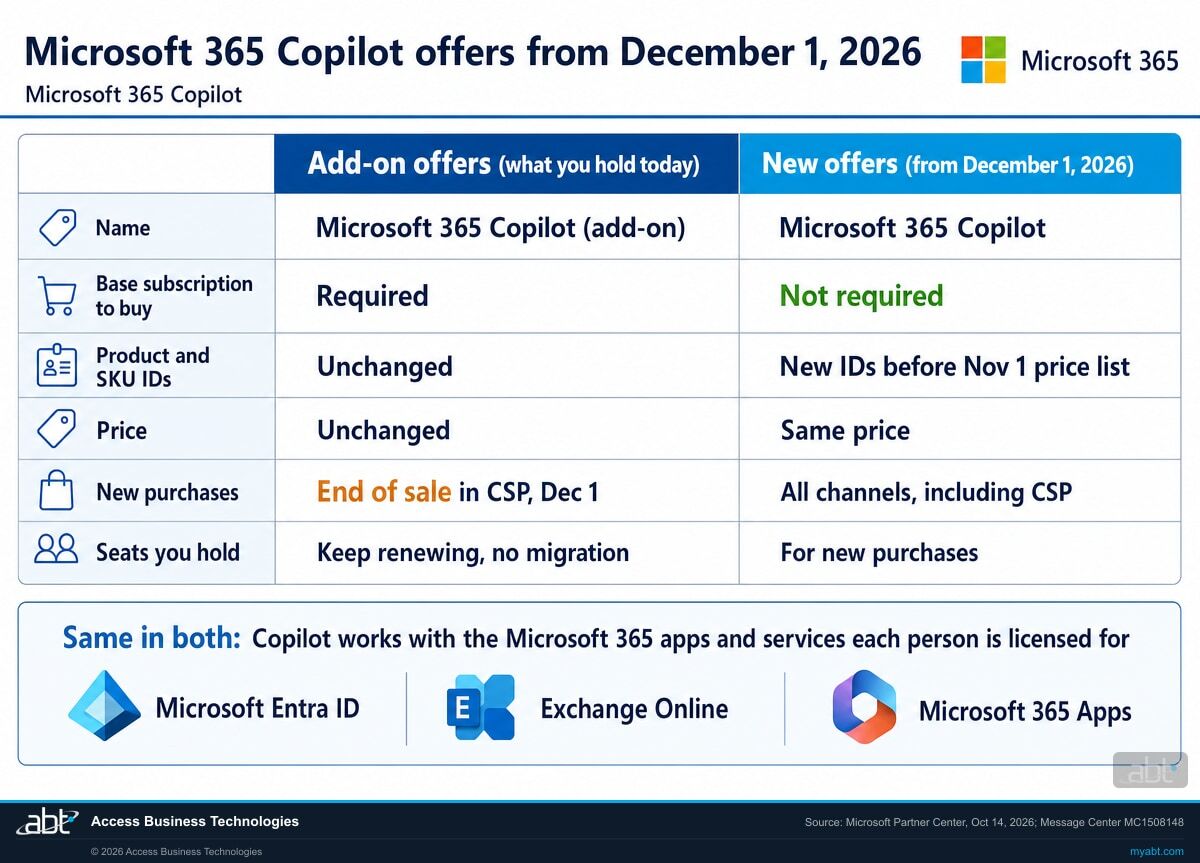
Side by side
How do the add-on offers compare with the new Copilot offers?
The product is the same and the price is the same. What changes is the name on the order, the IDs behind it, whether a base subscription is required to buy it, and which offer a new order lands on after December 1.
| Question | Add-on offers (what you hold today) | New offers (from December 1, 2026) |
|---|---|---|
| Name | Microsoft 365 Copilot (add-on) and Microsoft 365 Copilot Business (add-on), since October 16, 2026 | Microsoft 365 Copilot and Microsoft 365 Copilot Business, without "(add-on)" |
| Base subscription to purchase | A qualifying Microsoft 365 base subscription is required | Can be purchased without a qualifying Microsoft 365 base subscription |
| Product and SKU IDs | Unchanged | Their own new IDs, shared ahead of the November 1, 2026 price list preview |
| Price | Unchanged | Priced the same as the current offers |
| New purchases | End of sale in CSP on December 1, 2026 | Available across all channels, including CSP, for commercial, education, government and nonprofit customers |
| Seats you already hold | Keep renewing; add or reduce seats as today; no migration or license reassignment | Replace the add-on offers for new purchases only |
| Usage-based billing, Copilot Business through CSP | Microsoft's default-on announcement covers new purchases from December 1 | On by default for new licenses, including standalone offers and bundles; default limit 4,000 Copilot Credits per user per month, adjustable by admins |
| What Copilot can reach | Depends on the Microsoft 365 apps and services the person is licensed for | Depends on the Microsoft 365 apps and services the person is licensed for |
What "without a base subscription" leaves in place
Microsoft Learn's requirements list holds the parts a Copilot user needs to get value: a Microsoft Entra ID account for every user, an Exchange Online mailbox for experiences that use email, calendar, meeting or other mailbox data, supported Microsoft 365 apps and services for app-specific experiences, a supported browser with the right cookie settings for web experiences, and open network paths. The same page states that Microsoft Copilot isn't available with device-based licensing for Microsoft 365 Apps for enterprise.
So the useful question for each new seat after December 1 is what that person will ask Copilot about. If the answer lives in their Outlook, their OneDrive, their Teams meetings and the SharePoint sites they work in, the seat belongs on someone whose account, mailbox and apps are already in your tenant, so Copilot has that work to draw on once the seat is assigned.
See which of your people are ready for a Copilot seat on December 1, and what each one still needs
ABT works with your team to match the people you want on Copilot against the account, mailbox, apps, permissions and network paths Copilot depends on, and leaves you a seat plan and a fix list, as part of a free Copilot readiness assessment.
Request the free assessmentThe work
How should a credit union, bank, or mortgage company prepare before December 1?
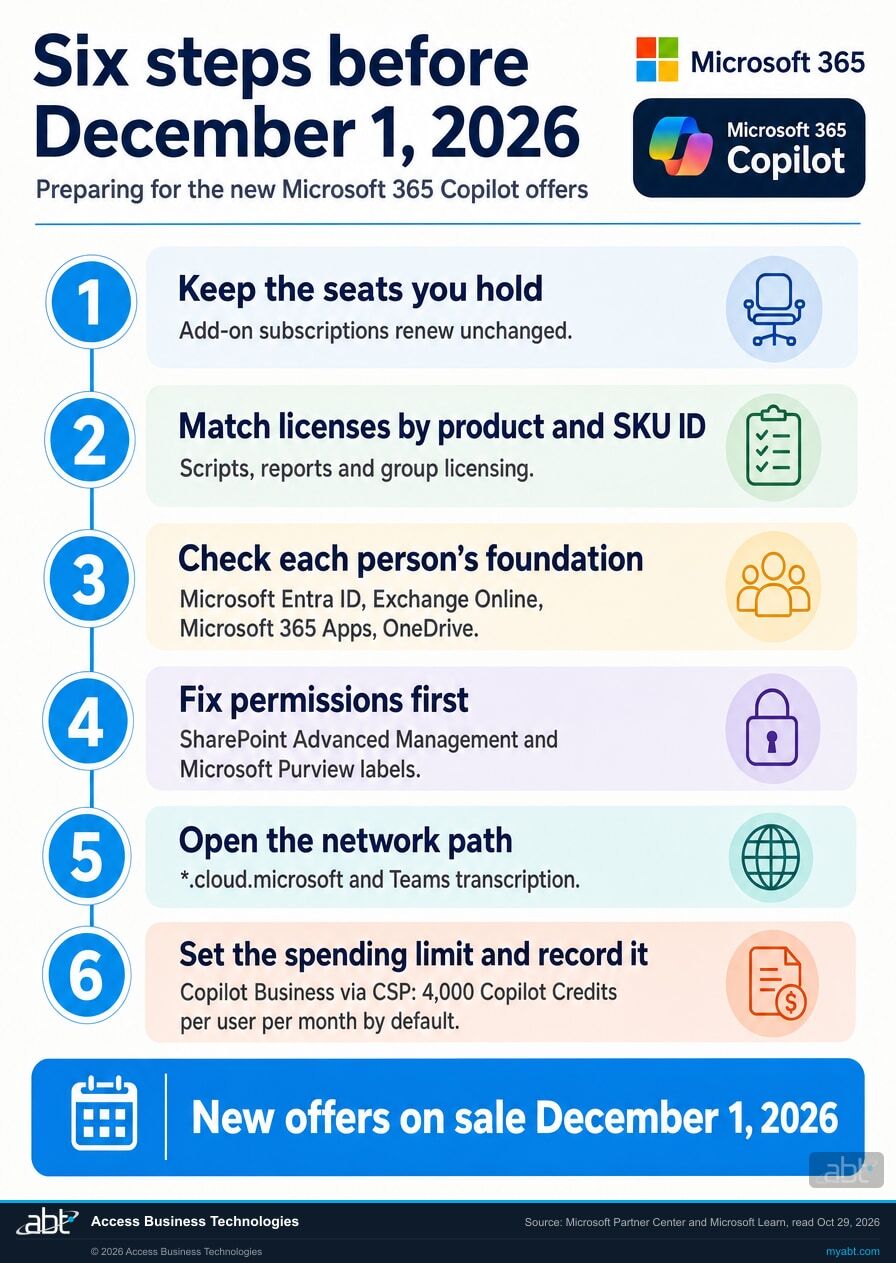
Six steps, in the order the decisions depend on each other. Steps 1 and 2 protect what you already have. Steps 3 to 5 make each new seat useful and safe. Step 6 sets the spend and writes it down.
Keep the seats you hold as they are
Your current Copilot subscriptions now show "(add-on)" in their names. Microsoft asks for no action on them: product and SKU IDs, pricing, renewal terms, auto-renew settings and service stay as they are, and you keep renewing and adjusting seat counts after December 1. Microsoft's tenant notice is direct about it: "Do not migrate subscriptions or reassign licenses solely because of the name update."
Match licenses by product and SKU ID
Microsoft asked for scripts, catalog mappings and automations that rely on offer names to move to product and SKU IDs by October 16. Check the license report your team sends the board, any group-based licensing rule, and any onboarding script that assigns Copilot. Then expect a second set of IDs: the new offers carry their own, shared ahead of the November 1 price list preview. A new Copilot subscription ordered after December 1 uses one of the new IDs, and seats added to a Copilot subscription you already hold stay on that subscription's IDs, so your reports may carry both sets.
Pick the people, then check each one's foundation
Start from the work: the loan officer whose pipeline lives in Outlook and Teams, the compliance analyst who reads policy all day, the branch manager who runs six meetings a week. For each person, confirm a Microsoft Entra ID work account, an Exchange Online mailbox if Copilot should use their mail, calendar or meetings, the Microsoft 365 apps they work in on a license that supports Copilot (device-based licensing for Microsoft 365 Apps for enterprise does not), and a OneDrive account, which some Copilot features require.
Fix what each person can see before Copilot sees it
Microsoft's privacy documentation states that Copilot only surfaces organizational data to which individual users have at least view permissions. That makes old sharing the real risk: the site shared with everyone years ago, the folder of member statements a former employee left open, the Teams shared channel with an outside party. Microsoft strongly recommends a secure and governed foundation before rollout, using SharePoint Advanced Management, which Microsoft lists as available as part of Microsoft 365 Copilot or as an add-on, and Microsoft Purview sensitivity labels and data loss prevention. Our Copilot readiness page walks through that cleanup in order.
Open the network path and the meeting record
Add *.cloud.microsoft to your allow lists, allow WebSocket Secure traffic to *.cloud.microsoft and copilot.cloud.microsoft, and allow third-party cookies where Copilot needs them: Word, Excel and PowerPoint for the web, and [*.]safelinks.protection.outlook.com so links in Copilot Chat answers pass the Safe Links check. Microsoft supports allowing the entire *.cloud.microsoft domain only. For Copilot to use a meeting after it ends, turn on Teams transcription or recording for the people who need it. Our page on the Copilot app's move to copilot.cloud.microsoft covers the allow list in detail.
Set the spending limit and record the decision
If you buy Copilot Business through CSP on or after December 1, usage-based billing is on by default, with a default spending limit of 4,000 Copilot Credits per user per month that admins can adjust. Decide the limit you want before people start using agents and other usage-billed experiences. Then write down who holds a seat, what data each seat can reach after step 4, which billing model each subscription is on and the limit you set, with the date and the approver. That page of record is what your board, your auditors and your next renewal conversation all start from.
The foundation
What does Copilot still need to work after December 1?
Six items from Microsoft Learn's Copilot requirements page, as read October 29, 2026. From December 1 the new offers can be bought without a qualifying Microsoft 365 base subscription, and these six items still decide what Copilot can do for the person holding the seat.
A Microsoft Entra ID account
Users must have a work or school account in Microsoft Entra ID. Microsoft lists it as required for both Microsoft Copilot and Copilot Chat.
An Exchange Online mailbox
Required for experiences that use email, calendar, meeting or other mailbox data. Copilot supports primary mailboxes hosted in Exchange Online and can use archive, shared and delegate mailboxes the user can access.
The Microsoft 365 apps
Supported Microsoft 365 apps and services are required for app-specific experiences, such as Copilot in Word, Excel, PowerPoint, Outlook and Teams. Device-based licensing for Microsoft 365 Apps for enterprise is excluded.
A OneDrive account
Microsoft notes that some Copilot features require the user to have a OneDrive account, set up through the OneDrive guide in the Microsoft 365 admin center.
A meeting record
To let Copilot reference meeting content after a meeting ends, configure Teams transcription or recording. Copilot in Teams Phone calls needs transcription or recording as well.
An open network path
The entire *.cloud.microsoft domain on your allow lists, WebSocket Secure connectivity to it, and third-party cookies for Office for the web and for Safe Links checks on links in Copilot Chat answers.
For financial institutions
Why does this matter at a credit union, bank, or mortgage company?
Because the purchase is about to get easier, and every seat is still worth exactly as much as the work it can reach.
Get more from every seat. A seat placed on a person whose day runs through Outlook, Teams and SharePoint has the most for Copilot to work with: Copilot drafts the borrower follow-up from the thread, summarizes the loan committee meeting, and finds last year's version of the vendor policy. From December 1 a new Copilot subscription can be ordered without a Microsoft 365 base subscription, which gives a CFO more ways to buy. The seat plan in step 3 keeps that flexibility pointed at the people whose work Copilot can reach.
Protect what Copilot can see. Copilot answers from the data a person can already view. At a financial institution that includes member and borrower records, board materials and HR files, often shared more widely than anyone remembers. Step 4 turns that old sharing into a list you can fix before the first prompt, and Microsoft Purview sensitivity labels keep the most sensitive content marked as it moves.
Keep the record. A new way to buy, a new set of product IDs and a new default billing model all arrive on the same day. The seat record in step 6, who holds a seat, what it can reach, how it is billed and the limit you set, is what your board, your auditors and your vendor management program can review. If some desks still run Office LTSC 2021, our page on Office LTSC 2021 end of support covers the move to Microsoft 365 Apps, where Copilot's in-app experiences run.
The controls to turn on before the seats arrive
In April, our channel made a 29-second Short on the Copilot protections an institution pays for and has to configure: sensitivity labels, data loss prevention policies, Conditional Access and Purview audit logging. Its point, in its own words, is that an unconfigured setup "protects you on paper, but not in practice."
December 1 makes that point more pressing. When a Copilot seat is easier to buy, the controls behind it are the part your team decides. Turn them on, test them on the first group of people, then grow the seat count.
How ABT helps
A free Copilot readiness assessment
ABT is a Tier 1 Microsoft Cloud Solution Provider serving more than 750 financial institutions, and it manages Microsoft 365 tenants for credit unions, banks, and mortgage companies. The assessment starts from the people you want on Copilot and works back to what each one needs.
With your team, we match the people you want on Copilot against what Copilot depends on, and leave you a seat plan, a fix list and a record
The assessment is free and ends with written findings you keep. We work through it with an administrator on your team, and your team decides what changes and who makes each change.
- The seat plan. The people and roles that get the most from Copilot, and the Copilot seats you already hold.
- The foundation check. Account, mailbox, apps and OneDrive for each planned seat, with the gaps listed by person.
- The permissions review. The SharePoint sites, Teams and folders shared more widely than intended, in the order to fix them.
- The controls check. Sensitivity labels, data loss prevention, Conditional Access and audit logging as Copilot will meet them.
- The network check. The cloud.microsoft allow list, WebSocket and cookie settings, and Teams transcription for the people who need meeting recaps.
- The record. A dated seat record with the billing model and spending limit for each subscription, ready for your board and your auditors.
ABT also operates M365 Guardian, its managed security service for credit unions, banks, and mortgage companies. Learn about M365 Guardian
Related reading
If this opened a bigger question
A change to how Copilot is bought tends to raise the questions around it: how the usage-billed side is governed, how to choose the seats, and why so many seats go unused.

Copilot Credits and Usage-Based Billing: Cost Governance for Financial Institutions
How Copilot Credits meter agent work, and the budgets, caps and access controls that govern the spend.
Read the article
Microsoft 365 Copilot Buyer's Guide for Financial Institutions
How banks, credit unions and mortgage lenders choose between the Copilot plans and plan the rollout.
Read the article
Why Copilot Licenses Sit Unused at Banks
Why Copilot seats go quiet after rollout, and the adoption work that puts them to use.
Read the articleAnswered
Copilot without a base subscription, answered
Verify it yourself
Where the facts on this page come from
Every Microsoft date, name, limit and quotation above was read from the sources listed here on October 29, 2026.
- Microsoft Partner Center, October 2026 announcements, "Copilot offers and name updates," dated October 14, 2026, page updated October 28, 2026. Source for the December 1 purchase without a qualifying Microsoft 365 base subscription, the channels and customer types, the new product and SKU IDs and the November 1 price list preview, same pricing, the "(add-on)" names from October 16, end of sale in CSP on December 1, "End of sale isn't end of life," no action for existing subscriptions, and both quotations in the change section.
- The same page, "Update: Usage-based billing is default on for new Microsoft 365 Copilot Business licenses starting December 1, 2026," dated October 1, 2026 and updated October 14, 2026. Source for the December 1 default (previously November 2), standalone offers and bundles, and the default spending limit of 4,000 Copilot Credits per user per month, adjustable by admins.
- Microsoft 365 Message Center, MC1508148, "Microsoft 365 Copilot offer and name updates," published October 14, 2026, read from the tenant over Microsoft Graph and through a public Message Center archive. Source for the tenant-side rollout schedule, "Do not migrate subscriptions or reassign licenses solely because of the name update," capabilities depending on licensed apps and services, and self-service purchase and trials continuing.
- Microsoft Learn, Microsoft Copilot requirements, updated October 28, 2026. Source for the product renaming, the requirements table as read October 29, the Entra ID, Exchange Online, apps, OneDrive, Teams, network and cookie requirements, the device-based licensing exclusion, and the secure and governed foundation recommendation.
- Microsoft Learn, Microsoft Copilot licensing, retrieved October 29, 2026. Source for the 300-user limit on Copilot Business and the eligible plans before December 1.
- Microsoft Learn, Data, privacy, and security for Microsoft Copilot, updated October 26, 2026. Source for Copilot surfacing only organizational data that users have at least view permissions to.
From December 1, 2026, Copilot can be bought on its own.
Make every new seat one Copilot can put to work.
The work starts with the people you want on Copilot and the seats you already hold. When it is done, you know who gets a seat, what each one still needs, what Copilot will be able to see, and the spending limit you chose.
Tell us a little about your plans and we will come back with what we would check first.
What should we look at? Optional.
Encrypted. Private.
Thank you. That is with us.
An ABT specialist will be in touch shortly. If a particular team, site or seat count is the one you are thinking about, say so in your reply and we will start there.
