


Your new Copilot licences arrive able to do more work. The meter arrives switched on with them.
Microsoft told partners on September 16 that from November 2, 2026, new Microsoft 365 Copilot Business licences bought through a Cloud Solution Provider include usage-based billing by default. For most buyers that removes a setup step worth removing. It also means a metered line now exists on an account that had only a fixed per-seat one, and the controls that bound it sit in a dashboard most people have never had a reason to open.
What exactly changes on November 2, 2026?
A default changes. Nothing about the price of a Copilot Business seat changes, and no charge appears on its own. What changes is what happens on a new purchase when nobody makes a decision.
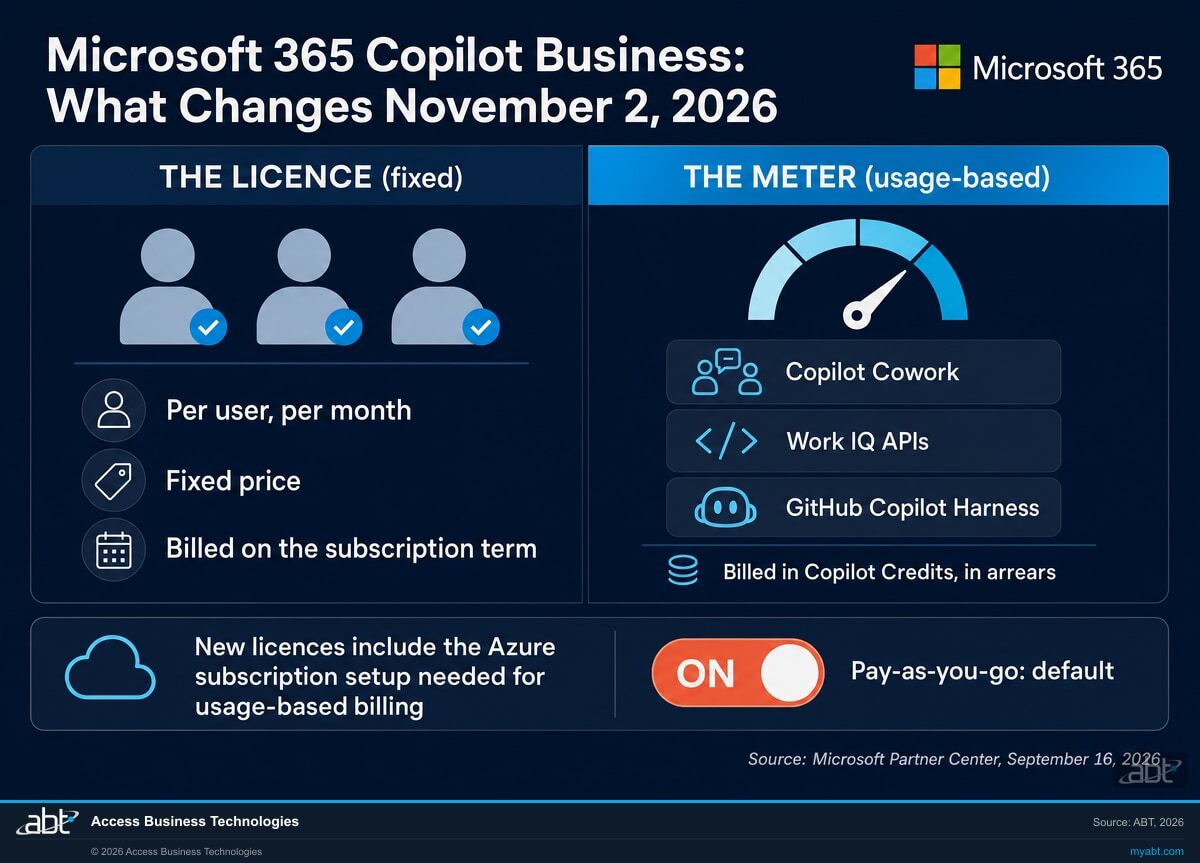
Microsoft's announcement to Cloud Solution Provider partners is short and specific. From November 2, 2026, new Microsoft 365 Copilot Business licences purchased through CSP include usage-based billing by default, and pay-as-you-go becomes the default billing configuration. The stated purpose is to let customers reach eligible usage-based experiences with less billing setup.
"Starting November 2, 2026, new Microsoft 365 Copilot Business licenses that you purchase through Cloud Solution Provider (CSP) include usage-based billing by default. Pay-as-you-go is the default billing configuration to help customers access eligible usage-based experiences, including Copilot Cowork, Work IQ APIs, and GitHub Copilot Harness, with less billing setup."
Microsoft Partner Center announcements, September 2026, item dated September 16, 2026The three details that decide whether this touches you
- It is scoped to new purchases. Microsoft states the change applies to new purchases of Microsoft 365 Copilot Business, standalone and bundles, through CSP. Nothing in the announcement describes a retroactive change to licences already bought.
- It is the Copilot Business SKU, not the enterprise one. Microsoft 365 Copilot Business is the partner-led product aimed at smaller organizations. If your institution buys a different Copilot product, read the announcement before assuming this applies.
- An Azure subscription comes with it. Microsoft states that new Copilot Business licences include the Azure subscription setup needed for usage-based billing. That subscription is a real cloud resource, and it is the thing being billed.
Pay-as-you-go is post-paid against actual consumption, so a tenant where nobody uses the eligible experiences consumes nothing and is billed for nothing. The exposure is not that a bill appears. It is that the ceiling on that bill is now set by whatever the default configuration says, rather than by a decision somebody made and wrote down.
Read the preset monthly limit in your own tenant
Microsoft tells partners to "familiarize your teams with the upcoming change and the preset monthly limit." A preset monthly limit therefore exists. Microsoft does not publish its amount on that announcement page, and it does not appear in the Copilot Credits usage-based billing documentation or in the Microsoft Copilot Credits Guide for September 2026.
Figures circulate in secondary coverage, and we checked four Microsoft sources on the day this page was published without finding one. The limit that governs your account is visible in the Cost management dashboard in the Microsoft 365 admin center, where it is a fact rather than a report of a fact. That is the number to work from.
Why is Microsoft switching this on by default?
Because the old sequence had a detour in it. Buy the licence, try to do something useful, discover it needs usage-based billing, go configure an Azure billing arrangement, come back. Microsoft's stated reason for the change is to remove that setup step.
The experiences behind the meter are the ones that do work rather than answer questions, and they are where the productivity case for Copilot Business now sits. Microsoft names three as eligible usage-based experiences in the announcement.
What the meter actually pays for
- Copilot Cowork. Microsoft describes it as an agentic system that plans, executes and delivers real work: you describe the outcome and it carries out the steps, building apps, sending email, scheduling meetings, creating documents, posting in Teams and managing files, running multi-step work autonomously.
- Work IQ APIs. The programmatic surface that lets agents and AI solutions reach the understanding Microsoft builds from how your people actually work together.
- GitHub Copilot Harness. One of the three harnesses in Microsoft Copilot Studio, the one Microsoft describes as building agents that automate end-to-end business processes.
Those three are the experiences the announcement names as eligible. The list of services Microsoft currently says are managed by usage-based billing inside the Microsoft 365 admin center is narrower: Cowork, apps built with Copilot Cowork, and the Work IQ API. Microsoft says it will add more agents and services over time, so treat the two lists as related rather than identical, and check which one you are reading before drawing a conclusion about what your spending policy governs.
Microsoft's case to partners is straightforward: less setup friction, more time spent on adoption instead of multistep billing configuration, and a path from early usage into wider consumption. For a lender whose processors currently retype data between three systems, an agent that completes the loop is worth reaching without a billing detour in the middle.
That case is sound. It just has a second half, which is that a spending surface arrives with it, and the institution that reads the defaults before November gets the productivity without the surprise.
Find out what your tenant is configured to do before the default decides for you.
We read the Cost management configuration on your tenant, tell you what limits exist today, and price the usage-based experiences against what your team would actually use them for. No licence purchase required.
Request a free licensing assessmentWhat is a Copilot Credit, and what does one cost?
One cent. Microsoft publishes the pay-as-you-go price of a Copilot Credit as $0.01, which means every dollar of metered spend is 100 credits.
Copilot Credits are the common currency for usage-based billing across Microsoft's AI services. Microsoft states that credits are pooled at the tenant level, so the total is the sum of what every supported experience consumed, and that the number of credits a single response or action costs depends on the complexity of the task.
What drives the count on a single task
For Copilot Cowork, Microsoft names four cost buckets: the models chosen for the task, the runtime that keeps an agent working across long-running jobs, the context drawn from emails, files, meetings and past interactions, and the tools the system uses to actually send the email or update the document. A one-line question and an overnight reconciliation are not the same unit of work, and they are not priced as though they were.
Microsoft publishes representative consumption figures per task type, and labels them rough planning estimates that vary with workflow and usage pattern. Treat them as a planning input rather than a quote. There is also a Copilot Credit Estimator for modelling Cowork consumption, and inside Cowork a user can type /cost to see the approximate credit cost of the task in front of them.
Prepaid credits, and the order money is spent in
Pay-as-you-go is not the only way to buy credits. The Copilot Credit Pre-Purchase Plan, which Microsoft abbreviates as P3, is a one-year pay-upfront pool with tiered discounts running from 5 percent at 300,000 credits to 20 percent at 300,000,000. Microsoft states that unused credits expire at the end of the annual term, which makes the tier choice a forecasting exercise rather than a free option.
Where both exist, Microsoft states the order plainly: a policy always uses prepaid credits first, whether from capacity packs or a pre-purchase plan, before moving to pay-as-you-go. Both constructs decrement a Microsoft Azure Consumption Commitment, so an institution already carrying one has a reason to choose where this spend lands rather than let the default choose for it.
Microsoft notes that all of its published pricing is in United States dollars and subject to change, so confirm the current figures against Microsoft before building a budget on them.
| The Copilot Business licence | Usage-based billing in Copilot Credits | |
|---|---|---|
| What it pays for | The assigned Microsoft 365 Copilot Business seat | Eligible usage-based experiences, which the Microsoft announcement names as Copilot Cowork, Work IQ APIs and GitHub Copilot Harness |
| How it is priced | Per user, per month, fixed | Per Copilot Credit consumed, published at $0.01 per credit on the pay-as-you-go meter |
| When you are billed | On the subscription term | In arrears, at the end of the billing month, against actual consumption |
| What caps it | Your seat count | The spending policy limit, and the per-user limit if an administrator sets one |
| Where it is governed | Licence assignment in the Microsoft 365 admin center | Copilot then Cost management in the Microsoft 365 admin center. Microsoft currently lists the services managed there as Cowork, apps built with Cowork and the Work IQ API, which is a narrower list than the eligible experiences named in the announcement |
| What happens at the ceiling | Unassigned users have no seat | Users lose access to agents and services for the rest of the month, and credits reset on the first |
| Who can change it | License administrator and above | Global or Billing administrator for the billing method; AI or License administrator for limits and alerts |
Which controls actually cap the spend?
Spending policies. They live under Copilot then Cost management in the Microsoft 365 admin center, and for the services they govern they are where a ceiling is set.
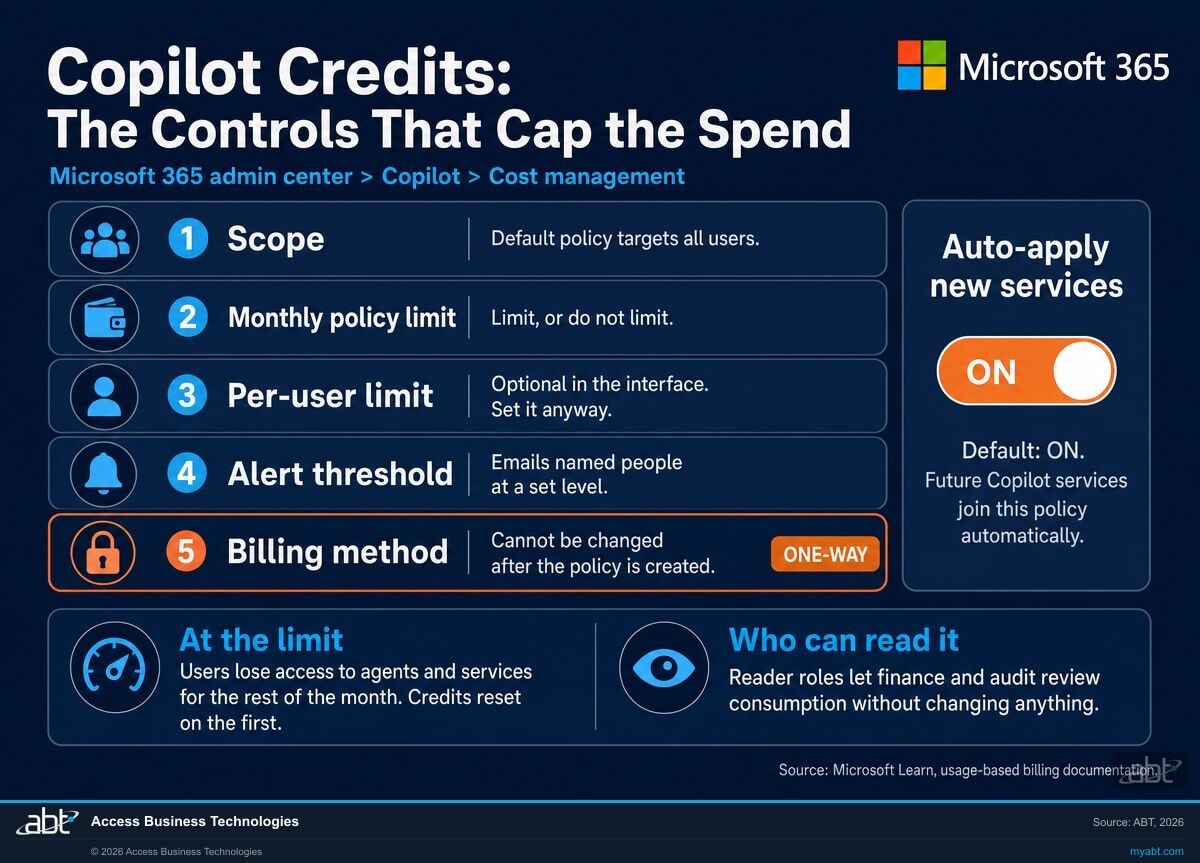
The first policy an administrator creates is the default spending policy, and Microsoft is explicit about its reach: the default setup targets your entire organization and all users. That is a reasonable starting point and a poor finishing point for an institution that wants agent work concentrated in one department first.
The four settings worth reading before anyone uses this
Decide these before anyone uses it
- The monthly policy limit. Microsoft offers a choice between not limiting monthly spending and limiting it. One of those is a budget and the other is not.
- The per-user limit. Optional in the interface. Microsoft advises setting it anyway, in its words to prevent runaway spending of Copilot Credits by one individual user.
- Alert thresholds. Policy-level alerts email named people at a credit amount or a percentage, and repeat weekly until the month resets or the policy changes. User-level notifications only appear as an option once a per-user limit exists.
- Scope. All users is the default. Targeting specific groups requires directory security groups, because Microsoft supports individual users only through group membership.
The behaviours that surprise people
- Auto-apply new services is on by default. Future supported Copilot services and agents join the policy automatically as Microsoft releases them, unless an administrator turns the setting off.
- The billing method is a one-way door. Microsoft states that once a policy is created you cannot change its billing method: to change it, you delete the policy and create a new one.
- Moving someone between groups does not reset their consumption. Credits spent under the previous policy still count against the limit in the new one for that billing period.
- Overlapping policies resolve by the most generous. A user in more than one policy for the same service is assigned the one with the highest per-user limit, then the largest overall limit, then the most recently created.
What happens when a user reaches the limit
Microsoft states it directly: when users hit the limit they lose access to agents and services for the rest of the month, until credits reset on the first of the month. That is a hard stop rather than a warning, which is the right behaviour for a budget and the wrong surprise for a loan processor mid-file. It is also why the alert thresholds matter more than they look, and why the credit request queue exists so a blocked user can ask for more rather than simply stop.
There is one piece of grace. Microsoft states that if a running task exceeds the per-user limit it can complete without interruption, and that the excess is not billed, at Microsoft's sole discretion. Read that last clause as written: it is a courtesy, not an entitlement, and no budget should be built on it.
Who is allowed to do what
The roles split along a useful line. Global administrator and Billing administrator can add, select and change billing methods. AI administrator and License administrator can create spending policies and manage limits and alerts, but cannot set or modify the billing method. Those two facts sit alongside a third that is easy to misread together with them: holding the right role lets you choose and change the billing methods available to your organization, and it still does not let you change the billing method on a policy that already exists. The permission governs the choice; the policy locks the choice once it is made. Microsoft recommends using the roles with the fewest permissions and limiting Global administrator to emergencies, which is the same advice an examiner gives about every other privileged role in the tenant.
The part worth carrying into a governance conversation is the reader tier. Microsoft supports reader-based roles that can review consumption dashboards and reports without any ability to change policies, limits or billing. That is how finance, audit and compliance get to see AI spend on their own rather than by asking an administrator for a screenshot, and it is a cleaner answer to an examiner asking who monitors this than a description of an informal arrangement.
The reporting is close to live. The Overview tab refreshes every four hours and the Consumption tab every two, with consumption broken out by policy, user, group, agent and service, and exports for offline review.
What does this mean on a tenant your provider manages?
One extra requirement, and one thing that can happen without anybody asking for it.
Microsoft publishes separate setup guidance for Cloud Solution Provider and partner-managed customers, and the first step is about the Azure subscription: it must be set up and linked to the partner billing account. If the customer already has an Azure subscription, it needs to be associated with that billing account. If the customer has none, one is created through the Azure portal or Partner Center.
Then the usual configuration follows in the Microsoft 365 admin center: connect the Azure subscription associated with the partner billing account, set who can use the services, set spending limits and alerts, and make sure the discovery setting that lets users find and use the usage-based services is turned on.
The subscription that can appear on its own
This is the sentence worth reading twice. Microsoft states that if you do not have access to any Azure subscriptions, the system automatically creates one for you using the billing account linked in the Microsoft 365 admin center, and that a Global administrator is required to create a subscription that way.
For a credit union, bank or mortgage company, a new Azure subscription is not a billing detail. It is a cloud resource that belongs in the inventory, has an owner, carries a resource group, and shows up in the scope of the next examination. Pay-as-you-go configuration also lets an Owner or Contributor on the subscription choose the billing region and resource group the billing policy is deployed into, and when the subscription has no resource group, one is created automatically. None of that is alarming. All of it is easier to document on the way in than to reconstruct afterwards.
Where ABT sits in this
Access Business Technologies is a Tier 1 Microsoft Cloud Solution Provider working with credit unions, banks and mortgage companies. We manage Microsoft 365 tenants and we host Azure environments, which means both halves of this change land inside work we already do: the tenant where the spending policy lives, and the Azure subscription the meter bills against.
If ABT is your provider, the Azure subscription linkage is ours to get right. If somebody else is, ask them which billing account the subscription is linked to and get the answer in writing before November.
What to do before November 2, in order
Seven steps, in the order the product actually forces. The first three are reading rather than changing, and they decide what the rest should say.
Decide whether you want the usage-based experiences at all
This is a business question, not a billing one. If there is a real task an agent should own, name it: the reconciliation somebody does by hand every Monday, the file review that takes two hours. If there is not one yet, the honest answer is that the meter should stay at a low ceiling until there is.
Find out who holds the roles
List who currently has Global administrator, Billing administrator, AI administrator and License administrator in your tenant. The first two can change how this is billed and the second two can change what it is allowed to spend. If that list surprises you, fix the list before you configure anything that depends on it.
Open Cost management and read what is actually there
Go to Copilot then Cost Management in the Microsoft 365 admin center and read the current state: which policies exist, what their limits are, which billing method each uses, and whether a per-user limit is set. That tells you what governs your tenant today. The preset monthly limit that arrives with a purchase made on or after November 2 is a separate question, and the same dashboard is where to confirm it once a purchase is made rather than trusting a figure from an article, including this one.
Settle the Azure subscription and the billing method first
This step comes before any policy is created, because Microsoft states that once a policy exists its billing method cannot be changed: the only route is to delete the policy and build a new one. Decide which Azure subscription this bills against, confirm it is linked to the right billing account, and if your institution holds a Microsoft Azure Consumption Commitment, settle here whether this spend should count toward it.
Set the policy limit and the per-user limit yourself
Pick a monthly ceiling you would be comfortable seeing on an invoice, and set the per-user limit even though the interface calls it optional. Microsoft's own guidance is to set it so one person cannot spend the organization's credits. Then set the alert threshold below the ceiling, and name a person who receives the alert rather than a shared mailbox nobody reads. These are the settings you can revisit later, which is exactly why they belong after the one you cannot.
Make the Auto-apply new services call yourself
Leaving it on means services Microsoft has not shipped yet inherit this policy automatically. That is convenient and it is a governance decision. For a regulated institution the defensible answer is usually to turn it off on any policy with a meaningful limit, so a new agent is reviewed before it can consume, and to record the choice either way.
Name who reads the consumption report every month
Give finance or audit a reader-based role so they can review consumption without the ability to change it, put the review on a monthly cadence, and keep the export. A named owner, a standing review and a saved report are the kind of evidence an examiner asking about AI spend oversight is looking for, and they are considerably easier to produce than an administrator pulling a screenshot during the exam. What any given examination expects is a question for your own compliance function.
A free licensing assessment, sized to the November 2 change
Find out what your tenant is configured to spend, and what the usage-based experiences are worth to your team.
Access Business Technologies is a Tier 1 Microsoft Cloud Solution Provider working with credit unions, banks and mortgage companies. We manage Microsoft 365 tenants and we host Azure environments, so a Copilot estate with a fixed line and a metered line is the kind of thing we untangle regularly.
- A read of your current Cost management configuration, covering the policies that exist, their limits, their billing methods and whether a per-user limit is set, so the November 2 default lands on a tenant somebody has already looked at.
- The Azure subscription question answered, naming which subscription the meter would bill against, which billing account it is linked to, and whether it already exists or would be created.
- A role inventory for the four roles that can change what this spends, mapped against who should hold them.
- A usage forecast built from real work, starting from the tasks your team would hand to an agent rather than from a generic per-seat assumption, so the ceiling you set has a reason behind it.
- A prepaid versus pay-as-you-go comparison at your projected volume, including whether an Azure Consumption Commitment changes the answer, and the monthly review routine that keeps it honest afterwards.
ABT also operates M365 Guardian, its managed security service for credit unions, banks, and mortgage companies.
Where the facts on this page come from
Every date, price, quotation and behaviour described on this page was taken from Microsoft rather than from secondary coverage, and checked on the day this page was published.
- Microsoft Partner Center announcements, September 2026, item dated September 16, 2026. The November 2 effective date, the default-on statement, the scope covering new purchases of Microsoft 365 Copilot Business standalone and bundles through CSP, the three eligible usage-based experiences, the included Azure subscription setup, and the reference to a preset monthly limit. Read the Microsoft announcement.
- Microsoft Learn, Usage-Based Billing and Cost Management for Copilot Credits. The services managed by usage-based billing in the Microsoft 365 admin center, the Auto-apply new services default, and the reader-based roles for reviewing consumption. Read the Microsoft overview.
- Microsoft Learn, Managing AI experiences enabled by usage-based billing. The default spending policy scope, the monthly and per-user limits, alert thresholds, the loss of access at the limit and the reset on the first of the month, the one-way billing-method choice, the multi-policy resolution order, group-move behaviour, the running-task grace, role requirements, the CSP and partner-managed setup steps, the automatic subscription creation, and the dashboard refresh intervals. Read the Microsoft management guide.
- Microsoft Copilot Credits Guide, September 2026. The $0.01 per Copilot Credit pay-as-you-go price, tenant-level credit pooling, the four Copilot Cowork cost buckets, the Pre-Purchase Plan discount tiers and annual expiry, the Microsoft Azure Consumption Commitment treatment, and the description of GitHub Copilot Harness. Read the Microsoft Copilot Credits Guide.
- Microsoft Learn, Copilot Cowork. Background on what Cowork does and how it is administered. Read the Copilot Cowork documentation.
Microsoft changes product guidance, and states that its published pricing is subject to change. If you are planning around this date, confirm the current wording and figures against the Microsoft sources above before relying on any statement, including the ones on this page.
Related reading

Copilot Credits and Usage-Based Billing: Cost Governance for Financial Institutions
The budgets, hard caps and access controls that make metered AI spend governable. Written before this change, and the reason it matters more now.

Microsoft 365 Copilot Business Pricing for Community Banks, Credit Unions, and Mortgage Lenders
What the per-seat line costs and what it includes, which is the other half of the bill this page describes.

I Gave Copilot ONE Prompt. It Did 6 Hours of Work.
Copilot Cowork running multi-step work end to end. Useful for judging what your own usage forecast should look like.
Two neighbouring decisions: the Copilot free 30-day trial, and a free Microsoft 365 licensing assessment.
Why a ceiling matters once agents are doing the work
Agents that run on their own are exactly what the meter pays for, and exactly why a limit somebody chose beats a limit nobody looked at. About a minute on how that goes wrong.
Worth separating clearly: a spending limit caps what agent activity costs. What an agent is permitted to reach, which data it can act on and what it is allowed to do are governed by identity, permissions and data access controls, which are a different set of decisions from the ones on this page.
Custom agents doing more than anyone scoped them to do. A spending policy bounds the cost of that. Bounding the access behind it is separate work.
Copilot Business usage-based billing, answered from Microsoft's documentation
Microsoft states that starting November 2, 2026, new Microsoft 365 Copilot Business licenses purchased through Cloud Solution Provider include usage-based billing by default, with pay-as-you-go as the default billing configuration. Microsoft says the purpose is to help customers access eligible usage-based experiences, including Copilot Cowork, Work IQ APIs, and GitHub Copilot Harness, with less billing setup. Microsoft also states that new Copilot Business licenses include the Azure subscription setup needed for usage-based billing.
Microsoft describes the change as applying to new purchases of Microsoft 365 Copilot Business, standalone and bundles, through CSP, and its wording throughout is about licenses that you purchase starting November 2, 2026. The announcement does not describe a retroactive change to licences bought before that date. Because the usage-based billing controls apply at tenant level regardless of when a licence was bought, the practical step for an existing customer is the same: read what is configured in Cost management in the Microsoft 365 admin center rather than assuming.
Microsoft confirms that a preset monthly limit exists, telling partners to familiarize their teams with the upcoming change and the preset monthly limit. Microsoft does not publish the amount on that announcement page, and it does not appear in the Copilot Credits usage-based billing documentation or in the Microsoft Copilot Credits Guide for September 2026. Figures circulate in secondary coverage, so the reliable way to know the limit that applies to your tenant is to read it in the Cost management dashboard in the Microsoft 365 admin center.
Microsoft publishes the pay-as-you-go price as $0.01 per Copilot Credit, which means a dollar of metered spend is 100 credits. Credits are pooled at the tenant level, and the number consumed by a given response or action depends on the complexity of the task. Prepaid credits through the Copilot Credit Pre-Purchase Plan carry tiered discounts running from 5 percent at 300,000 credits to 20 percent at 300,000,000 credits, and Microsoft states that unused prepaid credits expire at the end of the annual term. Microsoft notes that its published pricing is in United States dollars and subject to change.
Through spending policies, in the Microsoft 365 admin center under Copilot then Cost Management. A policy carries a monthly spending limit, and Microsoft offers a choice between not limiting monthly spending and limiting it. A per-user limit is also available, and although the interface marks it optional, Microsoft advises setting it to prevent runaway spending of Copilot Credits by one individual user. Policies also carry alert thresholds that email named administrators or stakeholders when usage reaches a set credit amount or percentage.
Microsoft states that when users hit the limit they lose access to agents and services for the rest of the month, until credits reset on the first of the month. Blocked users can submit a credit request for access or a higher limit, which administrators review in the Cost management dashboard. Microsoft also states that a task already running when a per-user limit is exceeded can complete without interruption, and that the excess usage is not billed, at Microsoft's sole discretion. That last clause makes the grace a courtesy rather than something to plan around.
Yes, unless you turn that off. Microsoft states that the Auto-apply new services setting is enabled by default for spending policies, so newly supported Microsoft Copilot services and agents are added to the policy automatically as they become available. Microsoft advises reviewing existing spending policies to determine whether automatic coverage is appropriate, and turning the setting off for any policy where future services and agents should be reviewed first. For a regulated institution, turning it off on any policy with a meaningful limit is usually the more defensible choice, and the decision is worth documenting either way.
Not after the policy is created. Microsoft states that once you set a billing method for a spending policy and create the policy, you cannot change it, and that to update it you must delete the policy and create a new one. That makes the billing method a decision to settle before the policy exists, particularly for an institution holding a Microsoft Azure Consumption Commitment, because Microsoft states that eligible Copilot usage applies against a commitment only when the selected subscription links to the billing account that includes it.
Microsoft splits this across two tiers. Global administrator and Billing administrator roles can add, select and change billing methods, and set billing methods in policies. AI administrator and License administrator roles can create spending policies and manage limits and alerts, but cannot set or modify the billing method. Microsoft also supports reader-based roles, including AI Reader and Global Reader, that can review consumption dashboards and reports with no ability to change policies, limits, alerts or billing methods, which is how finance, audit and compliance can monitor AI spend directly. Microsoft recommends using the roles with the fewest permissions and limiting Global administrator to emergency scenarios.
Set the ceiling yourself
before November 2.
Tell us roughly how many people you have and what you would want an agent to take off their hands. Our engineers will read what your tenant is configured to spend today, name the Azure subscription the meter would bill against, and build a usage forecast from real tasks rather than a per-seat guess.
