


Microsoft began moving the Copilot web app to a new address on 18 August. If your network restricts outbound traffic by domain, that move is the one to check.
Microsoft redirects the old address to the new one automatically, so on a permissive network nothing appears to have happened. On a network that restricts outbound traffic by domain, which is a common posture in a regulated institution, that redirect lands somewhere the proxy may never have been told about.
- What Microsoft changed, in its own words, including the one sentence that tells you what did not change
- Why the allow-list instruction most people received is correct and still leaves a gap
- The three domains Microsoft marks Required, and an order of work that does not create the outage early
What Microsoft changed, and what it says did not change
On 14 August 2026 Microsoft published an announcement to partners describing a set of updates to the Copilot apps. The stated purpose is to make it easier for people to tell a work account from a personal one. Most of it is cosmetic. One part of it is not.
The cosmetic part: clearer account labels, a green shield on Microsoft Entra work accounts, distinct backgrounds, and a simplified name and icon. Useful, and nothing an administrator has to act on.
The part that reaches your network is a single clause. Microsoft describes "a transition of the web app URL from m365.cloud.microsoft to copilot.cloud.microsoft", and adds the sentence that decides whether this matters to you:
"Users are automatically redirected unless access to the new URL is blocked within their organization."
Read that clause as a conditional and it tells you exactly who has work to do. If nothing in your organisation blocks the new address, the redirect carries your users across and you will never know it happened. If something does block it, the redirect is the thing that breaks, and it can break for everyone at once.
The timing needs care, because Microsoft describes a start rather than a completion. The announcement says these updates begin "Starting August 18, 2026" and that the desktop early preview was planned for the same day, with broad deployment beginning in mid-September. It does not say the web address transition finished on any particular date, and a staged rollout that starts on one date can reach an individual tenant considerably later. Treat 18 August as the date the change started arriving, not the date it was done, and treat your own Message Center as the only authority on when it reaches you.
Microsoft states plainly: "Security, compliance, and governance controls remain unchanged." Take that sentence at its own scope rather than expanding it. What the announcement describes is a change of web address plus a set of visual account indicators, and it does not describe a change to the way Copilot is governed. That is worth knowing before anyone opens a data-governance review over a change that reads, on the evidence Microsoft published, as a network one.
The redirect is the reason nobody notices until it breaks
An automatic redirect is a kindness on an open network and a trap on a filtered one. It removes every signal that would normally tell an administrator a change is coming.
Nobody has to be told a new address exists. No user is asked to update a bookmark. No prompt appears. The old link keeps working, right up to the moment the destination it hands you to is one your proxy has never heard of. At that point the failure arrives without any of the vocabulary that would help you diagnose it.
It does not present as a blocked domain. It presents as Copilot is broken, reported by a user, about a product nobody on the security team touched that week. The natural first move is to look at Copilot: licensing, service health, the tenant, a recent policy change. Every one of those is the wrong place, and each one costs time before anyone thinks to look at egress.
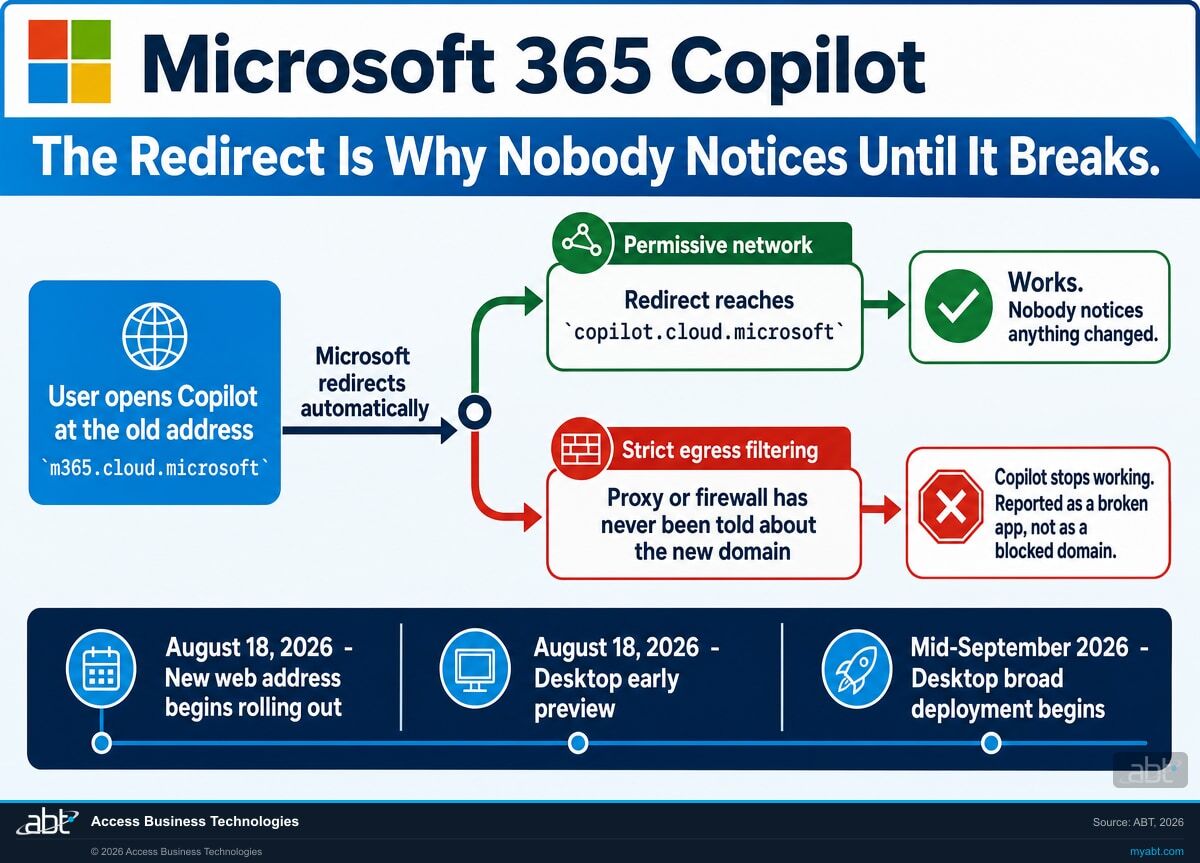
There is a second-order version of this worth naming. A tenant can pass a check today and fail when the updated desktop app reaches its users, because the web app and the desktop app are separate deployments on separate schedules. Someone tests the browser, finds Copilot loading normally, and reasonably concludes the organisation is fine. The desktop wave then arrives on its own timetable, from a different client, potentially over a different network path, and sometimes through a proxy configuration that treats a desktop application differently from a browser session. Microsoft has published the desktop timeline without publishing the desktop client's connectivity requirements, so whether your browser result carries over is a question to answer by testing rather than by assumption.
Confirming that Copilot loads in a browser confirms that one client, on one network path, is working today. It does not tell you how the desktop client behaves on your network, and the desktop client is the half that has not finished rolling out. Test it rather than infer it.
The allow-list instruction is correct. It is also narrower than the change underneath it.
The announcement gives partners three next steps: verify that copilot.cloud.microsoft is not blocked by existing network, proxy, firewall or access policies; "Add *.cloud.microsoft to organizational allow lists, where appropriate"; and validate connectivity.
That instruction is correct. Follow it and Copilot will reach its new address. The difficulty is that it is scoped to Copilot, and the change underneath it is not scoped to Copilot at all.
Microsoft's canonical endpoints article, the one network teams actually build allow lists from, describes a wider programme:
"Microsoft has initiated the process of consolidating Microsoft 365 apps and services into a select group of dedicated, secured, and purpose-managed domains within the .microsoft top level domain (TLD). To avoid connectivity issues for users, ensure that the following essential domains are included in your allowlist and that connectivity to these domains isn't blocked."
It then lists three consolidation domains, not one. All three carry the same endpoint ID, 184, and all three are Category Required. To be precise about what that does and does not mean: these three are the domains belonging to the consolidation programme, and they are not the complete Microsoft 365 Required list, which runs to many more entries across Exchange Online, SharePoint, Teams and the rest. They are the three Required domains in Microsoft's broader consolidation guidance, and the Copilot announcement directly calls out only *.cloud.microsoft.
| Domain | Microsoft's stated purpose | ID | Category | Ports |
|---|---|---|---|---|
*.cloud.microsoft | "Dedicated to authenticated user facing Microsoft SaaS product experiences." | 184 | Required | TCP 443, UDP 443 |
*.static.microsoft | "Dedicated to static (not customer generated) content hosted on CDNs." | 184 | Required | TCP 443, UDP 443 |
*.usercontent.microsoft | "Content used in Microsoft 365 experiences that requires domain isolation from applications." | 184 | Required | TCP 443, UDP 443 |
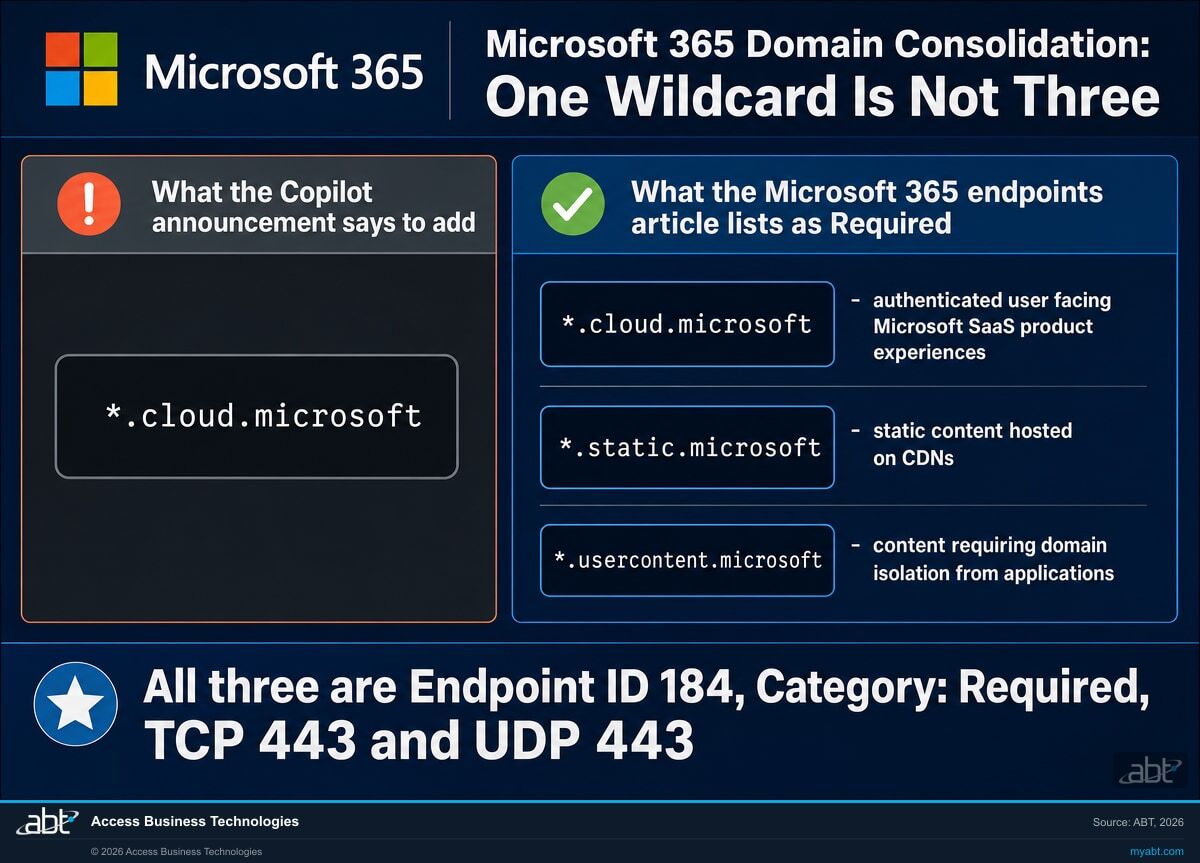
These two pages do not contradict each other. The announcement is scoped to Copilot and is right within that scope. The gap opens for the reader who only ever sees the announcement, adds the one wildcard, marks the task closed, and has now satisfied one product rather than the consolidation Microsoft is carrying out across Microsoft 365.
The two additional domains are worth understanding rather than pasting. *.static.microsoft serves content from CDNs, which is the class of asset whose absence produces the worst kind of bug report: the application loads, the layout is wrong or an element never appears, and nothing is obviously broken enough to look like a network fault. *.usercontent.microsoft is the domain Microsoft dedicates to content that requires domain isolation from applications. Blocking it does not undo that isolation, which is a property of keeping the content on a separate domain in the first place. What it does is stop that content loading, which is the same class of hard-to-read failure as the CDN case.
Search your proxy or firewall configuration for all three strings: cloud.microsoft, static.microsoft and usercontent.microsoft. If the first is present and the other two are not, you have the shape this page exists to describe, and you found it before anybody filed a ticket.
Find out whether your network is ready for the desktop wave.
Our engineers read what your egress controls actually allow, not what the documentation says they should, and tell you which of the three Required domains are missing before the rollout answers the question for you.
Get a free Copilot readiness assessmentThe organisations most likely to break are the ones doing it right
An organisation that allows outbound traffic broadly is unlikely to notice this at all. An organisation that maintains an explicit list of destinations its users may reach, reviews that list, and can produce it for an examiner is the one that stops working.
That is not an argument against the control. Explicit egress filtering is the stronger posture and it should stay. It is an argument about maintenance: a domain allow list is a dated artefact, and it silently expires whenever a vendor moves. The control that was correct on 17 August is the same control that fails after the move, unchanged, still doing precisely what it was configured to do.
For credit unions, banks, and mortgage companies there is a second reason to handle this deliberately rather than reactively. When a widely used tool stops working and nobody can say why, the pressure to restore service arrives fast, and the quickest way to restore service is usually to loosen something. A rule relaxed under that pressure is broader than it needed to be, is written by whoever was on the call, and tends to outlive the incident by years. The same work done on your own schedule is a planned change with a review behind it. Done during an outage, it is the same change plus a rule nobody scoped.
It is the emergency change that resolves the outage. An allow-any rule added at 9:40 on a Tuesday to get Copilot working again is the artefact that shows up in next year's examination, long after everyone has forgotten which incident produced it.
What to do, in an order that does not create the outage early
Every step here is a read until the last one. Nothing below changes state until you have decided it should.
Read your current allow list before changing it
Export the outbound rules as they stand and search for the three strings. Keep the export. It is the before-state, and if anything unexpected happens later it is the only way to tell what you changed from what moved on its own.
Test the new address from a client that is actually filtered
A test from an administrator's machine on a permissive segment answers a question nobody asked. Test from the network a loan officer sits on. If your organisation has more than one egress path, and most do once you count branch offices and remote access, test each one rather than assuming they share a configuration.
Compare against the endpoints article rather than the announcement
The announcement names one domain. The endpoints article names three as Required and is the document Microsoft maintains for exactly this purpose. Work from the article, and check the wider Required list at the same time, because if the Copilot change caught you then the consolidation has probably moved something else you have not noticed either.
Decide on wildcards deliberately
Microsoft publishes these as wildcards by design and says so: the design intent is that wildcards "significantly lower the network configuration effort for customers." If your policy forbids wildcards you can enumerate hosts instead, but understand what you are choosing, because an enumerated list needs re-checking every time Microsoft adds a service and this whole page is a description of what happens when one is not re-checked.
Check the desktop client separately, and again once the updated app reaches you
The web address began rolling out in August. The desktop app is on its own schedule. Treat them as two changes, because they are, and re-test once each has actually reached you rather than when it was scheduled to.
Read your own Message Center, and trust it over anything published elsewhere
Microsoft says further guidance arrives through Message Center. That is tenant-specific, it is not publicly indexed, and it is where a revised timeline appears first. When your Message Center and an article on the internet disagree about a date, including this one, your Message Center is the one that governs your tenant.
Make the change, then read it back
Apply the rule, then re-export the configuration and confirm the entries are present and scoped as intended. A change window that closed without an error is not evidence the rule is live. Re-reading takes a minute and is the only step that actually proves the work landed.
This is bigger than Copilot, and it has been running for a while
Copilot is the visible instance of a programme already well underway. Microsoft describes a domain consolidation initiative built around the cloud.microsoft root, and gives a security rationale rather than a convenience one:
"Exclusive use of cloud.microsoft root domain for security isolation and specific functions. This enables customer network and security teams to trust Microsoft 365 domains, while improving connectivity to those endpoints and avoiding unnecessary network security processing."
The evidence that this is not a Copilot story sits in the same endpoints table. The Exchange Online entry already lists outlook.cloud.microsoft next to the long-standing outlook.office.com and outlook.office365.com. Mail has been part of the consolidation for some time. Copilot is simply the service whose move came with an announcement most people read.
The useful conclusion is not about this change at all. If a Microsoft product can relocate to a new domain and reach your users through an automatic redirect, then a domain allow list is a dependency on a third party's naming decisions. That is a perfectly reasonable dependency to accept. It is not a reasonable one to accept without a review cadence, because the failure it produces is silent, arrives on Microsoft's schedule rather than yours, and looks like a broken application rather than a network control doing its job.
We said this in May
Twenty-one seconds, recorded 2 May 2026, three months before the announcement: "When Microsoft migrates your tenant, your Copilot traffic moves to cloud.microsoft. If your network is not ready, your Copilot stops working."
Copilot governance, readiness, and the controls around it
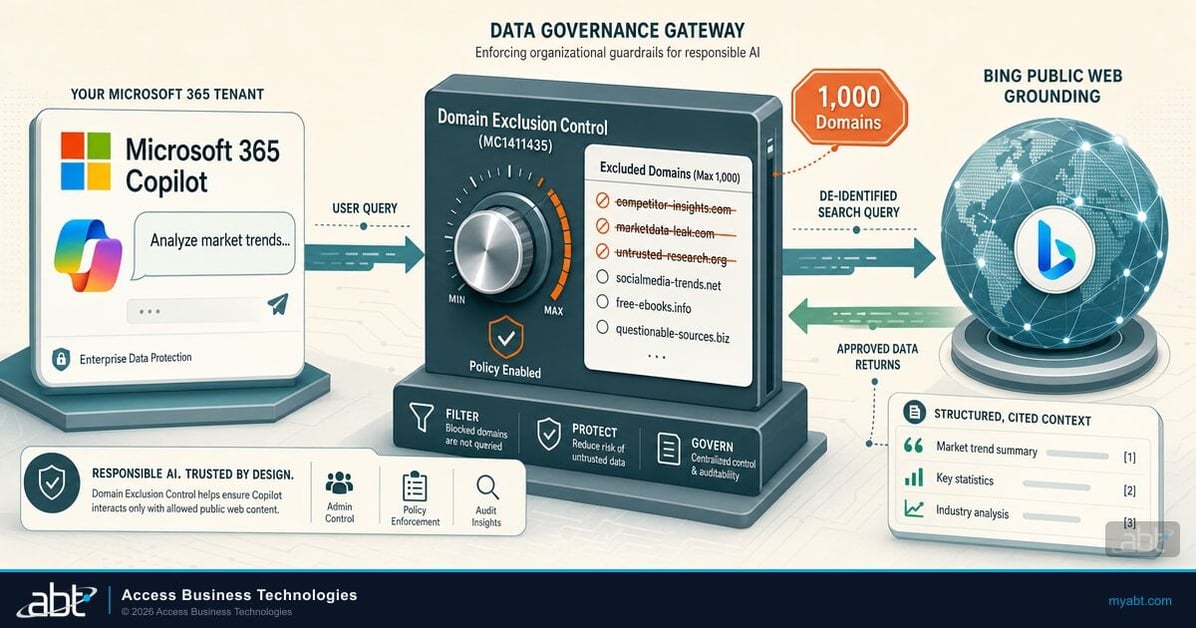
Microsoft 365 Copilot Web Grounding Domain Exclusion for Financial Institutions
The other Copilot control that turns on a domain list. Governs which web sources Copilot is allowed to draw on, and sits with the same team that owns your egress rules.
Read the article
The 30-Day Copilot Sprint for Financial Institutions
What a deliberate Copilot rollout looks like from kickoff to a measured readout, including the network and identity groundwork that has to land before anybody logs in.
Read the article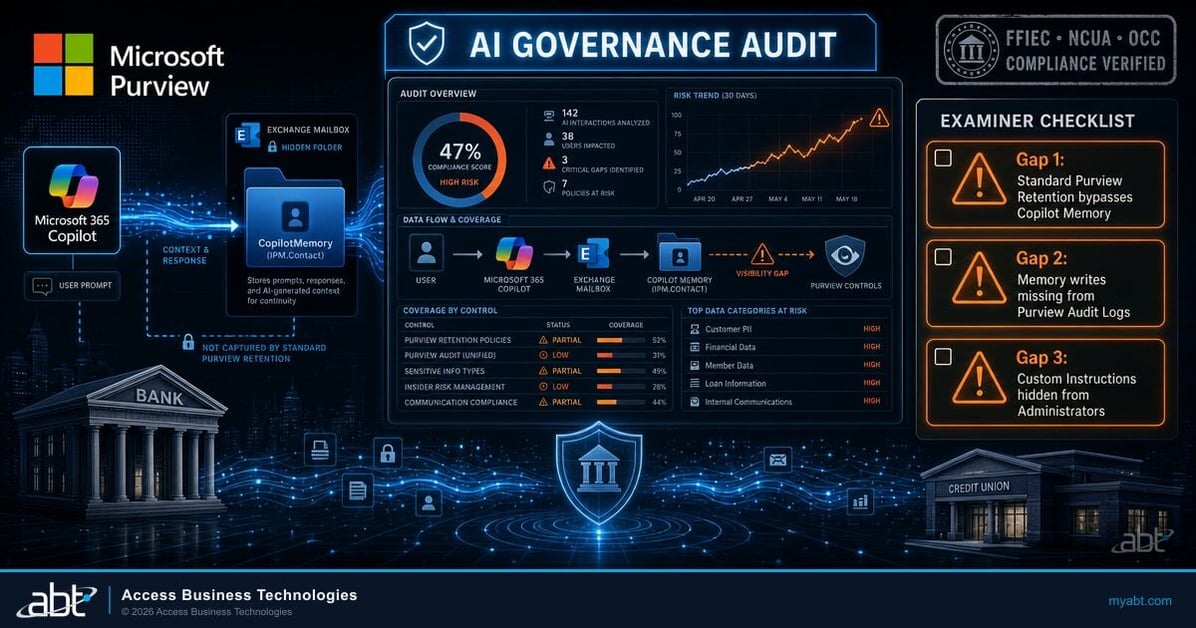
Is Your Copilot Memory Examiner-Ready? Three Governance Gaps to Document
Microsoft says governance is unchanged by the URL move. This is what your governance actually has to say about Copilot when somebody asks to see it.
Read the articleWhere ABT fits
Access Business Technologies is a Tier-1 Microsoft Cloud Solution Provider. We have worked with Microsoft technology since 1999, and today we manage Microsoft 365 tenants and host Azure environments for more than 750 financial institutions. Working out which of a customer's controls a Microsoft change is about to reach is ordinary work here rather than a special engagement.
The free Copilot readiness assessment is a technical read, not a sales call with a report attached. For this change specifically, the things we look at are which of the three Required consolidation domains your egress controls currently permit, whether the new address resolves and connects from the network segments your staff actually sit on rather than from an administrator's desk, how your desktop clients behave against your browsers, and what else in the wider Required endpoint list has moved without being picked up. What we report back depends on what your environment turns out to contain.
What a configuration read cannot tell you is why a given restriction was written and whether the reason still holds. That part needs your people, and it is usually where the useful conversation happens. There is no cost and no obligation.
ABT also operates M365 Guardian, its managed security service for credit unions, banks, and mortgage companies.
If Copilot has already stopped working and you need it running today, say so when you get in touch and we will treat it that way rather than as a review.
Where the facts on this page come from
Every claim on this page about the Copilot URL transition and Microsoft's domain consolidation, including each date, quotation and domain, comes from one of the three Microsoft-owned pages below, retrieved on 3 September 2026. Where a Microsoft page and a secondary article disagreed, the Microsoft page is what we used. Everything else here, including ABT credentials, the video quotation, and the description of our own assessment, is ours rather than Microsoft's.
Other Microsoft changes landing on the same estate
Answered from Microsoft's own documentation
Does this change anything about how Copilot handles our data?
Microsoft's own answer, and the only one we will give you, is this: "Security, compliance, and governance controls remain unchanged." The announced changes are the web app address, the account indicators such as labels and a green shield for Microsoft Entra work accounts, distinct backgrounds, and a simplified app name and icon. That sentence is Microsoft's and it is the one to rely on, rather than any enumeration of specific controls from us. What the announcement describes is a change of web address plus a set of visual account indicators, and it does not describe a change to the way Copilot is governed. If your own review covers a control this announcement does not mention, the announcement is not evidence either way about it, and your tenant configuration and Microsoft's product documentation remain the place to check.
Our Copilot still works. Do we need to do anything?
Probably a check rather than a change, and the check is worth running because a working browser proves less than it appears to. Microsoft began introducing the new web address on 18 August 2026, and describes a rollout rather than a single cutover, so a browser that loads Copilot today may have reached the new address or may not have been moved yet. The desktop app is a separate deployment: early preview began on 18 August and Microsoft said broad deployment would begin in mid-September. A desktop client can take a different network path from a browser, and some proxy configurations treat an application differently from a browser session. Test from a filtered network segment, test the desktop client specifically, and re-test after the desktop wave has actually reached you.
Is adding *.cloud.microsoft to our allow list enough?
It is enough for Copilot and it is not the whole picture. The Copilot announcement names that one wildcard. Microsoft's canonical endpoints article lists three domains as Category Required under endpoint ID 184, on TCP 443 and UDP 443: *.cloud.microsoft for authenticated user facing Microsoft SaaS product experiences, *.static.microsoft for static content hosted on CDNs, and *.usercontent.microsoft for content that requires domain isolation from applications. The two pages are not in conflict, they have different scopes. The practical risk of adding only the first is that a missing *.static.microsoft tends to surface as an application that loads with something visually wrong rather than as an obvious connectivity failure, which is considerably harder to diagnose.
Will the old m365.cloud.microsoft address stop working?
Microsoft has not published a date for withdrawing the redirect, and we will not guess at one. What the announcement does say is that users are automatically redirected from the old address to the new one unless access to the new address is blocked within their organization. The planning consequence is that the redirect is not a substitute for allowing the new address: a redirect that lands on a blocked destination fails in exactly the same way as a direct request to a blocked destination. Treat the new address as the one that has to be reachable, regardless of how long the old one continues to forward.
Our policy does not allow wildcard entries. What are our options?
You can enumerate specific hosts instead of using the wildcards, and you should go in knowing what that commits you to. Microsoft publishes these endpoints as wildcards deliberately and states the intent: where possible the published domain endpoints include wildcards "to significantly lower the network configuration effort for customers." An enumerated list transfers that effort to you permanently, because it has to be revisited every time Microsoft adds or moves a service, and this page describes what happens when a list like that is not revisited. If your policy requires enumeration, pair it with a scheduled review of the Microsoft 365 endpoints article rather than treating the list as a one-time task.
Is this only about Copilot?
No, and that is the more useful way to read it. Microsoft describes an initiative consolidating Microsoft 365 apps and services "into a select group of dedicated, secured, and purpose-managed domains within the .microsoft top level domain (TLD)", with a security-isolation rationale rather than a cosmetic one. The consolidation already reaches mail: the Exchange Online entry in the endpoints article lists outlook.cloud.microsoft alongside outlook.office.com and outlook.office365.com. Copilot is the service whose move arrived with an announcement most administrators actually read. If this change caught your allow list, it is worth reviewing the full Required endpoint list rather than only the domain that produced the ticket.
Where do we find the authoritative timeline for our own tenant?
Your Message Center in the Microsoft 365 admin center. Microsoft states that additional guidance for this change will be provided through Message Center communications, and Message Center entries are tenant-specific: they carry the rollout timing that applies to your organization rather than a general one. That content is not indexed by search engines, so an article on the internet cannot reflect a revision made after it was written, and Microsoft does revise rollout timings. Where your Message Center and any external article disagree about a date, including this page, your Message Center governs your tenant.
Find out whether your network is ready for the desktop wave.
Tell us roughly how many people use Copilot and whether anything has already stopped working. Our engineers read what your egress controls actually permit rather than what the documentation says they should, and come back with what they found: which of the three Required consolidation domains are allowed today, how the new address behaves from the segments your staff sit on, how your desktop clients compare with your browsers, and anything else in the Required endpoint list that has moved without being picked up.
ABT manages Microsoft 365 tenants and hosts Azure environments for more than 750 financial institutions. The assessment is a technical review and is not legal or compliance advice.
Get a free Copilot readiness assessment
A read of your network controls, and a plain answer on which of the Required domains you allow today.
