


Microsoft 365 Copilot · Federated connectors
Copilot can now update the apps it used to only read. Writes ask first by default, and a short list of admin settings decides which connectors and tools are in play.
Microsoft began rolling out write, update, and delete tools for federated Copilot connectors in early October 2026 and expected the rollout to complete by late October. Where a connector's publisher provides those tools, Copilot can create, update, or delete content in the connected service with the signed-in user's own permissions, asking first unless that user has allowed the tool for the conversation or chosen Always allow. From October 30, 2026, the Copilot Connectors page enforces Agent and plugin access, the setting Microsoft's Message Center notice still calls Allowed agent types.
- Early to late October 2026: write, update, and delete tools roll out to supported Copilot experiences
- October 30, 2026: the Copilot Connectors page enforces Agent and plugin access, formerly Allowed agent types
- Copilot Chat, agents, Cowork, and Copilot in Word, Excel, PowerPoint, and Outlook can write. Researcher stays read-only
- Available connectors carry any write tools their publishers add
- Writes ask first by default, unless the user allowed that tool for the conversation or always
- Agents, then Tools, blocks a whole connector or a single tool
The sequence
What changed in October, and what comes next?
Three dates from Microsoft's Message Center shaped how connectors work in your tenant this fall, and a fourth is on the way.
The PowerShell switch retired
Microsoft deprecated the command-line toggle it calls setFederatedConnectors and asked administrators to move connector governance into the Microsoft 365 admin center, where one setting now covers connectors and agents together.
Connectors learn to write
Supported connector tools that create, update, and delete content in the connected service became available in Copilot on Microsoft's rollout schedule, which started in early October and was expected to complete by late October. Read tools keep running exactly as before.
Allowed agent types takes effect
Microsoft's notice MC1454973 says that from this date the Copilot Connectors page enforces the configuration defined by Allowed agent types, the control Microsoft Learn now documents as Agent and plugin access. A tenant that takes no action is governed by its existing configuration and the default posture of that setting. Microsoft asks organizations to review their current settings so the resulting connector behavior matches the policies they intend.
A usage report for connectors
Microsoft's notice MC1404326 sets general availability of the Connectors usage report for November 2026. It shows active users and responses per connector under Reporting, then Usage, then Microsoft 365 Copilot, then Connectors.
Allowed agent types is now Agent and plugin access
Microsoft Learn's connector FAQ refers to "Agent and plugin access (formerly Allowed agent types)." It lives in the Microsoft 365 admin center under Agents, then Settings, and offers the same three publisher choices: agents and plugins built by Microsoft, by your organization, and by external publishers. Microsoft's October 23 update to MC1454973 still uses the older name and the older path through Agent 365. Both point at the same decision.
The new name is the more accurate one. Microsoft describes plugins as including "tools, MCP servers, connectors, skills, and other AI artifacts that extend agents," so this one setting reaches well past connectors. Asked whether there is a PowerShell or API option for it, Microsoft Learn answers "Not currently" and points to the Microsoft 365 admin center, which is where to check it as well.
The mechanics
How do Copilot connector write actions work?
At the level of a single action, the design is careful. The decisions a governance team owns sit one level up, at the connector and the tool.
A user asks Copilot to do something in a connected service. Copilot selects a tool the connector exposes and shows a confirmation card for the action, and the user can expand the card to review the parameters that will be sent. While the action waits for that answer, nothing is sent to the connected system. Microsoft's own examples are everyday office work: turning an escalation email into an issue in a project-tracking tool, updating a record in a CRM system, adding a comment to a ticket.
That is the productivity case, and it is a good one. The work finishes inside the conversation where it started, and the record in the other system is current before anyone switches windows.
The four answers on the approval card
Runs the action now. Copilot asks again the next time it wants to use that tool.
Runs the action and stops asking for that tool for the rest of the current conversation.
Runs the action and stops asking for that tool until the user changes the setting or the publisher changes the tool.
Declines the action. The connected system is left exactly as it was.
Source: Microsoft Learn, Federated connectors overview. The Message Center post lists three of these answers, and the Learn page lists all four.
Two details deserve more attention than they will get. Always allow applies to a single tool, and it holds until the user changes it or the publisher changes the tool. When a publisher adds a write tool or changes an existing one, that tool returns to Needs approval. Users manage all of this in Copilot under Settings, then Sources, where each connector's write and delete tools are grouped apart from its read tools, and a user who chose Always allow can switch the whole Write/Delete group back to Needs approval. Read tools always run without asking.
| Read tools | Write, update, and delete tools | |
|---|---|---|
| What they do | Retrieve information from the connected service in real time | Create, update, or delete content in the connected service |
| Approval | Run without asking | Ask first, until the user picks Allow for conversation or Always allow for that tool |
| When the publisher changes a tool | Keep running | Return to Needs approval |
| Where they work | Copilot Chat, agents, Cowork, Copilot in Word, Excel, PowerPoint, and Outlook, and the Researcher agent | The same experiences except Researcher, which stays read-only |
| What leaves Microsoft 365 | Data is fetched live from the service, and no data is indexed into Microsoft 365 | Customer Data is exported to the connected system to make the change |
| Admin control | Enable, disable, stage, or block the connector | The same connector controls, plus tool-level blocking under Agents, then Tools |
"Write, update, and delete tools are part of the connector and aren't enabled separately."
Microsoft Learn, Federated connectors overview, read October 30, 2026Read that sentence against your own connector list. A connector someone enabled when all it could do was read can write as soon as its publisher ships the tools. If it was reviewed while it could only read, that review covered a read-only integration, and a Microsoft-built connector may have arrived with no review at all, because those are available by default whenever the Microsoft publisher type is allowed. Microsoft's control table gives the administrator's answer just as plainly: Agents, then Tools, offers blocking at the level of a whole connector or a single tool.
Know which connectors can write in your tenant, and who decided they should
ABT reviews the federated connectors available in your Microsoft 365 tenant, the write and delete tools each one exposes, and whether Agent and plugin access and User access say what your institution means.
Get the free security assessmentThe default
Which connectors are already available in your tenant?
Microsoft-built connectors are available by default whenever the Microsoft publisher type is allowed, so the list in your tenant can be longer than the list anyone approved.
Microsoft Learn puts it this way: Microsoft-built federated connectors are available by default when Allow agents and plugins built by Microsoft is selected in Agent and plugin access and the user is included in User access. Connectors from external publishers are available when Allow agents and plugins built by external publishers is selected, or when an administrator turns on the individual connector. Both kinds appear in the Microsoft 365 admin center under Copilot connectors, then Your connections. The table Microsoft publishes for its Connectors Gallery lists 178 federated data sources across 16 categories by ABT's count on October 30, 2026, up from 125 on September 23, among them HubSpot, Box, Gmail, Xero, Asana, monday.com, Notion, PandaDoc, and GoDaddy.
Which of those offer write tools is up to each publisher. Microsoft says the available actions depend on the tools the connector's publisher exposes, and that publishers can add or change tools over time. So the write capability of your tenant keeps moving, one publisher update at a time, and an AI governance framework has to be built to notice.
Enable or disable
Copilot connectors, then Your connections, turns an individual connector on or pauses it while keeping its configuration. Once the change propagates, a disabled connector drops out of users' Sources list in Copilot.
Staged rollout
Limits a connector to chosen users or Microsoft Entra ID groups, inside the population User access allows. It keeps a useful connector with the people who need it.
Agent and plugin access
Three publisher choices under Agents, then Settings. Clearing one sets that type's existing connectors to No users and keeps future connectors of that type off until an administrator turns each one on.
User access
The tenant-wide ceiling for every agent and plugin, connectors included: All users by default, specific users or groups, or No users. Connector staging narrows access within it.
Block in Agents, then Tools
Microsoft lists tool-level and connector-level blocking here. Blocking a connector has the same effect as disabling it, and blocking a single tool leaves the rest of the connector in place.
The Tools view
A Tools section on a connector's details page lists the tools that can modify or delete data. Microsoft labels it coming soon, for connectors that support it, and Write/Delete tools are also listed in Copilot under Settings, then Sources.
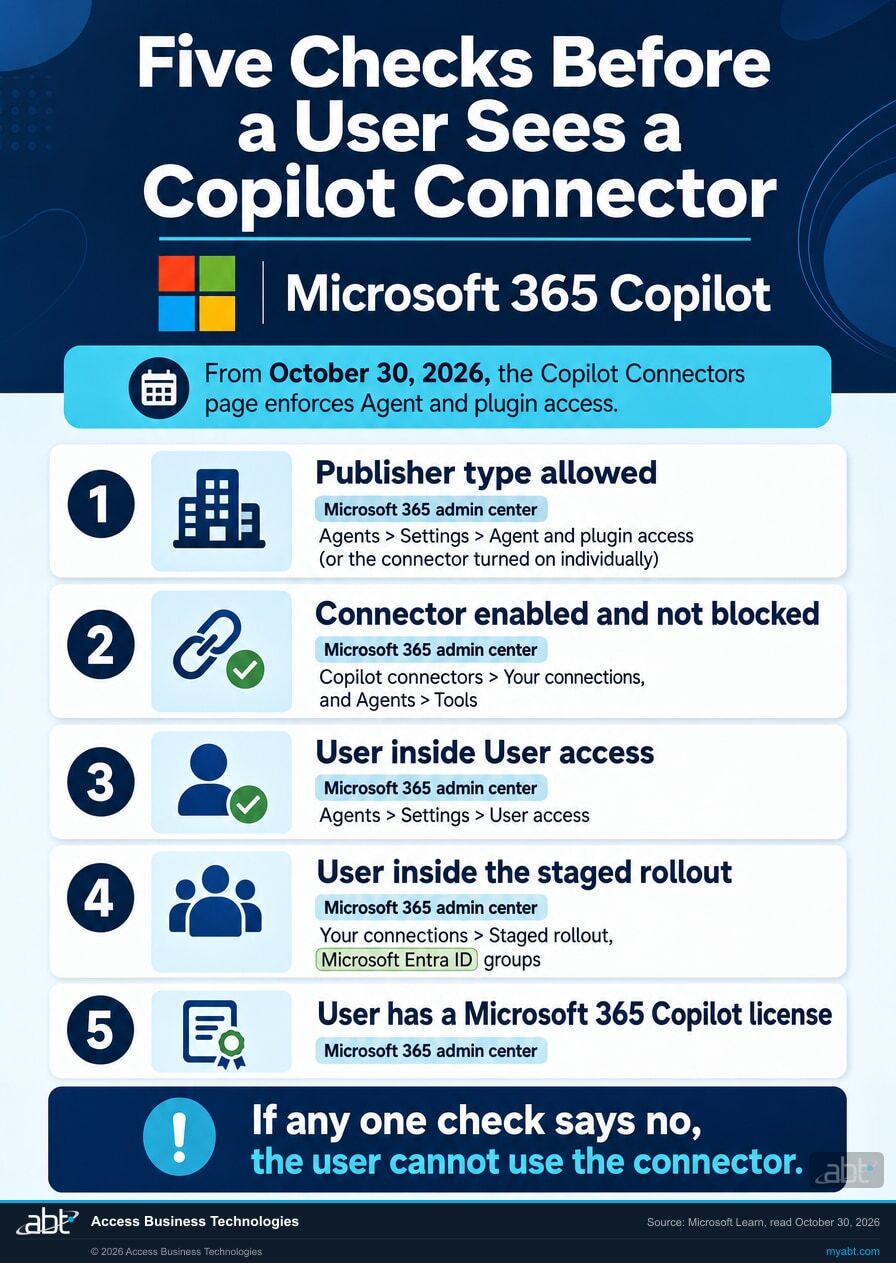
Users answer the approval prompts. Administrators decide what there is to approve.
Approving a single write happens on the user's side, tool by tool, and Always allow is the user's choice. The administrator's side sits one level up: which publisher types are allowed, who is inside User access, which connectors are enabled and staged to whom, and which connectors or tools are blocked. For an institution, that list is where the real decision lives, and it is worth recording in writing.
One detail from Microsoft's own troubleshooting guidance matters to anyone who disabled a single connector. While its publisher type stays selected in Agent and plugin access, a new version or a republished connector can follow the default rollout and come back. To keep a connector off, Microsoft points to clearing the publisher type or setting the connector's staged rollout to No users, then checking as a non-admin test user in Copilot under Settings, then Sources. Microsoft handles neighboring questions with separate controls, covered in our guides to the advanced agent upload setting and the Copilot plugin registry.
For credit unions, banks, and mortgage companies
Why does a write-capable connector matter more at a financial institution?
The productivity is the reason to want it. The data flow is the reason to review it first.
Picture the good version first. A processor asks Copilot to log a borrower's question as a ticket in the team's tracker. An operations lead updates a vendor record in the CRM straight from the email in front of them. Nobody copies and pastes, and the record is current before the meeting ends. That is where Microsoft has taken Copilot, and it is worth having.
Every one of those actions sends institution data to an outside service. At a regulated institution, a data flow to a third party is a vendor question, and vendor oversight programs already have a place for it. The connector is the new route. The review is the familiar one, and the vendor due diligence file is where its answer belongs.
"These actions export Customer Data to the connected system to create, update, delete, or otherwise modify data."
Microsoft Learn, Federated connectors overview, section on confirming an actionThe connector terms carry a September 22 date
Microsoft's terms of use for Copilot connectors carry an update date of September 22, 2026. They say that by enabling connectors you authorize Microsoft, subject to your configuration, to send Customer Data to third-party services and to modify data in those services, and that you, as the data controller, are "solely and exclusively responsible" for that connector functionality. The terms also point out that the third-party service may carry terms of its own. Microsoft's recommendations for this change ask administrators to review those agreements for licensing, privacy, data residency, and acceptable use.
For a compliance officer, that reads as a familiar allocation. Microsoft provides the plumbing, the institution owns the decision to turn it on, and the other end of each connection answers to its own contract.
The evidence has to exist before anyone asks for it
Microsoft states that administrators can audit connector activity in Microsoft Purview, and Purview's Copilot interaction records carry a property listing the plugins or extensions enabled for an interaction. Before a policy relies on that trail, run one approved write against a test service, find the record, and write down what it shows on your tenant and what the connected service's own log has to supply. A control you have watched fire is one you can describe to an examiner with confidence. Our guide to auditing AI with Purview and Sentinel covers the quarterly review that record would feed.
What should be in place before a third-party connection can write?
The Short from our channel names three guardrails for any outside AI that touches a tenant: Conditional Access over which apps and devices connect, data loss prevention over sensitive data, and audit logging, so the institution can say what connected and what it touched. Connectors that can write raise the stakes on the third, because the record now has to show changes as well as reads.
ABT manages Microsoft 365 tenants for credit unions, banks, and mortgage companies, so the Copilot questions and the examination questions arrive at the same desk. They are easier to answer together, starting with how agents get built and approved at your institution.
The short list
What should an administrator check now that connectors can write?
Microsoft's own recommendations run to six lines. Here is the version that leaves an institution with something to file afterwards.
List the federated connectors in your tenant
In the Microsoft 365 admin center, open Copilot connectors, then Your connections. Note which connectors are Microsoft-built, and therefore available whenever that publisher type is allowed, and which external connectors somebody turned on. Microsoft lists Global Administrator and Search Administrator as the roles for this work.
Read each connector's write and delete tools
Where a connector's details page shows a Tools section, sign in to the third-party service there and select All tools. Microsoft labels that view as coming soon, so for other connectors sign in to Microsoft 365 Copilot, open Settings, then Sources, select the connector, and expand Write/Delete tools. Use an account with a high level of access, because Microsoft notes the list reflects the permissions of the account that signs in.
Decide per connector: enable, stage, block, or disable
Staging to a Microsoft Entra ID group keeps a useful connector with the people who need it. Blocking under Agents, then Tools, or disabling under Your connections takes it away from users, and Microsoft's control table also lists blocking for a single tool. Each is a sound answer, and the useful thing is that somebody chose one and wrote it down.
Confirm Agent and plugin access and User access, then test as a user
Both live under Agents, then Settings. From October 30, 2026, the Copilot Connectors page enforces Agent and plugin access, so make sure each publisher type says what your institution intends. Changes can take up to 10 minutes to appear. Then sign in as a non-admin test user, open Copilot Chat, then Settings, then Sources, and confirm the list matches your decision. Our Agent 365 governance guide walks through the neighboring controls.
Read the terms on both ends of the connection
Review Microsoft's connector terms of use and your agreement with each publisher whose connector stays available, against your licensing, privacy, data residency, and acceptable-use requirements. Microsoft lists that review in its own recommendations for this change.
Tell users what Always allow means
Update user and help-desk guidance: actions run with your own permissions in the other service, Always allow stops the prompt for that tool, and the whole Write/Delete group can be set back to Needs approval in Copilot under Settings, then Sources. Microsoft recommends the same guidance update.
Prove the audit trail, then watch the usage
Run one approved write against a test service and find it in Microsoft Purview before relying on the record. Microsoft's Message Center post MC1404326 describes a Connectors usage report under Reporting, then Usage, then Microsoft 365 Copilot, then Connectors, showing active users and responses per connector, with general availability set for November 2026 and a Microsoft 365 Copilot (Premium) license required. Review it once it reaches your tenant.

Read the notices in your own tenant
In your Microsoft 365 admin center, open Message center and search for MC1476316, on connectors gaining create, update, and delete actions, and MC1454973, updated October 23, 2026, on connector governance moving to Allowed agent types from October 30. They are the authoritative versions for your tenant, and each takes about two minutes to read.
How ABT helps
A free security assessment
ABT is a Tier 1 Microsoft Cloud Solution Provider. We manage Microsoft 365 tenants for more than 750 financial institutions, and questions like this one reach our desk every month.
We show you which outside services Copilot can reach from your tenant, and which of them it can change
- The connector inventory. Every federated connector available in your tenant, whether Microsoft or an external publisher built it, and who it is staged to.
- The write list. Which tools on each connector can create, update, or delete data, read with a high-access account from the admin center or Copilot's Sources settings, dated, with anything that account cannot see noted.
- The settings that decide it. Agent and plugin access, User access, staging groups, and any connector or tool blocked under Agents, then Tools.
- The wider picture. Conditional Access, guest access, and data loss prevention around Copilot, measured by what each policy actually does in your tenant.
- The note for the file. A short written record of what was decided and when, which is the part that answers the question later.
ABT also operates M365 Guardian, its managed security service for credit unions, banks, and mortgage companies. Learn about M365 Guardian
Related reading
If this opened a bigger question
A connector that can write is a third-party integration, a vendor relationship, and an audit record at the same time. These three pick up each thread.

Should You Connect Claude or ChatGPT to Your M365 Tenant?
A five-question decision framework for CISOs weighing third-party AI access to a financial institution's tenant.
Read the framework
Vendor Due Diligence on Microsoft 365: What Goes in the File
What belongs in a bank or credit union vendor file for Microsoft 365, built from the audit reports Microsoft publishes.
Read the guide
AI Governance Auditing: The Purview and Sentinel Quarterly Cycle
The audit, data loss prevention, and monitoring cycle examiners look for when a community bank or credit union runs AI.
Read the guideAnswered
Copilot connector write actions, answered
Verify it yourself
Where the facts on this page come from
Every Microsoft date, count, and quotation above was read from the Microsoft sources listed here on October 30, 2026. This page first published on September 23, 2026 and was revised on October 30, 2026.
- Microsoft 365 Message Center post MC1476316, Microsoft 365 Copilot: Federated Copilot connectors support create, update, and delete actions, published September 21, 2026. Source for the early to late October 2026 rollout, actions running with the signed-in user's permissions, the approval requirement, the Researcher agent staying read-only, the MCP tools section on each connector's details page, and Microsoft's recommendations to review connectors, third-party agreements, and user guidance. Visible to administrators in your own Microsoft 365 admin center.
- Microsoft 365 Message Center post MC1454973, Manage Copilot connectors (Global setting) from Agent 365: SetFederatedConnectors CLI toggle is retiring, published August 14, 2026 and updated October 23, 2026. Source for the August 25, 2026 deprecation, the October 30, 2026 date from which the Copilot Connectors page enforces Allowed agent types, and the default posture for tenants that take no action.
- Microsoft Learn, Federated connectors overview, updated October 19, 2026. Source for Model Context Protocol and real-time access, no data indexed into Microsoft 365, default availability by publisher type, the control table (Agent and plugin access, User access, enable and disable, staged rollout, tool-level and connector-level blocking under Agents, then Tools), the five conditions for a user to see a connector, the Connectors Gallery table (178 data sources in 16 categories, counted by ABT on October 30, 2026), the supported experiences, the four approval answers, per-tool approvals, tools returning to Needs approval, Customer Data export, write tools not being enabled separately, the Tools view marked as coming soon, auditing in Microsoft Purview, and OAuth 2.0.
- Microsoft Learn, Manage federated connector availability, updated October 15, 2026. Source for the administrator roles, clearing a publisher type setting existing connectors to No users, the 10-minute propagation time, and the absence of a PowerShell or API option for Agent and plugin access.
- Microsoft Learn, Set up custom federated connectors, frequently asked questions, updated October 19, 2026. Source for "Agent and plugin access (formerly Allowed agent types)," blocking having the same effect as disabling, why a disabled connector can come back, and testing as a non-admin user.
- Microsoft Learn, Agent settings in Microsoft 365 admin center, read October 30, 2026. Source for the three Agent and plugin access choices, the User access options, and plugins including tools, MCP servers, connectors, and skills.
- Microsoft Learn, Microsoft 365 Copilot connectors: Terms of use, updated September 22, 2026. Source for the authorization to send Customer Data to and modify data in third-party services, and for the customer's responsibility as data controller.
- Microsoft Learn, Audit logs for Copilot and AI applications, updated August 26, 2026. Source for the plugin and extension details carried in Copilot interaction audit records.
- Microsoft 365 Message Center post MC1404326, Microsoft 365 admin center: New usage report for Copilot connectors, updated October 16, 2026. Source for the Connectors usage report location, its November 2026 general availability, and its license requirement.
Your connector list now decides
what Copilot can change.
Listing the connectors available in your tenant and the write tools each one exposes is a short piece of work. Done now, it leaves a record of who decided each one, before Always allow choices and publisher updates pile up.
Tell us a little about your environment and we will come back with what we would check first.
What should we look at? Optional.
Encrypted. Private.
Thank you. That is with us.
An ABT specialist will be in touch shortly. If a connector decision is waiting on this, say so in your reply and we will move it to the front.
