In This Article
- The short answer for a United States tenant
- The decision someone made once and cannot undo
- Four services committed, four not
- Where "the United States" actually is
- What Copilot stores, and where it stores it
- How to pull the evidence in about a minute
- What the examiner is actually asking for
- Frequently Asked Questions
The question usually arrives on someone else's schedule. A vendor due diligence questionnaire lands with a box that says "specify the geographic location where customer data is stored at rest." An examiner asks it out loud in a pre-exam call. A board member reads something over the weekend and forwards it Monday with three words on top: "can we confirm?"
Most banks, credit unions, and mortgage lenders can answer it. What they usually cannot do is answer it in the next ten minutes with a screenshot attached, which is what the person asking actually wants. So the question turns into a support ticket, then a thread with the licensing reseller, then two weeks of nobody being certain.
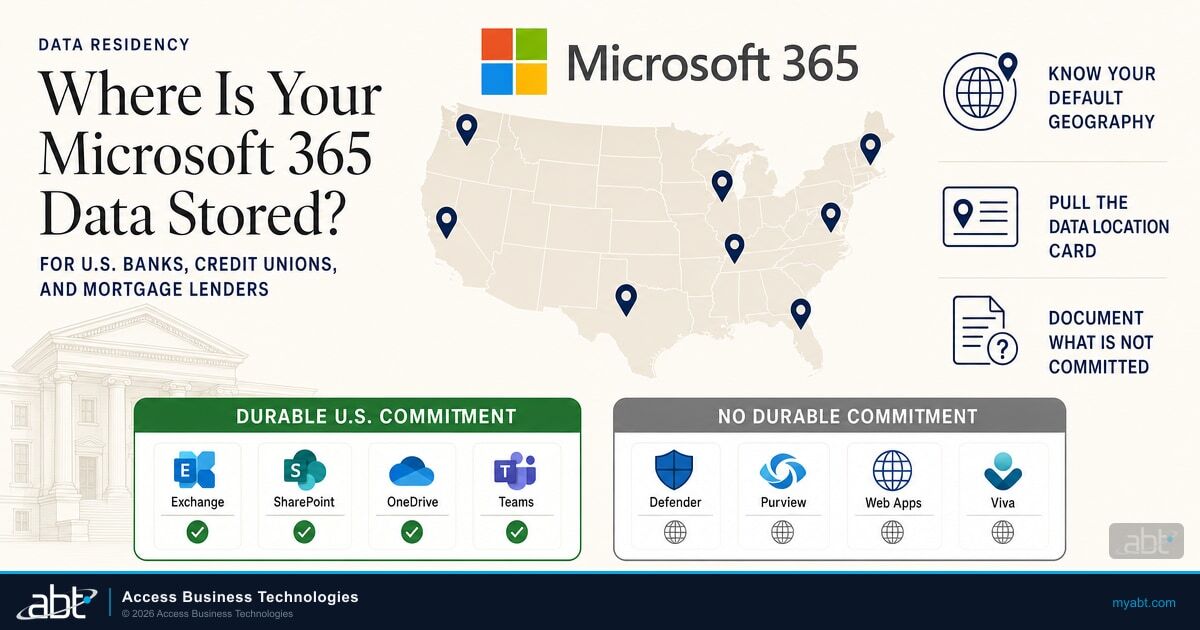
The answer takes about a minute to find, and for a United States tenant it is more interesting than most people expect. Four of the Microsoft 365 services with published residency commitments are contractually committed to stay in the United States. Four others, sitting in the same subscription, are not committed to stay anywhere at all. Here is how to tell which is which, and how to produce the evidence.
The short answer for a United States tenant
If your institution signed up for Microsoft 365 with the United States as its country, your Exchange Online mailboxes, your SharePoint and OneDrive content, your Microsoft Teams data, and your Microsoft 365 Copilot interactions are covered by a data location commitment in Microsoft's Product Terms. Microsoft commits to storing that data at rest in the United States.
That commitment is real, contractual, and it is the answer to the question on the questionnaire. It is also narrower than the phrase "our Microsoft 365 data stays in the US" suggests, because it does not cover everything in your subscription.
The answer in one sentence
For a United States tenant, Exchange Online, SharePoint, OneDrive, Teams, and Microsoft 365 Copilot have a durable United States data location commitment through Product Terms. Microsoft Defender for Office P1, the Microsoft 365 web apps, Viva Connections, and Microsoft Purview do not, and the add-on that would cover them cannot be purchased by a United States tenant.
That last clause is the part that surprises people, so it is worth being precise about it.
The decision someone made once and cannot undo
Every Microsoft 365 environment has a property called the Default Geography. It comes from the country entered when the tenant was first created, and Microsoft's documentation is blunt about what happens next: once a tenant is created, the Default Geography cannot be changed.
Whoever set up your tenant made a permanent data residency decision, possibly years ago, possibly during a trial, possibly at a predecessor institution before a merger. Nobody signs off on it. It is simply a field on a signup form that turns into a contractual commitment and then cannot be edited.
Why This Matters for Financial Institutions
Two situations make this worth checking rather than assuming. The first is a merger or acquisition, where the surviving institution inherits a tenant it did not create and may not know the country value on. The second is a tenant that started life as a trial or a small-business subscription and grew into the production environment, which happens more often than anyone puts in writing.
If the Default Geography is wrong, the fix is not a setting. It is a tenant-to-tenant migration, which is a project, not a support ticket.
This is a good reason to confirm the value before an examiner asks rather than during. It is also one of the practical arguments for handling residency as part of a planned tenant-to-tenant migration during a credit union or bank merger, when a migration is already scoped and funded, rather than discovering the problem later when it is nobody's budget.
Four services committed, four not
Microsoft publishes three mechanisms that create what it calls a Durable Commitment on Data Location: the Product Terms, the Multi-Geo add-on, and the Advanced Data Residency add-on. A service is committed for your tenant only if at least one of those three applies to it in your geography.
For the United States row of Microsoft's published table, the picture splits cleanly in half. Microsoft revises these tables as it opens datacenter regions and moves services between programs, so the table below reflects Microsoft's published documentation as of August 4, 2026, and the admin center navigation described later reflects the same date. Re-check both against Microsoft Learn before you attach either to an examination response.
| Microsoft 365 service | Product Terms | Multi-Geo | Advanced Data Residency |
|---|---|---|---|
| Exchange Online | Yes | Yes | Not available in the US |
| SharePoint and OneDrive | Yes | Yes | Not available in the US |
| Microsoft Teams | Yes | Yes | Not available in the US |
| Microsoft 365 Copilot and Copilot Chat | Yes | Yes | Not available in the US |
| Microsoft Defender for Office P1 | No | No | Not available in the US |
| Microsoft 365 web apps | No | No | Not available in the US |
| Viva Connections | No | No | Not available in the US |
| Microsoft Purview (select services) | No | No | Not available in the US |
The Advanced Data Residency column is the one that catches people. Advanced Data Residency is the add-on Microsoft sells specifically to extend residency commitments across a wider set of services, and it covers exactly the four services in the bottom half of that table. It is available only to tenants whose country is on Microsoft's Local Region Geography list, which currently runs to 27 countries including Canada, the United Kingdom, Germany, Japan, and Australia.
The United States is not on that list. American tenants sit in a grouping Microsoft calls Macro Region Geography 3 for the Americas, alongside Brazil, Canada, Chile, and Mexico. A United States commercial tenant cannot buy Advanced Data Residency, which means there is no upgrade path to a residency commitment for those four services.
One scoping note before anyone forwards this to a vendor manager. Everything here describes the Microsoft 365 commercial cloud, which is what the overwhelming majority of community banks, credit unions, and mortgage lenders run. The US Government cloud offerings, GCC and GCC High, are separate environments with their own residency and eligibility terms, and institutions on those plans should read against that documentation instead. Negotiated enterprise agreements can also carry bespoke terms. If you are unsure which applies to you, that is itself worth confirming before the questionnaire arrives.
What "no commitment" actually means
Microsoft states the consequence plainly. Where a tenant does not have a Durable Commitment on Data Location, the data is not committed to reside in any particular datacenter, and Microsoft will store it wherever it can deliver the service effectively. In Microsoft's own words, that storage location is subject to change without notice.
This is not a claim that the data has left the country, and it should not be written up that way. It is narrower and more awkward than that: for those four services, your institution cannot affirmatively document where the data resides, because Microsoft has not committed to a location and reserves the right to move it.

Where "the United States" actually is
When Microsoft commits to storing data in the United States, it is committing to a set of datacenter regions, not a single building. Microsoft publishes the metropolitan areas: Boydton, Cheyenne, Chicago, Des Moines, Quincy, San Antonio, Santa Clara, and San Jose.
It does not publish exact addresses, and it says so directly, citing the physical security of the facilities. This is worth knowing before an examination, because a questionnaire that demands a street address is asking for something no major cloud provider will supply. The metropolitan list plus the contractual commitment is the complete available answer, and it is the answer the regulators' own guidance contemplates.
Two technical points tend to come up here, and both have documented answers.
On encryption, Microsoft 365 encrypts customer data at rest using volume-level and file-level encryption, and encrypts data in transit using multiple technologies including Transport Layer Security and Internet Protocol Security. On Microsoft personnel access, Microsoft states that by default its engineers have no standing administrative privileges and no standing access to customer data. Access is limited, logged, time-boxed, and approved by a Microsoft senior manager, and for institutions licensed for Customer Lockbox, approved by the customer as well.
The third point is the one that generates the most confused escalations. A user request may be processed by servers in a region other than where the data sits at rest, because of network routing. Microsoft's documentation addresses this specifically and states that in those cases the customer data is not moved to a new at-rest location. Processing location and storage location are different questions, and a network trace showing a connection to another region is not evidence that data has been relocated.
Processing location and storage location are different questions. A network trace showing a connection to another region is not evidence that data at rest has moved.
What Copilot stores, and where it stores it
Copilot is where residency questions have gotten sharper, because the thing being stored is new. Microsoft calls it the content of interactions, and defines it as the user's prompt, Copilot's response, and the citations to whatever information was used to ground that response.
For a United States tenant, that content of interactions is covered by the same Product Terms commitment that covers Exchange Online and SharePoint. Copilot prompts and responses are committed to the United States. That is a genuinely useful thing to be able to say to a board that is nervous about AI, and it is documented rather than reassuring.
Institutions running Multi-Geo should know one wrinkle. Under Multi-Geo, the storage location for a user's Copilot interactions follows that user's Preferred Data Location, not the tenant default. If the Preferred Data Location is unset or invalid, the data lands in the tenant's primary provisioned geography. Microsoft's own worked example is a user in Canada asking Copilot to rewrite a paragraph in a document stored in France: the prompt and the suggested rewrite are stored in Canada, while the document stays in France.
Multi-Geo is also not a small purchase. It requires an active Enterprise or Cloud Solution Provider agreement and purchased Multi-Geo units totaling more than five percent of the tenant's eligible licenses. For most single-country community institutions it solves a problem they do not have.
Copilot residency answers where the interactions are stored. It does not answer who could see them, which is a separate control set and a more common source of audit findings. That is a permissions question, covered in our guidance on fixing Copilot oversharing before rollout.
How to pull the evidence in about a minute
The artifact you want is called the Data Location Card, and it lives in the Microsoft 365 admin center. It shows the actual current storage location for each service rather than the theoretical one, which is exactly the distinction an examiner is testing.
Sign in to the Microsoft 365 admin center with an account that can read organization settings.
Go to Settings, then Org settings, then Organization profile, then Data location.
The card lists the current geography per service. Screenshot it, date it, and note which services it does not display.
Store it with the vendor management file for the Microsoft relationship, not in an inbox.
Two honest caveats about the card. It currently displays Exchange Online, SharePoint, OneDrive, Teams, Microsoft 365 Copilot, the built-in security features for cloud mailboxes, and Viva Connections. Microsoft Defender for Office P1, the select Purview services, and Copilot Chat are not currently shown on it, so the card alone will not give you a complete picture of all eight services. And the card reports current location, which for an uncommitted service is a snapshot rather than a promise.
That is why the screenshot needs a date on it. For the four committed services the date is a formality. For the four uncommitted ones it is the whole point, because Microsoft has reserved the right to change that location without telling you.

Not sure what your tenant's Default Geography is set to?
ABT manages Microsoft 365 tenants for more than 750 banks, credit unions, and mortgage companies. We can pull your Data Location Card, document which services carry a commitment and which do not, and hand you the evidence package before your next examination rather than during it.
What the examiner is actually asking for
It helps to understand what the question is testing. The FFIEC IT Examination Handbook InfoBase, the online handbook published at ithandbook.ffiec.gov, devotes an appendix of its Outsourcing Technology Services booklet to third-party service providers and data location. The standard it sets is about examinability and documentation rather than geography for its own sake.
"U.S. regulatory authorities must have the ability to examine the services performed by an organization's third-party service provider regardless of whether it is foreign or domestically based. Organizations must maintain, in the files of a U.S. office, appropriate English language documentation to support all arrangements with service providers."
Read that carefully, because the phrase "regardless of whether it is foreign or domestically based" is doing real work. The obligation to document does not switch off because the provider is American. Microsoft is a domestic provider and the appendix's foreign-provider risk analysis is not being applied to it here. What transfers is the documentation standard: the institution keeps the records, in a United States office, and can produce them.
Framed that way, the residency question stops being a geography trivia question and becomes a records question. Can you show, on demand, which services are contractually committed and which are not, and can you show you knew the difference?
In practice, the institutions that handle this well walk in with three things: a dated Data Location Card, the relevant Product Terms language, and a short written note acknowledging that four services carry no commitment. Whether any particular examination is satisfied is a judgment your examiner and your compliance counsel make, not something a vendor or a blog post can promise in advance. What is safe to say is the comparison. An institution holding those three artifacts is in a materially better position than one that answers "it is all in the US" and cannot show its work, even when the underlying data happens to be sitting in Des Moines.
The appendix also ties this class of arrangement to Section 501(b) of the Gramm-Leach-Bliley Act and to Bank Secrecy Act recordkeeping, which is a reminder that residency documentation is one thread in a larger vendor management file rather than a standalone exhibit. It sits naturally alongside your Microsoft 365 audit log retention posture and your data retention and email archiving configuration, both of which examiners tend to ask about in the same session.
None of this requires a project. It requires someone to open the admin center, take a screenshot, and write a paragraph explaining what it does and does not cover. The institutions that struggle with the question are not the ones with a bad answer. They are the ones who have never looked.
Frequently Asked Questions
For a tenant whose Default Geography is the United States, Microsoft commits through its Product Terms to storing Exchange Online, SharePoint, OneDrive, Microsoft Teams, and Microsoft 365 Copilot data at rest in the United States. Microsoft publishes the datacenter metropolitan areas as Boydton, Cheyenne, Chicago, Des Moines, Quincy, San Antonio, Santa Clara, and San Jose. It does not publish exact street addresses, citing physical security of the facilities.
No. Advanced Data Residency is available only to tenants whose default country is on Microsoft's Local Region Geography list, which as of August 2026 includes 27 countries such as Canada, the United Kingdom, Germany, Japan, and Australia. The United States is not on that list, so a United States commercial tenant cannot purchase the add-on. This matters because Advanced Data Residency is the only mechanism that extends a durable commitment to Microsoft Defender for Office P1, the Microsoft 365 web apps, Viva Connections, and Microsoft Purview. The US Government cloud offerings, GCC and GCC High, are separate environments governed by their own residency terms.
No. Microsoft states that once a tenant is created, its Default Geography cannot be changed. The country entered during signup permanently determines where Microsoft provisions data for that tenant. If the value is wrong, the remedy is a tenant-to-tenant migration rather than a settings change, which is why it is worth confirming during a merger or acquisition when migration work is already scoped.
For a United States tenant, yes. Microsoft calls this data the content of interactions and defines it as the user's prompt, Copilot's response, and the citations used to ground that response. It is covered by the same Product Terms data location commitment that covers Exchange Online, SharePoint, OneDrive, and Teams. Institutions running the Multi-Geo add-on are an exception, because there the storage location follows each user's Preferred Data Location rather than the tenant default.
Use the Data Location Card in the Microsoft 365 admin center, found under Settings, then Org settings, then Organization profile, then Data location. It reports the current storage geography per service. Capture it, date it, and file it with the vendor management record for the Microsoft relationship. Note that the card does not currently display Microsoft Defender for Office P1, the select Purview services, or Copilot Chat, so pair the screenshot with a short written note covering the services it omits.
Not necessarily. Microsoft documents that a customer request may on occasion be handled by servers in a region different from where the data is stored at rest, because of network routing decisions, and states that in those cases the customer data is not moved to a new at-rest location. Processing location and storage location are separate questions. A connection to another region is not by itself evidence that data at rest has been relocated, and the Data Location Card remains the authoritative source for where data actually resides.