

In This Article
The apps your managed provider connects to your Microsoft 365 tenant do useful work all night. They back up mail, pull reports and watch for alerts, and nobody has to sign in for any of it.
Since November 1, 2026, someone has been signing in as apps like those. On November 3, the security vendor Todyl reported a campaign it calls Key Eater. One operator, Todyl says, is signing in to managed service providers' (MSPs') Microsoft 365 and Azure environments "as their own applications," using stolen credentials that are still valid. Todyl counts about 45 app registrations targeted at roughly 18 organizations, with more than 33 authenticating successfully.
Todyl is direct on the cause: "No Microsoft vulnerability is involved." The operator holds stolen Entra app secrets, the passwords that apps use to sign in, and they still work. Jon Semon of Huntress told Cybersecurity Dive the attacker "already had valid secrets for application registrations in Microsoft Entra."
The sectors Todyl lists are government, energy, food and agriculture, transportation, construction and engineering, legal, education and nonprofits. Financial institutions are absent from that list, and the list only reflects what Todyl can see, so a bank, credit union or mortgage company with a provider has good reason to look for itself.
This guide to stolen Entra app secrets is for IT and security leaders at community banks, credit unions and mortgage companies that use a managed provider for Microsoft 365. ABT is a Tier-1 Microsoft Cloud Solution Provider serving 750+ financial institutions, and we manage tenants under delegated administrative access our customers grant. Microsoft documents a specific limit on what you can enforce against a provider's app, and the checks below work within that limit.
The clock is already running. Entra keeps sign-in logs for seven days on the Free tier and 30 days on P1 and P2. Sign-ins from November 1, the first access Todyl reports, age out around November 8 or December 1, depending on your license.
What Todyl reported
Todyl describes a single operator working from one virtual private server, drawing on a stockpile of stolen app secrets assembled before November 1. Scripted clients made 95% of the sign-ins. How the operator first got those credentials is still unknown, and the activity is unattributed.
For nearly every credential, the operator asks for a Key Vault token early. Key Vault is where organizations keep secrets for other systems, and Todyl reports that apps which had never been used before begin authenticating within minutes.
Here is the sequence as Todyl lays it out, in selected events. The times are UTC, the same basis Microsoft documents for downloaded sign-in logs.
The operator signs in with a stolen app credential.
Files come out of SharePoint at about one per second, focused on names related to credentials and configuration. Across the campaign so far, Todyl counts searches across about 25 tenants, 81 files downloaded and around 2,279 mailbox items accessed.
A single multi-tenant app runs through 15 client tenants in about 10-second loops. Spoofed browser signatures start one minute later, after detections fire.
Multiple users' refresh tokens are replayed with scripted clients, and Conditional Access blocks all of them.
Todyl describes the activity as ongoing as of its November 3 update.
The files matter more than the mailbox count. Todyl lists password lists, private keys, VPN profiles, multifactor authentication (MFA) and remote monitoring and management (RMM) API keys, backup-storage credentials, firewall and remote desktop (RDP) configurations, Azure environment inventories and service-account maps. It expects them to be used against VPNs, MFA services, remote monitoring platforms, backup storage and network devices. Those systems sit outside Microsoft 365 and outside Todyl's log view, so a clean Microsoft 365 review leaves them as a separate question.
The downstream step is the one that reaches a provider's customers. Todyl says the operator uses MSP multi-tenant apps and apps with granular delegated admin privileges (GDAP), plus Partner Center tokens, to reach client tenants. One MSP's app obtained a Partner Center token, and its GDAP automation app was tried against client tenants without success. An earlier Todyl update reports that in at least one case, access to an MSP was followed within seconds by access to several downstream customer tenants through delegated admin.
Why stolen Entra app secrets never meet your MFA policy
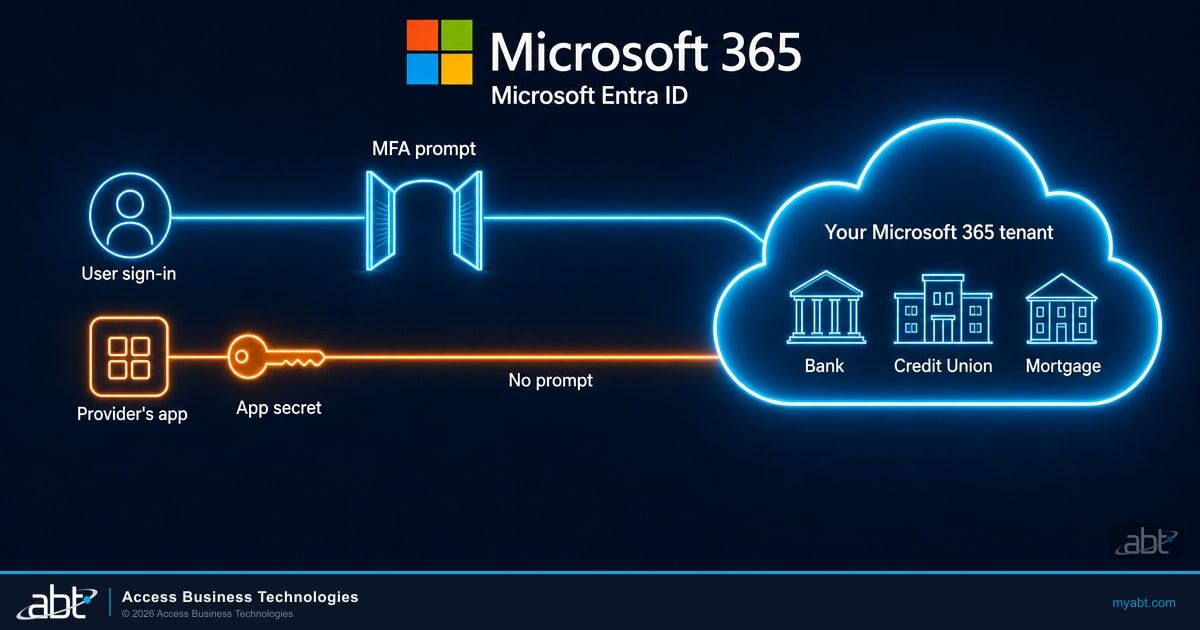
Most of the identity work a community institution has done protects people: MFA, Conditional Access, risky sign-in policies. Apps, and anyone holding stolen Entra app secrets, sign in through a different door. Todyl puts the problem in one sentence: "Because these are app sign-ins, there is no MFA prompt, user-scoped Conditional Access doesn't apply, and firewall rules never see the traffic."
Microsoft's documentation makes the MFA point directly. It uses the term workload identities for the apps, service principals and managed identities that software signs in with. It notes that they "Can't perform multifactor authentication," "Often have no formal lifecycle process," and "Need to store their credentials or secrets somewhere."
That last point is the exposure. A secret that lives in a script, a runbook or a documentation system can be copied, and whoever holds a copy can use it from anywhere.
When a person signs in
- MFA prompt appears when policy requires it
- User-scoped Conditional Access evaluates the sign-in
- Sessions can be revoked and the password reset
- Shows up in the interactive sign-in log your team already reads
When an app signs in with a secret
- No MFA prompt
- User-scoped Conditional Access does not apply
- A valid credential signs in from any address your policies leave open
- Shows up in a separate service principal sign-in log
Our earlier guide to Azure service principal security covers how these identities get attacked inside one tenant, and our piece on service account password spray covers the password-based accounts that no person signs into. With stolen Entra app secrets, Key Eater adds the provider channel: one app, one credential, many customers.
Where Conditional Access stops for provider apps
A provider that builds one app for all its customers usually registers it as a multitenant app. The registration and the credential live in the provider's tenant. When you consent, your tenant gets a service principal, a local copy of the app's identity, and that copy carries whatever permissions you approved.
Microsoft Entra has Conditional Access for workload identities, and it can block an app's sign-in from outside an allowed network range. It requires Workload ID Premium, a standalone product listed at $3 per workload identity per month.
Its scope is the part to read carefully. Microsoft's page says: "Policy can be applied to single tenant service principals that are registered in your tenant. Microsoft and third-party SaaS applications, including multitenant apps, are not covered by these policies. Managed identities aren't covered by policy."
So a location policy you write in your own tenant can protect single-tenant apps you registered yourself. It has no effect on your provider's multitenant app. Here is what remains available against stolen Entra app secrets for each kind of app:
| Control | Single-tenant app registered in your tenant | Provider's multitenant app | What it takes |
|---|---|---|---|
| Conditional Access location policy | Covered | Outside policy scope | Workload ID Premium; assign directly to the service principal |
| Risk-based Conditional Access | Covered | Outside policy scope | Workload ID Premium |
| ID Protection risk detections | Detected | Detected | Security Reader to view; Microsoft says tenants without Workload ID Premium receive all detections with limited reporting details |
| Service principal sign-in logs | Visible | Visible for sign-ins into your tenant | Reports Reader; 7 days on Free, 30 days on P1 and P2 |
| Review and revoke admin-consented permissions | Available | Available | Enterprise apps, Permissions page |
| Turn off the app in your tenant | Available | Available for your tenant's copy | Cloud Application Administrator |
Every control that still works in the right-hand column is something you read, review or switch off.
Your provider's multitenant app sits outside every workload Conditional Access policy you can write, so your control comes from four things you already hold: knowing the app is there, limiting what it can read, watching its sign-ins and keeping the switch that turns it off.

Six checks to run this week
These six checks look for signs of stolen Entra app secrets in your tenant and show what those secrets could reach. Start with the fourth check if time is short, since Entra's retention window is the one deadline here. Todyl's own advice is to "search as far back as retention allows."
If your provider holds the only admin accounts in your tenant, ask for Reports Reader and Security Reader for someone on your staff, which cover the risk, sign-in and credential checks. Microsoft lists Cloud Application Administrator or Application Administrator for the permissions review, so ask your provider to run that one with you.
Open the Partner relationships page in the Microsoft 365 admin center. It shows each partner and which ones have GDAP. A former partner should come off through Remove roles.
In the Entra admin center, open Enterprise apps, then an app, then Permissions. The Admin consent tab shows what the app can do across the organization. In Microsoft Graph, appOwnerOrganizationId gives the app's home tenant, which separates your own apps from everyone else's.
Go to ID Protection, then Risky workload identities, with at least Security Reader. Microsoft's detections cover multitenant apps and include suspicious sign-ins and leaked credentials.
Under Entra ID, Monitoring and health, Sign-in logs, search the Service principal sign-ins tab, then search the Non-interactive user sign-ins tab separately. Look for 199.19.77.84, for AADSTS7000215 or AADSTS7000222 failures from hosting addresses you can't place, and for one address touching several service principals. Save what you find before retention rolls it off.
The Application credential activity report (preview) shows credential type, last use and expiration. Usage reports need P1 or P2. A secret nobody has used in months is one to remove.
The operator went looking for file names related to credentials and configuration. Search your own libraries, and any shared with your provider, for password lists, private keys, VPN profiles and firewall configurations, then move what you find into a vault.
The AADSTS codes in the fourth check also appear for ordinary reasons, such as a forgotten script holding an old secret. The signal Todyl calls urgent is the sequence: a failure followed within minutes by a successful sign-in for the same app from the same address.
If you send Entra logs to Log Analytics or Microsoft Sentinel, Todyl publishes this query for the one high-confidence address:
union AADServicePrincipalSignInLogs, AADNonInteractiveUserSignInLogs
| where IPAddress == "199.19.77.84"
| project TimeGenerated, AppId, ServicePrincipalName, UserPrincipalName,
          ClientCredentialType, ResultType, ResourceDisplayName
Treat a clean result as one data point. Todyl notes the operator may move to new infrastructure as blocking takes effect. It also advises hunting on behavior, such as one address authenticating to three or more service principals in a tenant with mixed success. To block, name the exact address, and read Todyl's indicator list first, because it also names Microsoft service addresses that stay off your block list.
Your user-side policies still earn their keep here. Todyl says "Conditional Access blocked every token replay we saw on November 3, so check that your policies cover scripted clients signing in from hosting providers." M365 Guardian configures Microsoft Conditional Access, MFA enforcement and sign-in risk policies (risk-based policies need Microsoft Entra ID P2) through Entra ID and monitors them for configuration drift. Our piece on Conditional Access exclusions shows how to review the accounts those policies leave out, and our ConsentFix guide covers service principal restrictions, Token Protection and audit monitoring for OAuth consent grants.

Questions for your provider
Your provider is the party that can answer for the app's own credential, because it lives in the provider's tenant. Send these in writing, and keep the answers in your vendor file:
- Which of your apps are consented in our tenant, and what can each one read or change?
- Does each app sign in with a client secret, a certificate or a federated credential, and when was each last rotated?
- Where are those credentials stored, and who can reach them? Todyl's advice to MSPs is to "never store customer app secrets in runbooks, PSA/RMM notes or client documentation."
- Which GDAP roles do you hold in our tenant, for which of your staff, and when do they expire?
- Have you searched your logs for Key Eater activity since November 1, and what did you find?
- Which of our passwords, VPN profiles, firewall configurations and backup credentials sit in your documentation system?
- How quickly will you tell us if an app connected to our tenant is exposed, and who at your company will call us?
- Which identities does our agreement cover, including apps and service principals?
These questions apply to ABT exactly as they apply to any provider, because we hold delegated access too. Put them to us on the same terms and compare the answers. Bring them to an ABT financial services IT strategist.
Microsoft built GDAP as granular, time-bound access that a customer must explicitly grant, so a provider running a broad role on a long-dated relationship has something to fix. Apps are the other half of that conversation, because an app's permissions and its credential carry on outside a GDAP relationship.
On September 11, 2026, the Office of the Comptroller of the Currency (OCC) proposed third-party risk guidance built around actual risk:
"The OCC's proposed guidance would help banks focus their resources on third-party relationships based on the magnitude and likelihood of potential harm actually posed by each relationship, while tailoring risk management to each bank's size, complexity, and risk profile."
The OCC's proposal speaks to the banks it supervises. Whichever regulator supervises you, we would rank a provider with admin rights and consented apps in your tenant near the top of your vendor list. Our Microsoft 365 vendor due diligence guide covers how to document it.
If you own apps in your tenant
Many institutions have a few single-tenant apps of their own, and those are the apps Microsoft's workload controls were written for. Microsoft's guidance is blunt: "Don't use password credentials, also known as secrets." Our Azure service principal guide covers the rest of the work, and Key Vault logging belongs on the list, because Todyl says those logs are what confirm whether vault reads fed new credentials.
If you find something
A hit on the operator's address, or a failure followed by a success on an app you can't explain, points to stolen app secrets in use. That moves this from a review to an incident. Your incident response plan should already say who makes these calls. Save the logs before you change anything.
Rotating a stolen app secret is only the first step
Todyl's guidance is to remove all secrets, certificates and federated credentials on the affected app, and to watch for ones you didn't add, because "Issued tokens otherwise stay valid until expiry." It also reports that the actor keeps retrying against disabled and rotated apps, so expect failed attempts to continue. Then rotate everything in any Key Vault the app could read and any credentials in documents it reached, and find where the original credential was stored.
For a provider's multitenant app, the app's own credentials are the provider's to remove, so call the provider first. Your tenant's copy can also carry credentials a tenant admin added, so check it for any you didn't add.
Your own lever is that copy. Setting Enabled for users to sign-in to No in Enterprise apps stops new tokens being issued for it, though tokens already issued stay valid until they expire, and ID Protection offers a Disable service principal action. Whatever that app was doing for you stops too, so settle in advance who can make that decision at night.
Review the app's API permissions and roles, and search your audit logs for what it reached. Todyl advises treating confirmed access "as a potential data-exposure event" and involving "legal and privacy stakeholders early." ABT provides technical facts in these situations; the notification determination belongs to your counsel, your compliance officer and your cyber carrier. Talk through what you found with an ABT financial services IT strategist.
How ABT helps
ABT serves 750+ financial institutions and manages Microsoft 365 tenants under delegated administrative access that customers grant, so the provider questions above apply to us on the same terms.
Your own policies decide one part of this campaign. When the operator moved on to replaying users' refresh tokens, Conditional Access blocked every replay Todyl saw on November 3. M365 Guardian configures those policies through Entra ID and monitors them for configuration drift.
On the user side, Guardian Contain adds round-the-clock detection and automated containment. Guardian Respond adds ABT security engineers on covered incidents during business hours. Guardian Resolve adds after-hours escalation: a human on the incident at any hour.
Access you grant should be access you can see and end. ABT's Security Assessment runs on that model: "ABT uses a read-only Azure service principal," "provisioned with your consent and removed after the assessment is complete." Hold every app on your list to the same three tests: what it can read, who approved it, and when it ends.
The free ABT Security Assessment is a starting point for the user side of this picture. Most assessments finish within two weeks, with a written report, a review call with an ABT security engineer and a 90-day hardening roadmap.
Conditional Access blocked every token replay Todyl saw on November 3. See where your policies stand.
M365 Guardian hardens your Microsoft 365 tenant to Zero Trust baselines and watches for configuration drift, with ABT engineers on covered incidents on Guardian Respond and Guardian Resolve. The free Security Assessment reviews your Conditional Access policies and MFA coverage.
Frequently Asked Questions
Key Eater is security vendor Todyl's name for a campaign it reported on November 3, 2026. One unattributed operator signs in to managed service providers' Microsoft 365 and Azure environments as their own applications, using stolen credentials that are still valid. Todyl counts 27 organizations reached so far, including downstream clients, and calls that number a floor.
Todyl states that no Microsoft vulnerability is involved in Key Eater. The operator signs in with valid app credentials, drawn from a stockpile Todyl says was assembled before November 1 and added to with material it harvested along the way. How it first got them is still unknown. The fix is credential handling and app oversight.
MFA is a check on a person, and an app has no person to prompt. Microsoft says workload identities cannot perform multifactor authentication. An app proves itself with a secret, certificate or federated credential, so anyone holding a stolen but valid Entra app secret signs in as the app. Your MFA policy and user-scoped Conditional Access never evaluate that sign-in.
If your provider's app is a multitenant app, Microsoft says it is outside Conditional Access for workload identities. Those policies apply to single tenant service principals registered in your tenant and require Workload ID Premium. For a provider's app, you can review its permissions, watch its service principal sign-ins and risk detections, and turn off your tenant's copy.
Open the Partner relationships page in the Microsoft 365 admin center. It lists your partners and shows which ones hold granular delegated admin privileges, and you can remove a partner's GDAP by selecting the partner, then Remove roles. Apps need a separate review under Enterprise apps in Entra, because GDAP and app consent are different grants.
Rotating a secret is the first step of several. Todyl says issued tokens stay valid until expiry, and the Key Eater operator keeps retrying against rotated apps and replaying users' refresh tokens. Remove all credentials on the app, disable it if needed, revoke affected users' sessions, rotate anything in Key Vaults it could read and credentials in files it reached.