In This Article
Your team has Microsoft 365 Copilot licenses. Rollout day is coming. Your staff is excited. And somewhere in your admin center, four personalization settings are waiting for a decision you probably have not made yet.
Most organizations deploy Copilot and leave these settings at their defaults. That is not a disaster. But it is not the right starting point for a bank, credit union, or mortgage company either. The defaults are designed for a general Microsoft 365 customer. Your institution is not a general Microsoft 365 customer.
This article walks through each of the four Copilot Chat personalization controls, what they actually do for your users, and what regulated financial institutions should know before they flip them on for the whole organization. The privacy story is specific and worth understanding. Your Purview team will ask about it. The controls documented here may also inform supervisory expectations as AI governance matures across the financial sector.
The Four Controls, Explained Without Marketing Language
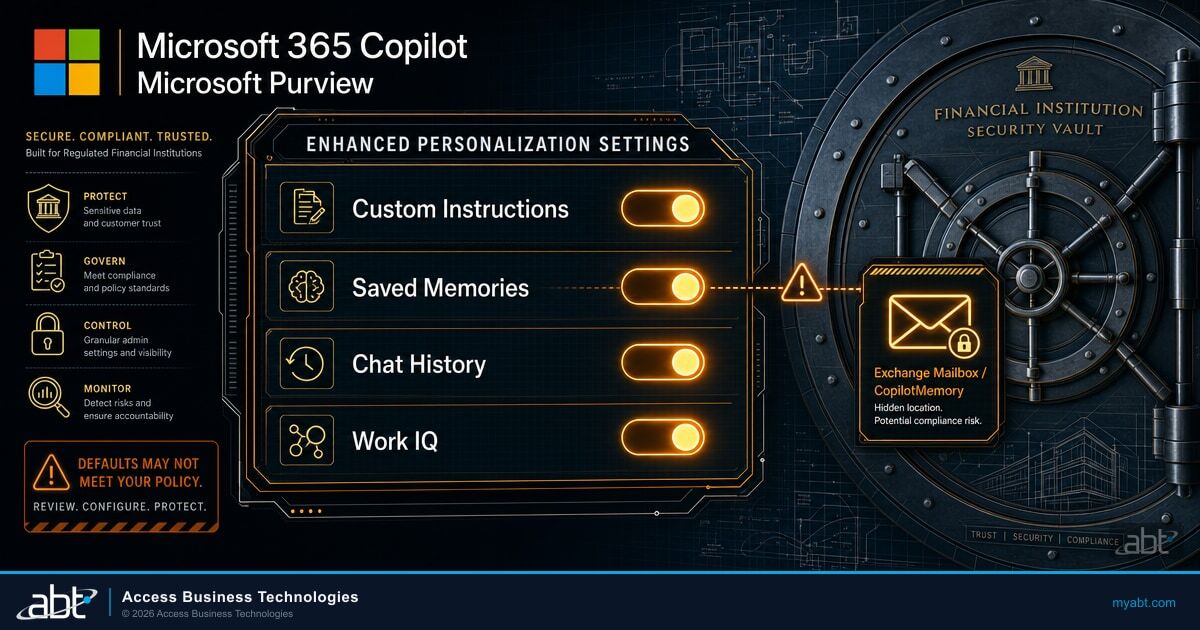
Microsoft groups Copilot Chat personalization under what it calls "Enhanced Personalization." Think of it as a master switch with four sub-controls underneath it. When the master switch is on, all four sub-controls are available to users. When the master switch is off, all four are disabled regardless of what individual users try to set.
Custom Instructions: Teaching Copilot How Your Users Work
Custom instructions are explicit preferences the user types in themselves. A loan officer might enter something like: "I review mortgage applications for a community bank. When I ask questions about loan guidelines, keep your answers concise and cite the specific guideline section." A compliance analyst might set "I prefer responses in bullet points with sources listed at the end."
Copilot uses these instructions across Copilot Chat conversations. They shape tone, response length, and context awareness without the user having to re-explain their role in every session.
Three Things That Matter for Regulated Institutions
First, custom instructions are not carried into Cowork. A user who has detailed custom instructions in Copilot Chat will start fresh in Cowork. Keep that in mind when you plan your rollout sequence.
Second, custom instructions are not eDiscovery-discoverable by administrators. If your compliance team ever needs to review what instructions a specific employee gave to Copilot, there is no Purview path to retrieve that information. The user can export their own custom instructions manually. Admins cannot. (We cover the full picture of what is and is not discoverable in the companion article on Copilot memory governance gaps for banks and credit unions.)
Third, when Enhanced Personalization is turned off at the tenant level, custom instructions are still visible in the Settings menu but users cannot set or edit them. The control appears but is greyed out.
Saved Memories: Copilot's Persistent Knowledge About Your Users
Saved memories are facts Copilot stores about a user, either because the user explicitly told Copilot to remember something ("remember that I work primarily with credit union member accounts") or because Copilot inferred a fact from past conversations. These memories persist across sessions.
Storage location matters for your compliance team. Saved memories are stored in a hidden folder in the user's Exchange mailbox -- a dedicated Copilot memory location that users cannot see in their standard mailbox view, but the data is there.
The Retention Gap That Catches Regulated Institutions Off Guard
Saved memories inherit the same security and compliance controls as mailbox data, including Customer Lockbox and encryption at rest. They are eDiscovery-searchable through Purview Content Search and eDiscovery tools -- unlike custom instructions.
However, the standard Purview retention policies for Microsoft Copilot experiences are designed to cover conversation prompts and responses. They do not automatically extend to saved memories, because memories are stored as Exchange mailbox items, not as conversation messages. To apply retention or deletion rules to saved memories, you would need retention policies scoped to Exchange mailbox items targeting the Copilot memory location specifically. That is not a standard out-of-the-box configuration.
Chat History (Frontier Tier): Dynamic Context from Past Conversations
Chat history personalization lets Copilot use context from the user's past conversations to make future sessions more relevant. If a user spent last week asking Copilot about commercial loan refinancing documentation, Copilot can carry that context forward.
This feature is available to organizations on the Frontier tier of Microsoft 365 Copilot. If your institution is on Copilot Business (the version designed for organizations under 300 seats on Business Basic, Standard, or Premium), confirm your tier eligibility before communicating this capability to users.
If Enhanced Personalization is turned off, any conversation history that Copilot would have used for this dynamic context is deleted after about 30 days. Cowork maintains its own separate conversation history and does not share chat history with Copilot Chat.
Work IQ: Copilot's Organizational Intelligence Layer
Work IQ is the broadest of the four controls. Rather than discrete facts or conversation history, Work IQ gives Copilot a semantic understanding of how the user operates within the organization. It processes content from email, calendar, meetings, Teams chats, files, people information, and collaboration patterns continuously.
The result is a Copilot that understands who the user works with, what their role actually involves day to day, and what content and context is most relevant to their queries -- without the user having to tell it any of that explicitly.
Work IQ also powers Cowork (the agentic capability). Microsoft's documentation describes Work IQ as shared infrastructure supporting both experiences. This makes Work IQ the foundational layer that carries across your full Copilot deployment, not just Copilot Chat.
Because Work IQ pulls from email, calendar, and meeting data, confirm with your compliance team how that data processing intersects with any confidentiality or information barrier policies your institution has in place.

The Enhanced Personalization Master Switch: What Admins Actually Control
Enhanced Personalization is on by default for most Microsoft 365 Copilot tenants. Admins can turn it off for the entire organization through a Microsoft Graph API setting.
When Enhanced Personalization Is Off
- No user-specific personalization accumulates going forward.
- Copilot treats each session more generically, without persistent context about the user.
- Frontier users: conversation history context deletes after 30 days.
- Saved memories stop accumulating. Existing memories that were already stored are not automatically deleted.
That last point is worth reading twice. Turning Enhanced Personalization off stops new memories from being created. It does not wipe the memories already stored in the Copilot memory location in Exchange. If your institution decides mid-rollout to disable personalization, the data from the period when it was active remains.
Some institutions looking at strict data minimization under the FTC Safeguards Rule or under their own internal AI governance policies may want to disable Enhanced Personalization from the start. That is a defensible choice. The tradeoff is a less tailored user experience, which tends to reduce Copilot adoption rates and the productivity gains your leadership is expecting.
There is no universally right answer here. The right configuration depends on your institution's specific compliance posture, regulatory oversight, and how your board has defined acceptable AI data practices. What matters is that you make the decision deliberately, document it, and configure it before your staff starts using Copilot on member or customer records.
What "Data Stays in the Mailbox" Actually Means for Your Institution
One of the most common questions from IT directors at banks and credit unions is: "Where is Copilot sending our data?"
The answer, for Microsoft 365 Copilot personalization features, is: it stays in your Microsoft 365 tenant. Saved memories are in the user's Exchange mailbox. Copilot Chat conversations are stored in a hidden Exchange mailbox folder used for compliance purposes. Work IQ processes data from within your Microsoft 365 tenant and stores workspace data within the same tenant boundaries.
Microsoft does not use Copilot interaction data from your tenant to train its AI models. Your member data, your loan files, your internal communications: none of that flows into Microsoft's general AI training pipeline.
This is the piece that matters most when your board asks "is Microsoft learning from our data?" The answer is no. Copilot is grounded in your tenant's data to give your users relevant answers. It is not sending that data to Microsoft for model training.
Your Purview team should still configure audit logging, retention policies, and eDiscovery scope for Copilot interactions before you go live. Those controls do not apply automatically at the right scope. But the data itself stays inside your tenant boundary, subject to the same Customer Lockbox and encryption controls as the rest of your Microsoft 365 environment.

The Configuration Sequence That Matters Before Rollout
Most institutions that run into compliance questions about Copilot are institutions that deployed first and configured governance second. Here is the sequence that makes more sense for a regulated financial institution.
Choose whether Enhanced Personalization will be on or off for your organization. Document that decision with your compliance and IT leadership before any user touches Copilot.
Scope retention policies to the Microsoft Copilot experiences location, covering conversation prompts and responses. Separately address saved memories via Exchange mailbox item policies targeting the Copilot memory location.
Confirm that Purview Audit is capturing Copilot interactions and that your audit retention period covers your institution's record-keeping obligations under applicable regulations.
Confirm that DLP policies using the "Microsoft 365 Copilot and Copilot Chat" location are in place for any data types requiring protection: SSNs, account numbers, credit cards, and any other categories under your institution's data classification policy.
Copilot is designed to honor existing sensitivity labels and DLP policies. The relevant question is whether your current label configuration actually covers the documents and data sources Copilot will have access to. This is often where the gaps live.
After rollout, monitor Copilot adoption through your Microsoft 365 admin center and review saved memory accumulation as part of your periodic AI governance reviews. If you move to Cowork or custom agents, revisit the governance configuration for those additional surfaces. The chat-level settings above cover Copilot Chat. They do not automatically extend to Cowork or to agents built in Copilot Studio. See our article on Copilot Chat vs. Microsoft 365 Copilot Cowork: what carries over when you upgrade before planning that next step.
ABT manages Microsoft 365 tenants for more than 750 banks, credit unions, and mortgage companies. Before enabling Copilot for any client, we run a pre-deployment review that covers the personalization configuration, Purview audit and retention setup, DLP policy scope, and sensitivity label alignment.
Get Copilot Configured Correctly Before Your Staff Uses It on Member Data
The questions your examiners will ask about Copilot are predictable. The configuration that answers them is not complicated. It just has to be in place before rollout. ABT's AI Readiness Assessment covers personalization settings, Purview governance, DLP scope, and sensitivity label alignment.
Frequently Asked Questions
No. Turning off Enhanced Personalization stops Copilot from creating new memories. Memories already stored in the user's CopilotMemory Exchange folder remain unless you take additional steps to remove them. Microsoft does not automatically purge existing memory data when you disable the master switch.
Not through standard Purview tools. Custom instructions are stored in a way that admins cannot retrieve through eDiscovery or Content Search. Saved memories (stored in the user's Exchange mailbox) are discoverable through those tools. Custom instructions are not. The user can manually export their own custom instructions, but there is no admin-facing API or Purview path to retrieve them. This is a meaningful distinction if your institution is responding to a regulatory inquiry.
This question falls into your institution's legal and compliance scope rather than your Microsoft configuration. What Microsoft's configuration gives you: saved memories are in the Exchange mailbox, subject to standard mailbox data governance. Custom instructions are user-controlled. Custom instructions are not admin-retrievable through standard tools. Your legal team should assess how this fits your institution's obligations under applicable state and federal privacy frameworks. ABT can walk through the technical configuration picture as part of a readiness review.
No. Microsoft 365 Copilot does not use your tenant's data to train its AI models. Personalization means Copilot uses your data to give your users more relevant answers within your tenant. That data stays in your Microsoft 365 environment under the same enterprise data protection commitments that cover the rest of Microsoft 365. The relevant Microsoft commitment covers both data not used for training and tenant data isolation.