In This Article
Your loan officers are getting more done with Copilot Chat. Shorter meeting summaries, faster first drafts, quicker answers to internal policy questions. The productivity gains are real.
Then someone on your team reads about Microsoft Copilot Cowork. Background task execution. Multi-step plans that run while you focus on something else. And they ask you: "Is this the same thing? Do we have to set everything up again? What happens to the instructions we already gave Copilot?"
Those are the right questions. The short answers are: it is not the same thing, some of your setup carries over automatically, and some of it does not carry over at all. For a credit union, community bank, or mortgage lender running a governed Microsoft 365 tenant, knowing which is which matters before you enable Cowork for your staff. This article walks through the comparison clearly: what the two surfaces are, what they share, what stays siloed, and what the practical implications are for a regulated institution.
What Each Surface Actually Does
Copilot Chat: Your AI Assistant for Single-Step Tasks
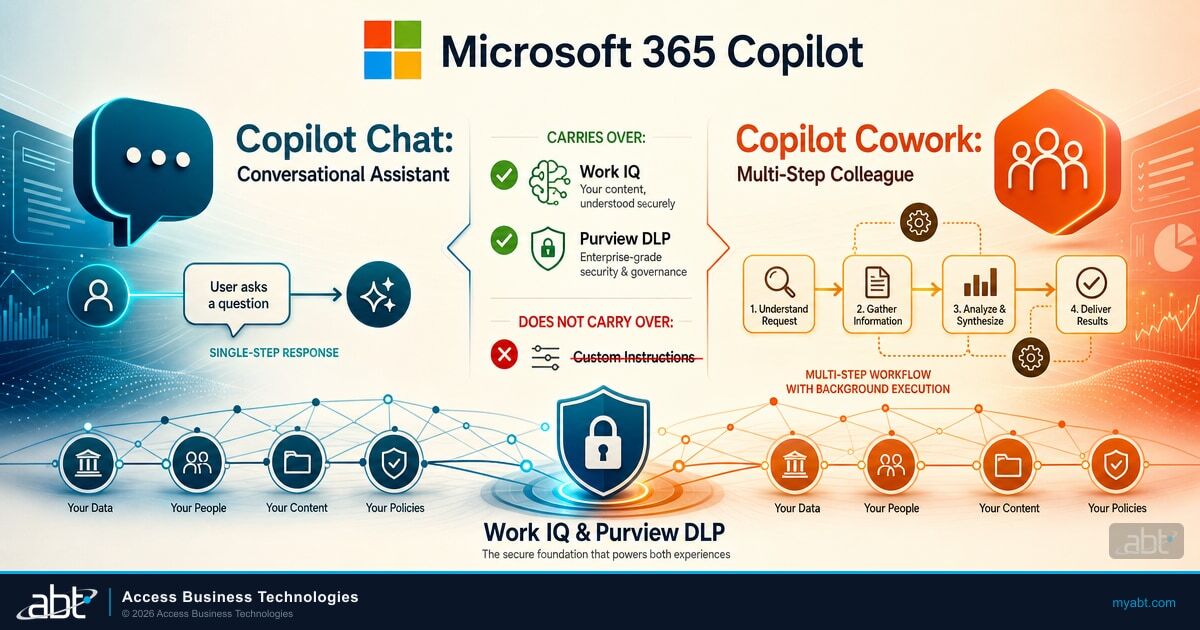
Copilot Chat is the conversational AI that lives inside Microsoft 365. Ask it a question, get an answer. Ask it to summarize a meeting, draft a reply, explain a document, or pull together talking points from your email thread. It generates content the user then acts on.
The speed profile is seconds to a few minutes. You type a prompt, Copilot responds, you decide what to do with the output. You are always the one taking the final action: sending the email, posting the summary, filing the document. Most ABT clients who have Copilot Business licenses are using Copilot Chat today. It runs inside Word, Excel, PowerPoint, Outlook, and Teams, plus the standalone Copilot Chat web app. It is included in the Microsoft 365 Copilot Business license at $21 per user per month.
Copilot Cowork: Your AI Colleague for Multi-Step Execution
Cowork is a different product. Where Copilot Chat generates content and hands it back to you, Cowork takes action on your behalf. Give it a multi-step task, set the parameters, and Cowork runs the workflow in the background: sending emails, scheduling meetings, creating Word documents, posting in Teams, conducting research, managing your calendar. It comes back to you with results or a checkpoint when it needs your approval to proceed.
The speed profile is minutes to hours for complex workflows. A task that would take a loan processor 45 minutes of clicking between documents and drafting multiple messages can run while that person works on something else.
Cowork is included with the Microsoft 365 Copilot license -- the same license that gives you Copilot Chat. However, it does not activate automatically. An administrator has to turn it on. It is off by default. Cowork billing is usage-based: tenant usage is charged in Copilot Credits based on what actions Cowork executes, including model responses, tool calls, image generation, and browser tasks. Administrators can configure consumption limits in the Microsoft 365 admin center to manage usage across the tenant.
One important detail about the models Cowork uses: at general availability, Cowork runs on Anthropic Claude as its primary reasoning models. Depending on license tier and preview enrollment, additional model options may be available. Users can set the model picker to "Auto" (Cowork selects the best model for the task) or choose a specific model. This is different from the models that power Copilot Chat, and it matters for regulated institutions thinking about subprocessor agreements and data handling disclosures.
What Carries Over from Chat to Cowork
Work IQ: Your Organizational Intelligence Layer
Work IQ is the underlying intelligence layer that gives Copilot a semantic understanding of how you work. It processes content from your email, calendar, meetings, Teams chats, files, and collaboration patterns to build a picture of who you work with, what your role involves, and what context is relevant to your queries. Work IQ powers both Copilot Chat and Cowork. When you move from Chat to Cowork, you bring that organizational context with you. Cowork knows who your colleagues are, what projects your team is running, and what files are relevant to your current work. You do not have to rebuild that foundation.
This is the most important thing that carries over, and it is also the thing that raises compliance questions. Work IQ workspaces store data, files, memory, progress, and intermediate outputs within your Microsoft 365 tenant boundaries. All of that stays inside the tenant and respects your existing permissions and sensitivity labels.
Compliance Note on Work IQ
Work IQ is shared infrastructure powering both Chat and Cowork, keeping organizational context within your Microsoft 365 tenant boundaries. It respects existing permissions and sensitivity labels. Before enabling Cowork, verify your tenant's Work IQ configuration with your Microsoft 365 administrator to ensure the scope aligns with your institution's data governance policy.
Security and Compliance Policies
Your Microsoft Purview DLP policies apply to Cowork. Sensitivity labels on your documents carry forward. If a file has a sensitivity label, Cowork displays that label when it accesses the file. Cowork inherits the user's existing Microsoft 365 permissions. It can only access files and emails the user can already access. Cowork cannot elevate its own permissions.
This means the governance configuration you have already built for Copilot Chat provides a foundation for Cowork. If you have worked with ABT to configure Purview DLP, sensitivity labels, and Conditional Access before rolling out Copilot Chat, that baseline applies to Cowork as well. But it does not apply automatically at the same scope. Background execution changes the risk profile. A single-step Copilot Chat interaction where a user drafts one email is different from a Cowork task that drafts and sends ten emails, schedules three meetings, and creates two documents, all within the same job run. The same policies govern both. The surface area in Cowork is larger.
What Does NOT Carry Over
This is where the practical planning decisions live for IT directors and compliance officers at regulated institutions.
Custom Instructions
Copilot Chat custom instructions are the explicit behavioral preferences a user types in: preferred response length, whether to include bullet points, role context such as "I am a compliance officer reviewing GLBA examination findings." These persist across Copilot Chat sessions. They do not carry into Cowork. Cowork is a separate experience. A user who has spent time tuning their Copilot Chat instructions to match how they work needs to use a different mechanism to give Cowork that same context -- specifically, SKILL.md files.
For regulated institutions, there is a compliance consideration here: custom instructions in Copilot Chat are not eDiscoverable by administrators. If a regulator asks what instructions an employee gave to Copilot, the admin has no tooling path to retrieve custom instructions. The user can export their own, but there is no admin-facing Purview search for them. That limitation is specific to Copilot Chat custom instructions. It does not affect Cowork, which uses a different instruction mechanism.
Saved Memories
Copilot Memory stores facts Copilot has inferred from conversations or that users have explicitly stated. These persist across Copilot Chat sessions and sit in a hidden Exchange mailbox folder. They do not carry into Cowork. Cowork maintains its own separate conversation history and does not read the saved memories from Copilot Chat.
Retention Gap: Copilot Memory Storage
Saved memories in Copilot Chat sit in the Exchange mailbox in a dedicated hidden folder -- a location distinct from standard mailbox items. Purview retention policies configured for "Microsoft Copilot experiences" cover conversation prompts and responses, not this Exchange mailbox folder. That is a retention gap. Getting coverage right requires additional Purview configuration scoped to Exchange mailbox items. ABT's governance gap article in this series covers this in detail.
Conversation History
Copilot Chat conversation history (for users on Frontier-tier licenses) provides dynamic context from past sessions. Cowork maintains its own separate conversation history and does not draw on Copilot Chat's prior conversations. This is a clean silo by design. What you discussed with Copilot Chat last week does not automatically inform Cowork today. Each has its own context window and its own history store. For most regulated institution workflows, this separation is actually preferable. You want Cowork to have explicit, scoped instructions for a specific task rather than pulling in context from unrelated prior conversations.
Underlying AI Models
Cowork runs on different underlying models than Copilot Chat. At general availability, Cowork uses Anthropic Claude as its primary subprocessor for most reasoning, drafting, and tool-using work. Copilot Chat uses a different set of foundation models depending on the task and configuration. Before enabling Cowork, institutions with data processing agreements or privacy policies that reference their AI subprocessors should confirm that Anthropic is included as a new entry in those documents. Depending on admin configuration, administrators may be able to restrict which models are available in the Microsoft 365 admin center under Copilot settings.
Side-by-Side Feature Comparison
The table below summarizes what carries over and what does not for institutions transitioning from Copilot Chat to Cowork or running both surfaces in parallel.
Carries Over to Cowork
- Work IQ organizational context (email, calendar, Teams, files)
- Microsoft Purview DLP policies and enforcement
- Sensitivity labels on all accessed documents
- User permission scope (Cowork cannot exceed existing permissions)
- Purview Audit log coverage for task interactions
- Tenant-level admin on/off control
Does NOT Carry Over
- Copilot Chat custom instructions
- Saved memories (stored in a dedicated hidden Exchange mailbox folder)
- Conversation and session history
- Foundation model stack (Cowork uses Anthropic Claude at GA)
- Purview Audit scope is identical in coverage width
- Admin controls are separate (Cowork is off by default)

The same Microsoft Purview DLP policies apply to Cowork. The surface area of what those policies must govern is larger -- because Cowork acts, where Chat only generates.
What This Means for Your Institution's Rollout
If You Are Planning to Enable Cowork Soon
Start with the assumption that your Copilot Chat governance baseline is the floor, not the ceiling. Cowork's background execution means a misconfigured tenant creates more exposure per session than Copilot Chat does. ABT recommends five steps before turning Cowork on:
Your institution has Copilot Chat deployed with basic DLP and sensitivity labels configured. Staff use it daily for drafting and summarizing. Cowork is off by default.
DLP policies tested against background execution scenarios. Sensitivity label coverage verified across SharePoint and OneDrive. Consumption limits set per user group. Approval gate behavior trained with staff. Anthropic subprocessor documented in data processing agreements.
The specific steps: confirm your DLP policies are configured and tested (background execution against unsensitized documents in SharePoint or OneDrive is the most common risk vector); review your sensitivity label coverage across SharePoint and OneDrive; set consumption limits per user group in the admin center; train staff on the per-action approval gate process so they review Cowork's proposed actions rather than clicking through prompts as a habit; and confirm the subprocessor implications with legal if your institution has data processing agreements that reference AI vendors.
If You Are Not Ready for Cowork Yet
That is fine. Cowork is off by default. Nothing activates without an administrator enabling it in the Microsoft 365 admin center. You can continue using Copilot Chat with the current configuration, let the Frontier-tier feature mature, and plan the Cowork rollout as a deliberate project with the governance review it deserves. The most common pattern ABT sees: credit unions and community banks deploy Copilot Chat broadly, tune the user experience, prove productivity gains with their department heads, and then evaluate Cowork for a specific high-volume workflow -- usually document-heavy compliance review or loan processing -- where the time savings justify the additional governance work.
If Someone on Your Team Is Already Asking About Cowork
The right answer is: let us look at where you are on the Copilot Chat foundation first. Cowork is more useful, and safer, in a tenant where the governance baseline is already solid. ABT's AI Readiness Assessment covers the Copilot Chat foundation and can identify where the gaps are before the Cowork conversation starts.

What IT Directors at Regulated Institutions Should Take Away
- Cowork inherits your DLP policies and sensitivity labels -- but background execution makes the same policies govern a larger blast radius per task.
- Custom instructions, saved memories, and conversation history are siloed: each surface maintains its own. Staff who rely on Chat context need to reconfigure for Cowork.
- Cowork uses Anthropic Claude as its primary subprocessor at general availability. Review your data processing agreements before enabling.
- Administrators must explicitly enable Cowork. Nothing happens without that step.
- ABT manages Microsoft 365 for more than 750 financial institutions. An AI Readiness Assessment is the fastest way to know if your tenant is ready.
Is Your Microsoft 365 Tenant Ready for Copilot Cowork?
ABT manages Microsoft 365 for more than 750 banks, credit unions, and mortgage lenders. Before your institution enables Cowork, we run a pre-deployment hardening review to confirm your Purview DLP policies, sensitivity labels, and Conditional Access configuration are ready to govern AI activity at scale.
Frequently Asked Questions
No. Cowork is a separate experience. Enabling it does not change your Copilot Chat tenant settings, user permissions, or personalization controls. The two experiences coexist, and each has its own admin controls.
No. Cowork inherits the user's existing Microsoft 365 permissions. It can only access files and emails the user already has permission to access. It cannot access files stored locally on a device. It works with OneDrive and SharePoint only. If a Copilot Chat user cannot open a file, Cowork cannot use that file either.
Yes. Cowork task interactions generate audit log entries. However, the scope of audit coverage differs between Cowork task interactions and Copilot Chat conversation interactions. Administrators should verify that audit retention policies are configured to cover both surfaces, not just one. The governance gap article in this series walks through the specific Purview configuration steps.
Yes, in practice. Copilot Chat is conversational. Staff learn it by experimenting. Cowork requires more intentional task framing: giving Cowork a clear goal, reviewing the plan it proposes, and making decisions at approval gates before it takes consequential actions. The approval gate process in particular needs to be reinforced with staff. Regulated institutions cannot afford a culture where employees click through approval prompts without reviewing the content Cowork is about to send or post.