In This Article
- What Web Grounding Actually Does in Copilot
- What Leaves Your Tenant, and What Does Not
- Domain Exclusion (MC1411435): Shipped in July, Rolled Back in August
- Why This Matters for a Regulated Institution
- A Practical Governance Playbook
- How ABT Deploys and Governs Copilot for Financial Institutions
- Frequently Asked Questions
Updated September 5, 2026: Microsoft shipped the Copilot domain exclusion control described in this article in mid-July 2026 and rolled it back in early August 2026. Microsoft Learn's domain exclusion overview, updated September 1, 2026, opens with the rollback notice and says Microsoft is evaluating next steps. This article now covers what the control did, where it stands, and the governance controls that remain available today.
When a loan officer asks Microsoft 365 Copilot to summarize this week's mortgage rate movement, or a compliance analyst asks it to check a vendor's latest breach disclosure, the answer is only as current as the information Copilot can reach. That is what web grounding does: it lets Copilot pull fresh context from the public web so its answers reflect today, not the last time its model was trained. For banks, credit unions, and mortgage companies, that currency is genuinely useful, and it is exactly why web grounding is turned on for most Microsoft 365 Copilot users by default.
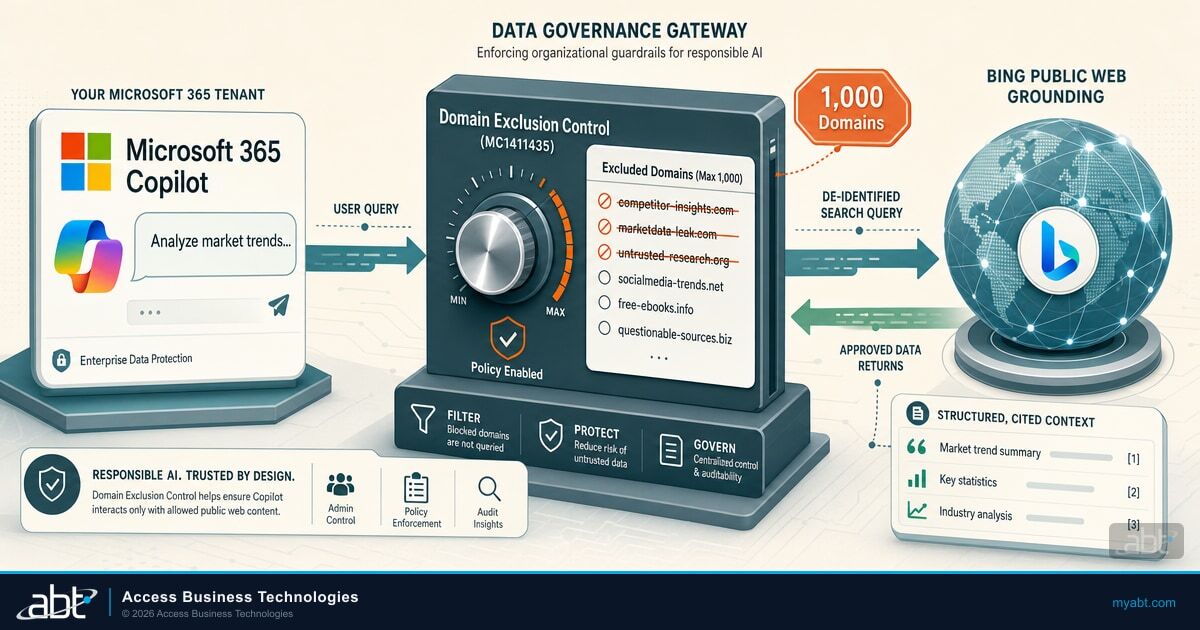
In July 2026, Microsoft shipped a much finer instrument to govern that behavior. A control published to the Microsoft 365 Message Center as MC1411435 let IT teams exclude up to 1,000 specific web domains from Copilot web grounding rather than choosing only between all web access on or all of it off. Within weeks, Microsoft rolled it back, and as of September 2026 it remains unavailable. The governance question the control was built to answer is still on the table, and it sits at the same moment examiners are starting to ask pointed questions about how banks, credit unions, and mortgage companies govern generative AI.
This guide explains what web grounding really does, what data does and does not leave your Microsoft 365 tenant, exactly what the domain exclusion control did and where it stands today, and how to build a governance posture your examiners will accept with the controls available now. The productivity is the point. The job is to keep it governed.
What Web Grounding Actually Does in Copilot
Web grounding is an optional feature in Microsoft 365 Copilot and Microsoft 365 Copilot Chat that lets Copilot reference public web content when it answers a prompt. Microsoft's own documentation is direct about the value: allowing Copilot to reference web content "improves the quality of Copilot responses by grounding them in the latest information from the web." When it helps, Copilot reaches out to the Bing search service for that current context, then folds what it finds into the response.
The mechanics matter, because they shape the governance conversation. When web grounding is on, Copilot does not send the user's whole prompt to Bing. It reads the prompt, identifies the terms where fresh web information would improve the answer, and generates a short search query, often just a few words, that it sends to the Bing search service. The response comes back, Copilot composes an answer, and in Microsoft 365 Copilot Chat the exact web queries are shown to the user as citations so they can see what was searched.
For a lending team, this is the difference between an assistant that knows current agency guidance and one that answers from a stale snapshot. Copilot can pull a regulator's newest bulletin, a vendor's current status page, or this morning's rate commentary into a draft, and it does so without a loan officer leaving the flow of work. That is the productivity win, and it is real. The governance question is not whether to allow it, but how to bound it.
What Leaves Your Tenant, and What Does Not
The most common fear a chief information security officer raises about Copilot web grounding is that customer data, loan files, or account details will be sent to a search engine. Microsoft's documentation addresses that directly, and the details are reassuring, up to a precise line that every regulated institution should understand.
The generated search query sent to Bing does not include the user's entire prompt (unless the prompt is very short, like "local weather"), it does not include entire Microsoft 365 files or documents uploaded into Copilot, and it does not include any identifying information from the user's Microsoft Entra ID, such as username, domain, or tenant identifier. The queries are sent to Bing with user and tenant identifiers removed. Your prompts and Copilot's responses, meanwhile, stay inside the Microsoft 365 service boundary and never leave it without your direction, protected by enterprise data protection and the Microsoft Products and Services Data Protection Addendum, with Microsoft acting as a data processor.

Here is the line that matters for a regulated institution, and it is one your examiners and your privacy counsel will want you to know. Microsoft states plainly that the Data Protection Addendum does not apply to the generated web search queries sent to Bing, and that HIPAA compliance and the European Union Data Boundary do not apply to those generated search queries either. For that narrow slice, the few-word query Copilot sends to the Bing search service, Microsoft acts as a data controller rather than a processor. This does not touch the prompts and responses stored in your Microsoft 365 tenant, which keep their full protections. But it means the generated web query is a genuinely different data flow, and it is precisely the flow the domain exclusion control was built to shape.
The distinction to get right
Enterprise data protection, the Data Protection Addendum, and the EU Data Boundary continue to cover the prompts and responses Copilot keeps inside your Microsoft 365 tenant. They do not extend to the short, de-identified query Copilot sends to the Bing search service for grounding. Treat the generated web query as a separate outbound flow in your vendor risk and data mapping, not as an extension of the tenant boundary.
Domain Exclusion (MC1411435): Shipped in July, Rolled Back in August
Governing Copilot web grounding has meant a blunt choice. An administrator can allow web search or block it, tenant wide or by user group, through the "Allow web search in Copilot" policy in the Cloud Policy service for Microsoft 365. That policy is the control you have today, and it offers three settings: web search enabled in both Microsoft 365 Copilot and Copilot Chat, disabled in both, or disabled in Copilot Work mode while enabled in Web mode and Copilot Chat. Individual Microsoft 365 Copilot users can also turn their own web content on or off with a personal toggle.
The control published as MC1411435 added the middle ground governance teams had been asking for. Instead of turning grounding off entirely, an administrator could exclude up to 1,000 specific domains from Copilot web grounding, and content from those excluded domains was kept out of any Copilot response that relied on the web, with grounding left on for everything else. Then Microsoft pulled it.
Domain exclusion was meant to turn a light switch into a dimmer. For now, you have the switch: on, off, or off for work prompts only, set by user group. That is still a line worth drawing around the sources you do not want an AI assistant grounding decisions on.
Here is the sequence. Microsoft published MC1411435 on July 1, 2026, with rollout beginning in mid-July, a PowerShell script rather than a point-and-click toggle, a cap of 1,000 domains, and nothing enabled by default. In early August 2026, Microsoft rolled the feature back, and tenants that had configured exclusions lost them. The Message Center announcement expired on August 31, 2026, and Microsoft Learn's domain exclusion overview, updated September 1, 2026, now opens with the rollback notice and the statement that Microsoft is "actively evaluating next steps." Microsoft has published no return date.
Why This Matters for a Regulated Institution
For banks, credit unions, and mortgage companies, an AI assistant that grounds answers in the open web introduces a supervision question that generic productivity advice tends to skip: which sources should be allowed to shape an answer a banker might act on? Left unbounded, Copilot can ground a response on a competitor's marketing page, a consumer-finance forum full of confidently wrong tax advice, a manipulated site engineered to poison AI answers, or a sanctioned or otherwise off-limits domain. None of that is malicious on Copilot's part. It is simply what an open web search returns, and for a regulated institution the provenance of an answer is part of the control environment.
Regulators have moved from asking whether financial institutions use AI to asking how they govern it. The Federal Financial Institutions Examination Council's guidance on architecture, infrastructure, and operations, the Gramm-Leach-Bliley Act Safeguards Rule, and the NIST AI Risk Management Framework all point the same direction: you are expected to know your data flows, bound your third-party dependencies, and be able to show your work. A defensible answer to "how do you control which external sources your AI assistant relies on" is now part of an examiner-ready posture, and today the honest answer for most Copilot deployments is "we can turn it on or off, tenant wide or by user group, and we can show what it searched." Documented and evidenced, that is a defensible answer.
Effective AI risk management calls for organizations to map the context and data sources an AI system draws on, and to put governance structures in place so that those dependencies are documented, bounded, and monitored throughout the system's life.
The examiner-facing story gets stronger because Microsoft already logs the raw material. Web search query logging lets administrators search, audit, and run eDiscovery on the exact web queries Copilot derived from a prompt, using Microsoft Purview audit log activities and the activity explorer in Microsoft Purview Data Security Posture Management for AI. That means a financial institution can pair its web search policy with real evidence: here is which users and groups have web grounding on and in which mode, here is the audit trail of what Copilot actually searched, and here is how we review it. That pairing, a control plus its evidence, is exactly what a strong AI governance program looks like, and it is the same discipline ABT brings to the rest of a managed Microsoft 365 tenant. It complements the broader set of examiner-ready Copilot controls a regulated institution should have in place before it scales AI to the front line.
A Practical Governance Playbook
The right posture for most financial institutions is not to switch web grounding off. Turning it off entirely trades away the productivity that makes Copilot worth the license, and it tends to push users toward consumer AI tools that carry none of your tenant protections. The better move is to keep grounding on where it earns its keep, scope it by user group and mode where it does not, and prove you are watching. Here is how the three postures compare.

Turning that into a rollout is straightforward once you treat it as a governance project rather than a checkbox. Decide who owns Copilot web search governance, because the policy, its group scoping, and the review of what Copilot searched are living artifacts a compliance or information security owner should revisit on a schedule. Set the "Allow web search in Copilot" policy by user group: on for the roles that need current web context, and off for work prompts where an answer could steer a regulated decision, so the productivity survives where it matters. Wire the audit side up front by confirming Purview audit logging and Data Security Posture Management for AI are capturing web query activity, so your control has evidence from day one. Keep the domain exclusion list your compliance and information security leads would defend drafted and ready, so it can be applied the day Microsoft re-releases the control. And write the whole thing down: the policy, the owner, the review cadence, and the audit source, in the same AI governance documentation your examiners will eventually ask to see.
What to do now
Confirm who owns Copilot AI governance in your institution. Set the "Allow web search in Copilot" policy in Cloud Policy by user group and mode to match your risk appetite. Turn on Microsoft Purview audit and Data Security Posture Management for AI so web query logging is capturing evidence. Draft the domain exclusion list your compliance and information security leads can defend and hold it ready for the day Microsoft re-releases the control. Then schedule the first review of what Copilot searched for 30 days out.
None of these steps require ripping anything out. They are the difference between a Copilot deployment that happens to have web access and one that can answer, on demand, the question every regulated institution will eventually field: how do you govern what your AI assistant learns from the open internet? The same discipline applies to the adjacent risks worth closing at the same time, including Copilot oversharing of internal content and the data-loss-prevention controls that govern Copilot and AI agents through Microsoft Purview.
How ABT Deploys and Governs Copilot for Financial Institutions
Access Business Technologies is a Tier 1 Microsoft Cloud Solution Provider primarily dedicated to financial services, and we manage the Microsoft 365 tenants of more than 750 banks, credit unions, and mortgage companies. That managed-tenant relationship is why a control like domain exclusion, and its rollback, is not a research project for our customers. We configure the Cloud Policy service, set the "Allow web search in Copilot" posture by user group to match each institution's risk appetite, keep a domain exclusion list ready for the day Microsoft re-releases the control, and stand up Microsoft Purview Data Security Posture Management for AI so the audit evidence is captured from the start.
Under the M365 Guardian operating model, ABT treats Microsoft 365 Copilot as a governed workload, not a feature toggle. We combine the Copilot admin controls (Cloud Policy web search settings today, and MC1411435 domain exclusion when Microsoft brings it back), the Microsoft Purview evidence layer (audit log activities and Data Security Posture Management for AI), and Microsoft Entra ID identity governance into one examiner-ready posture, then keep it current as Microsoft ships new controls. For lending teams, our MortgageGuide Copilot agent brings the same governed model to loan-specific work.
The productivity of Microsoft 365 Copilot is the reason financial institutions adopt it. Keeping that productivity governed, so a bank, credit union, or mortgage company can scale AI to the front line without inheriting an ungoverned data flow, is the reason they work with a partner who manages the tenant as a whole. Domain exclusion was a small control that shipped and disappeared inside a month. A documented governance program around Copilot web access, with the policy, the group scoping, and real audit evidence behind it, is what keeps your next exam from surprising you. If you are weighing how Copilot fits your institution at all, our Microsoft Copilot buyer's guide for financial institutions is the place to start.
Deploy Microsoft 365 Copilot with governance examiners accept
ABT manages the Microsoft 365 tenants of more than 750 banks, credit unions, and mortgage companies. We configure Copilot web grounding by user group, keep an exclusion list ready for the return of domain exclusion, and stand up the Microsoft Purview evidence layer so your AI deployment is productive and examiner-ready from day one.
Frequently Asked Questions
Web grounding is an optional feature that lets Microsoft 365 Copilot and Copilot Chat reference current public web content when answering a prompt. Copilot generates a short search query from the prompt, sends it to the Bing search service, and uses the results to ground a more current response. It improves answer quality but introduces a governance question about which external sources should be allowed to shape answers.
Domain exclusion let an administrator exclude up to 1,000 specific web domains from Microsoft 365 Copilot web grounding, so content from excluded domains was kept out of any Copilot response that relied on the web while grounding stayed on for everything else. Microsoft shipped it in mid-July 2026, configured through a PowerShell script and off by default, and rolled it back in early August 2026. As of September 2026 it is unavailable, and Microsoft says it is evaluating next steps.
No. The generated query Copilot sends to the Bing search service is a short set of terms, not the full prompt, not entire Microsoft 365 files or uploads, and not any Microsoft Entra ID identifying information such as username, domain, or tenant identifier. Queries are sent with user and tenant identifiers removed. Note, though, that Microsoft states the Data Protection Addendum, HIPAA compliance, and the EU Data Boundary do not apply to those generated web search queries, so treat the query as a separate outbound flow in your data mapping.
For most financial institutions, no. Turning grounding off entirely removes the current-web productivity that justifies the Copilot license and tends to push staff toward unmanaged consumer AI tools. The stronger posture is to keep grounding on, scope it by user group and mode with the "Allow web search in Copilot" policy, and pair the policy with Microsoft Purview audit and query logging so you have evidence of what Copilot actually searched. When Microsoft re-releases domain exclusion, add the exclusion list to the same program.
Pair a control with its evidence. The control is the Cloud Policy web search setting, scoped by user group and mode, plus the domain exclusion list once Microsoft re-releases that control. The evidence is Microsoft Purview web search query logging and the activity explorer in Data Security Posture Management for AI, which let you audit and run eDiscovery on the exact queries Copilot derived from prompts. Document the policy, the owner, the review cadence, and the audit source in your AI governance program, mapped to the NIST AI Risk Management Framework and FFIEC expectations.
Not as of September 2026. Microsoft shipped domain exclusion in mid-July 2026, configured through a PowerShell script rather than a graphical toggle, with support for up to 1,000 excluded domains, and rolled it back in early August 2026. Tenants that had configured exclusions lost them. Microsoft Learn's domain exclusion overview, updated September 1, 2026, opens with the rollback notice and says Microsoft is actively evaluating next steps. No return date has been published, so keep your exclusion list drafted and apply it when the control comes back.