


Windows 11 24H2 Home and Pro stopped getting updates on October 13, 2026. Version 26H2 puts them back on monthly updates until October 2028.
Microsoft confirmed it the same day: the October 2026 security update was the last one for version 24H2 on Home, Pro, Pro Education and Pro for Workstations. Its recommendation is to move those devices to version 26H2 or 25H2. Version 26H2 reaches an eligible 24H2 device as an enablement package, a small download and a quick restart with no reimaging, and on Home and Pro it is serviced until October 10, 2028. The Enterprise and Education editions of 24H2 keep receiving updates until October 12, 2027.
- Ended October 13, 2026: 24H2 on Home, Pro, Pro Education and Pro for Workstations. The last update was KB5127648.
- Still serviced until October 12, 2027: 24H2 on Enterprise, Education, IoT Enterprise and Enterprise multi-session.
- Named first in Microsoft's October 13 recommendation: 26H2, serviced until October 10, 2028 on Home and Pro and October 9, 2029 on Enterprise.
What ended on October 13, 2026?
Monthly servicing for Windows 11 version 24H2 on Home, Pro, Pro Education and Pro for Workstations. Microsoft's term is "end of updates (also known as end of servicing)". In the Windows message center on October 13, 2026, Microsoft wrote that these editions "have reached end of updates" and that "the October 2026 monthly security update is the last update available for these editions." That update is KB5127648, which brought version 24H2 to build 26100.9711. Microsoft had already said the September 2026 non-security preview update was the final preview update for version 24H2.
The devices keep booting and the applications keep opening, so day to day work carries on. What changed is the risk position. In Microsoft's words, devices on these editions "will no longer receive monthly security and non-security preview updates containing protections from the latest security threats." When Microsoft fixes a vulnerability after October 13, the fix ships to supported versions, and a 24H2 Home or Pro device does without it. For a bank, a credit union or a mortgage company, an operating system past its servicing date is the kind of item patch management review asks about, and institutions should be ready to show remediation, a documented risk acceptance, or compensating controls for any device still on it.
Microsoft's recommendation, in the same message, is to update these devices "to Windows 11, version 26H2 or Windows 11, version 25H2 to continue receiving monthly security and quality updates." Its 90, 60 and 30-day reminders named version 25H2 alone. Version 26H2 became generally available on September 29, 2026, and it is now the first option Microsoft lists. The same message confirms that "Windows 11, version 24H2 Enterprise and Education remain supported until October 12, 2027."
October 13, 2026 was a crowded day for Microsoft lifecycle dates. Windows 10 Extended Security Updates Year 1 coverage ended the same day, and our Windows 10 ESU Year 2 page covers that decision. The October 2026 deadline page collects the rest.
What should you do with a device still on 24H2 Home or Pro?
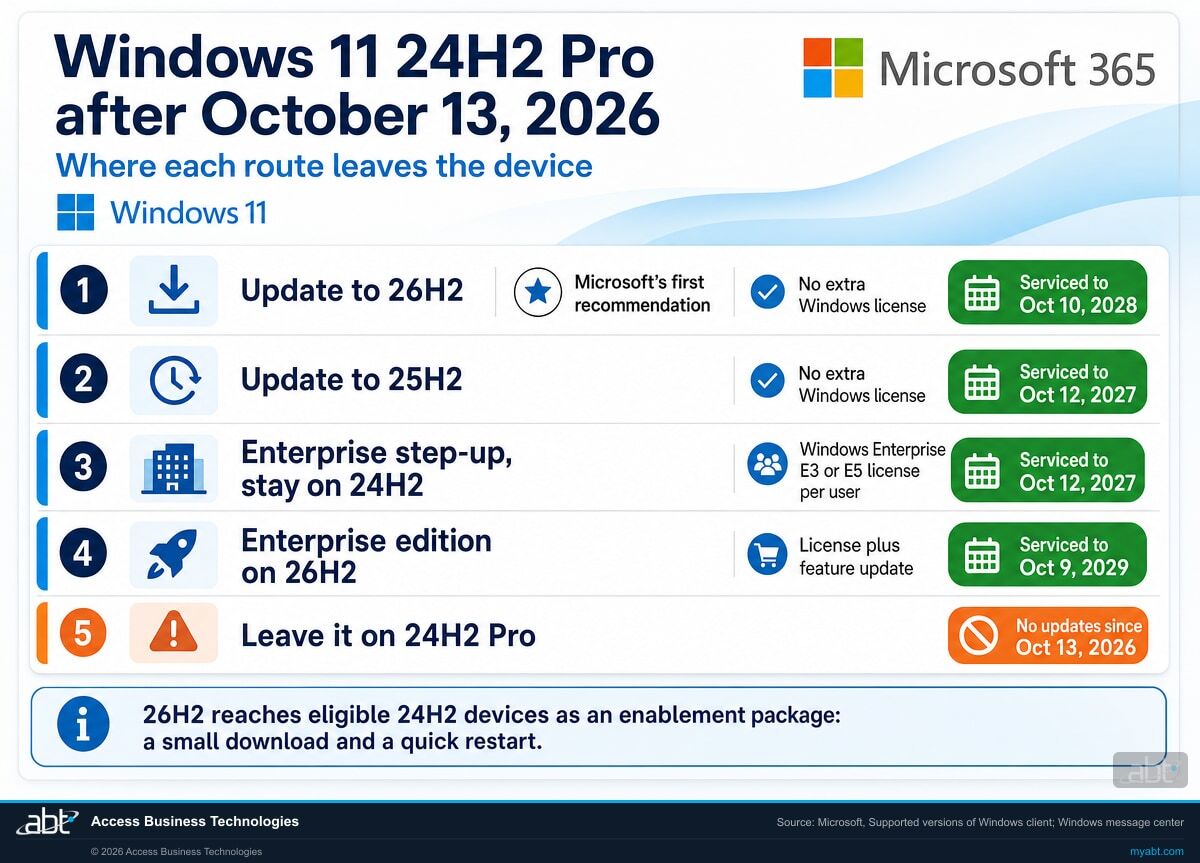
Move it to a version, or an edition, that is still serviced. The table compares four routes with the outcome every undecided device is already in. Read the first and third rows together: version 26H2 changed which one reaches further.
| Route | What it costs | Where it puts the device | When it is the right call |
|---|---|---|---|
| Update the device to 26H2, stay on Home or Pro | No additional Windows licensing cost. You still test and deploy it. | October 10, 2028 | Named first in Microsoft's recommendation, and our default for most fleets. |
| Update the device to 25H2, stay on Home or Pro | No additional Windows licensing cost. You still test and deploy it. | October 12, 2027 | When 25H2 is already validated in your rings and 26H2 is still in pilot. |
| Step the device up to Enterprise, stay on 24H2 | A Windows Enterprise E3 or E5 subscription license per user, on a device already running Pro. | October 12, 2027 | When you already hold the license and a device has to stay on 24H2 for now. |
| Both: Enterprise edition on 26H2 | The license, plus the feature update. | October 9, 2029 | When you want the longest runway and already license Enterprise. |
| Leave it as it is | No licensing spend now. The servicing gap stays open. | Out of servicing since October 13, 2026 | Where every undecided 24H2 Home or Pro device sits today. |
Before September 29, the cheapest feature update and the Enterprise step-up tied. Updating a Pro device to 25H2 and licensing the same device up to Enterprise on 24H2 both reached October 12, 2027. Version 26H2 broke the tie. On Microsoft's published dates, a Pro device moved to 26H2 is serviced until October 10, 2028, which is 364 days longer than the same device stepped up to Enterprise and left on 24H2, and it needs no additional Windows licensing.
Enterprise licensing earns its place for other reasons: an application or a peripheral that has to stay on 24H2 until it is validated on a newer version, a device you need to hold on a known build through an audit or a core conversion, or the Enterprise-only capabilities themselves. If you already hold the licenses, activating them adds no further licensing cost, and the fourth row shows where the two routes stack.
Two groups of devices need individual attention. The first is any device that cannot take 26H2 yet, because of an application, a driver or a safeguard hold: Microsoft says some devices "might temporarily not be offered the update to version 26H2" when it detects an incompatibility, and holds them until the issue is resolved. The second is shared branch workstations, teller stations, kiosks and machines that sit offline for weeks, where a per-user subscription and a feature-update window both need a plan device by device.
Why does one version of Windows have two different end dates?
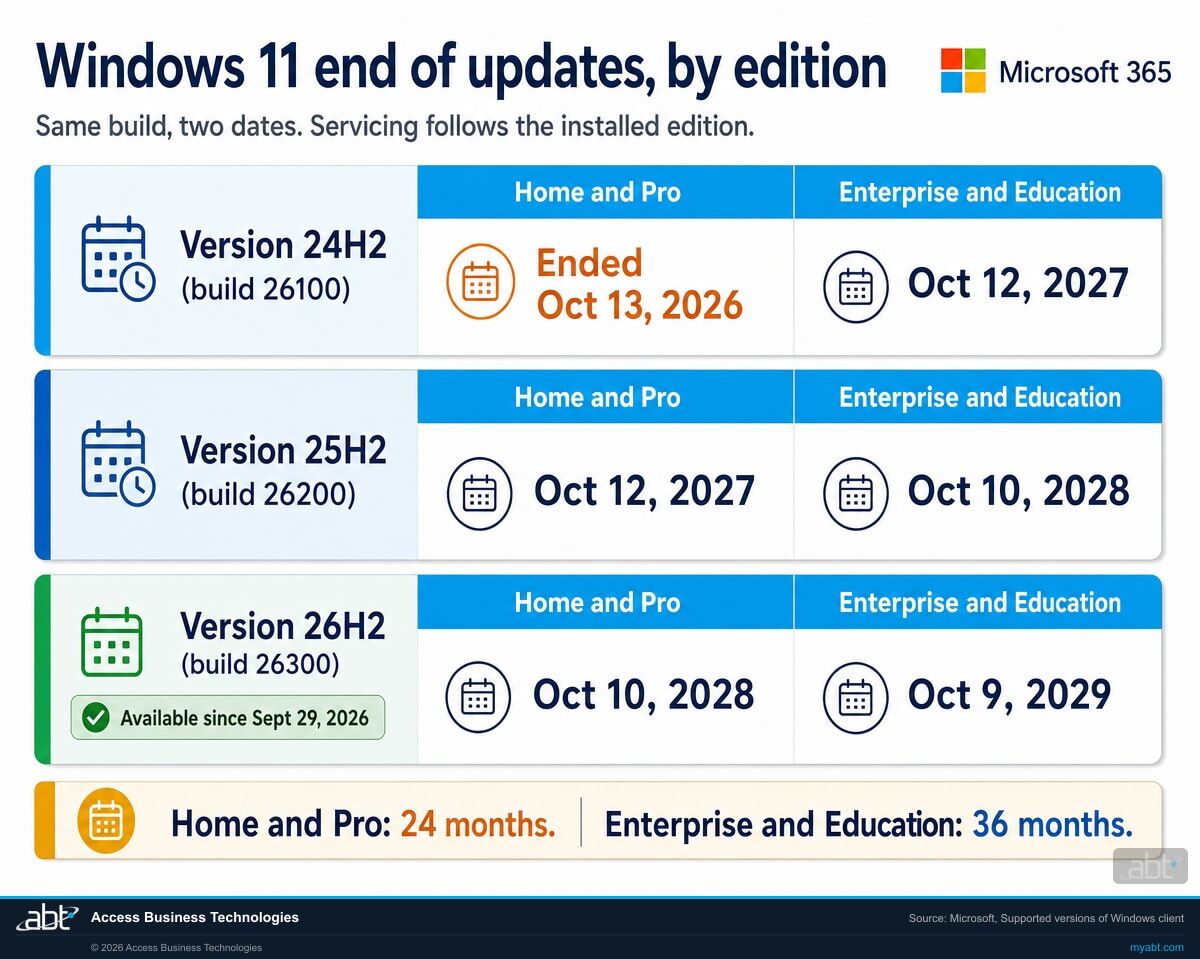
For General Availability Channel releases, Microsoft sets the end-of-updates date by edition. On the page where Microsoft lists supported versions of Windows client, the table has two end-of-updates columns. One covers Home, Pro, Pro Education and Pro for Workstations. The other covers Enterprise, Education, IoT Enterprise and Enterprise multi-session. Each release appears once with a date in each column. Microsoft's release information states the rule behind them: feature updates "come with 24 months of support for Home, Pro, Pro for Workstations, and Pro Education editions; 36 months of support for Enterprise and Education editions."
The split runs through every version, including the ones you are moving to. A Pro device on 26H2 is on the October 10, 2028 date; an Enterprise device on 26H2 runs about a year longer.
| Windows 11 version | OS build | Home, Pro, Pro Education, Pro for Workstations | Enterprise, Education, IoT Enterprise, Enterprise multi-session |
|---|---|---|---|
| 23H2 | 22631 | Ended | November 10, 2026 |
| 24H2 | 26100 | Ended October 13, 2026 | October 12, 2027 |
| 25H2 | 26200 | October 12, 2027 | October 10, 2028 |
| 26H2 | 26300 | October 10, 2028 | October 9, 2029 |
| 26H1 IoT Enterprise excluded |
28000 | March 14, 2028 | March 13, 2029 |
Two caveats before you use this table as a checklist. It covers the General Availability Channel, which is what most business PCs run. A device on the Long-Term Servicing Channel follows its own dates. Windows 11 Enterprise LTSC 2024 is also OS build 26100, the same build number as 24H2, and Microsoft services it until October 9, 2029. Windows 11 IoT Enterprise LTSC 2024, the only LTSC 2024 edition with extended support, runs until October 10, 2034. So build 26100 by itself carries four different end dates: 24H2 on Home or Pro, 24H2 on Enterprise, Enterprise LTSC 2024, and IoT Enterprise LTSC 2024. If you run LTSC anywhere, on kiosks or dedicated single-purpose hardware for example, those machines are on a separate track and the October dates on this page leave them untouched.
The second caveat sits on the last row: Microsoft states that IoT Enterprise edition is not supported on Windows 11, version 26H1, so that March 13, 2029 date stops short of IoT Enterprise. Version 26H1 is also on its own path in the other direction. Microsoft says devices running it "won't be able to update to version 26H2", because 26H1 "is based on a different Windows core" than 24H2, 25H2 and 26H2.
The 23H2 row is the next date to watch. Its Enterprise and Education editions reach end of updates on November 10, 2026, and Microsoft's 30-day reminder for that date is already published.
Do you know which of your machines are still on 24H2 Pro?
Knowing what you bought is the easy half. A per-device list of installed edition and feature version, matched against the licenses you hold, shows which devices fell out of servicing on October 13, which can take 26H2 now, and which are held back, and it is what our free licensing assessment produces.
How does a 24H2 device get to 26H2?
Through an enablement package. In Microsoft's IT pro guide, published the day the version became generally available, "Windows 11, version 26H2 is delivered as an enablement package for eligible devices running Windows 11, versions 25H2 or 24H2." The three versions share a servicing branch and a code base. New features have been arriving on 24H2 devices through the monthly cumulative updates, and the enablement package switches on the ones that were waiting.
For the people using the PCs, that means a short interruption. Microsoft's announcement says the update "is delivered with the same technology used for monthly security updates, requiring only a small download and a quick restart." For the IT team it means the work looks like a monthly update cycle: "Because versions 26H2, 25H2, and 24H2 share a common servicing branch, many organizations might find that validating version 26H2 requires less effort than a traditional feature update." And for the servicing calendar, Microsoft states that installing 26H2 "resets the support lifecycle for supported editions": 24 months for Home and Pro, 36 months for Enterprise and Education.
Read what each device runs today
Edition, feature version and servicing channel, read back from the endpoint. Microsoft offers the 26H2 enablement package to eligible devices running 24H2 or 25H2. A 26H1 device is on a different Windows core and waits for a future release, and an LTSC device stays on its own track.
Pilot it in the rings you already run
Microsoft's guidance is to validate 26H2 in pilot environments, test business-critical applications, representative hardware and workflows, then expand through existing update rings. It is available through familiar channels including Windows Autopatch, Microsoft Intune and Windows Server Update Services. Decide one setting before the rollout: with 26H2, Microsoft enables the Windows settings backup policy by default on eligible devices where an administrator has left it unset.
Track the devices Windows Update holds back
Microsoft can place a safeguard hold on a device when it detects an incompatibility, and the device is then temporarily left off the 26H2 offer. A held device that is still on 24H2 Home or Pro stays out of servicing until the hold lifts or it moves by another route, so list every held device by name with its edition, version, the reason and a date to check again.
Verify the version changed, per device
A deployment report shows what was sent. The feature version read back off each endpoint, 26H2 at build 26300, shows what installed, and that per-device record is the evidence that supports a patch management review.
How does a Windows Pro device become a Windows Enterprise device?
Through a Microsoft feature called subscription activation. Microsoft calls it a "step-up" from Windows Pro edition to Enterprise edition, and says it "can be used with a subscription to Windows Enterprise E3 or E5 licenses". It works without a rebuild. Microsoft describes it as eliminating "the need to manually deploy Enterprise or Education edition images on each target device", and says Windows Enterprise "can be deployed in an organization without keys and reboots".
The sequence is short, and it runs on identity: a license, a user and a sign-in.
Confirm the license exists
The step-up requires a Windows Enterprise E3 or E5 subscription license. Microsoft notes these can be obtained through a Cloud Solution Provider, which is how ABT supplies them. Check whether you already hold them before you plan anything else, because the answer changes what the rest costs. The step-up starts from Pro; Windows 11 Home is not a qualifying base edition.
Assign it to the user
Microsoft assigns Windows Enterprise to a user, for example through the Microsoft 365 admin center. The entitlement travels with the person. Microsoft states that "up to five devices can be upgraded for each user license", and that on a sixth device the computer the user has gone longest without signing in to reverts to Pro.
The user signs in with their work account
When a licensed user signs in to a qualifying device using their Microsoft Entra credentials, Windows steps up from Pro edition to Enterprise. Microsoft requires Windows Pro as the qualifying operating system underneath, so Pro is the floor the step-up builds on.
Verify the edition changed, per device
A license assigned in the admin center shows the entitlement. The installed edition read back off the endpoint shows the result, and the servicing date follows the installed edition.
Four limits that decide whether the step-up helps you
Stepping up to Enterprise moves a 24H2 Pro device onto the October 12, 2027 date. Each of the four limits below changes what the step-up is worth.
It changes edition, never version
Microsoft states it plainly: "Subscription activation can't be used to upgrade to a newer version of Windows." A 24H2 Pro device becomes a 24H2 Enterprise device and stays on build 26100. Since September 29, the feature update to 26H2 is the route that reaches the later date.
It can quietly reverse
Microsoft: "When a user's subscription expires or is transferred to another user, the device reverts seamlessly to Windows Pro or Windows Pro Education edition." The edition reflects a live per-user subscription. A device that was Enterprise in March can be Pro in September because of a licensing change nobody connected to it, and on 24H2 a reverted device is out of servicing again.
Conditional Access interacts with the reactivation
Because the step-up is re-checked against the user's subscription, Conditional Access policies can interrupt it. Microsoft's guidance names one cloud app to exclude: Universal Store Service APIs and Web Application, which appears in some tenants as Windows Store for Business. It warns that without that exclusion a device offline for an extended period "might not reactivate automatically". On Windows 11 23H2 and later with update KB5034848, Microsoft documents an alternative: the user is prompted to sign in when reactivation is needed, which removes the need for the exclusion where that prompt is acceptable. An exclusion takes that application out of the policies you exclude it from, so scope it to the smallest set of policies that blocks reactivation, and have your security team size and approve it against Microsoft's current documentation. Laptops that sit in a branch drawer between audits are the population this describes.
New hardware lands somewhere else entirely
Microsoft describes version 26H1 as "scoped to support new devices that started coming to market in early 2026" and states it "is not offered as an in-place update from 24H2 or 25H2 on existing devices". A 26H1 device cannot take 26H2 either. So a new PC that ships with 26H1 and a PC you already own can sit on separate tracks, and the fleet plan needs a line for each.
Which of your devices are still on 24H2 Home or Pro?
The answer comes from device data. Whether a given machine fell out of servicing on October 13 depends on the version, edition and servicing channel it is actually running, and Microsoft itself documents that the edition running is often different from the edition an organization is entitled to.
Microsoft "recommends upgrading your Windows Pro devices to Enterprise edition when you have acquired a user subscription license for Windows", and then lists why that does not always happen. The reasons include devices "not properly provisioned that don't automatically upgrade to Windows Enterprise edition", devices "acquired for a business process that was not under control of a central IT department", and devices brought in temporarily by vendors for a project and never stepped up.
Every one of those descriptions fits an ordinary financial institution. The branch machine bought on a departmental card. The laptop a core processor's implementation team left behind. The three workstations that came from a merger and were joined to the domain by somebody who has since left. They are what a real fleet looks like after a few years, and they are the machines most likely to be on 24H2 Pro today.
The inventory produces three lists. The devices on 24H2 Home or Pro, which have been out of servicing since October 13. The devices entitled to Windows Enterprise that are running Pro. And the devices held back from 26H2, with the reason for each. A build number on its own leaves the question open, because build 26100 belongs to 24H2 and to Enterprise LTSC 2024 alike, and those are years apart. Devices that are offline, unmanaged or outside central management get chased separately, and they usually carry the surprise.
A free Microsoft licensing assessment
ABT is a Tier-1 Microsoft Cloud Solution Provider. We manage Microsoft 365 tenants for more than 750 financial institutions, and this reconciliation is routine work for our licensing team.
- Your reachable devices inventoried by installed Windows edition, servicing channel and feature version, so you know which devices have been out of servicing since October 13 and which servicing date every other device is on, including any Long-Term Servicing Channel machines that follow a different track. Unmanaged and offline devices are listed as gaps to chase.
- Every Windows and Microsoft 365 license you hold, matched against the users and devices it is assigned to.
- The gap list: devices on 24H2 Home or Pro, devices that should simply take 26H2, devices entitled to Windows Enterprise that are running Pro, and the seats you are paying for that nothing is using.
- A written plan to move what is out of servicing now, with the versions and editions named, and the feature-update route costed against the licensing route.
Related reading
Inside a Single Patch Tuesday
What one month of Microsoft updates actually carries, and how to decide what your institution patches first.
Windows Hello for Business Key Abuse
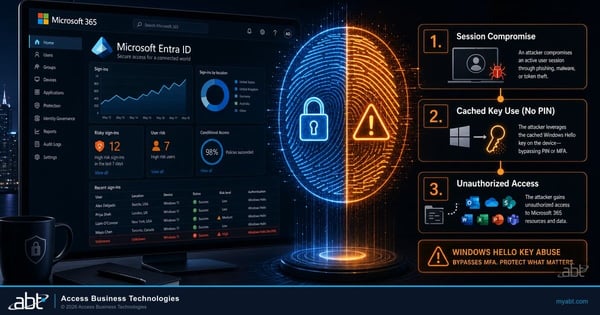
A Windows endpoint issue that turns on which edition and configuration a device is actually running.
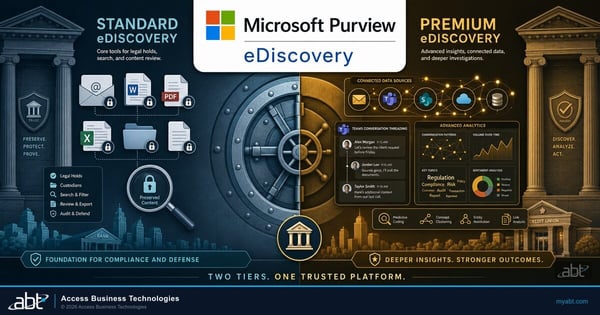
Purview eDiscovery: The Licensing Rule That Reverses
Another case where the license you hold and the capability you get can differ.
Windows 11 24H2 end of support, answered
Where the facts on this page come from
Every Microsoft date, update number and quotation above is taken from Microsoft's own documentation, linked below. The 364-day comparisons are arithmetic on those published dates. All were read October 14, 2026.
- Windows message center is the source for the October 13, 2026 notice that Windows 11 version 24H2 Home and Pro reached end of updates, that the October 2026 monthly security update is the last update available for those editions, Microsoft's recommendation of version 26H2 or 25H2, and the October 12, 2027 date for 24H2 Enterprise and Education; for the earlier 90, 60 and 30-day reminders recommending 25H2; for the note that the September 2026 non-security preview update was the final preview for 24H2; for the September 29, 2026 announcement of 26H2, its small download and quick restart, and safeguard holds; for the Windows settings backup default with 26H2; and for the 30-day reminder on 23H2 Enterprise and Education.
- Windows 11 release information is the source for the 24 month and 36 month servicing terms, the end of updates dates and builds for 23H2, 24H2, 25H2, 26H2 and 26H1, the October 2026 update KB5127648 and build 26100.9711, the LTSC 2024 dates including the IoT Enterprise LTSC 2024 extended date, the IoT Enterprise exclusion on 26H1, and the statement that 26H1 is scoped to new devices.
- Supported versions of Windows client is the source for the two end-of-updates columns by edition and the 26H2 availability date of September 29, 2026.
- An IT pro's guide to Windows 11, version 26H2 is the source for the enablement package delivery to eligible 24H2 and 25H2 devices, the shared servicing branch, the lifecycle reset on installing 26H2, and the pilot and deployment guidance.
- Get ready for Windows 11, version 26H2 is the source for the statement that 26H1 devices will not be able to update to 26H2 and the reason, and for the deployment channels: Windows Autopatch, Microsoft Intune and Windows Server Update Services.
- Windows subscription activation is the source for the step-up from Pro to Enterprise, the Windows Enterprise E3 and E5 requirement, deployment without keys and reboots, the five devices per user license, the reversion to Pro, the Conditional Access exclusion and KB5034848, the edition-only limit, and the Cloud Solution Provider channel.
- Windows Commercial Licensing overview is the source for Microsoft's recommendation to upgrade Pro devices to Enterprise and its list of reasons devices are not stepped up.
Ready to
Close the Gap?
Tell us about your fleet and ABT's licensing team will build your free assessment: which devices are still on 24H2 Home or Pro, which Windows edition and feature version every reachable device is actually running, which Windows and Microsoft 365 licenses you hold, and a plan to move what is out of servicing.
