


SharePoint Online and OneDrive · Microsoft Graph file APIs · Message Center MC1492958
SharePoint is taking the tokens out of its URLs. On April 1, 2027, the applications that still redeem them can stop working.
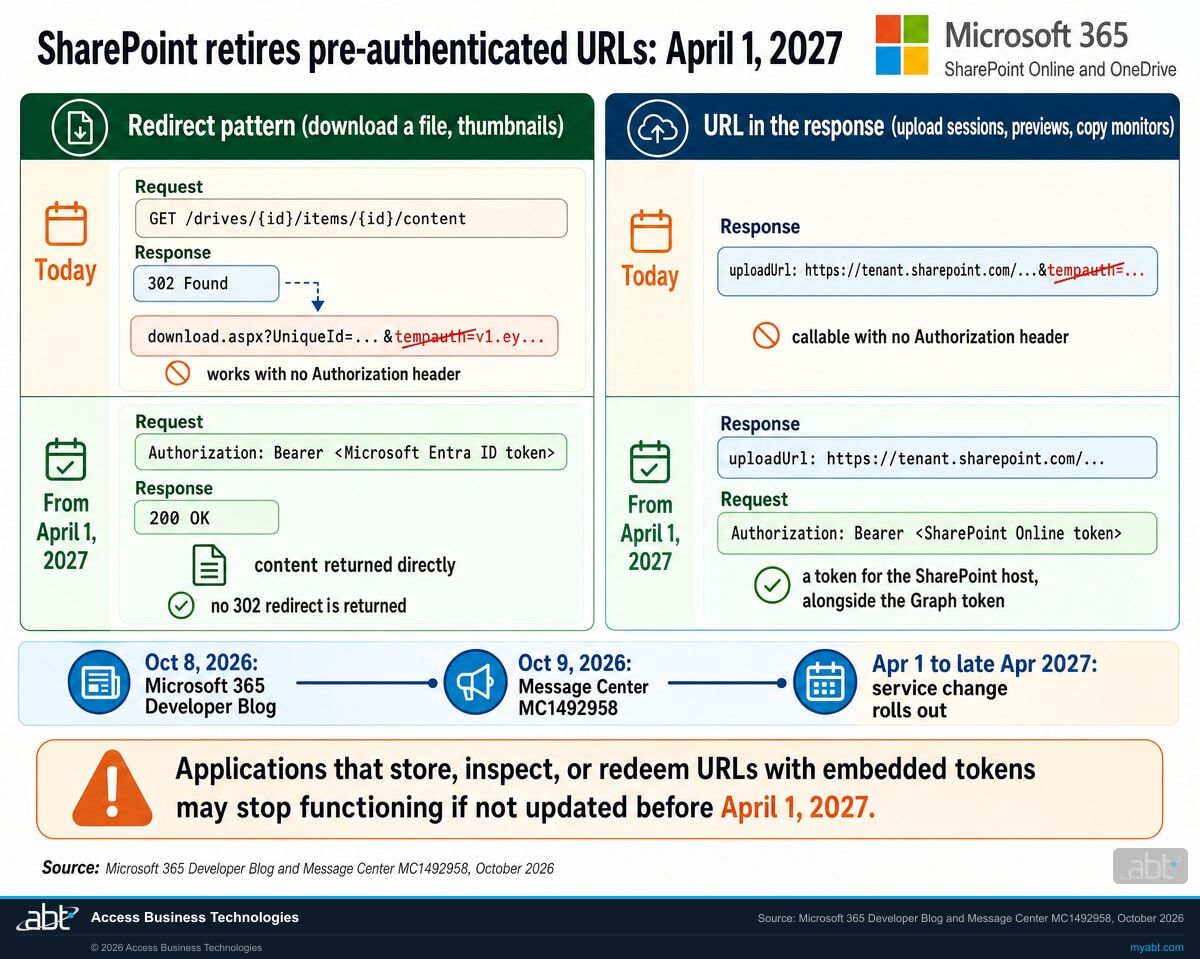
Today, several Microsoft Graph file APIs hand applications a SharePoint URL with a short-lived token inside it, the tempauth parameter, that works with no sign-in header. Microsoft announced on October 8 and 9, 2026 that it is retiring those pre-authenticated URLs from SharePoint Online and OneDrive. Beginning April 1, 2027, the affected APIs stop returning URLs with embedded authentication and stop issuing HTTP 302 redirects to them. Every application that redeems one of those URLs has to present a Microsoft Entra ID access token instead, while applications already on direct Microsoft Graph content endpoints with Entra ID authentication have nothing to change. For a credit union, bank, or mortgage company, that is an inventory question about document imaging, loan file systems, backup tools, and the scripts nobody has looked at in a while.
- April 1, 2027: selected Microsoft Graph file APIs stop returning pre-authenticated URLs and stop issuing 302 redirects to them; the service change runs from early to late April 2027
- Seven API families are named: download and content, upload sessions, copy and long-running action monitors, preview, thumbnails, versions, and format conversion
- The fix is a Microsoft Entra ID access token on every request: a SharePoint Online token, or your existing Graph token where your tenant opts the application into Graph URLs
The change
What stops working on April 1, 2027, and why is Microsoft doing it?
A pre-authenticated URL is a SharePoint link with a self-issued token inside it, so a client can fetch one file without a separate sign-in. Microsoft is removing that pattern from the Graph file APIs because a token in a URL travels everywhere the URL travels. The Developer Blog published the plan on October 8, 2026, and Message Center post MC1492958 followed on October 9 as a major change.
The decision in brief
- What
- SharePoint Online and OneDrive retire pre-authenticated (tempauth) URLs. Selected Microsoft Graph file APIs stop returning URLs that carry embedded authentication and stop issuing HTTP 302 redirects to them. Applications that store, inspect, or redeem those URLs can stop functioning if they are not updated first.
- When
- Beginning April 1, 2027. Microsoft lists the service change for Worldwide, GCC, GCC High, and DoD as beginning in early April 2027 and completing in late April 2027. Microsoft's action-required date on the post is April 1, 2027.
- Who
- Owners of third-party, line-of-business, custom, and automation applications that use the affected Graph file APIs, and the administrators responsible for Microsoft Graph, SharePoint Online, OneDrive, application integrations, and tenant security.
- Owner
- Your SharePoint administrator and the person who owns each integration, with your information security officer for the vendor file.
- Action
- Inventory the applications that move files through Microsoft Graph, ask each vendor and internal owner how they redeem the URLs they receive, read your tenant's pre-authentication settings, test in a test tenant, and record the change.
The Developer Blog explains it
The SharePoint team publishes the retirement plan: the two URL patterns, the six API families in its checklist, the audit list, and the two paths forward.
MC1492958 reaches tenants
The Message Center post is tagged Retirement and major change, names seven API families, and sets an action-required date of April 1, 2027.
Tenant controls for testing
A SharePoint administrator opts specific application IDs into Graph URLs to test early. The read switch is documented; Microsoft says the write switches arrive in a future SharePoint Online PowerShell release.
The service change rolls out
The affected APIs stop returning pre-authenticated URLs and 302 redirects to them, across Worldwide, GCC, GCC High, and DoD.
"URLs get logged, cached, forwarded, and stored in ways that bearer tokens in headers do not."
SharePoint team, Microsoft 365 Developer Blog, Pre-authenticated (tempauth) URLs are retiring: move to Microsoft Entra ID tokens before April 1, 2027, October 8, 2026A pre-authenticated URL looks like https://<tenant>.sharepoint.com/sites/samplesite/_layouts/15/download.aspx?UniqueId=<id>&tempauth=v1.ey.... SharePoint issues the token inside the URL so a client can fetch one item without a separate authentication round trip; Microsoft describes the tokens as short-lived and scoped to one item. The Graph documentation for downloading a file says the /content call returns a 302 redirect to a preauthenticated download URL, the same URL exposed as @microsoft.graph.downloadUrl, and that those URLs are valid for a limited time and might expire within minutes.
Microsoft describes two patterns, and each changes differently. In the redirect pattern, the API returns a 302 to a short-lived pre-authenticated URL that needs no Authorization header; after the change, no 302 is returned and the application receives the content directly. In the URL-in-the-body pattern, the API returns a short-lived pre-authenticated URL in the response (an upload session's uploadUrl, a preview's getUrl, a copy operation's monitor URL); after the change, the SharePoint URL in the body carries no token and the application has to supply an Authorization header with a Microsoft Entra ID access token for SharePoint.
Microsoft's own list of who is affected covers owners of third-party, line-of-business, custom, and automation applications that use the affected Graph file APIs, and organizations whose applications follow redirects or rely on URLs with embedded authentication. It also says who has nothing to do: organizations that use none of the affected APIs, and applications that already use direct Microsoft Graph content endpoints with standard Entra ID authentication. Microsoft has run an allow-list-then-switch-off sequence like this before; our page on the Exchange Web Services allow list covers the Exchange version of the same inventory.
The options
Which path fits each application: a SharePoint token, Graph URLs, or contentStream?
Microsoft documents one path that works everywhere today and one that depends on a tenant setting, and it points at a Graph endpoint that needs no change at all. The right answer differs per application, so the table is meant to be read once per vendor.
| Path | What the application presents | Where it applies | What it takes | What to weigh |
|---|---|---|---|---|
| Path A: a SharePoint Online token | A Microsoft Entra ID access token for the SharePoint host in the Authorization header, alongside the Graph token it already uses | Wherever the API returns a SharePoint URL: downloads, upload sessions, previews, copy monitors. Microsoft's path for every API that has no Graph alternative | Token audience https://{tenant}.sharepoint.com; SharePoint Online permissions on the app registration to match its Graph Files.Read or Files.ReadWrite permissions; code that accepts content directly, with no 302 to follow | Two tokens per flow. Vendors have to ship the change. Delegated tokens for user-initiated work, app-only tokens for background services |
| Path B: Graph URLs by tenant setting | Its existing Microsoft Graph token, against the Microsoft Graph URL the API now returns | Third-party applications a SharePoint administrator opts in by application ID, for APIs that have a Graph URL alternative | Get-SPOTenantPreAuthSettings -UseGraphUrlSettings to read; Set-SPOTenantPreAuthSettings with -UseGraphUrlIsEnabled and -UseGraphUrlAppsList to opt applications in, announced for a future SharePoint Online Management Shell release | Off by default. Third-party applications only. APIs without a Graph alternative keep returning pre-authenticated SharePoint URLs until the retirement removes the token. An empty application list applies to all third-party applications |
| driveItem/contentStream | Its Microsoft Graph token; the content comes back directly | Downloads, where the application can change which endpoint it calls. As of October 10, 2026, Microsoft Learn documents the endpoint under the Graph beta version only | A code change in the application, against an endpoint Microsoft says is not supported for production use while it sits in beta | Microsoft's blog says it already returns content directly, with no tempauth and no redirect, and is unchanged by any of this. Track it for v1.0 before building production code on it |
| Change nothing | A URL it was handed, with no Authorization header, or a 302 it expects to follow | Any application that stores, inspects, or redeems URLs containing embedded authentication tokens | No work before April 1, 2027 | Microsoft: such applications "may stop functioning if not updated before April 1, 2027" |
What an application that changes nothing sees
It depends on which of the two patterns the application uses. For a URL handed back in a response body (an upload session, a preview, a copy monitor), the metadata call keeps working and the final request to that URL fails for lack of an Authorization header; 401 Unauthorized is the shape to expect for that failure, because the token that rode inside the URL is gone and nothing took its place, and the test in step 4 is where you confirm what your own applications return. For the redirect pattern, the 302 the application waits for never comes: the content arrives directly, and code written to intercept a Location header, or an HTTP client set to refuse automatic redirects, handles that in its own way. A developer described the first shape on Microsoft Q&A on October 6, 2026: /content returned its 302, @microsoft.graph.downloadUrl matched the redirect target, and the download URL itself answered 401, starting in mid-September, with the tenant's administrators confirming they had changed nothing. The thread carries an automatically generated answer and none from Microsoft, so whether that report has anything to do with this retirement is unknown. Both shapes belong in front of your help desk and your vendors.
Plan for the people outside your development team too. The tenant setting is off by default, applies to third-party applications only, and leaves requests that go straight to SharePoint APIs untouched, so a vendor product that bypasses Graph is on Path A whatever you configure. Microsoft asks ISVs to publish updated minimum-version guidance to their customers well ahead of April 1, 2027; asking each vendor for that guidance is the shortest version of the inventory.
Know which of your applications redeem SharePoint URLs before April 1, 2027
ABT reviews the applications that move files through Microsoft Graph in your tenant, the permissions and tokens behind them, and your pre-authentication settings, and leaves you a written plan for the retirement, as part of a free security assessment.
Request the free assessmentThe work
How do you find and fix the affected applications before April 1, 2027?
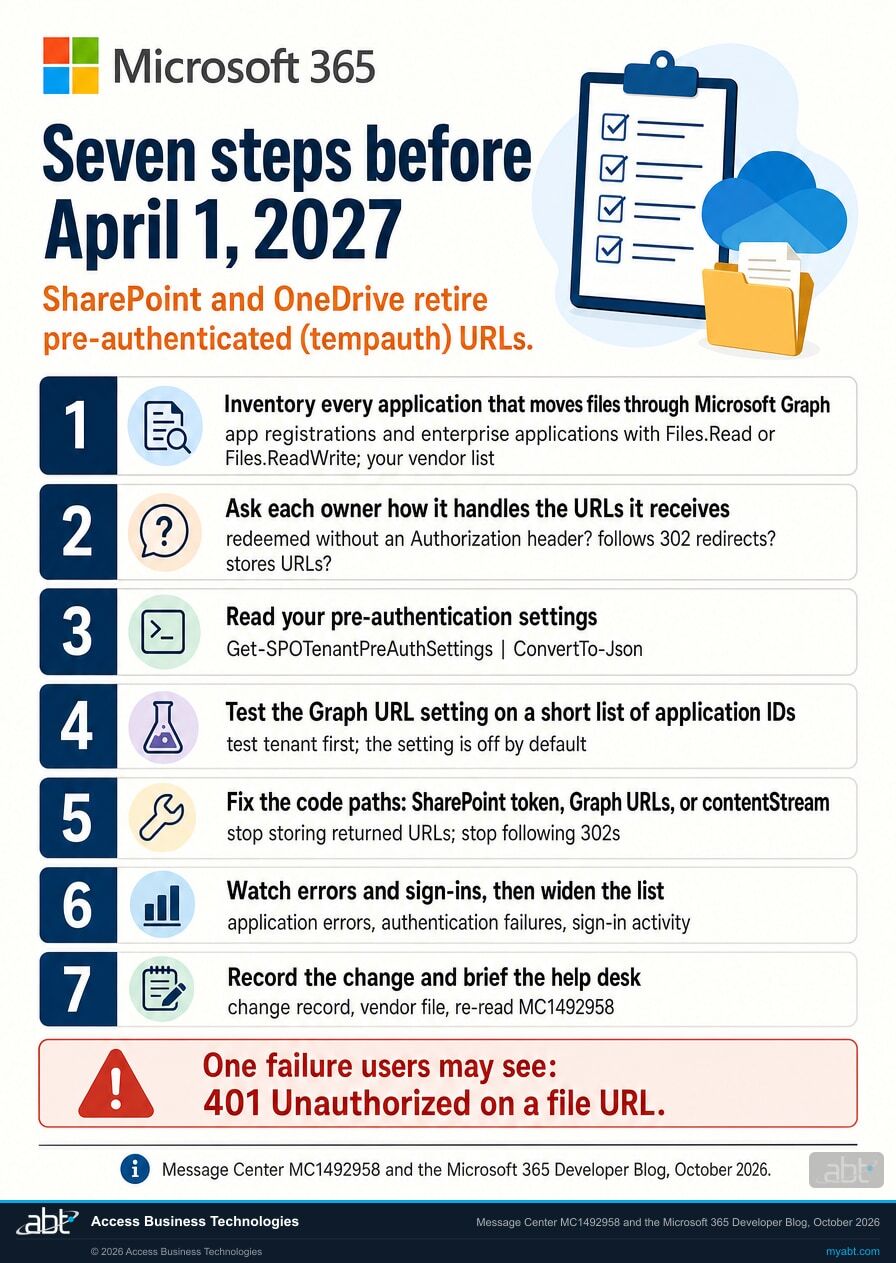
Seven steps, in the order the decisions depend on each other. Steps 1 and 2 are the inventory. Steps 3 and 4 use the cmdlets Microsoft documents. Steps 5 and 6 are the fix and the proof. Step 7 is the record a regulated institution keeps.
Inventory every application that moves files through Microsoft Graph
Microsoft's instruction is to identify applications that obtain file, version, thumbnail, preview, upload-session, or copy-operation URLs through Microsoft Graph. Start with the application registrations and enterprise applications in your tenant that hold Graph file permissions such as Files.Read or Files.ReadWrite, the permissions Microsoft names in its guidance, then add the vendors you know touch documents: imaging and document management, the loan origination system's document connector, e-signature, backup, robotic process automation, and the scheduled scripts that copy files overnight.
For each one, record the owner, whether it is third-party or built in house, and whether it calls Microsoft Graph or SharePoint APIs directly. That last column decides which path is available to it.
Ask each owner how the application handles the URLs it receives
Microsoft's audit checklist gives you the questions. Does the application read tempauth=, access_token=, uploadUrl, getUrl, @microsoft.graph.downloadUrl, or a monitor URL out of a Graph response and fetch it with no Authorization header? Does its HTTP client turn off automatic redirects or inspect a Location header? Does it persist a returned URL anywhere, in a queue, a database, an email, another service, or a browser? Then ask the question Microsoft asks on your behalf: what is the vendor's support plan and timeline for the change?
A vendor that answers "we already use direct Microsoft Graph content endpoints with Microsoft Entra ID authentication" is in Microsoft's no-action group. Keep the answer in the vendor file.
Read your tenant's pre-authentication settings today
Microsoft's first instruction to administrators is to run Get-SPOTenantPreAuthSettings to see where you stand. It returns every pre-authentication setting for the tenant as an object, and Microsoft suggests Get-SPOTenantPreAuthSettings | ConvertTo-Json because complex Allow or Deny lists are hard to read otherwise. The documented -UseGraphUrlSettings switch returns the configuration that controls whether supported Graph file APIs return Graph URLs for configured applications.
You need the SharePoint Administrator role to run these cmdlets. If the output shows pre-authentication already disabled or an Allow or Deny list in place, somebody made a decision earlier; find out who and why before you touch it, because the lists use an order of precedence (Deny, then Allow, then the IsDisabled switch) and a Deny entry wins over everything.
Test with the Graph URL setting on a short list of applications
Microsoft's sequence is to enable the new tenant setting for a limited set of application IDs, validate application behavior, and expand after successful validation. The Developer Blog adds the guardrail: because these settings can disable functionality in a production tenant, evaluate every change in a test tenant first, and use an empty application list, which applies to all third-party applications, only after you have assessed your tenant.
Microsoft's Message Center post and the Developer Blog's Path B heading say the write switches, Set-SPOTenantPreAuthSettings -UseGraphUrlIsEnabled and -UseGraphUrlAppsList, come in a future release of SharePoint Online PowerShell, while the blog's timeline section says the setting is available. Check the Set-SPOTenantPreAuthSettings page and your installed module before you schedule the test. Until you can run the switches in your own tenant, steps 1 to 3 and the vendor conversation are the work; once you can, this step is the proof.
Fix the code paths, yours and your vendors'
For software your institution builds or scripts it runs, Microsoft's migration list applies, by path. For every application: inventory every call site that touches the affected API families; remove every assumption about 302 redirects and make sure the HTTP client accepts content directly; stop storing, forwarding, or queuing returned URLs for later redemption. For applications on Path A: add SharePoint Online token acquisition alongside the Graph token and add the matching SharePoint Online permissions to the app registration. For applications your tenant opts into Graph URLs: keep the Graph token and make sure the code accepts the Graph URL the API returns. For downloads, Microsoft's blog says to prefer driveItem/contentStream where you can; as of October 10, 2026, Microsoft Learn documents that endpoint under the Graph beta version only and says use of beta APIs in production applications is not supported, so track it for v1.0 before you build production code on it.
For vendor software, the fix is a version. Record the minimum version each vendor names and the date it ships, and hold the vendor to Microsoft's "well ahead of April 1, 2027."
Watch the errors and the sign-ins, then widen the list
Microsoft tells administrators to monitor application errors, authentication failures, and sign-in activity during testing, and to expand the configuration to additional applications after successful validation. A 401 on an upload, preview, or copy-monitor URL, or a download that fails because the application waited for a redirect, from an application on your test list is the signal you are looking for. The success signal depends on the path: an application on Path A acquires a SharePoint Online token, which is a sign-in your tenant records, where the bare URL fetch produced no sign-in of its own; an application your tenant opted into Graph URLs keeps using its Graph token, so the signal is the Graph URL working with no errors.
Record the change and tell the people who will take the first call
Microsoft asks you to communicate the change to development and application support teams. Give the help desk the two shapes of the failure (a file URL from a response body that answers 401 for lack of a token; a redirect that never arrives, with the content delivered directly) and the list of applications and their fix dates. Put the vendor answers from step 2 in the vendor file, and the test results from steps 4 and 6 in the change record.
Then calendar a re-read of MC1492958. Microsoft revises its own dates after it announces them, and our page on how Message Center dates change after publication covers how to track a moving date without re-reading every post by hand.
Before you decide
What else should you know before you choose a path?
Five facts from Microsoft's own documentation that decide which path fits a given application, and one question Microsoft's texts leave open.
The tenant setting is off by default
Microsoft's words: "The change is not enabled by default through tenant controls. Administrators must choose which application IDs participate in testing and validation." Nothing moves to Graph URLs until a SharePoint administrator turns the setting on and chooses which applications it covers, by listing their IDs or, with an empty list, by applying it to all third-party applications.
It covers third-party applications only
The Developer Blog states that the Graph URL setting applies only to third-party applications. For APIs without a Graph URL alternative, the response keeps including a pre-authenticated SharePoint URL until the broader deprecation removes the token, so those calls need Path A whatever the setting says.
Direct SharePoint API calls sit outside the setting
Microsoft: requests made directly to SharePoint APIs, outside Microsoft Graph, are unaffected by the tenant control setting. Graph URLs are returned only when the request came through Graph, so a product that talks to SharePoint directly needs its own token plan.
Deny beats Allow, and both beat the master switch
The pre-authentication cmdlets use an order of precedence: Deny, then Allow, then IsDisabled. An application on both the Allow and Deny lists gets nothing. If an application breaks in your tenant, Microsoft's fastest diagnosis is to ask the administrator which features are currently allowed for its application ID.
The existing controls can already break applications
Set-SPOTenantPreAuthSettings can disable pre-authentication per feature today, and Microsoft's feature table warns that turning off Download, UploadSession, or WebRenderingEmbed means "3rd party application and some 1st party applications may be broken." Microsoft recommends testing every change in a test tenant first.
Two Microsoft texts, one open question on timing
The Developer Blog's timeline says the opt-in setting for Graph URLs is available today, while its Path B heading says the switches come in future SharePoint Online PowerShell versions, and MC1492958 says the controls are coming soon in a future release. On October 10, 2026, Microsoft Learn documents Get-SPOTenantPreAuthSettings -UseGraphUrlSettings and lists no UseGraphUrl parameters on the Set cmdlet page. Read the Set page before you schedule the test.
For financial institutions
Why does this matter at a credit union, bank, or mortgage company?
Because the applications that move loan files, statements, and member documents in and out of SharePoint and OneDrive are mostly somebody else's software, and a change to how they prove who they are is a change to how your institution controls access to customer information.
Keep the documents moving. Imaging systems, loan origination connectors, e-signature platforms, backup tools, and overnight scripts move files through Microsoft Graph without anyone watching them do it. Microsoft says applications that store, inspect, or redeem those URLs may stop functioning once the change reaches your tenant in April 2027, and the existing pre-authentication controls can affect them sooner, so the inventory in steps 1 and 2 is how you learn which back-office processes are exposed, and the vendor fixes and tests in steps 5 and 6 are what closes the exposure. Our guide to vendor due diligence on Microsoft 365 covers what belongs in the file for each of those vendors, and our article on finding and governing shadow IT covers the applications nobody registered.
Protect the access path. Microsoft's reason for the change is a security reason: a token inside a URL goes everywhere the URL goes, into logs, caches, forwarded messages, and databases, while a bearer token in a header stays with the request. The FFIEC Information Security booklet says sensitive or mission-critical applications "should incorporate appropriate access controls that restrict which functions are available to users and other applications," and that management should implement an authentication method "consistent with the criticality and sensitivity of the application" and log access and events. Moving file access onto Microsoft Entra ID tokens means the token is acquired through a sign-in your tenant evaluates and records, so the Conditional Access policies you have configured for that application and identity, and your session revocation, apply to acquiring it.
Keep the record. For mortgage companies and other non-bank lenders under the FTC Safeguards Rule, 16 CFR 314.4(c)(2) requires them to "Identify and manage the data, personnel, devices, systems, and facilities that enable you to achieve business purposes"; 314.4(c)(4) requires "procedures for evaluating, assessing, or testing the security of externally developed applications" that transmit, access, or store customer information; 314.4(c)(7) requires them to "Adopt procedures for change management"; and 314.4(f) requires them to oversee service providers by selecting ones "capable of maintaining appropriate safeguards," requiring those safeguards by contract, and "Periodically assessing your service providers based on the risk they present." The FFIEC booklet's third-party section says management should conduct appropriate due diligence in selecting and monitoring third-party service providers, and that contracts should "Provide for the right to require changes to standards as external and internal environments change."
Those texts speak to applications and vendors in general terms, and how they apply to a given integration is your institution's call. The retirement is a natural point to write that call down: which applications touch customer files through Graph, which path each one takes, what each vendor committed to and when, and who approved the test in your tenant. Our page on which Microsoft Entra roles hold app governance covers who in your tenant should be making those approvals.
Why does Microsoft want the token in a header and never in a URL?
Because access lives in tokens and sessions, and tokens you issue through Microsoft Entra ID are tokens you can condition, watch, and revoke. The Short from our channel makes the same point from the offboarding side: resetting a password leaves the live sessions open, so the first move is to block sign-in and revoke the user's sessions in Entra ID, in 21 seconds.
The tempauth retirement applies that principle to files. A pre-authenticated URL is redeemed with no sign-in of its own, so that fetch passes through none of the Conditional Access policies you have configured and appears in no sign-in log. A Microsoft Entra ID token is acquired through a sign-in that your tenant evaluates and records, so the policies you have configured for that application and identity apply to acquiring it; the file request it then authorizes is governed by SharePoint's permissions and recorded in the audit logs you have turned on, as before.
How ABT helps
A free security assessment
ABT is a Tier 1 Microsoft Cloud Solution Provider serving more than 750 financial institutions, and it manages Microsoft 365 tenants for credit unions, banks, and mortgage companies. The applications that touch your files are part of your access-control picture, so the assessment starts there.
We inventory the applications that move your files through Microsoft Graph and leave you a written plan for April 1, 2027
The assessment is free and ends with written findings you keep. We work through it with an administrator on your team, and your team decides what changes and who makes each change.
- The inventory. Every application registration and enterprise application in your tenant that holds Microsoft Graph file permissions, with its owner and whether it is third-party or built in house.
- The vendor questions. Microsoft's three questions, drafted for each vendor, and a place to record the answer and the promised version.
- The settings readback. Your tenant's pre-authentication configuration as Get-SPOTenantPreAuthSettings reports it, with any existing Allow or Deny entries explained.
- The permissions review. Which applications hold which Graph and SharePoint permissions, who consented, and which ones nobody can account for.
- The test plan. A test tenant first, then a limited application list, with the errors and sign-in activity to watch, following Microsoft's sequence.
- The record. A dated summary for your change record, your vendor file, and your risk assessment.
ABT also operates M365 Guardian, its managed security service for credit unions, banks, and mortgage companies. Learn about M365 Guardian
Related reading
If this opened a bigger question
An application inventory tends to surface the questions behind it: what belongs in the vendor file, which applications nobody registered, and how an attacker uses the consent an application was granted.

Vendor Due Diligence on Microsoft 365: What Goes in the File
What a credit union, bank, or mortgage company keeps on file for Microsoft 365 and the vendors that connect to it.
Read the article
Shadow IT in Financial Institutions: Find It, Govern It
How to find the applications and connections nobody registered, and how to bring them under the institution's controls.
Read the article
ConsentFix v3: The OAuth Consent Phishing Toolkit That Bypasses MFA for Financial Institutions
How an attacker turns an application's granted consent into access, and what that says about reviewing the applications in your tenant.
Read the articleAnswered
The SharePoint tempauth URL retirement, answered
Verify it yourself
Where the facts on this page come from
Every Microsoft, FTC, and FFIEC date, setting, cmdlet, and quotation above was read from the sources listed here on October 10, 2026.
- Microsoft 365 Message Center post MC1492958, Microsoft Graph: New tenant controls for retirement of non-standard file API tokens, published October 9, 2026, tagged Retirement and Major change, action required by April 1, 2027. Source for the April 1, 2027 date, the early-to-late April 2027 service change, the seven API families, who is affected, the off-by-default statement, the recommended actions, and the no-action cases. Visible to administrators in your own Microsoft 365 admin center; an unofficial public archive copy is at mc.merill.net/message/MC1492958.
- Microsoft 365 Developer Blog, SharePoint team, Pre-authenticated (tempauth) URLs are retiring: move to Microsoft Entra ID tokens before April 1, 2027, October 8, 2026. Source for the two URL patterns, the six-item checklist, the audit checklist, Path A and Path B, the -UseGraphUrl* switches, the scope and precedence rules, the contentStream advice, the ISV and administrator migration steps, and the quoted sentence on URLs and bearer tokens.
- Microsoft Learn, Get-SPOTenantPreAuthSettings, page updated September 17, 2026. Source for the -UseGraphUrlSettings parameter and the ConvertTo-Json example.
- Microsoft Learn, Set-SPOTenantPreAuthSettings, page updated September 18, 2025. Source for the -IsDisabled switch, the Allow and Deny lists, the order of precedence, the feature table and its warnings, the SharePoint Administrator requirement, and the test-tenant recommendation.
- Microsoft Learn, Clear-SPOTenantPreAuthSettings. Source for clearing an Allow or Deny list.
- Microsoft Learn, Download driveItem content. Source for the 302 redirect to a preauthenticated download URL, its equivalence to @microsoft.graph.downloadUrl, and the validity window.
- Microsoft Learn, driveItem: createUploadSession and driveItem: preview. Source for the uploadUrl and getUrl response properties named in the audit checklist.
- Microsoft Q&A, Microsoft Graph /content returns non-preauthenticated SharePoint URL which results in 401, October 6, 2026. A developer's report, cited for the shape of the failure; the thread carries an automatically generated answer and none from Microsoft.
- FTC Safeguards Rule, 16 CFR 314.4, paragraphs (c)(1), (c)(2), (c)(4), (c)(7), and (f), on the eCFR. Source for the quoted inventory, externally developed application, change management, and service provider requirements, and for the access-control requirement summarized in the FAQ.
- FFIEC IT Examination Handbook, Information Security booklet, II.C.15(b) Application Access and II.C.20 Oversight of Third-Party Service Providers. Source for the quoted application access and third-party oversight language.
