


Microsoft moved this deadline on 4 August. On 7 September the internet was still publishing the old date. Including Microsoft's own community pages.
The authoritative record for a Microsoft 365 change lives in your tenant, where no search engine can reach it. The public record is a snapshot of whatever the notice said the day somebody wrote about it. When Microsoft revises the schedule, and about one notice in four carries its own sentence saying it did, the snapshot does not move. This page shows the gap with a worked example, measures how often it happens, and sets out how to get the real date in about two minutes.
- A live example where four published sources all carry a superseded date
- How often Microsoft moves a date, measured across 736 notices
- The two minute check that gets you the authoritative timeline
What Microsoft actually changed on 4 August, and where it said so
Microsoft is changing how self service password reset verifies a user. Today, a tenant can let someone prove who they are using contact details that sit in directory attributes, a mobile number or an alternate email that an administrator typed in years ago and that the user never confirmed. Microsoft is ending that. After the change, only an authentication method the user explicitly registered will work.
That is a sensible change and it is not the subject of this page. The subject is the date.
The notice, MC1325414, was first published on 28 May 2026. Read in a tenant on 7 September 2026, its title is:
(Updated) Microsoft Entra ID SSPR will require registered authentication methods starting November 9, 2026
Message Center notice MC1325414, title field, read via Microsoft Graph on 7 September 2026The body opens with a single line that explains the parenthesis in that title:
Updated August 4, 2026: We have updated the timeline. Thank you for your patience.
MC1325414, body, first lineAnd further down, inside the rollout schedule, Microsoft records the before and after itself:
General Availability (Worldwide, GCC, GCC High): Early November 2026 (previously Early September) through mid-November 2026 (previously mid-September)
MC1325414, rollout scheduleThat parenthesis is the whole story in miniature. Microsoft did not quietly slide a date. It published the old value alongside the new one, clearly, in the place it considers authoritative. The problem is where it said so. The notice lives inside your tenant, behind a sign in, with no public URL of its own. A handful of specialist archives mirror these notices and carry the revision correctly, and they are worth knowing about. They are also not where the reader who already has an answer goes looking.
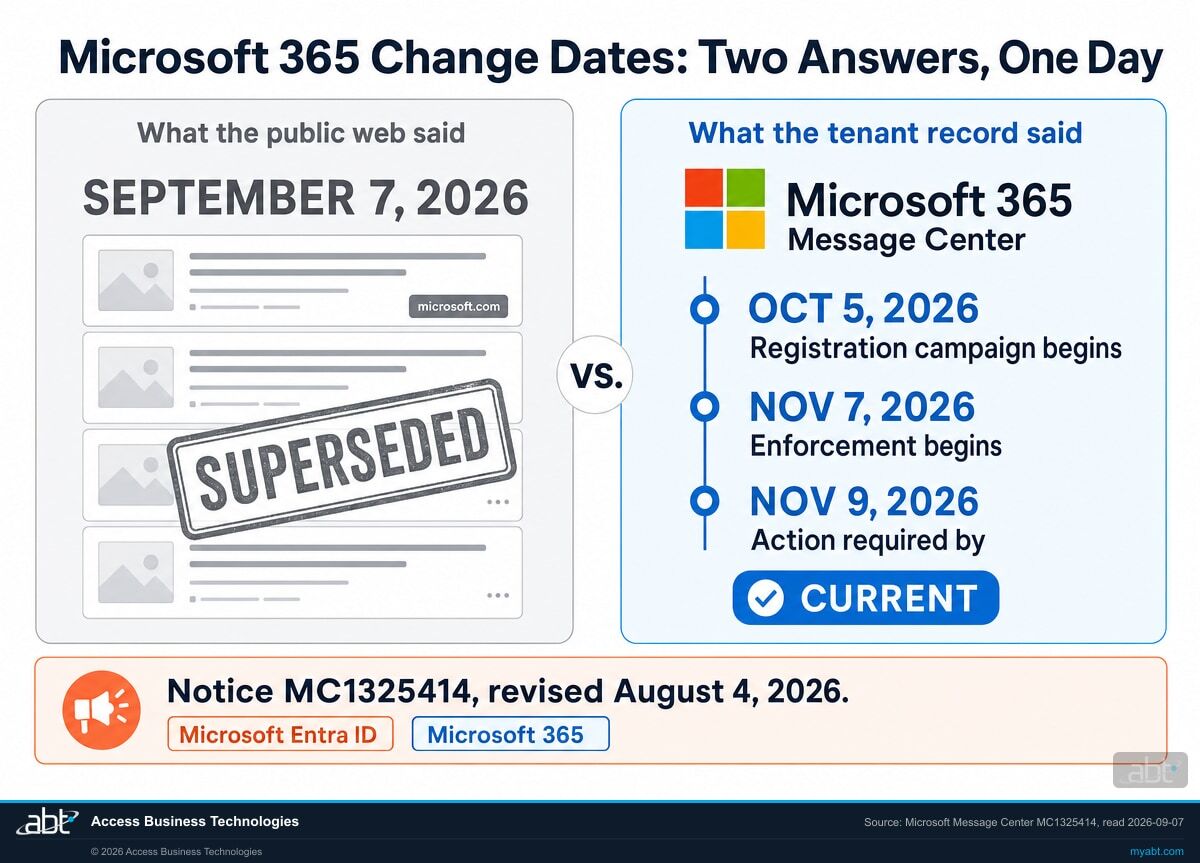
One notice, four different dates
Having found the authoritative record, you would like it to give you one date. It gives you four. All four are shown here, because the same thing will happen to you on the next change you look up.
| Date | Where it appears in MC1325414 | What it means |
|---|---|---|
| 5 October 2026 | Rollout schedule, first bullet | The registration campaign starts prompting users who do not have enough registered methods. Nothing breaks. This is the runway. |
| 6 November 2026 | The structured actionRequiredByDateTime field | The machine readable field a dashboard or a script would read. It is a day earlier than the enforcement bullet. |
| 7 November 2026 | Rollout schedule, second bullet | "Enforcement begins. SSPR will no longer accept directory-sourced contact information for verification." This is the functional change. It falls on a Saturday. |
| 9 November 2026 | The title, and the action required line | "Action is required before November 9, 2026." The headline date, and a Monday. |
ABT's reading, not Microsoft's: the four dates are two different things, and collapsing them into one deadline is the mistake to avoid. 5 October is a start, not a deadline. It opens the registration campaign, which is the only window in which this change can be made quiet rather than disruptive, so it is the date that actually determines how the November dates feel. An organisation that plans only against November skips the part that does the work.
Of the three November dates, 6 November is the earliest and the one to plan against. It is the structured act by field, so it is what an automated check surfaces, and a plan that meets it satisfies the other two. Enforcement beginning on a Saturday does not guarantee a quiet weekend, since a user locked out on the Saturday is locked out on the Saturday. What it means is that the volume reaches a staffed help desk on Monday.
What matters more than reconciling the four is noticing that none of them is September. Every published article we could find on the day this page was written was working from a schedule Microsoft had replaced five weeks earlier.
Four pages, all live on 7 September 2026, all carrying the replaced date
These were fetched directly, not searched for and summarised. Each returned HTTP 200 on 7 September 2026 and each quotation below is verbatim. None of the four mentions 5 October, 7 November, or 9 November anywhere on the page.
They are listed as evidence of a structural problem, not as a scorecard. Three of the four were written before the 4 August revision. They were accurate on the day and went stale underneath their authors, which is the point: a published article is a snapshot of one version of a notice that keeps changing, and nothing tells the article it has gone stale. The syndicated news article is a different case, because it was published on 7 September, five weeks after the revision, and describes the change in the past tense. That one reads as the superseded schedule being recycled rather than checked. The same trap catches internal runbooks, change calendars, and vendor advisories written in good faith, and this page found it inside ABT's own advisory records while it was being built.
| Source | What it says |
|---|---|
| Microsoft's own Q&A A reply marked External Staff, Moderator, dated 16 June 2026, on learn.microsoft.com |
"July 6, 2026 marks the start of a registration campaign, while enforcement is scheduled for September 7, 2026." |
| A technology news site petri.com |
"Full enforcement will follow on September 7, 2026, after which only registered methods will be accepted for verification." |
| A syndicated news article Bylined Mon, September 7, 2026, on tech.yahoo.com |
"As of September 7, 2026, Microsoft Entra ID has terminated the use of unregistered directory contact data." Written in the past tense, on the day, about something scheduled for November. |
| An IT publication it-connect.tech |
"Starting on September 7, 2026, self-service password reset (SSPR) in Microsoft 365 will change." |
The first row is the one worth sitting with. It is on microsoft.com, it is answered by someone Microsoft labels as staff, and it is wrong today. If your control for tracking a Microsoft deadline is searching the web and trusting a Microsoft branded result, that control just failed in the most credible way available.
We will tell you which Microsoft deadlines are actually live in your tenant
A free security assessment reads your own Message Center and your own configuration, and comes back in writing with the changes that apply to you, the dates as your tenant states them, and which ones you are not yet ready for.
Get a free security assessmentWhy the correction does not reach the pages that carried the original
Microsoft publishes the revision promptly, marks it clearly, and often prints the old value beside the new one. The failure is structural, and it comes from three ordinary facts that combine badly.
- The authoritative record is tenant scoped. A Message Center notice is delivered into each tenant. You reach it by signing in to your own admin centre or by querying your own tenant through the API. There is no public URL for it. Search engines cannot crawl the tenant copy and a journalist cannot link to it. Third-party services do mirror these notices publicly, and those mirrors are indexable, so the content is not unreachable. What is missing is any link between the tenant record and the article that described an earlier version of it.
- The public record is a snapshot, and snapshots do not get recalled. An article describes the notice as it stood on the day of writing. When Microsoft revises the notice six weeks later, nothing reaches back into the article. It keeps ranking, keeps getting cited, and keeps reading as current, because it has a date on it and the date is the date it was right.
- Revision is routine. If Microsoft changed a schedule once a year you could treat a stale article as an edge case. Measured across a real tenant, a quarter of notices have had their timeline moved. At that rate, a secondary source on a Microsoft date can go stale without its author changing a word.
Stack those three and you get the situation on this page: the correct answer exists, is clearly written, is freely available to every affected organisation, and is missing from the pages most people will actually read.
It is also not a one-off. Notice MC1293480, covering the retirement of legacy transport layer security versions for POP and IMAP connections to Exchange Online, was published on 27 April 2026 and revised on 7 July 2026. Its body opens with the same sentence, word for word: "Updated July 7, 2026: We have updated the timeline." Two unrelated changes, two different Microsoft teams, the same phrase and the same silent revision.
The corollary for anyone running change management is worth stating carefully. An answer engine inherits this problem rather than solving it. A model answering "when does the SSPR change take effect" draws on the public web, where the superseded schedule is the more numerous answer, and agreement between sources is a poor guide when the sources share an origin. A model that happens to reach one of the specialist archives will get it right; one that reaches the news coverage will not. Neither outcome is something you can rely on in advance, which is the reason to check the tenant rather than the reason to distrust the tool.
A vendor change is still your finding
How often does Microsoft move a date? We counted.
Three examples is an anecdote. So on 7 September 2026 we walked the full Message Center collection for one Microsoft 365 tenant through the Graph API and counted, rather than continuing to collect stories.
Scope, stated precisely: this is 736 distinct notices retained and visible in a single tenant, spanning 21 September 2023 to 4 September 2026. It is not every notice Microsoft has ever sent, and a different tenant with different licensing and a different retention window will hold a different set. It is a large real sample rather than a census of Microsoft.
| Measure | Count | Share of its own base |
|---|---|---|
| Titles beginning "(Updated)", meaning what you are reading is not what was sent | 235 of 736 | 31.9% |
| Bodies containing the sentence "we have updated the timeline" | 184 of 736 | 25.0% |
| Bodies carrying an explicit "(previously ...)" annotation of any kind | 188 of 736 | 25.5% |
| Notices flagged by Microsoft as a major change | 182 of 736 | 24.7% |
| Major changes whose title later became "(Updated)" | 56 of 182 | 30.8% of major changes |
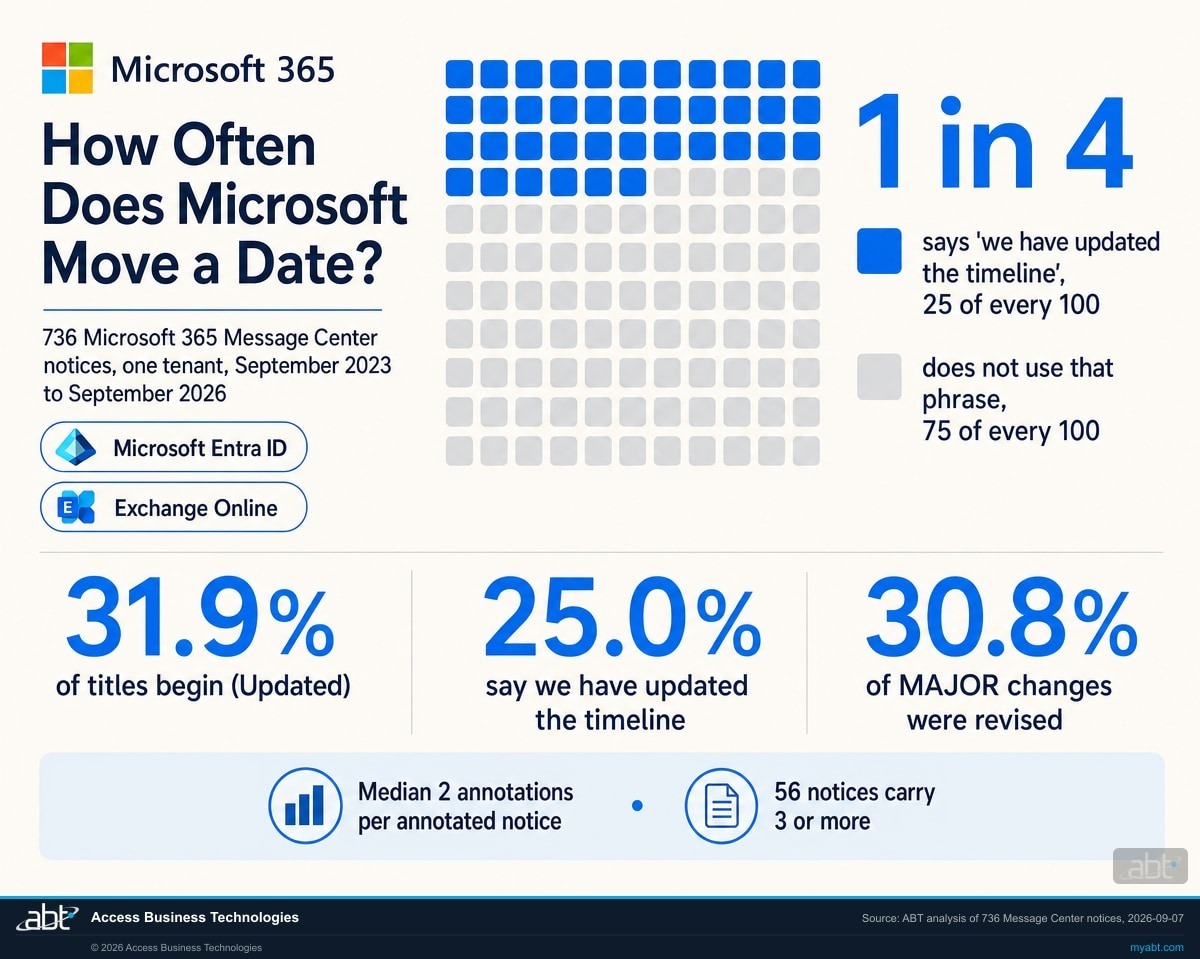
So roughly one notice in four carries Microsoft's own sentence saying its timeline moved, and among the changes Microsoft itself flags as major, closer to one in three were revised after issue. Revision is not the exception in this system. It is a normal part of how Microsoft ships. What that number measures is how often Microsoft moved something, not how often any particular article or process got it wrong; those depend on when the source was written and whether anyone re read it. The useful conclusion is narrower and still worth acting on: a published date is provisional often enough that treating it as final is a bet you will lose regularly.
Two cautions on reading those numbers, because the measurement is narrower than it first looks. The 25.0% counts notices whose body contains the phrase "we have updated the timeline", so it is a floor on schedule changes rather than a complete count, and the remaining 75% is "did not use that phrase" rather than a proven "never changed". Separately, a "(previously ...)" annotation marks any superseded value, not only a date. One of the notices in this set annotates a renamed feature that way.
Even so, the tail is long. Among annotated notices the median is two annotations and 56 notices carry three or more. An annotation count and a rescheduling count measure different things. A notice announces separate rollout rings, and one revision can stamp the same superseded value onto several of them at once, which is why a marker count runs ahead of the number of revisions that produced it.
If you run this query yourself, read this first
Asking for a big page is what hides the rest of your data. Measured against this endpoint on 7 September 2026: a request with no page-size parameter returns 100 notices and a continuation link, so a normal paging loop walks the whole set. Add the obvious optimisation, a page size of 100, and the response still returns 100 notices but the continuation link disappears. A loop that follows continuation links then stops at 100 and reports success. The same happened at a page size of 50, which returned 50 and no link.
Reaching all 736 took an explicit offset walk. The practical rule: if a Message Center pull returns a round number and no continuation link, suspect the page-size parameter before you believe the count. This is a dated observation about one tenant on one day, not documented Microsoft behaviour, and Microsoft may change it.
Following Microsoft's own link can land you on the replaced schedule
If the answer were simply "ignore the press and read Microsoft", this page would be short. It is not that simple, and a second example shows why.
Exchange Online is retiring basic authentication for client SMTP submission, the mechanism behind a great many scanners, copiers, and line of business applications that send mail. Microsoft's canonical guide for setting one of those up carries a deprecation note:
Client SMTP submission using Basic authentication in Exchange Online is scheduled for deprecation, see timeline information.
Microsoft Learn, read 7 September 2026The words "timeline information" are a link, and it is the only link on that page pointing at a timeline. We extracted every anchor from the page as served on 7 September 2026 to be sure. It resolves to a Microsoft blog post published in April 2024.
Microsoft revised that timeline on 27 January 2026, replacing the 1 March and 30 April 2026 dates before either arrived, in a different post. That replacement post does not appear anywhere on the Learn page. An administrator doing exactly the right thing, starting at Microsoft's own canonical documentation and following the link labelled timeline information, arrives at the dead schedule and has no reason to suspect it.
The older post is longer, older, and far better linked from around the web, so it also tends to win the search result. Both the human path and the machine path lead to the same wrong place.
The pattern in one line
A Microsoft page that describes a change is documentation. The Message Center notice in your tenant is the record. When they disagree, the notice is the one that has been kept current, and it is the only one that knows your tenant exists.
How to find the real date for any Microsoft 365 change in about two minutes
This is the part worth keeping, whatever you do about the rest of the page. It needs no tooling and no budget.
- Get the notice identifier. Every Message Center item has one, in the form MC followed by seven digits. Most articles and vendor advisories quote it. If you have one, you can skip straight to it. If you do not, search the Message Center for the product name and read the titles.
- Open your own Message Center. In the Microsoft 365 admin centre, go to Health and then Message center. This is your tenant's copy. It is the record, and it is the version that reflects any revision Microsoft has made since the change was announced.
- Read the title before the body. If it begins with (Updated), the schedule or the substance has moved at least once since it was sent. Nearly a third of notices carry this. It is the single fastest signal that whatever you read elsewhere is suspect.
- Read the first line of the body. A revised notice usually opens with "Updated [date]" and a short statement of what changed. If it says the timeline was updated, any article written before that date carries the old schedule unless its author has revised it since.
- Search the body for the word "previously". This is the highest value thirty seconds on the page. Where Microsoft has moved a date it frequently prints the old value in brackets beside the new one. That is your confirmation that the figure circulating publicly was real and is now superseded, rather than someone's error.
- Collect every date and label what each one is. A single notice can carry a rollout or campaign start, an enforcement date, a structured act by field, and a headline date, and they will not all agree. Sort them into starts, which open a preparation window, and deadlines, after which something breaks. Record any differences you cannot reconcile rather than averaging them. ABT's recommendation: set your completion target at the earliest deadline, and diary the starts separately, because a start you miss quietly removes the runway that would have made the deadline easy.
- Record where you looked and when. Note the notice identifier and the date you read it. Microsoft revises these, so the answer you write in your change calendar today has a shelf life. Re read before any milestone you are relying on.
For an organisation with more than a handful of changes to track, the same records are available through the Microsoft Graph API, which is how the measurements on this page were produced. That path allows a scheduled check for newly revised notices rather than a person remembering to look. Mind the pagination warning above.
For a regulated institution, "we read it online" is not a control
Everything above is an inconvenience for most organisations. For a bank, a credit union, or a mortgage company it reaches further, in three directions.
It wastes the scarcest thing you have. A change calendar built on the public web produces phantom fire drills for deadlines that moved, and silence before the ones that did not. Both cost the same small team the same hours. The SSPR change is a good illustration: an institution reading the news this month would spend September bracing for something that is not going to happen. Preparing early is not itself the harm. The harm arrives if the team then treats the change as handled once September passes quietly and closes it out, because the 5 October registration campaign, the date that actually gives users a runway, arrives after the attention has moved on. The failure is closing the item, not opening it early.
It quietly changes what a control does. The SSPR example is not a cosmetic change. Today a user can recover an account using a phone number an administrator typed into a directory field years ago and nobody ever verified. After enforcement, only a method the user registered themselves will work. That is a real improvement in identity assurance, and it is also a real change to your account recovery process and to what your help desk does when somebody cannot get in. A team that thinks the change already happened has not planned for the fallback. A team that thinks it happens in September will be surprised in November.
It shows up in an examination as a vendor management gap. Examiners ask how you track changes in the platforms that carry your regulated workloads, and the answer is expected to be a process rather than an individual's attention. "We follow the news" is hard to evidence and rests on a source that is not the authoritative one and is not obliged to correct itself. "We review our tenant's Message Center on a defined cadence, record the notice identifiers and the date we read them, and re read before each milestone" is a control you can show someone, and it costs about the same effort.
None of this requires new spending. It requires reading a different source, on a schedule, and writing down what it said.
We read your tenant's own record and hand back the answer in writing
The free security assessment includes the check this page describes, run against your tenant rather than described to you. We read your Message Center, pull the notices that carry an action for your configuration and licensing, and report each one with its identifier, the dates exactly as your tenant states them, whether the notice has been revised since it was issued, and what it asks of you. Where a notice describes a change to something you rely on, we say what is currently configured and what will need to change.
Two things about that engagement. It is a technical review rather than legal or compliance advice, and the written output is yours whether or not you engage us for the work that follows. Some questions need your records as well as your tenant, such as which applications still send mail through a device using basic authentication, and we name exactly which ones to pull rather than guessing.
ABT manages Microsoft 365 tenants and hosts Azure environments for more than 750 financial institutions, so reading these notices against a regulated configuration is routine work here rather than an occasional project. ABT also operates M365 Guardian, its managed security service for credit unions, banks, and mortgage companies.
Where the facts on this page come from
Every claim above traces to one of the following, each read on 7 September 2026 unless another date is given beside it. Microsoft revises these records, which is the subject of the page, so treat the reading date as part of the citation.
- Message Center notice MC1325414, read from a live tenant through the Microsoft Graph service announcement endpoint. Source of the title, the published and last modified timestamps, the structured act by field, the rollout schedule, and the "previously" annotations.
- Message Center notice MC1293480, Exchange Online retirement of legacy transport layer security versions for POP and IMAP, read the same way. Source of the second "We have updated the timeline" example.
- The full Message Center collection for one tenant, 736 notices spanning September 2023 to September 2026, read through the same endpoint. Source of every percentage in the measurement section and of the pagination warning.
- Microsoft Learn, setting up a multifunction device or application to send email. Source of the deprecation note and the link target described in the Microsoft trail section.
- Microsoft Learn, Message center in the Microsoft 365 admin center, read 25 September 2026. Source of the 30-day notice figure in the statistics band.
- Microsoft Q&A, SSPR upcoming enforcement, petri.com, tech.yahoo.com, and it-connect.tech. The four published pages quoted in the evidence section.
The measurements are ABT's own, taken from one tenant on one day, and the scope is stated with them. The reasoning about what the dates mean for a regulated institution is ABT's and is labelled where it appears. Quotations are reproduced verbatim from whichever source is named beside them: Microsoft notices and Microsoft Learn in the worked example and the Microsoft trail section, and the four named publishers in the evidence table. Microsoft's wording and a publisher's wording are never merged.
The deadlines behind this one
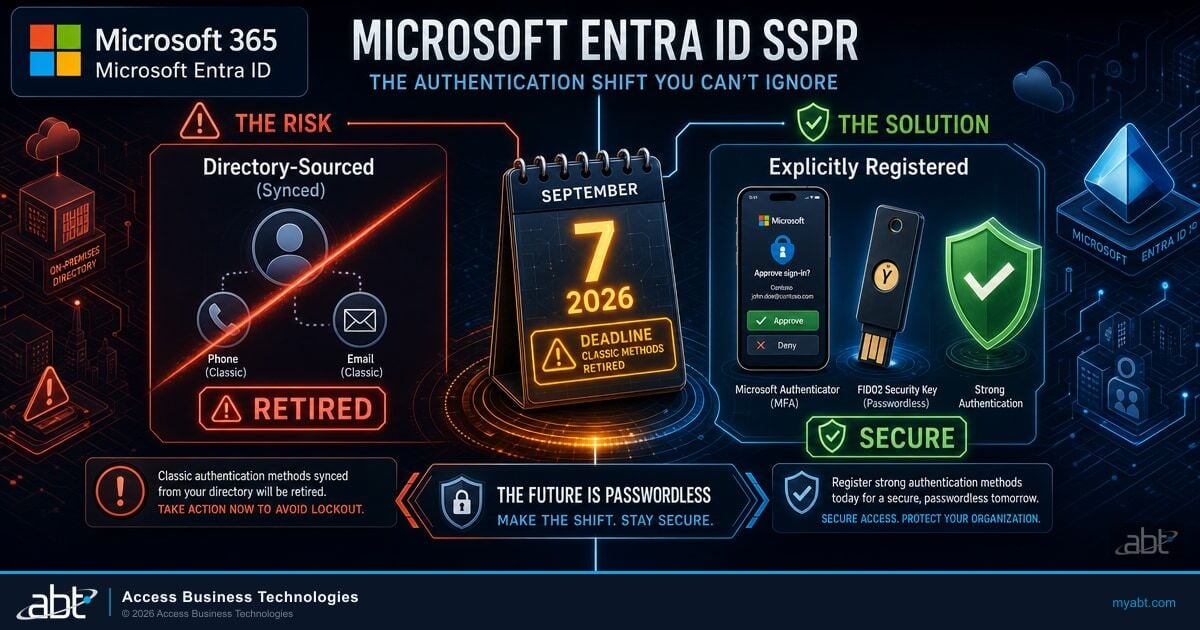
Microsoft Entra SSPR Registered-Methods Deadline: What Banks, Credit Unions, and Mortgage Companies Must Do
This page uses the SSPR change to illustrate a problem about dates. If you need the change itself, what breaks, who is affected, and what to do before November, it is covered in full here on the revised timeline.
Read the article ›
FFIEC IT Examination Readiness for Financial Institutions
Where change management sits in what an examiner asks for, and what evidence of a working process looks like when the platform belongs to somebody else.
Read the article ›
Conditional Access Exclusions: The List Nobody Reviews
The same shape of problem one layer down. A setting that was right when somebody made it, that nothing since has told anyone is now wrong.
Read the article ›Answered from Microsoft's own records
Not in September 2026. Message Center notice MC1325414, revised on 4 August 2026, sets the registration campaign at 5 October 2026 and says enforcement begins on 7 November 2026. The notice title and its action required line both say 9 November 2026, and its structured act by field says 6 November 2026. Enforcement falls on a Saturday, so the volume reaches a staffed help desk on Monday 9 November, though a user locked out on the Saturday is locked out on the Saturday. Plan against 6 November, the earliest of the three November dates and the one an automated check surfaces. Note separately that 5 October is not a deadline at all; it opens the registration campaign, which is the window that decides how disruptive November feels. The widely published date of 7 September 2026 came from an earlier version of the same notice and was replaced five weeks before it arrived. Confirm against the notice in your own tenant, because Microsoft may revise it again.
Mostly because they were accurate when they were written and nothing has told them otherwise. Microsoft published MC1325414 on 28 May 2026 with an earlier schedule, and articles written between then and early August correctly reported it. Microsoft revised the notice on 4 August 2026 inside each customer tenant, where there is no public URL for a search engine to recrawl and no mechanism to notify anyone who wrote about the earlier version, so those pages keep ranking and keep reading as current. That explanation does not cover every case. On 7 September 2026 we fetched four such pages, including one hosted on microsoft.com, and none mentioned the revised dates; one of the four was published that same morning, five weeks after the revision, which looks like the old schedule being repeated rather than a page going stale. Specialist archives that mirror Message Center notices did carry the revision correctly, so the corrected dates were publicly findable, just not on the pages carrying the original.
A Message Center notice is delivered into your individual Microsoft 365 tenant and describes a change as it applies to you, with an identifier in the form MC followed by seven digits. You read it in the Microsoft 365 admin centre under Health and then Message center, or through the Microsoft Graph API. It is revised in place when a schedule moves. A Learn page is documentation and a blog post is an announcement; both are public, both are useful, and neither is guaranteed to reflect the current schedule. When they disagree with the notice in your tenant, the notice is the record that has been kept current.
Often enough that it should be assumed rather than treated as unusual. Across 736 notices retained in one Microsoft 365 tenant between September 2023 and September 2026, read on 7 September 2026, 184 of them, or 25.0%, contain the sentence "we have updated the timeline", and 235, or 31.9%, carry "(Updated)" at the front of the title. Among the 182 notices Microsoft itself flagged as a major change, 56, or 30.8% of that group, later carried "(Updated)" in the title. Two limits worth stating: the 25.0% counts a specific phrase, so it is a floor on schedule changes rather than a complete count, and the remaining notices are ones that did not use that phrase rather than ones proven never to have changed. A separate count, 188 notices, carries an explicit "(previously ...)" annotation, which marks any superseded value and not only a date. This is also one tenant's retained set rather than every notice Microsoft has ever issued, so treat it as a large real sample rather than a complete census.
Open the Microsoft 365 admin centre, go to Health and then Message center, and find the notice by its MC identifier or by product name. Check whether the title begins with "(Updated)". Read the first line of the body, which on a revised notice states what changed and when. Search the body for the word "previously", because Microsoft often prints the superseded value in brackets beside the new one, which confirms that the figure circulating publicly was real and is now out of date. Collect every date in the notice rather than the headline one, since a single notice can carry a rollout date, an enforcement date, a structured act by field and a title date that do not all agree. Record the identifier and the date you read it, and re read before any milestone you are relying on.
No. It means the notice was revised, which may be a clarification, an added detail, a corrected link, or a schedule change. In the sample measured here 235 notices carried "(Updated)" and 184 contained the timeline sentence. Those are two separate counts and this measurement did not record how far they overlap, so no conclusion should be drawn about what share of revisions were schedule changes. Treat "(Updated)" as the signal to read the first line of the body, which states what actually changed, rather than as proof the date moved.
Yes. The same notices are available through the Microsoft Graph service announcement endpoint, which is how the measurements on this page were produced, and a scheduled job can compare a notice's last modified timestamp against the last time you read it, rather than relying on somebody remembering to look. One warning from doing it on 7 September 2026. Requested with no page-size parameter, the endpoint returned 100 notices and a continuation link, so an ordinary paging loop walked the whole set. Requested with a page size of 100, it returned the same 100 notices but no continuation link, so the same loop stopped and reported success at 100 of 736. A page size of 50 behaved the same way. If a pull returns a round number and no continuation link, suspect the page-size parameter before believing the count. That is a dated observation about one tenant, not documented behaviour.
The notice in your tenant. On 7 September 2026 the Microsoft Learn page for setting up a multifunction device to send email carried a deprecation note reading "see timeline information", and the only timeline link on that page resolved to a blog post from April 2024 whose schedule Microsoft had replaced on 27 January 2026. The replacement post did not appear anywhere on the page. Microsoft Learn is documentation maintained separately from the announcement, so a stale link there is a maintenance gap rather than a contradiction of the change. The tenant notice is the record, and it is the only source that knows which changes apply to your configuration and licensing.
Because examiners ask how you track changes in the platforms carrying regulated workloads, and the expected answer is a repeatable process rather than an individual's attention. "We follow the news" is hard to evidence, and it depends on a source that is not authoritative and has no duty to correct itself. Reviewing your own Message Center on a defined cadence, recording notice identifiers and the date you read them, and re reading before each milestone is a control you can show an examiner, and it costs roughly the same effort. The measurements on this page describe how often Microsoft revises a notice, which is the reason re reading matters; they are not a measured error rate for any particular team or publication.
Find out which Microsoft deadlines are actually live in your tenant.
Tell us roughly how many users you have and which Microsoft 365 plan you are on. Our engineers read your own Message Center and your configuration, then come back in writing: the changes that apply to you, the dates exactly as your tenant states them, which notices have been revised since they were issued, and which ones you are not yet ready for. Some answers need your records as well as your tenant, and we name exactly which ones to pull.
ABT manages Microsoft 365 tenants and hosts Azure environments for more than 750 financial institutions. The assessment is a technical review and is not legal or compliance advice.
Get a free security assessment
A read of your own Message Center and configuration, and a written answer on which Microsoft deadlines are really in front of you.
