


Exchange Online · Admin API v2.0 · Worldwide deprecation December 1, 2026
Exchange Online Admin API permissions change December 1, 2026, worldwide. Give every affected app the new permission, admin consent, and a fresh test by November 30.
Organizations moving off Exchange Web Services built on the Exchange Online Admin API to keep everyday jobs running: Send on Behalf delegation, folder-permission updates, group expansion, MailTips. Microsoft is now changing the permissions behind those calls. Message Center post MC1540345, published November 5, 2026, replaces Exchange.ManageV2 with Exchange.AdminAPI.Manage and Exchange.ManageAsAppV2 with Exchange.AdminAPI.ManageAsApp. The endpoints, URLs and API version stay the same. Worldwide, migration finishes by November 30, and on December 1 the old permissions are deprecated. An app that relies only on an old permission after that date loses access to the API. For a credit union, bank, or mortgage company, the work is a short list: find every app that holds an old permission, add the new one, grant consent, check the Exchange role, test with a fresh token, and remove the old one while there is still time to put it back.
- Who has to act, in Microsoft's words: organizations that develop, own, or manage applications that use either old permission
- MC1540345 names only the two V2 permissions. Exchange.ManageAsApp, which Exchange Online PowerShell app-only access uses, is a separate entry, so read the full name before removing anything
- A second notice, MC1540342, changes the MailboxFolderPermission response: User becomes an object with DisplayName, Name and PrimarySmtpAddress, so a parser that expects a string needs a look now
The change
What is changing in the Exchange Online Admin API permissions?
Microsoft said it in two Message Center posts published together on November 5, 2026: MC1540345 for the permissions and MC1540342 for one response. Here is what they say, and who they reach.
The change in brief
- What
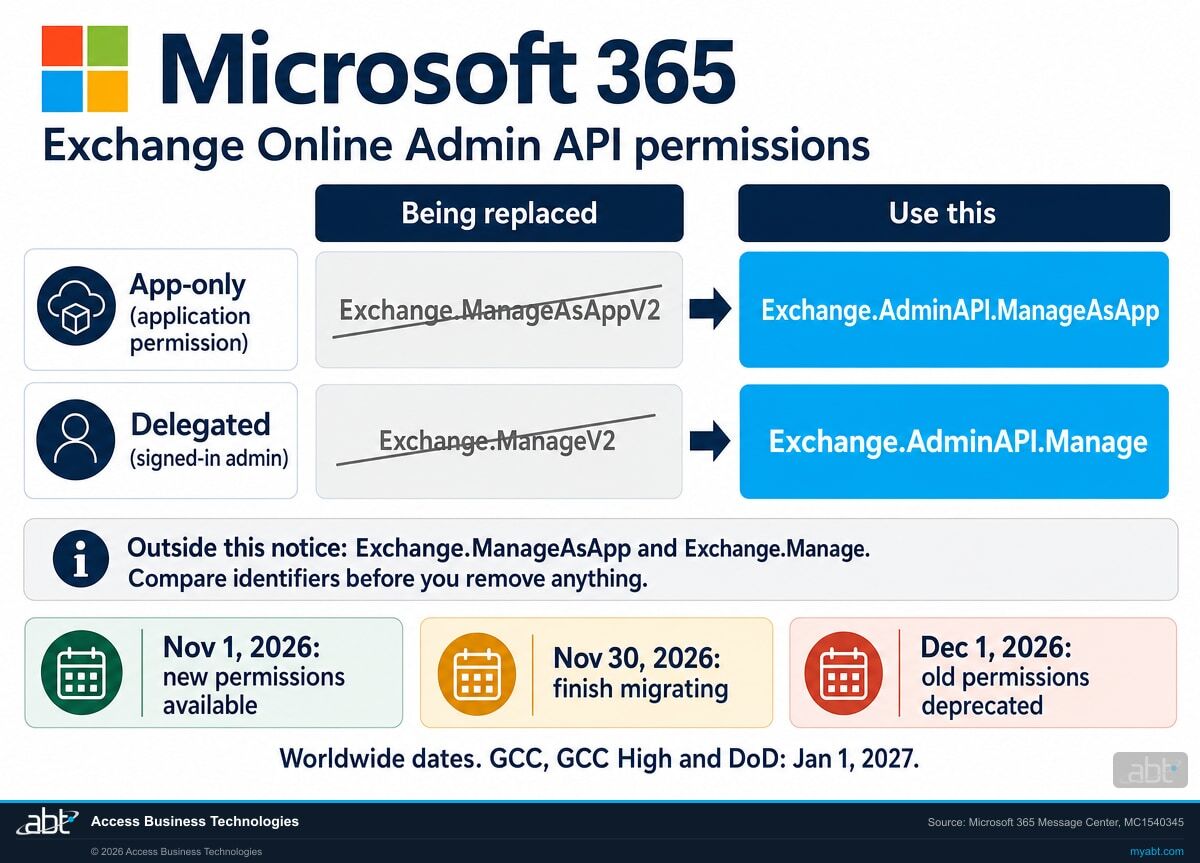
- Exchange.ManageV2 (delegated) is replaced by Exchange.AdminAPI.Manage. Exchange.ManageAsAppV2 (application) is replaced by Exchange.AdminAPI.ManageAsApp. URLs, the API version and supported operations stay the same.
- When
- Worldwide: new permissions available November 1, 2026, migration complete by November 30, 2026, existing permissions deprecated December 1, 2026. GCC, GCC High and DoD: rollout begins in November 2026, existing permissions deprecated January 1, 2027.
- Who
- Organizations that develop, own, or manage applications using either old permission. Microsoft adds: "If your organization does not use either permission, no action is required." The inventory in step 1 is how you find out which case is yours.
- Owner
- Whoever owns each app: the developers who wrote it, the vendor who sells it, the administrator who grants consent, and the Exchange administrator who holds its role assignment.
- Action
- Microsoft's list, in order: identify affected applications, configure the new permissions, grant administrator consent, verify Exchange RBAC assignments, validate API functionality, remove the retired permissions, update explicit permission references, and check third-party applications.
New permissions available
Microsoft's date for worldwide availability. We read both new permissions on the Office 365 Exchange Online service principal in our own tenant on November 7, 2026, enabled and carrying the replacement wording.
The User property changes
MC1540342: the MailboxFolderPermission endpoint returns User as a structured object, with rollout expected to complete in early November. This one is already moving.
Complete migration by
The worldwide migrate-by date. Every affected app holds the new permission, with consent, and its workflows pass a test before the old permission comes off.
Existing permissions deprecated
An app relying only on the old permissions loses access to the APIs. For GCC, GCC High and DoD the same date is January 1, 2027.
"The Exchange Online Admin API v2.0 endpoints are not being retired. Only the permissions used to access them are changing."
"Applications relying exclusively on the retired permissions after the applicable deprecation date will no longer be able to access the APIs."
Microsoft 365 Message Center, MC1540345, November 5, 2026The Exchange Online Admin API is a small REST API under outlook.office365.com/adminapi/v2.0. Microsoft built it to give administrative jobs a path off Exchange Web Services, and it covers six endpoints, every one called with POST. Microsoft Learn still labels it Preview, and says it "isn't a replacement for Exchange Online PowerShell." The timing explains why this matters now: Microsoft's Exchange Web Services deprecation article sets full disablement for April 2027, and the Exchange team's October 21 post says "Re-enabling EWS will stop working in April 2027." So the apps taking this permission change are often the newest code in the tenant, written this year to get off EWS.
Microsoft Learn's Admin API articles were last updated September 25, 2026, before these notices, so their steps still name the V2 permissions and describe User as a string. The Message Center posts are the newer source, and the service principal in a tenant confirms them: the descriptions on the new entries read "This permission replaces the previous Exchange.ManageAsAppV2 permission" and "This permission replaces the previous Exchange.ManageV2 permission."
Side by side
How do the six Exchange permissions compare?
Six management permissions with near-identical names sit on the Office 365 Exchange Online resource, among its other permissions. The identifier is the safe way to tell them apart. Every identifier here was read from the service principal in our own tenant on November 7, 2026.
| Permission | Type | Identifier | Microsoft's description covers | What to do |
|---|---|---|---|---|
| Exchange.ManageAsAppV2 | Application | ea3d980d-ebc7-4be4-8298-a167e5b8797c | A limited set of objects through adminapi/v2.0, no signed-in user | Replace. Deprecated December 1, 2026 |
| Exchange.AdminAPI.ManageAsApp | Application | 95930782-af91-4e2e-89b7-e34ce33a0450 | The same limited set through adminapi/v2.0, no signed-in user | Add, grant consent, assign the Exchange role |
| Exchange.ManageV2 | Delegated | 44d6b5f2-d42b-4fa7-b999-1c5fcab98e4d | A limited set of objects through adminapi/v2.0, for a signed-in user | Replace. Deprecated December 1, 2026 |
| Exchange.AdminAPI.Manage | Delegated | 9f021f4d-e924-4317-bf46-8db5e8340c6c | The same limited set through adminapi/v2.0, for a signed-in user | Add, grant consent, confirm the user's Exchange role |
| Exchange.ManageAsApp | Application | dc50a0fb-09a3-484d-be87-e023b12c6440 | The organization's Exchange environment, no signed-in user. Microsoft Learn documents it for Exchange Online PowerShell app-only access | Outside MC1540345. Leave it for what uses it |
| Exchange.Manage | Delegated | ab4f2b77-0b06-4fc1-a9de-02113fc2ab7c | The organization's Exchange environment, for a signed-in user | Outside MC1540345. Leave it for what uses it |
Where the near-identical names catch people
An administrator who searches an app's permission list for "Exchange.ManageAsApp" finds both the PowerShell permission and the V2 permission, and removing the wrong one breaks a different job. Compare identifiers before any removal. Microsoft Learn's Admin API authentication article itself asks the reader to select Exchange.ManageAsAppV2 and then, in its check of the result, lists Exchange.ManageAsApp.
Sign-in logs help less than they appear to. Exchange Online PowerShell and the Admin API both take tokens for outlook.office365.com, so in our reading a sign-in entry points to a candidate and the permission reads in step 1 settle it.
See which apps in your tenant hold the old permissions, and what each one can reach
ABT works with your team to read the permission grants, name the owner of each app, check the Exchange role behind it, and leave you a dated plan for the move, as part of a free security assessment.
Request the free assessmentThe work
How do you move to the new Exchange Admin API permissions by November 30, 2026?
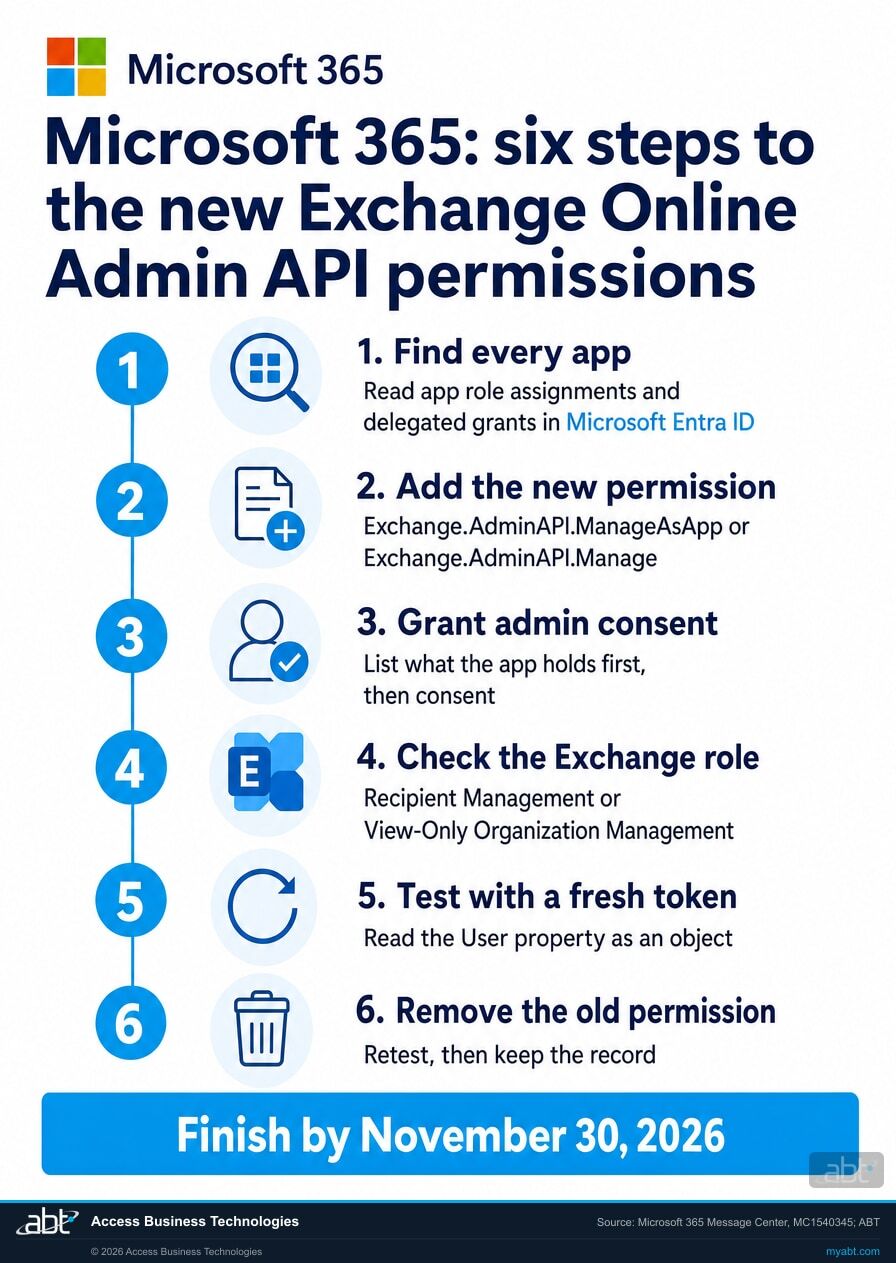
Six steps, following Microsoft's action list. Steps 1 to 4 are the change itself. Steps 5 and 6 are the proof that the new permission is the one doing the work.
Find every app
Three reads answer the question. The first lists apps holding application permissions on the Exchange resource; check each row's appRoleId for ea3d980d-ebc7-4be4-8298-a167e5b8797c. The second lists delegated grants; check each row's scope string for Exchange.ManageV2. The third lists what your own registrations ask for, whether or not consent was granted. Follow the @odata.nextLink on each read until the list ends.
GET https://graph.microsoft.com/v1.0/servicePrincipals(appId='00000002-0000-0ff1-ce00-000000000000')/appRoleAssignedTo
GET https://graph.microsoft.com/v1.0/oauth2PermissionGrants?$filter=resourceId eq '{id of that service principal}'
GET https://graph.microsoft.com/v1.0/applications?$select=id,displayName,requiredResourceAccess
Microsoft lists Application.Read.All as the least privilege for the first and Directory.Read.All for the second. The first two also show vendor apps consented in your tenant. We ran all three against our own tenant on November 7, 2026; they returned normally and separated the permissions. If you are still building your list of what moved off EWS, our EWS app inventory page is the place to start.
Add the new permission
Add Exchange.AdminAPI.ManageAsApp where the app holds Exchange.ManageAsAppV2, and Exchange.AdminAPI.Manage where it holds Exchange.ManageV2. Leave the old permission in place for now. Certificates or managed identities are what Microsoft Learn recommends for production app-only workloads, so a client secret you find here is worth a note for the change record. For a vendor's app, this step belongs to the vendor: ask which permission the app requests, when its update ships, and what your tenant has to consent to afterward.
Grant consent, after listing what the app holds
The MC1540345 action list says administrators must grant consent "where required," and Microsoft Learn calls consent a sensitive operation. Its warning belongs in front of the person clicking: "Granting tenant-wide admin consent may revoke permissions that have already been granted tenant-wide for that application." So list every permission the app holds first and compare afterward. Privileged Role Administrator can grant any permission on any API; Cloud Application Administrator, AI Administrator or Application Administrator can grant any permission on any API other than Microsoft Graph app roles.
Delegated apps have one more trap. Microsoft's scopes article says the .default scope "only triggers a consent prompt if consent wasn't granted for any delegated permission between the client and the resource." In our reading, an app with an earlier grant sees no new prompt, so an administrator grants the new scope and the fresh token proves it.
Check the Exchange role
Microsoft's notice says existing Exchange Online RBAC requirements continue to apply, and this is the step that answers a 403. Learn lists View-Only Organization Management for OrganizationConfig and AcceptedDomain, and Recipient Management for Mailbox, MailboxFolderPermission, DistributionGroupMember and DynamicDistributionGroupMember. App-only callers can hold a Microsoft Entra role, where Learn offers Exchange Administrator as the simple option, or a custom Exchange role group with only what the app needs. Learn says the role group "follows least-privilege security," and for an app that touches mailbox access at a regulated institution, we recommend it.
Test with a fresh token
Get a new token, because a cached one was issued before the change, then read it: the roles claim carries application permissions and the scp claim carries delegated ones, so the new name should appear there. Run each endpoint the app uses. Microsoft's get-started article reads the failures for you: 401 is a missing, invalid or expired token or an incorrect scope, and 403 is a missing RBAC role or an object out of scope. While you are in there, test the second notice. MailboxFolderPermission now answers with an object, so read PrimarySmtpAddress:
{ "User": { "DisplayName": "...", "Name": "...", "PrimarySmtpAddress": "..." } }
Parse only the core properties too. Learn says the Preview response carries full cmdlet output and "will be limited to the core properties" during the transition to public release: Identity, FolderName, User, AccessRights, SharingPermissionFlags, IsValid and ObjectState. Microsoft has named no date for that trim.
Remove the old permission, retest, keep the record
Microsoft's order is test first and then remove. We add one point: while both permissions are granted, a passing call cannot say which one was honored, so the test that counts is the one after removal. Revoke the old permission well before November 30, take its name off the app registration, get another fresh token, and run the same calls. If something fails, you still have days to put the old permission back and find out why. Re-run the step 1 reads and confirm the old identifier is gone. Then update anything that names the old permissions: "configurations, scripts, or consent workflows." Record the app, the old and new permission, who consented, the test result and the date. Our Defender Advanced Hunting API page follows the same pattern for the next API move on the calendar.
What sits behind the permission
Which Admin API endpoints do these permissions reach?
Six endpoints, each with the Exchange Web Services operation Microsoft maps it to and the role group Microsoft Learn lists for it. If your EWS code used one of these operations, its replacement probably takes this permission change.
OrganizationConfig
Organization configuration and MailTips settings. Maps to the EWS operation GetServiceConfiguration. Role: View-Only Organization Management.
AcceptedDomain
The domains your organization accepts mail for. Also maps to GetServiceConfiguration. Role: View-Only Organization Management.
Mailbox
Send on Behalf delegation. Maps to the EWS operations AddDelegate and RemoveDelegate. Role: Recipient Management.
MailboxFolderPermission
Who can open which folder. Maps to GetFolder, UpdateFolder and CreateFolder. Role: Recipient Management. This is the endpoint with the changed User property.
DistributionGroupMember
Who is in a distribution group. Maps to ExpandDL. Role: Recipient Management.
DynamicDistributionGroupMember
Who a dynamic distribution group resolves to. Also maps to ExpandDL. Role: Recipient Management.
For financial institutions
Why does this matter at a credit union, bank, or mortgage company?
Because these calls run the small jobs people only notice when they stop, and they touch who can read whose mail.
Keep the jobs running. Delegate access for an executive assistant, a shared-calendar permission for a branch, the group lookup behind a routing rule: when a team moved these off EWS this year, they often landed on the Admin API. They keep running with the same URLs once each app holds the new permission and passes its test. Our page on EWS and archive mailboxes covers another move on the same calendar.
Protect the access. Folder permissions and delegation decide who can read a loan officer's mailbox or a controller's calendar. An app that can change them is a privileged identity, even when nobody thinks of it that way. The consent step is a natural moment to ask whether each app still needs what it holds, and whether its role could be narrower.
Keep the record. When an examiner or a cyber insurer asks who can change mailbox access, app names, owners and dates answer the question directly. The record from step 6 holds them: which app, which permission, who consented, what the test showed, and when the old permission came off. Our article on Azure service principal security goes further into how app identities get reviewed.
The same question on a bigger scale: who can act alone?
In March, our channel covered a control built around one sentence: "No single admin should be able to factory reset your entire fleet with one click." The Short's point is a second approval before a mass device wipe runs, and it notes that the control is included in your license.
Device wipes and mailbox permissions are different jobs, and the question carries over. An app holding an Exchange permission acts on its own, around the clock, across everything its role covers. Asking who approved it, what it can reach, and whether its role could be narrower is the same habit applied to app identities.
How ABT helps
A free security assessment
ABT is a Tier 1 Microsoft Cloud Solution Provider serving more than 750 financial institutions, and it manages Microsoft 365 tenants for credit unions, banks, and mortgage companies. App permissions are part of how those tenants get reviewed, so the assessment starts with what yours hold.
With your team, we read which apps hold the old Exchange permissions, map what each one can reach, and plan the move to the new ones
The assessment is free and ends with written findings you keep. We work through it with an administrator on your team, and your team decides what changes and who makes each change.
- The app inventory. Every app holding Exchange.ManageAsAppV2 or Exchange.ManageV2, by identifier, with its owner named.
- The reach map. What each app's permission and Exchange role allow it to touch, plus the endpoints its owner or vendor confirms it calls.
- The consent plan. What each app holds today, the new permission it needs, and who in your organization grants it.
- The role check. The Exchange role behind each app, and where a narrower role group fits.
- The vendor list. The third-party apps in your tenant, and the questions to put to each provider.
- The record. A dated plan for your change record and your information security program.
ABT also operates M365 Guardian, its managed security service for credit unions, banks, and mortgage companies. Learn about M365 Guardian
Related reading
If this opened a bigger question
A permission change tends to surface the questions around it: which apps your tenant really has, how app identities get reviewed, and how consent gets abused.
Shadow IT in Financial Institutions: Find It, Govern It
Find the apps nobody listed in your Microsoft 365 tenant with Defender for Cloud Apps, then map them to the rule your examiner cites.
Read the article
Azure Service Principal Security: What Storm-3168 Deleted, and What Held
More than 100 storage deletion attempts in seven minutes, what held, and why.
Read the article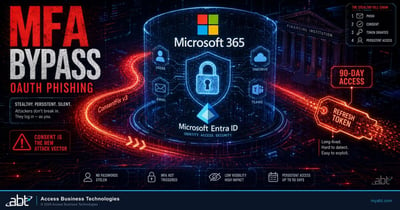
ConsentFix v3: The OAuth Consent Phishing Toolkit That Bypasses MFA for Financial Institutions
A criminal toolkit that reuses sessions to get past Microsoft 365 MFA, and what to configure now.
Read the articleAnswered
The Exchange Online Admin API permissions change, answered
Verify it yourself
Where the facts on this page come from
Every Microsoft date, permission name, identifier, role and quotation above was read from the sources listed here on November 7, 2026.
- Microsoft 365 Message Center, MC1540345, "Action required: Update permissions for Exchange Online Admin API," published November 5, 2026, read from the tenant over Microsoft Graph and through the public Message Center archive. Source for the replacements, the dates, who is affected, the effect after the date, and the action list.
- Microsoft 365 Message Center, MC1540342, "Action required: Exchange Online Admin API MailboxFolderPermission response update," published November 5, 2026, read from the tenant over Microsoft Graph and through the public Message Center archive. Source for the User property change.
- The Office 365 Exchange Online service principal, read over Microsoft Graph from ABT's own tenant on November 7, 2026. Source for the six permissions, their identifiers, their descriptions, and the new permissions being enabled.
- Microsoft Learn, Exchange Online Admin API overview. Source for Preview status, the six endpoints and the Exchange Web Services operations they map to.
- Microsoft Learn, Authentication and authorization. Source for the portal path, the role table, the 403 sentence and the role options.
- Microsoft Learn, Get started with the Exchange Online Admin API. Source for the meaning of 401 and 403, and the production authentication recommendation.
- Microsoft Learn, MailboxFolderPermission endpoint. Source for the Preview response, the public-release trim and the core properties.
- Microsoft Learn, App-only authentication in Exchange Online PowerShell. Source for Exchange.ManageAsApp and for consent in each tenant organization.
- Microsoft Learn, Grant tenant-wide admin consent to an application and Review permissions granted to enterprise applications. Source for the revocation warning, the consent roles and the revoke path.
- Microsoft Learn, Scopes and permissions in the Microsoft identity platform and Access token claims reference. Source for the .default behavior and the roles and scp claims.
- Microsoft Learn, List appRoleAssignments granted for a service principal and List oAuth2PermissionGrants. Source for the inventory reads and their least-privilege permissions.
- Microsoft Learn, Deprecation of Exchange Web Services in Exchange Online, and the Exchange Team Blog, Exchange Online EWS application stopped working? Do this., October 21, 2026. Source for the April 2027 dates.
- The Microsoft Graph reads in step 1 ran read-only against ABT's own tenant on November 7, 2026 and returned normally. The notes marked "in our reading" and "we add" are ABT's recommendations; everything else on this list is Microsoft's own.
The old Exchange Admin API permissions are deprecated December 1, 2026.
Move every app that holds one by November 30.
The work starts with the apps that hold Exchange.ManageAsAppV2 or Exchange.ManageV2 in your tenant. When it is done, you know which ones held them, what each can reach, what replaced the old permission, and where the decision is recorded.
Tell us a little about your environment and we will come back with what we would check first.
What should we look at? Optional.
Encrypted. Private.
Thank you. That is with us.
An ABT specialist will be in touch shortly. If a particular app, vendor or job is the one you are thinking about, say so in your reply and we will start there.
