


Microsoft Defender XDR · Microsoft Defender for Endpoint · Advanced Hunting APIs retire February 1, 2027
The Defender Advanced Hunting APIs retire February 1, 2027 and stop functioning after that date. Move every hunt, report and automation that calls them to the Microsoft Graph Security API by January 31, 2027.
Advanced hunting is how a security team asks Microsoft Defender a question across every device, mailbox, identity and cloud app at once: which accounts signed in from a new country this week, which devices ran a script nobody recognizes, which mailboxes gained a forwarding rule. Many institutions, and the vendors that watch their tenants, run those questions on a schedule through two REST endpoints, the Microsoft Defender for Endpoint Advanced Hunting API and the Microsoft Defender XDR Advanced Hunting API. Microsoft is retiring both. Message Center post MC1220762, first published January 22, 2026 and sent again as a reminder on October 26, 2026, states that after February 1, 2027 the two APIs will no longer function, that no automatic migration will occur, and that the Microsoft Graph Security API is the replacement. For a credit union, bank, or mortgage company, the work is an inventory of every caller, then for each one a new endpoint, a new permission, an optional Timespan in the request and a response read by new field names, a side-by-side check, and a dated cutover record.
- Who is affected, in Microsoft's words: organizations using the MDE or XDR Advanced Hunting API for automation, integration, or custom workflows
- The replacement, Microsoft Graph runHuntingQuery, is in the v1.0 endpoint, takes a KQL query with a Timespan, and needs one permission, ThreatHunting.Read.All
- Microsoft's action list: migrate all existing API workflows by January 31, 2027, update documentation, scripts and integration endpoints, tell your security operations, engineering and development teams, and validate the new queries and response schemas before the date
The change
What does the Advanced Hunting API retirement change?
Microsoft said it in one Message Center post, MC1220762, first published January 22, 2026 and updated October 26, 2026 as a reminder. Here is what it says, and who it reaches.
The change in brief
- What
- Two REST endpoints retire: the Microsoft Defender for Endpoint Advanced Hunting API at api.securitycenter.microsoft.com/api/advancedqueries/run, and the Microsoft Defender XDR Advanced Hunting API at api.security.microsoft.com/api/advancedhunting/run. The Microsoft Graph Security API, through its runHuntingQuery method, becomes the way to run advanced hunting queries from code.
- When
- Microsoft's notice gives a retirement start of February 6, 2026 and a full retirement of February 1, 2027. After February 1, 2027, the MDE and XDR APIs will no longer function. Microsoft's migrate-by date is January 31, 2027.
- Who
- In Microsoft's words, organizations using the MDE or XDR Advanced Hunting API for automation, integration, or custom workflows. Microsoft sent the post to tenants its reporting indicates may be using the APIs, so a tenant that received it has a reason to look.
- Owner
- Whoever owns each caller: your security team, your Microsoft 365 administrators, the developers who wrote the scripts, and any vendor whose SIEM, SOAR or reporting tool pulls hunting data from your tenant, together with the administrator who grants the Microsoft Graph permission.
- Action
- Migrate every API workflow to the Microsoft Graph Security API by January 31, 2027; update documentation, automation scripts and integration endpoints; tell security operations, engineering and development; validate the new queries and response schemas before the retirement date.
The notice
Microsoft published MC1220762 and tagged it admin impact, user impact and retirement. The October 26, 2026 update repeated the same dates as a reminder.
Retirement start
Microsoft's notice gives February 6, 2026 as the retirement start; the Learn pages for both APIs say retirement began in January 2026 and point at MC1220762 for the timeline. The two sources describe the start a few weeks apart; both name the same end, full retirement on February 1, 2027.
Migrate by
Microsoft's action item: migrate all existing API workflows to the Microsoft Graph Security API by this date, and validate that new queries and response schemas work as expected before the retirement date.
Full retirement
After this date the MDE and XDR Advanced Hunting APIs will no longer function. Scripts, automations and workflows that still call them fail, and Microsoft performs no automatic migration.
"After February 1, 2027, the MDE and XDR APIs will no longer function."
"No automatic migration will occur; manual updates will be required."
Microsoft 365 Message Center, MC1220762, updated October 26, 2026Both retiring endpoints take a POST with a JSON body holding one field, Query, and return a QueryResponse with Stats, Schema and Results. The Defender for Endpoint endpoint lives at api.securitycenter.microsoft.com/api/advancedqueries/run; Microsoft Learn's page for it also lists regional hosts, us., eu., uk., au., swa., ina. and aea. in front of api.security.microsoft.com. The Defender XDR endpoint lives at api.security.microsoft.com/api/advancedhunting/run. The two Learn pages carry different limits. The Defender for Endpoint page lists 30 days of data, 100,000 rows per query, up to 45 calls per minute and 1,500 per hour, 10 minutes of running time per hour and 3 hours per day, 200 seconds per request and a 50 MB result. The Defender XDR page lists 30 days of data, 100,000 rows, at least 45 calls per minute per tenant, CPU allocated per tenant size in 15-minute cycles and a three-minute timeout per request, the same quota model the Microsoft Graph endpoint carries.
The Microsoft Graph Security API runs the same kind of query through POST /security/runHuntingQuery. The body carries Query and an optional Timespan in ISO 8601 form, such as P30D; Microsoft's reference gives the default as 30 days. The response is a huntingQueryResults object with a schema and results. The permission is ThreatHunting.Read.All, available as a delegated and as an application permission; Microsoft's migration table maps the old AdvancedQuery and AdvancedHunting permissions to it. Microsoft Graph PowerShell exposes the same call as Start-MgSecurityHuntingQuery.
The Microsoft Graph endpoint also carries its own limits, set per tenant. Microsoft's overview gives up to 30 days of raw data, up to 100,000 rows per query, at least 45 calls per minute per tenant with the ceiling varying by tenant size, and CPU resources allocated per tenant size, with queries blocked once a tenant uses 100 percent of its allocation until the next 15-minute cycle. A single request that runs longer than three minutes times out, a result is capped at 50 MB, and HTTP 429 means a CPU, request or running-time limit was reached. A scheduled job that fires dozens of small hunts in a burst may need pacing it never needed before.
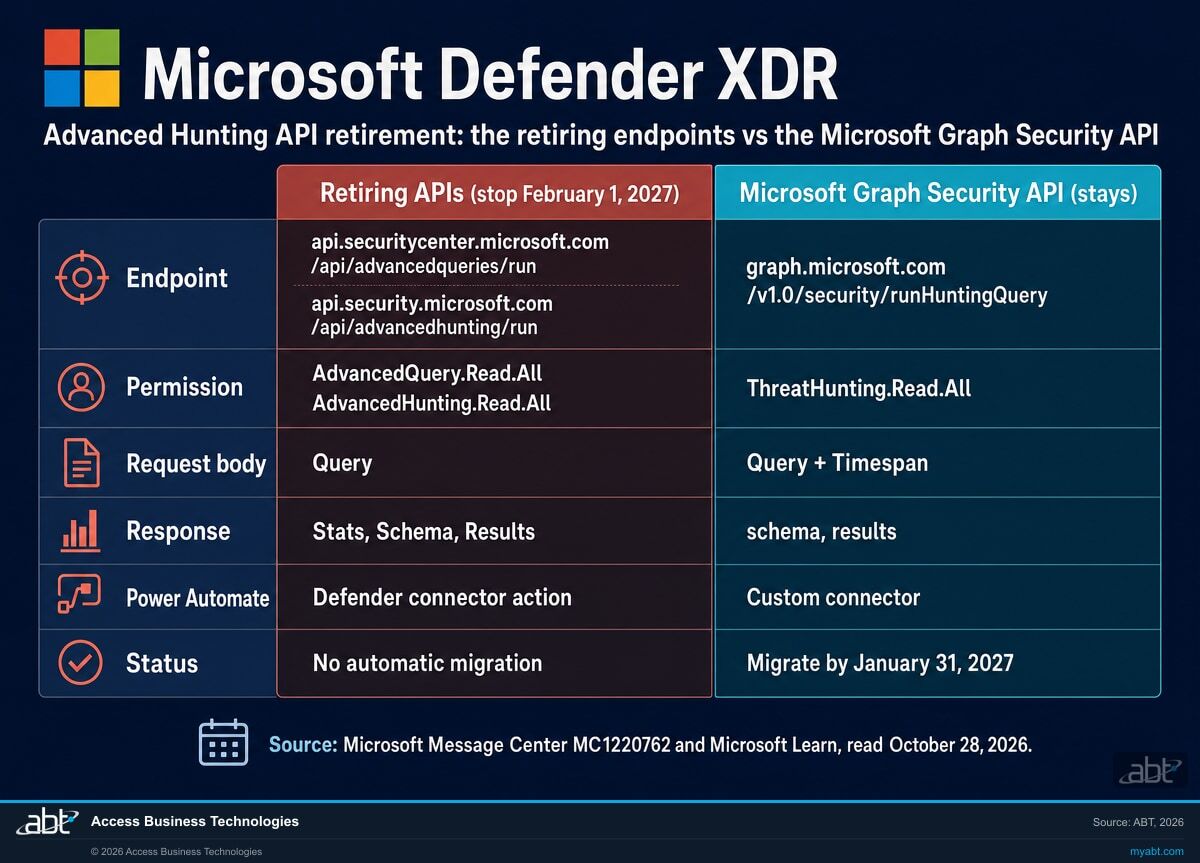
Side by side
How do the retiring Advanced Hunting APIs compare to Microsoft Graph runHuntingQuery?
The query language is the same, and Microsoft describes the Microsoft Graph version as able to query more tables. What changes for your code is the host you call, the permission you hold, the shape of the request and response, and the limits that pace you.
| Question | Retiring APIs (Defender for Endpoint, Defender XDR) | Microsoft Graph Security API |
|---|---|---|
| Endpoint | api.securitycenter.microsoft.com/api/advancedqueries/run and api.security.microsoft.com/api/advancedhunting/run, plus regional hosts | graph.microsoft.com/v1.0/security/runHuntingQuery, with the beta endpoint also available |
| Permission | AdvancedQuery.Read and AdvancedQuery.Read.All (Defender for Endpoint); AdvancedHunting.Read and AdvancedHunting.Read.All (Microsoft Threat Protection) | ThreatHunting.Read.All, delegated or application |
| Request body | Query | Query plus an optional Timespan (ISO 8601, default 30 days) |
| Response | QueryResponse: Stats, Schema, Results | huntingQueryResults: schema, results |
| Limits | Defender for Endpoint page: 30 days of data, 100,000 rows, up to 45 calls per minute, 1,500 per hour, 10 minutes of running time per hour, 3 hours per day, 200 seconds per request, 50 MB. Defender XDR page: 30 days, 100,000 rows, at least 45 calls per minute per tenant, CPU per tenant size in 15-minute cycles, three-minute timeout | 30 days of data, 100,000 rows, at least 45 calls per minute per tenant, CPU per tenant size in 15-minute cycles, 3-minute request timeout, 50 MB; HTTP 429 when reached |
| Power Automate and Power BI | The Defender ATP connector carried a built-in advanced hunting action; Power BI reports used the old parameters | No built-in action in the Microsoft Graph connector; Microsoft points to a custom connector, and Power BI reports move to the Microsoft Graph parameters |
| Status | Retirement under way since early 2026; the APIs no longer function after February 1, 2027 | In the v1.0 endpoint today; where Microsoft points every migration |
What happens to a hunt nobody moved
Microsoft's notice says existing scripts, automations and workflows that rely on these APIs will fail if not updated, and that no automatic migration will occur. A scheduled hunt that fails can raise no alert of its own. If a weekly report of risky sign-ins or a SIEM pull of device events stops after February 1, the quiet can read like a quiet week until someone checks the job.
Two checks belong on the list early. Microsoft Learn's support table for runHuntingQuery lists the global service, US Government L4 and US Government L5 (DOD) as supported and China operated by 21Vianet as not supported, as read on October 28, 2026. And the same Microsoft Graph security API overview that holds the migration table states that the legacy alerts API retired on October 15, 2026, so an integration that pulls alerts and hunts through the old resources has two moves to make.
See the hunts, reports and automations that still call the retiring APIs, and what each one feeds
ABT works with your team to list the scripts, SIEM connectors, flows, reports and vendor tools that call the Defender for Endpoint or Defender XDR Advanced Hunting API, maps what each one feeds, and leaves you a plan to move each one to the Microsoft Graph Security API, as part of a free security assessment.
Request the free assessmentThe work
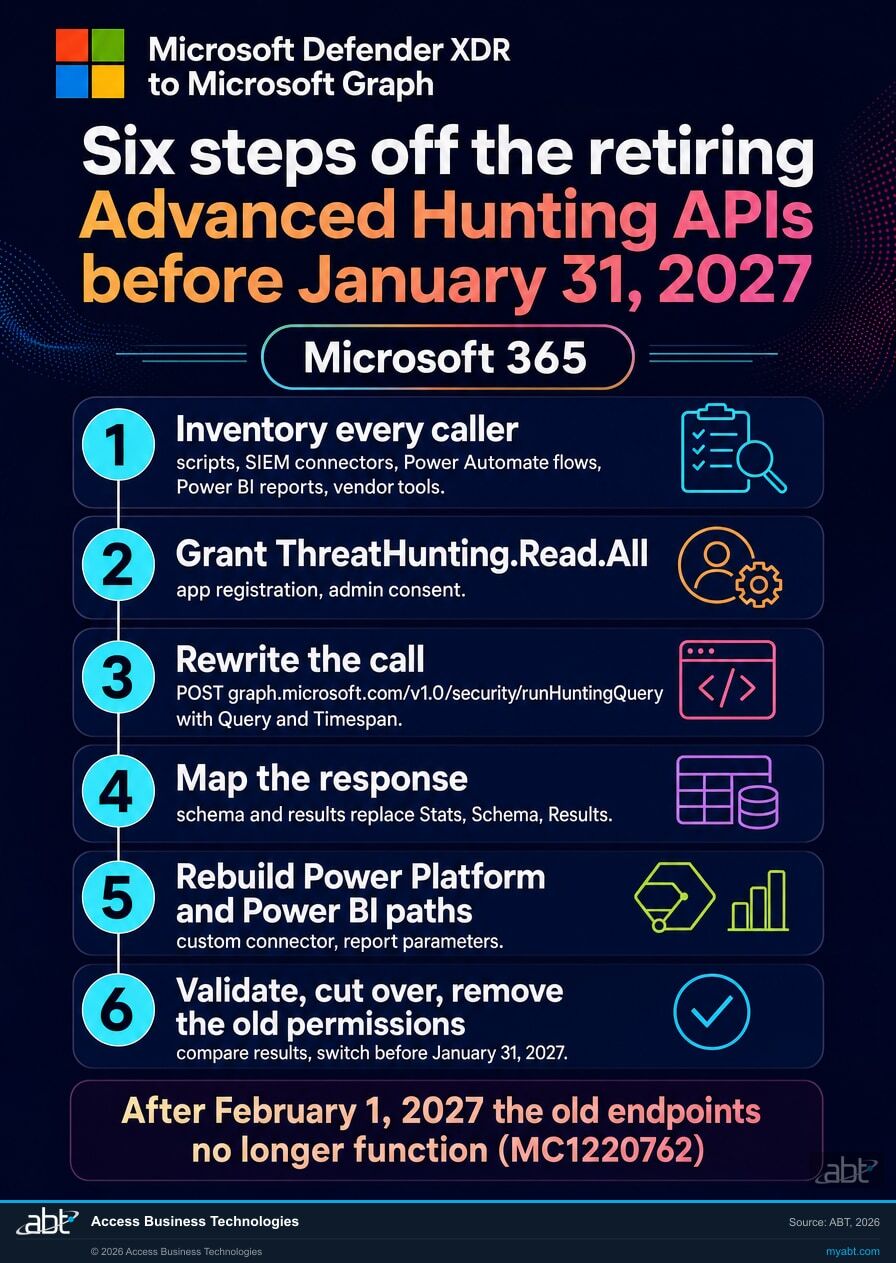
How do you move off the Advanced Hunting APIs by January 31, 2027?
Six steps, in the order the decisions depend on each other. Step 1 finds every caller. Steps 2 to 4 build the replacement. Step 5 rebuilds the paths that have no direct equivalent. Step 6 proves the cutover and records it.
Inventory every caller
Microsoft's notice reaches organizations using either API for automation, integration or custom workflows. Search your script repositories and automation runbooks for the hosts api.securitycenter.microsoft.com and api.security.microsoft.com and the paths advancedqueries/run and advancedhunting/run. In Microsoft Entra, list the app registrations that hold the AdvancedQuery.Read.All or AdvancedHunting.Read.All application permission; each one is a caller or a leftover. Scripts that sign in as a person use the delegated form of the same permissions and will not appear in that list; Microsoft Entra sign-in logs filtered to the two API resources point at candidates, and the people who run scheduled jobs confirm them. Then ask every vendor whose SIEM, SOAR or reporting tool pulls hunting data from your tenant which endpoint it uses and when it moves.
Grant ThreatHunting.Read.All
The Microsoft Graph Security API uses one permission for advanced hunting, ThreatHunting.Read.All, in delegated and application form. Add it to each app that will run hunts, grant admin consent, and leave the old Defender permissions in place until step 6 so the two can run side by side. Record who approved the grant and when; that line is part of the change record an examiner reads.
Rewrite the call
Point each caller at the Microsoft Graph endpoint. The body still carries Query, and can add Timespan, optional, an ISO 8601 duration such as P7D or P30D; Microsoft's reference gives the default as 30 days when it is omitted. The KQL query text goes in the Query field as before. Microsoft Graph PowerShell has a cmdlet for the same call, Start-MgSecurityHuntingQuery. We ran a summarize over the AlertInfo table for the last 30 days through this endpoint against our own tenant before publishing; it returned normally.
Map the response
The old endpoints returned a QueryResponse with Stats, Schema and Results. The Microsoft Graph endpoint returns a huntingQueryResults object with a schema and results. Anything downstream that reads the old field names, a parser, a SIEM mapping, a spreadsheet macro, needs the new names. Microsoft's action list says to validate that new queries and response schemas work as expected before the retirement date.
Rebuild the Power Platform and Power BI paths
Microsoft's overview says the Microsoft Graph connector has no built-in advanced hunting action like the one the Defender ATP connector carried, and points to a custom connector for Power Automate and Logic Apps. Power BI reports built on the old API are updated to the Microsoft Graph parameters. These two paths take the longest because they are rarely in a code repository; find them by asking who owns the dashboards and the flows.
Validate, cut over, remove the old permissions
Run each hunt both ways over the same time window, a Timestamp filter in the KQL for the retiring endpoint and the same filter or a matching Timespan on the Microsoft Graph side, and compare the row counts and a sample of rows. Watch for HTTP 429 on the Microsoft Graph side and pace the job if it appears. Then switch the caller, retire the AdvancedQuery and AdvancedHunting permissions from the app registration, and record the caller, its replacement, who approved it and the date. The result you want by January 31, 2027 is zero callers on the two retiring paths, advancedqueries/run and advancedhunting/run, with a dated record for each one that moved. Our companion page on the Search-UnifiedAuditLog retirement follows the same pattern for audit log searches, due October 15, 2027.
Before you rebuild a hunt
What else should you know before you rebuild a hunt?
Six facts from Microsoft's own documentation that shape the rebuild in your tenant.
The lookback is 30 days
Microsoft's overview says advanced hunting through Microsoft Graph lets you explore up to 30 days of raw data. A hunt that needs older events needs a job that stores its results as it goes.
Rows and size
Microsoft lists up to 100,000 rows per query and a 50 MB result size limit, so a wide hunt is split by time or by filter into several smaller requests.
Calls per minute
At least 45 calls per minute per tenant, with the ceiling varying by tenant size. A job that fires many small hunts in a burst shares that budget with every other caller in the tenant.
CPU in 15-minute cycles
CPU resources are allocated per tenant size. When a tenant uses 100 percent of its allocation, queries are blocked until the next 15-minute cycle, and HTTP 429 reports the condition.
Three minutes per request
A single request that runs longer than three minutes times out. The Defender for Endpoint API page gave 200 seconds per request and the Defender XDR API page already gave three minutes, so a query that ran close to either limit needs a look.
Check your cloud
Microsoft Learn's support table for runHuntingQuery lists the global service, US Government L4 and US Government L5 (DOD) as supported and China operated by 21Vianet as not supported, as read on October 28, 2026.
For financial institutions
Why does this matter at a credit union, bank, or mortgage company?
Because scheduled hunts are how a small security team watches a large tenant, and the people who ask about them expect an answer the same day.
Keep the hunts running. A team of two or three often watches sign-ins and process events through scheduled hunts: the risky sign-in report on Monday morning, the new-forwarding-rule check every hour, the SIEM feed that runs all night. Each one that calls a retiring endpoint stops functioning after February 1, 2027. Moved to Microsoft Graph, each one keeps running with the same KQL, once its endpoint, permission, request body and response parser are changed and the result is checked side by side.
Protect the detections. A hunting job that fails quietly is a detection gap nobody sees. The Short on this page, from ABT's own channel, describes a phishing campaign in its description as one that "has bypassed MFA at 340+ organizations." The signals that catch that kind of attack, a sign-in from a new device followed by a mailbox rule, sit in the tables these hunts read. The inventory in step 1 is the control: it tells you which detections depend on the old endpoints before the date does.
Keep the record. When a detection pipeline changes, an examiner or a cyber insurer tends to ask three things: what changed, who approved it, and how you know it still works. The migration record from steps 2 and 6, the permission grant, the side-by-side results and the dated cutover, answers all three. Our tabletop exercise guide shows where those hunts sit when the team rehearses the first hour of an incident.
The attacks these hunts are built to find
In April, our channel covered an active Microsoft 365 phishing campaign that, in the words of the Short's description, "has bypassed MFA at 340+ organizations." The Short's point for a financial institution: the MFA challenge happened, and a compromised mailbox inside a bank, credit union, or mortgage company hands an attacker wire transfer drafts, vendor payment threads and treasury routing information.
Finding that activity at scale takes a working hunt: the sign-in, the device, the mailbox rule, each in a table advanced hunting reads. The hunts that run those checks on a schedule are the ones to move first, so they are still running on the day one of them matters.
How ABT helps
A free security assessment
ABT is a Tier 1 Microsoft Cloud Solution Provider serving more than 750 financial institutions, and it manages Microsoft 365 tenants for credit unions, banks, and mortgage companies. Scheduled hunts are how activity in those tenants gets watched, so the assessment starts with how yours run.
With your team, we list the hunts, reports and automations that call the retiring Advanced Hunting APIs, map what each one feeds, and plan its move to the Microsoft Graph Security API
The assessment is free and ends with written findings you keep. We work through it with an administrator on your team, and your team decides what changes and who makes each change.
- The caller inventory. The scripts, SIEM and SOAR connectors, flows, reports, vendor tools and app registrations that call either retiring API, found with your team.
- The detection map. What each hunt feeds: an alert, a report, a SIEM, a ticket queue or an investigation runbook.
- The permission plan. The ThreatHunting.Read.All grant each app needs, and the old Defender permissions to remove after cutover.
- The query plan. The Timespan each hunt needs, and how the full set fits the row, size, per-minute and CPU limits of your tenant.
- The connector check. The Power Automate flows and Power BI reports that need a custom connector or new parameters.
- The record. A dated migration plan for your change record and your information security program.
ABT also operates M365 Guardian, its managed security service for credit unions, banks, and mortgage companies. Learn about M365 Guardian
Related reading
If this opened a bigger question
A hunting API change tends to surface the questions around it: how the team rehearses an incident, what watches the identity layer behind every login, and what the written response plan expects of each hunt.

Cybersecurity Tabletop Exercise: Rehearse the First Hour of a Microsoft 365 Incident
Who to invite, which Microsoft 365 scenarios to run, and which notice clocks to test.
Read the article
Microsoft Defender for Identity: Protect the Domain Controllers Behind Every Login
What it detects, how to license it, and how to deploy it in 2026.
Read the article
Microsoft 365 Incident Response Plan for Financial Institutions
The elements of a written incident response plan and how Microsoft 365 runs each one.
Read the articleAnswered
The Advanced Hunting API retirement, answered
Verify it yourself
Where the facts on this page come from
Every Microsoft date, endpoint, permission, limit and quotation above was read from the sources listed here on October 28, 2026.
- Microsoft 365 Message Center, MC1220762, "(Updated) Retirement notice: MDE and XDR Advanced Hunting APIs retiring; migrate to Microsoft Graph Security API," first published January 22, 2026 and updated October 26, 2026, read from the tenant over Microsoft Graph and through the public Message Center archive. Source for the two retiring APIs, the retirement start and full retirement dates, "will no longer function," "No automatic migration will occur," the January 31, 2027 migrate-by date, who is affected, and the action list.
- Microsoft Learn, Use the Microsoft Graph security API, retrieved October 28, 2026. Source for the migration table (endpoints, permissions, request and response shapes, Power Platform and Power BI guidance), the advanced hunting quotas, and the October 15, 2026 retirement of the legacy alerts API.
- Microsoft Learn, Microsoft Defender for Endpoint advanced hunting API, retrieved October 28, 2026. Source for the retirement warning, the limits that endpoint carried, and the regional hosts.
- Microsoft Learn, Microsoft Defender XDR advanced hunting API, retrieved October 28, 2026. Source for the "Retirement began in January 2026" warning and the quota model the Defender XDR API carried.
- Microsoft Learn, security: runHuntingQuery, retrieved October 28, 2026. Source for the ThreatHunting.Read.All permission, the Timespan parameter and its 30-day default, the national cloud support table, and the Start-MgSecurityHuntingQuery cmdlet.
- The Microsoft Graph request in step 3, a summarize over the AlertInfo table for the last 30 days through runHuntingQuery, was run read-only against ABT's own tenant on October 28, 2026 and returned normally.
The Defender Advanced Hunting APIs retire February 1, 2027.
Move every hunt that calls them by January 31, 2027.
The work starts with the scripts, SIEM connectors, flows, reports and vendor tools that run advanced hunting against your tenant. When it is done, you know which ones called the old endpoints, what each one fed, what replaced it, and where the decision is recorded.
Tell us a little about your environment and we will come back with what we would check first.
What should we look at? Optional.
Encrypted. Private.
Thank you. That is with us.
An ABT specialist will be in touch shortly. If a particular hunt, connector or report is the one you are thinking about, say so in your reply and we will start there.
