


Microsoft Entra ID · login.microsoftonline.com
Your staff keep signing in. From mid-October, Microsoft Entra blocks scripts other tools inject into its sign-in page, and custom CSS layout properties stop working October 26. Test both before mid-October.
Microsoft is hardening the page where browser sign-ins to Microsoft 365 begin. From mid-October 2026 the sign-in page at login.microsoftonline.com runs scripts only from Microsoft's own sources, so a browser extension, monitoring tool, or customization tool that injects code there may stop working, and Microsoft says users continue to be able to sign in. From October 26, custom CSS layout and positioning properties in company branding stop being honored. Microsoft asks for action only from organizations that use one of those tools or those properties, and the way to know is to test.
- Mid-October 2026: Microsoft Entra ID begins enforcing a Content Security Policy on its sign-in pages, expected to complete by late October (Message Center MC1481309)
- October 19, 2026: the act-by date Message Center lists for that notice
- October 26, 2026: custom CSS layout and positioning properties in company branding stop being honored (MC1435782 and MC1458474)
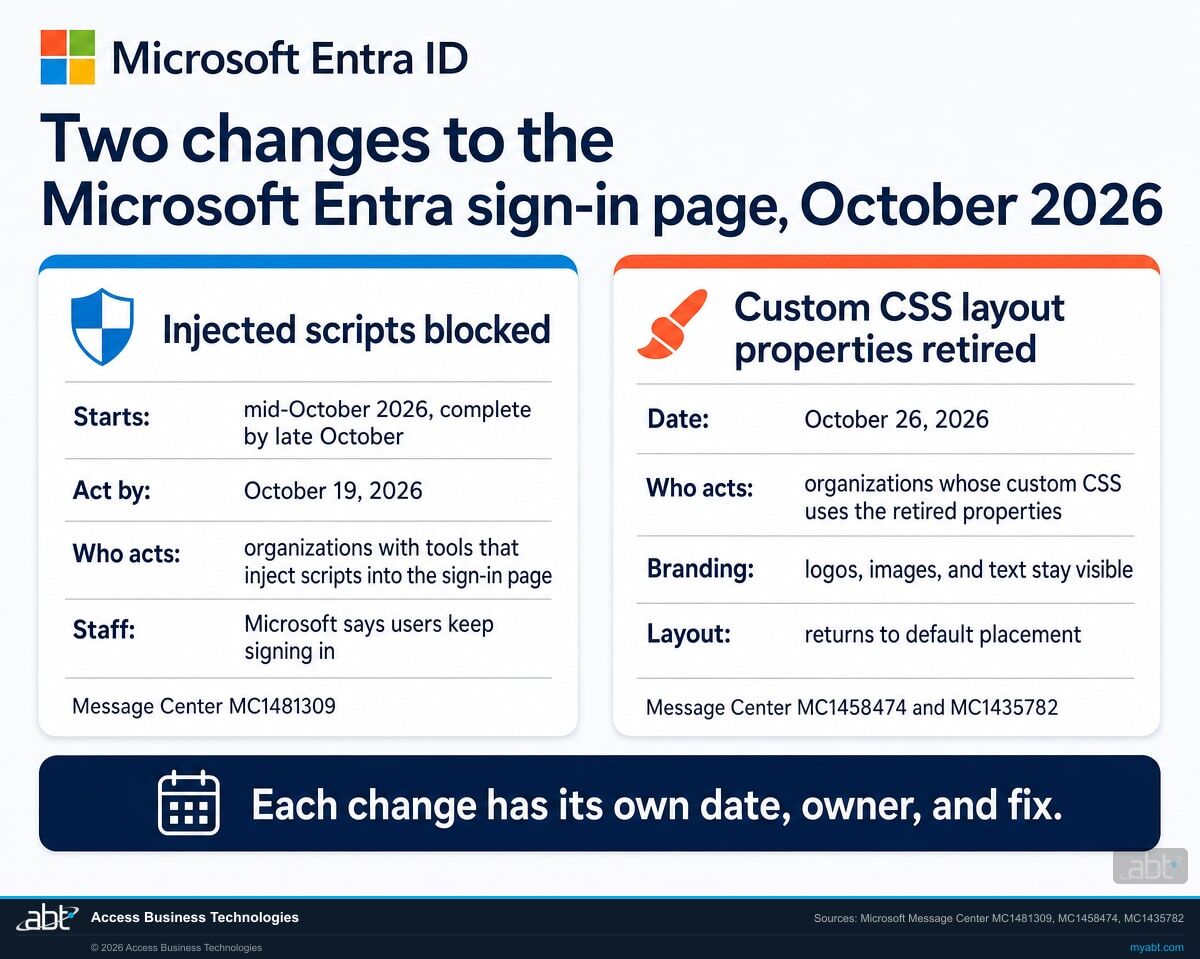
The two changes
What is Microsoft changing on the Entra sign-in page in October 2026?
Two things. From mid-October 2026, the Microsoft Entra ID sign-in page at login.microsoftonline.com enforces a Content Security Policy that lets scripts run only from Microsoft's trusted sources. From October 26, 2026, Microsoft stops honoring custom CSS layout and positioning properties in company branding. Microsoft says users continue to be able to sign in through the script change, and branded pages keep their logos, images, and text.
The decision in brief
- What
- Scripts that other tools inject into the Microsoft Entra sign-in page are blocked, and custom CSS layout and positioning properties in company branding stop working.
- When
- Script blocking begins in mid-October 2026 and is expected to complete by late October; Message Center lists October 19 as the act-by date. The CSS properties stop being honored from October 26, 2026.
- Staff
- Microsoft says users continue to be able to sign in. A tool that injected code into the page may stop working, and a branded page that relied on the retired properties returns to its default layout.
- Owner
- Your Microsoft 365 or identity administrator, with the owners of any browser extension, monitoring tool, or customization tool that touches the sign-in page.
- Action
- Test the sign-in paths your teams use, replace or update any tool that injects scripts, remove the retired properties from your custom CSS, and tell the help desk. Microsoft's act-by dates are October 19 for the scripts and October 26 for the CSS.
Script blocking announced
The Microsoft Entra blog and Message Center post MC1191924 announce the policy for the sign-in page, with rollout beginning in mid-October 2026.
Custom CSS closed to new use
MC1435782 announces the retirement of custom CSS positioning properties. From this date, custom CSS stays available only to organizations already using it.
Injected scripts blocked
MC1481309 reminds administrators that enforcement begins in mid-October and is expected to complete by late October. Message Center lists October 19 as the act-by date.
CSS layout properties retire
MC1435782: the affected positioning properties "will no longer be honored and will stop functioning." MC1458474 adds more properties on the same date.
"Users will continue to be able to sign in even if unsupported script injection tools no longer function."
Microsoft 365 Message Center post MC1481309, Microsoft Entra ID: Enhance protection of the authentication experience by blocking external script injection, plan for change, published September 28, 2026A Content Security Policy is a header a website sends to the browser listing where scripts may come from. Microsoft's notice describes what it adds to the Entra sign-in page: "Scripts will be permitted only from trusted Microsoft content delivery network (CDN) domains," and "Inline script execution will be restricted to trusted Microsoft-authorized sources." In Microsoft's words, the effect is "allowing only trusted Microsoft-hosted scripts to run during authentication and blocking unauthorized or externally injected code."
Microsoft delivers it as part of the service: the change "is enabled by default as part of the service update and does not require tenant configuration." The scope is the browser. MC1481309 says Microsoft Authentication Library (MSAL) and API-based authentication flows sit outside it, "because CSP enforcement applies only to browser-based sign-in experiences using login.microsoftonline.com." Microsoft Entra External ID tenants sit outside it too.
The second change is narrower. Microsoft first announced it on July 21, 2026, and MC1458474 widened it on August 21 with more properties. It applies to organizations whose custom CSS uses the retired properties, the ones that, in Microsoft Learn's words, "can move, overlap, resize, or hide page content." Microsoft's stated reason sits close to the first change: "reducing opportunities for deceptive or misleading sign-in experiences."
Side by side
What changes for your staff, your tools, and your branding?
The script-blocking change touches tools that add code to the sign-in page, and the CSS change touches branded layouts that rely on the retired properties. Each has its own date, its own owner, and its own fix.
| Question | Script blocking (MC1481309) | Custom CSS retirement (MC1458474) |
|---|---|---|
| When | Beginning in mid-October 2026, expected to complete by late October 2026. Act by October 19, 2026. | From October 26, 2026. MC1458474: "action is required before October 26, 2026." |
| Where | Browser-based sign-in at login.microsoftonline.com. | Branded sign-in pages built with company branding or branding themes. |
| Who has to act | Organizations using browser extensions, monitoring tools, customization tools, or other solutions that inject scripts into the sign-in experience. | Organizations whose custom CSS uses the retired layout and positioning properties. |
| What staff see | Microsoft: users continue to be able to sign in. A tool that injected code into the page may stop working. | Microsoft: branding elements remain visible and revert to their default placement and presentation. |
| Tenant setting | Microsoft: "enabled by default as part of the service update and does not require tenant configuration." | Your fix is in your CSS file: remove the retired properties and upload it again. |
| Outside the change | MSAL and API-based authentication flows; Microsoft Entra External ID tenants. | Organizations that were not using custom CSS as of July 21, 2026; Microsoft Entra External ID tenants. |
| The fix | Switch to tools that do their work without injecting code, or have the vendor update the tool. Microsoft Learn: work directly with the vendor. | Redesign the layout without the retired properties. MC1435782: "There is no supported migration path or replacement for the retired positioning properties." |
| Microsoft's reason | To protect users "from threats such as cross-site scripting (XSS)" by allowing only trusted Microsoft-hosted scripts to run during authentication. | "Reducing opportunities for deceptive or misleading sign-in experiences." |
| What comes next | The rollout completes, expected by late October 2026. | MC1458474: full custom CSS retirement is planned later in 2027, "with advance notice provided." |
The short version for a busy week
Microsoft's notices ask for action only from organizations with a tool that injects scripts into the sign-in page, or custom CSS that uses the retired properties. MC1481309 puts the first half plainly: "If your organization does not use tools or extensions that inject code into Microsoft Entra ID sign-in pages, no action is required." The test in the steps below is how you confirm which side you are on.
Find out what touches your sign-in page before mid-October
ABT runs Microsoft's sign-in test with your administrators across the paths your teams use, checks your company branding for the retired CSS properties, and lists the vendors who owe you an answer, as part of a free security assessment.
Request the free assessmentThe tools
Which tools inject scripts into the Microsoft Entra sign-in page?
Microsoft names four kinds: browser extensions, monitoring tools, customization tools, and other solutions that inject scripts into the sign-in experience. Microsoft Learn adds what its own analysis found: "most violations come from external browser extensions or injected scripts linked to third-party tools."
Browser extensions
Start with the extensions your device management policies install for everyone, then the ones staff added themselves. A violation from an extension appears only for the people who run it, so test with the browsers your teams actually use.
If you license Microsoft Defender Vulnerability Management (standalone, or the add-on for Microsoft Defender for Endpoint Plan 2), its browser extensions assessment lists the extensions installed on Windows devices in Microsoft Edge, Chrome, and Firefox, with the permissions each one requests.
Monitoring tools
Products that watch sign-in activity by adding their own code to the page. Ask the vendor two things in writing: does the product inject code into login.microsoftonline.com, and what is its plan for Microsoft's policy?
Microsoft Learn's guidance is direct: customers using tools that rely on injected scripts "should work directly with their vendors to identify and implement fixes that comply with CSP requirements."
Customization tools
Anything that changes how the sign-in page looks or what it says by adding code, such as a banner or a notice. Company branding in the Microsoft Entra admin center is the customization path Microsoft documents, and its sign-in page text holds a help desk number or a legal statement.
See what changes for custom CSS on October 26 before moving a design into branding.
Other solutions
Microsoft's notice ends its list with "other solutions that inject scripts into the sign-in experience." The console test decides what is in scope: whatever shows up as a violation on the paths you test counts, whoever built it.
Test where each team signs in
Microsoft Learn: "If a specific team or person caused the violation, it appears only in their flows." An extension installed only on the lending team's laptops shows up only when someone tests on those laptops. Test the sign-in paths of each team, on the devices they use: the inventory covers exactly the paths you tested.
The test
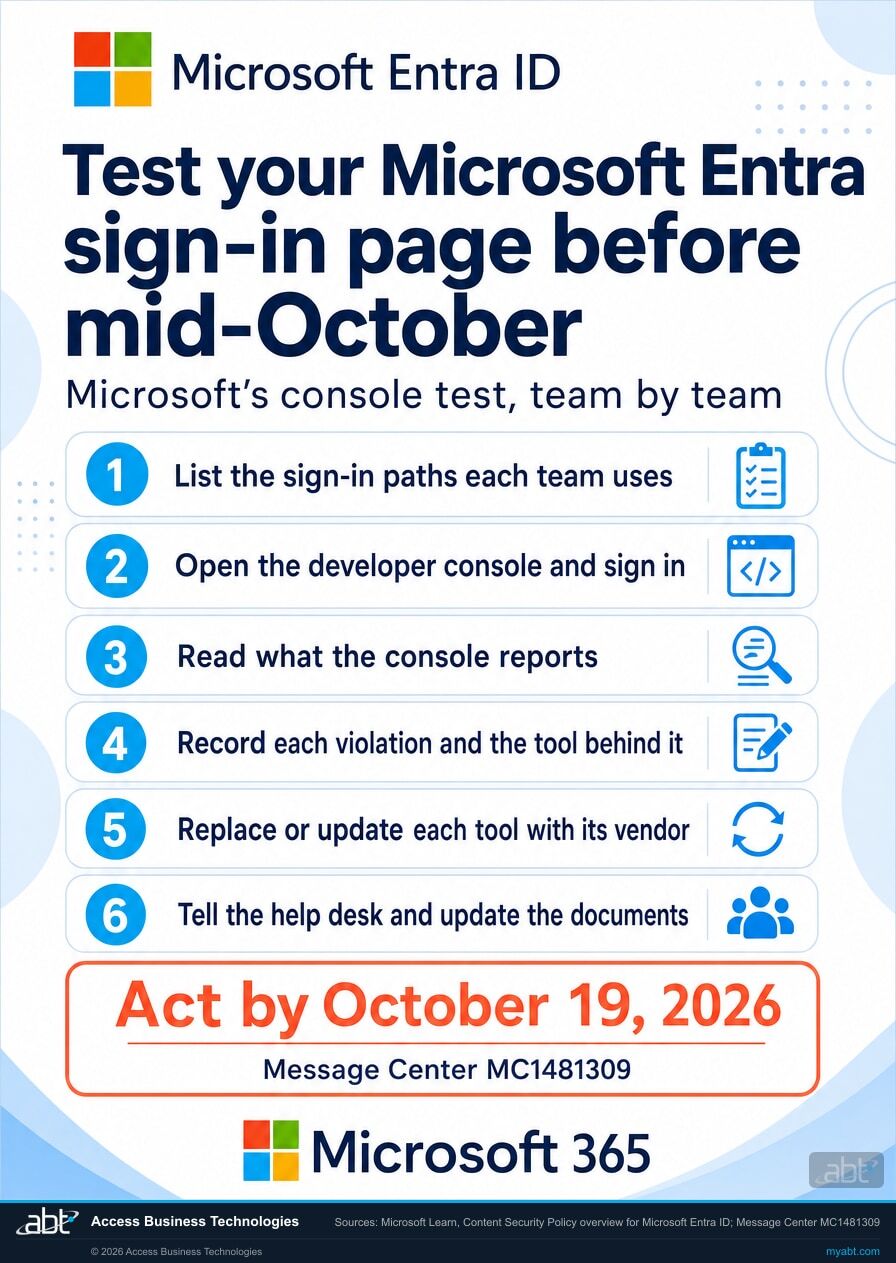
How do you test your sign-in flow before mid-October?
Sign in with the browser's developer console open and read what it reports. That is Microsoft's own test, and it works today: when ABT checked on October 5, 2026, the sign-in page was already sending its policy in report-only mode, which reports violations without blocking the script.
List the sign-in paths your teams use
Browsers, devices, and the apps people open from the sign-in page: a teller workstation, a loan officer's laptop, a shared device in a branch, a remote worker's managed PC. Microsoft recommends assessing "different sign-in scenarios within your organization," because a violation only appears where its tool runs.
Open the developer console and sign in
In Microsoft Edge or Chrome, press F12 and open the Console tab, then go to a Microsoft 365 sign-in. Microsoft Learn, step 1: "Go through a sign-in flow with the dev console open to identify any violations."
Read what the console reports
Microsoft Learn, step 2: "Review the information about the violation displayed in red." A Content Security Policy violation names the source it refused, which is where you start tracing the extension or product behind it.
The policy is already being sent in report-only mode. On October 5, 2026, login.microsoftonline.com returned a Content-Security-Policy-Report-Only header in ABT's check. MDN describes that header as one that "helps to monitor Content Security Policy (CSP) violations and their effects without enforcing the security policies." So the console can show violations of the policy today, while the tool still runs.
Record each violation and the tool behind it
Write down the team, the device, the browser, the source named in the reported violation, and the tool's owner. The list records what your tests found, it grows with each path you add, and it is the list your vendors answer against.
Replace or update each tool with its vendor
MC1481309 asks organizations to "Replace or update any solutions that depend on script injection into Microsoft Entra sign-in pages." Its first notice, MC1191924, gave the same instruction in seven words: "switch to alternatives that don't inject code."
Tell the help desk and update the documents
The last two actions on Microsoft's list: "Communicate potential impacts to help desk and identity administration teams," and "Update internal documentation if it references affected authentication customizations." A help desk that knows the date and the symptom can answer the first call on the spot.
Your branding
What happens to custom CSS in your company branding on October 26?
If your custom CSS uses the layout and positioning properties Microsoft is retiring, those properties stop working from October 26, 2026, and your logos, images, and text return to their default placement. Organizations that were not using custom CSS as of July 21, 2026 are outside the change.
Check whether your CSS uses the retired properties
- Download the file. In the Microsoft Entra admin center, open Custom branding, select Edit, and on the Layout tab, under Custom CSS, select Download.
- Check every locale. Microsoft Learn shows how to pull all branding localizations from Microsoft Graph and paste them into the tenant branding inspector tool it links, which lists each locale and the retired properties it uses.
- Look for the families. Position and its offsets (top, right, bottom, left, z-index), margin, transform, opacity, overflow, filter, display, visibility, inset, zoom, grid placement, and masks, among others. Microsoft's full list is the one to check against.
Fix it, then plan for the next step
- Remove and upload. Edit the downloaded file, remove the retired properties, and upload it to company branding. Microsoft suggests a test tenant first to see the visual effect.
- Redesign within the rules. MC1435782: "There is no supported migration path or replacement for the retired positioning properties." The layout you keep is the one the remaining properties can produce.
- Expect more. MC1458474: "Later in 2027: Microsoft Entra plans to move towards full custom CSS retirement, with advance notice provided."
Where should a legal notice or a help desk number go?
In the sign-in page text of company branding. Microsoft Learn: "You can use this text to communicate additional information, such as the phone number to your help desk or a legal statement." It takes up to 1,024 characters of Unicode text. The page is public, so Microsoft also asks you to keep sensitive information out of it. Microsoft Learn lists the licenses that include company branding: Microsoft Entra ID P1 or P2, Microsoft 365 Business Standard, or SharePoint (Plan 1). The Organizational Branding Administrator role is the minimum role that can change it.
If an institution added an "authorized use only" banner or a support notice with a script, this is where that text moves. Company branding is built from images, text, and CSS you configure in the admin center, and that is the customization path Microsoft documents for the page.
For financial institutions
Why does a sign-in page change matter at a credit union, bank, or mortgage company?
Because staff reach Microsoft 365 through this page all day. A tool that quietly stops working there turns into help desk calls and stalled work, while Microsoft is closing a route attackers use to steal credentials and sessions.
Keep the work moving. Browser sign-ins to Microsoft 365 start at login.microsoftonline.com. When a monitoring or customization tool stops working there, the staff who rely on it notice, and the help desk hears about it. Testing before mid-October turns that surprise into a scheduled change with an owner and a date.
Protect the credentials. Microsoft Learn lists what injected scripts can do on a sign-in page: "Attackers can steal sensitive information such as credentials or tokens," and "Injected scripts can take control of active sessions." The policy also covers the case Microsoft calls out by name, a script that gets in "such as through a user-installed malicious browser extension or a zero-day vulnerability." Cross-site scripting, the attack class Microsoft names for this change, made up 15% of all important or critical cases the Microsoft Security Response Center handled across Microsoft services from July 2024 to July 2025, and MSRC notes that a flaw on login.microsoftonline.com "may initially be rated Critical due to the domain's sensitivity."
Close it with a record. The test results, the vendor answers, and the CSS change make a short, dated file: what you tested, what you found, who owns each tool, and what changed. A security or monitoring product that stops working on the sign-in page is also a vendor question with a date attached, so ask it in writing and keep the answer with that vendor's file.
These two changes sit beside other Microsoft Entra sign-in changes this fall. Our page on finding the users Microsoft's SMS and voice MFA retirement affects covers the count that decides that one. Institutions that run third-party MFA through Conditional Access custom controls have their own timeline, covered in Conditional Access custom controls after the freeze.
Why does Microsoft guard the sign-in page this closely?
Because the sign-in page is where credentials are typed. Microsoft Learn puts that first in its list of what an injected script can do there: "Attackers can steal sensitive information such as credentials or tokens." The Short from our channel is about the same target, credential theft.
Microsoft Learn describes the policy as a second layer for exactly that moment: where a script gets onto the page despite the browser's first defenses, "CSP prevents that script from executing." Your part is to make sure the tools you rely on are ready for the same page before mid-October.
How ABT helps
A free security assessment
ABT is a Tier 1 Microsoft Cloud Solution Provider serving more than 750 financial institutions, and the sign-in page check is part of this assessment.
We run Microsoft's sign-in test with your administrators, check your branding for the retired CSS properties, and list what needs a vendor answer before mid-October
The assessment is free and ends with written findings you keep. We work through the tests and settings with an administrator on your team, and your team decides what changes in the tenant and who makes each change.
- The sign-in test. Microsoft's console test on the sign-in paths, devices, and browsers we agree with your team, with every violation the policy reports recorded against the tool behind it.
- The extension picture. The browser extensions your device management policies install, plus the Defender Vulnerability Management browser extensions inventory where you license it.
- The branding check. Your company branding localizations checked for custom CSS and the retired layout and positioning properties.
- The vendor list. Each tool that needs an answer from its vendor before mid-October, with the question to ask.
- The record. A dated summary of the findings and the changes your team decides to make, ready for your change-management file.
ABT also operates M365 Guardian, its managed security service for credit unions, banks, and mortgage companies. Learn about M365 Guardian
Related reading
If this opened a bigger question
These three cover other ways attackers go after Microsoft 365 sign-ins, each with its own controls: proxying the real page, faking a familiar one, and stealing the session that follows.
Knight Office AiTM Kit: Persistence Past Password Reset
How an adversary-in-the-middle kit captures a Microsoft 365 sign-in, and what a password reset leaves behind.
Read the article
AI Brands as Bait: How Fake ChatGPT and Copilot Pages Steal Financial Institutions' Microsoft 365 Logins
Fake AI-brand pages built to collect Microsoft 365 logins, and how institutions stop them.
Read the article
Hotel Wi-Fi Is Stealing Microsoft 365 Sessions
What a stolen Microsoft 365 session token gives an attacker, and the controls that limit it.
Read the articleAnswered
Microsoft Entra sign-in page changes, answered
Verify it yourself
Where the facts on this page come from
Every Microsoft date, scope line, step, and quotation above was read from the sources listed here on October 5, 2026.
- Microsoft 365 Message Center post MC1481309, Microsoft Entra ID: Enhance protection of the authentication experience by blocking external script injection, plan for change, published September 28, 2026, act by October 19, 2026. Source for the mid-October to late-October rollout, who is affected, the policy's behavior, the sign-in statement, the default-on delivery, the MSAL and API scope, the External ID scope, and Microsoft's action list. Visible to administrators in your own Microsoft 365 admin center; a public archive copy is at mc.merill.net/message/MC1481309.
- Microsoft 365 Message Center post MC1191924, the first announcement of the same change, published December 3, 2025. Public archive copy: mc.merill.net/message/MC1191924.
- Microsoft Learn, Content Security Policy overview for Microsoft Entra ID. Source for "mid-to-late October 2026", the browser-only scope, the risks of script injection, Microsoft's analysis of where violations come from, the vendor guidance, and the console test.
- Microsoft Entra blog, Enhance protection of Microsoft Entra ID authentication by blocking external script injection, November 25, 2025.
- Microsoft 365 Message Center post MC1458474, Microsoft Entra ID: Retirement of custom CSS layout and positioning properties in company branding, published August 21, 2026, act by October 26, 2026. Source for the action-required date, the July 21, 2026 and 2027 milestones, the default-placement behavior, and the External ID scope. Public archive copy: mc.merill.net/message/MC1458474.
- Microsoft 365 Message Center post MC1435782, Microsoft Entra ID: Retirement of custom CSS positioning properties in custom branding, published July 21, 2026. Source for the October 26, 2026 date and the absence of a migration path for the retired properties. Public archive copy: mc.merill.net/message/MC1435782.
- Microsoft Entra blog, Microsoft Entra ID enhances security of branded sign-ins, July 21, 2026.
- Microsoft Learn, CSS template reference guide for company branding. Source for the full list of retired properties and the steps to download and inspect your CSS.
- Microsoft Learn, Add company branding to your organization's sign-in page. Source for the license and role requirements and the sign-in page text.
- Microsoft Learn, Browser extensions assessment in Microsoft Defender Vulnerability Management. Source for the licensing, the Windows-only scope, and the browsers covered.
- Microsoft Security Response Center, Why XSS still matters: MSRC's perspective on a 25-year-old threat, September 4, 2025. Source for the 970+ cases and the 15% share.
- MDN Web Docs, Content-Security-Policy-Report-Only header. Source for what report-only mode does. The observation that the sign-in page sends this header is ABT's own check of login.microsoftonline.com on October 5, 2026, which anyone can repeat with the browser's developer tools.
Microsoft Entra starts blocking injected scripts on its sign-in page in mid-October.
Know what touches yours before mid-October.
The work starts with Microsoft's console test across the sign-in paths your teams use, and a look at your company branding. When it is done, you know which tools showed up on the paths you tested, which vendors owe you an answer, and whether your custom CSS uses the retired properties.
Tell us a little about your environment and we will come back with what we would check first.
What should we look at? Optional.
Encrypted. Private.
Thank you. That is with us.
An ABT specialist will be in touch shortly. If a tool has already stopped working on your sign-in page, say so in your reply and we will start there.
