


Microsoft Purview · Copilot retention
Your team does real work in Copilot. Microsoft now plans to take it out of older Teams retention policies in January 2027.
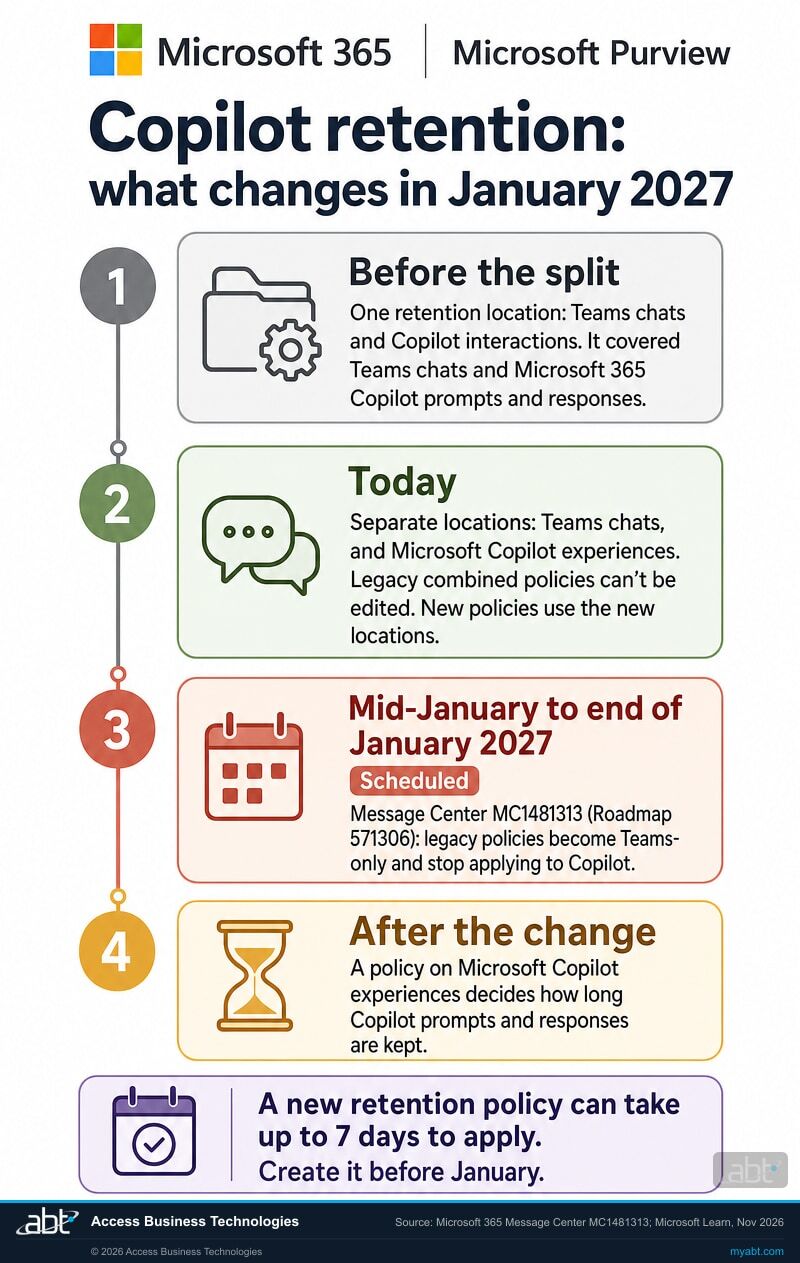
Microsoft updated its Message Center post MC1481313 on October 27, 2026: the rollout now begins in mid-January 2027 and is expected to complete by the end of January 2027. Retention policies built on the older combined location, Teams chats and Copilot interactions, become Teams-only policies. From then, Microsoft 365 Copilot prompts and responses follow the policy that selects the separate location Microsoft calls Microsoft Copilot experiences. Microsoft says a new retention policy can take up to seven days to apply, so the weeks before January are the time to create one.
- Mid-January to end of January 2027: Message Center post MC1481313, for Microsoft 365 Roadmap item 571306, converts legacy Teams retention policies that cover Copilot into Teams-only policies
- Microsoft Copilot experiences is the retention location for Microsoft 365 Copilot, Security Copilot, Copilot in Fabric, and Copilot Studio; Security Copilot and Copilot in Fabric also need a collection policy that captures content
- Two overlapping policies keep content for the longer period, so the new policy can go in today, alongside the old one
The change
What is changing with Teams retention policies and Copilot?
A retention policy written before Microsoft split the locations covers Copilot prompts and responses today, because the old location included them automatically. Microsoft now schedules the conversion to Teams only from mid-January 2027, complete by the end of January 2027. The Copilot half then needs a policy of its own.
One location covered both
Retention policies used a single location named Teams chats and Copilot interactions. Microsoft Learn says Copilot and Copilot Chat messages were included automatically, and that users didn't have to be using Teams for the policy to apply to Copilot.
Separate locations
New policies choose Teams chats or Microsoft Copilot experiences. Existing combined policies still run, and Microsoft says they can't be edited once your tenant supports the separate locations. Every new policy has to use the new locations.
Legacy policies become Teams-only
Message Center post MC1481313, which tracks Microsoft 365 Roadmap item 571306, converts legacy Teams retention policies that also cover Copilot into Teams-only policies, starting mid-January 2027. In Microsoft's words, they will no longer implicitly apply to Copilot workloads.
Copilot follows its own policy
How long Copilot prompts and responses are kept, and when they are deleted, is decided by a policy that selects Microsoft Copilot experiences. Build it before January and Copilot stays covered through the conversion.
"Organizations that require retention coverage for Copilot interactions must configure retention settings specifically for the Copilot workload."
Microsoft 365 Message Center, MC1481313, Legacy Teams retention policies that cover Copilot will be treated as Teams-only, updated October 27, 2026, read November 3, 2026Microsoft first listed the change on the Microsoft 365 Roadmap, item 571306, for October 2026. On October 27, 2026 it updated the Message Center post with a new schedule for worldwide tenants: beginning in mid-January 2027 (previously late October 2026) and expected to complete by the end of January 2027 (previously mid-November). A legacy policy may have been retaining Copilot content, deleting it on a schedule, or both. After the conversion it does neither for Copilot: Microsoft's post says Copilot interactions will no longer be retained or deleted through these legacy Teams retention policies, while retention for Teams content stays the same.
That matters in both directions. An institution counting on the legacy policy to keep Copilot prompts for its records schedule loses the keep. An institution counting on it to delete them after a set period loses the delete. The fix is the same for both: a policy on Microsoft Copilot experiences, or more than one where scopes or retention periods differ.
The conversion changes which retention policy governs Copilot content. Litigation Hold and eDiscovery holds are separate mechanisms, and Microsoft's retention guidance lists them among the things that keep Copilot content from being permanently deleted.
The check
How do you know whether your tenant relies on a legacy policy?
Open each retention policy and read its locations. The location name tells you which kind it is, and the check takes about as long as the list is long.
In the Microsoft Purview portal, go to Solutions, then Data Lifecycle Management, then Policies, then Retention policies. Any policy whose locations include Teams chats and Copilot interactions is a legacy combined policy, and it is the one the January 2027 change converts. Then look for a policy that selects Microsoft Copilot experiences. If the list has a legacy policy and no Copilot policy, your Copilot retention policy coverage today comes from the legacy policy alone.
Write down three things from each legacy policy before you change anything: whether it retains, deletes, or both, the retention period, and which users or groups it covers. Those settings are what your institution currently applies to Copilot, and they are the starting point for the replacement.
| Teams chats and Copilot interactions (legacy) | Teams chats (current) | Microsoft Copilot experiences (current) | |
|---|---|---|---|
| Teams 1:1, group, and meeting chats | Covered | Covered | Outside this location |
| Microsoft 365 Copilot prompts and responses today | Covered automatically, even for people who never use Teams | Outside this location | Covered |
| Which Copilot experiences | Microsoft 365 Copilot and Copilot Chat | None | Microsoft 365 Copilot, Security Copilot, Copilot in Fabric, and Copilot Studio |
| From the January 2027 rollout | Scheduled: converted to a Teams-only policy that covers Teams chats alone | Retention for Teams content stays the same, per MC1481313 | The location Microsoft points to for Copilot retention |
| Can you edit the policy? | Microsoft says these can't be edited once your tenant supports the separate locations, and documents PowerShell to separate them | Yes | Yes |
| Can new policies use it? | Microsoft says new policies must use the new locations | Yes | Yes |
Microsoft says legacy policies can't be edited. It documents PowerShell to split them.
Microsoft Learn's page on creating retention policies has a section titled Separate an existing Teams chats and Copilot interactions policy. It gives the command that turns an older combined policy into a Teams chat policy, Set-RetentionCompliancePolicy -Identity "<policy name>" -Applications "User:TeamsChatUserInteractions", and the command that adds Microsoft 365 Copilot interactions to a policy already built on the newer locations, Set-AppRetentionCompliancePolicy -Identity "<policy name>" -Applications "User:M365Copilot".
The first command performs, on your schedule, the same split Microsoft performs in January 2027. Run it after the Copilot policy is in place and confirmed, never before, so Copilot is covered by something at every point.
Find out which of your retention policies are set to stop covering Copilot in January 2027
ABT reviews every retention policy in your Microsoft 365 tenant, shows which ones cover Copilot today and which will after the conversion, and lays out the Copilot policy your records schedule calls for.
Request the free assessmentThe short list
What should an administrator do before January 2027?
Seven steps, in order. The order is the safeguard: the new policy is in place and on record before the old one changes.
List every retention policy and its locations
In the Microsoft Purview portal, open Solutions, then Data Lifecycle Management, then Policies, then Retention policies. Mark each policy whose locations include Teams chats and Copilot interactions, and note whether any policy already selects Microsoft Copilot experiences.
Record what each legacy policy does for Copilot
For each legacy policy, write down whether it retains, deletes, or both, the retention period, whether the scope is static or adaptive, and which users or groups it covers. Those settings are what you are about to reproduce or revise.
Confirm the period with your records owner
Your records schedule, your counsel, and your compliance officer decide how long Copilot prompts and responses are kept and when they are destroyed. Get that decision in writing before the policy is built: Microsoft says the policy name, the scope type, and the retention settings other than the retention period can't be changed after the policy is saved.
Create a retention policy on Microsoft Copilot experiences
Select New retention policy, keep Full directory on the admin units page (Microsoft says admin units aren't supported for this policy), choose adaptive or static, then select the Microsoft Copilot experiences location and set the retain and delete settings from step 3. The new location is broader than the legacy one: it also includes Security Copilot, Copilot in Fabric, and Copilot Studio, and for Microsoft Copilots other than Microsoft 365 Copilot and Copilot Studio, retention applies once a collection policy captures their content. Confirm with your records owner that one period fits all of them, or build separate policies. For a policy already built on the newer locations, Microsoft documents Set-AppRetentionCompliancePolicy -Identity "<policy name>" -Applications "User:M365Copilot" to add Microsoft 365 Copilot interactions.
Give it a week, then check the distribution status
Microsoft says a new retention policy can take up to seven days to apply. Select the policy on the Retention policies page to see its distribution status. If the status shows an error, Microsoft Learn documents a retry command for policy distribution on the same page.
Record the configuration, then run the eDiscovery check
Save a dated record of the new policy: its location, its scope, its retain and delete settings, and its distribution status. Then search a test user's mailbox in Microsoft Purview eDiscovery with the condition Type, Contains any of, Copilot activity, to confirm Copilot activity is being kept and can be found. Microsoft says compliance should be verified with eDiscovery tools.
While the legacy policy still covers the same user, a search result can't show which policy kept an item. The configuration record is what ties coverage to the new policy at this stage, and step 7 narrows the gap. Our guide to monitoring Copilot in Microsoft Purview covers the reporting side.
Split the legacy policy on your schedule, then repeat the test
Once the Copilot policy is confirmed, make each legacy policy Teams-only yourself with Microsoft's documented command, Set-RetentionCompliancePolicy -Identity "<policy name>" -Applications "User:TeamsChatUserInteractions". The January 2027 conversion then arrives in a tenant that already made the same change, in the order you chose.
Then repeat the test with a user whose mailbox carries no Litigation Hold or eDiscovery hold. Microsoft Learn says a mailbox gets a delay hold for 30 days after a hold is removed, and a temporary delay hold when a retention policy stops applying to it; Get-Mailbox <username> | FL *HoldApplied* shows whether one is in place. Once it has cleared, and where your tenant lets users delete Copilot chats, delete a test chat and search for it again a few days later. A deleted chat that eDiscovery still finds after a week, once the timer job has had time to run, is supporting evidence that a retention setting on Microsoft Copilot experiences is keeping content. For a policy that only deletes, the test runs the other way: after the deletion period, the item should stop appearing in search, and Microsoft's own example shows that can take more than two weeks for a one-day policy. Note in the record every policy on that location that covers the test user, and file the result with the configuration record.
Read the sources in two minutes
Open Message Center post MC1481313 in the Microsoft 365 admin center for the current schedule; it carries the change listed as Microsoft 365 Roadmap item 571306, titled "Microsoft Purview: Data Lifecycle Management-Legacy Teams retention policies covering Copilot will be treated as Teams-only". Then read the section Separate an existing Teams chats and Copilot interactions policy in Microsoft Learn's Create and configure retention policies, last updated June 9, 2026.
The mechanics
What does a Copilot retention policy actually keep, and where?
The prompt, the answer, and a copy that survives the user's delete button, stored in a place built for eDiscovery to search.
A retention policy on Microsoft Copilot experiences captures user prompts and Copilot's responses. Microsoft Learn says prompts include the text users type and prompts they select from a prepopulated list, and responses include text, links, and references. For Copilot in Teams chats and channels, responses include threaded summaries. Microsoft leaves out messages that only say a response is in progress, which it describes as having no business value.
The productivity case is why this matters. Copilot is where a loan officer summarizes a file history before a borrower call and where an operations lead drafts the reply to a vendor. The conversation that shaped the work is now part of the work, and the retention policy is how Microsoft 365 treats it that way.
Prompts and responses
What users type or select, and what Copilot returns: text, links, and references, plus threaded summaries for Copilot in Teams chats and channels.
A hidden folder in the user's mailbox
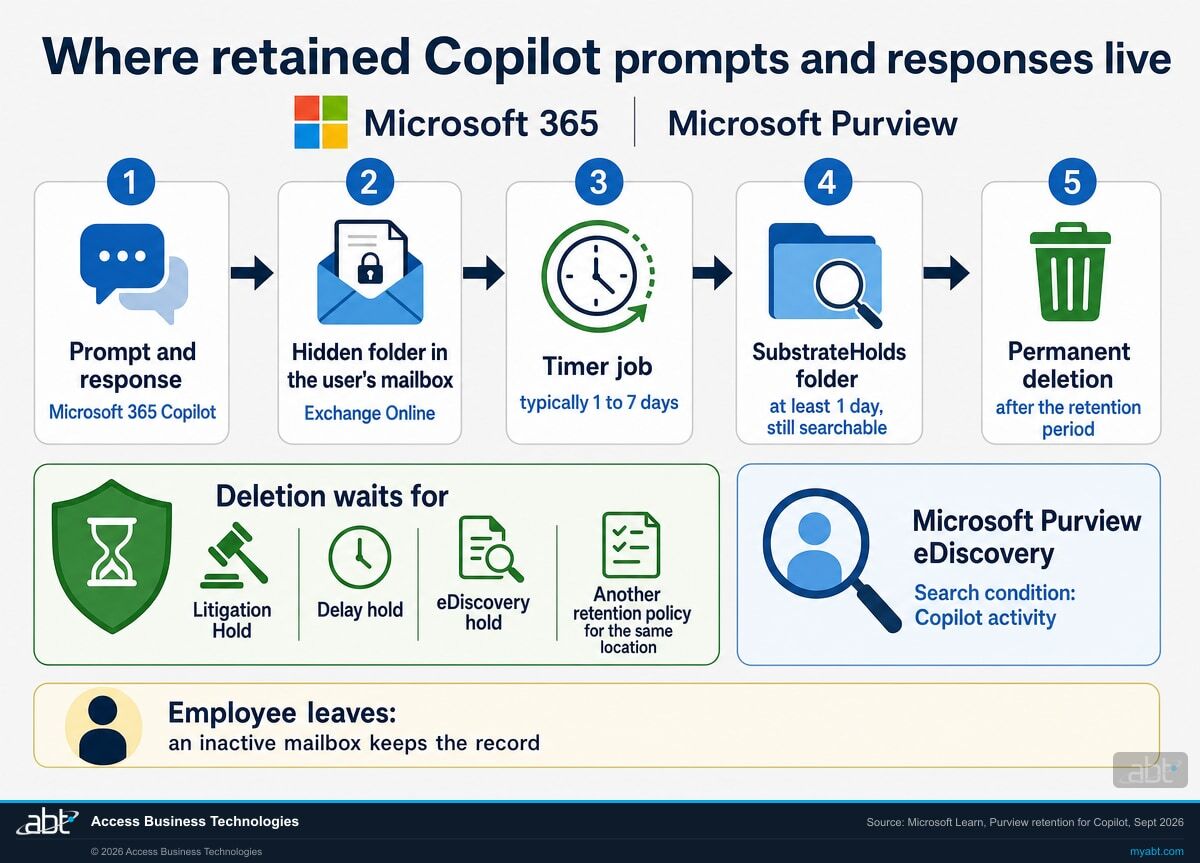
Microsoft stores the retained data in a hidden folder in the Exchange Online mailbox of the user who ran Copilot. It is built for compliance administrators to search with eDiscovery, and it isn't designed for users or administrators to open directly.
Holds pause deletion
Permanent deletion waits while the mailbox is under another retention policy for the same location, Litigation Hold, delay hold, or an eDiscovery hold.
Leavers keep their record
When an employee leaves and the account is deleted, retained Copilot messages move to an inactive mailbox and stay under the policy that applied before, available to eDiscovery.
What happens when a user deletes a Copilot chat?
With a retention policy in place, a message removed from Copilot moves to a second hidden folder, SubstrateHolds, where it stays for at least a day and remains searchable. It is permanently deleted only after the retention period ends, by a timer job that Microsoft says typically takes 1 to 7 days to run. Microsoft names two ways Copilot messages get removed: a user deletes the chat in Microsoft 365 Copilot Chat, where that option is available, or someone submits a request to delete a user's Copilot history.
Short policies carry the same lag. Microsoft's own example shows that a delete-after-one-day policy could take 16 days before a message stops appearing in eDiscovery searches, because each stage waits for the next timer run.
"Messages visible in your AI apps are not an accurate reflection of whether they are retained or permanently deleted for compliance requirements."
Microsoft Learn, Learn about retention for Copilot and AI apps, read November 3, 2026Read that sentence as the testing rule. What a user sees in Copilot tells you nothing about what the institution kept. eDiscovery is the instrument that answers, and it is the one to test with before anyone relies on the policy.
One more boundary sits in the same Microsoft guidance. Prompts and responses for Microsoft 365 Copilot and Copilot Studio are retained by the policy alone. For other Microsoft Copilots and generative AI apps, including the apps grouped under Enterprise AI apps and Other AI apps, Microsoft says retention first needs a collection policy with the setting to capture content.
For credit unions, banks, and mortgage companies
Why does a Copilot retention gap matter more at a financial institution?
The productivity is why your staff want Copilot. The record is what your institution needs when someone asks how a decision was reached.
Start with the good version. A member services lead asks Copilot to pull the three emails that explain a fee reversal. A processor summarizes a loan file before an underwriting call. A compliance analyst drafts a first pass at the answers to an examiner's request list. Each of those saves real time, and each leaves a prompt and a response behind.
Your records schedule and your counsel decide how long that kind of material is kept and when it is destroyed. Microsoft 365 provides the mechanism, and the retention policy is where the decision becomes something the tenant enforces. A policy that stops applying to Copilot turns a written decision into an unenforced one, and the gap tends to surface when someone needs the record: an audit request, litigation, or a member complaint that asks what was said.
"By default, retention always takes precedence over permanent deletion, and the longest retention period wins."
Microsoft Learn, Learn about retention policies and retention labels, last updated July 22, 2026Why the new policy can go in today
Microsoft's principles of retention settle what happens when two policies cover the same content. Retention beats deletion, and the longest retention period wins. The principle works item by item: in Microsoft's wording, if content is subject to multiple retention settings that retain it for different periods of time, the content is retained until the end of the longest retention period for the item. A new policy on Microsoft Copilot experiences, created alongside the legacy policy, therefore keeps Copilot content for the longest period either policy requires. Microsoft's own instructions treat the two kinds of policy as coexisting: legacy combined policies continue to be supported, and you can create new retention policies for just Copilot interactions.
So the new policy can go in now. Create it, confirm it with an eDiscovery search, and let the conversion arrive in a tenant that already has the answer in place. Our page on Copilot connector write actions covers another Copilot setting worth checking in the same review.
The evidence you want on file
Three items answer most questions later: the list of retention policies with their locations as of today, a dated configuration record of the Copilot policy, and the eDiscovery test results from before and after the legacy policy is split. Teams chats carry retention questions of their own, and our guide to Teams governance for financial institutions covers them.
Is retention the only Copilot policy that needs its own location?
No. Data loss prevention follows the same design. Microsoft Purview's data loss prevention for Copilot uses its own policy location, Microsoft 365 Copilot and Copilot Chat, and Microsoft Learn says that selecting it disables every other location in that policy. The Short from our channel makes the data loss prevention version of the point: the policies you wrote for Exchange and SharePoint need a Copilot counterpart.
ABT manages Microsoft 365 tenants for credit unions, banks, and mortgage companies, so the retention question and the data loss prevention question tend to arrive together. Both belong on the same list, and our Copilot readiness guide for financial institutions walks through the rest of it, from oversharing to sensitivity labels.
How ABT helps
A free Copilot readiness assessment
ABT is a Tier 1 Microsoft Cloud Solution Provider. We manage Microsoft 365 tenants for more than 750 financial institutions, and the Copilot retention check is part of this assessment.
We show you which retention policies cover Copilot in your tenant today, which ones are set to stop in January 2027, and what to put in their place
The assessment is free and ends with written findings you keep. We work through your retention configuration with an administrator on your team, and your team decides what changes in the tenant and who makes each change.
- The retention inventory. Every retention policy in the tenant, its locations, and who it covers, with the legacy combined policies marked.
- The Copilot coverage map. Which users' Copilot prompts and responses a policy governs today, and which would lose that coverage in the January 2027 conversion.
- The replacement plan. A Microsoft Copilot experiences policy that matches the period your records owner sets, and the order to apply it in.
- The evidence plan. The configuration record to keep, and the eDiscovery tests to run with your administrator before and after the legacy policy is split, so your file records what the new policy is set to do and what each search found.
- The wider readiness picture. Oversharing, sensitivity labels, and data loss prevention for Copilot, measured by what each setting does in your tenant.
ABT also operates M365 Guardian, its managed security service for credit unions, banks, and mortgage companies. Learn about M365 Guardian
Related reading
If this opened a bigger question
Copilot retention sits between your records program, your eDiscovery process, and your AI governance. These three pick up each thread.

Microsoft 365 Data Retention for Financial Institutions
How retention and email archiving in Microsoft Purview map to the recordkeeping rules banks, credit unions, and mortgage companies work under.
Read the guide
Microsoft Purview eDiscovery for Financial Institutions
The eDiscovery tool that finds retained Copilot activity, and the licensing rule that reverses between Standard and Premium.
Read the guide
Microsoft Purview for AI: What to Configure First
The Purview settings banks, credit unions, and mortgage companies set up before AI agents touch member and customer data.
Read the guideAnswered
Copilot retention policies, answered
Verify it yourself
Where the facts on this page come from
Every Microsoft date, figure, and quotation above comes from the Microsoft sources listed here. Each entry gives the date it was read.
- Microsoft 365 Message Center, MC1481313, (Updated) Microsoft Purview | DLM: Legacy Teams retention policies that cover Copilot will be treated as Teams-only, updated October 27, 2026, read November 3, 2026. Source for the current schedule (beginning mid-January 2027, previously late October 2026; complete by the end of January 2027, previously mid-November), the statement that legacy policies will no longer implicitly apply to Copilot workloads, the statement that Copilot interactions will no longer be retained or deleted through them, Teams retention staying the same, and the quotation on configuring retention specifically for the Copilot workload.
- Microsoft 365 Roadmap, item 571306, Microsoft Purview: Data Lifecycle Management-Legacy Teams retention policies covering Copilot will be treated as Teams-only, created September 18, 2026, read September 24, 2026, when it listed general availability in October 2026 for worldwide standard multi-tenant tenants. Source for the original October 2026 listing.
- Microsoft Learn, Learn about retention for Copilot and AI apps, read November 3, 2026. Source for the former combined location, the separate locations for new policies, what is included for retention, the hidden mailbox folder, SubstrateHolds, timer job timing, holds suspending deletion, the 16-day example, the statement that what users see is not an accurate reflection of retention, and inactive mailboxes.
- Microsoft Learn, Create and configure retention policies, last updated June 9, 2026, read November 3, 2026. Source for the Microsoft Copilot experiences location and the four experiences it includes, the collection policy prerequisite for other AI apps, the portal path, admin units, the section on separating an existing Teams chats and Copilot interactions policy with its PowerShell commands, legacy policies not being editable once separate locations are supported, and the seven-day application window.
- Microsoft Learn, Learn about retention policies and retention labels, last updated July 22, 2026, read November 3, 2026. Source for the principles of retention: retention takes precedence over permanent deletion, and content subject to multiple retention settings is retained until the end of the longest retention period for the item.
- Microsoft Learn, How to identify the type of hold placed on an Exchange Online mailbox, read November 3, 2026. Source for the 30-day delay hold after a hold is removed, the temporary delay hold when a retention policy stops applying to a mailbox, and the Get-Mailbox command that shows the hold properties.
- Microsoft Learn, Microsoft Purview data security and compliance protections for Microsoft 365 Copilot, last updated May 1, 2026, read November 3, 2026. Source for selecting Microsoft Copilot Experiences in retention policies, the longest-duration outcome when policies overlap, and the eDiscovery condition Copilot activity.
- Microsoft Learn, Learn about using Microsoft Purview Data Loss Prevention to protect interactions with Microsoft 365 Copilot and Copilot Chat, last updated October 16, 2026, read November 3, 2026. Source for the separate Microsoft 365 Copilot and Copilot Chat policy location in data loss prevention.
Copilot conversations are part of your record.
Decide how long they stay.
Checking which retention policies cover Copilot is quick work before January. Working out afterward what happened to Copilot prompts during a gap in coverage is slow work.
Tell us a little about your environment and we will come back with what we would check first.
What should we look at? Optional.
Encrypted. Private.
Thank you. That is with us.
An ABT specialist will be in touch shortly. If your January 2027 change window is already scheduled, say so in your reply and we will move it to the front.
