


Windows Server 2022 · Extended support
Windows Server 2022 moved into extended support on October 13, 2026. Office on those servers is on its final feature build.
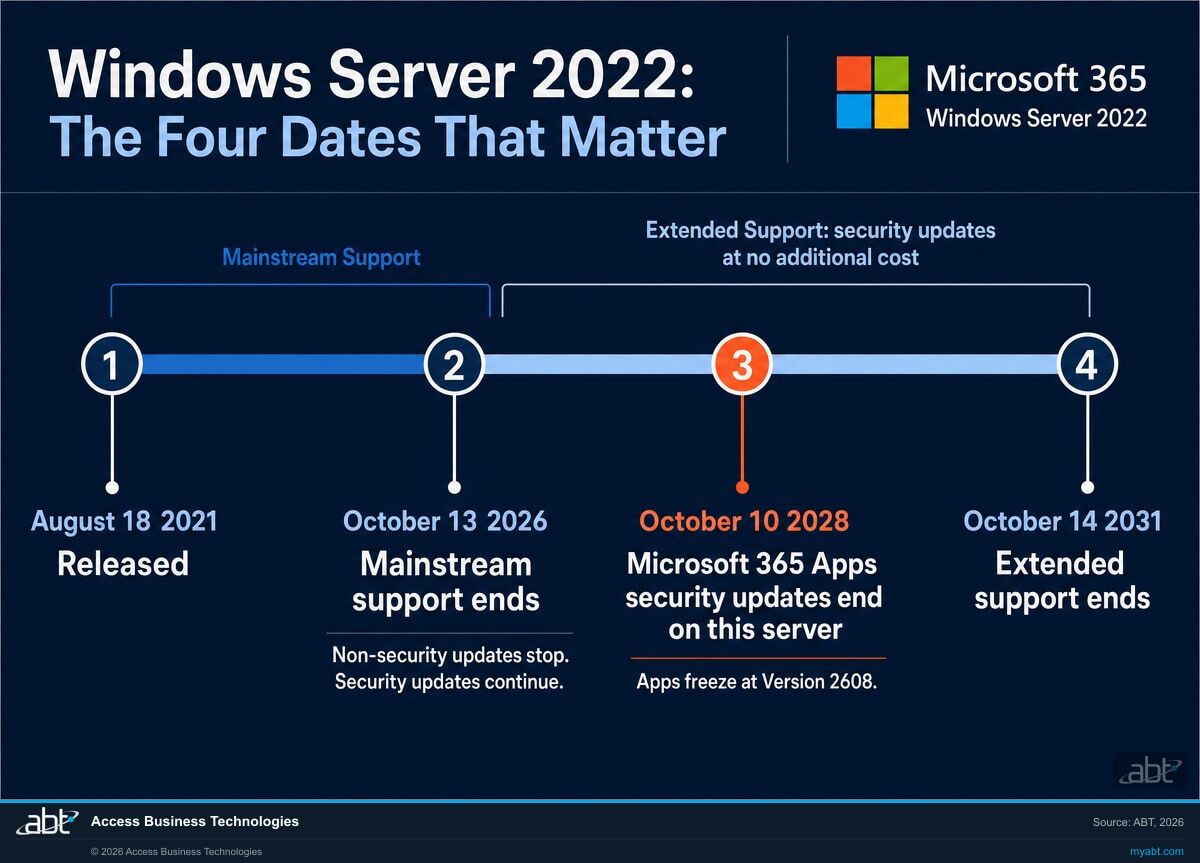
Microsoft confirmed the change on October 14: Windows Server 2022 has reached end of mainstream support and keeps receiving monthly security updates at no additional cost through October 14, 2031. The operating system stays supported, and Microsoft keeps shipping its security updates. Microsoft 365 Apps on the same server runs on a shorter clock: it stays on Version 2608 and receives security updates only, until October 10, 2028.
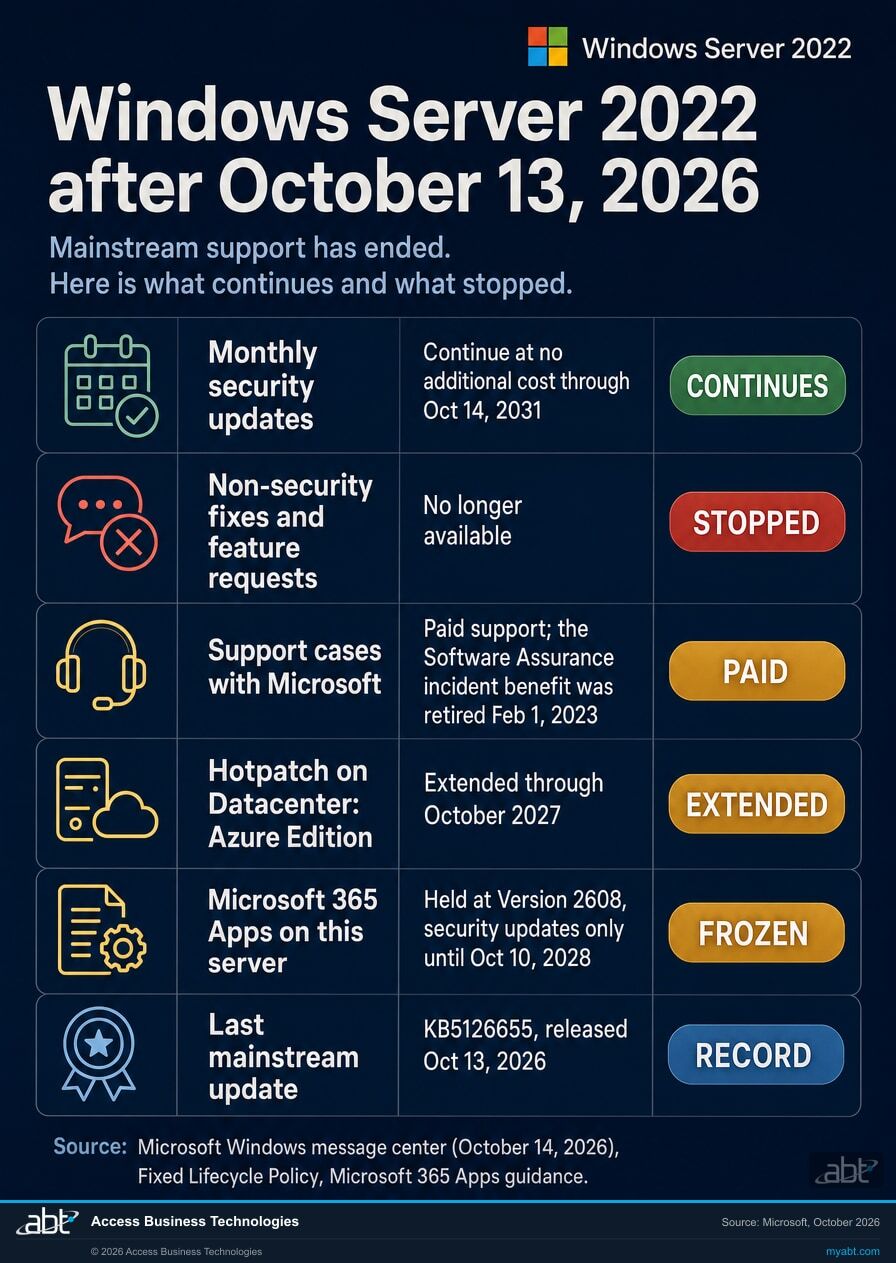
- Microsoft: as of October 13, 2026, Windows Server 2022 has transitioned to extended support, with monthly security updates through October 14, 2031
- The October 2026 security update was the last mainstream support update. For Windows Server 2022 that is KB5126655, OS build 20348.5761
- Microsoft 365 Apps on this server stay on Version 2608 and receive security updates only, until October 10, 2028
- Security updates continue through Oct 14, 2031
- Hotpatch on Datacenter: Azure Edition extended through Oct 2027
- Microsoft 365 Apps on this server: security updates until Oct 10, 2028
- Source: Microsoft, Windows message center, October 14, 2026
Your users first
What happens to Microsoft 365 Apps on Windows Server 2022 now?
The operating system kept its support on October 13. Office on top of it left its supported configuration the same day, and its feature freeze was already in place.
Microsoft states it in one sentence: Microsoft 365 Apps is supported on Windows Server 2022 while it is in mainstream support. That phase ended on October 13, 2026. Microsoft's Office and Windows configuration support matrix shows the same thing as a table, where the cell for Microsoft 365 Apps on Windows Server 2022 reads October 2026. The reason sits one level up: Microsoft 365 is governed by the Modern Lifecycle Policy, which requires Microsoft 365 Apps to run on a Windows operating system that is currently in support, and for Office on a server that means the mainstream phase.
For a credit union, bank, or mortgage company running Office on Remote Desktop Services or a session-host farm, this decides what those users get from here on. Microsoft states that devices running Microsoft 365 Apps on Windows Server 2022 receive feature updates until Version 2608 is released, then remain on Version 2608. Version 2608 reached Current Channel on August 18, 2026. Current Channel moved to Version 2609 on September 22, 2026, and its October 13 release is Version 2609, build 20430.20182. Microsoft 365 Apps features that ship after Version 2608 reach the supported laptops and desktops elsewhere in the institution, and the session hosts stay on 2608.
Security fixes continue, and they have an end date
Microsoft keeps the frozen build patched. In its words, in the interest of maintaining security while customers complete their migrations to a supported configuration, it will continue providing security updates for Microsoft 365 desktop apps running on Windows Server 2022 until October 10, 2028. The same guidance covers subscription versions of the Project and Visio desktop apps, such as Planner and Project Plan 5 or Visio Plan 2. Plan the Office estate around October 10, 2028, and leave the operating system's 2031 date to the servers that run everything else.
What a support case looks like in this configuration
The configuration matrix also sets out how Microsoft handles support incidents for Microsoft 365 Apps running in an unsupported configuration. Customers with a valid Microsoft 365 subscription can still open support cases. If the issue occurs only in the unsupported configuration and does not occur on a more up-to-date operating system, support will ask the customer to move to that operating system. If the customer cannot move, support provides troubleshooting assistance only, and technical workarounds might be limited or unavailable. Those incidents do not include the option to log a bug or request other product updates.
Where Microsoft points instead
Microsoft's recommendation on its Windows Server guidance page is direct: if your organization is using a version of Windows Server that does not support Microsoft 365 Apps, move to Windows 365 or Azure Virtual Desktop. For an institution already on Microsoft 365, the identity, the licensing and the management tools are ones it already runs. Windows Server 2025 is the in-place alternative. Its lifecycle page lists the operating system's mainstream end date in November 2029, and for Microsoft 365 Apps on that server Microsoft's guidance and configuration matrix give October 2029, so plan an Office estate on Windows Server 2025 around October 2029. If your session hosts are published to users through RD Web Access, also read our page on the browser XSLT change and RD Web Access.
Find the session hosts still running Office
ABT inventories the Windows Servers we can reach with the access and records you provide, records each machine's edition, build, lifecycle phase and end dates, and flags the hosts running Microsoft 365 Apps where the October 10, 2028 date applies.
Get the free licensing assessmentThe record
What did Microsoft confirm on October 14, 2026?
One announcement, one update number, and one row of lifecycle dates. Together they settle the server's status.
"As of October 13, 2026, Windows Server 2022 has reached end of mainstream support and transitioned to extended support. The October 2026 security update is the last mainstream support update available for this version."
Microsoft, Windows message center, entry dated October 14, 2026. The same notice reached Microsoft 365 admin centers as MC1507704.Microsoft's Windows Server 2022 release health page carries the same status, dated October 13, 2026. Microsoft's Windows Server release information lists the October 2026 update for Windows Server 2022 as KB5126655, OS build 20348.5761, released October 13, 2026, and gives the version's end of updates as October 14, 2031. Because the monthly updates are cumulative, a server reporting build 20348.5761 or later has the last mainstream update installed, and the monthly updates after it are extended-support security updates.
Windows Server 2022 follows the Fixed Lifecycle Policy. Microsoft's list of products moving to extended support in 2026 names four Windows Server 2022 entries with the October 13, 2026 date: Windows Server 2022, Windows Server 2022 Datacenter: Azure Edition, Windows Server 2022 Standard (MSL), and Windows Server IoT 2022. The lifecycle entry covers the Datacenter, Datacenter: Azure Edition, Essentials, and Standard editions, and Microsoft notes that containers released with Windows Server 2022 follow the same dates.
| Listing | Start Date | Mainstream End Date | Extended End Date |
|---|---|---|---|
| Windows Server 2022 | 8/18/2021 8:00:00 AM | 10/14/2026 6:59:59 AM | 10/15/2031 6:59:59 AM |
The two date formats describe the same moments. The lifecycle table stores each boundary as an end timestamp written as a UTC clock time: 10/14/2026 6:59:59 AM UTC is 11:59:59 PM Pacific on October 13, 2026, the last second of that day in Redmond. Read at face value, the string looks like October 14. Microsoft's announcements give the last supported day instead: October 13, 2026 for mainstream support, and October 14, 2031 for security updates. In a risk register or a questionnaire, use the announcement dates and cite the lifecycle page beside them.
Is end of mainstream support the same as end of support?
No. Under the Fixed Lifecycle Policy these are two named phases with different contents, and support ends when the second one ends. A Windows Server 2022 machine today runs a supported, in-lifecycle operating system that Microsoft still ships security updates for, and that holds through October 14, 2031. An unsupported-operating-system entry against that machine describes its lifecycle status incorrectly, and correcting it later usually costs a review cycle.
Why does this get reported wrong so often?
Because the signal that reaches most people is a scanner result or a vendor questionnaire field, and both tend to carry a single yes-or-no value. The lifecycle phase has more states than that. A scanner that flags "end of mainstream support reached" is reading the same table correctly and saying something much narrower than the risk register entry it turns into three steps later. The gap opens between the tool and the write-up.
The difference
What changed when mainstream support ended?
Non-security updates, feature requests and warranty support stopped on October 13. Security updates carried across the line.
| Type of support | Mainstream Support | Extended Support | Beyond End of Support |
|---|---|---|---|
| Security updates | Available | Available | Available via the Extended Security Update Program |
| Non-security updates | Available | Not available | Not available |
| Request to change product design and features | Available | Not available | Not available |
| Self-help support | Available | Available | Available |
| Paid support | Available | Available | Available, with the Extended Security Update program required |
Microsoft defines the extended phase in two lines: paid support, and security updates at no additional cost. Patches keep arriving through the same channel as before, with no Extended Security Updates purchase or enrollment needed for them. The Extended Security Update program belongs to the phase after extended support, which for this product begins after October 14, 2031.
What stopped on October 13
Non-security updates stopped, and that is the substantive one. A reliability fix, a performance regression, a compatibility problem with new hardware: from here, those get addressed only when the fix is also a security fix. Requests to change product design or add features stopped being accepted. Microsoft also states that it will not accept requests for warranty support during the extended phase.
Support cases are paid support from here
Microsoft's policy note reads that incident support benefits included with a license, with licensing programs such as Software Assurance, or with other no-charge support programs are only available during the mainstream support phase. For Software Assurance the benefit had already gone: Microsoft's support page states that the Software Assurance 24x7 Problem Resolution Support benefit is retired as of February 1, 2023. Extended support includes paid support, so a Windows Server 2022 case with Microsoft today runs through a paid support arrangement, whether that is a support contract the institution already holds or support bought for the case. Settle who takes the call before one of these servers misbehaves.
Hotpatching on Datacenter: Azure Edition runs to October 2027
Microsoft's lifecycle entry still carries a note that hotpatching is supported on Windows Server 2022 Datacenter: Azure Edition Core through the end of mainstream support. Its October 14 announcement says more: hotpatch update support for Windows Server 2022 Datacenter: Azure Edition has been extended through October 2027, and devices enrolled in hotpatch updates continue to receive monthly security updates without requiring a restart. The dated announcement is the newer statement, so put October 2027 on the calendar for that edition.
The server you run carries a clock the cloud version does not
Every on-premises server an institution keeps is a lifecycle date somebody has to track, an update cycle somebody has to run, and a line on a questionnaire somebody has to defend. When the same workload runs as a Microsoft 365 service or an Azure platform service, Microsoft runs the operating system underneath and that work moves to the platform.
ABT manages Microsoft 365 tenants and hosts Azure environments for credit unions, banks, and mortgage companies, so the lifecycle question and the examination question tend to arrive on the same desk. They are easier to answer together.
Now
What should a financial institution do now that mainstream support has ended?
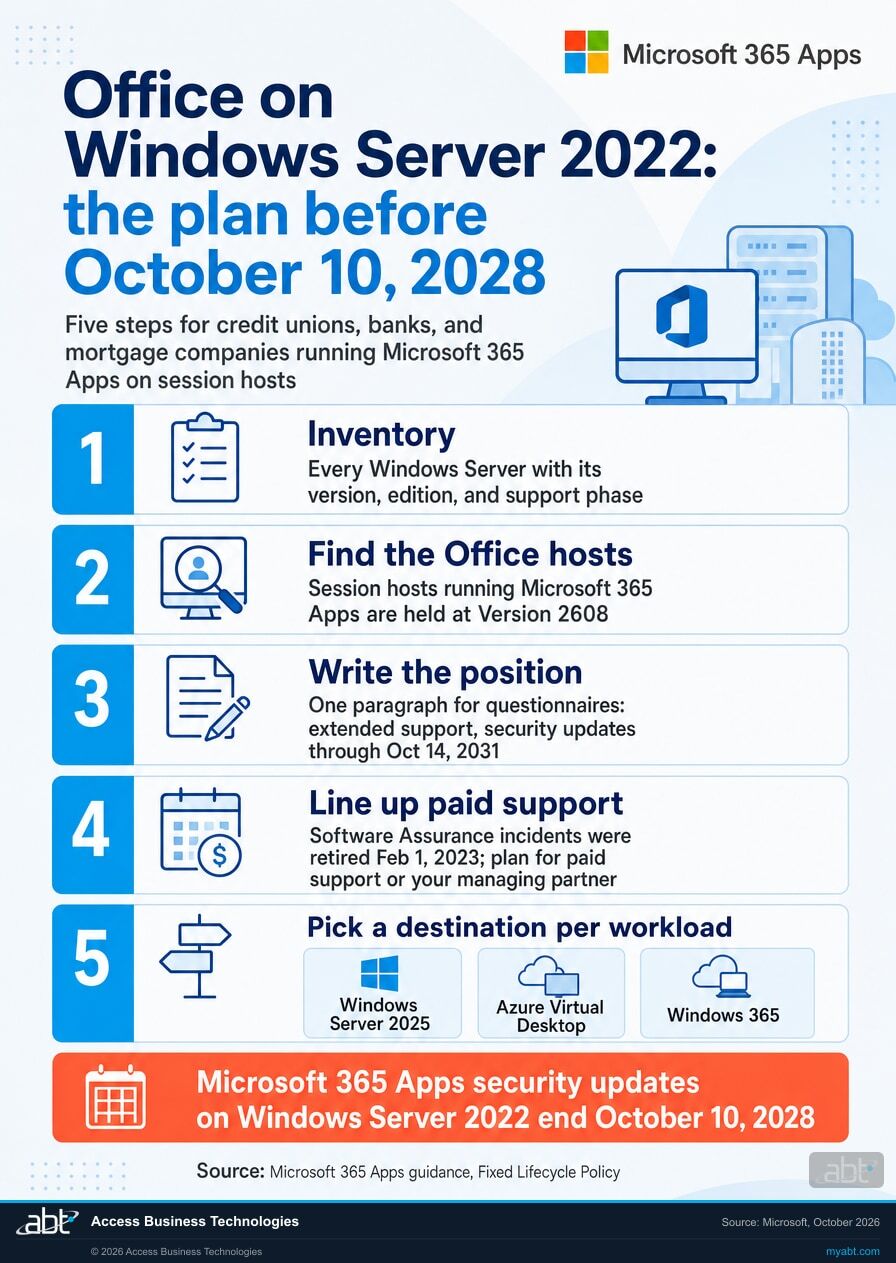
Five steps. The inventory comes first, and each later step builds on it.
Get the inventory, with editions and builds
Count the Windows Server 2022 machines and record the edition, the lifecycle phase, both end dates and the OS build on each. The build tells you which servers took the last mainstream update, KB5126655 (build 20348.5761 or later). The edition matters because Datacenter: Azure Edition carries its own hotpatch date of October 2027.
Separate the servers running Microsoft 365 Apps
This split decides your timeline. A file server, a domain controller, or a line-of-business application server on Windows Server 2022 is patched through 2031 and can run on a long plan. A Remote Desktop Services host or session-host farm with Microsoft 365 Apps installed gets no feature build past Version 2608 and carries the October 10, 2028 date. Most estates have both, and the plan works best when they are listed apart.
Write the support-phase position into the file
One paragraph, now in the past tense: Windows Server 2022 follows the Microsoft Fixed Lifecycle Policy; it reached end of mainstream support on October 13, 2026 and is in extended support, receiving monthly security updates at no additional cost through October 14, 2031; the institution tracks these dates in its asset inventory. Cite Microsoft's lifecycle entry and the Windows message center. The paragraph states the lifecycle facts for a vendor questionnaire; your institution's risk assessment and policies sit beside it.
Decide who answers the phone
Extended support includes paid support, and Microsoft retired the Software Assurance incident benefit on February 1, 2023. Check which paid support arrangement covers these servers today, or confirm that the partner who manages the environment is the one who picks up when a Windows Server 2022 machine misbehaves.
Pick a destination for each Office host before 2028
Windows Server 2025 keeps the same architecture, with Microsoft 365 Apps supported there until October 2029 under Microsoft's guidance. Azure Virtual Desktop and Windows 365 are the destinations Microsoft names for hosted desktops; with Windows 365, Microsoft runs the service and the Windows versions on it follow their own published timelines. Servers without Office can stay on Windows Server 2022 under security-only servicing for a stable workload. The further ahead of October 2028 the Office decision is made, the more of it is an ordinary project.
What examiners tend to ask
The questions that land are whether you know what you run, whether you know its support state, whether somebody owns the date, and whether the plan is written down. An inventory that records each server's lifecycle phase and build, names an owner for each date, and carries the plan for each server answers all four in one document. The same document answers the lifecycle questions on a vendor questionnaire, and your own risk assessment and policies sit beside it.
How ABT helps
A free Microsoft licensing assessment
ABT is a Tier 1 Microsoft Cloud Solution Provider. We manage Microsoft 365 tenants and host Azure environments for more than 750 financial institutions, and lifecycle questions like this one arrive on our desk every month.
We tell you what you run, what phase it is in, and which dates are actually yours
- The server inventory, in writing. Every Windows Server we can reach with the access and records you provide, with its version, edition, build, lifecycle phase, and both end dates.
- The Office estate, separated out. Which servers run Microsoft 365 Apps, which of those carry the October 10, 2028 date, and what the Version 2608 freeze means for the people who work on them.
- What your agreements already cover. Where Software Assurance sits, what support looks like now that the mainstream phase has ended, and whether the licensing you hold matches the way the estate is actually deployed.
- The destination recommendation, with the reasoning. Stay, move to Windows Server 2025, or move the workload to Microsoft 365 or Azure, decided one workload at a time.
- The paragraph for the file. A short written support-phase position you can hand to a vendor questionnaire or an examiner, with the Microsoft sources cited.
ABT also operates M365 Guardian, its managed security service for credit unions, banks, and mortgage companies. Learn about M365 Guardian
Related reading
If this opened a bigger question
A lifecycle date is usually the visible edge of three other questions: what is in the estate, what goes in the examination file, and where the workload should live.
FFIEC IT Examination Readiness for Financial Institutions
What examiners ask about asset inventory, patching and support state, and the evidence that answers each question the first time.
Read the guide
Vendor Due Diligence on Microsoft 365: What Goes in the File
The documents an institution is expected to hold, and how to write a position once so it answers the same question every year.
Read the guide
Hybrid Cloud for Financial Institutions
How banks, credit unions, and mortgage companies decide which workloads stay on a server and which belong in Microsoft Azure.
Read the guideTwo neighboring dates are worth checking in the same pass. Office LTSC 2021 reached end of support on October 13, 2026, the same day this server changed phase. And Windows Server 2016 reaches end of updates on January 12, 2027; Microsoft posted its 90-day reminder on October 14.
Answered
Windows Server 2022 support, answered
Verify it yourself
Where the facts on this page come from
Every date, quotation and definition above was read from a Microsoft source on October 16, 2026. Each one is a page you can open. The recommendations, the steps and the assessment are ABT's.
- Microsoft, Windows message center, entry dated October 14, 2026, "Windows Server 2022 has reached end of mainstream support" (also sent to Microsoft 365 admin centers as MC1507704). Source for the statement that as of October 13, 2026 Windows Server 2022 has reached end of mainstream support and transitioned to extended support, that the October 2026 security update is the last mainstream support update available for this version, that extended support includes security updates at no additional cost with monthly security updates through October 14, 2031, and that hotpatch update support for Windows Server 2022 Datacenter: Azure Edition has been extended through October 2027 with enrolled devices continuing to receive monthly security updates without requiring a restart. The same page carries the 90-day reminder posted October 14, 2026 that Windows Server 2016 will reach end of updates on January 12, 2027.
- Microsoft, Windows Server 2022 known issues and notifications. Source for the current status as of October 13, 2026: end of mainstream support reached and extended support in effect, with monthly security updates at no additional cost through October 14, 2031.
- Microsoft, Windows Server release information, as read on October 16, 2026. Source for the October 2026 update for Windows Server 2022 being KB5126655, OS build 20348.5761, available October 13, 2026, and for the version's end of updates on October 14, 2031.
- Microsoft Lifecycle, Windows Server 2022. Source for the Fixed Lifecycle Policy designation, the editions in scope, the start date of 8/18/2021 8:00:00 AM, the Mainstream End Date timestamp of 10/14/2026 6:59:59 AM, the Extended End Date timestamp of 10/15/2031 6:59:59 AM, the statement that support dates are shown in the Pacific Time Zone, the note that containers released with Windows Server 2022 follow the same lifecycle dates, and the note on hotpatching through the end of mainstream support, which the October 14, 2026 announcement above extends to October 2027 for Datacenter: Azure Edition.
- Microsoft Lifecycle, Ending Support in 2026, section "Products moving to Extended Support". Source for the four Windows Server 2022 entries listed with an end of mainstream support date of October 13, 2026.
- Microsoft Lifecycle, Fixed Lifecycle Policy. Source for the phase table reproduced above, for the definition of extended support as paid support plus security updates at no additional cost, for the note that incident support benefits included with a license or with licensing programs such as Software Assurance are only available during the mainstream support phase, and for the statement that Microsoft will not accept requests for warranty support, design changes, or new features during the extended support phase.
- Microsoft Learn, Windows Server end of support and Microsoft 365 Apps, last updated May 1, 2026. Source for the statement that Microsoft 365 Apps is supported on Windows Server 2022 while it is in mainstream support, for the October 10, 2028 end of security updates for Microsoft 365 desktop apps on that server, for the Version 2608 feature-update freeze, for the Modern Lifecycle Policy requirement that Microsoft 365 Apps run on a Windows operating system that is currently in support, for the recommendation to move to Windows 365 or Azure Virtual Desktop, for the October 2029 date it gives for Microsoft 365 Apps support on Windows Server 2025, and for the note that subscription versions of the Project and Visio desktop apps are covered by the same information.
- Microsoft Lifecycle, Office and Windows configuration support matrix, last updated July 21, 2025. Source for the October 2026 entry for Microsoft 365 Apps on Windows Server 2022 and for the customer service and support limitations that apply to incidents involving Microsoft 365 Apps running in an unsupported configuration.
- Microsoft Learn, Release notes for Current Channel and Update history for Microsoft 365 Apps by date, as read on October 16, 2026. Source for Version 2608 reaching Current Channel on August 18, 2026 as build 20326.20100, for Version 2609 reaching Current Channel on September 22, 2026, and for the October 13, 2026 Current Channel release, Version 2609 build 20430.20182.
- Microsoft Lifecycle, Windows Server 2025. Source for the operating system Mainstream End Date timestamp of 11/14/2029 6:59:59 AM, which reads as November 13, 2029 under the convention described above.
- Microsoft Support, Microsoft Software Assurance - Support Incident Submission. Source for the statement that the Software Assurance 24x7 Problem Resolution Support benefit is retired as of February 1, 2023.
- Microsoft Support, End of support for Office 2021. Source for the neighboring date only: support for Office LTSC 2021 ended on October 13, 2026.
The server runs to 2031.
Office security fixes on it end October 2028.
Listing the servers, recording the phase and build of each one, and separating the hosts running Microsoft 365 Apps is a short, bounded piece of work. It gives you the lifecycle answer for these servers before a questionnaire or an examiner asks for it.
Tell us a little about your environment and we will come back with what we would check first.
What should we look at? Optional.
Encrypted. Private.
Thank you. That is with us.
An ABT specialist will be in touch shortly. If your deadline is this week, say so in your reply and we will move it to the front.
