


Windows Server Remote Desktop Services · KB5130994 · Message Center MC1491832
Chrome and Edge are switching off XSLT, and RD Web Access uses it to draw its page. Choose how your staff reach their remote apps before November 17.
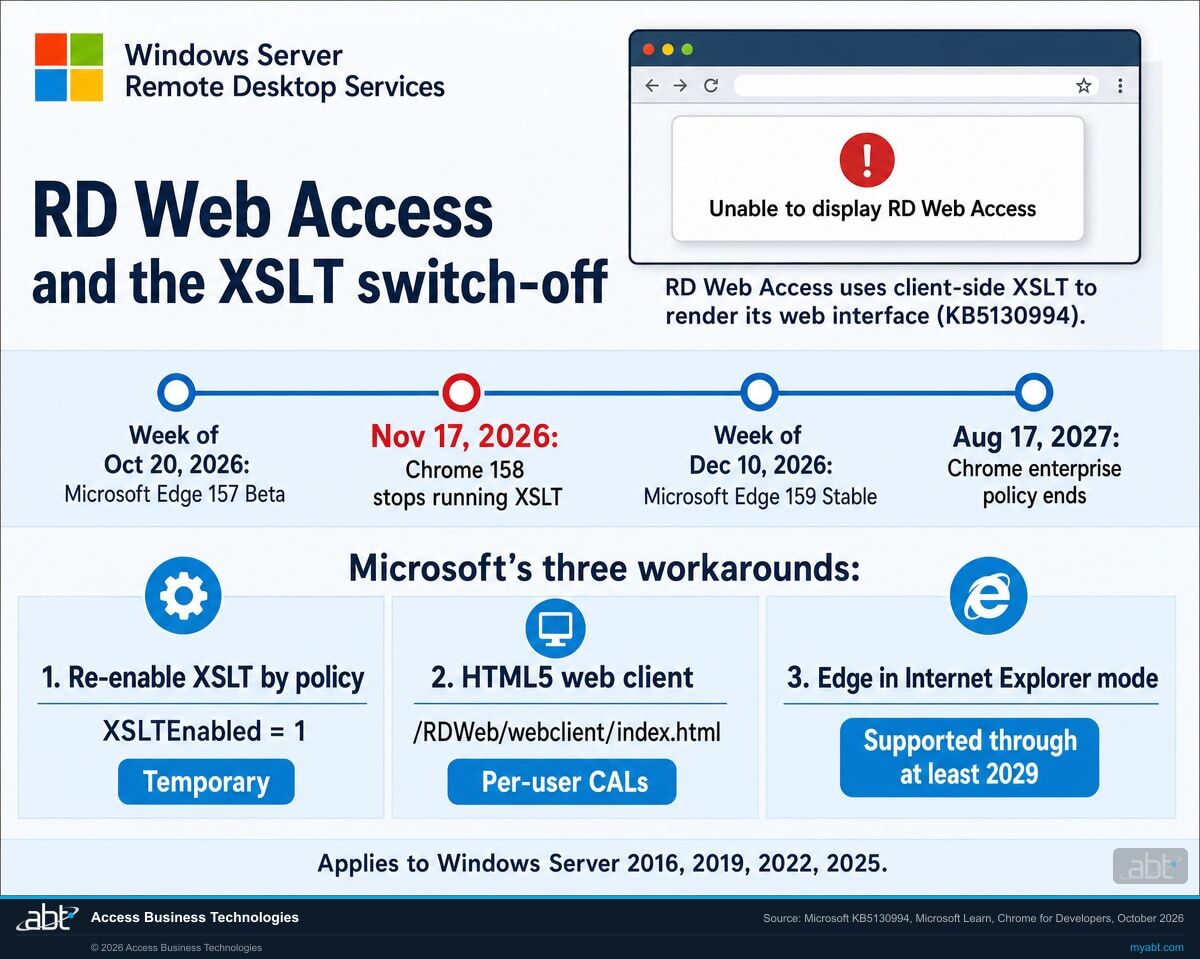
RD Web Access, the Remote Desktop web portal included with Windows Server, uses the browser's XSLT processor to render its web interface. Google stops running XSLT in Chrome 158 on November 17, 2026, and Microsoft lists the same change for Microsoft Edge version 159, which its release schedule targets for the Stable channel the week of December 10, 2026. Once a browser stops running XSLT, users who open RD Web Access get an error page that reads "Unable to display RD Web Access." Microsoft's KB5130994 documents three workarounds and says a fix is in progress.
- November 17, 2026: Chrome 158 stops running XSLT on the Stable channel, except where an enterprise policy or an origin trial keeps it on
- Week of December 10, 2026: Microsoft Edge 159, the version Microsoft lists for the XSLT change, is scheduled to reach the Stable channel
- August 17, 2027: Chrome's enterprise policy stops working, and XSLT is off for every Chrome user
An unexpected error has occurred that is preventing this page from being displayed correctly.
The change
Why does RD Web Access stop loading in Chrome and Edge?
RD Web Access builds its page with XSLT, a browser feature for turning XML into a web page that the W3C recommended in 1999, and the browsers are retiring XSLT for security reasons. Microsoft published the details in KB5130994 on October 6, 2026, and in Message Center post MC1491832 on October 8.
The decision in brief
- What
- Chromium-based browsers are disabling XSLT, and the RD Web Access experience included with Windows Server uses client-side XSLT to render its web interface. With XSLT off, the page fails to render, and users might be unable to reach their remote resources.
- When
- Chrome 158 on November 17, 2026. Microsoft Edge version 159, scheduled for the Stable channel the week of December 10, 2026, with Edge Canary, Dev, and Beta from version 157. Chrome's enterprise policy keeps XSLT available until Chrome 176 on August 17, 2027.
- Servers
- Windows Server 2016, 2019, 2022, and 2025, the versions KB5130994 applies to.
- Owner
- The administrator who runs your Remote Desktop Services deployment and your browser policies, with your information security officer.
- Action
- List who uses RD Web Access and in which browser, test with XSLT turned off, choose a path for each group of users, and record the decision in your remote access procedures.
Microsoft documents it
KB5130994 (October 6) lists three workarounds, and Message Center post MC1491832 (October 8) flags it as a major change.
Edge Beta gets the change
Microsoft lists the XSLT deprecation for Edge Canary, Dev, and Beta from version 157, which its schedule targets for Beta that week.
Chrome 158 reaches Stable
XSLT stops working in Chrome for everyone outside an enterprise policy or origin trial, and RD Web Access shows its error there.
Edge 159 reaches Stable
The version Microsoft lists for the XSLT deprecation arrives on the Stable channel, per Microsoft's target schedule.
"Industry-wide, browsers are moving away from XSLT in favor of more secure alternatives. The symptoms described here are not issues to be solved but necessary effects of this global hardening effort."
Microsoft Support, KB5130994, RD Web Access fails to load when XSLT is disabled in Microsoft Edge or Google Chrome, original publish date October 6, 2026RD Web Access is the web portal role of Remote Desktop Services: staff open it in a browser, sign in, and start the remote desktops and apps your institution publishes. Microsoft's KB explains what the browser change does to it in one line: "RD Web Access uses client-side XSLT processing to render the web interface." When the browser stops running XSLT, the page shows "Unable to display RD Web Access" and "An unexpected error has occurred that is preventing this page from being displayed correctly." Microsoft's Message Center post states the consequence: users "might be unable to access remote resources."
The change comes from the browsers. Google's Chrome team says XSLT "is the source of several recent high-profile security exploits that continue to put browser users at risk," and Chrome stops running it on its Stable channel in version 158 on November 17, 2026. Microsoft lists the same deprecation for Edge version 159 and tells organizations to treat reliance on client-side XSLT as technical debt and plan a migration. Google also reports that the Firefox and WebKit projects have indicated plans to remove XSLT from their browser engines, so plan for every browser your staff and vendors use.
KB5130994 applies to Windows Server 2016, Windows Server 2019, Windows Server 2022, and Windows Server 2025. In its Resolution section, Microsoft says it "is working on a fix for this issue and will provide more information when it is available." The KB carries no date for that fix, so the plan for November rests on the three workarounds. If some of these servers are also near the end of their support, our page on Windows Server 2016 end of support covers that timeline.
The options
Which of Microsoft's three workarounds fits your institution?
KB5130994 offers three ways to keep RD Web Access reachable. They differ in how long they last, which browsers and devices they cover, and how much server work they take. You can mix them, matched to who connects and from where.
| Workaround | What users get | Support horizon | What it takes | What to weigh |
|---|---|---|---|---|
| Re-enable XSLT by policy | The classic RD Web Access page, in Edge or Chrome, on the devices that receive the policy | Chrome: until Chrome 176 on August 17, 2027. Edge: Microsoft calls the policy temporary and has published no end date. | XSLTEnabled = 1 under HKLM\SOFTWARE\Policies\Microsoft\Edge or HKLM\SOFTWARE\Policies\Google\Chrome (Edge 147 and later) | Keeps running a feature the browsers are removing for security reasons, and reaches only browsers your institution manages |
| HTML5 Remote Desktop web client | A browser-based client at /RDWeb/webclient/index.html: sign in, see published apps and desktops, connect in the browser or download an RDP file | Microsoft documents it as a current Remote Desktop Services client, and KB5130994 lists it as a workaround | RD Gateway, RD Connection Broker, RD Web Access; per-user CALs; public trusted certificates; the RDWebClientManagement PowerShell module | Server setup work; a per-device CAL deployment changes its licensing mode first; Microsoft Entra application proxy works with it, Web Application Proxy does not |
| Microsoft Edge in Internet Explorer mode | The classic RD Web Access page, opened by Edge in IE mode | IE mode is supported through at least 2029, with a year's notice before Microsoft retires it | Settings > Default browser: allow sites to be reloaded in IE mode, then add the RD Web URL to the Internet Explorer mode pages | Edge only; on the first visit Edge might ask to allow ActiveX, which lets the portal use the signed-in user's credentials for single sign-on |
What a deployment that changes nothing sees
Once Chrome 158 reaches them, from November 17, staff who open RD Web Access in Chrome without the enterprise policy see "Unable to display RD Web Access." Edge users meet the same page when version 159 reaches them; Microsoft's schedule targets the Stable channel the week of December 10, 2026. Edge's Extended Stable channel skips version 159 in Microsoft's schedule and moves to version 160 the week of January 7, 2027.
Plan for the people outside your browser policy too. Vendors and staff on personal devices run browsers outside your Group Policy, so the re-enable policy stops at your managed fleet. Microsoft says the HTML5 web client needs only the web client address, the user's credentials, and a supported web browser, which makes it the workaround best suited to them.
Know how every user reaches your remote apps before Chrome 158 reaches Stable on November 17
ABT reviews your RD Web Access setup, the browsers your staff and vendors use, and the controls around remote sign-in, and leaves you a written plan for the change, as part of a free security assessment.
Request the free assessmentThe work
How do you keep remote access working before November 17?
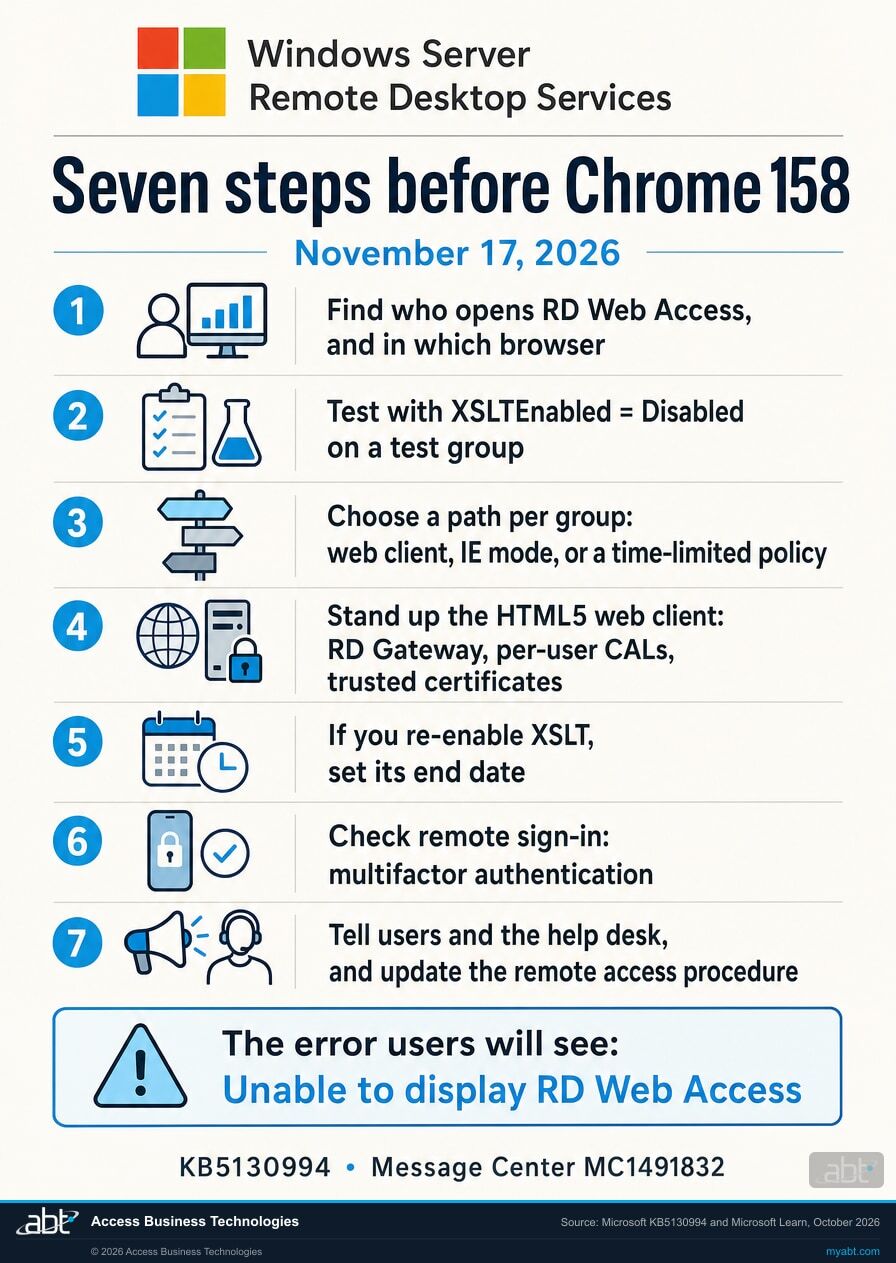
Seven steps, in the order the decisions depend on each other. Steps 2, 4, and 5 use settings Microsoft and Google document. Steps 6 and 7 cover the sign-in controls and the people, which is where a regulated institution keeps its record.
Find everyone who opens RD Web Access, and in which browser
List every RD Web Access address your institution publishes and who uses it: branch staff, remote employees, loan officers on the road, outside vendors. For each group, note the browser, its release channel, and whether your institution manages the device. Together they decide the path for each group in step 3.
Test with XSLT turned off before the browsers do it for you
Microsoft encourages organizations "to proactively test setting XSLTEnabled = Disabled to identify application dependencies and remediation requirements." Edge has carried the XSLTEnabled policy since version 147, and Chrome's enterprise policy has been available for testing since Chrome 146 on March 10, 2026.
Apply the setting to a few test machines, open RD Web Access, and confirm you see Microsoft's error. Then open your other internal web tools the same way and note any that fail to load, since the browser change reaches every page that uses XSLT.
Choose a path for each group of users
Staff on managed Windows devices with Edge can use IE mode or the HTML5 web client. Staff on managed Chrome can use the web client, or the re-enable policy while the web client is built. For vendors and anyone on a device outside your browser policy management, the web client is the documented workaround that fits, because a browser policy reaches only the devices you manage.
Write the choice down per group, with the date it was made. You will revisit it when Microsoft ships the fix it describes in KB5130994.
If the web client is your path, stand it up in test first
Microsoft's prerequisites are an RD Gateway, an RD Connection Broker, and RD Web Access; per-user client access licenses, because a per-device deployment consumes all its licenses; and public trusted certificates on the RD Gateway and RD Web Access roles.
On the RD Web Access server, install the module with Install-Module -Name RDWebClientManagement, download the client with Install-RDWebClientPackage, and import the RD Connection Broker certificate with Import-RDWebClientBrokerCert. Microsoft documents a test publish, Publish-RDWebClientPackage -Type Test -Latest, which serves the client at a test address such as https://server_FQDN/RDWeb/webclient-test/index.html. Work through step 6 on that test address before staff see the client.
Rerun the certificate import whenever the broker certificate is renewed, or users receive an "unexpected server authentication certificate was received" error.
If you re-enable XSLT, set its end date the same day
KB5130994's first workaround sets the XSLTEnabled policy to 1, through Group Policy or the registry: HKLM\SOFTWARE\Policies\Microsoft\Edge for Edge and HKLM\SOFTWARE\Policies\Google\Chrome for Chrome, followed by a browser restart. Microsoft describes it as a temporary workaround.
Chrome's enterprise policy stops working in Chrome 176 on August 17, 2027, and Microsoft says the Edge policy "is temporary and will be removed in a future version of Microsoft Edge." Treat the policy as a bridge to the web client, and record the date it comes off so the bridge has a planned end.
Check the sign-in and the publishing path, then publish to production
A change to how staff reach remote apps is the right moment to confirm how they prove who they are. The FFIEC's 2021 authentication guidance says controls for remote access software "can include placing a firewall in front of systems that use remote access software, having remote users connect with a virtual private network (VPN) or other secure channel, and implementing strong passwords with MFA."
If you publish the web client through a reverse proxy, note Microsoft's line that the web client "does support using Microsoft Entra application proxy but doesn't support Web Application Proxy at all." Before switching a group over, have a few of its people sign in at the test address and open the apps they use, and agree in advance how you will roll back if a problem appears. When the sign-in, the publishing path, and those trial sign-ins check out, publish with Publish-RDWebClientPackage -Type Production -Latest, and users go to https://server_FQDN/RDWeb/webclient/index.html.
Tell users and the help desk, and update the procedure
Give the help desk the exact error text, "Unable to display RD Web Access," and the answer for each group: the web client address, the IE mode setting, or the date the temporary policy ends. Send users the new address before November 17.
Then update the document that describes how your institution provides remote access, because the method just changed. Microsoft revises its own dates after it announces them, so keep an eye on KB5130994; our page on how Message Center dates change after publication covers how to track a moving date.
Before you choose
What else should you know before you choose a path?
Six facts from Microsoft's and Google's documentation that decide which path fits a given group of users.
The error has fixed wording
Users see "Unable to display RD Web Access" followed by "An unexpected error has occurred that is preventing this page from being displayed correctly." Put both lines in the help desk script so the first call gets the right answer.
Every listed Windows Server version is in scope
KB5130994 applies to Windows Server 2016, 2019, 2022, and 2025. The RD Web Access role renders its page with the browser's XSLT processor on each of them, so a server upgrade by itself leaves the page with the same browser dependency.
A browser policy covers managed browsers
The XSLTEnabled policy is a Group Policy or registry setting on devices your institution manages. Vendors and staff on personal devices run their own browsers, and Microsoft says the web client needs only its address, the user's credentials, and a supported web browser.
The web client expects per-user licensing
Microsoft's setup guide says the deployment should be "configured for per-user client access licenses (CALs)," because "otherwise all licenses are consumed." Check your Remote Desktop licensing mode before the cutover weekend.
IE mode has a published horizon
Microsoft says IE mode "will be supported through at least 2029" and that it will give a year's notice before retiring it. It is an Edge feature, so Chrome users need another path, and on the first visit Edge might ask users to allow ActiveX for single sign-on.
Microsoft's fix is still to be dated
KB5130994 says Microsoft is working on a fix and will provide more information when it is available. Watch the KB and the Windows message center, and plan November and December on the three workarounds.
For financial institutions
Why does this matter at a credit union, bank, or mortgage company?
Because remote access is how branches, back offices, and people on the road reach the systems they work in, and a browser update now decides whether that path opens.
Keep staff working. When RD Web Access is the way staff reach a core system, a loan origination system, or a back-office application, a browser update can decide whether they reach those systems that morning: Chrome 158 is scheduled for November 17, and Microsoft lists the change for Edge version 159. Moving each group to the HTML5 web client or IE mode ahead of the date keeps the work moving, and a planned change lets the help desk answer the first call in one sentence. Our guide to running Microsoft Azure alongside on-premises systems covers the wider question of where these servers live.
Protect the access path. Re-enabling XSLT keeps a feature switched on that Google describes as the source of recent high-profile security exploits, so it belongs on a short leash with an end date. The FFIEC's 2021 authentication guidance lists a firewall, a VPN or other secure channel, and "strong passwords with MFA" among the controls for remote access software, and adds that "Software is updated periodically." Our article on why financial institutions need a managed patch process covers the update side.
Keep the record. The FFIEC Information Security booklet says "Management should develop policies to ensure that remote access by employees, whether using institution or personally owned devices, is provided in a safe and sound manner," and that those policies "should define how the institution provides remote access and the controls necessary to offer remote access securely." It describes virtual desktop access as a remote computer that "connects to a special purpose software system (sometimes a website), authenticates the user, and establishes a secure connection to an internal network server," which is the job RD Web Access does. It also says "Management should conduct a risk assessment and implement appropriate controls before adopting any remote access solution."
For mortgage companies under the FTC Safeguards Rule, 16 CFR 314.4(c)(5) requires them to "Implement multi-factor authentication for any individual accessing any information system, unless your Qualified Individual has approved in writing the use of reasonably equivalent or more secure access controls." The FFIEC and FTC texts address remote access and authentication in general terms, and how they apply to RD Web Access is your institution's call. The browser change is a natural point to write that call down: which path each group uses, who approved it, and when the temporary pieces come off.
Who keeps track of changes like this?
Microsoft and Google publish changes like the XSLT removal in support articles, compatibility tables, and release schedules, and a small IT team has to notice them before users do. The Short from our channel is about Microsoft's June 2026 Patch Tuesday and what a large security release asks of a small IT team, in 27 seconds.
The XSLT removal is the same kind of work: one line in a browser's compatibility table becomes a help desk queue on the morning it ships. Reading those tables is part of running remote access.
How ABT helps
A free security assessment
ABT is a Tier 1 Microsoft Cloud Solution Provider serving more than 750 financial institutions. Remote access is where your network meets the internet, so the assessment starts with how your staff and vendors reach their remote apps.
We review how your staff reach their remote apps and leave you a written plan for the browser change
The assessment is free and ends with written findings you keep. We work through it with an administrator on your team, and your team decides what changes and who makes each change.
- The inventory. Every RD Web Access address, who uses it, and from which browsers and devices.
- The test. With your administrator, what breaks with XSLT turned off, using the XSLTEnabled policy on a test group you choose, as Microsoft suggests.
- The path. The web client, IE mode, or a time-limited policy for each group of users, with the reasoning.
- Web client readiness. RD Gateway, RD Connection Broker, certificates, licensing mode, and how the site is published.
- The sign-in. Multifactor authentication on remote access, and who approved any exception.
- The record. A dated summary for your remote access procedures and your risk assessment file.
ABT also operates M365 Guardian, its managed security service for credit unions, banks, and mortgage companies. Learn about M365 Guardian
Related reading
If this opened a bigger question
A remote access change tends to surface the questions behind it: where your servers should run, how patches keep pace, and how hosted line-of-business systems reach your staff.

Hybrid Cloud for Financial Institutions: How Banks, Credit Unions, and Mortgage Companies Get Microsoft Azure + On-Prem Right
The framework for running Microsoft Azure alongside on-premises systems at banks, credit unions, and mortgage companies.
Read the article
6 Zero-Days in One Month: Why Financial Institutions Can't DIY Patch Management
Why a financial institution's patch process has to keep pace with exploited vulnerabilities, and what that asks of a small IT team.
Read the article
Calyx PointCentral Hosting Buyer Guide for Financial Institutions (2026)
What credit unions, banks, and mortgage companies should evaluate when choosing where Calyx PointCentral runs.
Read the articleAnswered
RD Web Access and the XSLT removal, answered
Verify it yourself
Where the facts on this page come from
Every Microsoft, Google, FFIEC, and FTC date, setting, path, and quotation above was read from the sources listed here on October 9, 2026.
- Microsoft Support, KB5130994, RD Web Access fails to load when XSLT is disabled in Microsoft Edge or Google Chrome, original publish date October 6, 2026. Source for the cause, the error text, the affected Windows Server versions, the three workarounds and their steps, and the fix in progress.
- Microsoft 365 Message Center post MC1491832, Take action to prevent RD Web Access rendering failures, published October 8, 2026, tagged Major change. Source for the statement that users might be unable to access remote resources. Visible to administrators in your own Microsoft 365 admin center; an unofficial public archive copy is at mc.merill.net/message/MC1491832, and Microsoft summarizes it on the Windows message center.
- Chrome for Developers, Removing XSLT for a more secure browser, with the Chrome Platform Status entry (updated September 30, 2026). Source for Chrome's timeline (Chrome 146, 158, and 176), the enterprise policy and origin trial exceptions, the security rationale, the 1999 W3C recommendation, and the Firefox and WebKit plans.
- Microsoft Learn, Site compatibility-impacting changes coming to Microsoft Edge, updated October 6, 2026. Source for the version 159 and version 157 listing, the technical debt guidance, the XSLTEnabled policy in Edge 147, and the advice to test with XSLTEnabled set to Disabled.
- Microsoft Learn, Microsoft Edge Browser Policy Documentation: XSLTEnabled. Source for what the policy does, its supported versions, the Group Policy path, and its temporary status.
- Microsoft Learn, Microsoft Edge release schedule, updated October 8, 2026. Source for the target weeks of versions 157, 159, and 160.
- Microsoft Learn, Set up the Remote Desktop web client for your users. Source for the prerequisites, the licensing note, the PowerShell steps, the certificate renewal error, and the proxy support statement.
- Microsoft Learn, Lifecycle FAQ: Internet Explorer and Microsoft Edge. Source for IE mode support through at least 2029 and the one-year notice.
- FFIEC IT Examination Handbook, Information Security booklet, II.C.15(c) Remote Access. Source for the quoted remote access policy, virtual desktop, and risk assessment language.
- FFIEC, Authentication and Access to Financial Institution Services and Systems (2021). Source for the quoted controls for remote access software.
- FTC Safeguards Rule, 16 CFR 314.4, paragraph (c)(5), on the eCFR. Source for the multifactor authentication requirement.
Chrome turns off XSLT on November 17.
Decide how your staff reach their remote apps.
The work starts with your RD Web Access addresses and the browsers that open them. When it is done, you know which path each group of users takes, when any temporary browser policy comes off, how remote sign-in is protected, and who approved it.
Tell us a little about your environment and we will come back with what we would check first.
What should we look at? Optional.
Encrypted. Private.
Thank you. That is with us.
An ABT specialist will be in touch shortly. If your users need a new path before a particular date, say so in your reply and we will start there.
