

Microsoft Entra · MC1450134 · Rollout early November to late December 2026
Windows Hello for Business and macOS Platform SSO now count as standalone MFA in Microsoft Entra. Fewer prompts for your staff, one portable sign-in method for every person, and your custom authentication strengths checked before late December.
A loan officer signs in to Windows with a face or a PIN. A controller unlocks a Mac with Touch ID. Both already pass MFA at sign-in. Until now, a step-up prompt, an authentication strength policy or a sign-in frequency check could still ask them to register and use a separate passkey. Microsoft Message Center post MC1450134 ends that: Microsoft Entra will recognize Windows Hello for Business and macOS Platform SSO as standalone MFA factors in those supported scenarios. The rollout began in early November 2026 for Worldwide and GCC tenants and is expected to complete in late December 2026. Microsoft says no configuration change is required. For a credit union, bank, or mortgage company, the work is in the edges: the people whose only method lives on one device, the custom strengths your team wrote, the Macs, and what the helpdesk tells callers.
- Users whose only MFA method is Windows Hello for Business or macOS Platform SSO will be considered MFA-capable, in Microsoft's words
- Both credentials are device-bound, so Microsoft recommends every user also register a portable method, such as a synced passkey or a Microsoft Authenticator passkey
- Users will see these credentials in My Security Info as auto-registered passkeys, which is worth a line in your helpdesk script
The change
What changes when Windows Hello for Business and Platform SSO become standalone MFA?
Microsoft said it in Message Center post MC1450134, first published August 7, 2026 and updated October 27, 2026, and listed it as generally available in the Microsoft Entra November 2026 update. Here is what it says, and who it reaches.
The change in brief
- What
- Microsoft Entra recognizes Windows Hello for Business and macOS Platform SSO as standalone MFA factors in supported scenarios, so users who sign in with them can complete supported MFA challenges without registering a separate passkey.
- When
- General availability for Worldwide and GCC tenants, beginning in early November 2026 and expected to complete in late December 2026. The October 27 update moved both dates later.
- Who
- Organizations using Microsoft Entra ID, users who authenticate with Windows Hello for Business or macOS Platform SSO, and organizations using Conditional Access Authentication Strength policies.
- Owner
- The identity administrator who owns Conditional Access and authentication methods, the endpoint team that manages Windows Hello and Mac configuration profiles, and the helpdesk lead who writes what callers hear.
- Action
- Microsoft's list: make sure users register at least one portable MFA method, consider a synced passkey or Microsoft Authenticator passkey, review custom Authentication Strength policies, and update user documentation and onboarding guidance.
Microsoft announces it
MC1450134 first appears in the Message Center, as a plan for change with user and admin impact, with an early October start.
The timeline moves
Microsoft updates the notice: the start moves to early November and completion to late December.
Rollout begins
Worldwide and GCC tenants start to receive it. The Microsoft Entra November update lists it as General Availability.
Rollout expected to complete
By then Microsoft expects Worldwide and GCC tenants to have the new behavior. The checks below are easiest before it reaches yours.
"Users whose only MFA method is WHfB or macOS PSSO will be considered MFA-capable."
"Because WHfB and macOS PSSO credentials are device-bound, users may not be able to complete MFA challenges from devices where those credentials are not available."
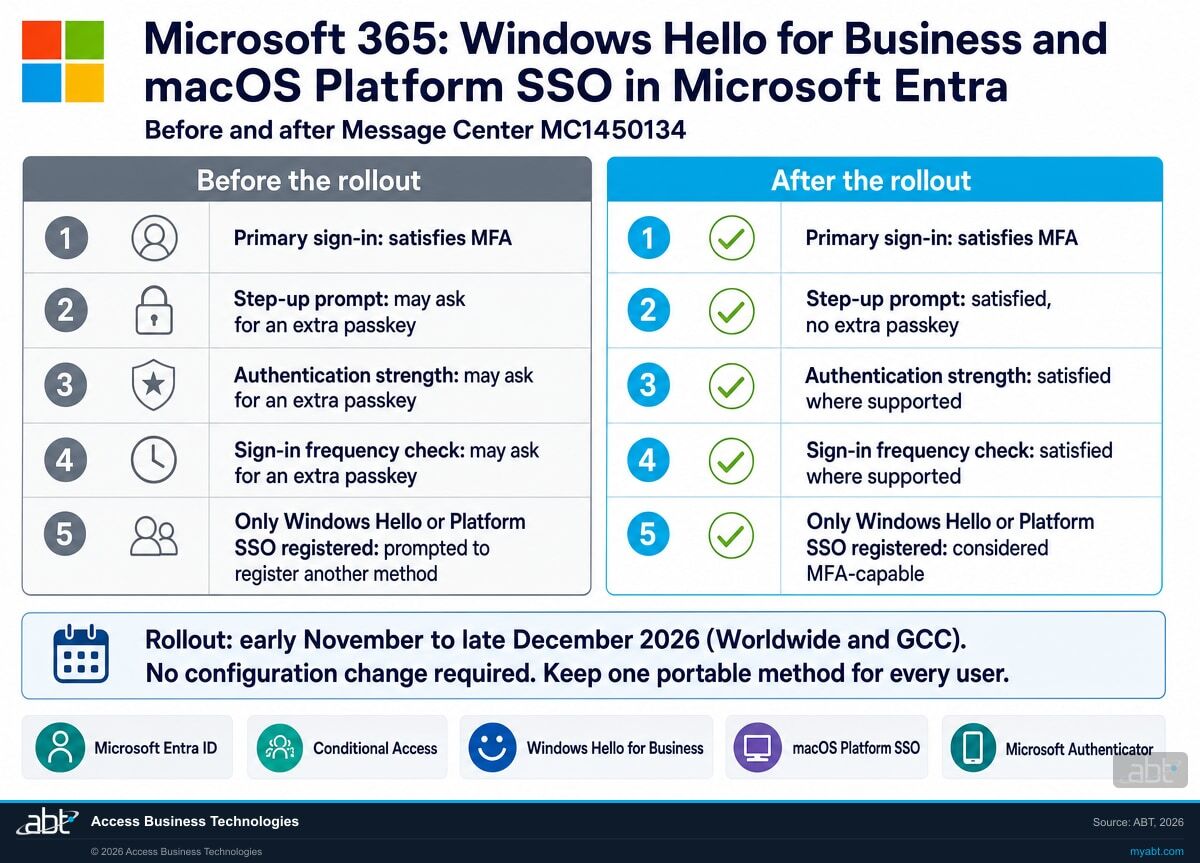
Microsoft 365 Message Center, MC1450134, updated October 27, 2026Windows Hello for Business already counts as strong authentication. Microsoft Learn describes it as two-factor: a private key protected by the device's security module, plus a PIN or a biometric gesture. Macs get the same kind of credential through Platform SSO, which Microsoft's Platform SSO article says can provision a Secure Enclave backed, hardware-bound key. What changes now is where Entra accepts them. Before the rollout, Microsoft says these credentials satisfy MFA "during primary sign-in," and a step-up prompt, an authentication strength or a sign-in frequency check could still send the user off to register an extra passkey. After the rollout, the credential the person already uses answers those prompts too.
The other change is quieter, and it is the one to plan for. A user who signs in with only a password, and whose only registered MFA credential is Windows Hello for Business or Platform SSO, will now skip the automatic prompt to register another method. Entra will treat that person as ready for MFA. That works well at their own desk. It works less well on a borrowed laptop, a new phone, or the day their computer goes in for repair, because both credentials stay on the device that created them.
Side by side
How do sign-ins change before and after the rollout?
Each row is a moment a user meets in a working day. The middle column is how Microsoft describes the behavior today; the next column is how it describes the behavior after the rollout reaches your tenant.
| Moment | Before the rollout | After the rollout | What to check |
|---|---|---|---|
| Primary sign-in | Windows Hello for Business or Platform SSO satisfies MFA | Same | Nothing new here |
| Step-up prompt | May ask the user to register and use an additional passkey or method | Satisfied by the credential the user already has, in supported scenarios | Which apps or actions trigger step-up in your tenant |
| Authentication strength policy | May ask for an additional passkey or method | Usable during the second factor to satisfy supported requirements | Custom strengths: confirm "Windows Hello for Business or platform credential" is allowed where you want it |
| Sign-in frequency check | May ask for an additional passkey or method | Usable during the second factor to satisfy supported challenges | Which policies set a frequency, and on which devices |
| User with only Windows Hello or Platform SSO | Prompted to register an additional MFA method when signing in with a password | Considered MFA-capable; no automatic prompt to register another method | Give this person a portable method before they need it |
| My Security Info | The extra passkey, if the user registered one | Windows Hello and Platform SSO credentials listed as auto-registered passkeys | Tell the helpdesk before users ask about a passkey they never added |
Where the device-bound part catches people
A credential that lives in one laptop's security chip is strong because it cannot leave that laptop. That is also why it cannot follow the person to a second device. A teller who only ever registered Windows Hello can answer supported MFA prompts at the branch PC that holds that credential, and has nothing to offer when a sign-in comes from a phone or a replacement machine. Microsoft's own recommendation is the fix: at least one portable method per user, with a synced passkey or a Microsoft Authenticator passkey as the examples it names.
Microsoft has published three named scenarios and the phrase "supported." In our reading, the safe plan treats anything outside those three as unchanged until your own pilot shows otherwise.
See who in your tenant depends on a single device to sign in, and which policies this rollout touches
ABT works with your team to read the registration data, review your custom authentication strengths and sign-in frequency policies, check your Mac configuration, and leave you a dated plan, as part of a free security assessment.
Request the free assessmentThe work
What should you check before the rollout reaches your tenant?
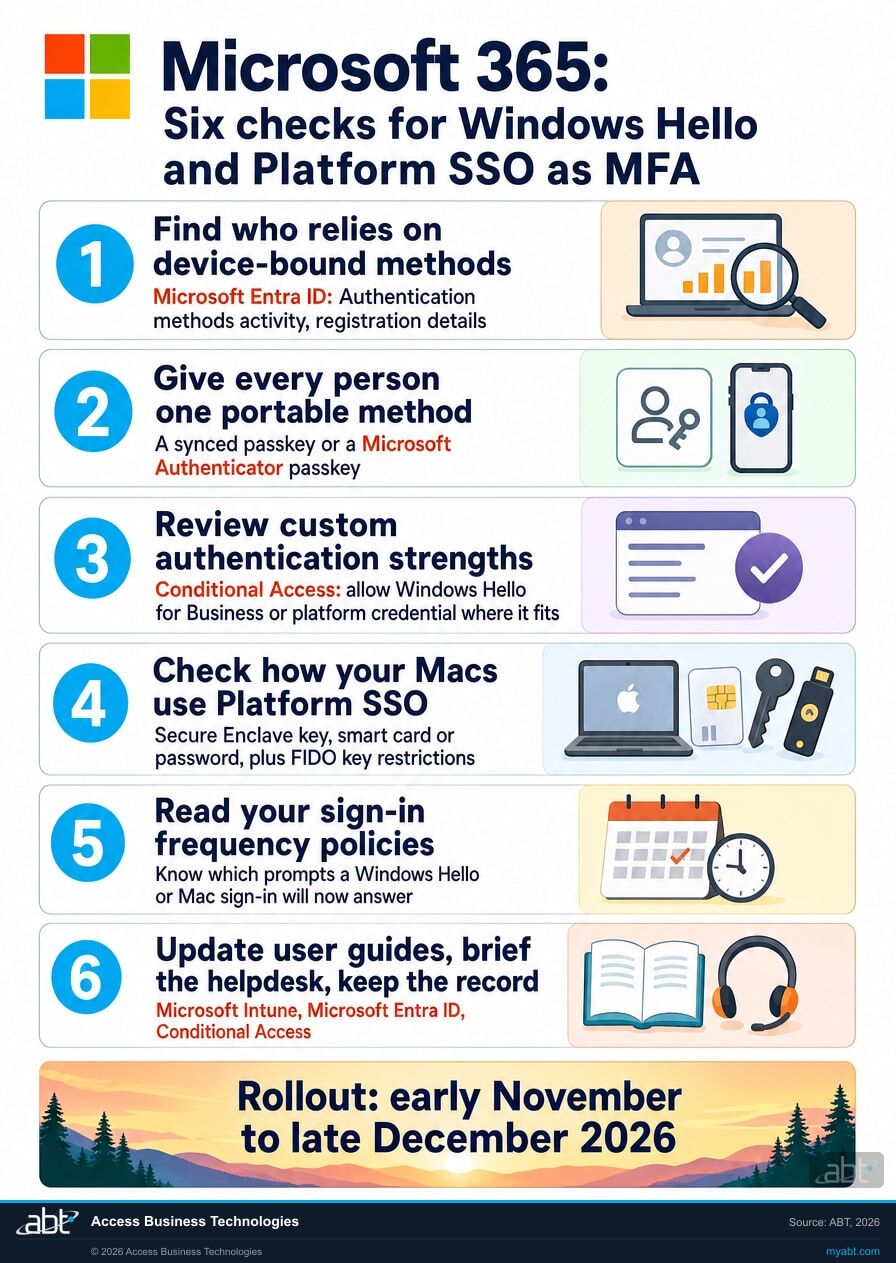
Six checks, built on Microsoft's recommendations. Steps 1 and 2 close the device-bound gap. Steps 3 to 5 confirm your policies behave the way you intend. Step 6 is what your users and your record need.
Find who relies on device-bound methods
The User registration details list shows each person's registered methods, and you can filter it by the columns shown. Microsoft says the report updates for most users within 36 hours, and Usage and insights needs a Microsoft Entra ID P1 or P2 license. Reports Reader, Security Reader and Global Reader are among the roles Microsoft lists for it. The same data is available over Microsoft Graph, where the least privileged permission is AuditLog.Read.All:
GET https://graph.microsoft.com/v1.0/reports/authenticationMethods/userRegistrationDetails
Read each user's methodsRegistered list and flag the people whose only registered methods are Windows Hello for Business or a platform credential. Treat that list as the starting point: confirm with your device records which machines each person signs in on before you decide who needs a portable method first. In our reading, this list matters more after the rollout, because Microsoft says those users "will be considered MFA-capable," so a filter on MFA capability will count them too.
Give every person one portable method
Microsoft's first recommendation is to "ensure users register at least one portable MFA method," and it names a synced passkey or a Microsoft Authenticator passkey. Passkey profiles let you set requirements per group, such as device-bound or synced passkeys and allowed authenticators, and Microsoft Learn notes that an Authentication Policy Administrator configures a passkey profile to enable synced passkeys. A companion notice, MC1450133, lets password-only users register a passkey as their first MFA method, with its first phase rolling out from early November 2026. Your staff can go straight to a phishing-resistant method, with no stop at a text message. Our page on the SMS and voice MFA retirement covers the other side of that move.
Review your custom authentication strengths
The three built-in strengths, Multifactor authentication, Passwordless MFA and Phishing-resistant MFA, already list "Windows Hello for Business or platform credential," and Microsoft Learn says it updates built-in strengths when new methods become available. Custom strengths are yours to maintain. A tenant can hold up to 15, and Microsoft Learn says to sign in as at least a Security Administrator to create one. Open each custom strength and choose what it accepts: allow Windows Hello for Business or platform credential where staff at their own desks should pass, and leave it out where you want a specific method, such as a hardware security key for administrators. A strength that a Conditional Access policy references cannot be deleted, and Entra asks you to confirm any edit, which is a useful pause before a change that reaches every user of that policy.
Check how your Macs use Platform SSO
Microsoft's Platform SSO article lists three authentication methods: Platform Credential for macOS, which provisions a Secure Enclave backed, hardware-bound key; smart card; and password, which syncs the Entra ID password to the local account. The built-in strength table names "platform credential," and in our reading a Mac on the password method holds no platform credential to offer, so confirm which method each profile uses. Microsoft recommends macOS 14 Sonoma as the minimum, supports macOS 13 Ventura, and requires Company Portal 5.2404.0 or later. If your passkey policy enforces key restrictions, Microsoft says to add the macOS Platform Credential AAGUID to the allowed list:
7FD635B3-2EF9-4542-8D9D-164F2C771EFC
Platform SSO also supports the UserSecureEnclaveKeyBiometricPolicy option, which asks for Touch ID whenever the Secure Enclave key is used. For a Mac that opens member or borrower files, it is worth a look.
Read your sign-in frequency policies
Microsoft Learn sets the default sign-in frequency at a rolling window of 90 days and says sign-in frequency now applies to MFA as well. On Microsoft Entra joined and hybrid joined devices, unlocking the device or signing in interactively refreshes the Primary Refresh Token every four hours. On Microsoft Entra registered devices, unlocking does not satisfy the policy. Policies set to Every time require full reauthentication when the session is evaluated, with five minutes of clock skew. List each policy with a frequency, the apps it covers and the devices it meets, then pilot it with one Windows Hello user and one Mac user once the rollout reaches your tenant. Our page on the Conditional Access custom controls retirement walks through another policy review on the same calendar.
Update user guides, brief the helpdesk, keep the record
Microsoft asks for updated user documentation "because users with only WHfB or macOS PSSO registered will no longer be automatically guided to register an additional MFA method." So the guide that once relied on that prompt now needs its own line: register a portable method on day one. Windows Hello provisioning itself requires MFA, so new hires still need a method to start with, and MC1450133's second phase lets Windows Hello for Business and Platform SSO register as a first MFA method, with completion expected by late February 2027. Brief the helpdesk on the auto-registered passkeys in My Security Info. Then record which strengths changed, who received a portable method, which frequency policies you piloted, and the dates.
Where it shows up
Where will your staff notice the change?
Six places, each tied to a line in Microsoft's notice or its Learn articles. The first three are the scenarios Microsoft names. The last three are the edges.
Step-up prompts
When an app or action asks for MFA again, Windows Hello for Business and Platform SSO satisfy supported step-up requirements without a separate passkey.
Authentication strengths
Policies that require a strength accept these credentials during the second factor where supported. Built-in strengths already list them; custom ones list them only if you selected them.
Sign-in frequency
A frequency check that comes due can be satisfied by the same credential during the second factor, in supported challenges.
My Security Info
Users see their Windows Hello for Business and Platform SSO credentials listed as auto-registered passkeys. Expect questions from people who never added one.
Registration prompts
A user whose only MFA credential is one of these now skips the automatic prompt to register another method when signing in with a password.
A second device
Both credentials are device-bound. On a phone, a loaner or a replacement machine, the user needs the portable method from step 2.
For financial institutions
Why does this matter at a credit union, bank, or mortgage company?
Because sign-in prompts are where staff time goes, and where an attacker hopes to find the weaker path.
Fewer interruptions. A loan officer who opens a borrower file behind a step-up policy, or a teller whose session hits a sign-in frequency check mid-shift, now answers with the face, fingerprint or PIN they already use. No second passkey to register, and one less registration screen in the first week of a new hire's job. Microsoft frames the change as a way to expand phishing-resistant sign-in and reduce reliance on less secure methods, and the time it gives back is the part your staff will notice first.
Stronger sign-ins. Windows Hello for Business and the Mac platform credential sit in Microsoft's built-in Phishing-resistant MFA strength, next to FIDO2 security keys and multifactor certificate-based authentication. Every prompt they answer is a prompt answered without a text message. The credential is only as safe as the device and session around it, and our article on Windows Hello for Business key abuse covers what to verify there.
A record you can show. When an examiner or a cyber insurer asks how staff authenticate to systems that hold member or borrower data, the supporting evidence includes the set of Conditional Access policies, the strength each one requires, and who holds which method. The record from step 6 holds that, dated. Our article on Conditional Access exclusions covers the other list that answer depends on.
Brief the helpdesk before the calls start
Our Short on the helpdesk makes one point about credit unions, community banks and mortgage companies: the same questions arrive every week, with password resets among them, while the answers sit in documents nobody opens.
This rollout adds a new one to that list. A user opens My Security Info and finds a passkey they never added, or a new hire signs in without the registration prompt the old guide described. Put the answer in the helpdesk script and the onboarding guide before the rollout completes, and the call takes a minute.
How ABT helps
A free security assessment
ABT is a Tier 1 Microsoft Cloud Solution Provider serving more than 750 financial institutions, and it manages Microsoft 365 tenants for credit unions, banks, and mortgage companies. Authentication methods and Conditional Access are where those tenant reviews begin, so the assessment starts with yours.
With your team, we read who signs in with what, review the policies this rollout touches, and plan the portable methods your staff need
The assessment is free and ends with written findings you keep. We work through it with an administrator on your team, and your team decides what changes and who makes each change.
- The method map. Who signs in with Windows Hello for Business, a Mac platform credential, a passkey or a phone, and who appears to rely only on device-bound methods, checked against your device records.
- The portable-method plan. Which groups get synced passkeys or Microsoft Authenticator passkeys, and the passkey profile settings behind them.
- The strength review. Each custom authentication strength, which methods it allows, and the Conditional Access policies that use it.
- The Mac check. The Platform SSO method in each profile, the macOS and Company Portal versions, and the passkey key restrictions.
- The frequency read. Every sign-in frequency policy, the apps and devices it meets, and a pilot plan.
- The record. A dated summary for your change log and your information security program, plus the lines for your helpdesk script.
ABT also operates M365 Guardian, its managed security service for credit unions, banks, and mortgage companies. Learn about M365 Guardian
Related reading
If this opened a bigger question
A change in how sign-ins count tends to raise the questions around it: how strong each method really is, where the key lives, and who sits outside the policy.
Phishing-Resistant MFA for Financial Institutions: Why FFIEC, NCUA, and OCC Examiners Now Expect FIDO2, Passkeys, and Hardware Keys
FIDO2 keys, passkeys and certificate-based authentication, and a Microsoft 365 rollout playbook for regulated institutions.
Read the article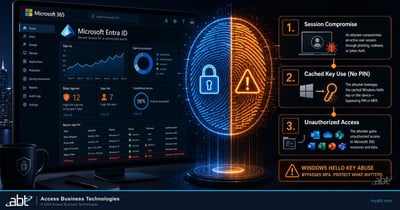
Windows Hello for Business Key Abuse: What Financial Institutions Need to Verify
How code running in a signed-in session can use a Windows Hello key, and what to verify on your devices.
Read the article
Conditional Access Exclusions: The List Nobody Reviews
An exclusion stays until someone removes it. How to find yours and keep the list reviewed.
Read the articleAnswered
Windows Hello for Business and Platform SSO as MFA, answered
Verify it yourself
Where the facts on this page come from
Every Microsoft date, method name, path and quotation above comes from the sources listed here.
- Microsoft 365 Message Center, MC1450134, "Microsoft Entra: Windows Hello for Business and macOS Platform SSO as standalone MFA factors," first published August 7, 2026 and updated October 27, 2026, in the Microsoft 365 admin center and the independent public Message Center archive. Source for the change, the rollout window and its earlier dates, the behavior after rollout, the device-bound caution, the recommendations and the quotations.
- Microsoft 365 Message Center, MC1450133, "Microsoft Entra: Users can register a passkey or passwordless sign-in as their first multifactor authentication method," updated October 26, 2026, through the independent public Message Center archive. Source for passkeys as a first MFA method and the late February 2027 completion of the phase that covers Windows Hello for Business and Platform SSO.
- Microsoft Entra Blog, What's new in Microsoft Entra: November 2026, November 6, 2026. Source for the General Availability label.
- Microsoft Learn, Conditional Access authentication strengths. Source for the built-in strengths and their combinations, the update of built-in strengths, and the Microsoft Entra ID P1 requirement.
- Microsoft Learn, Custom Conditional Access authentication strengths. Source for the limit of 15, the admin path and role, and the delete and edit rules.
- Microsoft Learn, Configure adaptive session lifetime policies. Source for the 90-day default, sign-in frequency and MFA, the four-hour token refresh, registered devices and Every time.
- Microsoft Learn, Windows Hello for Business overview and Prepare users to provision and use Windows Hello for Business. Source for the two-factor model and for provisioning requiring MFA.
- Microsoft Learn, macOS Platform single sign-on overview. Source for the three authentication methods, the Secure Enclave key, the macOS and Company Portal requirements, the AAGUID and the biometric policy option.
- Microsoft Learn, Enable passkeys (FIDO2) for your organization. Source for key restrictions and passkey profiles.
- Microsoft Learn, Authentication methods activity and List userRegistrationDetails. Source for the registration report, its 36-hour update, its license and roles, and the Graph read with its least privileged permission.
- The notes marked "in our reading" are ABT's recommendations; everything else on this list is Microsoft's own.
Windows Hello for Business and Platform SSO now answer more MFA prompts.
Give every person a portable method and check your strengths before late December.
The work starts with who signs in with what. When it is done, you know who holds only a device-bound method, which custom authentication strengths and sign-in frequency policies this rollout touches, how your Macs use Platform SSO, and what your helpdesk tells callers.
Tell us a little about your environment and we will come back with what we would check first.
What should we look at? Optional.
Encrypted. Private.
Thank you. That is with us.
An ABT specialist will be in touch shortly. If a particular group of users, a custom strength or your Macs are what you are thinking about, say so in your reply and we will start there.
