


Microsoft Teams · Microsoft 365 Copilot · Meeting policy
Teams is replacing the Copilot meeting policy. See what your setting becomes before January 2027.
Microsoft is splitting the Teams Copilot meeting policy in two. MeetingAI decides whether Copilot, Facilitator, Intelligent Recap and other AI features are available in meetings. TranscriptionWithMeetingAI decides whether transcription starts when meeting AI is on. Microsoft maps every existing value for you; scripts and runbooks that set the old policy need updating. This page covers the mapping, the dates, and six steps a credit union, bank, or mortgage company can take now.
- Microsoft maps each Copilot value to the new settings automatically, preserving current behavior
- Once the new controls are on, scripts must use MeetingAI and TranscriptionWithMeetingAI
- General availability begins worldwide in early January 2027, per Microsoft
The change
What is changing in the Teams Copilot meeting policy?
Today one setting decides two things: whether Copilot is available in a meeting, and whether a saved transcript is required. Microsoft is separating them.
The policy split in brief
- What
- The Copilot meeting policy is replaced by MeetingAI and TranscriptionWithMeetingAI (MC1532253, updated November 19, 2026).
- Automatic
- Microsoft maps each existing Copilot value to the new settings in a one-time update that preserves current behavior. Administrators do not need to recreate policies.
- Needs action
- Scripts, automation, runbooks and documentation that read or update the Copilot policy.
- Stays
- The Transcription policy, which still controls whether transcription is allowed.
- Data
- Microsoft says the change does not alter how existing customer data is processed or stored.
One setting, two jobs
The Copilot policy sets whether AI is available and whether a saved transcript is required.
Targeted Release
The new controls reach organizations on Targeted Release first.
General availability
Microsoft maps every Copilot value to MeetingAI and TranscriptionWithMeetingAI.
Scripts stop updating the old policy
Attempts to update the Copilot policy return guidance to use the new policies.
"Administrators do not need to recreate their policies."
Microsoft 365 Message Center, MC1532253, November 19, 2026For most institutions, the day the change lands should look like nothing happened. Staff who used Copilot in meetings keep using it, meetings that required a saved transcript still create one, and meetings with Copilot off stay off. Microsoft's mapping is built to preserve the effective behavior of every existing policy.
The work sits with the people and tools that manage Teams. A script that assigns meeting policies to new hires, a runbook that tells the help desk which Copilot value to pick, a document that describes your AI controls to the board: each one names a setting that is about to be renamed and split. Microsoft is also adding a separate policy for who can record and transcribe, with general availability in late December 2026 (MC1560924), which our Teams recording and transcription permissions page covers.
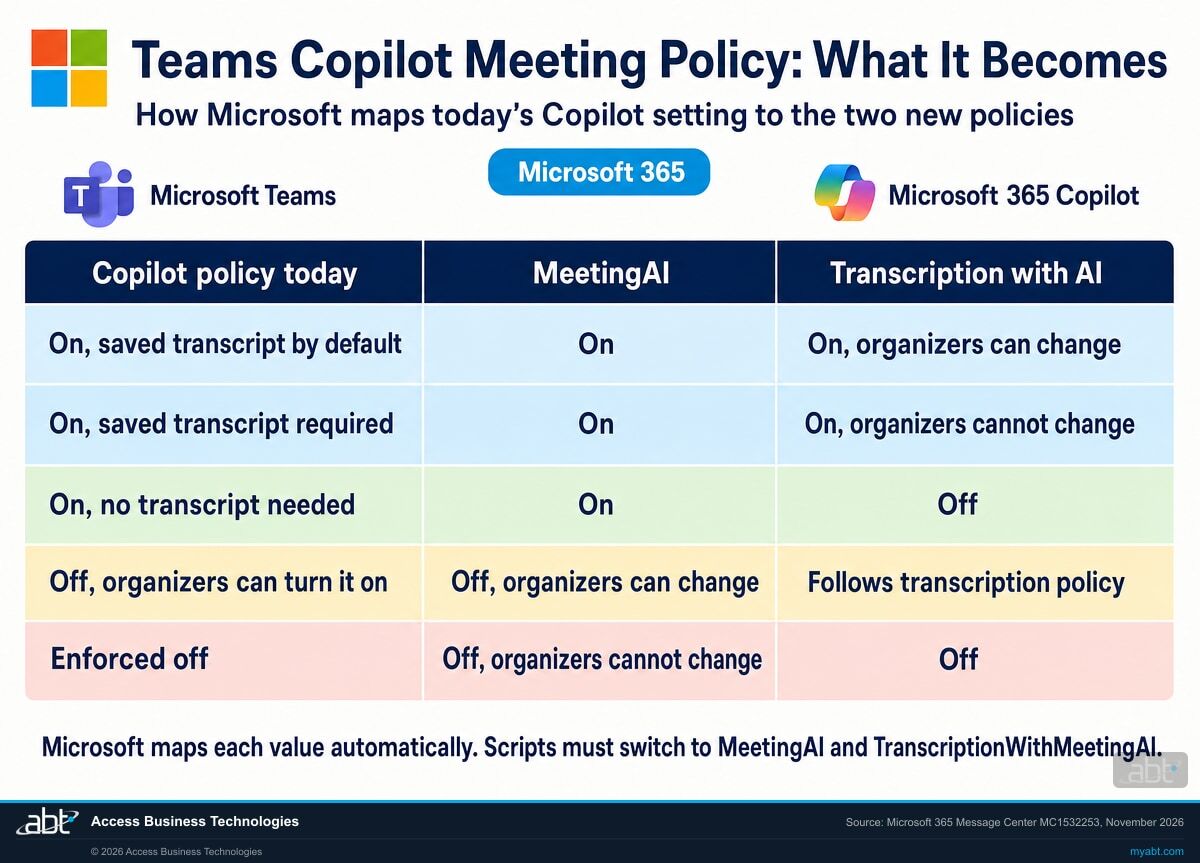
Side by side
What does each Copilot meeting policy value become?
The first, third and fourth columns are Microsoft's mapping examples. The second column is ABT's match to the PowerShell values Microsoft Learn lists for today's Copilot policy.
| Copilot setting today (Microsoft's wording) | PowerShell value today (ABT's match) | MeetingAI | TranscriptionWithMeetingAI |
|---|---|---|---|
| Copilot is on and uses a saved transcript by default | EnabledWithTranscriptDefaultOn | On | On, but organizers can change |
| Copilot is on and a saved transcript is required | EnabledWithTranscript (Microsoft's default value) | On | On, and organizers cannot change |
| Copilot is available without transcription | Enabled | On | Off |
| Copilot is off, but organizers can enable it | Disabled | Off, but organizers can change | Based on the existing transcription configuration |
| Copilot is enforced off | Outside the four current values | Off, and organizers cannot change | Off |
Check the mapping, then the meetings
Microsoft's mapping keeps each policy doing what it does today. That makes the switch a good moment to ask whether today's behavior is the behavior you want. A policy left on Microsoft's default value, a saved transcript required, will map to transcription that starts with AI and cannot be changed by organizers. If some meetings should run Copilot without keeping a transcript, decide that now and set it once the new settings appear. Two points for the records owner: the Transcription policy still decides whether anyone can start a transcript by hand, and Copilot prompts and responses can still be retained under your Microsoft Purview policies.
Know what Teams will do with AI in every meeting before the rollout reaches your tenant
ABT works with your team to record each meeting policy's Copilot value, find the scripts that set it, and check the mapped settings, as part of a free Copilot readiness assessment.
Request the free assessmentThe work
How do you prepare for the Teams meeting AI policy split?
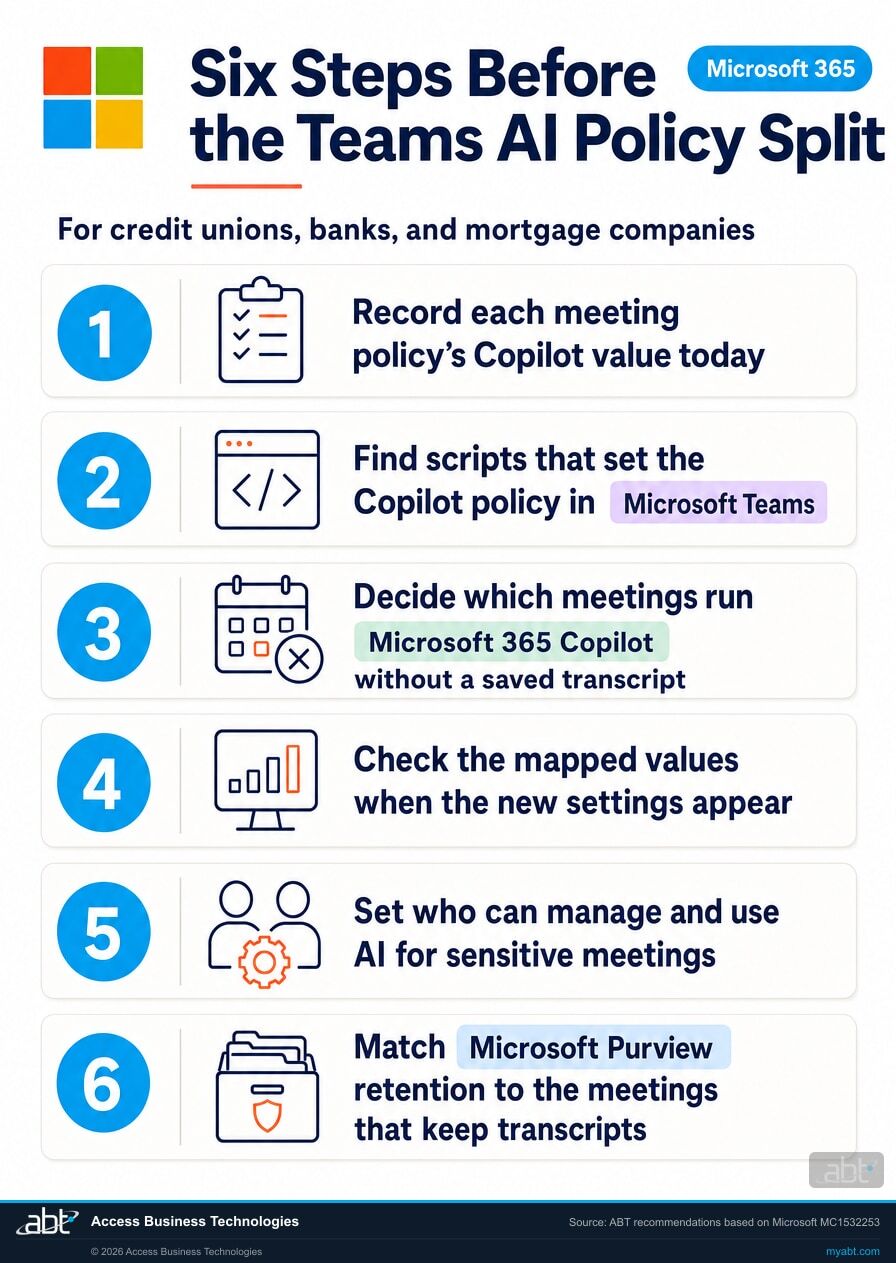
ABT's recommended sequence, built on Microsoft's recommendations in MC1532253. Steps 1 to 3 happen before the change. Steps 4 to 6 happen once the new settings appear.
Record each meeting policy's Copilot value today
List every meeting policy, its Copilot value and the users or groups it is assigned to. The same values appear in PowerShell as Enabled, EnabledWithTranscript, EnabledWithTranscriptDefaultOn and Disabled. This dated list is what you compare against after the switch.
Find scripts that set the Copilot policy
Search onboarding scripts, scheduled automation and help desk runbooks for the Copilot setting. Microsoft recommends updating them to use MeetingAI and TranscriptionWithMeetingAI, because once the new controls are enabled, updates to the Copilot policy return guidance to use the new policies. Tell your Teams administrators that one setting is becoming two.
Decide which meetings run Microsoft 365 Copilot without a saved transcript
Board meetings, loan committees and personnel conversations are common candidates. Under the new settings, Copilot without a transcript is MeetingAI On with TranscriptionWithMeetingAI Off. Write the decision down per meeting policy, so step 4 has a target to check against.
Check the mapped values when the new settings appear
Open each meeting policy and compare Allow AI in meetings and Start transcription when AI is turned on with what you recorded in step 1. Check your meeting templates too, where Microsoft shows the same controls. Microsoft's own recommendation is to confirm the mapped configuration reflects the behavior you intend.
Set who can manage and use AI for sensitive meetings
Where organizers can change the setting, the new meeting options Who can manage AI and Who can use AI decide who turns AI on and who uses it. Where AI should stay off, choose Off, and organizers cannot change; Microsoft then turns transcription with AI off too. Turning that transcription back on removes the enforced off, so set the two together.
Match Microsoft Purview retention to the meetings that keep transcripts
Depending on your Purview retention policies, Copilot prompts and responses during meetings might be retained even when recording and transcription are off, in Commercial and GCC environments. Check that retention matches your records schedule for the meetings that keep transcripts and the ones that do not, and keep a dated note of the check.
Check first
Where is the Copilot meeting policy likely to be set outside the admin center?
ABT's list of the places to look first, each tied to something Microsoft names in MC1532253 or on Microsoft Learn.
Onboarding scripts
Scripts that create users and assign Teams meeting policies often set the Copilot value too. Microsoft names these first in its recommendations.
Help desk runbooks
Instructions that tell staff which Copilot value to pick will name the retired Copilot setting once the new controls appear. Update them before the help desk gets the first question.
Meeting templates
Microsoft shows the new AI controls in Teams meeting templates as well as meeting policies. Templates built for board or committee meetings deserve a second look.
Policies left on the default
Microsoft Learn lists EnabledWithTranscript, a saved transcript required, as the default value. A policy nobody changed maps to transcription that starts with AI and cannot be turned off by organizers.
Encrypted meetings
Copilot is not available in end-to-end encrypted meetings, per Microsoft Learn. Meetings you already run that way stay outside Copilot whatever the new settings say.
Who holds a Copilot license
Using Copilot in meetings requires a Microsoft Copilot license, and Facilitator is included with one, subject to available capacity. Match the policy plan to the people who can actually use it.
For financial institutions
Why does the Teams meeting AI policy split matter at a credit union, bank, or mortgage company?
Because meetings are where decisions get made, and AI in those meetings now has two settings.
Copilot that shows up where staff expect it. Copilot, Facilitator and Intelligent Recap take notes, track action items and summarize what was decided, so staff spend the meeting on the work. Getting the new settings right means every team that relies on those features keeps them on the day the switch arrives.
AI and transcripts that stay off where they should. The split lets an administrator run Copilot without a saved transcript, or enforce AI off entirely for a set of meetings. That is a finer control than the old single setting, and it helps when someone chooses each value for each kind of meeting. Our page on blocking AI notetakers in Teams meetings covers the related question of third-party bots that join meetings to take notes.
A record you can show. A dated list of each meeting policy, its Copilot value before the switch, its two values after, and the retention that applies is the evidence your AI governance program can point to when the board or an examiner asks how AI is controlled in meetings.
Should your institution use Copilot at all?
In our 30-second Short, we take up the question boards keep asking about Copilot: should we be using this?
The meeting policy split is where much of that answer gets set in Teams: one setting for whether AI is available in a meeting, one for whether it starts a transcript. Recording today's values first turns the answer into a recorded decision.
How ABT helps
A free Copilot readiness assessment
ABT is a Tier 1 Microsoft Cloud Solution Provider serving more than 750 financial institutions. It manages Microsoft 365 tenants and hosts Azure environments for credit unions, banks, and mortgage companies. What Teams will do with AI in each of your meetings after January has a short answer, once someone has written down every policy.
With your team, we map every meeting policy to the new AI settings, and plan the changes
The assessment is free and ends with written findings you keep. We work through it with an administrator on your team, and your team decides what changes and when.
- The policy inventory. Every Teams meeting policy, its Copilot value and who it is assigned to.
- The script review. The scripts, automation and runbooks that read or set the Copilot policy.
- The meeting decisions. Which meetings run AI with a transcript, without one, or not at all.
- The mapping check. Each policy's MeetingAI and TranscriptionWithMeetingAI values against your decisions.
- The retention check. Microsoft Purview retention compared with your records schedule.
- The record. A dated summary for your AI governance and information security programs.
ABT also operates M365 Guardian, its managed security service for credit unions, banks, and mortgage companies. Learn about M365 Guardian
Related reading
If this opened a bigger question
The meeting policy split sits inside the larger work of getting a Microsoft 365 tenant ready for Copilot and showing how AI is governed.
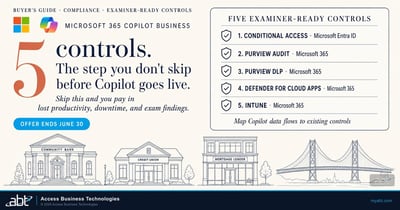
Five Microsoft 365 Controls Examiners Will Ask About Before You Roll Out Copilot
The tenant controls to have in place, and documented, before Copilot reaches your staff.
Read the article
Copilot Governance Dashboard
How to monitor AI usage in your Microsoft 365 tenant with Microsoft Purview.
Read the article
Is Your Microsoft 365 Tenant Ready for Copilot?
A financial services readiness assessment, from permissions and labels to licensing.
Read the articleAnswered
Teams meeting AI policy, answered
Verify it yourself
Where the facts on this page come from
The Microsoft policy names, values, dates, mapping and quotation above come from these sources, each listed with the claims it supports.
- Microsoft 365 Message Center, MC1532253, "(Updated) Enhanced Copilot and AI controls for meetings," updated November 19, 2026, in the Microsoft 365 admin center Message Center. Source for the two new policies and what each controls, the rollout dates, the admin settings and their values, the enforced-off rule, the PowerShell change, the one-time mapping and its examples, the quotation, the Transcription policy, the new meeting options, the recommendations and the compliance note.
- Microsoft 365 Message Center, MC1560924, "Microsoft Teams: Tenant policy controls who can record and transcribe," November 20, 2026. Source for the late December 2026 general availability of the separate recording and transcription policy.
- Microsoft Learn, Manage Microsoft Copilot in Teams meetings and events, updated October 2026. Source for the current Copilot values and the default value, the Only during the meeting option, Purview retention of Copilot prompts and responses, end-to-end encrypted meetings, GCC High and the Copilot license requirement.
- Microsoft Learn, Set up Facilitator in Microsoft Teams. Source for Facilitator being included with a Microsoft Copilot license, subject to available capacity.
- The PowerShell column's match of each Microsoft example to a current value, the callout's advice, the six steps and their order, the places to look first, and the line about the board and examiners are ABT's recommendations; everything else on this list is from Microsoft.
What will Teams do with AI in your meetings in January?
Check every policy before the switch.
The work starts with a list of every Teams meeting policy and its Copilot value. The assessment ends with a written review you keep: what each policy becomes, which scripts need updating, which meetings keep transcripts, and how retention applies.
Tell us a little about your environment and we will come back with what we would check first.
What should we look at? Optional.
Encrypted. Private.
Thank you. That is with us.
An ABT specialist will be in touch shortly. If a particular meeting policy, script or group of meetings is what you are thinking about, say so in your reply and we will start there.
