


Microsoft 365 admin center · Message Center MC1490899
Microsoft retires Targeted release in January 2027. Choose how new Microsoft 365 features reach your staff before enrollment locks in November.
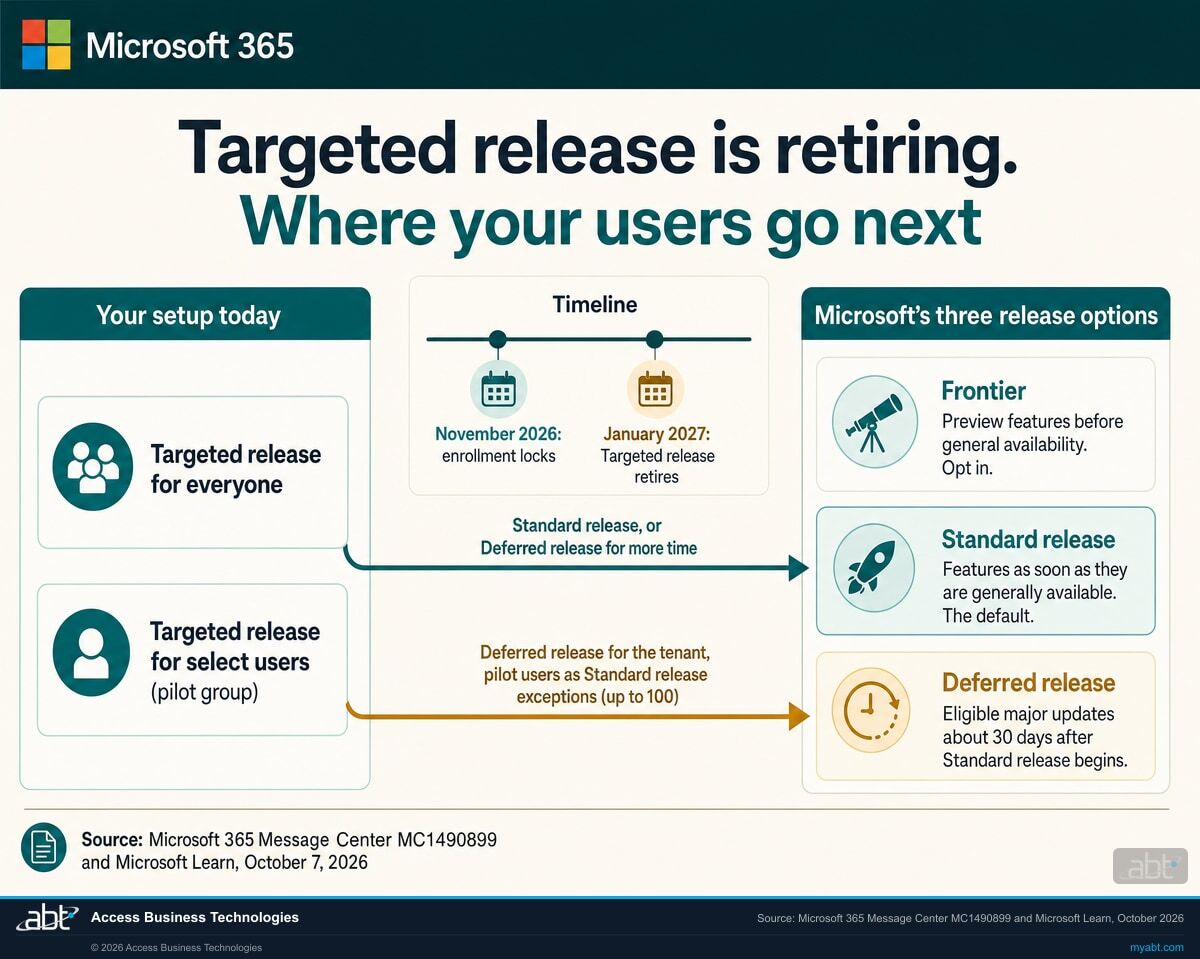
Targeted release, the Microsoft 365 admin center setting that gave some or all of your users new features early, retires in January 2027, and in November 2026 administrators lose the ability to add users to it, remove users from it, or change it. Microsoft replaces it with three release options: Frontier for preview features before general availability, Standard release for features as soon as they are generally available, and Deferred release for eligible major updates about 30 days after Standard release begins. Microsoft leaves the release preference settings to you, and it recommends making the choice before November.
- November 2026: Targeted release enrollment locks, and adds, removals, and changes stop (Message Center MC1490899, act by October 31, 2026)
- January 2027: Targeted release retires, and its assignments stop deciding when features reach your users
- To keep a pilot group's head start on eligible major updates, an administrator rebuilds it as Standard release exceptions in a Deferred release tenant, up to 100 users
Retires Jan 2027
The change
What is happening to Targeted release in Microsoft 365?
Microsoft is retiring Targeted release for Microsoft 365 services in January 2027 and replacing it with three release options: Frontier, Standard release, and Deferred release. Enrollment in Targeted release locks in November 2026, so the users you want to see changes first need a new home before then.
The decision in brief
- What
- Targeted release retires and is replaced by Frontier (preview before general availability), Standard release (general availability, the default), and Deferred release (eligible major updates about 30 days after Standard release begins).
- When
- Microsoft published Message Center post MC1490899 on October 7, 2026, tagged as a major change with an act-by date of October 31, 2026. Targeted release enrollment locks in November 2026, and Targeted release retires in January 2027.
- Users
- Users in Targeted release keep receiving its features until retirement, then follow your Standard or Deferred release preference, or Standard release if you have set none.
- Owner
- A Microsoft 365 administrator holding the Office Apps Admin, Security Admin, or AI Admin role, with whoever runs change management at your institution.
- Action
- Find who is in Targeted release, choose Standard or Deferred release for the tenant, rebuild any pilot group as release exceptions, decide on Frontier, and write the decision down.
Microsoft announces it
Message Center post MC1490899 sets the dates, tagged as a major change with an act-by date of October 31, 2026.
Review and choose
Find your Targeted release users, pick Standard or Deferred release, and decide who, if anyone, previews features in Frontier.
Enrollment locks
No more adding, removing, or changing Targeted release users. A unified release preferences experience arrives in the admin center.
Targeted release retires
Its assignments stop being used for feature delivery, and users follow Frontier, Standard, or Deferred release.
"Targeted release for Microsoft 365 services will be retiring in January 2027 as Microsoft 365 transitions to three release options: Frontier, Standard release, and Deferred release."
Microsoft 365 Message Center post MC1490899, Microsoft 365: Targeted Release retirement, published October 7, 2026Targeted release has been the setting an IT team used to see Microsoft 365 changes before everyone else, for the whole organization or for a chosen group of users. Microsoft draws the line between it and its new preview program in one sentence: "Frontier is for access to pre-GA features and Targeted release is for access to features early within general availability." After January 2027, early access within general availability comes from a different arrangement: the tenant on Deferred release and a small group on Standard release, so that group sees eligible major updates up to about 30 days before everyone else.
The change covers the Microsoft 365 services that deliver features through Targeted release today. Microsoft Learn lists the Microsoft 365 admin center, Microsoft Teams, OneDrive, SharePoint Online, Outlook on the web, new Outlook for Windows, and Office for the web, and the Message Center post adds some components of Exchange Online. Microsoft 365 Apps update channels, Windows update channels, and the Microsoft 365 Insider programs keep their own release paths and stay as they are.
Users already enrolled in Frontier stay enrolled after Targeted release retires. Users in Targeted release keep receiving its features until the retirement date, and then they follow whatever general availability preference the tenant has: Standard release or Deferred release. Microsoft's FAQ answers the question most administrators ask first: "No, Microsoft won't automatically modify your release preference settings." If you have never configured one, your users receive features through Standard release.
Tenants in GCC, GCC High, and DoD have a narrower choice. Microsoft Learn states that Standard release remains the supported option there after Targeted release retires, and that Deferred release and Frontier are currently unavailable in government cloud environments.
The options
How do Frontier, Standard release, and Deferred release compare with Targeted release?
Standard release is the default and the option Microsoft recommends for most customers. Deferred release buys about 30 days for eligible major updates. Frontier is a separate preview program you opt into. The table sets out when each delivers features, what support comes with it, and where you set it.
| Release option | When users get features | Support | Default and scope | Where you set it |
|---|---|---|---|---|
| Targeted release (retiring) | Early, within general availability | Generally available features | Everyone or select users. Enrollment locks in November 2026; retires January 2027. | Settings > Org settings > Organization profile > Release preferences |
| Frontier | Before general availability | "Pre-GA, not fully supported"; preview features, subject to change, and not governed by GA service level agreements | Opt in. Default is No access; choose All users or specific users and groups. Copilot-related Frontier features need a Microsoft Copilot license. | Copilot > Settings > View all > Copilot Frontier |
| Standard release | As soon as features are generally available | Fully supported generally available features | The default. Microsoft: "Standard release should be the primary release channel for most customers." | Copilot > Settings > View all > Copilot Release preferences: General availability |
| Deferred release | About 30 days after rollout to Standard release begins | Fully supported generally available features, delayed | Applies to features Message center tags as both Major update and Deferred feature. Set for the tenant or for up to 100 exceptions. | Copilot > Settings > View all > Copilot Release preferences: General availability |
| Your setup today | What Microsoft recommends after retirement |
|---|---|
| Targeted release for everyone | Standard release, so users receive eligible features as soon as they reach general availability. Choose Deferred release if you need more time to prepare for eligible major changes. |
| Targeted release for select users (a pilot group) | Deferred release for the tenant, with your validation, support, or pilot users added under Assign users or groups for standard release. The pilot group keeps a head start of up to about 30 days on eligible major updates. |
| Standard release for everyone | No update required. Standard release is the default release preference. |
What a tenant that changes nothing ends up with
A tenant that has run a pilot group in Targeted release, with everyone else on Standard release, ends up with every user on Standard release once Targeted release retires. The pilot group and the rest of the institution then receive changes on the same schedule, and the head start that let IT test a change and brief the help desk before branch staff saw it is gone.
Keeping that head start takes two settings, which Microsoft recommends making before November: Deferred release for the tenant and the pilot group as Standard release exceptions. Standard and Deferred release stay configurable after November, in the unified release preferences experience. Moving users to Deferred release has a cost Microsoft names: "If you move users from Standard release to Deferred release, they might lose access to features that aren't available yet in Deferred release." Tell staff before you make the switch.
Know who sees Microsoft 365's major updates first before enrollment locks in November
ABT reviews your Targeted release assignments and release preferences with your administrators, maps your pilot group to Microsoft's new options, and writes the decision up for your change-management file, as part of a free Copilot readiness assessment.
Request the free assessmentThe work
How do you move off Targeted release before November 2026?
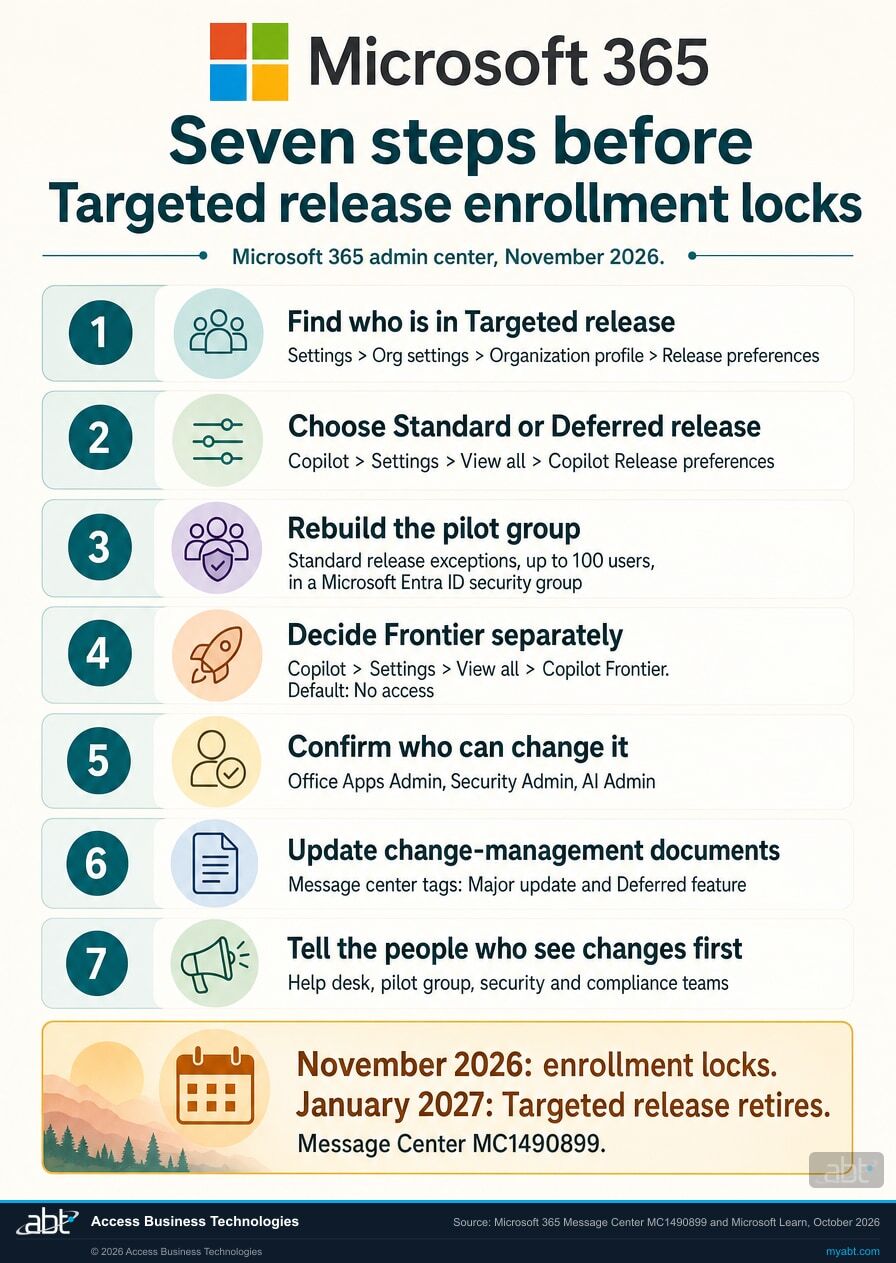
Seven steps, in the order the decisions depend on each other. The first five are settings and roles Microsoft Learn documents in the Microsoft 365 admin center. The last two are the paperwork and the people, which is where a regulated institution earns the change.
Find out who is in Targeted release today
Microsoft's first recommended action is to review and identify the users currently assigned to Targeted release. Note whether the whole tenant is in Targeted release or only select users, and save the list of names. That list is where your pilot group starts. Some names may be there by accident, so review each one before it moves to a new setting, and keep the list as the evidence of what your release setting was before the change.
Choose Standard release or Deferred release for the tenant
Standard release is the default, and Microsoft calls it "the primary release channel for most customers." Deferred release lets you delay eligible major updates for approximately 30 days after rollout to the Standard release audience begins, and Microsoft suggests it if you have additional validation requirements. The 30-day clock starts when the feature begins rolling out to Standard release users globally, so a rollout that takes weeks to reach your pilot users shortens their head start.
Microsoft notes that changes can take up to 24 hours to take effect, and that users moved from Standard to Deferred release might lose access to features that aren't available yet in Deferred release.
Rebuild your pilot group as Standard release exceptions
To keep a group that sees changes first, Microsoft's mapping is Deferred release for the tenant, with your validation, support, or pilot users assigned to Standard release. Hold the group in a dedicated Microsoft Entra ID security group so membership is managed in one place.
Mind the limit. You can add up to 100 exceptions to Standard or Deferred release, and each user in a security group counts toward the 100-user limit. A pilot group of 150 people does not fit; pick the 100 or fewer who will actually test, report, and brief their teams.
Decide on Frontier as its own question
Frontier gives chosen users preview access to AI and non-AI features before general availability. Access starts at No access, and Microsoft describes Frontier features as preview, subject to change, and outside general availability service level agreements. Users without a Microsoft Copilot license aren't presented with Copilot-related Frontier features, and Microsoft says Frontier never turns on an AI provider for you.
Copilot's own changes often reach Frontier first. Microsoft's notice for the new Copilot app, MC1479277, says its updates roll out to Frontier in October, and they include the new Plugins entry point that replaces Agents in Chat. Our page on the Copilot plugin registry and its admin controls covers that change. Frontier is a choice about preview access; Deferred release is a choice about timing at general availability. Make each one on its own merits.
Confirm who can make the change
Microsoft Learn names three Microsoft 365 admin center roles that can configure Standard and Deferred release: Office Apps Admin, Security Admin, and AI Admin. The same three appear in Microsoft's Frontier prerequisites. Check who holds them in your tenant, and decide who makes this change and who approves it.
Rewrite the documents and the Message center routine
Microsoft's checklist includes updating internal documentation and processes that reference Targeted release. In Message center, Microsoft now labels deferred-eligible features as both Major update and Deferred feature, and adds a Rollout timing column. Major updates are communicated at least 30 days in advance when an action is required, and the roadmap Microsoft points to is now the AI at Work Roadmap, formerly known as Microsoft 365 Roadmap.
Microsoft also revises dates after it announces them. Our page on how Message Center dates change after publication covers how to track a moving date.
Tell the people who feel the change first
Microsoft recommends notifying change management teams, support teams, security and compliance teams, pilot groups, and key IT stakeholders about the retirement. Your help desk should know which users get which features when, and your pilot group should know it is still the pilot group, now on a different setting.
The limits
Which changes reach everyone on Microsoft's schedule?
Deferred release covers eligible major updates delivered user by user. Microsoft's FAQ is specific about everything else, and a validation plan built on Deferred release needs these six facts in it.
Only tagged major updates wait
Deferred release applies to features Microsoft tags in Message center as both Major update and Deferred feature. A feature without both tags releases to users when it is broadly available, even for users in Deferred release.
Tenant-wide changes can land on everyone at once
Most features are delivered at the user level and respect release assignments. Microsoft's FAQ adds: "Tenant-wide changes might apply to all users at once, regardless of release audience assignment." Watch Message center for those, because a release setting cannot stagger them.
Deferral covers every eligible feature at once
In a Deferred release tenant, every eligible major feature follows the deferred timeline together. For a single feature, Microsoft points to existing feature-level admin controls, where they exist.
Frontier runs on its own track
Microsoft's FAQ states that Deferred release doesn't apply to Frontier program features. Frontier is a preview program managed separately, and it runs inside an otherwise generally available environment.
Apps and Windows keep their own channels
The retirement changes Microsoft 365 release preferences only. Microsoft 365 Apps update channels, Windows update channels, and the Microsoft 365 Insider programs are unaffected, and so is your servicing plan for the desktop apps.
A rollback can stop before Deferred users
If Microsoft finds a quality problem during rollout, it pauses the rollout, users who have not received the feature do not get it, and Microsoft might remove it from users who already have it. Deferred release users never receive a feature that Microsoft rolls back before it reaches them.
For financial institutions
Why does the release setting matter at a credit union, bank, or mortgage company?
Because Microsoft ships functional changes to the apps your staff use every day, and the release setting is where your institution decides who sees them first and how long everyone else waits.
Get the new features to work. Microsoft 365 updates are how Copilot and the apps around it keep getting better, and Standard release delivers them to staff as soon as they are generally available. A validation group that meets each eligible major update first, a loan processing lead, a member services supervisor, someone from the help desk, can show the rest of the institution how to use it the week it lands. Our guide to the 30-day Copilot sprint for financial institutions shows how a small group carries a rollout.
Protect the change. Deferred release gives that group up to about 30 days with an eligible major update before everyone else sees it, less when Microsoft's rollout to Standard release users runs long. That is time to test it against how your teams work, write the help desk note, and adjust a setting where Microsoft offers one. Microsoft communicates major updates at least 30 days in advance when an action is required, and tenant-wide changes still arrive on Microsoft's schedule, so the Message center routine stays part of the plan.
Keep the record. The FFIEC's Development, Acquisition, and Maintenance booklet, issued in 2024, describes change management as covering "configuration changes, software patches, and functional changes," and says "Management should be aware of and manage the risks associated with unauthorized, untested, and unplanned changes." It applies its processes "regardless of whether the system or component was developed internally," and lists "Change management policies and procedures" and "Change logs" among what examiners review.
The booklet speaks to change management in general terms and names no particular Microsoft 365 setting. How your program treats Microsoft's feature releases is your institution's call. The November lock is a natural point to write that call down: which release option the tenant uses, who is in the validation group and why, who approved it, and when it is next reviewed.
Who should see Microsoft's changes first?
Microsoft changes the apps your staff open every morning. The Short from our channel walks through one change Microsoft made in 2026 to the free Copilot experience in Word, Excel, and PowerPoint, and what teams keep and lose with it, in under a minute.
A change like that is what a validation group exists for: someone who sees it first, can tell the help desk what moved, and can say whether the rest of the institution is ready. After January 2027, that group lives in your Standard release exceptions, in a tenant set to Deferred release.
How ABT helps
A free Copilot readiness assessment
ABT is a Tier 1 Microsoft Cloud Solution Provider serving more than 750 financial institutions. Release preferences and Frontier now sit under Copilot settings in the Microsoft 365 admin center, so the release review is part of this assessment.
We review your release preferences with your administrators and leave you a written record of the decision
The assessment is free and ends with written findings you keep. We work through the settings with an administrator on your team, and your team decides what changes in the tenant and who makes each change.
- The current state. Who is in Targeted release today, your Standard and Deferred release settings, and who is enrolled in Frontier.
- The mapping. Microsoft's recommended setting for your setup, with the reasoning for your institution.
- The validation group. Who belongs in it, how it fits the 100-exception limit, and the security group that holds it.
- The Frontier decision. Whether any users should preview features before general availability, and the licenses and agent settings that depends on.
- The wider Copilot picture. Licensing, agent and plugin settings, and readiness for the rest of the Copilot rollout.
- The record. A dated summary of the decision, ready for your change-management file.
ABT also operates M365 Guardian, its managed security service for credit unions, banks, and mortgage companies. Learn about M365 Guardian
Related reading
If this opened a bigger question
A release decision tends to surface the rollout behind it: how a small group carries new features, which other Microsoft retirements land the same winter, and what staff can reach once Copilot is live.

The 30-Day Copilot Sprint for Financial Institutions
ABT's 30-Day Copilot Sprint takes banks, credit unions, and mortgage companies from kickoff to a measured Copilot ROI readout in one month.
Read the article
Microsoft Is Retiring Restricted SharePoint Search: The Copilot Oversharing Deadline for Financial Institutions
Microsoft is retiring Restricted SharePoint Search by January 2027. The Microsoft 365 Copilot oversharing migration playbook for financial institutions.
Read the article
Microsoft 365 Copilot Oversharing: How Financial Institutions Fix Data Access Before Rollout
Microsoft 365 Copilot only surfaces what users can already open. Here is how financial institutions fix oversharing before a Copilot rollout.
Read the articleAnswered
Microsoft 365 Targeted release retirement, answered
Verify it yourself
Where the facts on this page come from
Every Microsoft date, setting, path, and quotation above was read from the sources listed here on October 8, 2026. Microsoft updated all four Learn articles on October 7, 2026, the day it published the Message Center post.
- Microsoft 365 Message Center post MC1490899, Microsoft 365: Targeted Release retirement, published October 7, 2026, tagged Major change, Admin impact, and Retirement, act by October 31, 2026. Source for the November 2026 enrollment lock, the January 2027 retirement, the three release options, the affected services, and Microsoft's recommended actions. Visible to administrators in your own Microsoft 365 admin center; a public archive copy is at mc.merill.net/message/MC1490899.
- Microsoft Learn, Plan for the retirement of Targeted release in Microsoft 365, updated October 7, 2026. Source for the dates, the scope and what is unaffected, the government cloud note, the mapping table, the admin center paths, and the recommended actions.
- Microsoft Learn, Configure new Standard and Deferred release options for Microsoft 365, updated October 7, 2026. Source for the release option comparison, the 30-day deferral, the 100-exception limit, the three roles, the 24-hour note, what qualifies as a major update, and the AI at Work Roadmap name.
- Microsoft Learn, Frequently asked questions about modern release options for Microsoft 365, updated October 7, 2026. Source for when the 30-day timer starts, individual feature deferral, tenant-wide changes, rollbacks, Frontier and Deferred release, the unaffected update channels, and what happens if you take no action.
- Microsoft Learn, Get started with the Microsoft Frontier Program, updated October 7, 2026. Source for the Frontier and Targeted release distinction, the No access default, license requirements, AI provider settings, the preview terms, and continued Frontier enrollment after the retirement.
- Microsoft 365 Message Center post MC1479277, Microsoft Copilot: New ways to work across Microsoft Copilot and Microsoft 365, updated October 5, 2026. Source for the October rollout of the new Copilot app updates to Frontier, including the Plugins entry point. Public archive copy: mc.merill.net/message/MC1479277.
- FFIEC IT Examination Handbook, Development, Acquisition, and Maintenance booklet, VII.B Change Management and VII.B.1 Implementing Changes. Source for the quoted change management language and the examiner review list.
- FFIEC press release, Financial Regulators Update Examiner Guidance on Financial Institutions' Information Technology Development, Acquisition, and Maintenance, the FFIEC announcement of the booklet. Source for its 2024 issue.
Targeted release locks in November.
Decide who sees Microsoft's major updates first.
The work starts with your Targeted release assignments and your release preferences. When it is done, you know which users meet eligible major updates first, how long the rest of the institution waits for them, who previews features in Frontier, and who approved it.
Tell us a little about your environment and we will come back with what we would check first.
What should we look at? Optional.
Encrypted. Private.
Thank you. That is with us.
An ABT specialist will be in touch shortly. If your Targeted release users need to move before a particular date, say so in your reply and we will start there.
