

Skip to the main content.

Microsoft SharePoint Online · Microsoft 365

SharePoint Online blocks new classic publishing sites on March 1, 2027. Classic pages go read-only on October 1, 2028. Find yours now.

Microsoft is retiring classic publishing and classic user-created pages in SharePoint Online in two phases. In March 2027, every tenant loses the ability to create classic publishing sites or turn on publishing features. In October 2028, existing classic wiki, Web Part, blog, publishing and custom ASPX pages become read-only. Each phase rolls out from its start date, and timing can differ by cloud. This page shows what each date changes and six steps a credit union, bank, or mortgage company can take now.

  • Provisioning scripts that create classic publishing sites stop working on March 1, 2027
  • Read-only classic pages stay viewable; editing moves to modern pages
  • The Microsoft 365 Assessment Tool and Purview Audit show which classic pages staff use
Mar 2027
From March 1, 2027, no tenant can create classic publishing sites or activate publishing features.
Source: Microsoft 365 Message Center, MC1565964
Oct 2028
From October 1, 2028, existing classic user-created pages become read-only in every tenant.
Source: Microsoft Learn, classic pages changes
10
Classic publishing site templates in scope, from Publishing Portal to Topic Area.
Source: Microsoft 365 Message Center, MC1464926
180 days
Longest audit window the Microsoft 365 Assessment Tool reads for classic page use. The default is 14.
Source: Microsoft Learn, Assessment Tool requirements

What changes for SharePoint classic pages in 2027 and 2028?

On March 1, 2027, SharePoint Online stops new classic publishing in every tenant. On October 1, 2028, every existing classic user-created page becomes read-only and custom script enforcement reaches all tenants. Content stays viewable throughout.

The two phases in brief

Phase 1
March 1, 2027: classic publishing site creation and publishing feature activation are blocked in all tenants. AllowClassicPublishingSiteCreation is enforced as False.
New tenants
Tenants created on or after March 1, 2027 start with classic page creation and custom scripts turned off, and modern page creation on and locked.
Phase 2
October 1, 2028: existing classic user-created pages become read-only, adding or updating custom scripts is disabled, and existing scripts continue to function.
Rollout
Microsoft expects the rollout to begin in early March 2027 and complete by early October 2028 (MC1565964). Learn lists GCC, GCC High, DoD, air-gapped and 21Vianet in scope, and timing can differ by cloud, so government tenants should follow the notice in their own Message Center.

Now

Inventory

Run the Microsoft 365 Assessment Tool and read Purview Audit to see which classic pages staff use.

By Feb 28, 2027

Fix provisioning

Update scripts, templates and migration plans that create classic publishing sites or turn on publishing.

March 1, 2027

Phase 1

No new classic publishing sites and no publishing feature activation, in every tenant.

October 1, 2028

Phase 2

Classic user-created pages become read-only. Custom script enforcement reaches all tenants.

"A foundation for current and future AI-powered experiences"

Microsoft Learn, on modern SharePoint, in its classic pages change notice

Microsoft gives three reasons for the change. Classic pages render on the server and often carry custom script, which raises security risk, adds admin work and costs more to run. Modern pages are built for phones and current browsers. And Microsoft calls modern pages "a foundation for current and future AI-powered experiences."

For most institutions the first date is about automation and the second is about people. March 1, 2027 breaks anything that builds new classic publishing sites, so the provisioning script for a new branch site or a half-finished move from SharePoint Server is the item to check first. October 1, 2028 freezes the pages staff still edit: the intranet home, the policy wiki, the board portal. Those need a modern home and an owner before then.
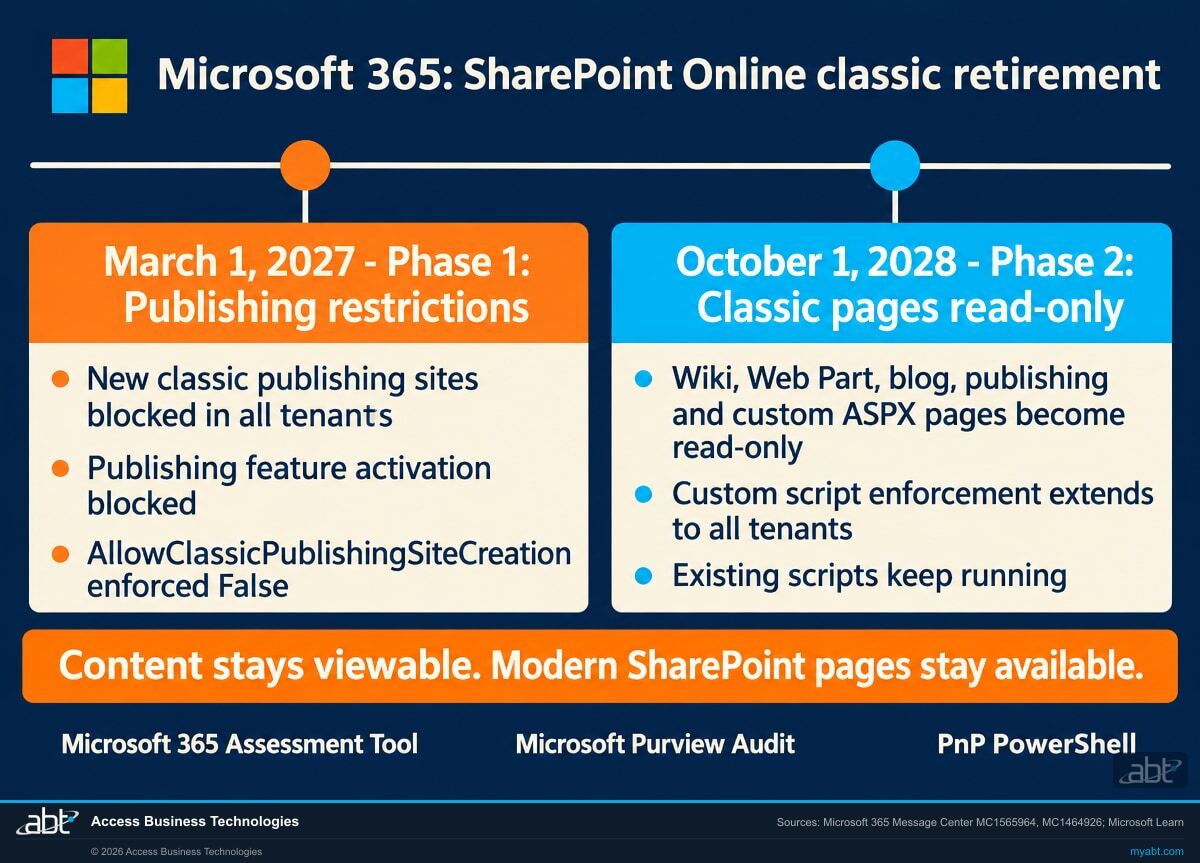
Microsoft SharePoint Online classic retirement timeline. March 1, 2027, Phase 1: new classic publishing sites and publishing feature activation blocked in all tenants. October 1, 2028, Phase 2: classic wiki, Web Part, blog, publishing and custom ASPX pages become read-only and custom script enforcement extends to all tenants. Content stays viewable.
The two phases and what each one changes. Sources: MC1565964, MC1464926, Microsoft Learn.

What still works on each date?

Each SharePoint item changes on its own date, and existing tenants follow a different path from new ones. Read across each row.

SharePoint Online classic changes for existing tenants, from MC1565964, MC1464926 and Microsoft Learn, read November 24, 2026
ItemTodayFrom March 1, 2027From October 1, 2028Source
Create a classic publishing siteAllowed if the tenant setting permitsBlocked in all tenantsBlockedMC1565964
Activate publishing featuresAllowed on site collections and subsitesBlocked in all tenantsBlockedMC1565964
Classic user-created pagesCreate and editCreate and edit in existing tenantsRead-only, still viewableMC1464926, Learn
Custom scriptsAllowed per site, reverts within 24 hoursCurrent behavior in existing tenantsNo adding or updating; existing scripts keep runningMC1464926, Learn
List and library views, list formsWork as todayOutside the read-only changeOutside read-only; scripts in them follow script rulesMC1565964
Modern pagesAvailableAvailableAvailableLearn

Tenants created on or after March 1, 2027

A tenant created on or after March 1, 2027 starts with the October 2028 rules already in force for classic pages and scripts: users cannot create or edit classic user-created pages, DenyAddAndCustomizePages is enforced as True, and the "Allow users to create new modern pages" setting is on and locked. Microsoft states this has no effect on existing tenants.

For an institution planning a merger, a new subsidiary or a tenant-to-tenant move, that means the destination tenant may refuse classic content the source tenant still edits. Microsoft's classic pages change notice has the full detail.

Know which classic pages your staff still edit before the March 2027 restrictions arrive.

ABT runs the Microsoft 365 Assessment Tool with your team, reads the audit data, and gives you a written wave plan with owners and dates. The assessment is free.

Request the free assessment

How do you prepare a tenant for the SharePoint classic retirement?

Inventory classic pages, measure real use, fix provisioning before March 1, 2027, list custom script sites, assign owners and waves, then pilot and run the transformation. The steps below follow that order.

1
Microsoft 365 Assessment Tool

Run the classic pages assessment

Use version 1.16.0 or later of the Microsoft 365 Assessment Tool against SharePoint Online, with certificate-based application authentication for a full-tenant run. The report lists classic sites and pages and how ready each one is for modern pages.

2
Microsoft Purview › Audit

See which classic pages people actually use

Search the SharePoint Classic Activities category for ClassicPageViewed and ClassicPageEdited, or set the tool's audit window up to 180 days. Pages people edit every month go first. A page with no activity in the window you scanned goes to its owner for a keep or retire decision. Confirm how far back your audit records reach before you trust a zero.

3
Provisioning and migration scripts

Fix anything that creates classic publishing before March 1, 2027

Search site provisioning scripts, site templates and migration plans for publishing site templates such as CMSPUBLISHING#0 or BLANKINTERNETCONTAINER#0, and for code that activates publishing features. Update them to create modern communication or team sites.

4
SharePoint admin center › Active sites

List the sites that allow custom script

Open the Custom script allowed sites view, or add the Custom script column to Active sites. Record why each site needs script. Consider Baseline security mode to block new custom scripts permanently.

5
Owners and waves

Give every classic site an owner and a wave

Assign a named owner per site and group sites into waves: the intranet home and policy pages staff edit most, then department sites, then archives. Put a date on each wave, with the last one well before October 1, 2028.

6
PnP PowerShell

Pilot the transformation, then run the waves

Transform a pilot set of classic Wiki and Web Part pages in the Site Pages library with PnP PowerShell and check the results with the site owner. Publishing pages and blog pages follow their own procedures. Then run each wave and rerun the assessment to confirm the count drops.
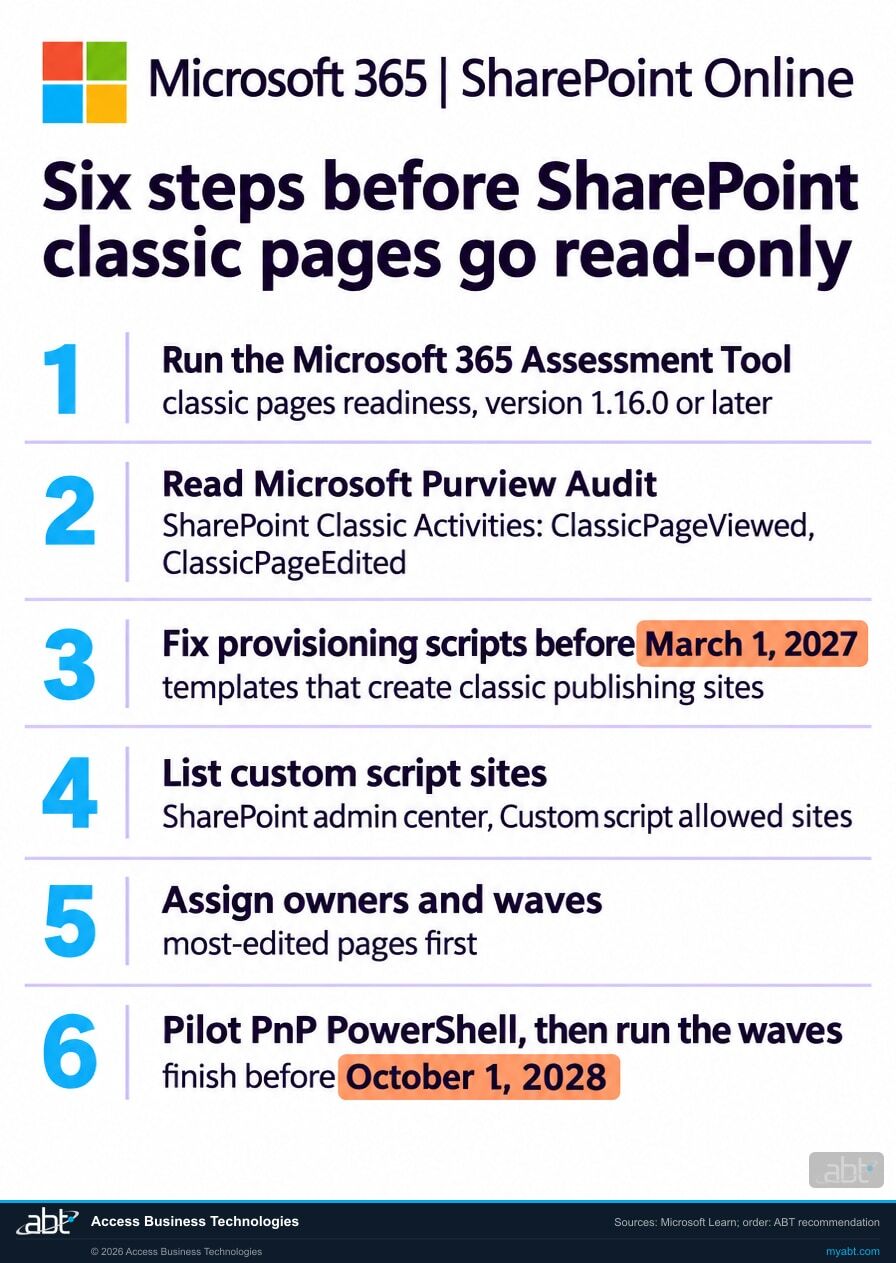
Six steps before SharePoint classic pages go read-only: run the Microsoft 365 Assessment Tool, read Purview Audit classic page activity, fix provisioning scripts before March 1, 2027, list custom script sites, assign owners and waves, and pilot PnP PowerShell transformation before October 1, 2028.
The six steps on one page. Sources: Microsoft Learn and MC1565964; order and wave grouping are ABT recommendations.

Where do classic pages hide in a financial institution's tenant?

Usually in the sites that have run quietly for years. These six places are worth checking first.

The old intranet home

Intranets built before modern pages often sit on a Publishing Portal or Publishing Site template. Staff read them daily, and HR or marketing still edits them.

Policy and procedure libraries

Wiki pages were a common way to publish policies and procedures. If a compliance officer edits them, they need a modern home before October 1, 2028.

Board and committee portals

Older portals sometimes use custom ASPX pages or script editor web parts for agendas and minutes. Check these against the Custom script allowed sites view.

Site provisioning scripts

Automation that creates sites for new branches, departments or loan programs may still call a publishing template or turn on publishing features. This is the March 1, 2027 item.

Sites moved from SharePoint Server

Sites migrated from an on-premises farm often carry classic publishing and Web Part pages. A move still in progress needs its plan checked against the March 1, 2027 change.

Subsites with publishing turned on

Publishing features can be active on a single subsite under a modern site collection. The assessment tool finds these; a site list alone misses them.

Why should a financial institution start on classic pages now?

Productivity. Branch staff, loan officers and member service teams look up procedures and forms on the intranet every day. Modern pages work on a phone, load faster and are easier for the people who own the content to edit. Moving the pages people use most first means the change feels like an upgrade to them.

Security. Custom script lets anyone with Add and Customize Pages permission run code on a site. Microsoft names server-side rendering and custom scripting as a security risk in its change notice. A list of the sites that allow script today, with a reason for each, shrinks that exposure well before Microsoft enforces it.

Governance. An inventory, an owner per site, a wave plan with dates and audit evidence of real use are easy to show to a board, an auditor or an examiner. Use the inventory to prioritize sites for a separate access review before Microsoft 365 Copilot and agents reach them.

Why does SharePoint cleanup matter for AI agents?

Microsoft calls modern pages a foundation for its AI-powered experiences. In this short video, ABT explains why it treats every AI agent as a possible path for data to leave until its access is set. A classic page inventory is a good place to start that work.

What does ABT check in a SharePoint classic review?

ABT is a Tier 1 Microsoft Cloud Solution Provider serving more than 750 financial institutions. It manages Microsoft 365 tenants and hosts Azure environments for credit unions, banks, and mortgage companies.

A free security assessment focused on classic SharePoint and custom script

We work through your tenant with your team and hand back an inventory, a wave plan and the evidence behind it.

  • Classic page inventory: the Microsoft 365 Assessment Tool run with read-only permissions, every classic site and page listed
  • Real usage: Purview Audit classic page views and edits, so effort goes to the pages staff use
  • Custom script exposure: every site that allows custom script, with the reason recorded
  • Provisioning and migration review: scripts and templates that create classic publishing sites, flagged before March 1, 2027
  • Modernization wave plan: owners, waves and dates that finish before October 1, 2028
  • Your findings in writing: yours to keep, ready for your IT steering committee or board

ABT also operates M365 Guardian, its managed security service for credit unions, banks, and mortgage companies. Learn about M365 Guardian

More on SharePoint, Copilot and data access

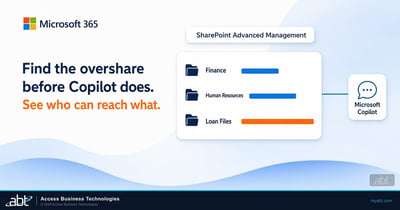
SharePoint Advanced Management for Financial Institutions: Find the Overshare Before Copilot Does

SharePoint Advanced Management for Financial Institutions: Find the Overshare Before Copilot Does

How SharePoint Advanced Management finds overshared sites and inactive content before Copilot reaches it.

Read the article
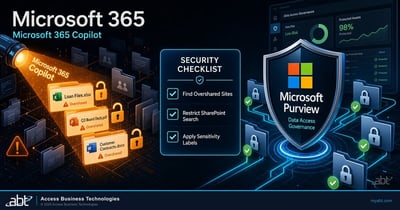
Microsoft 365 Copilot Oversharing: How Financial Institutions Fix Data Access Before Rollout

Microsoft 365 Copilot Oversharing: How Financial Institutions Fix Data Access Before Rollout

Why SharePoint permissions decide what Copilot can surface, and the order to fix them in.

Read the article

SharePoint Server RCE Cluster: What Banks and Credit Unions Must Do

SharePoint Server RCE Cluster: What Banks and Credit Unions Must Do

What the SharePoint Server vulnerabilities mean for institutions still running an on-premises farm.

Read the article

SharePoint classic pages retirement: common questions

From March 1, 2027, SharePoint Online blocks the creation of new classic publishing sites and the activation of publishing features on site collections and subsites, in every tenant. Microsoft enforces the AllowClassicPublishingSiteCreation tenant setting as False, and admins cannot change it. Classic publishing sites that already exist stay in place. Microsoft rolls the change out starting in early March 2027, and timing can differ by cloud, so government tenants should follow the notice in their own Message Center.
On October 1, 2028, existing classic user-created pages become read-only in every tenant. Users can still open and view them, and new editing happens on modern pages, which owners create or convert as needed. Custom scripting enforcement also extends to all tenants: adding or updating custom scripts is disabled, and existing scripts continue to function.
Microsoft lists wiki pages, Web Part pages, blog pages, publishing pages and custom ASPX pages. List and library views and list form pages sit outside the read-only change, and custom scripts in them remain subject to the scripting restrictions.
Microsoft says classic content stays in place and classic pages remain viewable after they become read-only. Existing classic sites remain. The change stops new creation and editing, so the work for an institution is choosing which pages to modernize before staff need to edit them again.
Microsoft lists ten: Publishing Portal (BLANKINTERNETCONTAINER#0), Publishing Site (CMSPUBLISHING#0), Publishing Site Blank (BLANKINTERNET#0), Enterprise Wiki (ENTERWIKI#0), Enterprise Search Center (SRCHCEN#0), Site Directory (SPSSITES#0), News Home Site (SPSNHOME#0), Product Catalog (PRODUCTCATALOG#0), Report Center (SPSREPORTCENTER#0) and Topic Area Template (SPSTOPIC#0).
Yes, for publishing. On March 1, 2027, every tenant loses the ability to create classic publishing sites and activate publishing features. The stricter page and script rules on that date apply to tenants created on or after March 1, 2027. Existing tenants reach the page and script rules on October 1, 2028.
Microsoft points to two tools. The Microsoft 365 Assessment Tool, version 1.15.0 or later, scans SharePoint Online for classic page readiness, and version 1.16.0 or later adds an audit usage report that reads 1 to 180 days of activity, 14 by default. Purview Audit also records a SharePoint Classic Activities category with ClassicPageCreated, ClassicPageEdited and ClassicPageViewed events.
For a full-tenant run, Microsoft recommends application authentication with a certificate, using Microsoft Graph Sites.Read.All and SharePoint Sites.Read.All, plus AuditLogsQuery-SharePoint.Read.All for the audit usage report. All of these permissions are read-only. The output contains tenant URLs and user information, so store it like any other sensitive report.
Microsoft asks admins to find provisioning automation and migration plans that create classic publishing sites or activate publishing features, and to update those workflows before March 1, 2027. A site provisioning script, a site template that turns on publishing, or a planned move from SharePoint Server can all depend on classic publishing.
From March 1, 2027, classic publishing sites cannot be migrated as they are from SharePoint Server, according to Microsoft. Classic user-created pages can still be migrated, and they become read-only under the October 1, 2028 change. Microsoft notes that script-based elements might not be preserved.
Microsoft documents PnP PowerShell for transforming classic Wiki and Web Part pages in the Site Pages library. Publishing pages, blog pages, pages outside Site Pages, home pages and SharePoint Server sources each need their own procedure. The PnP tools and the SharePoint Page Migration Agent, which is in preview, come without a Microsoft support SLA, so Microsoft recommends a pilot and modernization in waves.
Classic pages often rely on custom script. In SharePoint Online, a change that allows custom script on a site reverts to Not allowed within 24 hours, and custom script is never allowed on OneDrive. The Custom script allowed sites view in the SharePoint admin center lists the sites where it is on today, and Baseline security mode can block new custom scripts permanently.
With your team, ABT runs the Microsoft 365 Assessment Tool, reads Purview Audit for classic page activity, lists the sites that allow custom script, reviews provisioning and migration scripts for classic publishing, and writes a modernization wave plan with owners and dates. You keep the written findings.

Where the facts on this page come from

Each date, setting and tool above comes from these sources, listed with the claims each one supports.

  • Microsoft 365 Message Center, MC1565964, "Microsoft SharePoint Online: Classic publishing restrictions begin March 1, 2027," published November 23, 2026, in the Microsoft 365 admin center Message Center. Source for the March 1, 2027 block on classic publishing site creation and publishing feature activation, the enforced AllowClassicPublishingSiteCreation setting, the new-tenant rules, the page types in scope, the list and library exclusion, the rollout window and the recommended actions.
  • Microsoft 365 Message Center, MC1464926, "Upcoming changes to classic publishing sites, classic user-created pages and custom scripting in SharePoint Online," published August 31, 2026. Source for the two phases, the ten classic publishing templates, read-only pages staying viewable, existing scripts continuing to function, and the SharePoint Classic Activities audit events.
  • Microsoft Learn, Classic publishing sites, classic user-created pages, and custom scripting changes in SharePoint Online. Source for the phase dates, the clouds in scope, Microsoft's reasons for the change, the quote on AI-powered experiences, the SharePoint Server migration answer and the modernization approach.
  • Microsoft Learn, Microsoft 365 Assessment Tool requirements for classic pages. Source for the tool versions, the 1 to 180 day audit window, authentication and permissions, and the note on sensitive output.
  • Microsoft Learn, Transform classic pages to modern client-side pages. Source for the PnP PowerShell workflow, the page types that need separate procedures, and the support statement.
  • Microsoft Learn, Allow or prevent custom script. Source for the 24-hour revert, OneDrive, the Custom script allowed sites view and Baseline security mode.
  • The order of the six steps, the wave grouping, the places to look first and the six-month retirement guideline are ABT's recommendations; everything else on this list is from Microsoft.

Which classic SharePoint pages does your staff still edit?
Find out before March 2027.

The work starts with a read-only run of the Microsoft 365 Assessment Tool and the audit data behind it. The assessment ends with a written review you keep: the inventory, the custom script sites, the provisioning fixes and the wave plan.

Tell us a little about your environment and we will come back with what we would check first.

Tier 1 Microsoft CSP 750+ financial institutions SOC 2 Type II Attested

What should we look at? Optional.

Classic page inventory
Custom script sites
Provisioning and migration scripts
Intranet modernization plan

Encrypted. Private.

Thank you. That is with us.

An ABT specialist will be in touch shortly. If a particular site, script or deadline is what you are thinking about, say so in your reply and we will start there.

Trusted by 750+ of the Nation's Leading Lenders, Banks & Credit Unions.

TIER 1 MICROSOFT CSP
SOC 2 TYPE II ATTESTED
ZERO TRUST
NIST CSF ALIGNED
FFIEC
GLBA / FTC SAFEGUARDS
NCUA / FDIC
CFPB / GSE AUDIT READY
750+ INSTITUTIONS
SINCE 1999