


Microsoft Purview Audit · Exchange Online PowerShell · Retires October 15, 2027
Search-UnifiedAuditLog retires on October 15, 2027. Move every script and tool that calls it to the Microsoft Graph AuditLogQuery API before then.
Audit log searches answer the questions your team gets every month: who opened a file, who changed a mailbox rule, who signed in from where, and what an examiner wants pulled for a date range. Many institutions run those searches with Search-UnifiedAuditLog, an Exchange Online PowerShell cmdlet, inside scripts, scheduled reports, incident runbooks and the tools vendors run for them. On October 12, 2026, Microsoft announced in Message Center post MC1505599 that the cmdlet retires on October 15, 2027, when its access to the audit log ends, and that the Microsoft Graph AuditLogQuery API is its replacement. For a credit union, bank, or mortgage company, the work is an inventory of every caller, a rebuild against the API, a side-by-side check, and a dated cutover record.
- Search-UnifiedAuditLog keeps working unchanged until October 15, 2027, and Microsoft offers no tenant setting to keep it after that date
- The Microsoft Graph AuditLogQuery API is generally available on Microsoft's global service and exports up to 1 million audit records per query
- Microsoft's action list: find every script, application and workflow that calls the cmdlet, register an app with the right Graph permissions, then update and test each one
The change
What does the Search-UnifiedAuditLog retirement change?
Microsoft announced both halves in one Message Center post, MC1505599, published October 12, 2026: the API is generally available, and the cmdlet retires a year later. Here is what it says, and who it reaches.
The change in brief
- What
- The Search-UnifiedAuditLog cmdlet in Exchange Online PowerShell retires, and the Microsoft Graph AuditLogQuery API becomes the way to search the Microsoft Purview audit log from code. Microsoft says its future investment in audit search goes to the API.
- When
- The API's worldwide general availability began in early October 2026 on the global service; US Government and 21Vianet clouds are listed as not supported. The cmdlet works unchanged until October 15, 2027; on that date its access to the audit log ends.
- Who
- Any organization that uses the cmdlet for audit data retrieval, reporting, investigations, compliance workflows or automation, including tools a vendor runs against your tenant. Microsoft says organizations that do not use it have no action to take for this retirement.
- Owner
- Whoever owns each script or tool: your Microsoft 365 administrators, your security team, your reporting staff, and any vendor that searches your audit log, together with the administrator who registers the app in Microsoft Entra and grants its Graph permission.
- Action
- Find every caller, grant each replacement the narrowest audit permission, rebuild and test each search against the API, run old and new side by side, and record the cutover.
Inventory
List every script, scheduled task, runbook, report and vendor tool that runs Search-UnifiedAuditLog, including copies of Microsoft's own sample script.
Rebuild and test
Register an app, grant the AuditLogsQuery permission for the services it searches, and rebuild each search as a submitted query. Run both over the same window and explain any difference before cutover.
The cmdlet retires
Search-UnifiedAuditLog stops returning audit records on this date. Microsoft offers no tenant setting to prevent the retirement.
Gaps until rebuilt
Microsoft warns that organizations that have not migrated may experience disruptions to audit retrieval processes that still depend on the cmdlet.
"Search-UnifiedAuditLog will continue to function unchanged until October 15, 2027. On October 15, 2027, Search-UnifiedAuditLog will no longer provide access to the audit log. There is no tenant setting to prevent the retirement."
Microsoft 365 Message Center, MC1505599, published October 12, 2026Search-UnifiedAuditLog runs inside an Exchange Online PowerShell session and returns pages of data from repeated runs of the same command. Its ResultSize tops out at 5,000 results per call. With the SessionCommand parameter set to ReturnLargeSet, a script can page through a maximum of 50,000 results for one search; with ReturnNextPreviewPage, which returns results sorted by date, the maximum is 5,000 records. Microsoft's own Learn article, Use a PowerShell script to search the audit log, publishes a script built on the cmdlet that pages through up to 50,000 audit records for each search it runs and exports them to a CSV file. Microsoft adds that a run returning 50,000 records likely missed activity in the date range and should be split into smaller ranges. Copies of that script in shared drives and scheduled tasks are callers too.
The AuditLogQuery API works as a submitted job. You send a POST request to /security/auditLog/queries with a start and end time and the filters you need: record types, keywords, services, operations, user principal names, IP addresses, object IDs or administrative units. Microsoft runs the search, you check the query until its status reads succeeded, and then you read the results from its records collection. Microsoft says the API "supports exporting up to 1 million audit records per query."
The API also brings limits set per tenant. Microsoft's post gives each tenant a baseline of 200 search submissions per rolling 24-hour period and up to 50 searches queued or running at one time, with higher allocations possible for larger tenants based on eligible license counts. When a limit is reached, the API returns an HTTP 429 Too Many Requests response with retry guidance. A script that loops through many small searches today may need to combine them into fewer, wider queries.
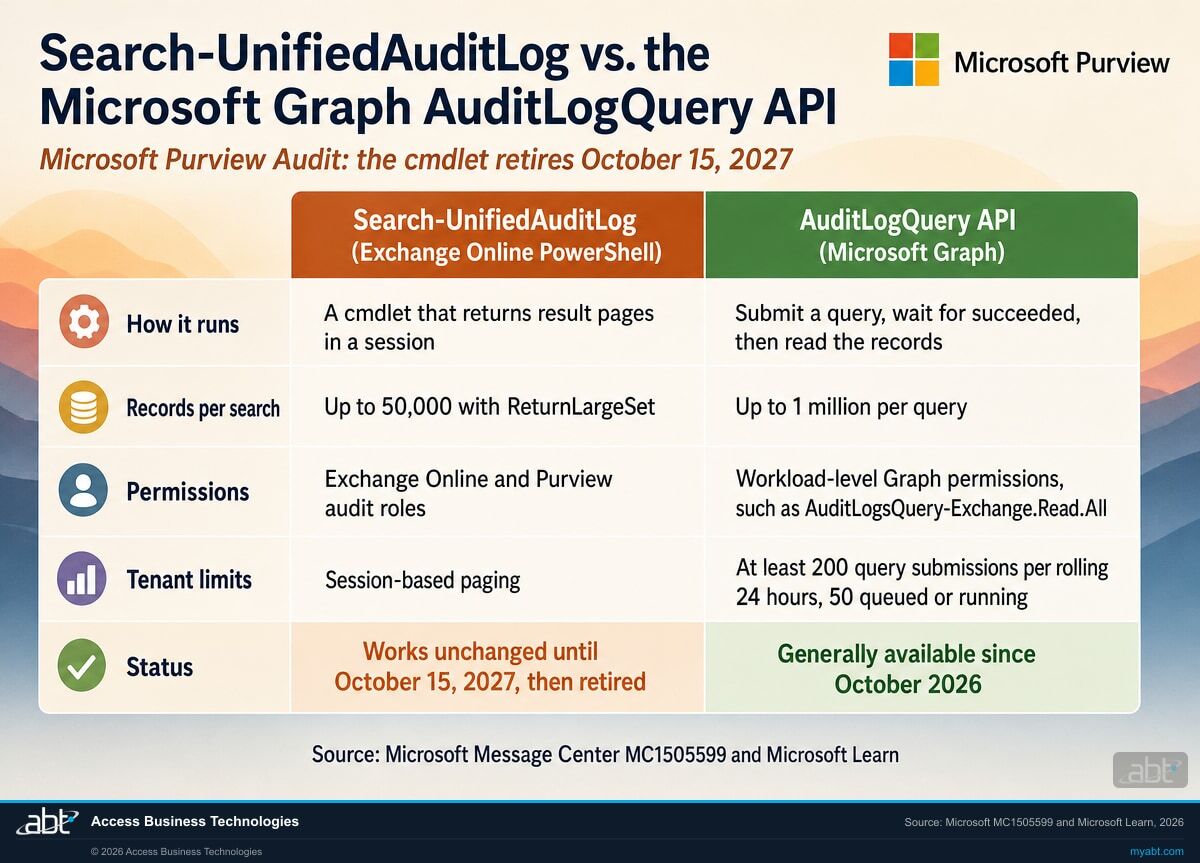
Side by side
How does Search-UnifiedAuditLog compare to the AuditLogQuery API?
The audit log is the same. What changes is how a script asks for it, who is allowed to ask, and how much comes back.
| Question | Search-UnifiedAuditLog (Exchange Online PowerShell) | AuditLogQuery API (Microsoft Graph) |
|---|---|---|
| How a search runs | A cmdlet in a PowerShell session; repeated runs with the same SessionId return the next page | POST a query, check its status until succeeded, then read its records |
| Records per search | A maximum of 50,000 with ReturnLargeSet; 5,000 with ReturnNextPreviewPage | Up to 1 million per query |
| Filters | StartDate, EndDate, RecordType, Operations, UserIds, IPAddresses, ObjectIds, SiteIds, FreeText | Start and end time, record types, keywords, services, operations, user principal names, IP addresses, object IDs, administrative units |
| Who can run it | A user with the Audit Logs or View-Only Audit Logs role in the Exchange admin center | A user or app granted an AuditLogsQuery permission, one per Microsoft 365 service or AuditLogsQuery.Read.All for all of them |
| Paging and quotas | Up to 5,000 results per call, paged through repeated runs in one session | Baseline of 200 submissions per rolling 24 hours and 50 queued or running; HTTP 429 when reached |
| Status | Works unchanged until October 15, 2027, then retired | Generally available on the global service since early October 2026; where Microsoft's audit search work goes next |
What happens to a search nobody moved
Microsoft's post says organizations that do not complete the migration before October 15, 2027 "may experience disruptions to audit retrieval processes that depend on Search-UnifiedAuditLog." The scheduled jobs are the ones to watch. If a monthly access report or an alert that depends on the cmdlet stops producing data, the gap can read like a quiet month until someone checks the job.
One more check belongs on the list. Microsoft Learn's support table for creating an audit log query lists the global service as supported and US Government L4, US Government L5 (DOD) and China operated by 21Vianet as not supported, as read on October 27, 2026. A tenant in one of those clouds should confirm its path with Microsoft before planning the move.
See the audit searches that depend on Search-UnifiedAuditLog, and what each one feeds
ABT works with your team to list the scripts, reports, runbooks and tools that call the cmdlet, maps what each one feeds, and leaves you a plan to move each one to the AuditLogQuery API, as part of a free security assessment.
Request the free assessmentThe work
How do you move off Search-UnifiedAuditLog before October 15, 2027?
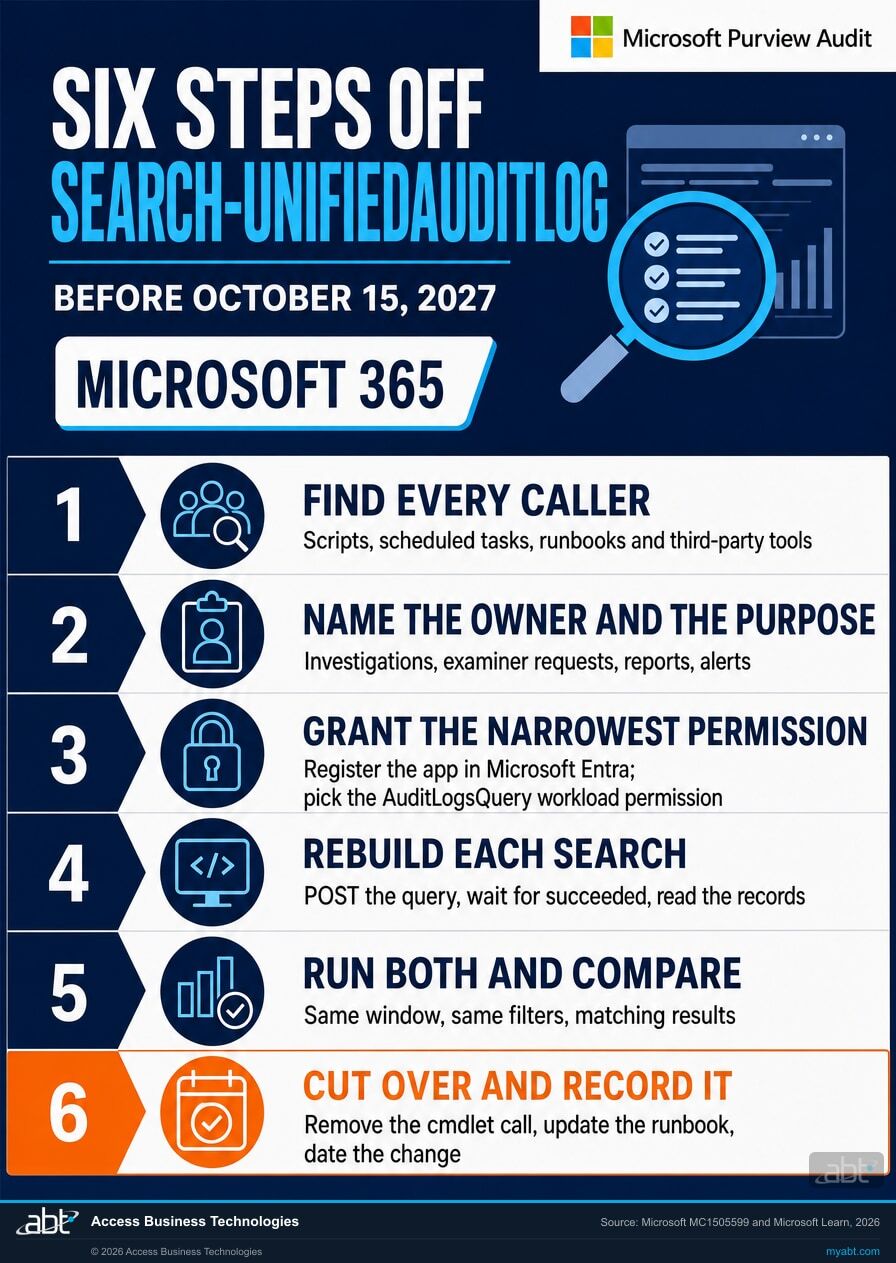
Six steps, in the order the decisions depend on each other. Steps 1 and 2 find every caller and what it is for. Steps 3 and 4 build the replacement. Steps 5 and 6 prove it and record it.
Find every caller
Microsoft's first action item is to "Identify scripts, applications, automation workflows, and operational processes that currently use Search-UnifiedAuditLog." Search your script repositories, shared drives, Windows Task Scheduler jobs and automation runbooks for the text Search-UnifiedAuditLog, and include copies of Microsoft's sample audit search script. Then ask each vendor or tool that pulls your audit log, such as a SIEM connector, a reporting product or a managed service, how it does so and when it moves.
Name the owner and the purpose
For each caller, write down what it is for (an investigation step, an examiner or auditor request, a monthly access report, an alert, a SIEM feed), who owns it, how often it runs, and which record types and date ranges it reads. That list decides which Graph permission each replacement needs and how many queries your tenant will submit in a day against the 200-submission baseline.
Grant the narrowest permission
Microsoft's second action item is to "Register your application with Microsoft Graph and add the required Microsoft Graph permissions." Audit query permissions are classified at a Microsoft 365 service level: AuditLogsQuery-Entra.Read.All, -Exchange, -SharePoint, -OneDrive, -Endpoint and -CRM, plus AuditLogsQuery.Read.All for every service, each in delegated and application form. Grant the ones for the services each script searches.
Rebuild each search
Write each search as a query with a start and end time and the filters it needs, from the API's list: record types, keywords, services, operations, user principal names, IP addresses, object IDs and administrative units. Check the query until its status reads succeeded before reading the records, and handle an HTTP 429 response by waiting and retrying. We ran the read side of this against our own tenant before publishing: listing audit log queries through Microsoft Graph returned successfully.
Run both and compare
Microsoft's third action item is to "Update and test existing integrations to use the AuditLogQuery API." Until the cutover, run the old search and the new query over the same window with the same filters, compare the record counts and a sample of records, and explain each difference. Keep both outputs with the date you ran them.
Cut over and record it
Remove the cmdlet call, update the runbook that describes the search, and record the caller, its replacement, who approved it and the date. Then search again for the text Search-UnifiedAuditLog. The result you want before October 15, 2027 is zero callers left, with a dated record for each one that moved. Our Microsoft 365 incident response plan for financial institutions shows where those searches sit in an investigation.
Before you rebuild a search
What else should you know before you rebuild an audit search?
Six facts from Microsoft's own documentation that shape the rebuild in your tenant.
The roles today
Microsoft Learn says audit cmdlets need the Audit Logs or View-Only Audit Logs role in the Exchange admin center, and searching in the Microsoft Purview portal needs the same roles in the Purview portal. The API uses Microsoft Graph permissions instead.
One permission per service
Audit query permissions are classified at a Microsoft 365 service level, so an app that only reads one service's records can be granted that service's permission. AuditLogsQuery.Read.All covers every service.
Limits are per tenant
Microsoft Learn says tenants with more eligible licenses can receive higher limits and that the calculation used to set a tenant's allocation isn't published. Plan around the baseline of 200 submissions per rolling 24 hours and 50 queued or running.
Retention sets the window
Audit (Standard) keeps most audit records for 180 days by default, and custom audit retention policies can change that. Check your retention settings before you set the date range of a rebuilt search.
Check your cloud
Microsoft Learn lists the API as supported on the global service and not supported on US Government L4, US Government L5 (DOD) and China operated by 21Vianet, as read on October 27, 2026.
Where the work is going
Microsoft says its future investment in audit search will focus on the AuditLogQuery API, so a search rebuilt now sits on the path Microsoft is developing.
For financial institutions
Why does this matter at a credit union, bank, or mortgage company?
Because audit searches are how your team answers questions about what happened in Microsoft 365, and the people asking do not wait.
Keep the answers coming. A member or borrower says someone changed their account details, a loan officer asks who edited a shared file, an auditor wants a quarter of sign-in activity. Audit searches answer each of those when the script works. A rebuilt search keeps answering after October 15, 2027, and one API query can export up to 1 million records, which covers wide date ranges in a single request.
Protect investigations. The audit log is where an investigator separates an attacker's actions from a user's own, and when an attacker holds a stolen session those actions look like the user's. An incident runbook whose first search fails costs time at the moment it matters most. Rebuilding it now, with a permission scoped to the services it reads, keeps that step ready. Our token replay response guide shows what that investigation looks like.
Keep the record. The FTC Safeguards Rule, at 16 CFR 314.4(c)(8), requires controls designed to monitor and log the activity of authorized users and detect unauthorized access or use of, or tampering with, customer information. For a mortgage company under the Rule, an audit search process that keeps running through the change, plus a dated migration record with test results, shows the review side of that control kept running. The same record answers anyone who asks how your audit searches kept working through the change.
Stolen sessions show up in the audit log
In June, our channel covered a phishing kit that steals Microsoft 365 accounts without ever seeing a password. The Short's description names the reason the audit log matters: "every action looks like normal user activity in the audit log."
Finding that activity takes a working audit search. The scripts and runbooks your team uses for it are the ones to move first, so they are ready on the day an investigation needs them.
How ABT helps
A free security assessment
ABT is a Tier 1 Microsoft Cloud Solution Provider serving more than 750 financial institutions, and it manages Microsoft 365 tenants for credit unions, banks, and mortgage companies. Audit searches are how activity in those tenants gets reviewed, so the assessment starts with how yours are run.
With your team, we list the audit searches that depend on Search-UnifiedAuditLog, map what each one feeds, and plan its move to the AuditLogQuery API
The assessment is free and ends with written findings you keep. We work through it with an administrator on your team, and your team decides what changes and who makes each change.
- The caller inventory. The scripts, scheduled tasks, runbooks, reports and vendor tools that call the cmdlet, found with your team.
- The purpose map. What each one feeds: investigations, examiner and auditor requests, reports, alerts or a SIEM.
- The permission plan. The AuditLogsQuery permission each replacement needs, scoped to the services it reads.
- The query plan. The filters each search needs as an AuditLogQuery request, and how the full set fits your tenant's daily submission limits.
- The retention check. Your audit retention settings against the date ranges your searches need.
- The record. A dated migration plan for your change record and your information security program.
ABT also operates M365 Guardian, its managed security service for credit unions, banks, and mortgage companies. Learn about M365 Guardian
Related reading
If this opened a bigger question
An audit search change tends to surface the questions around it: how long records are kept, how an investigation runs, and what a stolen session looks like.

Microsoft 365 Audit Log Retention for Financial Institutions
How long Microsoft Purview Audit and Entra ID keep records under each license, and how to extend it.
Read the article
Microsoft 365 Incident Response Plan for Financial Institutions
The elements of a written incident response plan and how Microsoft 365 runs each one.
Read the article
Token Replay Attack in Microsoft 365: Response Guide
What banks, credit unions, and lenders should check, contain, and harden in Entra ID after a token replay campaign.
Read the articleAnswered
The Search-UnifiedAuditLog retirement, answered
Verify it yourself
Where the facts on this page come from
Every Microsoft date, limit, permission, role and quotation above was read from the sources listed here on October 27, 2026.
- Microsoft 365 Message Center, MC1505599, "Microsoft Purview Audit: AuditLogQuery API generally available and Search-UnifiedAuditLog retiring," published October 12, 2026, read through the public Message Center archive. Source for the retirement date, the unchanged function until then, the absence of a tenant setting, general availability, the 1 million record export, the tenant limits and HTTP 429, the three action items, and who is affected.
- Microsoft Learn, auditLogQuery resource type and Create auditLogQuery, retrieved October 27, 2026. Source for the query filters, the status values, the service-level permissions and the national cloud support table.
- Microsoft Learn, Get auditLogQuery and List auditLogRecords, retrieved October 27, 2026. Source for checking a query's status and reading its records.
- Microsoft Learn, Microsoft Graph service-specific throttling limits, retrieved October 27, 2026. Source for the audit log query service limits, higher allocations and the unpublished calculation.
- Microsoft Learn, Search-UnifiedAuditLog cmdlet reference, retrieved October 27, 2026. Source for the parameters, the 5,000 ResultSize maximum, the 50,000 ReturnLargeSet maximum and the 5,000 ReturnNextPreviewPage maximum.
- Microsoft Learn, Search the audit log and Use a PowerShell script to search the audit log, retrieved October 27, 2026. Source for the Audit Logs and View-Only Audit Logs roles and for Microsoft's sample script.
- Microsoft Learn, Manage audit log retention policies, retrieved October 27, 2026. Source for the 180-day Audit (Standard) default.
- Electronic Code of Federal Regulations, 16 CFR 314.4, retrieved October 27, 2026. Source for paragraph (c)(8). 16 CFR 314.6 lists the exempt paragraphs, (b)(1), (d)(2), (h) and (i), and 16 CFR 314.1 sets the Rule's scope, both retrieved October 27, 2026.
- The Microsoft Graph request in step 4, listing audit log queries, was run read-only against ABT's own tenant on October 27, 2026 and returned successfully.
Search-UnifiedAuditLog retires October 15, 2027.
Move every script that calls it before then.
The work starts with the scripts, reports, runbooks and tools that search your Microsoft Purview audit log. When it is done, you know which ones called the cmdlet, what each one fed, what replaced it, and where the decision is recorded.
Tell us a little about your environment and we will come back with what we would check first.
What should we look at? Optional.
Encrypted. Private.
Thank you. That is with us.
An ABT specialist will be in touch shortly. If a particular script, report or tool is the one you are thinking about, say so in your reply and we will start there.
