



SharePoint Storage Quota Enforcement May 2026: FI Verification Guide
How the earlier license-aligned quota enforcement worked and how to verify a tenant against it.
Read the articleMicrosoft OneDrive for Business · Microsoft 365
Microsoft is fixing a licensing bug in OneDrive for Business. Users who hold a small storage plan, such as the 2 GB plan in Microsoft 365 F3, together with an add-on such as Microsoft 365 Copilot can show a 1 TB quota today. From early January 2027 their quota drops to what the storage plan allows, and anyone storing more than that goes read-only. This page shows who is affected, what each plan allows, and six steps a credit union, bank, or mortgage company can take before the rollout.
The change
OneDrive will set each affected user's quota from their storage plan, which can be 2 GB, 5 GB, 10 GB or 100 GB in place of the 1 TB some users show today. Users already storing more than the corrected quota go read-only until usage drops or the quota rises.
The change in brief
Now
Run the PnP over-quota report and list every user holding a plan from both lists.
December 2026
License with more storage, a OneDrive Extra Storage pack, or a cleanup plan.
Early January 2027
Affected quotas start to drop to the storage plan's amount.
Late January 2027
Any user still over the corrected quota has a read-only OneDrive.
"OneDrive will instead apply the quota associated with the user's storage plan"
Microsoft 365 Message Center, MC1567261
Microsoft calls the change a bug fix. Some storage plans, combined with some add-on plans that carry no OneDrive storage of their own, made OneDrive hand out its standard 1 TB quota. The fix takes that away and applies the quota the storage plan actually grants. Microsoft says the change "improves license and storage entitlement accuracy."
For a financial institution, the combination most worth checking is a frontline license with an add-on. Microsoft 365 F1 and F3 carry the 2 GB SharePoint Kiosk plan, and Microsoft lists F1, F3 and Microsoft Teams Essentials among the plans eligible for a Microsoft 365 Copilot add-on. A branch or operations team given Copilot or Viva Connections Premium for the intranet may be holding a 1 TB quota that becomes 2 GB or 10 GB in January.
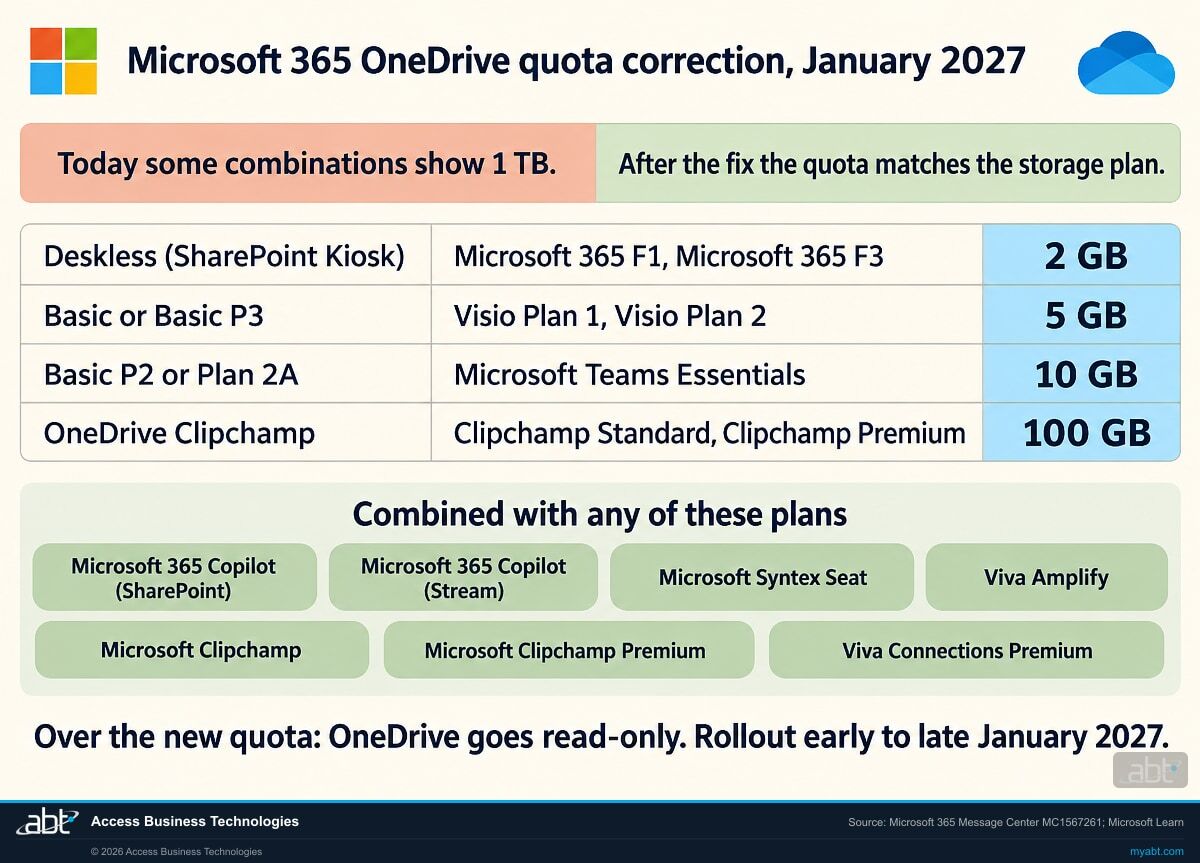
Plan by plan
Read across each row: the storage plan named in MC1567261, products that include it, the quota some users show today, and the quota after the fix.
| Storage plan | Example products that include it | With a listed add-on today | After the fix | What to check |
|---|---|---|---|---|
| Deskless | Microsoft 365 F1, Microsoft 365 F3 (SharePoint Kiosk) | Can show 1 TB | 2 GB | Frontline staff given Copilot or Viva add-ons |
| Basic or Basic P3 | Visio Plan 1, Visio Plan 2 (OneDrive for Business Basic) | Can show 1 TB | 5 GB | Users whose only OneDrive comes from Visio |
| Basic P2 or Plan 2A | Microsoft Teams Essentials (OneDrive for Business Basic 2) | Can show 1 TB | 10 GB | Teams Essentials users with Copilot |
| OneDrive Clipchamp | Clipchamp Standard, Clipchamp Premium | Can show 1 TB | 100 GB | Clipchamp Standard and Premium carry both this plan and a Microsoft Clipchamp plan from the add-on list |
These plans carry no OneDrive storage of their own. Combined with one of the storage plans above, each can currently produce the incorrect 1 TB quota: M365 Copilot SharePoint, Microsoft 365 Copilot Stream, Microsoft Syntex Seat, Viva Amplify, Microsoft Clipchamp, Microsoft Clipchamp Premium and Viva Connections Premium.
The first two are service plans inside the Microsoft 365 Copilot license. Microsoft's licensing reference also lists the Microsoft Clipchamp plan inside the Clipchamp Standard and Premium licenses, next to the OneDrive Clipchamp storage plan, so a Clipchamp license on its own is worth checking. Look at the service plans on each user's licenses, since the product name alone can hide them. Microsoft's licensing service plan reference maps every product to its plans.
ABT runs the read-only report with your team, matches every user to Microsoft's two lists, and recommends a fix per person. The licensing assessment is free.
Request the free assessmentSix steps
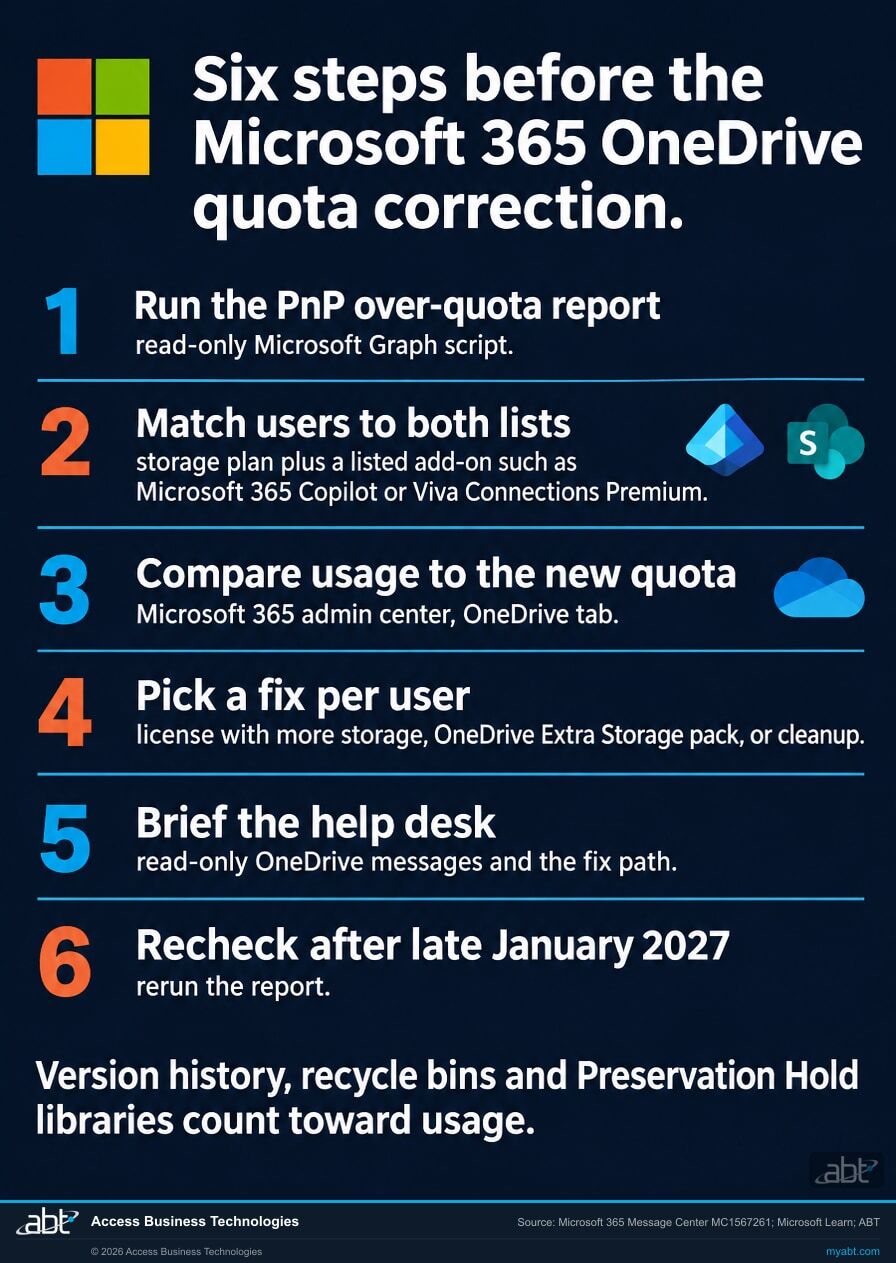
Run the over-quota report, match users to both lists, compare usage with the new quota, pick a fix per user, brief the help desk, then recheck after the rollout. The steps below follow that order.
Microsoft's notice links the PnP sample "Identify OneDrive Users Over License-Based Storage Quota". It is a read-only Microsoft Graph script that runs on Windows PowerShell 5.1 or PowerShell 7. The fast mode reads the usage reports, which lag 24 to 48 hours and need report anonymization off; the slower mode checks each user live.
For each user, note the storage plan (Deskless, Basic or Basic P3, Basic P2 or Plan 2A, or OneDrive Clipchamp) and any listed add-on, such as Microsoft 365 Copilot, Microsoft Syntex Seat or Viva Connections Premium. A user with one of each is a user to check. This license inventory finds everyone whose quota can drop; the report in step 1 finds the people already storing more than the lower quota.
Open the OneDrive tab for each matched user and compare storage used with 2 GB, 5 GB, 10 GB or 100 GB. Users under the corrected quota need no change. Users over it go read-only when the fix reaches the tenant.
Assign a license with more OneDrive storage, add OneDrive Extra Storage for that user where their license allows it, or help the user reduce content. Version history, recycle bins and Preservation Hold libraries count toward usage, so bring in the records owner before anyone deletes content a retention policy covers.
Microsoft asks admins to tell the help desk and SharePoint admins about the change. Give them the two messages users see, "This site has exceeded its maximum file storage limit" and "Unable to create new file. Site quota is full.", and the fix path for each user on your list.
Rerun the report after late January 2027. After any license or storage change, allow time for SharePoint Online to re-evaluate the site, then confirm the user can save again.
Where to look first
The people licensed on smaller plans who later received an add-on. These six groups are worth checking first.
Tellers, member service and branch staff are often licensed on Microsoft 365 F1 or F3. Microsoft lists both as eligible for a Microsoft 365 Copilot add-on, and the combination is on Microsoft's list.
Viva Connections Premium and Viva Amplify are on the add-on list. Institutions that added them for the whole staff, frontline included, should check their F1 and F3 users.
Microsoft Teams Essentials carries the 10 GB Basic 2 plan. A subsidiary, affiliate or small office on Teams Essentials with Copilot added can show 1 TB today.
A user whose only OneDrive storage comes from Visio Plan 1 or 2 gets 5 GB, and from Clipchamp, 100 GB. Contractors and marketing staff sometimes sit here.
Microsoft Syntex Seat is on the list. Teams given a Syntex seat for document processing, such as loan operations, are worth a look if their base license is a small plan.
The PnP community sample also flags unlicensed users whose OneDrive still holds data, such as accounts kept after offboarding. Expect them in the results and route them to whoever owns retention.
Why it matters
Productivity. A loan processor or branch manager who opens OneDrive in late January and cannot save a file loses time, and the help desk takes the call. Finding those users in December means the license or storage change is done before anyone notices.
Security. A person who cannot save to OneDrive will look for somewhere else to put the file. That place may sit outside the sensitivity labels, data loss prevention and retention policies your institution set up for Microsoft 365. Keeping OneDrive writable keeps the work inside those controls.
Governance. Preservation Hold libraries count toward usage, so a user under a retention policy may be over quota through no choice of their own, and deleting files may not free the space. A written list of affected users, the fix chosen for each and the date it was made is easy to show to an IT steering committee, an auditor or an examiner.
Watch
A license change can change a user's OneDrive quota with no change on the user's screen until the day saving stops. In this short video, ABT makes the case for checking configuration between exams in place of once a year. A license-to-quota check is one place to start.
Free licensing assessment
ABT is a Tier 1 Microsoft Cloud Solution Provider serving more than 750 financial institutions. It manages Microsoft 365 tenants and hosts Azure environments for credit unions, banks, and mortgage companies.
We work through your tenant with your team and hand back the list of users to check, a fix for each, and the evidence behind it.
ABT also operates M365 Guardian, its managed security service for credit unions, banks, and mortgage companies. Learn about M365 Guardian
Keep reading
How the earlier license-aligned quota enforcement worked and how to verify a tenant against it.
Read the article
What changed when OneDrive file exclusions became self-service, and what to verify in your tenant.
Read the article
How to find unused seats and right-size Microsoft 365 plans at a financial institution.
Read the articleFAQ
Sources
Each date, plan, quota and tool above comes from these sources, listed with the claims each one supports.
The work starts with a read-only run of the over-quota report and the license data behind it. The assessment ends with a written review you keep: the users to check, their usage against the new quota, and a fix for each.
Tell us a little about your environment and we will come back with what we would check first.
What should we look at? Optional.
Encrypted. Private.
An ABT specialist will be in touch shortly. If a particular team, license or deadline is what you are thinking about, say so in your reply and we will start there.
