


Windows 11 and Windows Server 2025 · October 13, 2026 security update · BlockNtlmv1SSO
Since the October 13 Windows update, MS-CHAPv2 Wi-Fi and VPN sign-in can stop connecting on its own. Keep staff connected with certificate sign-in, and keep Audit mode to a dated exception.
Starting with the October 13, 2026 security update, Windows 11, versions 26H2, 26H1, 25H2 and 24H2, and Windows Server 2025 use Enforce mode for NTLMv1-derived single sign-on on any device where Credential Guard is off and the BlockNtlmv1SSO registry value is not set. Microsoft says Wi-Fi, Ethernet and VPN connections that use MS-CHAPv2 for single sign-on, including PEAP-MSCHAPv2 and EAP-MSCHAPv2, might then fail to connect automatically. Typing the password by hand can still work, and Windows cannot save it for next time. Microsoft lists the change under "Take action" in the Windows message center and names the lasting fix in one sentence: move those connections to certificate-based sign-in, PEAP-TLS or EAP-TLS. For a credit union, bank, or mortgage company, the work is a list of devices, the network profiles behind them, and a certificate plan.
- October 13, 2026 (KB5127648 for Windows 11, versions 26H2, 25H2 and 24H2; KB5127646 for version 26H1; KB5126646 for Windows Server 2025): Enforce becomes the internal default where BlockNtlmv1SSO is not set and Credential Guard is off
- Wi-Fi, Ethernet and VPN that use PEAP-MSCHAPv2 or EAP-MSCHAPv2 single sign-on can fail to connect automatically, and Windows logs Error Event ID 4025 in Microsoft-Windows-NTLM/Operational
- The fix Microsoft names: certificate-based sign-in with PEAP-TLS or EAP-TLS, and Credential Guard on every device that meets its requirements
The change
What changed in the October 13, 2026 Windows update, and which devices does it reach?
Microsoft changed a default. The BlockNtlmv1SSO setting has existed since the August 2025 updates, running in Audit mode. From the October 13, 2026 security update, a device with no value set behaves as if the value were 1, Enforce. Whether a given laptop is affected comes down to two facts about that device and one about the network it joins.
The change in brief
- What
- Windows updates released on and after October 13, 2026 change the internal default behavior when the BlockNtlmv1SSO registry value is not set: Windows uses Enforce mode (1) in place of Audit mode (0), and requests to use NTLMv1-derived credentials for single sign-on are blocked. The update does not create or modify the registry value, which stays absent.
- When
- The October 13, 2026 security update: KB5127648 for Windows 11, versions 26H2, 25H2 and 24H2 (OS Builds 26300.9711, 26200.9711 and 26100.9711), KB5127646 for Windows 11, version 26H1 (OS Build 28000.3231), and KB5126646 for Windows Server 2025, and every update after them.
- Who
- Devices running Windows 11, versions 26H2, 26H1, 25H2 and 24H2, or Windows Server 2025, where Credential Guard is disabled and BlockNtlmv1SSO is not set. The people who notice are the ones whose Wi-Fi, wired or VPN connection uses MS-CHAPv2 single sign-on, PEAP-MSCHAPv2 or EAP-MSCHAPv2, in a domain-joined environment.
- Owner
- Whoever runs your network access (the wireless controllers, the NPS or other RADIUS server, the VPN), together with whoever manages your Windows devices, and your information security officer for any exception.
- Action
- Read the NTLM log for Event ID 4024 and 4025, map each network profile to its authentication method, issue certificates and move those profiles to PEAP-TLS or EAP-TLS, turn on Credential Guard where the device meets its requirements, and keep Audit mode to a documented, dated exception.
Audit mode arrives
Microsoft's timeline: auditing logs for NTLMv1 usage enabled on Windows 11, version 24H2 and newer clients. Single sign-on kept working, and Windows logged Warning Event ID 4024 each time.
Windows Server 2025 follows
The same timeline: rollout of changes to Windows Server 2025 begins, still in Audit mode. Microsoft explains the gap between clients and servers as its gradual rollout method.
Enforce becomes the default
Where the value is absent and Credential Guard is off, Windows uses Enforce mode (1) in place of Audit mode (0), logs Error Event ID 4025, and blocks the single sign-on request.
Network NTLM off by default
Microsoft's Windows IT Pro post of January 29, 2026 sets phase 3 of its NTLM roadmap: in the next major Windows Server release and associated client releases, network NTLM will be disabled by default.
"Migrate Wi-Fi and VPN connections from MS-CHAPv2-based authentication, such as PEAP-MSCHAPv2 and EAP-MSCHAPv2, to certificate-based authentication, such as PEAP-TLS or EAP-TLS. MS-CHAPv2-based endpoints are subject to risks similar to those affecting NTLMv1."
Windows message center, Take action: NTLMv1 hardening changes might affect network connections on devices without Credential Guard, and Microsoft 365 Message Center post MC1508562, October 2026Microsoft removed the NTLMv1 protocol from Windows 11, version 24H2 and Windows Server 2025. Its support article explains what was left behind: "remnants of NTLMv1 cryptography are still present in some scenarios, such as when using MS-CHAPv2-based connections, including PEAP-MSCHAPv2, and EAP-MSCHAPv2, in a domain-joined environment." Those are the connections that let a domain-joined laptop join the office Wi-Fi, a wired 802.1X port or the VPN with the user's Windows credentials, automatically. The BlockNtlmv1SSO setting decides whether Windows still produces the NTLMv1-derived credential for that single sign-on. In Audit mode it does, and logs a warning. In Enforce mode it refuses, and logs an error.
Message Center post MC1508562 describes what staff see: those connections "might consequently fail to connect automatically," and while "manually entering credentials can continue to work," the credentials "cannot be saved for future use." The support article's FAQ puts the same point plainly: "Manually entering credentials will continue to work in Enforce mode." So the symptom is a network or VPN that asks for a password where it used to connect on its own, on the subset of devices the change reaches. Microsoft's article recommends using the Audit mode events "to identify authentication flows that depend on NTLMv1-derived credentials," which makes any Event ID 4024 your devices logged before October 13 the clearest list of what Enforce now stops.
The subset is the devices where Credential Guard is off. Microsoft: "if Windows Credential Guard is enabled on the device, these changes do not take effect," because Credential Guard already blocks NTLMv1 single sign-on on its own terms. Credential Guard has been on by default since Windows 11, version 22H2 on domain-joined, non-domain-controller devices that meet its hardware requirements and hold an eligible license, so the devices the October change reaches tend to be the ones outside that group: an edition or license that excludes it, hardware that falls short, or a device where someone switched it off. Version matters as well; our page on the Windows 11 24H2 end-of-support dates covers which versions a fleet should be running.
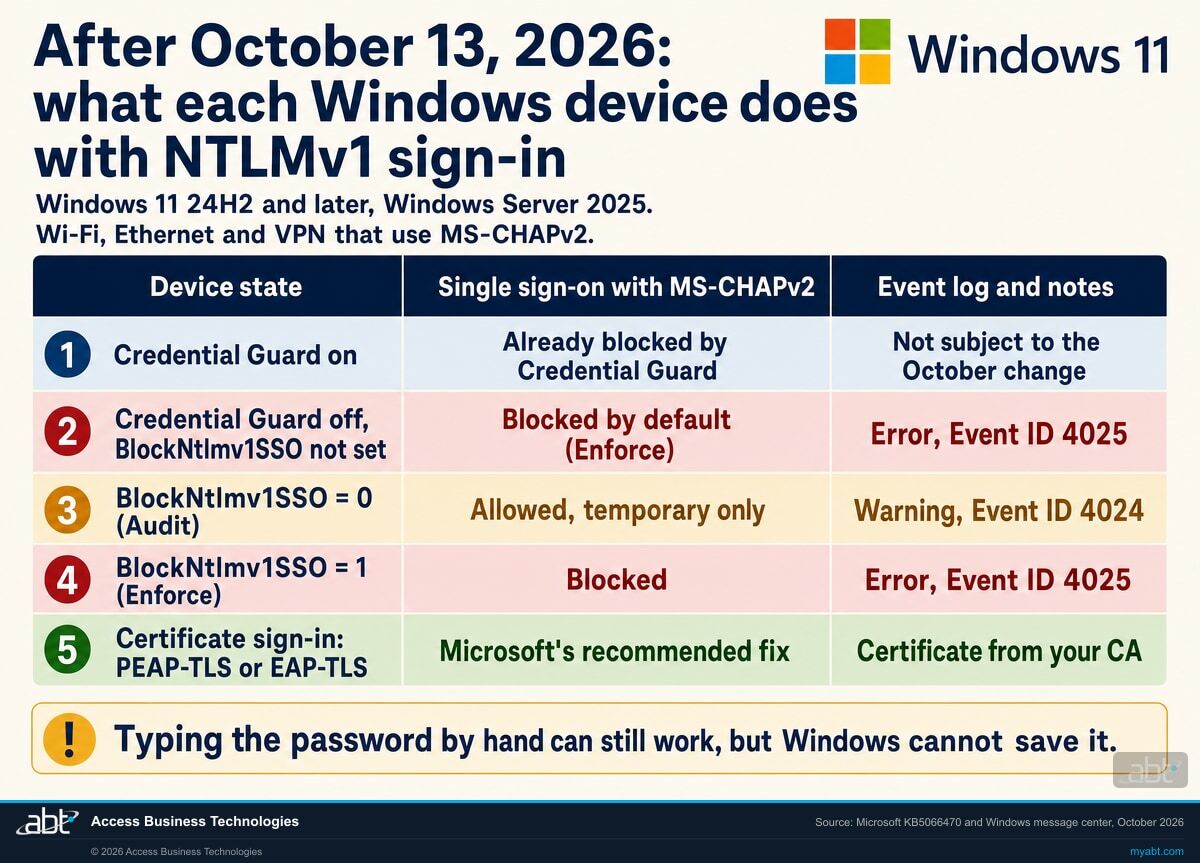
The device states
What does each Windows device do with MS-CHAPv2 single sign-on after October 13?
Read the first four rows once per device group: the first two depend on Credential Guard, and the registry rows apply to devices with Credential Guard off, because Credential Guard blocks this sign-in whatever the value says. The last row is where every device should end up, with Credential Guard on or off.
| Device state | MS-CHAPv2 single sign-on | What Windows records | Microsoft's guidance | What to weigh |
|---|---|---|---|---|
| Credential Guard on | Already blocked by Credential Guard, which blocks MS-CHAP and NTLMv1 single sign-on and leaves typed credentials working. The October change does not take effect here | NTLM/Operational: Event ID 4013 (Warning) or 4014 (Error) | "Microsoft strongly recommends its deployment and enablement if Credential Guard's requirements are met" | The strongest state for the credential. These devices already need certificate sign-in to connect automatically |
| Credential Guard off, BlockNtlmv1SSO not set | Blocked by default since the October 13, 2026 update (Enforce) | NTLM/Operational: Event ID 4025 (Error) | Migrate the connection to PEAP-TLS or EAP-TLS; enable Credential Guard where requirements are met | The state the update created. Staff are asked for a password each time and Windows cannot save it |
| Credential Guard off, BlockNtlmv1SSO = 0 (Audit) | Allowed and logged, as before October 13 | NTLM/Operational: Event ID 4024 (Warning) | "a scoped, temporary security exception"; document it, limit its duration, monitor Event ID 4024, plan the return to Enforce | Restores automatic connection today and keeps the exposure Microsoft describes, so it needs an owner and an end date |
| Credential Guard off, BlockNtlmv1SSO = 1 (Enforce) | Blocked | NTLM/Operational: Event ID 4025 (Error) | The value Microsoft's article defines as Enforce mode; the same behavior the absent value now produces | Setting it explicitly records the decision in your own configuration, independent of the default |
| Certificate sign-in: PEAP-TLS or EAP-TLS, Credential Guard on or off | Connects with a device or user certificate; Microsoft: "Credential Guard doesn't block certificate-based authentication" | Outside the NTLMv1 path | The recommended action in the Windows message center, MC1508562 and the Credential Guard documentation | Needs a certificate authority, a trusted root and client certificates on every device, and a server certificate on NPS |
The old quick fix now points the wrong way
For years, Microsoft's Credential Guard documentation has offered a shortcut for MS-CHAPv2 sign-in that stopped working when Credential Guard turned on: "For a more immediate, but less secure fix, disable Credential Guard." The same page warns, "If you disable Credential Guard, you leave stored domain credentials vulnerable to theft." On these Windows versions, after October 13, 2026, that shortcut leads straight into the Enforce group: a device with Credential Guard off and the value unset is exactly the device the update blocks. Turning Credential Guard off now gives up its protection and leaves the Wi-Fi or VPN prompt in place.
That leaves two honest paths for a device that must connect automatically today. The lasting one is certificate sign-in. The temporary one is BlockNtlmv1SSO = 0 on the specific devices that need it, written down as an exception with an owner, an end date and someone watching Event ID 4024, which is what Microsoft's own compliance guidance in MC1508562 asks for.
Find the devices logging Event ID 4025, and the network profiles behind them
ABT reads Credential Guard status, the BlockNtlmv1SSO value and the NTLM operational log on your managed Windows devices, maps the Wi-Fi, wired and VPN profiles you manage to the method each uses, and leaves you a written certificate plan, as part of a free security assessment.
Request the free assessmentThe work
How do you keep Wi-Fi and VPN sign-in working after the October update?
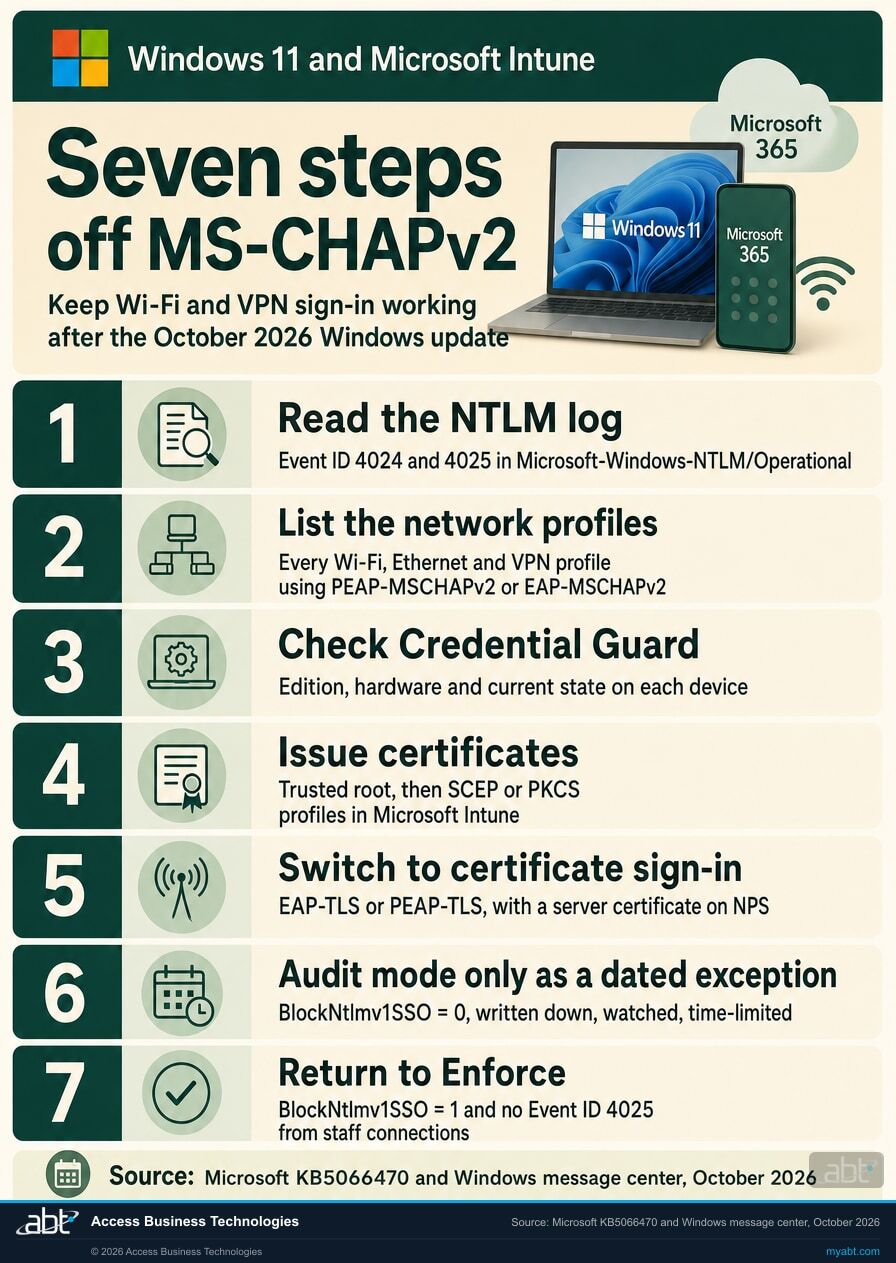
Seven steps, in the order the decisions depend on each other. Steps 1 to 3 find the devices and the connections. Steps 4 and 5 are Microsoft's recommended fix. Step 6 covers the devices that cannot wait, and step 7 closes the exception.
Read the NTLM log on the devices staff report
Event ID 4025 (Error, source NTLM) means Windows blocked an attempt to use NTLMv1-derived credentials for single sign-on. Event ID 4024 (Warning) means the attempt was audited and allowed, which is what a device with Credential Guard off logged for these connections before October 13, and what a device in Audit mode still logs. Both events name the target server, the supplied user and the client process, so they tell you which connection made the request. From PowerShell: Get-WinEvent -FilterHashtable @{LogName='Microsoft-Windows-NTLM/Operational'; Id=4024,4025}.
On a device where Credential Guard is running, Microsoft's Credential Guard documentation points to Event ID 4013 (Warning) and 4014 (Error) in the same log. A device with those events was already prompting before October and is outside this change.
List every network profile that uses PEAP-MSCHAPv2 or EAP-MSCHAPv2
Microsoft's article asks that environments "using MS-CHAPv2 Single Sign-On for Wi-Fi, Ethernet, or VPN authentication should be evaluated for potential dependencies." Go profile by profile: the network name or VPN, the EAP method, whether it signs in with the user's Windows credentials, and the server that answers it, usually an NPS or other RADIUS server. That list is the migration scope, and it is usually far shorter than the device count.
Check Credential Guard on each device: edition, license, hardware, current state
Microsoft documents two quick checks: in System Information, Credential Guard appears next to Virtualization-based Security Services Running; in an elevated PowerShell session, (Get-CimInstance -ClassName Win32_DeviceGuard -Namespace root\Microsoft\Windows\DeviceGuard).SecurityServicesRunning includes 1 when it is running (Microsoft lists 0 as not running and 1 as running). Microsoft's edition table lists Windows Enterprise and Windows Education as Yes and Windows Pro and Pro Education/SE as No, with license entitlement through Windows Enterprise E3 or E5 and Education A3 or A5; its considerations page adds that default enablement also reaches "some Pro licenses," so read each device.
Where a device qualifies and Credential Guard is off, Microsoft Intune can turn it on with a Settings catalog policy (Device Guard, Credential Guard, Enabled with UEFI lock or Enabled without lock; Microsoft notes that only the second can be turned off remotely). Remember the order: Credential Guard also blocks MS-CHAPv2 single sign-on, so turn it on together with, or after, the certificate profiles in steps 4 and 5.
Issue the certificates
Microsoft's Intune documentation lists certificates for "Network authentication (for example, 802.1x) with device or user certs" and for "Authenticating with VPN servers," and says to deploy the trusted root "Before you deploy SCEP or PKCS certificate profiles." On the server side, Microsoft's NPS documentation says that with PEAP-MS-CHAP v2, PEAP-TLS or EAP-TLS, "the NPS must use a server certificate that meets the minimum server certificate requirements," so an NPS already serving PEAP-MSCHAPv2 has a server certificate today; confirm it meets the requirements for the certificate method you choose. The larger addition is a client certificate on every device that connects, one that chains to a trusted root certification authority and carries the Client Authentication purpose, per the same NPS documentation.
Switch the profiles to certificate sign-in
For Windows Wi-Fi in Intune, an Enterprise profile supports EAP-TLS with a SCEP or PKCS client certificate profile and "Root certificates for server validation." Change the client profile and the server policy as a pair, pilot them on a small group of devices with the old profile still in place, and confirm each pilot device connects without a prompt before you widen the rollout. Microsoft's Credential Guard documentation confirms that certificate sign-in keeps working once Credential Guard is on, so these devices are ready for step 3's setting as soon as they connect.
Use Audit mode only as a dated exception
Microsoft's article allows it for "a critical authentication dependency that cannot immediately be migrated," and adds: "Using Audit mode reduces the protection provided by Enforce mode and should only be considered as a scoped, temporary security exception." MC1508562 spells out the governance: "Organizations should document the exception, limit its duration, monitor Event ID 4024, and establish a plan to return affected devices to Enforce mode." Set the value only on the devices on the list, through your device management tooling; Microsoft says "A device restart isn't required after you change the BlockNtlmv1SSO."
Return every device to Enforce and record it
When a device's profiles have moved to certificate sign-in, set BlockNtlmv1SSO to 1 or remove the exception value (on these updates an absent value behaves as Enforce), read the NTLM log again, and close the exception with the date. Record the change, the exception list and the closure in your change record. The direction of travel is clear in Microsoft's roadmap: network NTLM disabled by default in the next major Windows release, so the certificate work done now also prepares the fleet for that step. Our page on the Microsoft 365 finding-to-fix map for IT exams shows where a configuration finding like this lands and what closes it.
Before you decide
What else should you know before you change a setting?
Six facts from Microsoft's own articles that decide what the change means on a given device.
The registry looks the same before and after
KB5066470: "The update does not create or modify the registry value, which itself remains absent." A device with no BlockNtlmv1SSO value was in Audit mode in September and is in Enforce mode now. Read the NTLM log and the installed update to know which behavior a device has.
Credential Guard devices already prompt
Microsoft's considerations page: "When Credential Guard is enabled, you can no longer use NTLM classic authentication (NTLMv1) for single-sign-on (SSO). You'll be forced to enter your credentials to use these protocols and can't save the credentials for future use." Devices in that state have behaved this way since Credential Guard turned on.
Edition and license decide who can run Credential Guard
The overview's tables list Windows Enterprise and Education as Yes, Windows Pro and Pro Education/SE as No, and license entitlement through Windows Enterprise E3 or E5 and Education A3 or A5. The considerations page adds that default enablement reaches "some Pro licenses." Check each device before you plan on it.
A typed password still connects
KB5066470 FAQ: "Manually entering credentials will continue to work in Enforce mode." That keeps a person working for the day and leaves the prompt in place every time, which is why it belongs in the help desk script while the certificate profiles roll out.
Microsoft treats this as the intended behavior
MC1508562: "It is not a known issue with the October 2026 security update." KB5066470: the setting and its Audit and Enforce events "are supported throughout the normal lifecycle of these Windows versions, and there are currently no plans to remove the setting." Plan the certificate migration as the outcome.
NTLM itself is next
Microsoft's January 29, 2026 Windows IT Pro post lays out a three-phase NTLM roadmap and says that in the next major Windows Server release and associated client releases, "Network NTLM will be disabled by default." Certificate sign-in for Wi-Fi and VPN sits on the same path.
For financial institutions
Why does this matter at a credit union, bank, or mortgage company?
Because every branch, every remote loan officer and every back-office team depends on the Wi-Fi and VPN connecting before the first customer call, and the credential that makes it connect is one attackers want.
Keep staff connected. A teller laptop, a loan officer working from home and a processor in a branch all start the day by joining a network. When that sign-in uses MS-CHAPv2 single sign-on on a device the October update reaches, the day starts with a password prompt and a call to the help desk, every day, until the profile changes. Certificate sign-in puts automatic connection back, with the device's certificate doing the work the password used to do. Our October 2026 Patch Tuesday guide for banks, credit unions, and lenders covers the rest of that month's update.
Protect the credential. Microsoft's own wording is that MS-CHAPv2-based endpoints "are subject to risks similar to those affecting NTLMv1," and that turning Credential Guard off leaves "stored domain credentials vulnerable to theft." Certificate sign-in takes the password out of the network handshake, and Credential Guard, which Microsoft "strongly recommends" wherever its requirements are met, protects the domain credentials that remain on the device. The combination closes the exposure the October default is pushing against, and fits the identity monitoring described in our article on Microsoft Defender for Identity and the domain controllers behind every login.
Keep the record. Microsoft's compliance considerations in MC1508562 ask for four things whenever a device stays in Audit mode: document the exception, limit its duration, monitor Event ID 4024, and plan the return to Enforce. A short exception register with the device, the reason, the owner, the end date and the 4024 count records each of them for your information security officer and for exam preparation, and the closure in step 7 completes the record. Our page on the Microsoft 365 finding-to-fix map for IT exams shows how a configuration exception reads in an exam file.
Why does a sign-in setting on a laptop matter this much?
Because the sign-in is the way in. The Short from our channel puts it in one line, "Attackers do not break in, they log in," and in 29 seconds makes the case for auditing the sign-ins nobody has looked at since the day they were turned on.
An MS-CHAPv2 Wi-Fi or VPN profile is often exactly that: set up years ago, working quietly, and never revisited until a default changed. The October update brought those profiles into view. Moving them to certificate sign-in is the audit-and-replace the Short describes, done on the connection every employee uses first each morning.
How ABT helps
A free security assessment
ABT is a Tier 1 Microsoft Cloud Solution Provider serving more than 750 financial institutions, and it manages Microsoft 365 tenants for credit unions, banks, and mortgage companies. How your devices sign in to the network is part of your security picture, so the assessment starts there.
We find the devices and connections the October change touches, and leave you a written certificate plan
The assessment is free and ends with written findings you keep. We work through it with an administrator on your team, and your team decides what changes and who makes each change.
- The device readback. Credential Guard state, the BlockNtlmv1SSO value, and Event ID 4024 and 4025 counts on your managed Windows devices.
- The profile map. The Wi-Fi, wired and VPN profiles you manage, the EAP method each uses, and the server that answers it.
- The certificate plan. The trusted root, the SCEP or PKCS profiles in Microsoft Intune, the NPS server certificate, and the order to roll them out.
- The Credential Guard check. Which devices can run it by edition, license and hardware, and the Intune setting that turns it on.
- The exception register. Any device that stays in Audit mode for now, with the reason, the owner and the end date.
- The record. A dated summary for your change record, your exception file and your help desk notes.
ABT also operates M365 Guardian, its managed security service for credit unions, banks, and mortgage companies. Learn about M365 Guardian
Related reading
If this opened a bigger question
A sign-in change tends to surface the questions around it: what else the same month's update changed, which other legacy authentication defaults Microsoft is tightening, and who is watching the domain controllers.
October 2026 Patch Tuesday: What Banks, Credit Unions, and Lenders Patch First
The same update that changed the NTLMv1 default: one exploited Windows flaw, five Outlook Reading Pane bugs, and what to patch first.
Read the article
Kerberos RC4 to AES: The April Patch That Will Break Your Service Accounts
Another legacy authentication default Microsoft changed this year, and the 15-minute audit that finds the affected service accounts.
Read the article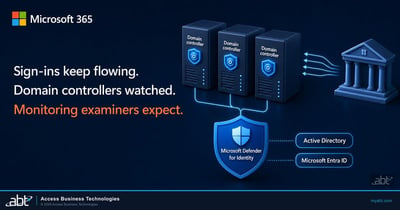
Microsoft Defender for Identity: Protect the Domain Controllers Behind Every Login
What Defender for Identity detects on the domain controllers behind every staff login, how to license it, and how to deploy it in 2026.
Read the articleAnswered
NTLMv1 single sign-on and Wi-Fi or VPN sign-in, answered
Verify it yourself
Where the facts on this page come from
Every Microsoft date, version, registry value, event ID and quotation above was read from the sources listed here on October 21, 2026.
- Microsoft Support, Manage NTLMv1 changes and prevent network authentication issues in Windows (KB5066470), originally published August 29, 2025, retitled October 19, 2026. Source for the versions, the October 13, 2026 default change, the registry location and values, Event IDs 4024 and 4025, the no-restart note, the timeline, the temporary security exception, the FAQ and the lifecycle statement.
- Microsoft Support, October 13, 2026 security update for Windows 11 (KB5127648), OS Builds 26300.9711, 26200.9711 and 26100.9711. Source for the Windows 11, versions 26H2, 25H2 and 24H2 update and its NTLMv1 note. KB5126646 is the matching update for Windows Server 2025, named in KB5066470.
- Windows release health, Windows 11 release information. Source for KB5127646, the October 13, 2026 update for Windows 11, version 26H1 (OS Build 28000.3231).
- Windows release health, Windows message center, entry "Take action: NTLMv1 hardening changes might affect network connections on devices without Credential Guard." Source for the affected versions and the recommended migration to certificate-based authentication.
- Microsoft 365 Message Center post MC1508562, published October 15, 2026. Source for the connection behavior, the statement that it is not a known issue, the Credential Guard exemption, the temporary option and the compliance considerations. Visible to administrators in your own Microsoft 365 admin center Message Center (sign-in required).
- Microsoft Learn, Credential Guard overview, updated October 8, 2026. Source for default enablement since Windows 11, version 22H2, the edition and license tables, and the hardware requirements.
- Microsoft Learn, Considerations and known issues when using Credential Guard, updated October 8, 2026. Source for the Wi-Fi and VPN considerations, the protocols Credential Guard blocks, Event IDs 4013 and 4014, the certificate-based recommendation, the "disable Credential Guard" workaround and its warning, and the "some Pro licenses" note.
- Microsoft Learn, Configure Credential Guard. Source for the Intune Settings catalog values and the System Information and PowerShell checks.
- Microsoft Learn, Wi-Fi settings for Windows devices in Microsoft Intune. Source for EAP-TLS with SCEP or PKCS client certificates and root certificates for server validation.
- Microsoft Learn, Use certificates for authentication in Microsoft Intune. Source for certificate use in 802.1x and VPN authentication and the trusted-root-first order.
- Microsoft Learn, Configure certificate templates for PEAP and EAP requirements. Source for the NPS server certificate requirement with PEAP-MS-CHAP v2, PEAP-TLS and EAP-TLS.
- Windows IT Pro Blog, Advancing Windows security: Disabling NTLM by default, January 29, 2026. Source for the NTLM roadmap and network NTLM disabled by default in the next major release.
The October 13 update changed the default.
Know which devices it reaches, and move them to certificate sign-in.
The work starts with the NTLM operational log on your Windows devices and the Wi-Fi, wired and VPN profiles behind them. When it is done, you know which devices have Credential Guard on, which connections still use MS-CHAPv2, what certificates they need, which devices sit in a dated exception, and when each one returns to Enforce.
Tell us a little about your environment and we will come back with what we would check first.
What should we look at? Optional.
Encrypted. Private.
Thank you. That is with us.
An ABT specialist will be in touch shortly. If a particular network, VPN or group of devices is the one you are worried about, say so in your reply and we will start there.
