

Security investigations in plain English, inside Microsoft 365 Copilot Cowork. One sentence replaces the hunting queries and the portal-hopping.
Guardian SecOps Coworker is a plugin for Microsoft 365 Copilot Cowork, built by ABT. Your security and IT staff ask a question the way they would ask a senior analyst. Cowork reads your Microsoft 365 security settings, logs and records live, works the problem through Microsoft's own playbooks, and answers in plain words with the evidence behind every finding and Microsoft's page for every fix.
Trusted by 750+ of the Nation's Leading Lenders, Banks & Credit Unions.
What can you ask Guardian SecOps Coworker?
What: A plugin for Microsoft 365 Copilot Cowork, built by ABT, that answers security questions about your Microsoft 365 tenant in plain English.
Who: Security officers, IT managers and the small teams who run Microsoft 365 at credit unions, banks, mortgage companies and healthcare organizations.
Speed: A quick answer in under 90 seconds. A full investigation shows its plan, reports progress, and ends with a verdict.
Access: Your own credential, your own tenant, read only. Records, never content.
| Ask it | What comes back |
|---|---|
| "Investigate incident 4127" or "review our open incidents" | Microsoft's playbook for that alert type, run check by check, ending in an Assessment (confirmed malicious, confirmed benign or inconclusive), the checks still open, and a suggested classification and closing comment |
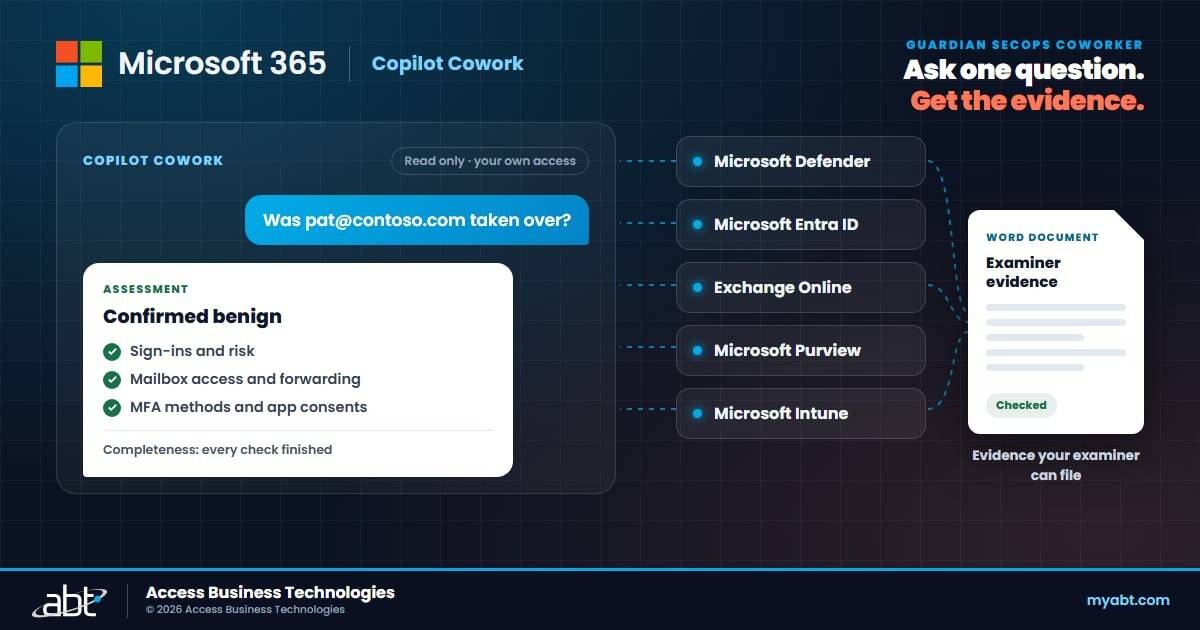
| "Are we compromised?" or "was pat@contoso.com taken over?" | Sign-ins, risk, stolen sessions, mailbox access and forwarding, and what keeps access after a password reset, for one account, one device or the whole organization |
| "Who got this phish, and did anyone click?" | Every recipient, what Microsoft pulled back, which settings let it through, who clicked, whether Safe Links stopped them, and what each clicker's account did next |
| "Were we sprayed?" | Password spray, brute force and MFA fatigue over up to 30 days: the addresses, the accounts they reached, and the control that stopped each attempt |
| "Find the holes in our Conditional Access" | What each policy really does when it fires, the sign-ins no policy covered, who sits outside more than one control, legacy and device code sign-in, and weak MFA methods |
| "What would survive a password reset?" | App consents, app secrets, new sign-in methods, role changes, mailbox delegates and forwarding, and cross-tenant trust |
| "Who has no MFA?" or "run the basics" | The everyday questions behind the Guardian Insights report, page by page, live from your tenant: admins, MFA, dormant accounts, guests, devices, patches and licenses |
| "Does our tenant support our AI policy?" | Your written AI policy checked requirement by requirement against what Microsoft 365 enforces today, each with a verdict and what closes the gap |
| "Write it up for our examiner" | A finished Word document, checked before you share it: an incident case record, an incident review, a findings review, a Conditional Access exception review, a tenant assessment, or examiner evidence for MFA enforcement, administrator access and patch status |
Nine questions and what comes back. Names such as pat@contoso.com and incident 4127 are examples.
How does Guardian SecOps Coworker compare with the manual way?
| The job | The manual way | With Guardian SecOps Coworker |
|---|---|---|
| Incident review | Open the incident in the Microsoft Defender portal, then work each check by hand across the portals that hold the evidence. | "Investigate incident 4127." Microsoft's playbook for that alert type runs check by check and ends in an Assessment, the checks still open, and a suggested classification and closing comment. |
| Account takeover check | Export sign-in logs, then look up risk, sessions, mailbox access and forwarding one admin portal at a time. | "Was pat@contoso.com taken over? Check the last 7 days." Sign-ins, risk, stolen sessions, mailbox access and forwarding, and what keeps access after a password reset, in one answer. |
| Phishing trail | Write a hunting query to find the recipients, then trace clicks and each clicker's account separately. | "Who got the email with the subject 'Invoice past due', and did anyone click?" Every recipient, what Microsoft pulled back, who clicked, whether Safe Links stopped them, and what each account did next. |
| Password spray check | Write and tune hunting queries over the sign-in logs to spot spray, brute force and MFA fatigue. | "Were we sprayed in the last 30 days?" The addresses, the accounts they reached, and the control that stopped each attempt. |
| Conditional Access review | Read each policy in the admin center and work out by hand who sits outside which control. | "Who is excluded from our MFA policies?" What each policy really does when it fires, the sign-ins no policy covered, and who sits outside more than one control. |
| After a password reset | Check app consents, app secrets, sign-in methods, roles, mailbox delegates and cross-tenant trust in separate places. | "What would survive a password reset?" Every one of those, from one question. |
| Evidence for the examiner | Stitch screenshots and exports from four admin portals into a document. | "Give me evidence that MFA is enforced for our examiner." A finished Word document, built from the findings and checked before you share it. |
| A check that cannot run | A missing role or license leaves a query empty, and the reason is left for you to work out. | The answer names the gap with its reason (a missing role, a source outside your licensing, Microsoft's search still running) and what closes it. |
Eight everyday security jobs, done by hand and done in Copilot Cowork.
Give your security team an analyst's reach inside Copilot Cowork
ABT deploys a dedicated app and service in your tenant, your administrator grants consent and adds the plugin, and your team starts asking. Guardian SecOps Coworker is quoted per organization as part of onboarding.
Talk to our teamHow does Guardian SecOps Coworker work in Copilot Cowork?
Set it up
ABT deploys a dedicated app and a dedicated service inside your Microsoft environment. Each organization gets its own. Your administrator grants consent to the app, then adds Guardian SecOps Coworker in the Microsoft 365 admin center and chooses who gets it: named people, a group, or the whole organization.
Each person who will use it holds Microsoft read roles. Global Reader and Security Reader together cover nearly every question, and Microsoft Purview Audit Reader adds history past 30 days. Your organization decides how those roles are granted, standing or through Privileged Identity Management.
Sign in
Open Copilot Cowork, and Guardian SecOps Coworker appears under your plugins. The first time you ask a security question, Cowork asks you to sign in to the connector with your own Microsoft work account. From then on, every answer reads with your access, in your organization.
To check what you can see, ask "What can I see with Guardian SecOps Coworker?" It lists your roles and which sources are open to you right now.
Ask
Cowork picks the right skill from what you say. Four habits make answers sharper:
- Name the target exactly: an incident number, a sign-in name such as pat@contoso.com, a device name, a policy name.
- Name the window when history matters: "in the last 7 days", "since September 1".
- Say what you want back: a quick answer, a full investigation to a verdict, or a Word document.
- One question per request. Follow-ups in the same conversation reuse what was already read.
Read what comes back
A quick answer arrives in under 90 seconds and starts with "Quick answer". An investigation shows its plan first, then progress lines with one of four status words:
It ends with an Assessment (Confirmed malicious, Confirmed benign or Inconclusive, with the evidence behind it), a Completeness line naming every check still open and why, and Next steps: what to change, in which Microsoft admin center, with Microsoft's own page for the change. An empty result counts as clean only after the tool proves it can see that kind of activity in your tenant.
Keep the record
Ask for a Word document and Guardian SecOps Coworker builds it from the findings, then checks it before you share it. Every finding carries its evidence, every gap is listed apart from the findings, and every fix points to Microsoft's page.
How does Guardian SecOps Coworker keep each organization in its own tenant?
Your own credential
Guardian SecOps Coworker reads with the signed-in person's own Microsoft access, in the organization they signed in to. Microsoft itself limits each person to their own tenant and their own roles.
Your own tenant
ABT deploys a dedicated app and a dedicated service for each customer, inside that customer's own Microsoft environment. The service proves who it is with its own managed identity and holds zero stored passwords or secrets.
Read only
Every tool reads. Asked to disable an account or change a policy, it names the admin center, the setting and Microsoft's page, and your administrator makes the change. The one thing it saves is a Microsoft Purview audit search, and Cowork asks your approval first.
Records, never content, and a record of every read
It reads settings, logs and records about mail, files, sign-ins and devices. Message bodies and file contents stay closed. The service logs who asked, which tool ran and when, with the values left out.
What does Guardian SecOps Coworker hand your examiner?
Six Word documents
| Document | Good for |
|---|---|
| Incident case record | One incident, start to close, for your file or your auditor |
| Incident review | Open or closed incidents, with suggested closing comments |
| Guardian Insights findings review | The report's findings, with today's live figures and the fix worth the most |
| Conditional Access exception review | Every exclusion, who holds it and why it matters |
| Tenant assessment | A full read of the tenant, for leadership or a board |
| Examiner evidence | MFA enforcement, administrator access and how it is reviewed, patch status for exploited vulnerabilities |
What it reads, and how far back
| Source | How far back |
|---|---|
| Microsoft Entra sign-in and directory audit logs | 30 days with Microsoft Entra ID P1 or P2 |
| Microsoft Defender advanced hunting | 30 days |
| Microsoft Defender XDR incidents and alerts | 180 days |
| Microsoft Purview audit search | Up to 180 days, longer with extended audit licensing |
History past 30 days comes from a Microsoft Purview audit search. Because it saves a search in your Purview, Cowork shows an approval card first, and the skill finishes the other checks while Microsoft runs the search. Later, ask "read the audit search I started earlier".
When a check cannot run, the answer names the gap with its reason (a missing role, a source outside your licensing, Microsoft's search still running) and what closes it. Your examiner sees what was checked, what was found, and what remains open.
What does Guardian SecOps Coworker need, and how does it fit with M365 Guardian?
What it needs
- Microsoft 365 Copilot licenses for the people who will use Cowork.
- ABT onboarding: ABT deploys the dedicated app and service in your tenant, your administrator grants consent, and your administrator adds the plugin in the Microsoft 365 admin center.
- Microsoft read roles for each user: Global Reader and Security Reader together read nearly everything it asks for, and Microsoft Purview Audit Reader adds history past 30 days.
Some answers depend on licensing you already hold. Advanced hunting comes with Microsoft Defender products that include it, risk history needs Microsoft Entra ID P2, and device detail needs Microsoft Intune.
How it fits with Guardian
- M365 Guardian is how ABT manages and hardens your Microsoft 365 tenant: the baseline, the monitoring and the response.
- Guardian Security Insights is the report that shows where your tenant stands, page by page.
- Guardian SecOps Coworker is the colleague you ask about it. Point at any page of the report and ask why the number is what it is, who is behind it, and what fix is worth the most. It answers live, so you see today's figure beside the report's.
What is Microsoft 365 Copilot Cowork?
Guardian SecOps Coworker brings security investigations into that same tool. Your team describes the security question, and Cowork reads Microsoft Defender, Microsoft Entra ID, Exchange Online, Microsoft Purview and Microsoft Intune to answer it, in the tool your team already uses every day.
Where should you read next?
Copilot Chat vs. Microsoft Copilot Cowork: What Carries Over
Copilot Chat and Microsoft Copilot Cowork share your organization's context. Here is what carries over between them, and what IT directors at banks and credit unions set up again.
Read the articleConditional Access Exclusions: How the List Drifts
A Conditional Access exclusion stays in place until someone removes it. Microsoft names access reviews as the fix, and this article explains which licensing includes them.
Read the articleMicrosoft 365 Incident Response Plan for Financial Institutions
Banks, credit unions, and mortgage companies need a written incident response plan. The seven elements, and how Microsoft 365 runs each one.
Read the articleWhat do security teams ask about Guardian SecOps Coworker?
Guardian SecOps Coworker is a plugin for Microsoft 365 Copilot Cowork, built by Access Business Technologies (ABT). Your security and IT staff ask a question the way they would ask a senior analyst. Cowork reads your Microsoft 365 security settings, logs and records live, works the problem through Microsoft's own playbooks, and answers in plain words with the evidence behind every finding and Microsoft's page for every fix.
Security officers, IT managers and the small teams who run Microsoft 365 at credit unions, banks, mortgage companies and healthcare organizations. These teams answer to examiners and auditors and carry a full workload beyond security. Guardian SecOps Coworker gives each of them the reach of an analyst who writes hunting queries all day.
A quick question answers in under 90 seconds, and the reply starts with "Quick answer". A full investigation shows its plan first, reports progress as it goes with one of four status words (Working now, Microsoft search pending, Blocked or Finished), and ends with an Assessment, a Completeness line and Next steps.
Every tool reads. Asked to disable an account or change a policy, it names the admin center, the setting and Microsoft's page for the change, and your administrator makes the change. The one thing it saves is a Microsoft Purview audit search, and Cowork shows an approval card first.
It reads settings, logs and records about mail, files, sign-ins and devices. Message bodies and file contents stay closed. The service also keeps a record of every read: who asked, which tool ran and when, with the values left out.
It reads with the signed-in person's own Microsoft access, in the organization they signed in to, so Microsoft itself limits each person to their own tenant and their own roles. ABT deploys a dedicated app and a dedicated service for each customer inside that customer's own Microsoft environment, and the service proves who it is with its own managed identity.
Three things: Microsoft 365 Copilot licenses for the people who will use Cowork; ABT onboarding, where ABT deploys the dedicated app and service in your tenant, your administrator grants consent and adds the plugin in the Microsoft 365 admin center; and Microsoft read roles for each user. Global Reader and Security Reader together read nearly everything it asks for, and Microsoft Purview Audit Reader adds history past 30 days.
Some answers depend on licensing you already hold. Advanced hunting comes with Microsoft Defender products that include it, risk history needs Microsoft Entra ID P2, and device detail needs Microsoft Intune. When a source is outside your licensing, the answer names it as a gap and says what closes it.
Microsoft Entra sign-in and directory audit logs reach back 30 days with Microsoft Entra ID P1 or P2. Microsoft Defender advanced hunting reaches back 30 days. Microsoft Defender XDR incidents and alerts reach back 180 days. A Microsoft Purview audit search reaches back up to 180 days, and longer with extended audit licensing.
Six kinds, each built from the findings and checked before you share it: an incident case record, an incident review, a Guardian Insights findings review, a Conditional Access exception review, a tenant assessment, and examiner evidence for MFA enforcement, administrator access and patch status. Every finding carries its evidence, and every fix points to Microsoft's page.
M365 Guardian is how ABT manages and hardens your Microsoft 365 tenant: the baseline, the monitoring and the response. Guardian Security Insights is the report that shows where your tenant stands, page by page. Guardian SecOps Coworker is the colleague you ask about it: point at any page of the report and ask why the number is what it is, who is behind it, and what fix is worth the most.
Guardian SecOps Coworker is quoted per organization as part of ABT onboarding. Talk to our team for licensing, fit and pricing.
Ask your tenant the next question.
Get the evidence in minutes.
Guardian SecOps Coworker is quoted per organization as part of ABT onboarding. ABT deploys a dedicated app and service in your tenant, your administrator grants consent and adds the plugin, and your team starts asking in Copilot Cowork.
Tell us about your environment and our team will come back with licensing, fit and pricing.
What should we look at? Optional.
Encrypted. Private.
Thank you. That is with us.
An ABT specialist will be in touch shortly with licensing, fit and pricing for Guardian SecOps Coworker.
