


Exchange Online now throttles out-of-date hybrid servers. The update that clears it is still public.
Microsoft has raised the oldest Exchange Server version allowed to send mail into Exchange Online over a hybrid connector. If your institution moved its mailboxes to the cloud years ago and kept one Exchange server for hybrid management and relay, that server's patch level now decides whether your mail arrives on time, arrives late, or bounces.
- The new floor is the October 2025 update, which is still publicly available at no cost
- Microsoft says Extended Security Updates are not required to clear it today, though the server stays out of support either way
- At the next adjustment, Microsoft says no public update will satisfy the bar
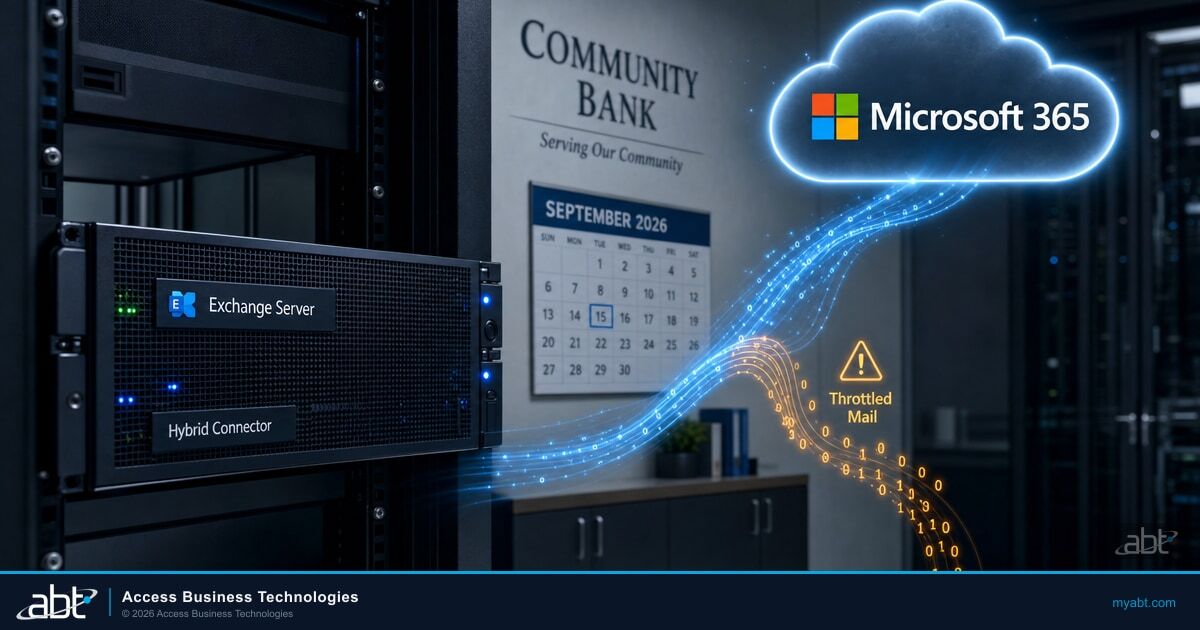
What changed in the second week of September 2026?
Exchange Online raised the minimum patch level it will accept mail from, for one specific kind of connection: a hybrid Exchange server sending over an inbound connector of type OnPremises.
Microsoft put it in one sentence: "starting in the second week of September 2026, we will raise the oldest allowed version for Exchange 2016 or Exchange 2019 servers that connect to Exchange Online over an inbound connector type of OnPremises to at least the last available public update version, released in October 2025."
Source: Exchange 2016/2019: Throttling and Blocking up to the Final Public Update Baseline, Exchange Team Blog, published September 2, 2026, read September 14, 2026.Microsoft has been raising this bar for years. What is different this time is that it said so publicly. In its words, "So far, these changes have been implemented silently." The September 2 post is the announcement that the floor is moving to the final public update, and it names what the floor becomes: "the oldest Exchange Server version allowed to send email to Exchange Online over the inbound OnPremises connector will be Exchange with October 2025 updates."
What the enforcement does not cover
Microsoft is specific about the boundaries, and they matter before anyone starts patching every server they own. The enforcement:
- Applies to servers that connect to Exchange Online over an inbound connector of type OnPremises.
- Does not apply to servers that send email to Exchange Online in other ways, using different types of connectors.
- Does not currently apply to all servers in an organization, only to those connecting over an OnPremises inbound connector. Microsoft adds that this "might change in the future."
So the question to answer first is narrow: does your organization have an inbound connector of type OnPremises, and which server or servers send through it? That is usually the hybrid server, and at many institutions it is exactly one machine.
Does this apply to a server kept only for hybrid management?
Only if that server sends to Exchange Online through an inbound connector of type OnPremises. The role you assign the server does not exempt it, and a hybrid deployment commonly creates exactly that connector.
The enforcement is scoped by connection, not by job title. Microsoft defines it as applying to servers that connect to Exchange Online over an inbound connector of type OnPremises, and says it does not apply to servers that send in other ways. So the test for any server, including one kept only for recipient management, is whether it sends through that connector.
That is worth checking rather than assuming in either direction. A hybrid deployment configured through the Hybrid Configuration Wizard commonly creates an OnPremises inbound connector, which is why a management server often does sit in scope. A server that relays through some other path may not. The detection step below shows which of your servers Exchange Online has already flagged, which is the fastest signal available to you; confirming the connector type behind each one is a separate check in the Exchange admin center, and it is part of what the assessment at the end of this page covers.
Separately, Microsoft says to patch it anyway
Whether or not a management server is in scope for throttling, Microsoft's guidance on patching it is explicit. In the frequently asked questions of its September 8, 2026 security update post, addressing hybrid organizations: "Exchange Online is already protected, but this SU needs to be installed on your Exchange servers, even if they are used only for management purposes." That is a security-update instruction rather than a statement about transport enforcement, and the two point the same way.
Sources: Exchange Team Blog, September 2, 2026 for the connector scope, and Released: September 2026 Exchange Server Security Updates, September 8, 2026, for the management-server patching instruction. Both read September 14, 2026.The pattern is common at credit unions, banks, and mortgage companies. Mailboxes moved to Exchange Online. One Exchange server stayed behind, because recipient attributes were still managed on-premises, or because a scanner, a core banking application, or a loan origination system needed somewhere to relay mail. Over time that server stopped appearing in anyone's mental list of production mail infrastructure. It has no mailboxes on it. Nobody logs into it. It shows up in the patch report as a server that has not needed attention in a while.
How the server is usually described
A leftover from the migration. No mailboxes, low usage, low priority in the patch queue, and often running on hardware or an operating system that is itself scheduled for replacement rather than maintenance.
What Exchange Online treats it as
A sending server whose version decides whether your mail is accepted, delayed, or refused. Microsoft's enforcement reads the version on the connection, not the role the server plays in your documentation.
Microsoft's own framing of why this system exists is worth reading alongside that: it describes servers that are unsupported or unpatched as persistently vulnerable, and says such servers "cannot be trusted, and therefore email messages sent from them cannot be trusted." The enforcement is a trust decision about the sending server, which is why its role in your environment does not change the outcome.
How do you know whether Exchange Online is throttling your server?
Two places to look: the errors in your on-premises mail logs, and a report in Exchange Online that tells you when enforcement starts.
Microsoft documents the exact strings. If your connecting servers are being throttled or blocked, one or both of these appears in your on-premises email logs:
5.7.230 Connecting Exchange server version is out-of-date; connection to Exchange Online blocked for n mins/hr.
To find out before anyone notices a delay, run this from Exchange Online PowerShell. Microsoft describes it as the way to check whether Exchange Online has detected any connecting out-of-date servers, along with details such as when throttling or blocking will start:
The same information appears in the Exchange admin center under Reports, then Mail flow, then Out-of-date connecting on-premises Exchange servers. Microsoft also publishes the Exchange Server Health Checker script, which it recommends for inventorying your Exchange servers to determine which updates are needed.
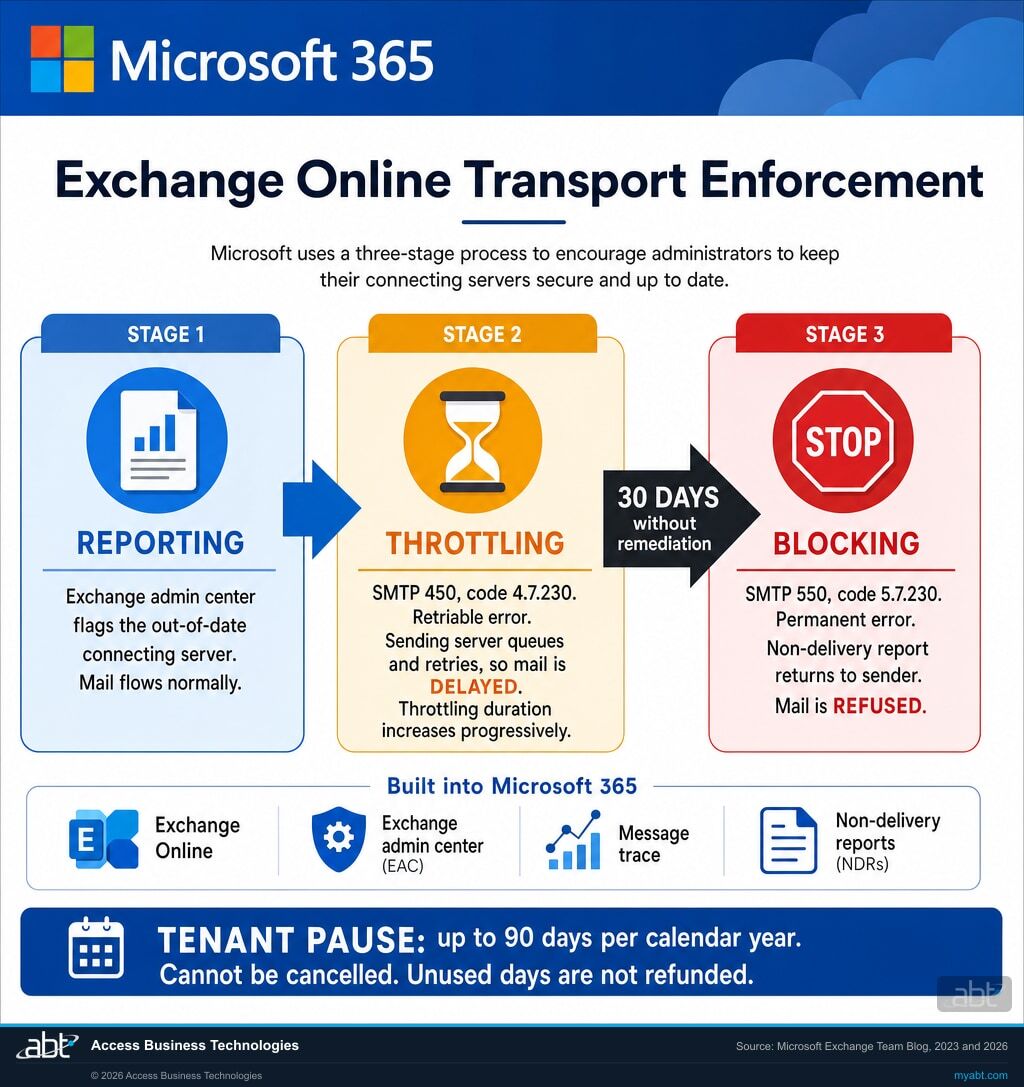
Sources: How to pause throttling and blocking of out-of-date on-premises Exchange Servers and Throttling and Blocking Email from Persistently Vulnerable Exchange Servers to Exchange Online, Exchange Team Blog, both read September 14, 2026.| Stage | Throttling | Blocking |
|---|---|---|
| What Exchange Online returns | A retriable SMTP 450 error, code 4.7.230 | A permanent SMTP 550 error, code 5.7.230 |
| What happens to the message | The sending server queues it and retries later, so delivery is delayed | A non-delivery report goes back to the sender, who has to send it again |
| Does it get worse over time | Yes. Microsoft says the throttling duration increases progressively | Blocking is the end state of that progression |
| When it starts | After a period without remediation, following the reporting stage | Microsoft says enforcement progresses to blocking if the server is not remediated within 30 days after throttling begins |
| How it usually reaches the help desk | Mail from one system is slow, intermittently, and nobody can reproduce it on demand | Bounce messages, and a clear starting point for the ticket |
Find out whether one of your servers is already on the list.
A free migration assessment starts by checking whether your tenant has an inbound connector of type OnPremises, which servers send through it, what update level each one is running, and whether Exchange Online has already flagged any of them. You get the answer in writing, whether or not you do anything else with us.
Request the free migration assessmentWhat stops the throttling today?
For an affected Exchange 2016 or 2019 server sending over an OnPremises inbound connector, installing the October 2025 updates. Microsoft states plainly that Extended Security Updates are not required for this. It clears the enforcement; it does not make the server supported.
Microsoft answers this in the frequently asked questions of its Extended Security Update announcement, for organizations asking why they cannot get ESU updates to solve a throttling problem: "To resolve the throttling or blocking immediately, please install October 2025 (last publicly available) updates for Exchange 2016 or 2019. ESU updates are not required."
Source: Announcing Period 2 Exchange 2016/2019 Extended Security Update (ESU) program, Exchange Team Blog, published April 15, 2026, read September 14, 2026.This is the part worth being precise about, because the surrounding facts push in the other direction and it would be easy to conclude that the only way out is a purchase. Today it is not. The October 2025 update for Exchange Server 2016 and 2019 is the last publicly available one, it is free, and installing it satisfies the bar Microsoft raised this month. Microsoft adds the caveat in the same breath: "There will come a day when October 2025 updates too will be throttled or blocked, but that is not currently the case."
Microsoft also notes that if your server is affected right now, the version it is running is roughly a year out of date. And it is direct about what patching does and does not settle: "even if you update to October 2025 updates your server is still out of support and out of date and you should migrate to a supported version ASAP." Exchange Server 2016 and 2019 have been out of support since October 2025. Clearing the throttling buys working mail flow. It does not buy a supported server.
One practical note on the update itself
Microsoft states that security updates are cumulative: if you are running a cumulative update the security update supports, you do not need to install every intervening update in order, and can install the latest one directly. The supported builds for Exchange Server 2016 are CU23, and for Exchange Server 2019 are CU14 and CU15. A server on an older cumulative update needs that step first, which is the part that turns a patch into a change window.
What changes at the next adjustment?
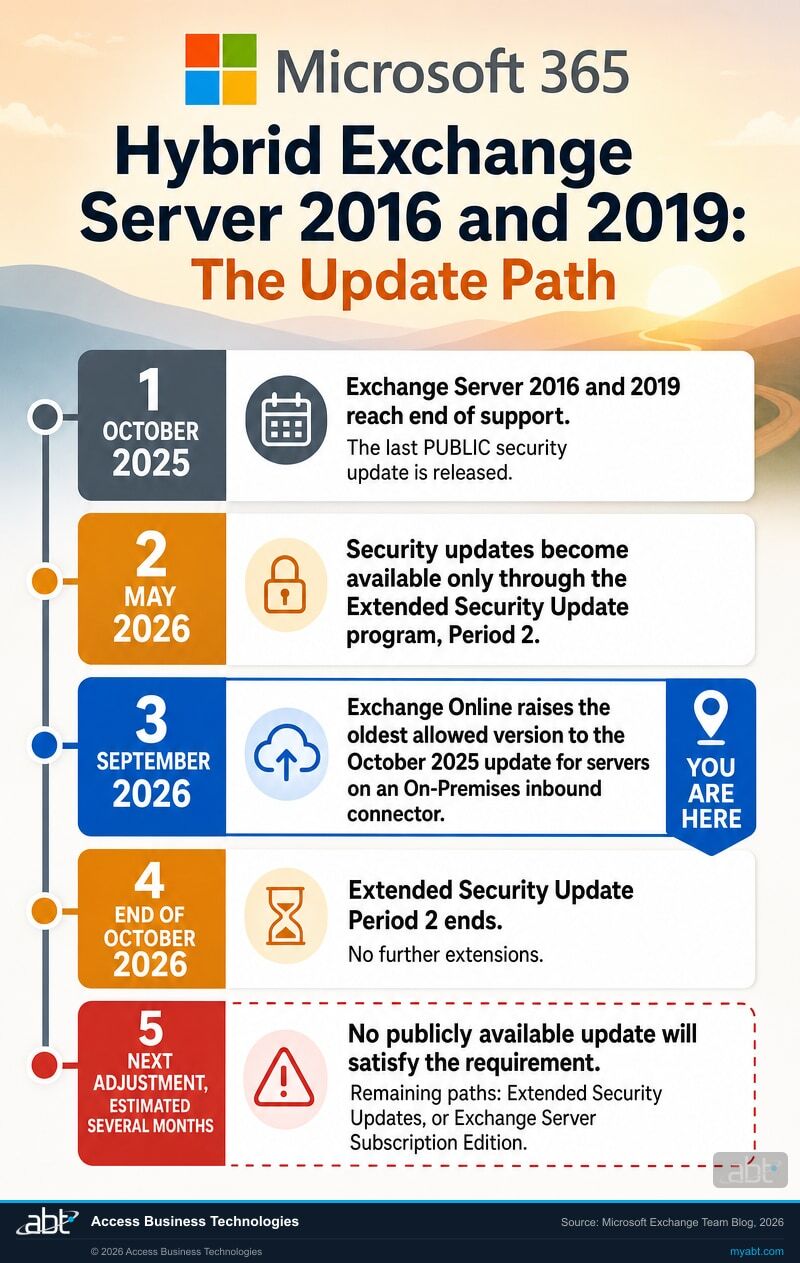
Microsoft says the next time it raises the bar, no publicly available update will clear it.
"The next time we update the oldest allowed Exchange Server version for sending email to Exchange Online, the required version of Exchange Server 2016 or Exchange Server 2019 will be newer than any publicly available update."
Microsoft continues: "When the next adjustment happens (we estimate in several months), only customers who were enrolled into our ESU program and customers who migrated to Exchange SE will have the required update versions to not be throttled or blocked when sending email to Exchange Online."
Source: Exchange Team Blog, September 2, 2026. Microsoft gives an estimate of several months and does not publish a date.Two facts sit next to that estimate, and they are worth holding together rather than separately.
- Since May 2026, security updates for Exchange Server 2016 and 2019 have been available only through the Extended Security Update program. Microsoft states that only customers enrolled in Period 2 are eligible to receive updates released between May and October 2026.
- That program has an end date. Period 2 runs "from the start of May 2026 through the end of October 2026 (6 months)", and Microsoft states: "There will be no further extensions of this program after that."
Microsoft has not published how those two things resolve against one another, and this page will not guess on its behalf. What Microsoft does say, repeatedly and in its own voice, is which direction it wants organizations to go: "If you are not part of the Period 2 ESU program, migrate to Exchange Server Subscription Edition (SE) to keep receiving the latest security updates." In the Extended Security Update announcement it is blunter still: "Please continue migrating to Exchange SE instead of taking advantage of this Period 2 ESU program."
The part that catches community institutions
For many of the credit unions, banks, and mortgage companies we work with, the Extended Security Update path is not actually on the table. Microsoft states that the program "is a separate contract that each organization must explicitly purchase via their Microsoft account team (requires Microsoft Enterprise Agreement)" and that it "is not automatically included in Volume Licensing or Software Assurance." An institution that buys its Microsoft licensing through a Cloud Solution Provider rather than an Enterprise Agreement should confirm with its Microsoft account team whether it can purchase Extended Security Updates at all before treating that as its plan.
Microsoft is also clear that Extended Security Updates are not a support extension. In its words, the servers "are still out-of-support, and you will not be able to open support cases for them", and Microsoft is "not committing to actually releasing any SUs during the Period 2 ESU."
On the Exchange Server Subscription Edition route, Microsoft's end of support announcement sets out which upgrade applies to you: it recommends an in-place upgrade to Exchange Server SE from Exchange 2019, and a legacy, or side by side, upgrade from Exchange 2016. It also notes that Exchange Server 2013 or earlier must be removed from the organization first. Which of those two you face changes the size of the project considerably, so it is worth establishing early rather than at the point of scheduling.
If the server exists only to manage recipients, can it go away?
Possibly. Microsoft documents a way to manage hybrid recipients with the Exchange Management Tools and PowerShell, with no running Exchange server, if your environment meets every condition.
Microsoft's guidance opens with the exact situation this page describes: "If you maintain an on-premises Exchange Server only for recipient management in a hybrid environment, even after moving all recipients to Exchange Online, you might be able to decommission your last Exchange Server and manage recipients using Windows PowerShell."
Source: Manage recipients in Exchange Hybrid environments using Management tools, Microsoft Learn, read September 14, 2026. Microsoft notes that keeping the server running remains supported, so this is an option rather than an instruction.Microsoft lists conditions that must all be true. Every mailbox and public folder already in Exchange Online, with no on-premises Exchange recipients. Active Directory used for recipient management, with cloud sync or Microsoft Entra Connect. No use of the on-premises Exchange admin center and no dependence on Exchange role-based access control. Recipient management by PowerShell only. No requirement for auditing or logging of recipient management activity. Exactly one on-premises Exchange server, running only for recipient management. The tools install from Exchange 2019 Cumulative Update 12 or later, onto any domain-joined computer.
Read that list against a regulated institution honestly. Two conditions do most of the deciding: whether anyone still needs the on-premises Exchange admin center or its role-based access control, and whether you can live without auditing or logging of recipient management activity. For an institution that has to evidence who changed what, that second condition is the one to test before anything else.
Note the wording of Microsoft's last condition: one on-premises Exchange server, running only for recipient management. Whether that is actually true of your server is a question of fact, and it is the one institutions most often get wrong, because a server acquires relay duties quietly and nobody writes them down. Before any shutdown is scheduled, establish what still sends through it: multifunction scanners emailing documents, the core banking platform, the loan origination system, alerting and backup jobs, statement and notice generation, and anything configured years ago with the server's name or address hard coded. If any of that turns up, the condition is not met and the server is not a candidate for this path until those senders are moved. That inventory is the gate, and it comes first.
Shut it down. Do not uninstall it.
Microsoft's warning is unusually blunt, and it is the part worth carrying into any change plan: "DO NOT uninstall the last server. You can choose to shut down the server, and use the script to clean up, but DO NOT uninstall. Uninstalling the server removes critical information from Active Directory that breaks the ability of the management tool package to manage Exchange attributes."
A decommissioning runbook written from habit will say uninstall. On this one, habit is wrong, and the damage lands in Active Directory rather than on the server you were retiring.
Microsoft also describes a second route for organizations that want recipients managed from the cloud instead: transferring the source of authority for mailboxes and other objects to Exchange Online. Either way, a server that is shut down sends no mail, which ends its relationship with the enforcement on this page permanently rather than until the next adjustment.
Can you pause the enforcement while you plan?
Yes, up to 90 days per calendar year per tenant. Spend them carefully, because the days do not come back.
Microsoft provides a tenant-level pause: "each tenant subject to this restriction can pause enforcement (throttling and blocking) for up to 90 days each calendar year. They can use these days however and whenever they want, within that same calendar year."
Decide the number before you run the command
Microsoft: "there is no way to cancel an enforcement pause once created to 'get back' the pause days you have requested." Its own worked example is the one to plan against: request a 30 day pause, patch the server five days later, and you have still spent 30 of your 90 days for the year. Microsoft states it "does not have a way to refund days not used."
So ask for the number of days the change window actually needs, not the number that feels safe. If the patch can be done in a week, a 90 day request spends most of the year's allowance to buy a week.
With that number decided, a pause can be created in the Exchange admin center from the same out-of-date servers report, or from Exchange Online PowerShell. Replace the placeholder with the days you actually need:
Get-TenantExemptionInfo -BlockingScenario UnpatchedOnPremServer
A pause is worth using when a change advisory board meets monthly, when the server needs a cumulative update before it can take the security update, or when the maintenance window sits behind a month-end or quarter-end freeze. It is a scheduling tool. It does not make the server current, and the clock resumes when it expires.
What does a credit union, bank, or mortgage company add to this?
Mail flow is the immediate problem. The examiner's question is about the server itself, and it arrives whether or not anything was ever throttled.
- Put the hybrid server on the asset inventory as a production mail system. If it relays mail into Exchange Online, it is in the path of member and customer communication, and a server that has been out of support since October 2025 is an unsupported system in that path. Whether that draws attention depends on your examiner and your program, but it is the kind of thing an asset inventory and a change record exist to answer, and it is easier to answer before the question is asked than after.
- Decide who owns the decision, and write down the date. Patching to October 2025 is a maintenance task. Choosing between Exchange Server Subscription Edition, Extended Security Updates if your agreement allows them, and removing the on-premises server entirely is a budget and architecture decision with a lead time measured in months.
- Treat mail delay as an availability issue. Throttling delays mail without breaking it, which is the failure mode least likely to be reported and most likely to affect a rate lock confirmation, a closing document, or a member notice with a deadline attached.
- Keep the evidence. The report output showing which servers were flagged, the update that was installed and when, any enforcement pause and why it was requested, and the decision record for the longer term path. That is a short, complete account of how this was handled, and it is the kind of record an examination asks for after the fact.
If the longer term decision is the live question at your institution, our page on Exchange Server SE or Exchange Online covers that choice, including what an in-place upgrade involves and what keeping an on-premises server continues to cost.
A free migration assessment, and the migration free with your licensing
ABT is a Tier 1 Microsoft Cloud Solution Provider working with more than 750 financial institutions. We manage Microsoft 365 tenants and host Azure environments for credit unions, banks, and mortgage companies, which is the tenant and mail flow work this question sits in.
- Your exposure. Whether your tenant has an inbound connector of type OnPremises, which servers send through it, and what Exchange Online currently reports about each one.
- Your update path. The cumulative update each server is on, whether it can take the October 2025 security update directly, and what a change window would involve.
- Your dependencies. What still relies on that server, including relay from scanners, core banking systems, and loan origination platforms, which is what decides whether the server can be removed or has to be replaced.
- Your options, priced. Exchange Server Subscription Edition, Extended Security Updates if your agreement supports them, or removing the on-premises server, with what each one requires of you.
- Your plan. A short written summary your team and your examiner can both read.
The assessment is free and carries no purchase requirement. If the outcome is a migration and your Microsoft licensing runs through ABT, we do the migration itself at no cost with that licensing commitment.
ABT also operates M365 Guardian, its managed security service for credit unions, banks, and mortgage companies.
Where the facts on this page come from
Every date, quotation, error code, cmdlet, and enforcement detail on this page comes from the Microsoft sources listed here, each read in full on September 14, 2026. The related reading and the video are ABT's own material and are not covered by this list.
- Exchange 2016/2019: Throttling and Blocking up to the Final Public Update Baseline, Exchange Team Blog, September 2, 2026. Source for the second week of September 2026 timing, the raised floor at the October 2025 public update, the statement that previous changes were implemented silently, the three scope limits on the OnPremises inbound connector, and the description of the next adjustment and who will satisfy it.
- Throttling and Blocking Email from Persistently Vulnerable Exchange Servers to Exchange Online, Exchange Team Blog, May 8, 2023. Source for the three functions of the enforcement system, the retriable SMTP 450 error and the permanent SMTP 550 error with its non-delivery report, the 4.7.230 and 5.7.230 codes, the progressive increase in throttling, the 30 day point at which enforcement progresses to blocking, and the description of persistently vulnerable servers as untrusted.
- How to pause throttling and blocking of out-of-date on-premises Exchange Servers, Exchange Team Blog, December 12, 2023. Source for the 90 day per calendar year pause and its terms, the statement that a pause cannot be cancelled and unused days are not refunded, the Exchange admin center report path, and the New-TenantExemptionInfo, Get-TenantExemptionInfo, and Get-OnPremServerReportInfo cmdlets.
- Announcing Period 2 Exchange 2016/2019 Extended Security Update (ESU) program, Exchange Team Blog, April 15, 2026. Source for Exchange 2016 and 2019 being out of support since October 2025, the Period 1 and Period 2 windows, the statement that there will be no further extensions, the Enterprise Agreement requirement and the statement that it is not automatically included in Volume Licensing or Software Assurance, the statement that Extended Security Updates are not a support lifecycle extension and that Microsoft is not committing to release updates under it, and the answer that Extended Security Updates are not required to resolve throttling today.
- Released: September 2026 Exchange Server Security Updates, Exchange Team Blog, September 8, 2026. Source for the statement that the security update must be installed even on servers used only for management purposes, the Period 2 eligibility for updates released between May and October 2026, the recommendation to migrate to Exchange Server Subscription Edition, the supported cumulative updates, the cumulative nature of security updates, and the Exchange Server Health Checker inventory recommendation.
- Support for Exchange Server 2016 and Exchange Server 2019 ends today, Exchange Team Blog, October 14, 2025. Source for the October 14, 2025 end of support date, the statement that installations continue to run after it without technical support, bug fixes, or security fixes, Microsoft's recommendation to migrate to Exchange Online or upgrade to Exchange Server Subscription Edition, and the in-place upgrade path from Exchange 2019 against the legacy side-by-side path from Exchange 2016.
- Manage recipients in Exchange Hybrid environments using Management tools, Microsoft Learn. Source for managing hybrid recipients through the Exchange Management Tools and PowerShell without a running Exchange server, the full list of conditions that must be true, the Exchange 2019 Cumulative Update 12 or later requirement, the warning not to uninstall the last server, and the alternative of transferring the source of authority to Exchange Online.
One thing is deliberately absent from this page. Microsoft publishes its stage by stage throttling schedule as an image rather than text, so no minute by minute escalation figures are stated here, only the progressive behaviour and the thirty day point that Microsoft states in prose.
Related reading
The Last Basic Authentication Deadline: SMTP AUTH Changes in December 2026
The other dated mail flow change that tends to run through the same relay server and the same application owners.
Exchange Web Services Retires: The August 2026 Deadline
A second Exchange dependency with a date on it, and the same first step: find out what is still connecting.
6 Zero-Days in One Month: Why Financial Institutions Can't DIY Patch Management
Why the server that never seems urgent is usually the one carrying the oldest unpatched vulnerability.
A related habit: the server patch window
Twenty-five seconds from our channel on why a server patch window is not a routine decision in financial services.
This Short is about a SharePoint server, which is a different product on a different schedule. The shared point is the one this page rests on: an on-premises server that nobody treats as urgent is still a server your institution is answerable for.
Exchange Online throttling questions, answered from Microsoft documentation
Because the server is running a version older than the minimum Exchange Online accepts. Microsoft operates a transport enforcement system that reports on, then throttles, then blocks mail from unsupported or unpatched Exchange servers. Starting in the second week of September 2026, Microsoft raised the oldest allowed version for Exchange 2016 or Exchange 2019 servers connecting over an inbound connector of type OnPremises to at least the last available public update, released in October 2025. If your server is affected now, Microsoft says that indicates the version running is roughly a year out of date.
They are the throttling and blocking codes for this enforcement. A 4.7.230 accompanies a retriable SMTP 450 error, which tells your sending server to queue the message and retry, so mail is delayed rather than lost. A 5.7.230 accompanies a permanent SMTP 550 error, which generates a non-delivery report to the sender, who then has to send the message again. Both strings say the connecting Exchange server version is out of date. Seeing 4.7.230 in your on-premises logs is the warning stage; seeing 5.7.230 means mail is already being refused.
Only if it sends to Exchange Online over an inbound connector of type OnPremises. That is the condition Microsoft states, and it is about the connection rather than the role the server plays in your documentation, so a server with no mailboxes on it is still a sending server if it uses that connector. A hybrid deployment commonly creates one, which is why a management server often is in scope, but check your tenant rather than assume it either way. Whether that server should be patched regardless is a separate question with a separate answer, and Microsoft says yes: addressing hybrid organizations, it states that Exchange Online is already protected but the security update needs to be installed on your Exchange servers even if they are used only for management purposes. That is a patching instruction rather than a statement about transport enforcement scope. The two are independent, and they point the same way.
For an affected Exchange 2016 or 2019 server sending over an inbound connector of type OnPremises, install the October 2025 updates. Microsoft states that to resolve the throttling or blocking immediately you should install the October 2025 updates, which are the last publicly available ones, and that Extended Security Updates are not required for this. Microsoft also notes that security updates are cumulative, so a server running a supported cumulative update can take the latest security update directly without installing every intervening one. Supported builds are Exchange Server 2016 CU23 and Exchange Server 2019 CU14 or CU15, so a server on an older cumulative update needs that step first. Clearing the enforcement restores mail flow; it does not make the server supported, because Exchange 2016 and 2019 reached end of support on October 14, 2025.
Not for the current enforcement. Microsoft says directly that Extended Security Updates are not required to resolve throttling or blocking today, and that installing the publicly available October 2025 updates is what clears it. Microsoft adds that there will come a day when the October 2025 updates are also throttled or blocked, but that this is not currently the case. Worth knowing before you plan around it: Microsoft states that the Extended Security Update program is a separate contract purchased through your Microsoft account team and requires a Microsoft Enterprise Agreement, and that it is not automatically included in Volume Licensing or Software Assurance.
Microsoft says that if the administrator does not remediate the server within 30 days after throttling begins, enforcement will progress to the point where email will be blocked. Throttling is not static during that window: Microsoft says the throttling duration increases progressively over time, which is designed to build awareness and give administrators time to remediate. In practice that means the delay your users experience gets worse before mail stops, so a complaint about intermittently slow mail from one system deserves a check of the connecting server version rather than a restart.
Yes. Microsoft allows each affected tenant to pause enforcement for up to 90 days each calendar year, used however and whenever you want within that year. You can create the pause in the Exchange admin center under Reports, then Mail flow, then Out-of-date connecting on-premises Exchange servers, or with the New-TenantExemptionInfo cmdlet in Exchange Online PowerShell. Request only the days you need: Microsoft says a pause cannot be cancelled to get days back, and gives the example of requesting 30 days, patching after 5, and still having spent 30 of the annual 90. Microsoft does not refund unused days.
Microsoft says that the next time it raises the oldest allowed version, the required version of Exchange Server 2016 or 2019 will be newer than any publicly available update, and that when that happens, estimated in several months, only customers enrolled in the Extended Security Update program and customers who migrated to Exchange Server Subscription Edition will have the versions needed to avoid throttling or blocking. Microsoft has not published a date for that adjustment. It has separately stated that Extended Security Update Period 2 runs from the start of May 2026 through the end of October 2026 and that there will be no further extensions of the program after that.
It establishes whether your tenant has an inbound connector of type OnPremises, which servers send through it, what update level each one runs, and whether Exchange Online has already flagged any of them. It then maps what still depends on that server, including relay from scanners, core banking systems, and loan origination platforms, and sets out your options with what each requires: Exchange Server Subscription Edition, Extended Security Updates if your agreement supports them, or removing the on-premises server. You get a short written summary. The assessment is free with no purchase requirement, and if the outcome is a migration and your Microsoft licensing runs through ABT, the migration itself is included with that licensing commitment.
Find the server before it finds you.
Tell us roughly how many Exchange servers you still run on-premises. Our engineers will check whether your tenant has an inbound connector of type OnPremises, what Exchange Online reports about the servers using it, and what your update and migration options are.
