In This Article
Your board approved Copilot. Your staff is getting productive with it. Now someone in IT is asking: "Can we make Copilot know our internal policies?" And someone else is asking: "Can we make Copilot send messages or create loan files on its own?"
Those are two very different questions. The first leads you toward custom skills. The second leads you toward custom agents. Microsoft gives you a path to both, but the governance implications, the build effort, and the right starting point differ significantly for each approach.
This article explains what each approach actually does, when to use which one, and why a SharePoint-grounded internal agent is the fastest, lowest-risk win for a financial institution that wants to extend Microsoft 365 Copilot without introducing new compliance problems.
What a Custom Skill Does (Knowledge Without Action)
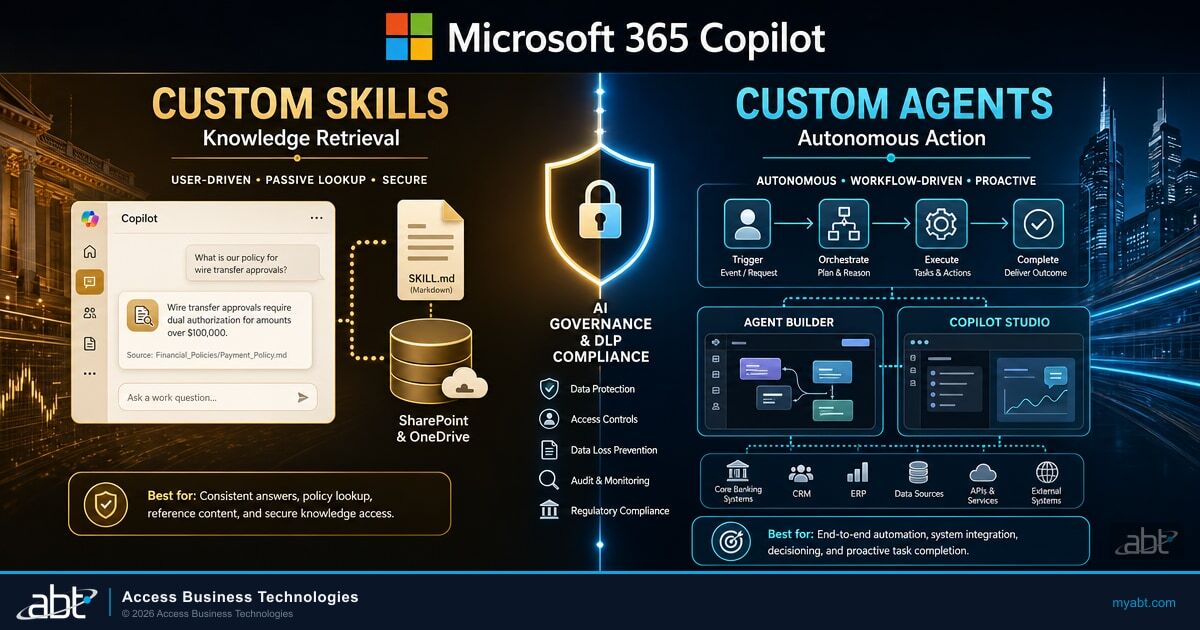
A custom skill adds a capability or a knowledge source to Copilot's existing responses. The user still drives the interaction. Copilot answers or assists. The skill does not act on its own.
There are two main forms a custom skill takes in the Microsoft 365 Copilot ecosystem today.
Cowork SKILL.md Files (User-Level, Behavioral Instructions)
If your institution has access to Microsoft 365 Copilot Cowork, individual users can create SKILL.md files stored in their OneDrive at /Documents/Cowork/Skills/. Each file teaches Cowork how to handle a specific type of task for that user, using plain-language instructions in a structured Markdown format.
A loan officer could write a SKILL.md that tells Cowork: "When I ask about a borrower's file, always lead with the property address, the loan amount, and the current stage. Use the stage names from our internal checklist, not Fannie Mae's generic terms." Cowork discovers and applies those instructions at the start of each conversation.
Each user can store up to 50 custom skills. These are user-level only. IT administrators cannot push a SKILL.md to the whole department from the admin center. That is both the strength of this approach (fast for individuals to experiment) and its limit (hard to standardize across a team). Cowork SKILL.md files run inside the same Microsoft 365 security boundary as the rest of Cowork -- your tenant's DLP policies and sensitivity label configurations remain in force regardless of what a skill instructs. For a full walkthrough on creating these files, see our guide on personalizing Microsoft Copilot Cowork with SKILL.md files.
When SKILL.md Is the Right Choice
An individual or small team wants to tune Cowork's behavior for their specific workflows, vocabulary, or reporting preferences, without requiring developer effort or IT deployment. Fast to create, personal, and contained.
Copilot Studio Plugins and Actions (Team-Level, Connected Data Sources)
Copilot Studio also supports declarative extensions: plugins and connector actions that give Microsoft 365 Copilot access to external data sources, line-of-business systems, or specialized knowledge bases. These are published through the Microsoft 365 App Store and can be deployed by IT administrators to the whole organization or to specific groups.
An IT administrator can deploy a plugin that connects Copilot to your core banking system's read-only knowledge base, for example, so every user with the right permissions can ask Copilot questions grounded in that system's data. That plugin does not act autonomously. It extends what Copilot knows and can look up.
Plugins are the right choice when you want to connect Copilot to an external data source or a specialized knowledge domain for a department or the whole organization, and the capability is about retrieving or generating content, not executing multi-step workflows.
What a Custom Agent Does (Action, Not Just Knowledge)
A custom agent is a purpose-built AI assistant with its own identity, its own knowledge, and the ability to take actions on behalf of users. An agent does not just answer questions. Depending on how it is built, it can create documents, query systems, send messages, or chain together multiple steps without the user manually driving each one.
Microsoft 365 Copilot gives you three build paths for custom agents, each suited to a different level of complexity and a different type of builder.
Agent Builder (No-Code, Information Workers)
Agent Builder is built directly into the Microsoft 365 Copilot app. No developer required. A department head or a technically capable operations manager can open it, describe what the agent should do in plain language, and connect it to organizational knowledge from Microsoft Graph.
Agents built this way are grounded on content from SharePoint, Teams, Outlook, and other M365 sources. The agent is designed to respect the user's existing M365 permissions. If a SharePoint site is restricted to the lending team, the agent honors those permissions and is not expected to surface content from that site to users who do not already have access. Agent Builder agents cannot be published or distributed outside your tenant -- they are within-tenant only, which makes them appropriate for internal teams, not customer-facing or partner-facing scenarios.
Agent Builder: Fastest Path From Documents to Answers
An information worker or department lead wants to create a focused Q&A agent grounded on internal knowledge, without involving IT or a development team. The fastest path from "we have a lot of documents" to "staff can ask questions and get cited answers."
Copilot Studio (Low-Code, Makers and Developers)
Copilot Studio lives at copilotstudio.microsoft.com and is included with a Microsoft 365 Copilot license. It is the right tool when Agent Builder is not enough. Where Agent Builder creates document-grounded Q&A agents, Copilot Studio supports complex, multi-step workflows with business system integration, external connectors, autonomous action capabilities, and publication to Teams, external websites, or custom endpoints.
A Copilot Studio agent built for a credit union's member services team might pull a member's account history from the core banking system via a connector, check current promotional rates from an internal SharePoint document, draft a personalized communication for the member based on their account tier, and submit the draft to a loan officer for review before sending. That is not a knowledge lookup. That is a workflow.
Copilot Studio agents are governed through the Power Platform admin center with ALM (application lifecycle management) across development, test, and production environments. IT administrators control connector governance, DLP, role-based access, and retention. For regulated institutions, this means a governed build-and-deploy pipeline, not a one-person experiment that bypasses your change management process. Pricing is consumption-based -- Copilot Studio runs on a credit model, approximately $200 per month per 25,000 credits. Verify current pricing before quoting to stakeholders, as Microsoft updates this periodically.
Microsoft 365 Agents Toolkit (Pro-Code, Developers)
For institutions with in-house developers or a technology partner building custom integrations, the M365 Agents Toolkit (available via Visual Studio and Visual Studio Code extensions) provides a full developer path using the Microsoft 365 Agents SDK. This is the primary route for building agents that need to be distributed across multiple tenants, integrated with proprietary back-end systems, or published to the Agent Store for other organizations to use. Most banks and credit unions will not start here, but knowing it exists matters if your institution has custom systems that no off-the-shelf connector reaches.

Why Governance Is Different for Agents Than for Skills
A custom skill retrieves information or adjusts behavior. A custom agent can take action. That difference matters a great deal when your institution is subject to NCUA, OCC, FDIC, or FFIEC oversight.
Entra Agent ID: Every Agent Gets an Identity
When an agent is deployed in Microsoft 365, Agent 365 -- Microsoft's agent governance layer (verify current pricing before quoting to stakeholders, as Microsoft updates this periodically) -- gives that agent an Entra Agent ID. This is a managed identity in Microsoft Entra, treated alongside users, apps, and devices with authentication, authorization, protection, and governance controls.
For a regulated institution, this matters directly: if an examiner asks "what AI agents are operating in your tenant, what can they access, and who is accountable for them?", the answer lives in Entra Agent ID and the Agent 365 management console. Every agent has an identity. Every agent has a designated human sponsor (owner). Orphaned agents -- agents whose original sponsor left the organization -- surface for review automatically.
Agents are built and deployed without managed identities or human sponsors. An examiner asks what AI agents are active in your tenant. You cannot provide a complete inventory or confirm who is accountable for each agent's actions.
Every agent has an Entra Agent ID, a designated human sponsor, and lifecycle policies. The management console shows your complete agent inventory. Orphaned agents surface automatically for remediation. Your examiner gets a complete, auditable answer.
Audit Trails Are Not Automatic
Every agent interaction generates a record in the Microsoft Purview Audit log, provided audit logging is configured at the right scope. This does not happen by default in every configuration. The same is true for custom skills and plugins. Purview's Copilot retention policy location covers user prompts and Copilot responses, including agent interactions, but only if that policy has been created and scoped correctly.
A financial institution that deploys a Copilot Studio agent without first verifying its audit trail configuration has an agent taking actions against member data with no log to show an examiner. That is the scenario ABT's pre-deployment checklist addresses before any agent handles its first query. For the full picture on what Copilot stores and which Purview controls apply, see our article on Copilot memory and data governance gaps that banks and credit unions need to address now.
The SharePoint-Grounded Internal Agent: The Fast Win for Financial Institutions
If your institution is looking for a concrete starting point that delivers real staff productivity, passes a compliance review, and does not require a development team, a SharePoint-grounded Q&A agent built in Agent Builder is the right first build.
The problem: staff spend significant time searching for internal policy documents, procedure guides, or regulatory reference materials. A branch manager at a community bank might search three different SharePoint sites to confirm the current procedure for a specific account type before advising a customer. A compliance officer might spend 20 minutes hunting through version-numbered PDFs to find the current GLBA notice template.
The solution is an Agent Builder agent connected to a curated SharePoint document library that contains your institution's internal policy library, procedure guides, and compliance documents. Staff ask the agent plain-language questions. The agent returns answers with citations to the source document and page, so the user can verify and share the reference if needed.
What Makes a SharePoint Agent Safe for Regulated Institutions
- The agent is designed to surface only documents the user already has SharePoint permission to access -- a teller-level employee is not expected to retrieve executive compensation documents restricted to HR and leadership.
- Microsoft Purview Audit captures every interaction. eDiscovery can surface agent conversations if an examiner requests them.
- The agent stays within your Microsoft 365 tenant. No data leaves.
- Agent Builder agents cannot be published outside the tenant, eliminating external access risk unless you explicitly build an external-facing agent through Copilot Studio.
Before the agent is deployed to staff, confirm that the SharePoint document library it draws from has correct permission scoping, sensitivity labels on any document containing member data or restricted content, and that audit logging is active for the agent. ABT configures these controls before your team accesses the first agent build. The expected impact: faster answers, fewer errors from outdated document versions, and a consistent reference point across branches or departments. For mortgage lenders, this compounds quickly -- loan officers referencing current guideline documents rather than last-quarter's PDFs means fewer underwriting errors and faster loan decisions.

Choosing the Right Path: A Decision Guide
The most common mistake institutions make is treating agent governance as a post-deployment task. Every agent that takes action in your tenant needs an Entra Agent ID, a human sponsor, and an audit trail configured before staff use it on real member data. Use this table to match your use case to the right build path before any work starts.
| If Your Use Case... | Consider This Path |
|---|---|
| Needs to take action (send, create, submit, query an external system) | Custom agent via Copilot Studio or Agent Builder |
| Is for one user or a small team tuning their own Cowork behavior | Cowork SKILL.md files |
| Connects Copilot to a specific data source for the whole department | Copilot Studio plugin or connector |
| Requires external system integration (core banking, LOS, CRM) | Copilot Studio agent (low-code) or M365 Agents Toolkit (pro-code) |
| Wants a Q&A agent grounded on internal SharePoint documents, fast, no developer | Agent Builder |
| Must be published to external customers or partner organizations | Copilot Studio or M365 Agents Toolkit |
| Is primarily about governance and accountability over existing agents | Agent 365 (control plane, separate from the build tool) |
ABT's pre-deployment checklist covers the three governance prerequisites so institutions are not retroactively finding gaps after their first NCUA examination question about AI.
Which Copilot Extension Approach Is Right for Your Institution?
ABT manages Microsoft 365 tenants for more than 750 financial institutions. We have seen what works and what creates compliance problems when institutions start extending Copilot. A 30-minute readiness conversation covers your current configuration, your governance gaps, and whether your first build should be an Agent Builder Q&A agent, a Copilot Studio workflow agent, or something in between.
Frequently Asked Questions
Yes, for most first-use cases. Agent Builder requires no coding and is accessible directly from the Microsoft 365 Copilot app. It is designed for information workers and department leads. If your use case requires integration with an external system (such as your core banking platform or loan origination system), you will need Copilot Studio and likely some technical configuration from a maker or developer. Copilot Studio is low-code, not no-code, for complex scenarios.
A Copilot Studio agent is a purpose-built AI assistant with its own identity, knowledge base, and potentially the ability to take actions in external systems. It is deployed by IT administrators and governed through the Power Platform admin center. A Cowork SKILL.md file is a user-created behavioral instruction for Cowork specifically. It lives in the individual user's OneDrive, it does not have an Entra Agent ID, and it cannot be pushed to a team or organization from the admin center. SKILL.md files are personal productivity tools. Copilot Studio agents are organizational tools with enterprise governance requirements.
No. Agent 365 is the governance and management layer, not the deployment tool. Copilot Studio and Cowork handle deployment and execution. Agent 365 manages agent inventory, assigns Entra Agent IDs, enforces lifecycle policies, detects orphaned agents, and provides Conditional Access controls for agents. Think of it as the control plane that sits above the build tools.
Three things: first, verify that Purview Audit is configured to capture agent interactions at the correct scope. Second, confirm that Agent 365 is active so every agent built in your tenant receives an Entra Agent ID and a designated human sponsor. Third, review the permissions on any SharePoint or data source the agent will access to confirm it only surfaces content that the requesting user already has rights to. ABT walks through all three steps in our standard Copilot readiness assessment.