

In This Article
The phone rings, and the caller says he is from IT, fixing a problem with your sign-in. That call is vishing, short for voice phishing. On November 20, 2026, Palo Alto Networks' Unit 42 published "Dialing for Data: Inside the Com's High-Profile Heists." It describes how Com-affiliated crews run that call against financial services, healthcare and legal organizations, and what they do in the minutes after it ends.
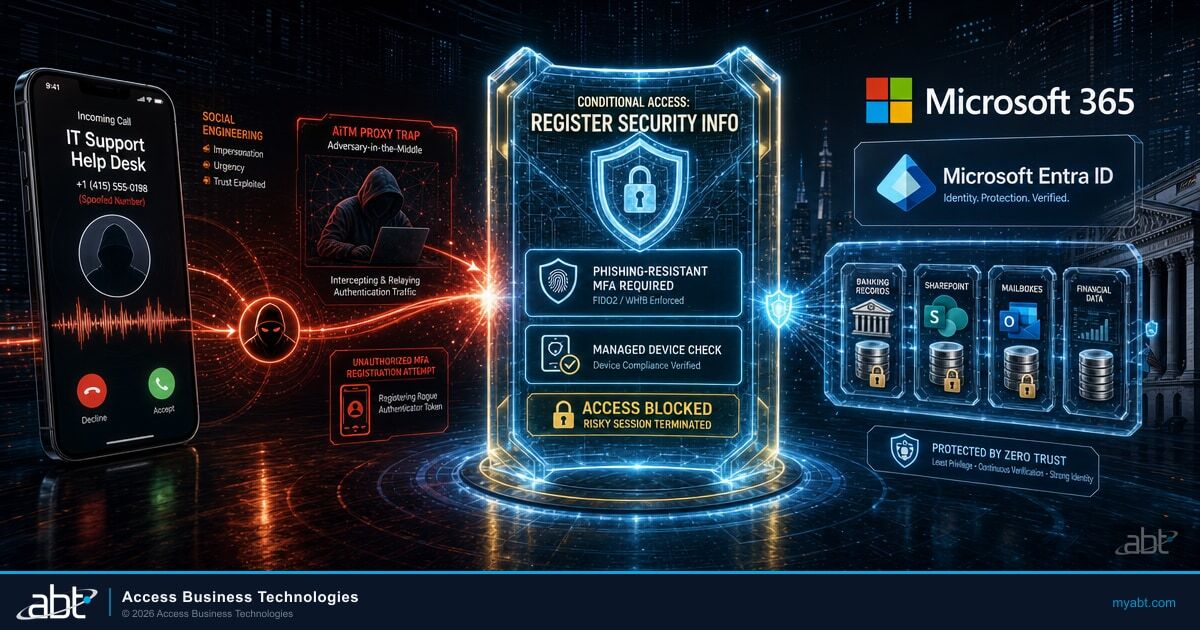
The sequence is short. The caller sends the employee to a sign-in page built for that organization. An adversary-in-the-middle (AiTM) kit passes the password and the multi-factor authentication (MFA) approval to the attacker in real time.
Then, Unit 42 reports, "the attackers quickly enroll their own MFA devices." Scripted collection from mail, OneDrive and SharePoint follows, and the extortion message arrives over Teams and email.
This guide is about that registration step in a Microsoft 365 vishing attack. ABT is a Tier 1 Cloud Solution Provider (CSP) serving 750+ financial institutions. For CISOs, IT directors and compliance officers at US credit unions, banks and mortgage companies, the risk is specific: if registration accepts the MFA already present in a captured session, an attacker may be able to add a method. Four controls in your own tenant narrow that path. They cover what a person must prove to register a sign-in method, sign-in methods a relay can't complete, alerts on new registrations and scripted downloads, and a verification rule for anyone who calls claiming to be IT. Stronger registration controls can prevent the addition; responders still need to revoke the session.
What Unit 42 Reported on November 20
Unit 42 attributes the activity to Bling Libra (aka ShinyHunters), the activity clusters it calls Redact, Pink, Falcon and Helix, and two new ones, Vortex (CL-CRI-1264) and Cinder (CL-CRI-1274). Campaigns were "accelerating significantly around August 2026," and that month the crews "targeted financial services organizations about twice as often as healthcare organizations." Healthcare overtook financial services in September and led in October, "alongside financial services."
Microsoft's September 9 research on passkey-themed social engineering found unusual sign-ins "followed by threat actor-added authentication methods, high-volume Microsoft Graph activity, SharePoint and OneDrive downloads."
How the IT Support Vishing Call Takes a Microsoft 365 Account
Unit 42 says intrusions "typically begin with vishing, in which threat actors pose as IT staff resolving an authentication issue and direct the victim to a phishing page tailored to their organization." In February, the New York State Department of Financial Services (NYDFS) warned that help desk impersonators "often use spoofed caller IDs." Google's Threat Intelligence Group saw cases where the actor "spoofed the legitimate helpdesk phone number."
The pages carry your name, on short-lived subdomains "such as {company}.mfaregister[.]com." Microsoft adds that passkey enrollment "is often not the actor's true objective": the passkey story is a pretext for an AiTM or device-code sign-in.
Often from a spoofed number.
A short-lived subdomain fronts an AiTM proxy.
The attacker completes the real Microsoft 365 sign-in.
A phone, authenticator app or software token lands on the account.
Mail and files leave by script; demands follow over Teams and email.
Unit 42's Vortex cases show the speed: attackers enrolled "an unauthorized MFA device within minutes of authenticating." Vortex mostly hit healthcare, pharmaceutical and other medical organizations. The device names Unit 42 lists across its investigations are "standard phone models," so review every new registration, whatever the device is called.
Financial services has its own evidence. "In at least one financial services case, telemetry recorded a full AiTM sequence from credential entry to an MFA number-match prompt, indicating a likely successful session capture," Unit 42 writes.
Google reported that by July 2026 the group it tracks as UNC6671 had narrowed "to focus on the financial and legal sectors." Google also reported that 18 BlackFile Bitcoin wallets it reviewed received 141.65 BTC, approximately $10.69 million at the time of the transactions, between January 7 and May 12, 2026. Unit 42 lists that cluster as Redact (formerly BlackFile).
When the lure is a Teams chat aimed at your on-premises certificate service, see our article on help desk impersonation leading to Active Directory Certificate Services (AD CS) abuse.
See which identity controls your tenant enforces today
The Security Grade gives you a security health check of your Microsoft 365 tenant.
Why the Attacker's First Move Is Registering Its Own MFA
A relayed sign-in is temporary: the session can be revoked and the password reset. Microsoft describes the answer: "Following initial access, the actor's first objective was to transform a temporary compromise into a persistent foothold." The actor "enrolled an MFA method under their control, typically by registering a new phone number, authenticator application, or software-based one-time password (OTP) token."
Microsoft is precise about what that buys: "While MFA enrollment alone does not survive a complete credential and session reset, it provides a durable persistence mechanism when combined with stolen tokens, unrevoked sessions, or subsequent access to valid credentials." In ABT's reading, a password reset alone leaves the attacker's authenticator on the account.
Google saw operators delete "password-reset confirmations, secondary security notifications, company-wide security alerts."
Vortex used "Python scripts (python-httpx User Agent) to target Microsoft 365 mailbox, OneDrive and SharePoint content." Cinder used python-requests and the Microsoft Graph software development kit, then "used a compromised account to send extortion messages internally via email and Microsoft Teams." Microsoft saw collection held to "fewer than 1,000 files or emails accessed within any one-hour period," a pace Microsoft says was "likely helping the activity blend with normal enterprise usage."

Lock Down Security Info Registration with Conditional Access
Microsoft lets Conditional Access, its policy engine for deciding what each sign-in must satisfy, treat registration "like any application". The user action is Register security information, and it "lets Conditional Access policies enforce rules when users try to register their security information." It needs combined registration and Microsoft Entra ID P1, which Microsoft 365 Business Premium includes.
What the policy demands is the decision. In ABT's analysis, a registration policy that asks only for MFA is one the attacker already satisfies, because the hijacked session carries the approval the victim just gave. The policy has to ask for something a relay can't hand over: a phishing-resistant authentication strength, together with a managed device, a named location or both, as Microsoft recommends below.
Microsoft's recommendation: "Enforce strict conditional access controls for security info registration, including setting required sign-in frequency to always (require a new interactive auth), requiring managed devices and/or named locations, and requiring phish-resistant MFA as a required authentication strength, and in a separate policy blocking security info registration with a high sign-in risk condition."
ABT's read: the grant control is where a relayed session can be stopped from adding a method, because plain MFA admits that session.
Picture a hypothetical loan officer who takes the vishing call and approves the prompt.
The relayed session already carries her MFA approval, so the attacker can register its own authenticator, and a password reset the next morning leaves it in place.
The attacker's session holds neither a passkey bound to Microsoft's real sign-in nor an enrolled device, so the registration ends at the grant.
Three controls carry this, each piloted first.
Require a strength the relay cannot meet
Microsoft's template targets Register security information and requires an authentication strength, the list of sign-in method combinations a policy accepts; organizations "might choose to require other grant controls with or in place of" MFA. Add sign-in frequency set to always. Starting July 6, 2026, Microsoft says these policies also apply during Windows Hello for Business and macOS Platform SSO credential registration, a change our article on Entra self-service password reset (SSPR) and registered authentication methods covers.
Plan the first registration around a Temporary Access Pass
The built-in Phishing-resistant MFA strength leaves out the Temporary Access Pass (TAP), so a new hire, or a user with no remaining qualifying method, has nothing that meets it yet. TAP credentials "satisfy Conditional Access requirements for multifactor authentication," and Microsoft says "Administrators have to issue Temporary Access Pass credentials to new users so they can satisfy the requirements for multifactor authentication to register."
ABT's approach has two parts: a deliberately scoped onboarding and recovery path that accepts a verified TAP for first registration, separate from the phishing-resistant requirement, and a help desk identity check before any TAP is issued. Microsoft's authentication strengths page covers the custom strengths that make the policy side possible. The attacker's target then becomes the person who issues TAPs, where the caller-verification rule sits. ABT can build both for your tenant, pilot group first, so a new hire, or a user with no remaining qualifying method, still has a verified way to register.
Block registration at high sign-in risk
Microsoft's second policy blocks registration when sign-in risk is high. "Risk-based Conditional Access policies (sign-in risk and user risk) require Microsoft Entra ID Protection," a Microsoft Entra ID P2 feature, and Microsoft's licensing page includes P2 in Microsoft Defender Suite for Microsoft 365 Business Premium. For a Business Premium institution, ABT recommends Defender Suite on all seats, so this policy has risk signals behind it on every account.
A relayed session satisfies the second stage. From the third stage on, a relayed sign-in that cannot satisfy the registration policy cannot add a method, and the existing session still has to be revoked.
Make the Relay Fail, Then Watch for What Gets Through
Phishing-resistant authentication protects the sign-in itself. Microsoft's Phishing-resistant MFA strength "Includes methods that require an interaction between the authentication method and the sign-in surface," and passkeys "use origin-bound public key cryptography, ensuring credentials can't be replayed or shared with malicious actors."
| Method | MFA strength | Passwordless MFA strength | Phishing-resistant MFA strength |
|---|---|---|---|
| FIDO2 security key | Yes | Yes | Yes |
| Windows Hello for Business or platform credential | Yes | Yes | Yes |
| Certificate-based authentication (multifactor) | Yes | Yes | Yes |
| Microsoft Authenticator (phone sign-in) | Yes | Yes | No |
| Temporary Access Pass | Yes | No | No |
| Password plus text, voice, push or OATH token | Yes | No | No |
Push approval with number matching, where the user types the number shown on the sign-in screen into Microsoft Authenticator, sits in the last row. Microsoft's September incident timeline records "MFA completed (AiTM with non-phishing resistant MFA)," and in one financial services case Unit 42 recorded a relay reaching a number-match prompt, indicating a likely session capture. A relay can carry a number-match prompt to the victim and back. See our guide to phishing-resistant MFA for financial institutions; the same logic covers the kits in our DOM mirroring phishing defense guide.
Passkeys "are available in all Microsoft Entra ID editions, including Microsoft Entra ID Free." Coverage is the work, and ABT runs the Entra passkey migration for you; our article on Entra passkeys and the SMS and voice MFA retirement covers pilot groups, lost devices and break-glass accounts.
Alert on the registration and the download
Entra audit logs record "User registered security info" and "Admin registered security info," and Microsoft published a hunting query that "Detects a newly registered MFA device with a populated device token." Google suggests watching for registration events "immediately preceded by authentication failures" or "abandoned push challenges." Route those alerts to your security team's queue, away from the mailbox the attacker controls.
Microsoft names detections including Defender for Identity's "Malicious registration of an attacker controlled MFA device" and the Defender XDR detection "Automated mass SharePoint/OneDrive file access via python-httpx." Defender for Cloud Apps lists "Unusual multiple file download activities." At a pace of fewer than 1,000 items an hour, thresholds need tuning to each user's normal.
For the logging layer, Microsoft advises: "Enable Microsoft Graph activity logs and mailbox auditing, and alert on anomalous enumeration, authentication-method registration, and high-volume file or mail access." Graph activity logs record every Graph request, user agent included. They need Entra ID P1 or P2 plus a destination Microsoft lists as a Log Analytics workspace, a storage account or Event Hubs, each of which can carry its own Azure cost.
A Caller-Verification Rule for Anyone Claiming to Be IT
Registration policies, passkeys and alerts can all be talked around at the desk that resets credentials and issues TAPs. Unit 42's first recommendation is "Tighten help desk verification processes." Microsoft's is "Verify user identity through a rigorous process before performing any helpdesk-initiated credential or MFA reset, and alert on every such reset." New York's regulator put it in writing.
"Identity Verification Procedures: ... implement procedures for personnel to confirm the identity of individuals requesting credential resets, remote access, or other activity associated with information system access." "MFA Enrollment: Review existing MFA controls, including permissions for MFA enrollment."
The NYDFS letter speaks to New York regulated entities, and its two controls are a useful reference for any bank, credit union or lender. It says a company that suspects it may be a victim "should investigate and report to the FBI Internet Crime Complaint Center at www.ic3.gov." Separately, it tells companies to fulfill their reporting obligations to DFS under 23 NYCRR 500.17.
Any reset or approval request ends the inbound call; the help desk calls back from the directory.
Use a check a breached mailbox can't answer, such as a manager's confirmation, and log it.
The security team sees each one with new registrations.
IT will ask you to hang up and call the help desk back. Report any caller who sends a link or asks for a prompt approval.
The same callback rule covers Teams calls, the channel in our article on the shift from email phishing to Teams vishing.
How ABT and M365 Guardian Help
M365 Guardian is the operating model ABT uses to manage your Microsoft 365 tenant. Guardian configures Microsoft Entra Conditional Access to enforce MFA, risk-based access controls for appropriately licensed users, device compliance, geo-blocking and legacy authentication blocking, and monitors that configuration for drift.
For IT support vishing, ABT starts with a review of three things in your tenant: the Register security information policy, the help desk's caller verification, and license coverage for the risk-based block. ABT then configures the gaps, pilot group first. For the passkey work, the M365 Guardian team inventories every SMS and voice user in your tenant, stands up and tunes the passkey registration campaign, hardens the Authentication Methods Policy, and monitors registration coverage. The order ABT recommends:
- Inventory. Every user on SMS, voice, push or one-time codes.
- Gate registration. Register security information behind a phishing-resistant strength, plus a managed device, named location or both.
- Enroll passkeys. Group by group, TAPs only after verification.
- Require the strength. Retire weaker methods as each group finishes.
- Alert and rehearse. Registration, reset and download alerts, and a tested runbook.

The runbook is Microsoft's: "Revoke active sessions and refresh tokens for confirmed compromised identities, reset credentials, remove attacker-registered authentication methods, remove attacker created mailbox rules, and require secure re-registration of authentication methods." Revoking a session leaves an attacker-added method on the account, so finding and deleting that method is its own step. Guardian Contain adds round-the-clock detection on Microsoft Defender XDR signals with pre-authorized automated containment that revokes a compromised session when a covered signal fires. Tokenator, ABT's automated response engine, detects suspicious OAuth token behavior and revokes compromised sessions.
Business Premium includes Microsoft Entra ID P1, enough for the registration policy and authentication strengths. The high-risk block runs on Entra ID P2 through Defender Suite, which ABT licenses directly from Microsoft as a Tier 1 CSP.
"Ask one question about every account in your tenant: what would someone need to prove to add a new sign-in method to it? If the answer is a password and a tap on a phone, a convincing caller can supply both. Fix that answer first."
Working with financial institutions since 1999, serving 750+ today
Close the registration step before the next IT support call
ABT reviews your registration policy, help desk caller verification and license coverage, configures the gaps, and monitors Conditional Access for drift under M365 Guardian.
Frequently Asked Questions
IT support vishing is a phone call from an attacker posing as IT staff, who sends an employee to a sign-in page built for that organization. An adversary-in-the-middle kit relays the password and MFA approval to the attacker in real time. Unit 42 reported in November 2026 that attackers then register their own MFA devices and collect mail and files.
A relayed sign-in is temporary, so the attacker registers a phone number, authenticator app or software token it controls to keep a foothold. Microsoft says this enrollment gives durable persistence when combined with stolen tokens, unrevoked sessions or later access to valid credentials. A response that only resets the password leaves that method on the account.
Create a Conditional Access policy that targets the Register security information user action and requires something a relayed session lacks: a phishing-resistant authentication strength plus a managed device, named location or both, with sign-in frequency set to always. Plan first registrations around a Temporary Access Pass issued after identity verification. Conditional Access requires Microsoft Entra ID P1, which Microsoft 365 Business Premium includes.
Number-matched push approval meets Microsoft's MFA authentication strength but sits outside the Phishing-resistant MFA strength. Microsoft's incident timeline shows an adversary-in-the-middle kit completing non-phishing-resistant MFA, and in one financial services case Unit 42 saw a relay reach a number-match prompt, indicating a likely session capture. FIDO2 security keys, passkeys, Windows Hello for Business and certificate-based authentication (multifactor) meet the phishing-resistant strength.
Follow Microsoft's sequence: revoke active sessions and refresh tokens, reset credentials, remove attacker-registered authentication methods, remove attacker-created mailbox rules, and require secure re-registration of authentication methods. Then review OAuth application grants and Microsoft Graph activity for scripted downloads from mail, OneDrive and SharePoint, and record what was accessed. Report the incident through the channels your regulator and counsel require.