In This Article
- Why Spreadsheet Compliance Monitoring Is Failing Financial Institutions
- What Power BI Actually Does as a Compliance Engine
- Five Power BI Dashboard Templates for Regulated Financial Institutions
- Mortgage BI Compliance Dashboards on MortgageExchange Data
- Microsoft Purview as Evidence Layer, M365 Guardian as Continuous Governance
- Building the Business Case for Real-Time Compliance Monitoring
- The Implementation Roadmap
- How ABT Accelerates Power BI Compliance Deployments
- Frequently Asked Questions
Banks, credit unions, and mortgage companies all face the same brutal math in 2026: regulatory change is accelerating while compliance budgets stay flat. NCUA just expanded cybersecurity examination procedures. The OCC issued new guidance on third-party risk management for AI vendors. CFPB updated Regulation Z thresholds for qualified mortgages. And the FDIC finalized its approach to digital asset compliance monitoring. That is four regulators issuing material updates in a single quarter, each requiring different data, different reporting formats, and different evidence trails.
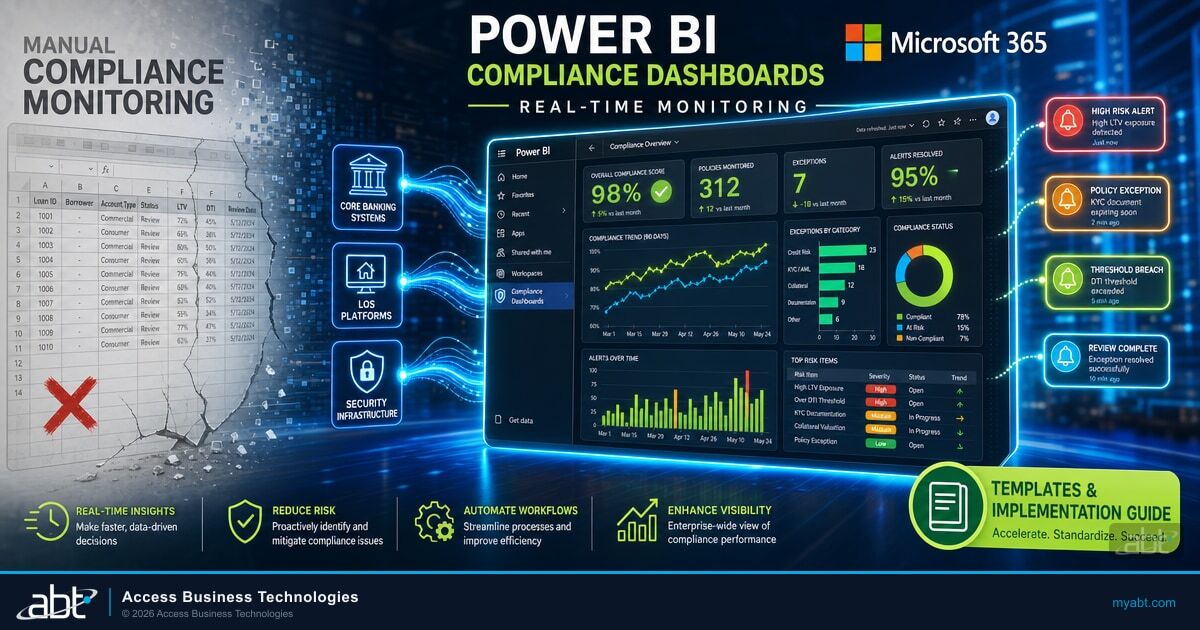
If your compliance team is still pulling data into spreadsheets for quarterly reviews, you are discovering problems after they compound. Power BI dashboards connect directly to your core banking systems, loan origination platforms, and security infrastructure to surface compliance drift the moment it happens. This guide covers Power BI dashboard templates built for regulated financial institutions, the Mortgage BI templates that mortgage lenders run on top of MortgageExchange data, the Microsoft Purview evidence layer that examiners actually accept, and how Access Business Technologies layers M365 Guardian as the continuous governance operating model that holds the whole compliance posture together for 750+ financial institutions.
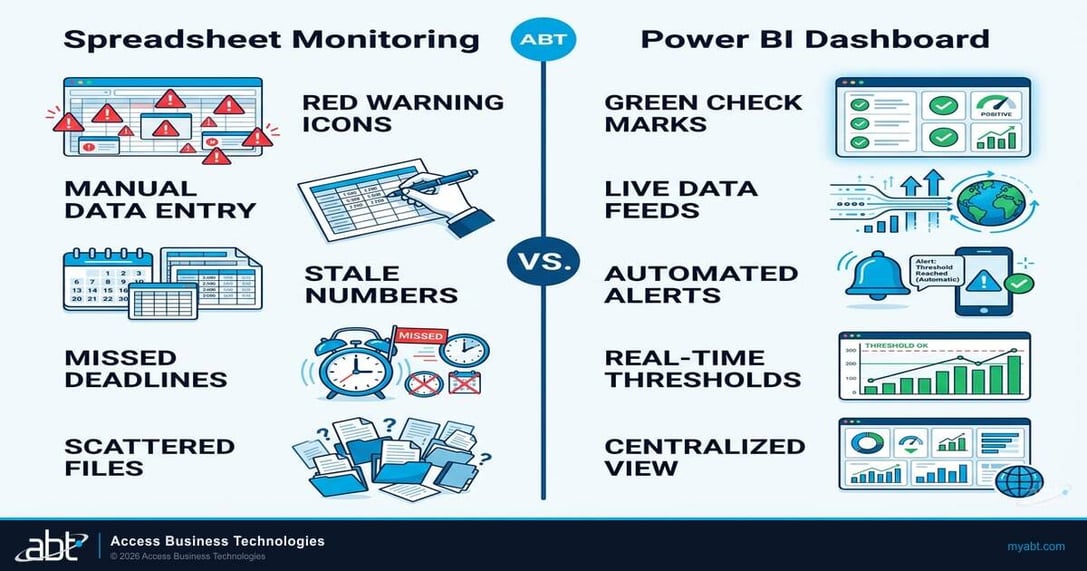
Spreadsheet Compliance Monitoring
- Quarterly data pulls from multiple systems
- Manual threshold calculations prone to formula errors
- Stale data by the time reports reach the board
- No alerting, gaps found during audits
- Examiner requests take days to fulfill
Power BI Real-Time Dashboards
- Automated data feeds from source systems
- Threshold rules update centrally, apply everywhere
- Live views refreshed daily or hourly
- Automated alerts for policy violations
- Examiner requests answered in minutes
Why Spreadsheet Compliance Monitoring Is Failing Financial Institutions
The problem is not that compliance teams lack discipline. The problem is that the volume and velocity of regulatory change has outpaced what manual processes can handle. A community bank compliance officer tracking OCC guidance, FFIEC examination updates, BSA/AML rule changes, and state-level requirements simultaneously cannot keep pace with spreadsheet-based monitoring.
Consider what happened in early 2026. The CFPB adjusted HOEPA high-cost mortgage triggers to $27,592, updated QM points-and-fees thresholds across five loan tiers, and raised the HMDA small-institution exemption to $59 million. Every pricing model, disclosure system, and compliance check at every mortgage-originating institution needed recalibration. Institutions tracking these thresholds in spreadsheets had to manually update formulas across dozens of files. Institutions with Power BI dashboards updated one parameter table and every dashboard reflected the change instantly.
Credit unions face their own velocity challenge. NCUA expanded cybersecurity examination procedures to include NIST Cybersecurity Framework alignment verification, third-party vendor risk assessments, and incident response testing documentation. These are not annual check-the-box exercises. Examiners now expect continuous evidence of compliance posture.
The Gap Most FIs Miss
Spreadsheets capture a point-in-time snapshot. Regulators increasingly expect continuous monitoring. The gap between these two approaches is where examination findings, consent orders, and enforcement actions live. Institutions that close this gap before their next examination avoid the findings entirely.
Banks under OCC supervision face parallel pressure. OCC Bulletin 2023-37 expanded third-party risk management expectations to include AI and machine learning systems embedded in vendor products. Tracking vendor compliance across dozens of technology relationships requires structured data management that spreadsheets cannot sustain at scale.
What Power BI Actually Does as a Compliance Engine
Power BI is Microsoft's business intelligence platform. For financial institutions, it serves a specific function: connecting to your core systems, applying compliance rules to the combined data, and surfacing violations or approaching thresholds through visual dashboards your team can act on.
- DAX
- Data Analysis Expressions, the formula language in Power BI used to create calculated columns, measures, and custom compliance threshold logic.
- Dataflow
- A reusable data preparation pipeline in Power BI that extracts, transforms, and loads data from source systems before it reaches dashboards.
- Row-Level Security (RLS)
- A Power BI feature that restricts data access by user role, branch managers see their branch, executives see all branches, examiners see what you define.
- Paginated Reports
- Pixel-perfect, print-ready reports in Power BI designed for regulatory submissions, board packages, and examination evidence binders.
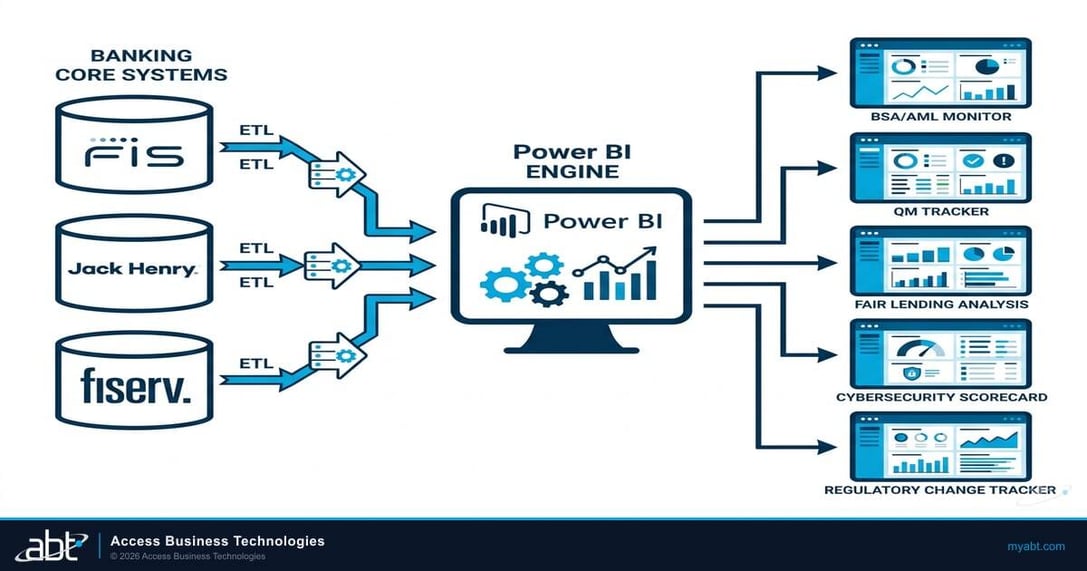
For banks, Power BI connects to core banking platforms like FIS, Jack Henry, or Fiserv through ODBC drivers, REST APIs, or scheduled data exports. For credit unions, it integrates with Symitar, Corelation, or DNA. For mortgage companies, it pulls from Encompass, Byte, LoanSoft, or any LOS with a data export capability. The point is that Power BI does not require you to replace anything. It sits on top of your existing systems and creates a unified compliance view.
Three capabilities distinguish Power BI from spreadsheet monitoring. First, it connects directly to source systems and refreshes automatically. A spreadsheet is a snapshot that ages every hour. A Power BI dashboard is a live feed that refreshes on the schedule you set, daily, hourly, or near real-time depending on your data architecture. Second, it applies threshold rules centrally. When the CFPB updates a QM limit or the FDIC changes a BSA reporting threshold, you update one parameter table and every dashboard reflects the change. Third, it alerts automatically. When a metric crosses a threshold, a loan approaching QM limits, a BSA transaction pattern flagging, a vendor contract expiring, Power BI sends notifications through email, Teams, or mobile push.
Power BI also runs natively in the Microsoft ecosystem. If your institution already uses Microsoft 365, Teams, and SharePoint, Power BI integrates without adding another vendor relationship, another security review, or another FFIEC vendor risk assessment. That matters when your compliance team is already managing dozens of technology vendor relationships.
Five Power BI Dashboard Templates for Regulated Financial Institutions
Each template below addresses a compliance domain that spans institution types. A community bank, a $2 billion credit union, and a multi-state mortgage company all need some version of these dashboards. The specific data sources and threshold values differ, but the monitoring architecture is the same.
| Template | Primary Regulator | Data Sources | Alert Triggers | Refresh Frequency |
|---|---|---|---|---|
| Regulatory Compliance Scorecard | OCC / NCUA / FDIC | Core banking, GRC platform | Control gaps, policy expiration | Daily |
| BSA/AML Transaction Monitor | FinCEN / State | Core banking, wire system | Threshold breaches, pattern flags | Hourly |
| Fair Lending Analysis | CFPB / DOJ | LOS, HMDA LAR | Denial rate disparity, pricing outliers | Daily |
| Cybersecurity Posture | FFIEC / NIST | M365 Security, Purview, vulnerability scanner | Overdue patches, failed MFA, incidents | Hourly |
| Vendor Risk Dashboard | OCC / NCUA | Contract management, security assessments | Expiring contracts, missing SOC reports | Weekly |
1. Regulatory Compliance Scorecard
This template creates a unified view of your institution's compliance posture across every regulatory domain. For banks, it maps controls against OCC examination expectations. For credit unions, it tracks NCUA examination preparedness across 11 risk areas. For mortgage companies, it monitors CFPB, state licensing, and GSE seller/servicer requirements simultaneously.
The dashboard uses a heat map that scores each compliance domain as green, yellow, or red based on control implementation status, policy currency, and evidence availability. Board members get the summary view. Compliance officers drill into specific domains. Examiners get a pre-formatted export that answers their questions before they ask them.
2. BSA/AML Transaction Monitoring Dashboard
BSA compliance is universal across institution types. Banks, credit unions, and mortgage companies all face Currency Transaction Report filing requirements, Suspicious Activity Report obligations, and Customer Due Diligence expectations. This template monitors transaction patterns against FinCEN thresholds and your institution's own risk-based limits.
The dashboard visualizes transaction velocity, structuring patterns, geographic risk concentrations, and beneficial ownership completeness. It integrates with your core banking platform and wire transfer system to flag transactions requiring CTR filing, identify potential structuring patterns below the $10,000 threshold, and track SAR filing deadlines against the 30-day regulatory window.
3. Fair Lending Analysis Dashboard
HMDA reporting requirements apply to any institution above the $59 million asset threshold that originates mortgage loans. This template visualizes approval rates, denial rates, and pricing by demographic category, geography, and product type, surfacing potential fair lending risks before they become examination findings or DOJ referrals.
The dashboard goes beyond HMDA reporting to provide early detection of patterns that could trigger fair lending scrutiny. If denial rates for one demographic group in one geography deviate significantly from the baseline, the dashboard flags it for review. Credit unions can use the same template to monitor member business lending concentration and compliance with their field-of-membership requirements.
Ready to see what your compliance gaps look like? Get Your Security Grade, free tenant assessment in under 5 minutes.
4. Cybersecurity Compliance Posture Dashboard
Every financial institution regulator now examines cybersecurity posture. The FFIEC Cybersecurity Assessment Tool, NIST Cybersecurity Framework, and regulator-specific guidance all require documented evidence of security controls. This template connects to Microsoft 365 security infrastructure and vulnerability management tools to create a continuous compliance evidence stream.
The dashboard tracks Microsoft Secure Score trends, Microsoft Entra ID Conditional Access policy effectiveness, Microsoft Defender for Endpoint protection coverage, vulnerability remediation timelines, and incident response plan currency. For institutions subject to Fannie Mae's Information Security Supplement, it maps controls across all 14 required security domains and tracks the annual officer attestation timeline. The 36-hour breach notification requirement means your incident response workflow needs to be documented, rehearsed, and verified as current, this dashboard tracks all three.
5. Third-Party Vendor Risk Dashboard
OCC Bulletin 2023-37 and NCUA's equivalent guidance require financial institutions to manage vendor risk proportional to the criticality of each relationship. This template tracks vendor contract expirations, SOC 2 report currency, business continuity plan verification, and, increasingly, AI and machine learning governance for vendors embedding those capabilities in their products.
The dashboard categorizes vendors by risk tier (critical, significant, limited) and monitors compliance evidence for each tier. When a critical vendor's SOC 2 report expires, when a contract renewal approaches without updated security language, or when a vendor adds AI capabilities that require governance review, the dashboard surfaces it automatically.
Mortgage BI Compliance Dashboards on MortgageExchange Data
Mortgage lenders have a compliance shape that generic banking dashboards do not cover well. HMDA Loan/Application Register completeness, ECOA adverse action timing, NMLS license currency across every loan originator in every state, and FFIEC interagency fair lending baselines all need pipeline-level data, not balance-sheet data. That pipeline-level data lives in the loan origination system (Encompass, Byte, LoanSoft, MeridianLink) and in the core (Fiserv DNA, Symitar Episys, Jack Henry, Corelation KeyStone) and historically required a quarterly spreadsheet reconciliation between the two systems. ABT solves that reconciliation with two purpose-built products. MortgageExchange is the custom interface that connects the LOS to the core in near real time, so loan-level data and member or customer data live in the same compliance view from origination through servicing. Mortgage BI is the Power BI compliance dashboard pack that runs on top of that combined data, with templates already calibrated to the regulatory baselines mortgage lenders are actually examined against: HMDA LAR completeness and edit-check status, ECOA notice-of-action-taken timing measured to the day, NMLS license expiration warnings rolled up per LO and per state, FFIEC interagency fair lending pricing distributions cut by demographic and geography, and TRID timing on intent-to-proceed and Closing Disclosure delivery. Lenders that adopt the MortgageExchange-to-Mortgage-BI stack stop running spreadsheet reconciliations between the LOS and core, and start examining their own pipeline the way their next CFPB or state regulator will.
Microsoft Purview as Evidence Layer, M365 Guardian as Continuous Governance
Power BI surfaces compliance drift in a dashboard. Examiners want more than that. They want the time-stamped audit trail behind the dashboard, the user-level evidence of who saw what and when, and the documented operating model that proves the institution is monitoring continuously rather than performing quarterly. That stack lives below the Power BI layer and matters every bit as much. Microsoft Purview Audit is the evidence layer. Purview Audit captures every create, modify, delete, and access action across Exchange Online, SharePoint Online, OneDrive, Teams, and Microsoft Entra ID with a time-stamped trail. Purview Audit Premium extends retention to one year with the option to extend to ten, which matches the practical retention floor for FFIEC examination scope and FINRA SEA Rule 17a-4 obligations on broker-dealers. Microsoft Purview Information Protection labels sensitive data at rest, Purview Data Loss Prevention enforces it in motion, and Purview Communication Compliance produces the supervisory evidence FFIEC and CFPB examiners expect on the communications channel. M365 Guardian is ABT's continuous governance operating model on top of that Purview foundation. Guardian applies the security baselines across Entra ID, Defender, Intune, and Purview the same way across every tenant in the institution's footprint, monitors for drift, produces the cross-tenant evidence packages a compliance officer needs at examination prep time, and runs the 24x7 security operations center that watches the Defender and Sentinel signals. A Power BI dashboard tells the institution where the gap is. Purview proves to the examiner that the institution detected it. Guardian is the operating model that catches it before the examiner ever asks.
Building the Business Case for Real-Time Compliance Monitoring
Compliance failures cost more than fines. A single examination finding can trigger a full-scope review. A BSA deficiency can result in a consent order that restricts your institution's growth for years. A fair lending pattern that goes undetected can lead to DOJ referral, restitution payments, and reputational damage that erodes depositor and member confidence.
Financial institutions using automated compliance monitoring detected policy violations 73% faster than those relying on manual review cycles, and reduced examination preparation time from an average of 160 hours to 40 hours per examination cycle.
Real-time monitoring changes the economics. Instead of quarterly reviews that find problems after they compound, dashboards catch drift in days or hours. That means smaller corrections, fewer escalations, and examinations where the data is already organized, current, and exportable. When examiners can pull the reports they need without waiting for your team to compile them, the tone of the entire examination changes.
There is also the vendor consolidation argument. Power BI is included in many Microsoft 365 E5 plans or available as a standalone Pro license at approximately $10 per user per month. Financial institutions already paying for the Microsoft stack often have Power BI access they are not using. The incremental cost of standing up compliance dashboards is template design and data connection work, not another SaaS subscription fee. ABT customers running Mortgage BI on top of MortgageExchange consolidate the LOS-to-core reporting layer at the same time, replacing a stack of point tools with a single Microsoft-native compliance view.
Your credit union's BSA officer leaves for another institution. The replacement inherits 14 spreadsheets tracking CTR filings, SAR deadlines, and CDD documentation across 3 branches, with no documentation of the formulas, thresholds, or manual processes used to maintain them.
Within 60 days, two SAR filing deadlines are missed. NCUA's next examination cites BSA program deficiencies. The credit union receives a Matter Requiring Attention that restricts new product launches until remediation is verified, a process that typically takes 12-18 months.
The Implementation Roadmap
A phased approach reduces risk and builds organizational support. Start with the compliance domain causing the most pain, typically BSA/AML monitoring for banks and credit unions, or TRID/QM tracking for mortgage companies, and expand from there.
Identify your highest-risk compliance domains. Map which source systems hold the data you need. Validate data quality and export capabilities. For most institutions, start with core banking, LOS, and Microsoft 365 Security Center plus Purview Audit.
Establish Power BI dataflows connecting to source systems. For mortgage lenders, light up the MortgageExchange feed so the LOS and core flow into one Mortgage BI compliance view. Configure threshold parameters for current regulatory requirements. Set up Row-Level Security so each role sees appropriate data. Build the first dashboard template.
Configure email and Teams notifications for threshold breaches. Validate dashboard outputs against known data to confirm accuracy. Test alert triggers with compliance officers. Refine threshold sensitivity to minimize false positives.
Train compliance officers, branch managers, and executives on their respective dashboard views. Build paginated reports for board packages and examination evidence binders. Begin planning the second and third dashboard templates.
The key to successful implementation is starting small and proving value fast. One dashboard that catches a compliance gap in its first week builds more organizational support than a six-month planning exercise. Financial institutions that deploy their first compliance dashboard in under 30 days consistently report higher adoption rates and faster expansion to additional compliance domains.
The difference between a spreadsheet and a Power BI dashboard is not visual polish. It is the difference between discovering a compliance gap during an examination and preventing it 90 days before examiners arrive.
How ABT Accelerates Power BI Compliance Deployments
Access Business Technologies has spent more than 25 years building Microsoft-native infrastructure for regulated financial institutions. As the largest Tier-1 Microsoft Cloud Solution Provider primarily dedicated to financial services, ABT manages Microsoft 365 tenants under delegated administration for 750+ banks, credit unions, and mortgage companies. Power BI compliance dashboards are one layer of the stack. MortgageExchange is the custom LOS-to-core interface that puts pipeline data and member data into the same compliance view. Mortgage BI is the Power BI dashboard pack pre-calibrated to HMDA, ECOA, NMLS, FFIEC, and TRID baselines. Microsoft Purview is the time-stamped evidence layer that examiners ask for. M365 Guardian is ABT's continuous governance operating model that applies, monitors, and documents the security and compliance configurations across every tenant in the institution's footprint, with the 24x7 security operations center watching the Microsoft Defender and Microsoft Sentinel signals every minute of the day.
ABT's compliance dashboard implementations start with your specific regulatory environment, not a generic template. Whether you are a community bank under OCC supervision, a credit union preparing for NCUA examination, or a mortgage company managing multi-state licensing and GSE seller/servicer requirements, ABT configures Power BI to address your actual compliance obligations. Templates are configured for current 2026 regulatory thresholds and designed so your team can update parameters independently as regulations change. Mortgage lenders get Mortgage BI templates that already understand the difference between an ECOA notice-of-action-taken count and a HMDA-reportable action-taken code, so the compliance officer is not re-explaining the regulation to the dashboard every quarter.
Key Takeaway
Power BI is the visualization layer. Microsoft Purview is the evidence layer. M365 Guardian is the operating model that holds the two together for 750+ financial institutions. For mortgage lenders, MortgageExchange feeds Mortgage BI with LOS-to-core data already reconciled, so the compliance dashboard reads from one source of truth instead of a quarterly reconciliation that no examiner will accept as continuous monitoring.
Turn Your Compliance Data into Examiner-Ready Dashboards
ABT builds Power BI compliance dashboards configured for your institution's specific regulatory requirements, live in weeks, not months. For mortgage lenders, MortgageExchange + Mortgage BI deploys on top of your existing LOS and core. For every FI, Microsoft Purview and M365 Guardian add the evidence and governance layers examiners actually accept.
Frequently Asked Questions
Power BI connects to core banking platforms through ODBC drivers, REST APIs, or scheduled data exports. Most major core platforms including FIS, Jack Henry, and Fiserv support direct database connections or provide API endpoints that Power BI dataflows can consume. Refresh schedules are configurable from daily to near real-time depending on your data architecture and compliance monitoring requirements. Mortgage lenders that run MortgageExchange already have a normalized LOS-to-core data feed, which is what Mortgage BI dashboards consume directly.
Power BI Pro is included in Microsoft 365 E5 plans, which many financial institutions already license. Standalone Power BI Pro licenses cost approximately $10 per user per month. For institutions requiring paginated reports for examination evidence or advanced data capacity, Power BI Premium Per User at $20 per month provides additional capabilities without requiring a dedicated Premium capacity commitment.
Yes, but examiners care about the audit trail behind the dashboard, not just the dashboard itself. Power BI's paginated reports feature produces pixel-perfect, print-ready documents formatted for examination evidence binders and board reporting packages. Microsoft Purview Audit captures the time-stamped trail of who accessed what data and when, which is the evidence layer examiners look for under FFIEC examination scope and books-and-records rules. Dashboards can be exported to PDF, shared via secure links with row-level security controls, or embedded in SharePoint sites that examiners can access directly during onsite or remote examinations.
A focused implementation covering two to three compliance dashboards typically takes four to six weeks from data connection to production deployment. The first dashboard can be operational in as few as two weeks when data sources are accessible and well-structured. For mortgage lenders, ABT's Mortgage BI templates running on MortgageExchange data deploy faster because the LOS-to-core reconciliation work is already in place. Costs vary based on data source complexity and customization requirements, but the incremental expense is template configuration, not new software licensing for institutions already on Microsoft 365.
Power BI can serve as a complementary BSA/AML monitoring layer alongside dedicated transaction monitoring systems. It excels at visualizing transaction patterns, tracking CTR and SAR filing deadlines, monitoring CDD documentation completeness, and creating the management reporting that examiners expect to see during BSA examinations. It is not a replacement for a dedicated transaction monitoring system but strengthens the overall BSA program by providing management-level visibility into program effectiveness, with Microsoft Purview Audit producing the access-trail evidence behind every report.
Well-designed Power BI compliance dashboards use centralized parameter tables that separate threshold values from dashboard logic. When regulators update a QM limit, BSA reporting threshold, or examination expectation, your compliance team updates one parameter table and every connected dashboard reflects the change immediately. This approach eliminates the spreadsheet problem of updating formulas across dozens of files and ensures consistency across all compliance reporting. ABT-managed deployments under the M365 Guardian operating model document the change history in Microsoft Purview Audit, so the threshold-update evidence is captured alongside the dashboard update itself.