In This Article
- What Stryker Disclosed (and What Outside Reporting Adds)
- How a Single Compromised Credential Becomes a Mass Wipe
- What It Looks Like If It Hits a Bank, Credit Union, or Mortgage Company
- Four Microsoft 365 Controls Every FI Should Verify This Week
- Building These Controls Into Operations (Not a One-Time Audit)
- Where M365 Guardian Fits, and What ABT Manages on Your Behalf
- Frequently Asked Questions
Picture a Wednesday morning at a community bank. The branch network opens at 8:30. The first call to the helpdesk arrives at 8:31. A teller cannot log in. By 8:45, every teller and every loan officer is locked out. Their corporate phones display a setup wizard. Their laptops are showing the out-of-box experience. Nothing has been encrypted. There is no ransom note. The devices have simply been factory reset.
This is not a hypothetical. On March 11, 2026, the Iran-aligned hacktivist group known as Handala used exactly this pattern against medical-device manufacturer Stryker Corporation. The damage was done not by malware, but by abuse of the company's own Microsoft Intune administration tooling. According to outside reporting attributed to a source familiar with the incident, roughly 80,000 enrolled devices across 79 countries were issued factory-reset commands inside a three-hour window, beginning at approximately 05:00 UTC. Stryker has formally confirmed only the higher-level facts: a "global disruption to the Company's Microsoft environment" and no indication of ransomware or malware deployed.
The reason this matters for banks, credit unions, and mortgage companies is straightforward. Every one of the controls that would have stopped the Stryker attack already shipped with Microsoft 365. Multi-Admin Approval for device wipe. Phishing-resistant MFA via Conditional Access Authentication Strength. Privileged Identity Management for the Intune Administrator and Global Administrator roles. Compliant-device requirements on admin portals. The features were sitting in Stryker's tenant unconfigured. They are sitting in most financial-institution tenants the same way. This article walks through what happened, what specifically to verify in your tenant this week, and how to keep those controls in place after the audit closes.
What Stryker Disclosed (and What Outside Reporting Adds)
Stryker is a roughly 50,000-employee Michigan-headquartered medical-device manufacturer with operations in 79 countries. On March 11, 2026, the company filed an SEC 8-K disclosure stating that it had "identified a cybersecurity incident affecting certain company IT systems that caused a global disruption" to its Microsoft environment. The same disclosure said the company had "no indication of ransomware or malware deployed to our systems" and that its medical devices and patient-facing systems were unaffected. Stryker confirmed disruption to order processing, manufacturing, and shipping, and reported that more than 5,500 employees in Ireland alone (4,000 of them at the Cork campus) were sent home after internal networks went offline.
Outside reporting fills in the technical detail that Stryker has not formally confirmed. According to BleepingComputer, citing a source familiar with the incident, the attackers used compromised administrative access to issue Microsoft Intune Remote Wipe commands to nearly 80,000 enrolled devices over roughly three hours. Censys, CybersecureFox, and the Wall Street Journal reached similar conclusions. Microsoft's Detection and Response Team (DART) and Palo Alto Networks Unit 42 are part of the joint investigation. The Intune mechanism remains the most-cited operating theory, but it is "outside reporting based on sources familiar with the incident," not Stryker's own formal language. The distinction matters when you brief your board.
The U.S. Department of Justice gave the attribution side of the story more concrete edges. On March 19, 2026, DOJ announced the seizure of four Handala-linked domains and tied the infrastructure to Iran's Ministry of Intelligence and Security (MOIS) as part of a cyber-enabled psychological-operations campaign. Palo Alto Networks Unit 42 has previously identified Handala as one of several personas operated by Void Manticore, a MOIS-affiliated actor. Handala publicly claimed responsibility on a Telegram channel, citing Stryker's 2019 acquisition of an Israeli medical-technology firm and a U.S. Department of Defense contract as the reasons for targeting the company. Handala's own claims (200,000 devices wiped, 50 terabytes exfiltrated) have not been substantiated by Stryker, Microsoft DART, or Unit 42.
What CISA Said the Day After
On March 18, 2026, the U.S. Cybersecurity and Infrastructure Security Agency (CISA) issued an advisory urging organizations to harden their endpoint management systems, with specific reference to Microsoft Intune. Microsoft published its own Intune hardening guidance approximately three days earlier. Both pointed to the same set of controls: phishing-resistant MFA on admin roles, Multi-Admin Approval for destructive Intune actions, Privileged Identity Management for time-bound admin elevation, and Conditional Access policies requiring compliant devices and named locations for admin-portal access. None of those controls require a license upgrade beyond Microsoft 365 E3 with Microsoft Entra ID P2 (the licensing layer most FIs already hold).
How a Single Compromised Credential Becomes a Mass Wipe
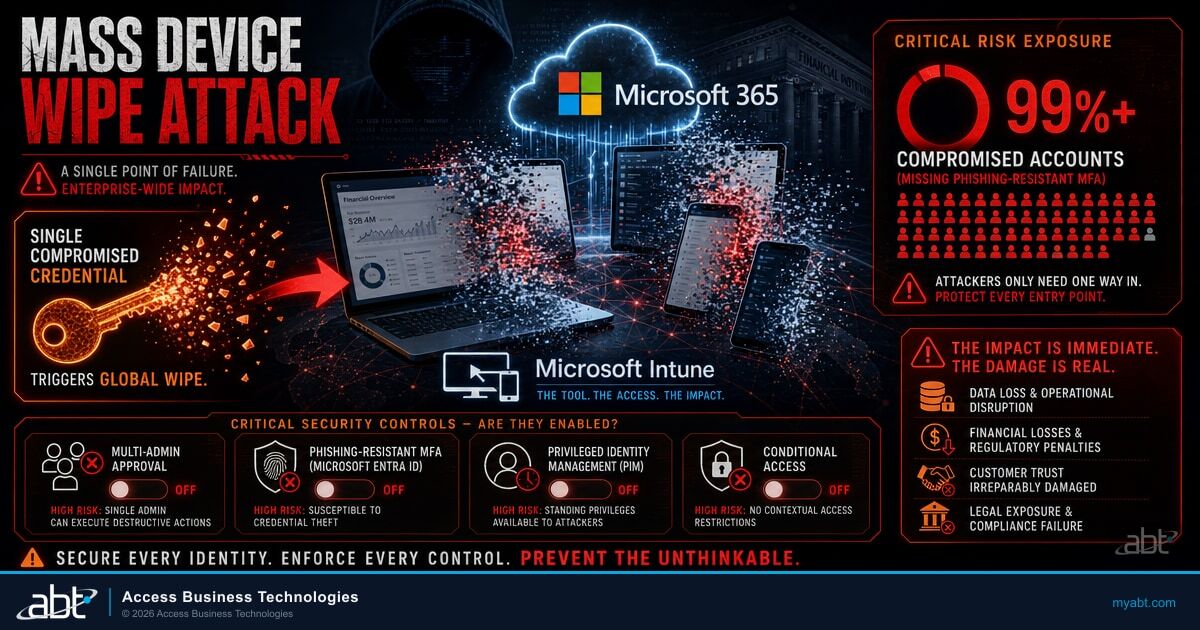
The reason the Stryker pattern is dangerous is that it does not look like an attack while it is happening. There is no malware payload for Microsoft Defender for Endpoint to flag. There is no anomalous network traffic for an intrusion-detection system to score. The destructive action is a legitimate administrative function, executed by an account with legitimate authority, through Microsoft's own management console. From a logging perspective, the wipe command is indistinguishable from your IT team retiring a returned laptop, except in volume.
The attack chain consolidates into four steps, each of which has well-documented Microsoft 365 controls that interrupt it.
Attackers obtain valid credentials for an existing administrative account. The most-likely vector at Stryker, per Palo Alto Networks Unit 42 and IBM analysis, is credential phishing or credential theft via infostealer malware, possibly combined with adversary-in-the-middle (AiTM) proxies that bypass standard MFA. SMS one-time codes, push-notification approvals, and TOTP apps are all phishable through these techniques. Stryker has not publicly confirmed the specific initial-access vector.
Inside the environment, attackers use the compromised admin account to create a new Global Administrator account they control directly. This persistence step ensures continued access even if the original compromised account is disabled or its credentials rotated. With Global Admin authority, the attacker holds equivalent rights to every Microsoft 365 service in the tenant, including Microsoft Intune.
The attacker browses the Intune console and adjacent administrative portals to understand device-fleet composition, BYOD enrollment scope, and which device groups would maximize impact. From a logging perspective, this stage looks identical to routine IT-team activity. The Stryker attack reportedly included this dwell-time stage, which is where defenders have the best chance to intervene if appropriate alerting is configured.
Using Microsoft Intune's built-in Remote Wipe capability, the attacker issues factory-reset commands to every enrolled device in scope. The platform processes the commands as designed. Devices receive the wipe command on next check-in (typically within minutes to hours, depending on device-group settings). Personal phones enrolled under bring-your-own-device (BYOD) policies are wiped alongside corporate laptops. No malware. No exploit. The console did exactly what it was built to do.
"We are essentially giving attackers a single point of failure that allows one compromised credential to execute a global factory reset." Denis Mandich, former CIA official, framing the structural failure exposed by the Stryker incident.
The pattern that makes this attack possible is the combination of broad standing privilege (a Global Administrator account that exists permanently and reads email), absent destructive-action approval (any single admin can wipe the fleet), and standard MFA on the admin portal (SMS, push, TOTP, all of which can be phished or relayed by AiTM proxies). Each of those three conditions is a configuration choice, not a Microsoft 365 limitation. The companion controls are visible in the same admin portals.
What It Looks Like If It Hits a Bank, Credit Union, or Mortgage Company
Translate the Stryker outage into the operating reality of a regulated financial institution and the picture sharpens. Branch networks depend on the Microsoft 365 stack for email, single sign-on into the core banking platform, secure messaging with members and borrowers, and (increasingly) Microsoft Teams as the primary collaboration channel. A mass wipe of corporate laptops and mobile devices would not just inconvenience employees. It would interrupt funded-loan processing, halt ACH and wire submission queues, take down member-facing branch IT, and block the pipeline that examiners and auditors expect to keep functioning.
A 40-branch community bank's Microsoft Intune Administrator credential is phished on a Tuesday afternoon. The attacker establishes a new Global Admin account, observes the environment quietly through Wednesday, and issues a bulk Remote Wipe command at 02:00 UTC Thursday morning. By the time the helpdesk arrives at 7:45 AM local time, every branch laptop and every corporate-issued mobile is in setup-wizard mode.
Branches do not open on time. Member-facing tellers cannot log into the core. Loan officers cannot access pipelines. Wire and ACH cutoff times slip into reportable territory under the bank's existing operations agreements. The CEO's emergency-notification procedure depends on Microsoft Teams, which now opens on a wiped device. The information-security officer's BCP drill assumed a ransomware outage with backup-restore as the recovery path. The wiper outage requires the IT team to re-image, re-enroll, and re-authenticate every device, sequentially, across 40 sites.
The OCC, FDIC, NCUA, and state DFIs all expect FIs to have business-continuity plans that anticipate a destructive cyber event. The FFIEC IT Examination Handbook (Information Security booklet, sections II.C.7 and II.C.12) is explicit that institutions must validate that recovery procedures work for events that include destructive malware and insider abuse of administrative tooling. Examiners reading the Stryker case will reasonably ask: have you verified that your Microsoft Intune Multi-Admin Approval policy is enabled? When was the last tabletop exercise that simulated a Global Administrator compromise? Where is the evidence?
What Examiners Are Likely to Ask After Stryker
Banks, credit unions, and mortgage companies should expect the next FFIEC, OCC, NCUA, or state DFI examination to include questions about Microsoft 365 administrative-role hardening. Specifically: how many Global Administrator accounts exist, who holds them, are they all configured with phishing-resistant MFA, is Privileged Identity Management active for those roles, and is Multi-Admin Approval enabled for destructive Intune actions. If the answer to any of those is "we have not validated that," the time to fix it is before the examination, not during it. See our FFIEC IT examination readiness guide for financial institutions for the broader examiner-expectation map.

Four Microsoft 365 Controls Every FI Should Verify This Week
The Microsoft hardening guidance issued in the wake of the Stryker incident, the CISA advisory of March 18, and the technical write-ups from Microsoft DART and Palo Alto Networks Unit 42 all converge on the same four controls. None of them require new licensing if you are already at Microsoft 365 E3 with Entra ID P2 (the typical FI baseline). All four can be configured in a working day by a competent Microsoft 365 administrator. Verifying that they are configured correctly is the work; the configuration itself is the easy part.
Microsoft Intune Multi-Admin Approval (MAA) for Device Wipe and Retire
Multi-Admin Approval is the single most direct mitigation against the Stryker attack pattern. With MAA configured, a destructive operation requested by one administrator (such as a Device Wipe issued to a group of devices) cannot execute until a second, independent administrator from a designated approver group reviews and approves the request. A single compromised credential is no longer a single point of failure. Nagomi Security's analysis put it bluntly: "with this enabled, Handala would have needed to compromise two independent admin accounts and coordinate approvals to execute the wipe; a substantially harder problem."
Configuration takes ten minutes. Navigate in the Intune admin center to Tenant administration, then Multi Admin Approval, then Access policies. Create a new policy. Choose Device wipe as the policy type. Assign an approver group (we recommend a small, named, hardware-MFA-protected group of senior administrators, separate from your daily helpdesk team). Submit the policy for approval. Have the second administrator approve it. Have the originating administrator return to the policy and complete the request. You can repeat for Device retire, Bulk action policy, and other destructive operations. The approver-group member must hold at least one Intune role assignment.
A common misunderstanding worth addressing
"Can't a Global Administrator just create a second Global Administrator account, log into both, and approve their own request?" Technically yes, if you do not also enforce the other three controls below. The defense-in-depth combination (phishing-resistant MFA on every privileged account, Privileged Identity Management gating role activation, audit-log alerting on new admin-account creation) is what makes the bypass impractical. MAA alone is not sufficient. MAA in combination with the other three controls is.
Phishing-Resistant MFA on Every Privileged Account, via Conditional Access Authentication Strength
If your Global Administrators or Intune Administrators sign in with SMS one-time codes, push notifications from the Microsoft Authenticator app, or TOTP codes from a third-party authenticator, you have not solved the problem the Stryker attack chain depends on. Each of those factors is bypassable through adversary-in-the-middle proxy phishing or push-notification fatigue (also called "MFA bombing"). The category of MFA Microsoft refers to as "phishing-resistant" includes FIDO2 hardware security keys, Microsoft Entra device-bound passkeys, Windows Hello for Business, and certificate-based authentication. These factors are bound to the device and cannot be relayed.
Microsoft Conditional Access supports an Authentication Strength setting that lets you require phishing-resistant MFA specifically for sign-ins to administrative portals. Build a Conditional Access policy that targets the Intune Administrator, Global Administrator, Cloud Device Administrator, and Privileged Role Administrator roles (and any custom roles with Intune-write permissions). Set the Authentication Strength to the built-in "Phishing-resistant MFA" option. Apply the policy unconditionally (no exclusions for "emergency" accounts; emergency accounts go through their own break-glass procedure). For the broader playbook on which phishing-resistant factors to deploy and how to roll them out across an FI workforce, see our phishing-resistant MFA guide for financial institutions.
Microsoft Entra Privileged Identity Management (PIM) for the Intune Admin and Global Admin Roles
Privileged Identity Management is the control that eliminates the standing privilege the Stryker attackers exploited. With PIM configured for a role, no administrator holds that role permanently. The role is held in an "eligible" state. To use it, the administrator activates the role for a fixed window (commonly one to four hours), with MFA, written justification, and (optionally) approval from a second human. Outside that activation window, the role is dormant. A compromised credential, even with MFA bypassed, cannot directly access Intune Administrator authority unless it also activates the role, triggering an alert that goes to a different human.
Configure PIM for the Intune Administrator, Global Administrator, Cloud Device Administrator, and Intune Service Administrator roles at minimum. Cap activation windows at four hours or less. Require MFA on activation (even if MFA was passed at sign-in, this enforces a second challenge specifically for role elevation). Disable permanent-active assignments; use permanent-eligible plus on-demand activation. Reduce Global Administrator headcount to two or three break-glass accounts that are themselves protected by hardware MFA, monitored separately, and never used for daily work. PIM is included in Microsoft Entra ID P2, which is part of Microsoft 365 E5 and Microsoft 365 E5 Security; for the licensing-tier comparison and how PIM availability factors into your E3-vs-E5 decision, see our Microsoft 365 E3 vs E5 vs Business Premium guide.
Conditional Access Policies Restricting Admin-Portal Access to Compliant Devices and Named Locations
The Intune admin console (intune.microsoft.com) and the Microsoft Entra admin center (entra.microsoft.com) should not be reachable from arbitrary devices in arbitrary locations. The Stryker attackers' privileged session reportedly did not originate from a Stryker-managed device; it originated from a residential or proxy IP range. Conditional Access can enforce two complementary requirements on admin-portal sign-ins: the device must be Microsoft Entra-joined and Intune-compliant, and the sign-in must originate from a named location (typically your corporate IP ranges, branch offices, and approved VPN egress).
Build a separate Conditional Access policy targeting your privileged-role group and the cloud-app filter for the Microsoft Intune service plus the Microsoft Graph PowerShell SDK. Require both "Require device to be marked as compliant" and "Require user to be a member of a privileged-access workstation group" (or, simpler, your trusted-locations list). Set sign-in frequency to one hour or less for these sessions. Block legacy authentication entirely. Add a Defender for Cloud Apps session policy if you have it, to prevent download and clipboard operations from the admin portal. None of these are exotic configurations; all of them are documented in Microsoft Learn and shipped in Microsoft 365 E3 with Entra ID P1 or higher.
Across the FI tenants ABT manages as a Microsoft Tier-1 Cloud Solution Provider, the most common gap we observe in pre-onboarding security assessments is permanent Global Administrator standing privilege held by IT staff who use the same identity to read email and approve sales orders. The same tenant typically also has Intune Multi-Admin Approval disabled and admin-portal Conditional Access scoped only to "MFA required" rather than "phishing-resistant MFA required." All three gaps are configuration choices that take less than a working day to close. None of them require an E5 upgrade if Entra ID P2 is already in place.
Building These Controls Into Operations (Not a One-Time Audit)
The hardest part of preventing a Stryker-pattern incident is not the initial configuration. It is keeping the configuration in place after the audit closes. Permissions creep. Emergency exclusions for "this one helpdesk technician" become permanent. Multi-Admin Approval policies get disabled to "unblock a critical wipe" and never get re-enabled. The security architecture you put in place in May 2026 is not the security architecture that exists by November 2026 unless someone owns the discipline of keeping it true.
The four operational disciplines above turn a one-time hardening project into a sustained control. Each of them produces evidence that an examiner will accept, and each of them surfaces drift before it becomes a finding. The annual tabletop in particular is what closes the loop between the technical configuration and the human response. The Stryker attackers spent dwell time in the environment between the privilege-escalation step and the destruction step; that gap is where defenders win the most contests, and tabletop practice is what makes the win possible in production.

Where M365 Guardian Fits, and What ABT Manages on Your Behalf
Access Business Technologies is a Tier-1 Microsoft Cloud Solution Provider serving more than 750 financial institutions. We manage the Microsoft 365 tenants of those institutions through a delegated-administrator relationship; Microsoft hosts the underlying infrastructure, and we manage the tenant configuration on behalf of the customer. M365 Guardian is our managed-feature family covering the prevention controls that map to the NIST CSF 2.0 Protect function, which is exactly the control surface the Stryker attack chain exploits. The boundary is operational rather than philosophical: M365 Guardian prevents the attack reaching the destruction stage; Guardian MxDR catches and remediates if anything gets past prevention.
The single most common gap we surface in pre-onboarding tenant assessments is "phishing-resistant MFA is intended" without "phishing-resistant MFA is enforced." The Conditional Access policy exists. The Authentication Strength is configured. But there is an exclusion for the legacy service account, or for the on-call helpdesk shift, or for the CFO who travels with an old laptop. The compromised credential at Stryker did not need a sophisticated bypass; it needed exactly that kind of exclusion. The remediation is to remove the exclusion and route the affected user through a phishing-resistant factor, not to add another exclusion.
What ABT manages directly through M365 Guardian for the controls described above: phishing-resistant MFA enrollment campaigns and ongoing exclusion review; Privileged Identity Management activation, reviewer assignment, and quarterly access-review packages; Multi-Admin Approval policy authorship for Device wipe and Device retire and approver-group standing review; admin-portal Conditional Access policy authorship and drift detection; bulk-wipe and new-admin alerting routed to the ABT 24x7 operations team. What we do not do for you, by design, is hold your break-glass Global Administrator accounts; those remain inside the institution under split-knowledge custody. The preventive controls described in this article are inside the boundary of what we operate; the post-incident detection and response live with Guardian MxDR. For the broader pattern of Microsoft 365 admin-credential compromise, see our M365 Device Code Phishing analysis.
Ready to verify your Microsoft 365 tenant against the Stryker attack pattern?
Get a graded assessment of your admin-role hardening, phishing-resistant MFA enforcement, Privileged Identity Management posture, and Multi-Admin Approval status. We tell you exactly what is configured, what is not, and the order in which to fix the gaps.
Frequently Asked Questions
No. Stryker's formal disclosure language confirms a "global disruption to the Company's Microsoft environment" and states there was no indication of ransomware or malware deployed. The Microsoft Intune mechanism, the approximately 80,000 device count, and the roughly three-hour wipe window come from outside reporting attributed to sources familiar with the incident, primarily BleepingComputer, the Wall Street Journal, Censys, and CybersecureFox. Microsoft DART and Palo Alto Networks Unit 42 are part of the joint investigation. The Intune-mechanism reading is the most-cited operating theory but remains outside reporting rather than Stryker's own formal language. The U.S. Department of Justice on March 19, 2026 confirmed the Handala attribution and tied the threat-actor infrastructure to Iran's Ministry of Intelligence and Security.
Most institutions do not. Microsoft Intune Multi-Admin Approval ships with the Microsoft Intune Plan 1 license that comes bundled in Microsoft 365 E3 and above. Conditional Access Authentication Strength is part of Microsoft Entra ID P1, which is also bundled in Microsoft 365 E3. Privileged Identity Management requires Microsoft Entra ID P2, which is bundled in Microsoft 365 E5 and Microsoft 365 E5 Security. Most regulated FIs already hold E5 or P2 add-ons because of FFIEC, OCC, FDIC, and NCUA examiner expectations around audit logging and conditional access. If your institution sits on E3 without P2, the licensing question is the small one; the configuration discipline is the big one.
Outside reporting on the Stryker incident notes that personal devices enrolled under BYOD as fully managed devices were factory reset alongside corporate-issued laptops and phones. Employees in the United States, Ireland, Australia, and India reported on social media that personal photos, eSIM configurations, and authentication apps were wiped. The mitigation that addresses this risk is to move BYOD to Mobile Application Management (MAM) without enrollment rather than full Mobile Device Management (MDM). MAM-only enrollment lets the institution wipe corporate data from the device without factory-resetting personal content. Microsoft Intune supports both modes; the BYOD privacy and operational risk argues strongly for MAM-only on personally owned phones for any institution that does not require full device control for compliance reasons.
The CISA advisory of March 18, 2026 framed endpoint-management hardening as urgent and directed organizations to Microsoft's Intune hardening guidance. For a community bank, credit union, or mortgage company with a competent Microsoft 365 administrator, the four controls described in this article can be configured in a single working day, validated in a second day, and documented for examiner review in a third. The harder work is the operational discipline of maintaining the controls quarter over quarter, which we recommend institutions begin during the same window. Institutions whose Microsoft 365 environment is managed through a Cloud Solution Provider should request the verification from their CSP; institutions that manage in-house should run the verification themselves and document the configuration state as of completion.
The board-level framing is that the Stryker incident demonstrated a destructive cyber outcome that did not require malware, did not require a software vulnerability, and did not require sophisticated tooling. It required compromised administrative credentials and a tenant configuration that lacked Multi-Admin Approval, phishing-resistant MFA, and Privileged Identity Management on the Global Administrator role. The Microsoft 365 features that would have prevented the destructive stage already shipped with the platform; they were not configured at the affected institution. The examiner-facing framing is that your institution has reviewed the four controls described in the CISA advisory of March 18, 2026, has verified the configuration state of each, has remediated any gaps, and has scheduled the operational reviews (quarterly privileged-access review, monthly Conditional Access drift check, annual Stryker-pattern tabletop) that maintain the control state going forward. Documentation of each step is the evidence the examiner expects.
Both are needed because they defend different stages of the attack chain. Privileged Identity Management defends the role-activation step; without PIM, an attacker holding a compromised admin credential immediately wields the standing privilege of that role. With PIM, the attacker must first activate the role, which surfaces an alert and requires MFA (and optionally a second-human approval) before the role is usable. Multi-Admin Approval defends the destructive-action step; even if the attacker successfully activates the role, MAA requires a second independent administrator to approve the actual wipe operation before it executes. The two controls compose: PIM raises the bar to obtain authority, and MAA raises the bar to use that authority for a destructive operation. Phishing-resistant MFA on Conditional Access is the third leg, defending the credential-acquisition step itself.