


Microsoft 365 · Service Retired
Project Online retired on September 30. Here is what you can still recover, and where it lives.
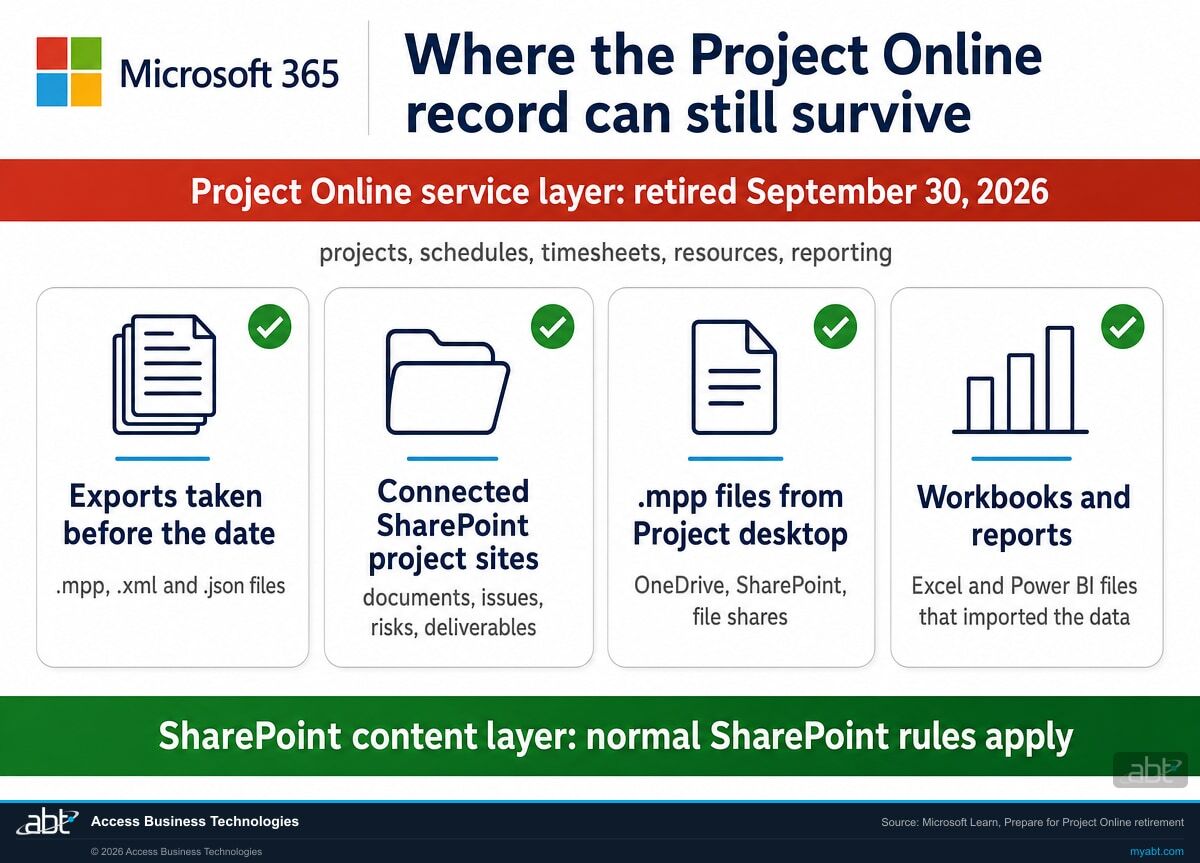
Microsoft's guidance says projects and the service data around them are no longer accessible through Project Online after retirement. Microsoft published no general grace period, and any extension runs through Microsoft's own eligibility guidance and your account team. Pieces of the record can live outside the service, and that is where recovery starts: exports taken before the date, the SharePoint sites underneath Project Web App, .mpp files saved from Project desktop, and workbooks and reports that imported Project Online data.
- Retired September 30, 2026, the date on Microsoft's own Lifecycle listing
- SharePoint content in connected project sites follows normal SharePoint rules
- Exported .mpp files open in Project desktop and import into the Planner Power App
- Projects and service data: no longer accessible through Project Online
- October 1, 2026: Project Online Essentials reached end of life
- SharePoint content: normal SharePoint rules still apply
- Project desktop: keeps working as a standalone product
The recovery map
Where does the Project Online record still exist?
Microsoft separates two layers in every Project Web App environment. The service layer, meaning projects, schedules, timesheets, resources and reporting, is what retired. The SharePoint content layer underneath it carries on under normal SharePoint rules, and while the service ran, parts of the record could also leave it as files and reports.
| Where to look | What it can still hold | What Microsoft documents |
|---|---|---|
| Exports taken before September 30 | For each project a user touched: .mpp and .xml files from the draft and published schemas, plus reporting and metadata files. For the user: timesheets, resource plans, status reports and portfolio data as .json files. | The exported .mpp files open in Project Professional 2016, Project Professional 2019, or Project. Saving them back to Project Online or Project Server is not supported. |
| Connected SharePoint project sites | Documents, issues, risks, deliverables and lists that lived in each project's SharePoint site. | A connected project site might remain reachable. Normal SharePoint permissions, retention, lifecycle and tenant policies continue to apply, while synchronization with the retired service stops. |
| .mpp files saved from Project desktop | Schedules project managers saved as files to their own machines, file shares, OneDrive or SharePoint. A Microsoft Purview content search on fileextension:mpp finds such files in the SharePoint and OneDrive locations it searches. | Project desktop does not retire with Project Online and can continue as a standalone product. The search finds saved files only: the projects, schedules and timesheets that lived in the service are service data, a separate layer in Microsoft's description. |
| Workbooks and reports that imported Project Online data | Excel workbooks and Power BI semantic models that loaded data from ProjectData or the OData reporting feeds hold whatever they last imported. | Reports and scheduled refreshes fail when they depend on Project Online endpoints or credentials. Power BI emails a semantic model's owner when a scheduled refresh fails, and again when it disables the schedule after consecutive failures. |
Save a copy before anyone cleans up
The first instinct after a retirement is to repair or delete whatever broke. A workbook or semantic model that imported Project Online data may now be the most complete copy of your portfolio, resource and timesheet reporting. Copy it to a governed location before anyone repairs it, re-points it, or deletes it.
The refresh failure emails Power BI sends to semantic model owners can help identify affected models. Treat them as one input to the dependency inventory, alongside the reports and flows your teams already know about.
If the work is unfinished
What if the migration was not finished by September 30?
Microsoft addressed this case twice: in its final Message Center reminder, published September 24, 2026, and in the frequently asked questions on its Planner Blog.
"If your organization will not be fully migrated by September 30, 2026, we highly recommend you contact a Microsoft partner immediately to make a migration plan and let your Microsoft account team know your plans."
Microsoft 365 Message Center notice MC1478955, read in our own tenant; public archive copy at mc.merill.net"Any extension or exception must follow approved Microsoft eligibility, scope, and duration guidance. Reach out to your account team or Microsoft partner for more information."
Microsoft Planner Blog, Changes to Project Web App site creation and unused sites effective April 1, 2026, frequently asked questionsAsk your Microsoft account team about an extension, in writing
Both Microsoft statements above point to the same people: your account team and a Microsoft partner. If your institution qualifies for an extension, get its scope and end date in writing. Either way, write down when you made contact, what you asked, and what you were told. That note becomes part of the record of how the institution handled the retirement.
Test what still opens before relying on it
If a Project Web App site in your tenant still opens and its project data still loads, run the documented export for one user on one site first, since the script works per user and per site. If that works, export for the owners and status managers of the plans you would have to produce later before you do anything else, and treat the access as temporary unless an approved extension says otherwise.
Start the recovery from what you already hold
The four places in the recovery map above all sit outside the retired service. Gather what they hold into one governed location, decide which plans are records, and land the live work in a supported destination.
Find out what survived before anyone cleans it up
ABT inventories every Project Web App site collection and connected project site in your tenant, finds the .mpp files and reports that still hold Project Online data, and tells you in writing what can be recovered and what needs a records note.
Request the free migration assessmentThe short list
What should we do this month?
Microsoft's preparation guidance ran inventory, classify, preserve, remediate, validate. After the date the order still holds. The inventory simply starts from what you hold.
Rebuild the list of Project Web App sites and their project sites
Start from any inventory made before the date. Without one, rebuild it from SharePoint: Microsoft's export guide found Project Web App sites by filtering Get-SPOSite on the PWAEnabled property, and connected project sites sit in the same site collection or wherever the Enterprise Project Types directed them. Record the owner of each and whether it still opens.
Gather what survived into one governed location
Exports taken before the date, copies of the workbooks and semantic models that imported Project Online data, and the .mpp files people saved. A Purview content search on fileextension:mpp across SharePoint and OneDrive finds the saved schedules; our article on Microsoft Purview eDiscovery for financial institutions covers the licensing behind content search. Put everything in a SharePoint site with retention applied, and record for each item where it came from, when it was last updated, and what it is missing.
Have the records owners decide what counts as a record
Sorting projects by whether they still matter is a much smaller job than recovering everything. Start with the plans tied to an obligation: core conversions, merger integrations, vendor implementations, and remediation of audit or examination findings. Your records, legal and business owners make the call on each one, against your retention schedule and any legal hold.
Treat the SharePoint content as its own job
Confirm you can reach the documents, issues, risks and deliverables directly, that ownership and permissions are current, and that retention is applied. The site collection stays a Project Web App site collection, so move what matters. Microsoft's guidance suggests a modern site and hub architecture for the content you move.
Retire or rebuild what pointed at the service
Microsoft's guidance says reports, flows, scripts and scheduled refreshes fail when they depend on Project Online endpoints or credentials: REST, CSOM, JSOM, ProjectData and the OData feeds, plus Power Automate flows with Project Online triggers or actions. Save a copy first, then rebuild each one on a supported source or retire it, and record which you chose.
Write the after-action record
A short memo naming what was preserved, what could not be recovered and why, when the institution learned of the retirement, and who approved each decision documents both the decisions and the gaps. Keep it with the records it describes.
One Microsoft document still worth reading
Microsoft's Prepare for Project Online retirement guidance remains the best checklist for this stage. Its feature impact matrix assigns every asset a disposition, and its validation list asks whether retained SharePoint content can be accessed directly, whether reports use supported data sources, and whether retention, compliance, security and governance requirements are met. The link is in the sources below.
Choosing a destination late
Where should the live work go now?
The four destinations Microsoft named are unchanged. What changed on September 30 is the starting point: a migration now begins from the files you hold, so the question for each destination is what it can take in.
| Destination | Fits when | What carries over from your files | What has to be rebuilt |
|---|---|---|---|
| Planner premium plans | Collaborative planning, task management, portfolio visibility and Microsoft Teams work, in Microsoft's evaluation list. | .mpp files from Project 2016 and later, through Import from Project in the Planner Power App, with up to 10 custom fields (Microsoft Support). The original .mpp file is not altered. | Anything the web experience does not support. The import lists each such feature and the change it made. Several Planner partners also offer .mpp import and sync tools. |
| Project desktop | Standalone schedule authoring, Gantt and timeline views, baselines, and resource and cost planning. | Exported and saved .mpp files, opened directly. | Everything that depended on the shared service: publishing, retrieval and connected reporting. Microsoft states Project desktop connections to Project Online do not continue. |
| Project Server Subscription Edition | An on-premises deployment, advanced portfolio management, or resource capacity management. | The exports, as the reference record. | The projects in the new system, planned with a partner. Saving exported .mpp files back to Project Server is not supported, and Microsoft states it does not provide a migration tool from Project Online to Project Server. |
| Dynamics 365 Project Operations | Project delivery connected to sales, resourcing, finance, project accounting, billing and profitability. | The exports, as the reference record. | The project setup in Project Operations, scoped against its sales, resourcing and finance requirements. |
Our recommendation for most institutions: Planner premium plans for live work, Project desktop for the people who build detailed schedules, and Project Server Subscription Edition only where a requirement needs an on-premises portfolio system. If Project desktop is part of the plan, put it on a supported version. Project 2021 retires on October 13, 2026, the same day the Office LTSC 2021 products covered on our Office LTSC 2021 end of support page reach end of support.
Check the licenses before the next renewal
Microsoft says premium license holders, including Project Online customers, already have access to Planner and Project desktop. A March 2026 Message Center notice ended new purchases of Planner and Project Plan 5 on May 1, 2026 and named Planner and Project Plan 3 as the recommended license for customers who need desktop capabilities.
Project Online Essentials reached end of life on October 1, 2026. Users assigned it no longer have access through that license. For users who need Planner Premium capabilities or Project Server access, Microsoft's notice says to assign Project and Planner Plan 1 or Project and Planner Plan 3; users who need only Project Server Subscription Edition access rights need Project Server client access licenses.
For regulated institutions
Is a project plan a record?
For most organizations Project Online held project management. For a bank, a credit union, or a mortgage company, it often held something an examiner will ask to see.
Think about what actually went through Project Web App at a financial institution. Core conversions. Digital banking rollouts. Merger integration plans. Vendor implementations. Remediation of audit findings, tracked task by task with dates, owners and sign-offs. Those schedules are the contemporaneous record of how the institution governed a major change, which is what they were built to be.
Retention obligations attach to the record, not to the product holding it. A schedule that documents how a core conversion was planned and approved keeps whatever retention period your policy assigns it, and the service that held it has retired. The question worth asking this month is narrow and answerable: which of the plans that lived in Project Online would we have to produce, and where are they now?
"Projects and associated Project Online service data are no longer accessible through Project Online after retirement."
Microsoft Learn, Prepare for Project Online retirementConfirm what your retention policies actually covered before relying on them for a schedule. Microsoft's guidance applies normal SharePoint retention to the SharePoint content layer, and it describes projects, schedules and timesheets as Project Online service data, a separate layer. Our guide to Microsoft 365 data retention for financial institutions covers how to set retention so the platform enforces it on whatever you recover.
The SharePoint site does not simply revert
A reasonable assumption is that when the Project Online layer switched off, the SharePoint site collection underneath returned to being a normal SharePoint site and the documents carried on. Microsoft addresses that assumption head on.
"There is no supported process to uninstall Project Online from a PWA site collection or convert the collection into a fully independent standard SharePoint site."
Microsoft Learn, Prepare for Project Online retirement"Non-PWA SharePoint content in those site collections, such as user-created lists, document libraries, pages, and subsites, will remain accessible through SharePoint, subject to the customer's SharePoint retention, permissions, and governance settings."
Microsoft Planner Blog, Changes to Project Web App site creation and unused sites effective April 1, 2026, answering what happens after Project Online retiresMicrosoft is careful to say this does not mean the SharePoint content vanishes. It means the site collection does not become an ordinary SharePoint site with Project Online cleanly removed. Documents, issues, risks and deliverables in connected project sites are SharePoint content and follow normal SharePoint permissions, retention and lifecycle rules. What stopped is everything the service was doing on top: task synchronization, permission synchronization, project metadata updates, and the project-specific web parts and workflows.
The practical consequence for a records owner is that a site being reachable proves very little. Validate direct access to the content you intend to keep, confirm who owns it and what retention applies, and move what matters somewhere it will still make sense in three years.
Can you still show the plan when an examiner asks?
The 20-second short here is about AI governance: examiners moving from asking whether an institution uses AI to asking it to show how it governs it. A retired system meets the same test. A project plan that recorded how a conversion was scoped, approved and tracked counts as evidence only if someone can still retrieve it and read it on the day it is requested.
ABT manages Microsoft 365 tenants for credit unions, banks, and mortgage companies, which means the retention and audit questions arrive on the same desk as the migration ones. They are easier to answer together than separately.
The sequence
Which dates shaped the retirement, and which come after it?
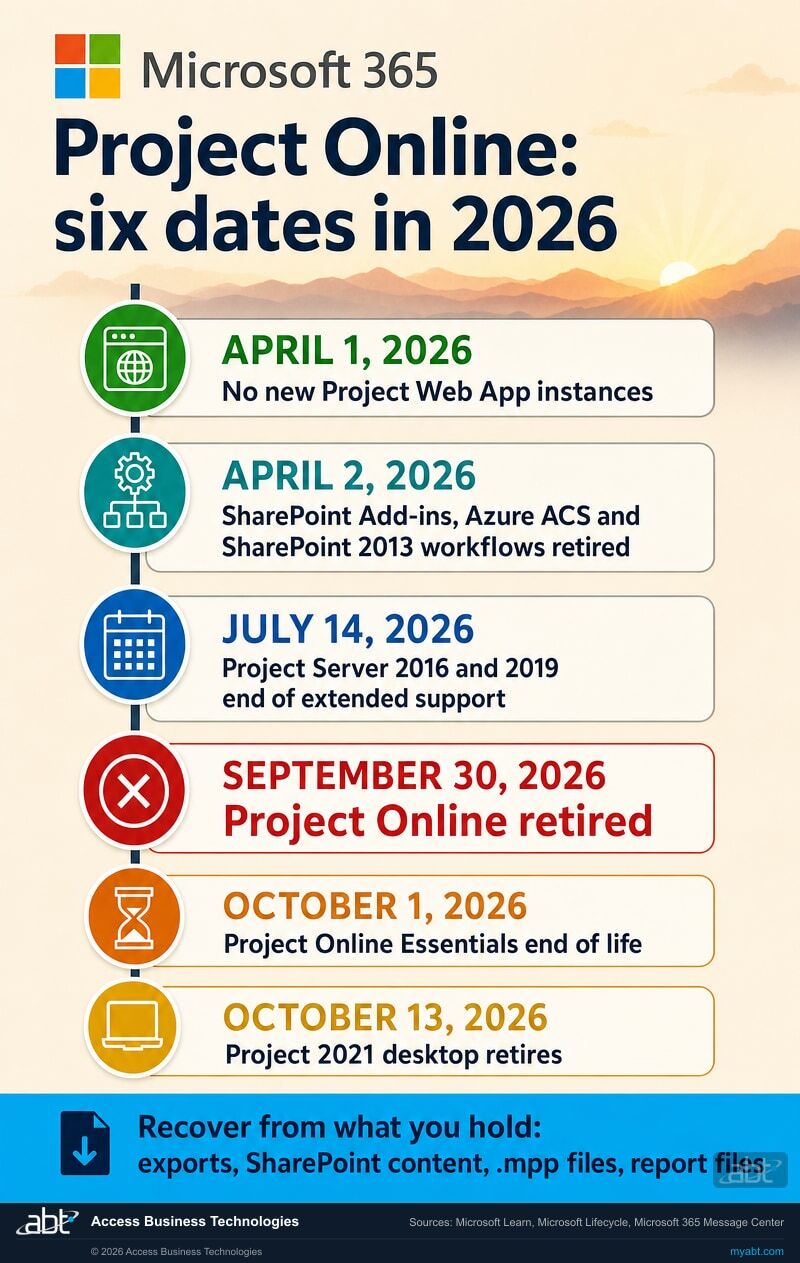
Project Online was the last of four dates in 2026 that took apart the Project Web App world. Two dates that follow it still matter to anyone holding what it left behind.
No new Project Web App instances
Creating new Project Web App sites was blocked, and Project Online tenants with no projects in any PWA site were blocked from the service. Microsoft said non-PWA data would still be accessible.
The customization layer retired
SharePoint Add-ins, Azure Access Control Services, and SharePoint 2013 workflows retired in Microsoft 365 the same day. Demand management and approval routing built on those workflows stopped months before the service did.
Both on-premises versions left support
Extended support ended for Project Server 2016 and Project Server 2019. An on-premises fallback now means Project Server Subscription Edition specifically, which Microsoft's Lifecycle listing shows in support.
Project Online retired
Projects, schedules, tasks, assignments, timesheets, enterprise resources, calendars, custom fields, portfolio analyses and the reporting endpoints are no longer accessible through Project Online, in Microsoft's wording.
Project Online Essentials end of life
Access through a Project Online Essentials license ended. Anyone who still needs Project Server access or Planner Premium needs a supported replacement license.
Project 2021 desktop retires
Project 2016 and 2019 reached end of support on October 14, 2025. Opening exported .mpp files on a supported client means the Project desktop app that comes with Planner and Project Plan 3, or Project 2024.
How ABT helps
Free migration, when you commit to the licensing
ABT is a Tier 1 Microsoft Cloud Solution Provider. We manage Microsoft 365 tenants for more than 750 financial institutions, and we run this kind of recovery and migration work as a matter of course.
We find what survived Project Online, recover what can be recovered, and land the work somewhere supported
- The inventory, in writing. Every Project Web App site collection and connected project site in your tenant, what still opens, and who owns each one.
- The recovery sweep. Exports, saved .mpp files, and the workbooks and semantic models that imported Project Online data, found across SharePoint and OneDrive and gathered in one governed location.
- The records call, made with you. Which plans carry a retention obligation, what survived for each, and a written note for the gaps.
- The dependency cleanup. The Power BI semantic models, Excel workbooks, Power Automate flows and scripts still pointed at Project Online endpoints, rebuilt on supported sources or retired.
- The destination, chosen on your requirements. Planner, Project Server Subscription Edition, Dynamics 365 Project Operations, or Project desktop, matched to how your teams actually plan.
The assessment comes first and costs nothing. The migration is free when you commit to the licensing through ABT.
Request the free migration assessmentABT also operates M365 Guardian, its managed security service for credit unions, banks, and mortgage companies. Learn about M365 Guardian
Related reading
If the retirement started a wider conversation
Recovering data from a retired service tends to raise the questions behind it: what has to be kept, for how long, and who can produce it later.

Microsoft 365 Data Retention for Financial Institutions
How to configure retention and archiving in Microsoft Purview so the platform itself enforces your recordkeeping obligations.
Read the guide
Tenant-to-Tenant Migration for Credit Union and Bank Mergers
What it takes to consolidate two Microsoft 365 tenants cleanly, and how to keep the cutover examiner-ready while it happens.
Read the guide
Microsoft Purview eDiscovery for Financial Institutions
The licensing rule that reverses between tiers, and what an institution actually needs to be able to produce content on request.
Read the guideAnswered
Project Online after the retirement, answered
Verify it yourself
Where the facts on this page come from
Every date, quotation and mechanism above was read from a Microsoft source and checked on October 1, 2026.
- Microsoft Planner Blog, Microsoft Project Online is retiring: What you need to know. The retirement announcement, published September 5, 2025 and shown as updated August 24, 2026. Source for the September 30, 2026 retirement date, the October 1, 2025 end of sale, the statement that customers will no longer be able to access projects or associated data within the service, the transition options, and the statement that premium license holders, including Project Online customers, already have access to Planner and Project desktop.
- Microsoft Learn, Prepare for Project Online retirement. Microsoft's preparation guidance, last updated August 21, 2026. Source for the retirement timeline, what stops working, the two layers, connected project sites that might remain reachable, the statement that no supported process converts a Project Web App site collection into a standard SharePoint site, Project desktop as a standalone product, the adjacent April 2, 2026 retirements, the modern site guidance, the feature impact matrix and the validation list.
- Microsoft Support, Frequently asked questions about Microsoft Planner. Source for both migration-tooling answers, the partner migration solutions for former Project Online customers, .mpp import through the Planner Power App, the partner tools that import .mpp files into premium plans, and the October 14, 2025 end of support for Project 2016 and Project 2019.
- Microsoft Learn, Export user data from Project Online, last updated September 25, 2026. Source for the export procedure and its prerequisites, the files it produces, the desktop versions that open them, and the note that saving exported .mpp files back to Project Online or Project Server is not supported.
- Microsoft Support, Move your project from Project desktop to Project Power Apps. Source for the .mpp import steps, the 10 custom field limit, and the note that the original .mpp file is not altered.
- Microsoft Lifecycle, Project Online, Project Server 2016, Project Server 2019, Project Server Subscription Edition, Project 2021 and Ending Support in 2026. Source for the September 30, 2026 retirement listing, the July 14, 2026 end of extended support for Project Server 2016 and 2019, Project Server Subscription Edition in support, and the October 13, 2026 retirement of Project 2021.
- Microsoft Planner Blog, Changes to Project Web App site creation and unused sites effective April 1, 2026, published March 12, 2026 and last edited September 21, 2026. Source for the April 1, 2026 changes, the statement that non-PWA SharePoint content remains accessible through SharePoint after retirement, and the statement that any extension or exception must follow approved Microsoft eligibility, scope, and duration guidance.
- Microsoft 365 Message Center notice MC1478955, Final reminder: Microsoft Project Online retires on September 30, 2026, published September 24, 2026, read in our own tenant; public archive copy at mc.merill.net, a third-party mirror of the Message Center. Source for the instruction to organizations not fully migrated by the date, the in-app retirement banner, and the September 30, 2026 rollout date across Worldwide, GCC, GCC High and DoD.
- Microsoft 365 Message Center notice MC1466302, Project Online Essentials reaches End of Life on October 1, 2026, read in our own tenant; public archive copy at mc.merill.net. Source for the end-of-life date, the loss of access through that license, and the replacement licenses Microsoft names.
- Microsoft 365 Message Center notices read in our own tenant over Microsoft Graph on October 1, 2026: MC1253809 (March 17, 2026: Planner and Project Plan 5 end of sale on May 1, 2026, and the Plan 3 recommendation for desktop needs), MC1227080 (February 2026: the April 1, 2026 Project Web App site changes) and MC1148537 (September 2025: the original retirement notice). They appear in the admin centers of the tenants Microsoft sent them to.
- Microsoft Learn, Data refresh in Power BI. Source for the refresh failure emails to semantic model owners and the email sent when the service disables a scheduled refresh after consecutive failures.
- Microsoft Learn, Keyword queries and search conditions for eDiscovery. Source for the FileExtension property used to find .mpp files.
Recover what survived,
and document the rest.
An inventory of the Project Web App site collections, the connected project sites, the saved .mpp files and the reports that imported Project Online data shows what you can still produce and where each piece is, and it is the starting point for the decisions after it.
Tell us a little about your environment and we will come back with what we would check first.
What should we look at? Optional.
Encrypted. Private.
Thank you. That is with us.
An ABT specialist will be in touch shortly. If an examiner or auditor request is waiting on this, say so in your reply and we will move it to the front.
