


Skip to the main content.

Microsoft Copilot desktop app · Windows and Mac

The Copilot desktop app opens websites inside itself in January.

Microsoft turns on in-app browsing by default in early January 2027. Set BrowsingEnabled, and match the browser controls your institution already applies elsewhere.

Jan 2027
In-app browsing rollout begins in early January and is expected to complete by the end of January.
Source: Microsoft 365 Message Center, MC1560922
Jan 3
Act-by date Microsoft set on the in-app browsing Message Center post.
Source: Microsoft 365 Message Center, MC1560922
152
Minimum Microsoft Copilot app version for the BrowsingEnabled policy.
Source: Microsoft Learn, Configure Microsoft Copilot policies
1,000
Entries the URLBlocklist policy can hold for the app's built-in browser.
Source: Microsoft Learn, Configure Microsoft Copilot policies

What changes in the Copilot desktop app in January 2027?

Websites shared in a Copilot chat will open inside the Copilot desktop app, side by side with the conversation, unless your institution sets the BrowsingEnabled policy to Off. Microsoft says that if no changes are made, in-app browsing stays enabled by default.

The change in brief

What
In-app browsing becomes the default in the Microsoft Copilot desktop app, announced in Message Center post MC1560922 on November 20, 2026.
Who
Users of the Microsoft Copilot desktop app for Windows and Mac.
When
The worldwide rollout begins in early January 2027 and is expected to complete by the end of January 2027. The post's act-by date is January 3, 2027.
Result
Links shared in Copilot chat open in the app's built-in browser, which follows the Copilot app's own policies.
Controls
BrowsingEnabled turns the browser on or off. Policies added in MC1568702 cover security, privacy, content access, sign-in and network behavior, downloads and permissions.

Now

Decide

Choose Off, or On with controls, for BrowsingEnabled.

Mid December 2026

Edge sync arrives

Optional, opt-in sync of passwords and browsing history with Microsoft Edge.

Early January 2027

Rollout begins

Shared links start opening inside the app by default.

End of January 2027

Expected complete

Recheck devices to confirm the setting you chose is in force.

"If no changes are made, in-app browsing will remain enabled by default."

Microsoft 365 Message Center, MC1560922

Microsoft first offered in-app browsing as an option, announced in MC1474455. MC1560922 makes it the default, so a user can read a web page and the Copilot answer about it in one window. For an institution, that means a second browser on every device that runs the Copilot app. It is configured through its own ADMX template, CopilotApp.admx, and its own registry path, SOFTWARE\Policies\Microsoft\Copilot.

Microsoft Learn documents today's behavior when the policy is not configured: people signed in with a personal Microsoft account can open links in the browsing pane, and people signed in with a Microsoft Entra ID work account open links in the device's default browser. MC1568702 also describes the policy as off by default. MC1560922 changes that default in January, so the safest course is to set BrowsingEnabled explicitly, on or off.

A related change, MC1562269, adds optional browser data sync between the Copilot desktop app and Microsoft Edge from mid-December 2026. After a user opts in, passwords, personal info, settings and browsing history sync for the signed-in account; payment info stays out. Microsoft asks admins to review browser data governance and says Learn documentation will follow when the rollout begins.
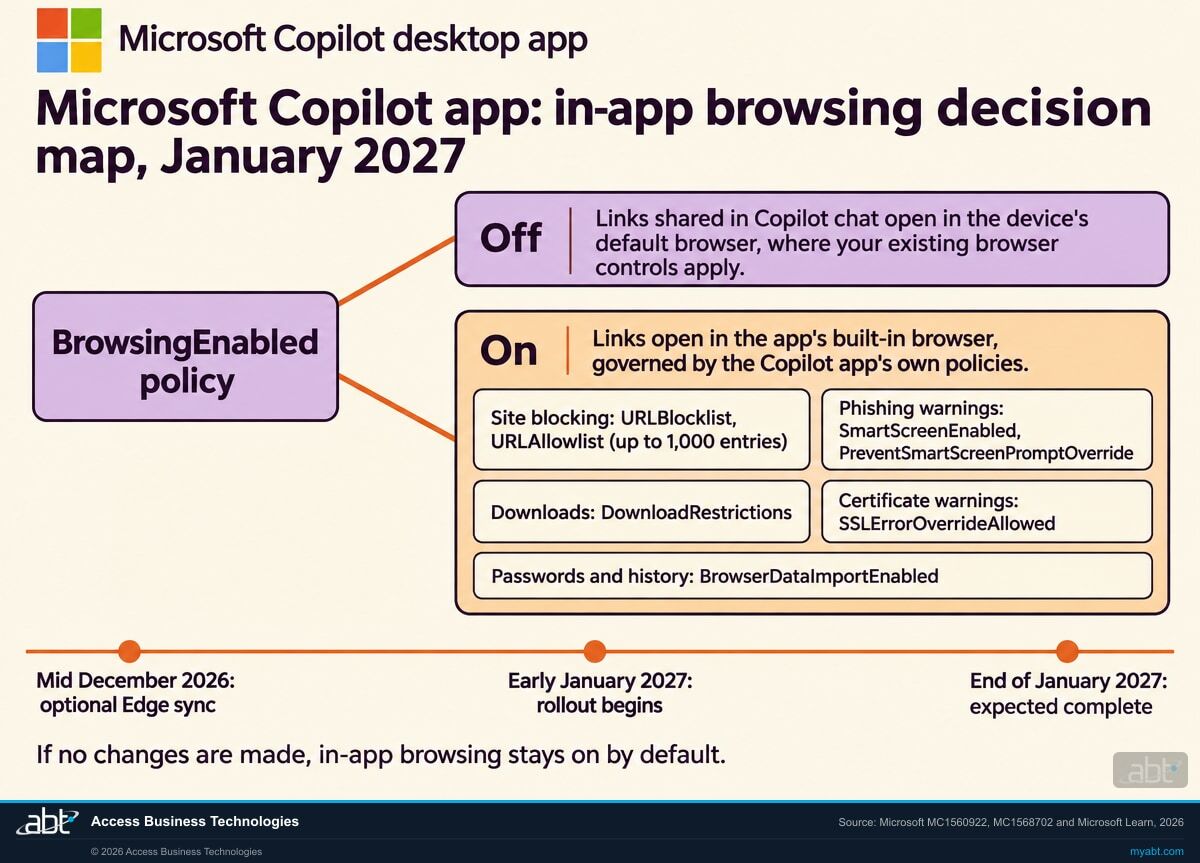
Microsoft Copilot desktop app in-app browsing decision map, January 2027. BrowsingEnabled off: links shared in Copilot chat open in the device's default browser. BrowsingEnabled on: links open in the app's built-in browser, governed by URLBlocklist and URLAllowlist for site blocking, SmartScreen and prompt override for phishing warnings, DownloadRestrictions for downloads, SSLErrorOverrideAllowed for certificate warnings, and BrowserDataImportEnabled for passwords and history. Rollout begins early January 2027.
The BrowsingEnabled decision and the policies that govern the built-in browser. Sources: MC1560922, MC1568702 and Microsoft Learn.

Which Copilot app policies control the in-app browser?

Read across each row: the control, the Copilot app policy that sets it, what Microsoft says it does, the setting ABT suggests for a regulated institution, and the minimum app version.

Microsoft Copilot app browser policies from Microsoft Learn, Configure Microsoft Copilot policies, read November 27, 2026. Suggested settings are ABT's.
ControlCopilot app policyWhat it doesABT suggested settingMinimum version
On or offBrowsingEnabledEnabled opens links in the app's browsing pane; disabled opens them in the default browserSet it explicitly, on or off152
Site blockingURLBlocklist,
URLAllowlist
Blocks URL patterns, up to 1,000 entries, with allowed exceptionsMatch your web filtering, then test that a blocked site stays blocked153 and 157
Phishing warningsSmartScreenEnabled,
PreventSmartScreenPromptOverride
Turns on Microsoft Defender SmartScreen and stops users ignoring its warningsEnabled, with override blocked153 and 157
DownloadsDownloadRestrictionsBlocks downloads by SmartScreen verdict and file type, up to blocking allAt least block dangerous downloads157
Certificate warningsSSLErrorOverrideAllowedEnabled or not configured lets users click through HTTPS warning pagesDisabled157
Browser data importBrowserDataImportEnabledLets users import passwords, cookies, history, payment info and autofill from Edge and Chrome after consentMatch your credential policy153 (Windows)
Copilot browser actionsCopilotCoworkToolActionsEnabled,
CopilotBrowserUseAllowList,
CopilotBrowserUseBlockList
Controls whether Copilot takes browsing actions for the user, and on which sitesDecide with your AI use policy owner152 and 158

Where the settings live

Microsoft documents every policy on its Learn page, Configure Microsoft Copilot policies, with the Group Policy path under Administrative Templates, Microsoft Copilot, the CopilotApp.admx template, registry values under SOFTWARE\Policies\Microsoft\Copilot and macOS preference keys.

MC1568702 says the browser policies apply only when BrowsingEnabled turns the browser on. The Copilot browser action policies stand apart: Microsoft Learn says BrowsingEnabled does not affect whether Cowork can navigate to websites to complete a task, so set CopilotCoworkToolActionsEnabled whichever way you choose BrowsingEnabled. Several SmartScreen policies apply only on managed devices: Windows joined to an Active Directory domain or enrolled for device management, or macOS managed through MDM.

Decide how the Copilot app opens links before January 2027.

ABT reviews which devices run the Copilot desktop app, compares its browser policies with your web filtering and download rules, and recommends a setting for each. The Copilot readiness assessment is free.

Request the free assessment

How do you prepare for in-app browsing in the Copilot app?

Inventory the devices, decide BrowsingEnabled, match your browser controls, decide what data can move, settle Copilot browser actions, then pilot and recheck. The steps below follow that order.

1
Intune or Group Policy inventory

Find every device that runs the Copilot app

The browser policies need Microsoft Copilot version 152 or later, and several need 153, 157 or 158. List the Windows and Mac devices that run the Copilot desktop app and their versions, so you know which policies each one will honor.

2
Administrative Templates › Microsoft Copilot › Browsing

Decide BrowsingEnabled before early January

Off keeps links opening in the device's default browser, where your existing browser controls already apply. On opens them inside the Copilot app. Microsoft says in-app browsing stays on by default if no changes are made, so set the policy either way.

3
Copilot app browser policies

If you turn it on, match your browser controls

Mirror your web filtering in URLBlocklist and URLAllowlist, turn on SmartScreen and enable PreventSmartScreenPromptOverride, set DownloadRestrictions, and disable SSLErrorOverrideAllowed so users stop at certificate warnings. If internal sites use Windows sign-in, review the HTTP authentication and proxy policies with your network team.

4
Browser data

Decide what browser data can move

BrowserDataImportEnabled controls import of passwords, cookies, history, payment info and autofill from Edge and Chrome on Windows. Set it to match your credential policy. For the optional Edge sync in MC1562269, read the Learn documentation Microsoft publishes when that rollout begins in mid-December.

5
Copilot browser actions

Decide whether Copilot can act in websites

CopilotCoworkToolActionsEnabled controls whether Copilot takes browsing actions for the user, separately from BrowsingEnabled. From version 158, CopilotBrowserUseAllowList and CopilotBrowserUseBlockList limit where. Settle these with the owner of your AI use policy.

6
Pilot group, then everyone

Pilot, tell users, and recheck in February

Microsoft recommends validating critical sites and sign-in flows with a pilot group and telling users what changes. Test your core processing, loan origination and vendor portals and single sign-on, then recheck devices after the rollout completes at the end of January 2027.
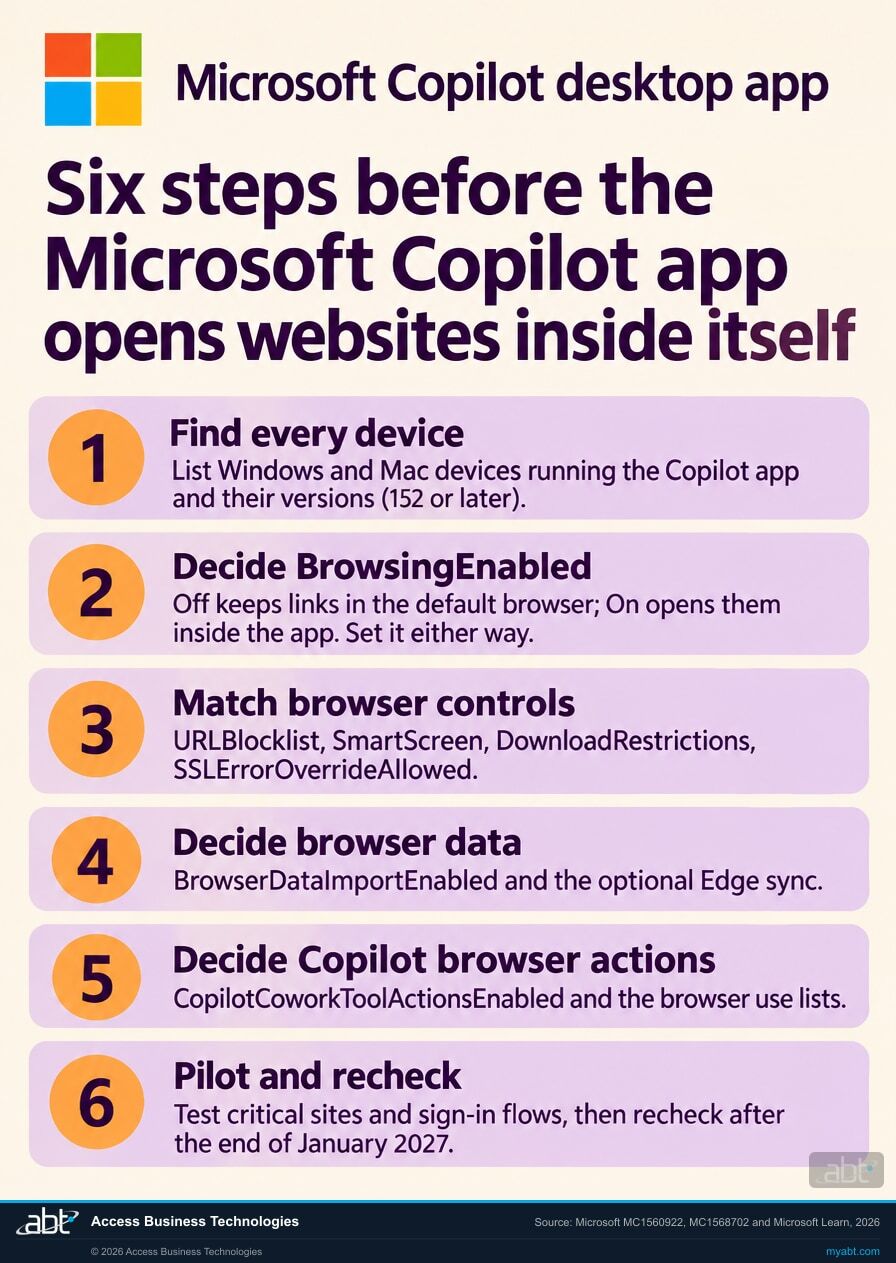
Six steps before Microsoft Copilot desktop app in-app browsing turns on in January 2027: inventory devices and app versions, decide the BrowsingEnabled policy, match browser controls such as URLBlocklist, SmartScreen, DownloadRestrictions and certificate warnings, decide browser data import and Edge sync, decide Copilot browser actions, then pilot critical sites and recheck after the end of January 2027.
The six steps on one page. Sources: MC1560922, MC1568702 and Microsoft Learn; the order is ABT's recommendation.

Where does in-app browsing matter most in a financial institution?

Anywhere a link shared in Copilot chat could lead somewhere your browser controls would normally filter, block or warn about. These six areas are worth checking first.

Web filtering in the browser

Check whether your web filtering lives in the browser or on the network. Rules set as browser policies need a matching URLBlocklist in the Copilot app, which holds up to 1,000 entries.

Downloads of loan and account files

Staff download statements, disclosures and loan files every day. Set DownloadRestrictions so the in-app browser blocks dangerous downloads at the level your main browser does.

Single sign-on and core systems

Microsoft recommends testing critical sites and sign-in flows. Core processing, loan origination and vendor portals that rely on Windows sign-in may need the Copilot app's HTTP authentication or proxy policies.

Saved passwords

BrowserDataImportEnabled and the opt-in Edge sync can bring saved passwords into the Copilot app. Decide whether that fits your credential and password manager policy.

Help desk scripts

From January, staff may see websites open inside Copilot. Give the help desk a one-line explanation and the setting your institution chose.

AI use policy

Copilot browser actions have their own policy. The owner of your AI use policy should sign off on CopilotCoworkToolActionsEnabled and the browser use lists.

Why should a financial institution decide on in-app browsing now?

Productivity. Microsoft built in-app browsing so people can read a page and the Copilot answer in one place. A loan officer checking an investor guideline or a member service representative reading a rate page saves a window switch each time. Deciding now lets your staff keep that convenience with your controls in place from the first day.

Security. A second browser is a second place for phishing pages, risky downloads and certificate warnings. The Copilot app ships its own SmartScreen, download and site blocking policies, each with the minimum app version and device management requirement Microsoft lists for it. Content that Copilot reads can also carry hidden instructions, as the video below explains, which is one more reason to decide which sites the app can open.

Governance. Examiners and auditors ask how an institution controls its browsers and the data that moves through them. A written record of the BrowsingEnabled decision, the policies set, the password import and sync choices, and the pilot results answers that question for the Copilot app.

What is prompt injection, and why does it matter here?

Prompt injection is an attack in which instructions hidden in content Copilot reads, such as an email, steer its answer. In this 30-second ABT Short, prompt injection is the fourth Copilot risk. When the Copilot app starts opening websites, the sites it may open and the SmartScreen setting belong in the same review.

What does ABT check in a Copilot app browsing review?

ABT is a Tier 1 Microsoft Cloud Solution Provider serving more than 750 financial institutions. It manages Microsoft 365 tenants and hosts Azure environments for credit unions, banks, and mortgage companies.

A free Copilot readiness assessment focused on the Copilot desktop app and its browser

We work through your environment with your team and hand back a recommended setting for each policy, the reason for it, and a pilot plan.

  • Devices and versions: the devices that run the Copilot desktop app, and which browser policies each version supports
  • The BrowsingEnabled decision: a recommendation of Off, or On with controls, with the reasoning
  • Policy match: the app's site blocking, SmartScreen, download and certificate policies compared with your main browser baseline
  • Browser data and Copilot actions: recommendations for password import, Edge sync and Copilot browser actions
  • Pilot plan: the critical sites and sign-in flows to test, and a short note for staff and the help desk
  • Your findings in writing: yours to keep, ready for your IT steering committee or board

ABT also operates M365 Guardian, its managed security service for credit unions, banks, and mortgage companies. Learn about M365 Guardian

More on Microsoft Copilot for financial institutions

Is Your Microsoft 365 Tenant Ready for Copilot? A Financial Services Readiness Assessment

Is Your Microsoft 365 Tenant Ready for Copilot? A Financial Services Readiness Assessment

What to check in a Microsoft 365 tenant before a financial institution turns on Copilot.

Read the article

Microsoft Copilot for Financial Institutions: The 2026 Deployment Guide

Microsoft Copilot for Financial Institutions: The 2026 Deployment Guide

A deployment plan for Copilot at a credit union, bank, or mortgage company.

Read the article

Copilot Governance Dashboard: How to Monitor AI Usage in Your M365 Tenant

Copilot Governance Dashboard: How to Monitor AI Usage in Your M365 Tenant

How to watch Copilot use in Microsoft Purview once it is live.

Read the article

Copilot app in-app browsing: common questions

It opens websites shared in a Copilot chat inside the Microsoft Copilot desktop app, side by side with the conversation, in place of the device's default browser. Microsoft announced it as an option in Message Center post MC1474455 and makes it the default in MC1560922 for the Windows and Mac apps.
Microsoft says the worldwide rollout begins in early January 2027 and is expected to complete by the end of January 2027. The Message Center post, MC1560922, carries an act-by date of January 3, 2027.
Set the BrowsingEnabled policy to Off (disabled) through your device management system. Links then open in the device's default browser. In Group Policy the setting is under Administrative Templates, Microsoft Copilot, Browsing, from the CopilotApp.admx template. On Windows the registry value is BrowsingEnabled under SOFTWARE\Policies\Microsoft\Copilot, and on macOS the preference key is BrowsingEnabled.
Microsoft says that if no changes are made, in-app browsing will remain enabled by default once the rollout reaches your users. Websites shared in Copilot chat will then open inside the app.
Microsoft Learn says that when the policy is not configured, people signed in with a personal Microsoft account can open links in the browsing pane, and people signed in with a Microsoft Entra ID account open links in the device's default browser unless the policy is enabled. MC1560922 changes the default in January, so set the policy explicitly, on or off.
Microsoft lists policies for site blocking (URLBlocklist and URLAllowlist), Microsoft Defender SmartScreen (SmartScreenEnabled and PreventSmartScreenPromptOverride), downloads (DownloadRestrictions), certificate warnings (SSLErrorOverrideAllowed), browser data import, HTTP authentication, proxy settings and more. Message Center post MC1568702 says these apply only when BrowsingEnabled turns the browser on.
BrowsingEnabled needs Microsoft Copilot version 152 or later. URLBlocklist, SmartScreenEnabled and BrowserDataImportEnabled need version 153. URLAllowlist, PreventSmartScreenPromptOverride, DownloadRestrictions and SSLErrorOverrideAllowed need version 157. The Copilot browser use allow and block lists need version 158.
Microsoft documents them on their own Learn page, with their own ADMX template (CopilotApp.admx), Group Policy folder (Microsoft Copilot), Windows registry path (SOFTWARE\Policies\Microsoft\Copilot) and macOS preference keys. Plan to set them alongside your main browser baseline, matching the choices your institution already made there.
Message Center post MC1562269 adds optional sync between the Copilot desktop app and Microsoft Edge on Windows and Mac. After a user opts in, passwords, personal info, settings and browsing history sync for the signed-in account; payment info is excluded. Rollout runs from mid-December to the end of December 2026, and Microsoft says more Learn details will arrive when the rollout begins.
On Windows, the BrowserDataImportEnabled policy controls import of cookies, history, payment info, passwords and autofill data from Microsoft Edge and Google Chrome. When the policy is enabled or not configured, import stays off until the user consents. When it is disabled, users cannot turn import on.
Microsoft Learn says BrowsingEnabled does not affect whether Cowork can navigate to websites to complete a task. The CopilotCoworkToolActionsEnabled policy controls whether Copilot can take browsing actions for the user, and locks the setting when it is enabled or disabled. From version 158, the Copilot browser use allow and block lists limit the sites it can use.
It adds a second browser to every device that runs the Copilot app, governed by its own policies. Web filtering, download blocking, SmartScreen and certificate rules set for the main browser need a matching decision in the Copilot app, and a written record of that decision answers the browser control questions examiners and auditors ask.
ABT lists the devices that run the Copilot desktop app, recommends a BrowsingEnabled setting, compares the app's browser policies with your web filtering, SmartScreen, download and certificate settings, and plans a pilot of your critical sites and sign-in flows. You get the findings in writing. ABT is a Tier 1 Microsoft Cloud Solution Provider serving more than 750 financial institutions.

Where the facts on this page come from

Each date, policy, version and setting above comes from these sources, listed with the claims each one supports.

  • Microsoft 365 Message Center, MC1560922, "Microsoft Copilot: In-app browsing will be enabled by default in the desktop app," published November 20, 2026, in the Microsoft 365 admin center Message Center. Source for the new default, who is affected, the rollout window, the January 3, 2027 act-by date, the BrowsingEnabled off switch and the statement that in-app browsing stays on if no changes are made.
  • Microsoft 365 Message Center, MC1568702, "Adding in app browsing control policies," published November 25, 2026. Source for the new policy areas, the rule that they apply only when BrowsingEnabled turns the browser on, and Microsoft's recommendation to pilot critical sites and sign-in flows.
  • Microsoft 365 Message Center, MC1474455, the earlier post that introduced in-app browsing as an option, as referenced in MC1560922.
  • Microsoft 365 Message Center, MC1562269, "Sync between Copilot desktop app and Microsoft Edge," published November 20, 2026. Source for the optional sync, the data it covers, the payment info exclusion and the December 2026 rollout.
  • Microsoft Learn, Configure Microsoft Copilot policies, read November 27, 2026. Source for each policy's behavior, minimum version, Group Policy path, ADMX template, registry path, macOS key and device management requirement.
  • The order of the six steps, the suggested settings, the six areas to check first and the governance advice are ABT's recommendations; everything else on this list is from Microsoft.

Is your Copilot app ready to open websites?
Decide before January 2027.

The work starts with a read-only look at which devices run the Copilot desktop app and how its policies are set today. The assessment ends with a written review you keep: the BrowsingEnabled recommendation, the browser policies to set, and a pilot plan.

Tell us a little about your environment and we will come back with what we would check first.

Tier 1 Microsoft CSP 750+ financial institutions SOC 2 Type II Attested

What should we look at? Optional.

BrowsingEnabled decision
Browser policy match
Passwords and Edge sync
Copilot browser actions

Encrypted. Private.

Thank you. That is with us.

An ABT specialist will be in touch shortly. If a particular team, device group or deadline is what you are thinking about, say so in your reply and we will start there.

Trusted by 750+ of the Nation's Leading Lenders, Banks & Credit Unions.

TIER 1 MICROSOFT CSP
SOC 2 TYPE II ATTESTED
ZERO TRUST
NIST CSF ALIGNED
FFIEC
GLBA / FTC SAFEGUARDS
NCUA / FDIC
CFPB / GSE AUDIT READY
750+ INSTITUTIONS
SINCE 1999