In This Article
- The Zero Trust Blind Spot: Where Device Trust Fails
- Why This Blind Spot Hits Financial Institutions Hardest
- The Numbers Behind the Blind Spot
- Closing the Blind Spot: A Practical Approach for Financial Institutions
- What Full Zero Trust Implementation Delivers
- How ABT Eliminates the Device Blind Spot With M365 Guardian
- Frequently Asked Questions
Your organization spent six figures on security last year. MFA is enforced. Conditional Access policies are active. The Microsoft Secure Score looks strong. By every visible metric, you have built a defensible security posture.
Then ask one question: How many personal devices accessed your Microsoft 365 environment this week without any corporate security controls?
If the answer is "we do not know," you have found the blind spot. And attackers found it before you did.
This is Zero Trust's most common failure mode. Organizations invest in identity verification and access controls while leaving the device layer unmanaged. The result: a security architecture that verifies who is logging in but trusts whatever they are logging in from.
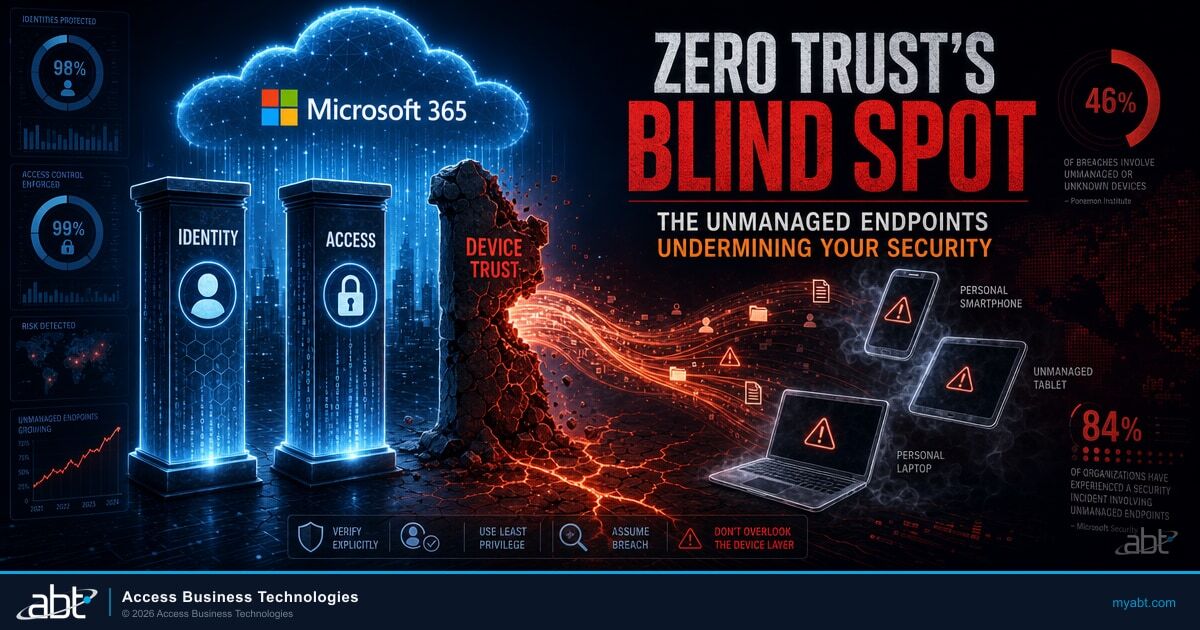
46% of systems found in credential breach logs are unmanaged devices. For financial institutions holding borrower records, member account data, and wire transfer approvals, that blind spot does not just represent a technical gap. It represents regulatory exposure, insurance risk, and reputational liability.
The Zero Trust Blind Spot: Where Device Trust Fails
Zero Trust is built on a simple principle: verify everything, trust nothing. In practice, most implementations verify two of three pillars and skip the third.
Pillar 1: Identity. Who is requesting access? This is where most organizations invest first. MFA deployment, phishing-resistant authentication, Microsoft Entra ID risk-based sign-in policies. Most financial institutions handle this well.
Pillar 2: Access. What should this identity be allowed to do? Conditional Access policies, role-based permissions, geographic restrictions. Increasingly mature at regulated institutions.
Pillar 3: Device. Can we trust what they are accessing from? This is where the blind spot lives. A verified user with valid permissions connecting from a compromised personal laptop is still a breach waiting to happen. Most Zero Trust deployments either skip this pillar or apply it inconsistently, managing corporate laptops but excluding personal phones, tablets, and home computers.
CISA's Zero Trust Maturity Model is explicit: all devices accessing organizational resources must be secured under Zero Trust principles, whether enterprise-owned or BYOD. If your implementation manages corporate endpoints but ignores personal devices, you have built two-thirds of a security architecture. The missing third is the one attackers exploit.
Why This Blind Spot Hits Financial Institutions Hardest
Financial services operates under a regulatory framework that specifically requires controls over how sensitive data is accessed. The blind spot is not just a security gap. It is a compliance gap.
Examiner expectations are specific. FFIEC, NCUA, and state regulators ask how institutions manage endpoint security. "We have MFA" answers the identity question but not the device question. An NCUA examiner finding that personal phones access member data without any management controls will flag it. An FFIEC auditor seeing no device compliance policies will note the gap.
Cyber insurance is tightening. Carriers are adding device management questions to their underwriting process. Can you enforce encryption on endpoints? Do you have remote wipe capability? Can you block non-compliant devices? Gaps here mean higher premiums or coverage exclusions. When a breach occurs through an unmanaged device, insurers have grounds to challenge the claim.
The data exposure is concentrated. A personal phone that accesses your Microsoft 365 environment does not just reach email. Through Single Sign-On, it reaches Teams, OneDrive, SharePoint, and potentially your loan origination system, core banking platform, or board documents. One unmanaged device accesses the same data an attacker would target.
The Numbers Behind the Blind Spot
The scale of unmanaged device exposure across financial services:
- 82% of organizations permit BYOD access to corporate resources.
- 78% of IT leaders acknowledge that employees use personal devices without formal approval, even in organizations with BYOD restrictions.
- 48% of organizations have experienced breaches linked to unsecured personal devices.
- 84% of organizations experienced identity-related breaches in 2025, many initiated through compromised personal devices.
- AI-powered phishing attacks grew 427% year-over-year, with mobile devices as primary targets since users interact with text and app-based phishing differently than email on managed desktops.
The behavioral reality compounds the technical risk. A loan officer who would scrutinize a suspicious email on a corporate laptop will tap a text link on a personal phone without hesitation. Mobile phishing attacks reach users through SMS, messaging apps, and social media where enterprise email filters do not operate.
Closing the Blind Spot: A Practical Approach for Financial Institutions
The solution is not banning personal devices. That is impractical in a sector where loan officers, branch staff, and executives need mobile access to remain productive. The solution is extending Zero Trust to include device-level verification without creating organizational resistance.
Start with Application-Level Protection (MAM)
Mobile Application Management through Microsoft Intune secures corporate data inside approved apps without managing the entire device. Deploy app protection policies on Outlook, Teams, and OneDrive that require PIN or biometric access, encrypt business data at rest, block data transfer to personal apps, and enable selective wipe of corporate data only.
MAM deploys in weeks and addresses the most urgent exposure. The message to employees: your personal phone stays personal. We are protecting company data inside the apps you use for work.
Then Layer Device-Level Compliance (MDM)
After MAM builds trust and demonstrates the approach, expand to device enrollment through MDM. This gives your security operations the ability to verify device encryption, enforce OS patch levels, detect jailbroken devices, and deploy mobile threat defense. Roll out in waves, starting with higher-risk roles and expanding quarterly.
Enforce Through Conditional Access
Connect both MAM and MDM to Conditional Access policies. Devices that do not meet compliance standards get blocked from accessing sensitive resources. Devices that are enrolled and compliant get seamless access. The compliant path becomes the easiest path, which drives adoption faster than any mandate.
For detailed guidance on the Conditional Access rules that make this work, see our article on 5 Conditional Access rules every financial institution needs. For a multi-tenant approach that standardizes device compliance across branches and affiliated entities, see our guide on deploying Microsoft Lighthouse for compliance standardization. And for the privileged-access pattern that tightens administrative exposure once the device layer is closed, see smarter access, safer audits with Just-in-Time Admin.
What Full Zero Trust Implementation Delivers
Organizations that close the device blind spot see measurable results:
- 21% improvement in ability to track critical systems and data (Cisco Zero Trust outcomes analysis).
- 50% reduction in security incidents compared to partial Zero Trust implementations.
- 38% lower breach costs for organizations with complete Zero Trust controls versus those without.
- Examination readiness: Documented device compliance policies, Microsoft Intune compliance reports, and Conditional Access logs give examiners concrete evidence of endpoint governance.
- Insurance positioning: Demonstrable device management capabilities strengthen underwriting conversations and reduce coverage exclusions.
The ROI is not theoretical. It is the difference between a partial security architecture that looks good on dashboards and a complete architecture that actually stops attacks.
How ABT Eliminates the Device Blind Spot With M365 Guardian
ABT has deployed Zero Trust device security across 750+ financial institutions. We have seen the pattern repeatedly: strong identity controls paired with weak or absent device management. M365 Guardian is built to close that gap.
The Microsoft 365 baseline for closing the device blind spot is Microsoft Intune for device enrollment, app protection, and compliance policy enforcement; Microsoft Entra ID Conditional Access for blocking non-compliant devices from accessing sensitive resources; and Microsoft Defender for Endpoint for device-side threat detection and response. Most institutions have these licenses already. The gap is configuration, not licensing. M365 Guardian is ABT's operating model on top of those Microsoft tools. Guardian adds a 24/7 security operations center watching the Defender and Microsoft Sentinel signals every minute of the day, Sentinel analytic rules tuned to financial-institution endpoint anomalies rather than vendor SMB defaults, and Intune compliance policies calibrated to financial-institution BYOD reality (loan officers in branches, executives on personal phones, registered representatives in the field) rather than generic corporate baselines. The institution keeps its Microsoft 365 licensing and tenant ownership. Guardian is added through the partner relationship.
Guardian's device security lifecycle:
- Hardening: Microsoft Intune MAM and MDM policies configured for your specific regulatory environment. Conditional Access enforcement in Microsoft Entra ID. BitLocker, OS baselines, threat detection through Microsoft Defender for Endpoint, all deployed correctly from day one.
- Monitoring: Continuous compliance tracking across every device through the Microsoft Intune compliance reporting surface. Drift alerts when devices fall out of compliance. Visibility into unmanaged devices attempting corporate resource access.
- Insights: Reporting that surfaces what Microsoft Secure Score hides. Unmanaged BYOD exposure. Policy exceptions. MFA gaps on personal devices. Configuration drift over time.
- Response: When a device is lost, stolen, or compromised, Guardian's automation selectively wipes business data through Microsoft Intune, revokes tokens through Microsoft Entra ID, and isolates the device before data leaves your environment.
As a Tier-1 Microsoft CSP, ABT provides the same Microsoft licensing you would get buying direct. M365 Guardian adds the security configuration, compliance alignment, and ongoing management that turns licensed tools into actual protection.
Close Your Zero Trust Blind Spot With M365 Guardian
ABT manages Microsoft 365 tenants for 750+ financial institutions. A 30-minute conversation maps your current device-management posture, surfaces the unmanaged-endpoint gaps your next examiner is most likely to find, and outlines what an ABT-managed M365 Guardian deployment would cover for the Microsoft Intune, Entra ID Conditional Access, and Defender for Endpoint configuration that closes the device pillar. No commitment, no quote, no obligation.
Key Takeaway
Zero Trust's most common failure mode is unmanaged endpoints. Most financial institutions invest in identity and access controls while leaving the device pillar inconsistent or absent, which is the gap attackers exploit and examiners flag. Closing that gap requires Microsoft Intune for device compliance and app protection, Microsoft Entra ID Conditional Access for enforcement, and Microsoft Defender for Endpoint for detection. M365 Guardian is ABT's operating model that configures, monitors, and runs that stack with the 24/7 SOC and the financial-institution-tuned policies that turn Microsoft licensing into actual protection.
Frequently Asked Questions
The most common blind spot is unmanaged personal devices. Most organizations invest in identity verification through MFA and access controls through Conditional Access but skip the device trust pillar. This means verified users can access sensitive data from compromised, unpatched, or jailbroken personal devices without any corporate security controls applied.
Secure Score measures whether recommended security controls are enabled in your Microsoft 365 tenant. It rewards policy enablement but has no visibility into personal devices accessing corporate resources outside management controls. An organization can score above 85% while dozens of unmanaged phones and tablets access borrower or member data daily.
FFIEC, NCUA, and state regulators require demonstrable controls over how sensitive financial data is accessed. Device management provides the evidence that endpoints accessing borrower and member information meet encryption, patch level, and security baselines. Without device compliance documentation, institutions face examination findings and potential enforcement actions.
Yes. The MAM-first approach secures corporate data inside approved applications on personal devices without managing the phone itself. Employees keep full control of personal content while business data stays encrypted, contained, and remotely wipeable. MDM enrollment can follow later for organizations that need deeper device-level compliance verification.
Organizations that complete the device pillar of Zero Trust report 21% better visibility into critical systems, 50% fewer security incidents compared to partial implementations, and 38% lower breach costs. For financial institutions, the additional benefit is documented compliance evidence that satisfies NCUA, FFIEC, and state examiner expectations during audits.