In This Article
- What is Microsoft 365? (It's More Than Just the Tile)
- The Subscription Trap: Why "Renting" Software Fails
- The Platform Mindset: Building a Digital Foundation
- Decoding the Architecture: Infrastructure & Identity
- The Licensing Labyrinth: Paying for What You Actually Need
- Microsoft Teams: The Hub, Not Just the Chat
- Security Services: Turning the Locks
- The Migration Minefield
- Why You Need a Pilot: M365 Guardian and the Tier-1 CSP Operating Model
- Frequently Asked Questions
Imagine buying a top-of-the-line, professional-grade gym membership. You have access to Olympic-sized pools, personal trainers, state-of-the-art weight equipment, and nutritional planning services. But every morning, you walk in, fill up your water bottle at the fountain, walk on a treadmill for 5 minutes, and leave. You are technically a member, you pay the subscription fee every month, but you aren't getting fit. You're just hydrating expensively and using the bare minimum of what you have access to.
This is exactly how most financial institutions and small-to-medium businesses (SMBs) treat Microsoft 365.
They pay the monthly invoice. They download Word, Excel, and Outlook. They send emails. And that is where the utilization stops. They view Microsoft 365 as a utility bill, a subscription they have to pay to keep the lights on and the emails flowing. But looking at Microsoft 365 through the lens of a "subscription" is a strategic error that leaves money on the table and leaves the back door open for cybercriminals.
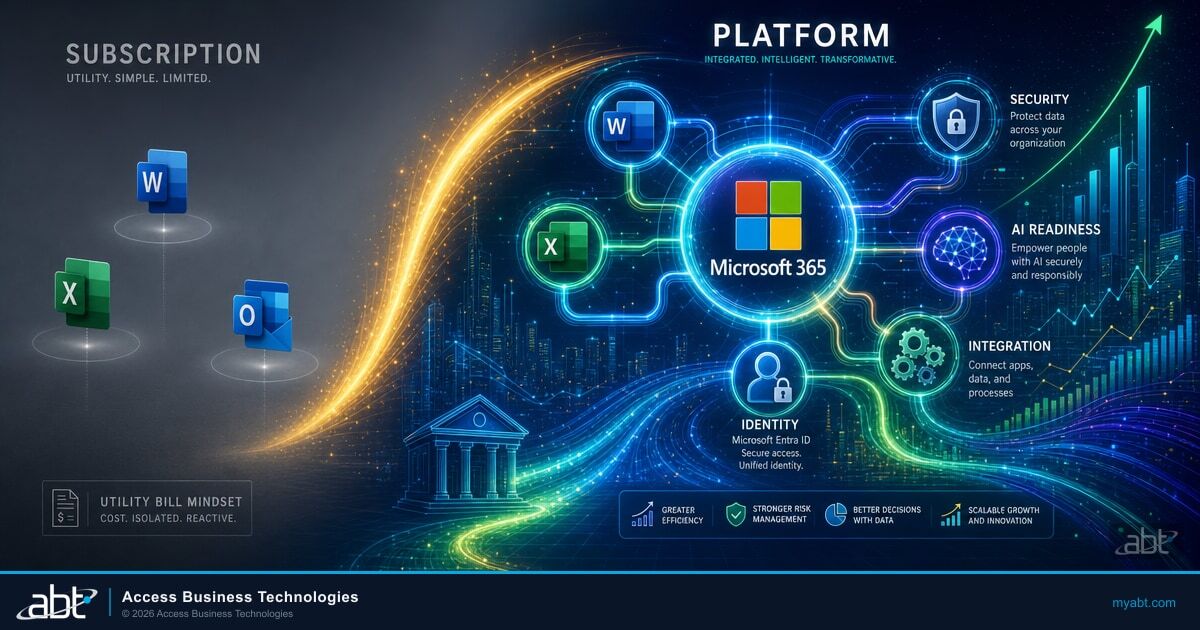
To truly modernize your IT, protect your data, and prepare for an AI-driven future, you need to stop running Microsoft 365 as a subscription and start running it as a platform. The license is what Microsoft sells. The platform is what an operator turns it into. That difference is the entire thesis of this article.
Where ABT Fits: M365 Guardian on Top of Microsoft 365
Access Business Technologies is a Tier-1 Microsoft Cloud Solution Provider that manages Microsoft 365 tenants for more than 750 financial institutions: community banks, credit unions, mortgage companies, and securities firms. The Microsoft 365 baseline (the licenses, the apps, the underlying service code) is what Microsoft ships. M365 Guardian is ABT's operating model layered on top of that baseline: a tuned set of Conditional Access policies, Microsoft Intune device baselines, Microsoft Purview retention and Data Loss Prevention rules, Microsoft Defender configuration, a Microsoft Sentinel deployment for SIEM, and a 24/7 security operations center that watches the signals every minute of the day. The license gets you the building blocks. Guardian turns them into leverage.
What is Microsoft 365? (It's More Than Just the Tile)
If you ask the average employee what Microsoft 365 is, they will likely list the icons on their desktop: the blue W, the green X, and the red P. While those productivity apps are the face of the brand, they are merely the tip of the iceberg.
Microsoft 365 is a cloud-powered productivity platform. Beneath the surface of that monthly bill lies a massive, interconnected ecosystem designed to run your entire business operation. It includes file storage (OneDrive and SharePoint), communication (Microsoft Teams), device management (Microsoft Intune), and advanced security (Microsoft Defender).
In today's business world, Microsoft 365 (M365) is ubiquitous. It is the standard language of global commerce. But simply speaking the language isn't enough; you have to know how to turn it into poetry. When utilized fully, M365 allows you to install apps on PCs, Macs, tablets, and phones, providing a smoothly interconnected workflow that follows you from the boardroom to the living room.
The Subscription Trap: Why "Renting" Software Fails
When you treat M365 as a subscription, you are in a passive relationship with your technology. You view IT as a cost center, something to be minimized. The goal becomes "how do we pay the least amount per user?"
This mindset leads to what we call "legacy thinking in the cloud." Businesses migrate their files to the cloud, but keep their old habits. They use OneDrive like an old-school file server. They use Teams just for chat, ignoring its project management capabilities. They turn off security features because they seem "annoying."
The result?
- Fragmented Data: Files are scattered across local desktops and cloud folders.
- Shadow IT: Employees start using unapproved apps because the company tools aren't configured correctly.
- Security Gaps: You might have the licenses for advanced security, but if they aren't turned on, you aren't safe.
- Audit Exposure: Examiners and auditors expect evidence that the controls you paid for are configured, enforced, and producing audit logs. A subscription you never tuned cannot produce that evidence.
A subscription is a line item. A platform is a strategy.
The Platform Mindset: Building a Digital Foundation
Running Microsoft 365 as a platform means acknowledging that this ecosystem is the operating system of your business. It is the foundation upon which your workflows, your communication, and your security are built.
When you adopt a platform mindset, integration becomes the priority. You realize that your email security should talk to your device management. You understand that your file storage should be linked to your collaboration tools.
This approach transforms IT from a utility bill into a competitive advantage. It allows for:
- Automation: Using Power Automate to streamline repetitive tasks.
- Intelligence: Preparing your data structure so you are ready to deploy AI tools like Microsoft Copilot.
- Resilience: Creating a disaster recovery plan that lives in the cloud, not in a server closet down the hall.
- Examination-Readiness: Producing audit evidence on demand instead of scrambling to assemble screenshots when a regulator calls.
Decoding the Architecture: Infrastructure & Identity
At the heart of the Microsoft 365 architecture is the concept of Identity. In the old days, your security perimeter was the firewall in your office. If you were inside the building, you were safe. If you were outside, you were blocked.
Today, work happens everywhere. The "office" is a coffee shop, an airport, or a kitchen table. The new perimeter is Identity.
Microsoft 365 uses Microsoft Entra ID (formerly Azure Active Directory) to handle this. It acts as the bouncer for your business platform. It doesn't matter where the user is; it matters who they are.
Running M365 as a platform means configuring this infrastructure correctly. It means setting up Single Sign-On (SSO) so your employees use one secure set of credentials to access everything, from Outlook to Salesforce. It means enabling Conditional Access, which checks not just the password, but the context of the login. Is this user logging in from a known device? Is it an impossible-travel scenario (logging in from New York and Tokyo within an hour)?
If you treat M365 as a subscription, you leave these settings on the default. If you run it as a platform, you configure it to create a Zero Trust environment. For a step-by-step look at what those configured controls should look like on your tenant, see our Financial Compliance Made Simple: M365 Self-Audit Guide.
The Licensing Labyrinth: Paying for What You Actually Need
Navigating Microsoft licensing can feel like trying to read a map in a foreign language while wearing a blindfold. There is an alphabet soup of F1, F3, E3, E5, Business Basic, and Business Premium.
A "subscription" mindset usually defaults to the cheapest option (Business Basic) or the one that sounds the most impressive (E5). A "platform" mindset matches the license to the role and the risk profile.
For the vast majority of SMBs and community-sized financial institutions (up to 300 users), the sweet spot is Microsoft 365 Business Premium.
Why? Because Business Premium includes device management, remote wipe capabilities, advanced security, and cyberthreat protection. It gives you the full suite of Office apps, but more importantly, it adds Microsoft Intune (for managing those iPhones and laptops) and Microsoft Defender for Business.
But simply buying the license doesn't make you compliant. You have to configure the platform to utilize those rights. And if your current footprint has overlapping licenses, redundant add-ons, or features nobody turned on, you may already be paying for shelfware that a right-sizing exercise would eliminate. See our License Downgrade Guide for Financial Institutions for the specific SKUs most FIs over-buy.
Microsoft Teams: The Hub, Not Just the Chat
If email is where work goes to die, Microsoft Teams is where work goes to live. However, most organizations only use about 10% of what Teams can do.
In a platform strategy, Teams is the "single pane of glass." It integrates:
- Telephony: Replacing your expensive, clunky desk phones with Microsoft Teams Phone.
- Files: Every Team has a SharePoint site behind it. When you share a file in Teams, you are creating a structured, version-controlled record in the cloud.
- Apps: You can pin your project management boards (Microsoft Planner), your business intelligence dashboards (Power BI), and your intranets (Viva Connections) right inside the Teams interface.
By centralizing work in Teams, you reduce "context switching", the mental drain of jumping between five different apps to get one task done.
Security Services: Turning the Locks
Here is the frightening reality: You can buy the most expensive lock on the market, but if you don't turn the deadbolt, the door is still open.
Many businesses purchase Microsoft 365 licenses that include incredible security features and then never turn them on. They rely on "security by obscurity," hoping attackers won't notice them.
Managed M365 security services are about hardening the tenant. This involves:
- Multi-Factor Authentication (MFA): This is non-negotiable. According to Microsoft, MFA stops the overwhelming majority of identity-based attacks.
- Endpoint Detection and Response (EDR): Traditional antivirus is dead. You need tools like Microsoft Defender that look for behavior, not just file signatures. If a laptop starts trying to encrypt all its files (ransomware behavior), Defender shuts it down instantly.
- Data Loss Prevention (DLP): Configuring the platform through Microsoft Purview to automatically detect sensitive data (like credit card numbers, SSNs, customer NPI) and prevent it from being emailed outside the company.
- Communication Compliance: Purview Communication Compliance reviews business communications for off-channel behavior, harassment, or policy-flagged content, which is the surface that examiners look at hardest under FINRA Rule 3110.09 and similar regulations.
The Migration Minefield
Moving to a platform model often requires a migration. You might be moving from an on-premises server or from a different cloud provider (like Google Workspace).
The biggest mistake we see is the "Lift and Shift." This is when a company takes their messy, disorganized file server structure and dumps it directly into SharePoint.
Garbage in, garbage out.
Migration is the perfect time to restructure your data architecture. It requires planning. Who needs access to what? How long do we need to keep these files? Which data is "hot" (active) and which is "cold" (archive)?
A platform-focused migration looks at the workflow, not just the file size. It ensures that when the data lands in Microsoft 365, it is searchable, secure, and ready for collaboration.
Why You Need a Pilot: M365 Guardian and the Tier-1 CSP Operating Model
By now, you might be thinking, "This sounds complicated." You are right. Running Microsoft 365 as a platform requires expertise in identity, networking, security, compliance, and governance.
Most community banks, credit unions, mortgage companies, and SMBs do not have a Chief Information Security Officer (CISO) or a team of cloud architects on the payroll. This is where a managed Microsoft 365 service comes in, and the kind of partner you choose matters more than most buyers realize.
ABT operates as a Tier-1 Microsoft Cloud Solution Provider. Tier-1 Direct-Bill is Microsoft's top program tier for partners: a small fraction of the Microsoft CSP ecosystem qualifies. A Direct-Bill partner transacts directly with Microsoft, holds dedicated support engineers, and is operationally accountable to Microsoft for how customer tenants are configured and run. It is the difference between a partner who resells Microsoft licenses and a partner Microsoft trusts to operate enterprise-grade tenants at scale. We do not just resell you a license; we provide the operating model.
The Microsoft 365 license gets you the building blocks: Microsoft Entra ID for identity, Microsoft Intune for device management, Microsoft Defender for threat detection, Microsoft Purview for retention, audit, and Data Loss Prevention, and Microsoft Sentinel for SIEM. M365 Guardian is ABT's operating model on top of those blocks: financial-services-tuned Conditional Access policies, FI-specific DLP rules, retention aligned to your regulatory perimeter, Communication Compliance templates aligned to actual examiner findings, a Sentinel deployment with analytic rules tuned to financial-services attack patterns, and a 24/7 security operations center watching the signals every minute of the day. The license is what Microsoft sells. Guardian is the configuration, monitoring, and accountability layer that turns the license into leverage.
For broker-dealers, registered investment advisers, and other federated financial firms with multiple operating entities, the Tier-1 CSP relationship unlocks an additional capability: a multi-tenant control plane that produces consistent configuration and ready-to-hand audit evidence across every entity in the regulatory perimeter. For a deeper look at how that pattern works for federated firms, see Deploying Microsoft Lighthouse for Broker-Dealer Compliance Standardization.
With ABT and M365 Guardian, we handle the hardening, the monitoring, and the optimization. We replace the weak default settings with Zero Trust baselines. We configure the compliance rules that keep auditors and examiners satisfied. We ensure your environment is patched and protected against the latest threats. You get the same Microsoft 365 software you would buy directly from Microsoft, but you also get a fully managed, FI-tuned operating model on top of it.
Key Takeaways
- Shift Your Mindset: Stop viewing Microsoft 365 as a bill for Word and Excel. View it as your business operating system.
- Identity is the Key: Secure your business by focusing on Identity (Microsoft Entra ID) and access management, not just firewalls.
- Right-Size Licensing: Microsoft 365 Business Premium is the "hero" SKU for most SMBs and community financial institutions, offering enterprise-grade security at a small-business price.
- Configure, Don't Just Buy: Buying the license doesn't make you safe. You must actively configure security settings (MFA, Conditional Access, DLP, retention, audit).
- Pick the Right Partner: The complexity of the Microsoft 365 ecosystem rewards a Tier-1 CSP that runs an operating model on top of the license. ABT's M365 Guardian is built for financial institutions specifically.
Run Microsoft 365 as a Platform, Not a Subscription
ABT manages Microsoft 365 tenants for more than 750 financial institutions under the M365 Guardian operating model. A 30-minute conversation maps your current tenant, surfaces the gaps your next examiner or auditor is most likely to find, and outlines what an ABT-managed deployment would cover. No commitment, no quote, no obligation.
Frequently Asked Questions
No. Microsoft provides world-class security capabilities, but default settings prioritize convenience over security. Features like MFA, strict Conditional Access, and Data Loss Prevention need to be manually configured and enforced by your team or a partner to provide real protection.
Microsoft 365 E3 includes everything in Office 365 E3 plus Windows OS licensing and advanced security features. Office 365 E3 covers apps and cloud services only, while Microsoft 365 E3 adds the operating system and device management tools for a more complete platform.
The cloud simplifies hardware but complicates configuration. An MSP or CSP like ABT manages tenant complexity, ensuring security settings stay current, licenses are optimized, and compliance standards are met. Most internal IT teams lack the specialized knowledge and time for this.
A subscription mindset treats M365 as a utility bill for Word and Outlook. A platform mindset treats it as your business operating system where identity, security, collaboration, and automation are interconnected. This shift transforms IT from a cost center into a competitive advantage.
Business Premium includes device management via Intune, advanced security through Defender for Business, and cyberthreat protection. It delivers enterprise-grade security at a small-business price for organizations up to 300 users. For most SMBs it is the best value license tier available.